
9067L - Grinder MAKITA - Free user manual and instructions
Find the device manual for free 9067L MAKITA in PDF.


| Product Type | Angle Grinder |
| Wheel Diameter | 4-1/2" (115 mm) |
| Power Input | 7.5 Amps |
| No-Load Speed | 10,000 RPM |
| Spindle Size | 5/8" - 11 UNC (M14) |
| Weight (without cord) | 4.5 lbs (2.0 kg) |
| Overall Length | 10.2" (260 mm) |
| Switch Type | Slide switch with lock-off |
| Spindle Lock | Yes, for easy wheel changes |
| AC/DC Capability | Yes, operates on AC or DC power |
| Protection Features | Low-vibration design, labyrinth construction to seal motor |
| Included Accessories | Wrench, side handle, wheel guard |
| Recommended Wheel Type | Type 27 grinding wheel or cut-off wheel |
| Motor Armiture | Field core with high efficiency |
| Bearing Type | Double-sealed ball bearings |
| Carbon Brush Type | Corded, self-disconnecting |
| Housing Material | Reinforced nylon composite |
| Maintenance | Keep vents clean, inspect brushes periodically |
| Repairability | Serviceable by qualified technician; spare parts available |
Frequently Asked Questions - 9067L MAKITA
User questions about 9067L MAKITA
0 question about this device. Answer the ones you know or ask your own.
Ask a new question about this device
Download the instructions for your Grinder in PDF format for free! Find your manual 9067L - MAKITA and take your electronic device back in hand. On this page are published all the documents necessary for the use of your device. 9067L by MAKITA.
USER MANUAL 9067L MAKITA
natural_image
Line drawing of a power tool with a circular base and mechanical components (no text or symbols)
1
2
3
4
5
6
7
8
9
Symbols
The following show the symbols used for the tool. Be sure that you understand their meaning before use.
Symboles
ENGLISH
Explanation of general view
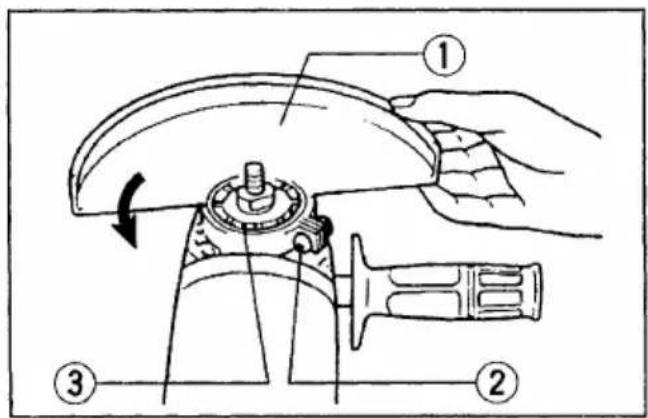
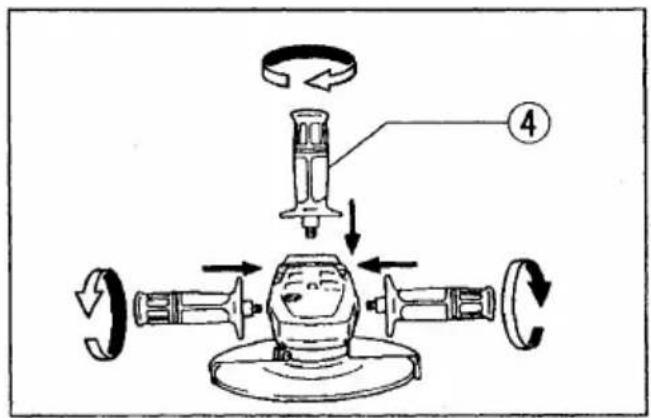
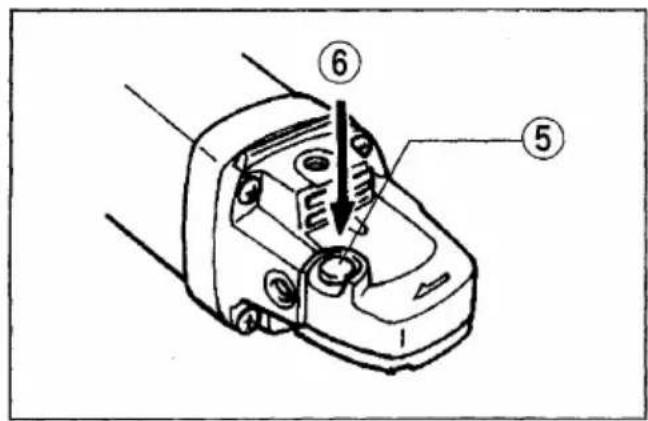
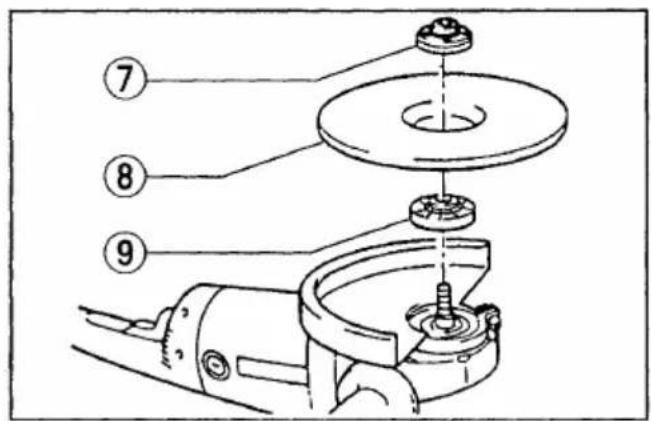
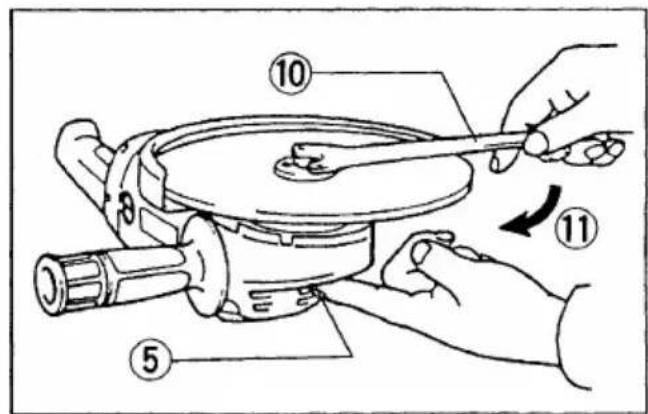
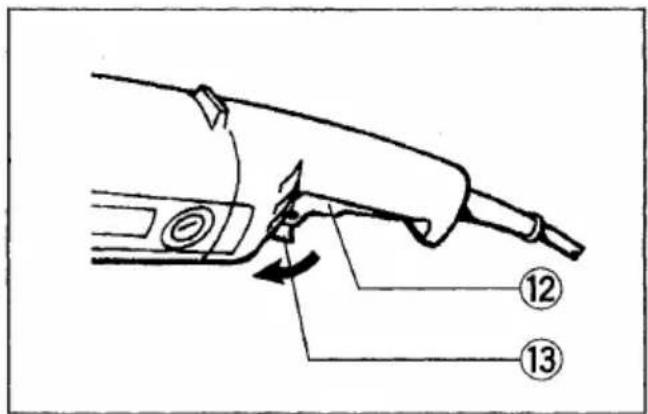
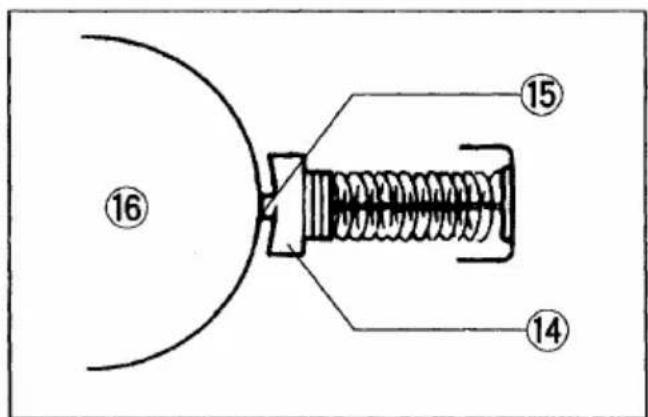
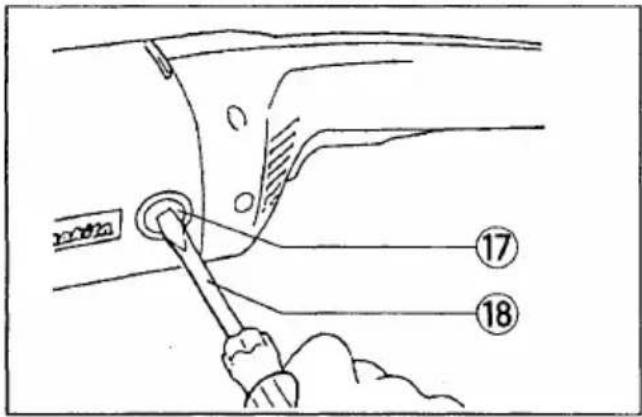
| 1 Wheel guard2 Screw3 Notch4 Side grip5 Shaft lock6 Press | 7 Lock nut8 Depressed center wheel9 Inner flange10 Lock nut wrench11 Tighten12 Switch trigger | 13 Lock lever14 Carbon brush15 Insulating tip16 Commutator17 Brush holder cap18 Screwdriver |
SPECIFICATIONS
| Model | 9067/9067S9067F/9067SF | 9067L | 9069/9069S9069F/9069SF |
| Depressed center wheel diameter | 180 mm | 180 mm | 230 mm |
| Spindle thread | M14 | M14 | M14 |
| No load speed (min ^-1 ) | 8,500 | 6,600 | 6,600 |
| Overall length | 458 mm | 458 mm | 458 mm |
| Net weight | 4.2 kg | 4.2 kg | 4.2 kg |
- Due to the continuing program of research and development, the specifications herein are subject to change without prior notice.
• Note: Specifications may differ from country to country.
Power supply
The tool should be connected only to a power supply of the same voltage as indicated on the nameplate, and can only be operated on single-phase AC supply. They are double-insulated in accordance with European Standard and can, therefore, also be used from sockets without earth wire.
For public low-voltage distribution systems of between 220 V and 250 V
Switching operations of electric apparatus cause voltage fluctuations. The operation of this device under unfavorable mains conditions can have adverse effects to the operation of other equipment. With a mains impedance equal or less than 0.31 Ohms it can be presumed that there will be no negative effects.
The mains socket used for this device must be protected with a fuse or protective circuit breaker having slow tripping characteristics.
Safety hints
For your own safety, please refer to enclosed safety instructions.
ADDITIONAL SAFETY RULES
ENB031-3
- Always wear safety goggles and ear protectors during operation.
- Always be sure that the tool is switched off and unplugged before carrying out any work on the tool.
- Keep guards in place.
-
Use only wheels with correct size and wheels having a maximum operating speed at least as high as the highest No Load Speed marked on the tool's nameplate. When using depressed center wheels, be sure to use only fiberglass-reinforced wheels.
-
Check the wheel carefully for cracks or damage before operation. Replace cracked or damaged wheel immediately.
- Observe the instructions of the manufacturer for correct mounting and use of wheels. Handle and store wheels with care.
- Do not use separate reducing bushings or adaptors to adapt large hole abrasive wheels.
- Use only flanges specified for this tool.
- Do not damage the spindle, the flange (especially the installing surface) or the lock nut. Damage to these parts could result in wheel breakage.
- For tools intended to be fitted with threaded hole wheel, ensure that the thread in the wheel is long enough to accept the spindle length.
- Before using the tool on an actual workpiece, test run the tool at the highest no load speed for at least 30 seconds in a safe position. Stop immediately if there is any vibration or wobbling that could indicate poor installation or a poorly balanced wheel. Check the tool to determine the cause.
- Check that the workpiece is properly supported.
- Hold the tool firmly.
- Keep hands away from rotating parts.
- Make sure the wheel is not contacting the workpiece before the switch is turned on.
- Use the specified surface of the wheel to perform the grinding.
- Do not use cutting off wheel for side grinding.
- Watch out for flying sparks. Hold the tool so that sparks fly away from you and other persons or flammable materials.
- Pay attention that the wheel continues to rotate after the tool is switched off.
- Do not touch the workpiece immediately after operation; it may be extremely hot and could burn your skin.
-
Position the tool so that the power cord always stays behind the tool during operation.
-
If working place is extremely hot and humid, or badly polluted by conductive dust, use a short-circuit breaker (30 mA) to assure operator safety.
- Do not use the tool on any materials containing asbestos.
- Do not use water or grinding lubricant.
SAVE THESE INSTRUCTIONS.
OPERATING INSTRUCTIONS
Installing wheel guard (Fig. 1)
Important:
Always be sure that the tool is switched off and unplugged before installing or removing the wheel guard.
When installing a depressed center wheel or an abrasive cut-off wheel, always use a wheel guard. Mount the wheel guard with the tab on the wheel guard band aligned with the notch on the bearing box. Then rotate the wheel guard 160 degrees counterclockwise. Be sure to tighten the screw securely.
Installing side grip (auxiliary handle) (Fig. 2)
Important:
Always be sure that the tool is switched off and unplugged before installing or removing the side grip.
Always install the side grip on the tool securely before operation. The side grip can be installed in any of three positions on the sides of the tool, whichever is convenient and keeps the guard properly positioned. Always hold the tool's switch handle and the side grip firmly with both hands during operation.
Shaft lock (Fig. 3)
Press the shaft lock to prevent spindle rotation when installing or removing accessories.
CAUTION:
Never actuate the shaft lock when the spindle is moving. The tool may be damaged.
Installing or removing depressed center wheel (Fig. 4 & 5)
Important:
Always be sure that the tool is switched off and unplugged before installing or removing the wheel.
Mount the inner flange onto the spindle. Fit the wheel on over the inner flange and screw the lock nut onto the spindle.
To tighten the lock nut, press the shaft lock firmly so that the spindle cannot revolve, then use the lock nut wrench and securely tighten clockwise.
To remove the wheel, follow the installation procedure in reverse.
NOTE:
Super flange
Models 9067F, 9069F, 9067SF and 9069SF are standard-equipped with a super flange.
Only 1/3 of efforts needed to undo lock nut, compared with conventional type.
Switch action (Fig. 6)
CAUTION:
Before plugging in the tool, always check to see that the switch trigger actuates properly and returns to the "OFF" position when released.
For U.K., Australia, New Zealand, France, Réunion and Algeria
To prevent the trigger from being accidentally actuated, a lock lever is provided. To start the tool, push the lock lever in and then pull the trigger. Release the trigger to stop.
For Germany, Austria, Italy, Netherlands, Belgium, Spain, Portugal, Denmark, Sweden, Norway, Finland, Greece and South Africa
To prevent the trigger from being accidentally actuated, a lock lever is provided. To start the tool, push the lock lever in and then pull the trigger. Release the trigger to stop. For continuous operation, push the lock lever in, pull the trigger and then push the lock lever further in. To stop the tool from the locked position, pull the trigger fully, then release it.
For other countries than the above countries
To start the tool, simply pull the trigger. Release the trigger to stop. For continuous operation, pull the trigger and then push the lock lever. To stop the tool from the locked position, pull the trigger fully, then release it.
NOTE:
Models 9067S and 9069S begin to run slowly when they are turned on. This soft start feature assures smoother operation and less operator fatigue.
Operation (Fig. 7)
CAUTION:
After operation, always switch off the tool and wait until the wheel has come to a complete stop before putting the tool down.
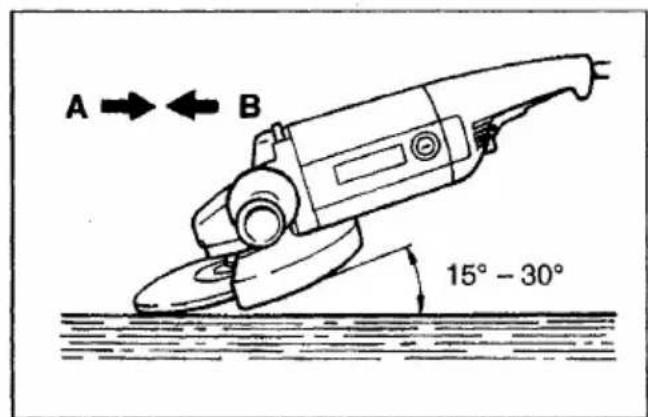
Hold the tool firmly. Turn the tool on and then apply the wheel or disc to the workpiece.
In general, keep the edge of the wheel or disc at an angle of about 15^-30^ to the workpiece surface. During the break-in period with a new wheel, do not work the tool in the B direction or it will cut into the workpiece. Once the edge of the wheel has been rounded off by use, the wheel may be worked in both A and B directions.
WARNING:
- It should never be necessary to force the tool. The weight of the tool applies adequate pressure. Forcing and excessive pressure could cause dangerous wheel breakage.
- Continued use of a worn-out wheel may result in wheel explosion and serious personal injury. Depressed center wheel should not be used after it has been worn down to 115 mm in diameter. Use of the wheel after this point is unsafe and it should be removed from service and rendered unusable by intentional destruction.
MAINTENANCE
CAUTION:
Always be sure that the tool is switched off and unplugged before carrying out any work on the tool.
Replacement of carbon brushes (Fig. 8 & 9)
When the resin insulating tip inside the carbon brush is exposed to contact the commutator, it will automatically shut off the motor. When this occurs, both carbon brushes should be replaced at the same time. Use only identical carbon brushes.
To maintain product safety and reliability, repairs, maintenance or adjustment should be carried out by Makita Authorized Service Center.
FRANÇAIS
Descriptif
These accessories or attachments are recommended for use with your Makita tool specified in this manual. The use of any other accessories or attachments might present a risk of injury to persons. The accessories or attachments should be used only in the proper and intended manner.
F ACCESSOIRES
ATTENTION :
- Symbols
- Symboles
- Power supply
- For public low-voltage distribution systems of between 220 V and 250 V
- Safety hints
- ADDITIONAL SAFETY RULES
- SAVE THESE INSTRUCTIONS.
- OPERATING INSTRUCTIONS
- Installing wheel guard (Fig. 1)
- Installing side grip (auxiliary handle) (Fig. 2)
- Shaft lock (Fig. 3)
- Installing or removing depressed center wheel (Fig. 4 & 5)
- Super flange
- Switch action (Fig. 6)
- For U.K., Australia, New Zealand, France, Réunion and Algeria
- For Germany, Austria, Italy, Netherlands, Belgium, Spain, Portugal, Denmark, Sweden, Norway, Finland, Greece and South Africa
- For other countries than the above countries
- Operation (Fig. 7)
- WARNING:
- MAINTENANCE
- CAUTION:
- Replacement of carbon brushes (Fig. 8 & 9)
- F ACCESSOIRES
- ATTENTION :
Brand : MAKITA
Model : 9067L
Category : Grinder