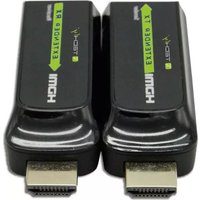
IDATA EXT-E70S - AV Extender Techly - Free user manual and instructions
Find the device manual for free IDATA EXT-E70S Techly in PDF.


| Product Type | HDMI Extender over Cat.6/7 |
| Brand | Techly |
| Model | IDATA EXT-E70S |
| Transmission Distance | Up to 40m (Cat.6/6A/7); up to 50m with high quality cable |
| Maximum Resolution | 1080p@60Hz |
| HDMI Compliance | HDMI 1.3 |
| HDCP Compliance | HDCP 1.2 |
| Maximum Transfer Rate | 10.2 Gbps |
| Audio Support | L/R stereo audio |
| Cable Required | Cat.6/6A/7 UTP/STP (EIA-568B wiring) |
| Power Supply | Micro USB cable (5V) to transmitter; receiver powered from transmitter (optional external USB) |
| Dimensions (Transmitter & Receiver) | 71.35 (L) x 25.9 (W) x 11.05 (H) mm |
| Weight (Each Unit) | 10 g |
| Material | ABS plastic |
| Color | Black |
| Operating Temperature | 0°C to 50°C |
| Storage Temperature | -10°C to 70°C |
| Humidity (Non-condensing) | 0% to 90% |
| Electrostatic Protection | Contact discharge level 3, air discharge level 3 (IEC61000-4-2) |
| MTBF | 30,000 hours |
| Plug and Play | Yes, no installation required |
| Zero Latency | Yes |
| Package Contents | Transmitter, Receiver, 2x USB cables, User manual |
| Maintenance | Clean with dry cloth; do not use solvents or abrasives |
| Safety | For indoor dry use only; keep away from water, children, high temperature, dust |
Frequently Asked Questions - IDATA EXT-E70S Techly
User questions about IDATA EXT-E70S Techly
0 question about this device. Answer the ones you know or ask your own.
Ask a new question about this device
Download the instructions for your AV Extender in PDF format for free! Find your manual IDATA EXT-E70S - Techly and take your electronic device back in hand. On this page are published all the documents necessary for the use of your device. IDATA EXT-E70S by Techly.
USER MANUAL IDATA EXT-E70S Techly
EXTENDER HDMI SU CAVO CAT.6/7 40M1
HDMI EXTENDER OVER CAT.6/7 CABLE 40M
natural_image
Diagram of a device rear panel with labeled ports (DC 5V) and pinout, no readable text or symbols beyond labelsflowchart
graph LR
    PC["PC"] -->|HDMI IN| Transmitter["Transmitter"]
    Transmitter -->|USB Cable| Transmitter
    Transmitter -->|CAT6| Receiver["Receiver"]
    Receiver -->|HDMI Cable| Monitor["HDMI display"]
Thank you for purchasing this product. For optimum performance and safety, please instructions carefully before connecting, operating or adjusting this product. Please keep this manual for future reference.
IMPORTANT SAFETY INSTRUCTION
INTENDED USE
We do not permit using the device in other ways like described in this user's manual.
Use the product only in dry interior rooms. Not attending to these regulations and safety instruction might cause fatal accidents, injuries, and damages to persons and property. The manufacturer/supplier assumes no liability for damages caus
failure to comply with the intended use.

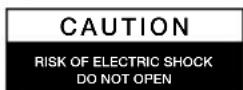

To reduce risk of electric shock, this product should ONLY
be opened by an authorized technician when service required. Disconnect the product from mains and other
equipment if a problem should occur. Do not expose the product to water or moisture.
- Your product is not a toy and is not meant for children, because it contains small parts which can be swallowed and can injure when used inappropriately!
- Please install the system and devices attached to it in a way that persons cannot be injured, or objects not be damaged for example by dropping or stumbling.
- Please remove the packing materials, because children may cut themselves on them while playing. Furthermore, there is a risk of swallowing and inhalation of incidentals and insulating material.
- Avoid places with high temperatures, or humidity, or places which might come with water. Do not install the product close to openings of air conditioners, or at places with an excessive amount of dust or smoke.
- Do not install the product at places subject to vibration, or oscillation
- Do not modify and alter the product and any accessories! Do not use any damaged parts.
- Keep enough space around all devices for a good ventilation and free motion damages.
- Keep distance from flammable and explosive devices
- Do not unplug the device when it is working.
- No extender power supply needed, use micro USB cable to power the transmitter and receiver is powered from transmitter.
- Please do not use other accessories to power this product.
- When only transmitter is powered by USB cable, please add an USB 5V cable to the receiver for power supply.
INTRODUCTION
This HDMI extender includes a transmitter and a receiver unit, working as a pair. transmission and extension uncompressed full HD 1080p@60Hz HDMI signal via Cat.6/6A/7 network cable, the transmission distance is up to 40 meters with zero latency. This product is perfect for AV transmission in application of HD conference system, HD video shooting, HD multimedia education system entertainment and signage, etc.
FEATURES:
- Portable size design
- Support HDMI1.3, compatible with HDCP1.2
- Highest resolution supported is up to 1080p@60HZ
- Use Cat.6/6A/7 for long distance transmission up to 40 meters (with very high quality cable the transmission length can reach 50 m)
- Uncompressed and zero latency
- Micro USB cable for power, support receiver powered from transmission
- Plug and play, without installation
PACKAGE CONTENTS
• Transmitter unit x1 pc
• Receiver unit x 1 pc
• USB cables x 2 pcs
- User's manual x 1pc
INSTALLATION REQUIREMENTS
- HDMI source device (computer graphics card, DVD, PS3, HD monitoring equipment etc).
- HDMI display device like SDTV, HDTV. Projector with HDMI port.
- Network cables UTP/STP Cat.6/6A/7 network cables, which following the standard of EIA-568B.
PANEL DESCRIPTION
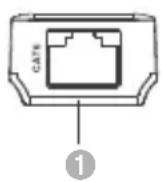
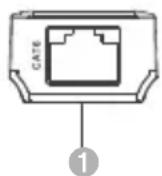
1. Transmitter unit (TX)
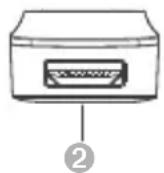
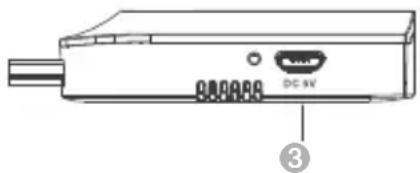
natural_image
Diagram of a device rear panel with labeled ports (no text or symbols beyond labels)① RJ45 signal output Output encoded HDMI signal
② HDMI signal Connect with HDMI source device
③ Power input Connect with USB cable
2. Receiver unit (RX)
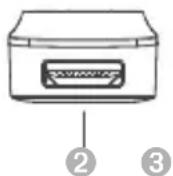
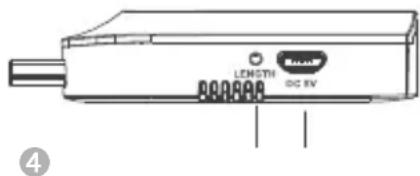
① R145 signal input Input encoded HDMI signal
② HDMI output Connect with HDMI display device
③ LENGTH button For adjusting the unit self-adopt to the length of the network cable
4 Power input Connect with the USB cable (optional)
INSTALLATION PROCEDURES
How to make a Cat6 network cable?
Follow the standard of EIA-568:
1-Orange/white 2-Orange 3-Green/white
4-Blue 5-Blue/white 6-Green
7-Brown/white 8-Brown
CONNECTIONS
1) Plug the transmitter unit to the HDMI output port of the source device direct receiver to the HDMI input port of the display device directly.
2) Connect transmitter unit (TX) and receiver unit (RX) via network cables (CAT6/CAT6A/CAT7)
3) Connect the USB cable to the transmitter unit only, each unit will be powered by extender works
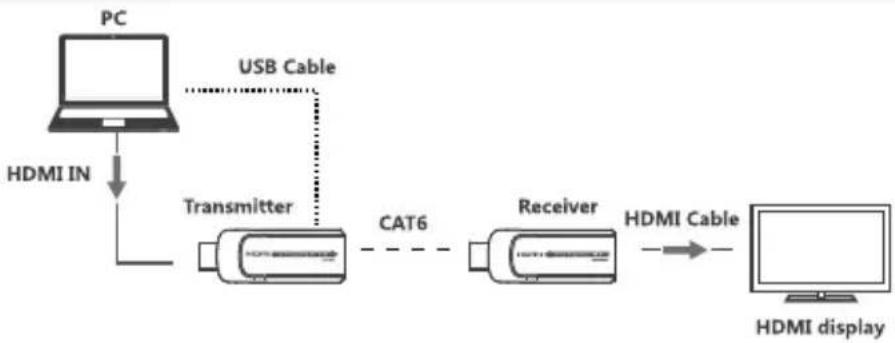
flowchart
graph LR
    PC["PC"] -->|HDMI IN| Transmitter["Transmitter"]
    Transmitter -->|USB Cable| Transmitter
    Transmitter -->|CAT6| Receiver["Receiver"]
    Receiver -->|HDMI Cable| Monitor["HDMI display"]
NOTE: It is recommended to use a length range within 15\~40m network cable. If the Cat.6 cable is too short, there may be no display output because of the signal is too strong. If the Cat.6 cable is too long, the output may be with poor quality.
FAQ
Q: No image output or audio and video display is not normal.
A: 1) Press Receiver "LENGTH" button for adjusting this unit to self -adapt to the length of network cable.
Q: No image output.
1) Make sure network cable connection follows the standard of EIA-568B.
2) Check and make sure there is HDMI signal input to the transmitter.
3) Press receiver "LENGTH" button to adjust this unit to self-adapt to the length of network cable.
4) Make sure HDMI cable is well connected with TV.
5) Make sure the network cable is fine copper wires.
SPECIFICATION
| Power section No power supply need, use micro USB cable to power transmitter | ||
| HDMI performance and interface | HDMI compliance HDMI1.3 | |
| HDCP compliance HDCP1.2 | ||
| HDMI resolution supported | 480i@60Hz, 480p@60Hz, 576i@50Hz, 576p@50Hz, 720p@50/60Hz, 1080i@50/60Hz, 1080p@50/60Hz | |
| Maximum transfer rate 10.2Gbps | ||
| Audio signal transmission format | L/R stereo audio | |
| Input and output TMDS signal | 0.5 ~ 1.5p-p (TMDS) | |
| Input and output DDS signal 5Vp-p (TTL) | ||
| Input cable lenght supported ≤5m (AWG26 HDMI1.3 cable standard) | ||
| Output cable lenght supported ≤5m (AWG26 HDMI1.3 cable standard) | ||
| Protection level | Electrostatic protection of the whole machine | 1a Contact discharge level 3 |
| 1b Air discharge level 3 | ||
| Standard IEC61000-4-2 | ||
| Operating environment | Working temperature 0°C ~ 50°C | |
| Storage temperature -10 ~70°C | ||
| Humidity (no condensation) 0 ~ 90% | ||
| Body properties | Dimension 71.35 (L) x 25.9 (W) x 11.05 (H) mm | |
| Material ABS plastic | ||
| Color Black | ||
| Weight | TX: 10g RX: 10g | |
| Reliability | MTBF | 30000 hours |
Maintenance: clean only with a dry cloth. Do not use cleaning solvents or abrasives.
Warranty: no guarantee or liability can be accepted for any changes and modifications of the product or damage caused due to incorrect use of this product.

In compliance with EU Directive WEEE this product is marked with this symbol. It means that used electrical and electronic products should not be mixed with general household waste.
There is a separate collections system for these products in compliance with WEEE directive, otherwise contaminative and hazardous substances can pollute the environment.

With the CE sign, Techly® ensures that the product is conformed to the basic European standards and directives.
CEFC

www.techly.com


Brand : Techly
Model : IDATA EXT-E70S
Category : AV Extender