BLH8622 - Uncategorized Blade - Free user manual and instructions
Find the device manual for free BLH8622 Blade in PDF.


User questions about BLH8622 Blade
0 question about this device. Answer the ones you know or ask your own.
Ask a new question about this device
Download the instructions for your Uncategorized in PDF format for free! Find your manual BLH8622 - Blade and take your electronic device back in hand. On this page are published all the documents necessary for the use of your device. BLH8622 by Blade.
USER MANUAL BLH8622 Blade
All instructions, warranties and other collateral documents are subject to change at the sole discretion of Horizon Hobby, LLC. For up-to-date product literature, visit horizonhobby.com and click on the support tab for this product.
Meaning of Special Language
The following terms are used throughout the product literature to indicate various levels of potential harm when operating this product:
NOTICE: Procedures, which if not properly followed, create a possibility of physical property damage AND a little or no possibility of injury.
CAUTION: Procedures, which if not properly followed, create the probability of physical property damage AND a possibility of serious injury.
WARNING: Procedures, which if not properly followed, create the probability of property damage, collateral damage, and serious injury OR create a high probability of superficial injury.

WARNING: Read the ENTIRE instruction manual to become familiar with the features of the product before operating. Failure to operate the product correctly can result in damage to the product, personalty and cause serious injury.
This is a sophisticated hobby product. It must be operated with caution and common sense and requires some basic mechanical ability. Failure to operate this Product in a safe and responsible manner could result in injury or damage to the product or other property. This product is not intended for use by children without direct adult supervision. Do not use with incompatible components or alter this product in any way outside of the instructions provided by Horizon Hobby, LLC. This manual contains instructions for safety, operation and maintenance. It is essential to read and follow all the instructions and warnings in the manual, prior to assembly, setup or use, in order to operate correctly and avoid damage or serious injury.
Age Recommendation: Not for children under 14 years. This is not a toy.
Safety Precautions and Warnings
- Always keep a safe distance in all directions around your model to avoid collisions or injury. This model is controlled by a radio signal subject to interference from many sources outside your control. Interference can cause momentary loss of control.
- Always operate your model in open spaces away from full-size vehicles, traffic and people.
- Always carefully follow the directions and warnings for this and any optional support equipment (chargers, rechargeable battery packs, etc.).
- Always keep all chemicals, small parts and anything electrical out of the reach of children.
- Always avoid water exposure to all equipment not specifically designed and protected for this purpose. Moisture causes damage to electronics.
-
Never place any portion of the model in your mouth as it could cause serious injury or even death.
-
Never operate your model with low transmitter batteries.
• Always keep the aircraft in sight and under control.
• Always move the throttle fully down at rotor strike.
• Always use fully charged batteries. - Always keep the transmitter powered on while the aircraft is powered.
- Always remove batteries before disassembly.
• Always keep moving parts clean.
• Always keep parts dry. - Always let parts cool after use before touching.
• Always remove batteries after use. - Never operate an aircraft with damaged wiring.
- Never touch moving parts.
Table of Contents
Box Contents 4
Technical Specifications 5
Loading the CG03 App to Your WiFi Smart Device ..... 5
Gimbal Components....6
Installing the Mounting Plate 7
Installing the Gimbal 7
Transmitter Programming 8
Using the CGO3 With Your Spektrum Transmitter ..... 9
Using the CGO3 App 10
Using the CGO3 With Your ST-10+
Personal Ground Station 10
LED Codes 11
Troubleshooting 12
Optional Parts 12
Limited Warranty 13
Service Contact Information 15
FCC Information 15
IC Information 16
Compliance Information for the European Union ..... 16
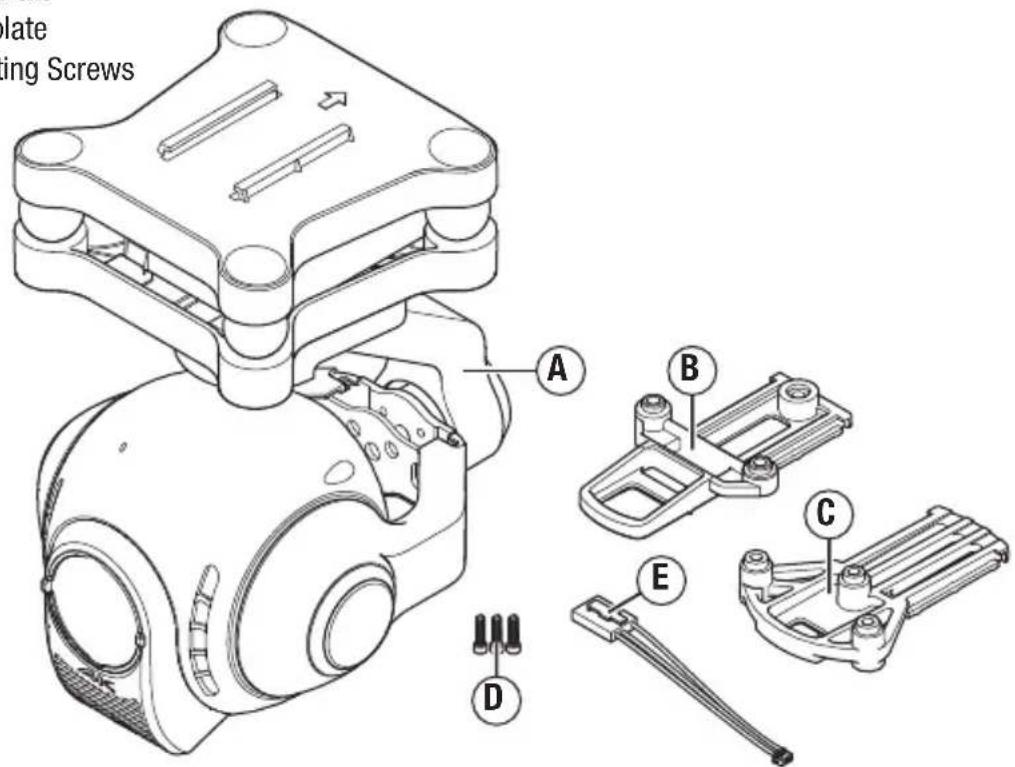
Box Contents
A. CG03 3-Axis 4K Camera/Gimbal
B. Chroma™ Mounting plate
C. 350 QX3 Mounting plate
D. (3) M2.5 x 10 Mounting Screws
E. 3 pin micro to 4 pin wire harness
Technical Specifications
| Dimensions LxWxH (with lens): 4.2x5.0x3.1in (106x128x80mm) | |
| Weight: 200 g | |
| Power Consumption: 12W | |
| Wireless Frequency Range: | |
| North America: 5745MHz–5825MHz** | |
| Europe: 5180MHz–5240MHz** | |
| Camera lens : 14mm/F2.8 (equivalent 35mm frame) | |
| Angle of view: 115° | |
| Effective Pixels: 12 Megapixels | |
| Video UHD: | |
| 4096 x 2160 25, 24 fps | |
| 3840 x 2160 30, 25, 24 fps | |
| 2560 x 1440 30, 25, 24 fps | |
| Full HD: 1920x1080 24, 25, 30, 48, 50, 60, 120 fps | |
| Working Temperature: 0° ~40°C | |
Loading the CGO3 App to Your WiFi Smart Device
- Download the free CG03 App to your smartphone or tablet at the iTunes App Store or Google Play Store.
• Install the app to your WiFi capable device.
**IMPORTANT: Your WiFi capable device must operate in the same wireless frequency range as broadcast by the product purchased in your region.
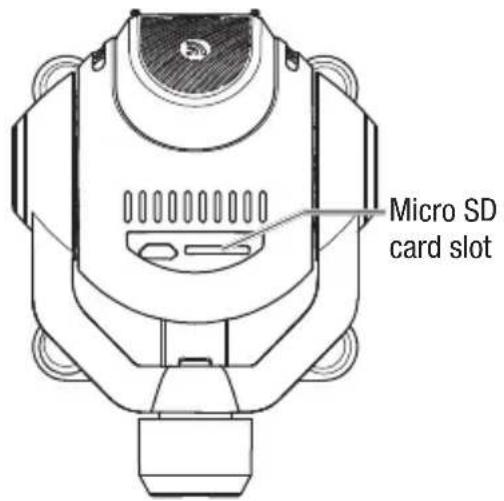
Gimbal Components
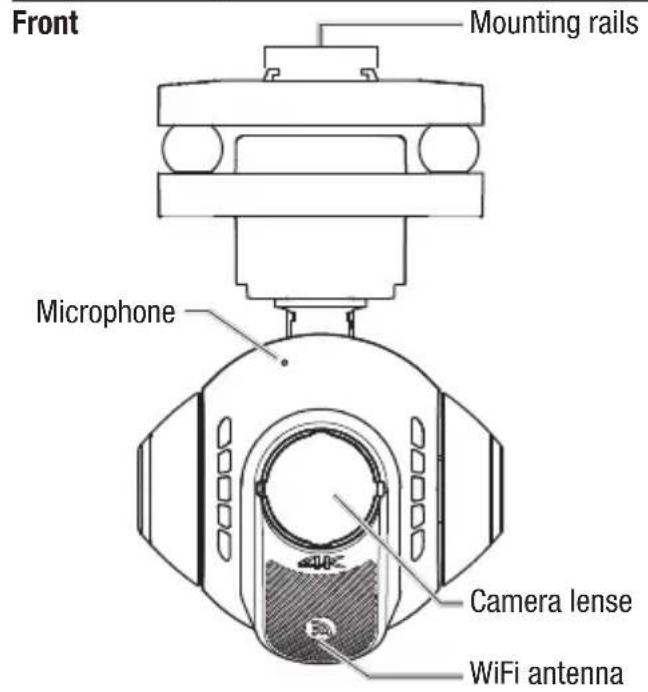
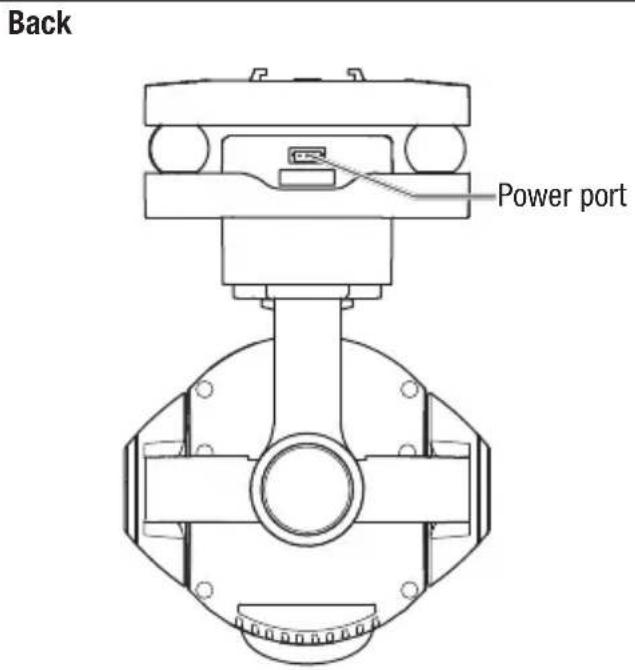
Bottom
EN
6
Installing the Mounting Plate
natural_image
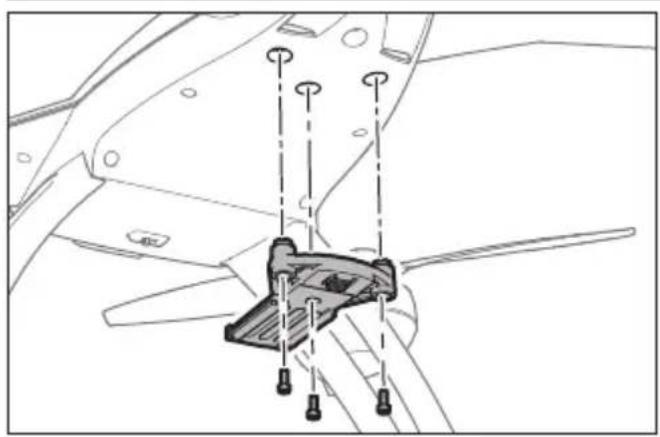
Technical line drawing of a mechanical component with mounting holes and a central bracket (no text or symbols)The CGO3 camera gimbal is compatible with 350 QX3 and Chroma™ quadcopters. Install the appropriate mounting plate using the 3 included M2.5 x 10 screws. Do not overtighten.
IMPORTANT: If you are mounting the CG03 to the 350 QX3, you must first install the 350 QX3 tall landing gear (BLH8105).
Installing the Gimbal
natural_image
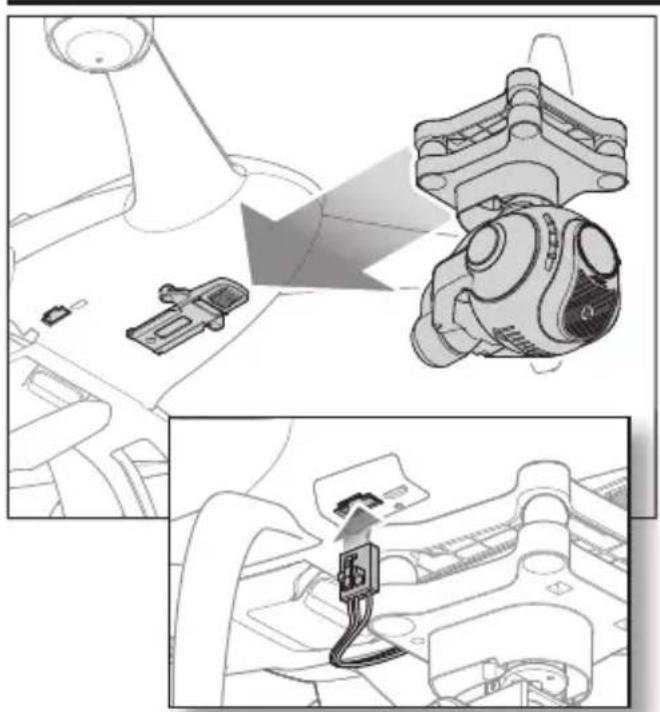
Technical illustration showing mechanical assembly and cable installation (no text or symbols)Install the gimbal by lining up the mounting rails of the gimbal and the mounting plate and pushing towards the rear of the plate as shown at left until it locks into place.
To remove the gimbal, push in the retaining clip at the front of the mounting plate and pull the gimbal forward.
Connect the harness from the gimbal power port to either the exposed wire harness from the 350 QX3 or to the recessed plug in the bottom of the Chroma quadcopter.
Transmitter Programming
Transmitter control of the pitch angle of the CG03 is possible with most 6-channel and above Spektrum ^™ transmitters or with the ST10+ Personal Ground Station and Chroma ^™ quadcopter. Control of the pitch angle in flight is achieved on the DX6i and DX6 by temporarily using the throttle control stick to adjust pitch. If you are using the DX7s, DX8, DX7, DX9 or DX18, pitch control is achieved via the rotary knob on your transmitter.
To program your transmitter:
DX6i
- Set the Channel 6 (FLAP) Travel Adj. to 120 up and 100 down.
- Set the values in the FLAP menu to 100 up and 100 down.
To change gimbal angle BEFORE starting the motors for fl ight, set the fl ap switch to position 1. The throttle stick will now control the angle of the gimbal. Set the fl ap switch to position 0 before fl ight.
To change the gimbal angle IN FLIGHT, cycle the fl ap switch to position 1. The throttle stick will now control the gimbal angle for approximately 5 seconds before returning to throttle control. Return the fl ap switch to position 0.
DX6
In Channel Input Configuration:
- Assign channel 6 (AUX1) to switch A.
- Assign Gear to switch B.
In Servo Setup:
- Reverse AUX1.
- Set the travel values for AUX1 to: 120% 140%
EN
To change the gimbal angle BEFORE starting the motors for flight, set switch A to position 1. The throttle stick will now control the angle of the gimbal. Set switch A to position 0 before flight.
To change the gimbal angle IN FLIGHT, cycle switch A to position 1. The throttle stick will now control the gimbal angle for approximately 5 seconds before returning to throttle control. Return switch A to position 0.
DX7s
In Channel Input Configuration:
- Assign Channel 7 Input (AUX2) to the rotary knob.
- Assign AUX1 to the Gear switch.
In Servo Setup: - Set the Channel 6 (AUX1) travel to the values below: 120% 140%
To change the gimbal angle, set the gear switch to position 0 and adjust the angle of the gimbal by rotating the knob on your transmitter at any time.
DX8
In Channel Input Configuration:
- Assign Channel 7 Input (AUX2) to the rotary knob.
- Assign AUX1 to the Gear switch.
In Servo Setup: - Set the Channel 6 (AUX1) travel to the values below: 120% 140%
To change the gimbal angle, set the gear switch to position 0 and adjust the angle of the gimbal by rotating the knob on your transmitter at any time.
DX7, DX9, DX18
In Channel Input Configuration:
- Assign Channel 7 Input (AUX2) to R Knob.
- Assign AUX1 to A.
In Servo Setup:
- Set the AUX1 travel to the values below: 140% 120%
To change the gimbal angle, set switch A to position 0 and adjust the angle of the gimbal by rotating the R Knob at any time.
ST10+ Personal Ground Station
The ST10+ requires no additional programming to use the CGO3. Proceed to “Using the CGO3 With Your ST10+ Personal Ground Station.”
Using the CGO3 With Your Spektrum Transmitter
- Insert the micro SD card into the slot on the bottom of the camera.
- Place the quadcopter on a flat and stable surface. Ensure there are no obstructions in the path of the CG03.
- Switch on your transmitter.
- Switch on your quadcopter.
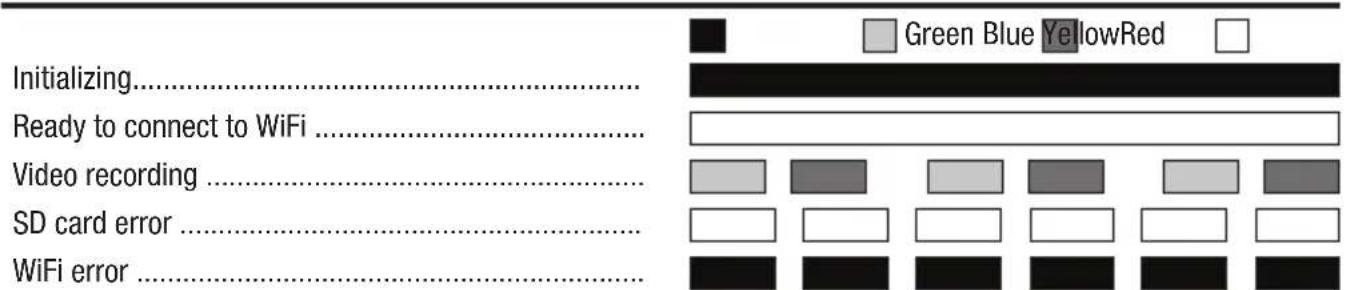
After the CGO3 powers on, the LED will glow red for approximately 40 seconds while the gimbal initializes. When the LED changes to green the CGO3 is ready to connect via WiFi.
See the “Using the CGO3 App” section for instructions on how to connect your gimbal to your smart device and for a description of the camera controls available. The gimbal will now compensate for any roll, pitch and yaw movements encountered by your quadcopter in flight.
If desired, you may change the pitch angle of the gimbal at any time using your programmed transmitter controls.
Using the CGO3 App
- With the CGO3 powered on, open the WiFi settings on your smartphone or tablet and connect to the CGO3 GB network (CGO3 GB_******) using the password "1234567890".
- Open the CGO3 GB App on your device.
You can now take still photos or start/stop recording video by using the on-screen controls on your device.
It is possible to take still photos at any time, even while you are recording live video.
Be sure to check for updates to the CGO3 App in the iTunes App Store, or Google Play Store.
Using the CGO3 With Your ST-10+ Personal Ground Station
NOTICE: The ST-10+ transmitter is not compatible with any receiver equipped with Spektrum™ DSM®, DSM2® or DSMX® technology.
- Insert the micro SD card into the slot on the bottom of the camera.
- Place the quadcopter on a flat and stable surface. Ensure there are no obstructions in the path of the CG03.
- Switch on your transmitter.
- Switch on your quadcopter.
After the CGO3 camera powers on, the LED on the gimbal will glow red for approximately 40 seconds. When the LED changes to yellow, complete the following steps to bind the CGO3 to the ST-10+:
- Select Flight Settings from the main menu on the ST-10+.
-
Select the Bind option.
-
Under Camera, select the CGO3 network (CGO3_******).
- Touch the Password line on the screen and enter the password "1234567890" on the touchscreen.
- Select OK.
- The ST-10+ will indicate a successful connection. Select OK.
- Return to the Main Menu.
The live video feed is now visible on the ST-10+ display.
Double tap on the image to expand the video to fi ll the display. Double tap again to return to the main menu with live video.
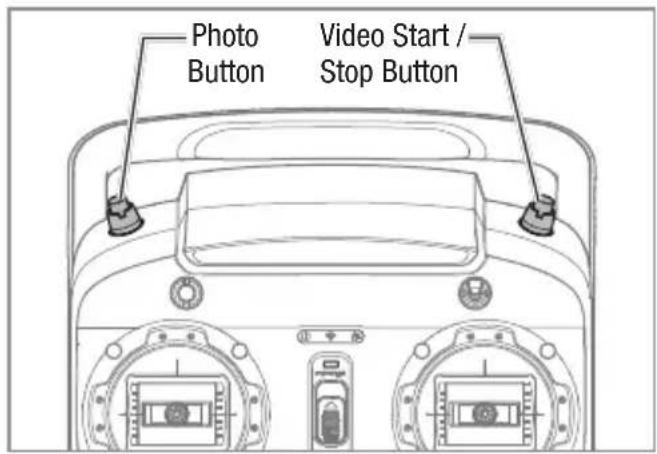
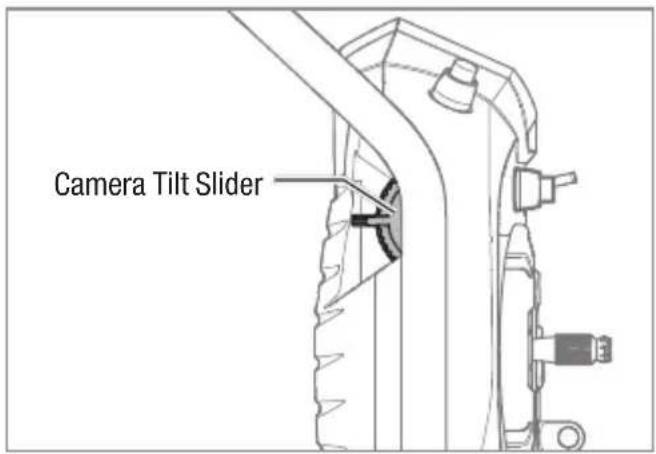
Use the buttons on the top of the ST-10+ to control the camera functions and the left slider to control the vertical angle of the camera gimbal.
LED Codes
Troubleshooting
| Problem Possible Cause Solution | ||
| The gimbal vibrates after switching ON | Gimbal did not initialize correctly or was obstructed | Re-initialize with the gimbal clear of obstructions |
| Gimbal does not respond to control input | Gimbal did not initialize | Keep the quadcopter and gimbal level and immobile for 5 seconds after switching ON |
| Gimbal is not ON Incorrect gimbal connection Correctly connect gimbal | ||
| Gimbal does not respond to transmitter | Incorrect transmitter set up | Review transmitter programming section and make corrections to transmitter set up |
| Gimbal is not ON and RED LED fl ashes slowly | Gimbal gyro board damage Contact Horizon Product Support | |
| Gimbal LED Flashing RED in Angle or Velocity Mode | Sensor Error | Check for correct gimbal connection or contact Horizon Product Support |
Optional Parts
| Part # Description | |
| BLH8105 Tall Landing Gear Set: 350 QX3 |
Limited Warranty
What this Warranty Covers
Horizon Hobby, LLC, (Horizon) warrants to the original purchaser that the product purchased (the "Product") will be free from defects in materials and workmanship at the date of purchase.
What is Not Covered
This warranty is not transferable and does not cover (i) cosmetic damage, (ii) damage due to acts of God, accident, misuse, abuse, negligence, commercial use, or due to improper use, installation, operation or maintenance, (iii) modification of or to any part of the Product, (iv) attempted service by anyone other than a Horizon Hobby authorized service center, (v) Product not purchased from an authorized Horizon dealer, (vi) Product not compliant with applicable technical regulations, or (vii) use that violates any applicable laws, rules, or regulations. OTHER THAN THE EXPRESS WARRANTY ABOVE, HORIZON MAKES NO OTHER WARRANTY OR REPRESENTATION, AND HEREBY DISCLAIMS ANY AND ALL IMPLIED WARRANTIES, INCLUDING, WITHOUT LIMITATION, THE IMPLIED WARRANTIES OF NON-INFRINGEMENT, MERCHANTABILITY AND FITNESS FOR A PARTICULAR PURPOSE. THE PURCHASER ACKNOWLEDGES THAT THEY ALONE HAVE DETERMINED THAT THE PRODUCT WILL SUITABLY MEET THE REQUIREMENTS OF THE PURCHASER'S INTENDED USE.
Purchaser's Remedy
Horizon's sole obligation and purchaser's sole and exclusive remedy shall be that Horizon will, at its option, either (i) service, or (ii) replace, any Product determined by Horizon to be defective. Horizon reserves the right to inspect any and all Product(s) involved in a warranty claim. Service or replacement decisions are at the sole discretion of Horizon. Proof of purchase is required for all warranty claims. SERVICE OR REPLACEMENT AS PROVIDED UNDER THIS WARRANTY IS THE PURCHASER'S SOLE AND EXCLUSIVE REMEDY.
Limitation of Liability
HORIZON SHALL NOT BE LIABLE FOR SPECIAL, INDIRECT, INCIDENTAL OR CONSEQUENTIAL DAMAGES, LOSS OF PROFITS OR PRODUCTION OR COMMERCIAL LOSS IN ANY WAY, REGARDLESS OF WHETHER SUCH CLAIM IS BASED IN CONTRACT, WARRANTY, TORT, NEGLIGENCE, STRICT LIABILITY OR ANY OTHER THEORY OF LIABILITY, EVEN IF HORIZON HAS BEEN ADVISED OF THE POSSIBILITY OF SUCH DAMAGES. Further, in no event shall the liability of Horizon exceed the individual price of the Product on which liability is asserted. As Horizon has no control over use, setup, final assembly, modification or misuse, no liability shall be assumed nor accepted for any resulting damage or injury. By the act of use, setup or assembly, the user accepts all resulting liability. If you as the purchaser or user are not prepared to accept the liability associated with the use of the Product, purchaser is advised to return the Product immediately in new and unused condition to the place of purchase.
Law
These terms are governed by Illinois law (without regard to conflict of law principals). This warranty gives you specific legal rights, and you may also have other rights which vary from state to state. Horizon reserves the right to change or modify this warranty at any time without notice.
WARRANTY SERVICES
Questions, Assistance, and Services
Your local hobby store and/or place of purchase cannot provide warranty support or service. Once assembly, setup or use of the Product has been started, you must contact your local distributor or Horizon directly. This will enable Horizon to better answer your questions and service you in the event that you may need any assistance. For questions or assistance, please visit our website at www.horizonhobby.com, submit a Product Support Inquiry, or call the toll free telephone number referenced in the Warranty and Service Contact Information section to speak with a Product Support representative.
Inspection or Services
If this Product needs to be inspected or serviced and is compliant in the country you live and use the Product in, please use the Horizon Online Service Request submission process found on our website or call Horizon to obtain a Return Merchandise Authorization (RMA) number. Pack the Product securely using a shipping carton. Please note that original boxes may be included, but are not designed to withstand the rigors of shipping without additional protection. Ship via a carrier that provides tracking and insurance for lost or damaged parcels, as Horizon is not responsible for merchandise until it arrives and is accepted at our facility. An Online Service Request is available at http://www.horizonhobby.com/content/_service-center_render-service-center. If you do not have internet access, please contact Horizon Product Support to obtain a RMA number along with instructions for submitting your product for service. When calling Horizon, you will be asked to provide your complete name, street address, email address and phone number where you can be reached during business hours. When sending product into Horizon, please include your RMA number, a list of the included items, and a brief summary of the problem. A copy of your original sales receipt must be included for warranty consideration. Be sure your name, address, and RMA number are clearly written on the outside of the shipping carton.
NOTICE: Do not ship Li-Po batteries to Horizon. If you have any issue with a Li-Po battery, please contact the appropriate Horizon Product Support offi ce.
Warranty Requirements
For Warranty consideration, you must include your original sales receipt verifying the proof-of-purchase date. Provided warranty conditions have been met, your Product will be serviced or replaced free of charge. Service or replacement decisions are at the sole discretion of Horizon.
Non-Warranty Service
Should your service not be covered by warranty, service will be completed and payment will be required without notification or estimate of the expense unless the expense exceeds 50% of the retail purchase cost. By submitting the item for service you are agreeing to payment of the service without notification. Service estimates are available upon request. You must include this request with your item submitted for service. Non-warranty service estimates will be billed a minimum of 12 hour of labor. In addition you will be billed for return freight. Horizon accepts money orders and cashier's checks, as well as Visa, MasterCard, American Express, and Discover cards. By submitting any item to Horizon for service, you are agreeing to Horizon's Terms and Conditions found on our website http://www.horizonhobby.com/content/_service-center_render-service-center.
ATTENTION: Horizon service is limited to Product compliant in the country of use and ownership. If received, a non-compliant Product will not be serviced. Further, the sender will be responsible for arranging return shipment of the un-serviced Product, through a carrier of the sender's choice and at the sender's expense. Horizon will hold non-compliant Product for a period of 60 days from notifi cation, after which it will be discarded.
Service Contact Information
| Country of Purchase | Horizon Hobby Contact Information Address | ||
| United States of America | Horizon Service Center (Repairs and Repair Requests) | servicecenter.horizonhobby.com/RequestForm/ | 4105 Fieldstone RdChampaign, Illinois, 61822 USA |
| Horizon Product Support (Product Technical Assistance) | www.quickbase.com/db/bghj7ey8c?a=GenNewRecord888-959-2304 | ||
| Sales | sales@horizonhobby.com888-959-2304 | ||
| United Kingdom | Service/Parts/Sales: Horizon Hobby Limited | sales@horizonhobby.co.uk Units+44 (0) 1279 641 097 | 1–4 , Ployters Rd, Staple TyeHarlow, Essex, CM18 7NS, United Kingdom |
| Germany | Horizon Technischer Service ser Sales: Horizon Hobby GmbH +49 (0) 4121 2655 100 | service@horizonhobby.de | |
| France | Service/Parts/Sales: Horizon Hobby SAS | infofrance@horizonhobby.com+33 (0) 1 60 18 34 90 | Christian-Junge-Straße 125337 Elmshorn, Germany |
| China | Service/Parts/Sales: Horizon Hobby – China | info@horizonhobby.com.cn+86 (021) 5180 9868 | Room 506, No. 97 Changshou Rd.Shanghai, China 200060 |
FCC Information
This device complies with part 15 of the FCC rules. Operation is subject to the following two conditions: (1) This device may not cause harmful interference, and (2) this device must accept any interference received, including interference that may cause undesired operation.

CAUTION: Changes or modifications not expressly approved by the party responsible for compliance could void the user's authority to operate the equipment.
Antenna Separation Distance
When operating your CG03 camera gimbal, please be sure to maintain a separation distance of at least 20 cm between your body (excluding fingers, hands, wrists, ankles and feet) and the antenna to meet RF exposure safety requirements as determined by FCC regulations.
IC Information
This device complies with Industry Canada license-exempt RSS standard(s). Operation is subject to the following two conditions:
(1) this device may not cause interference,
and (2) this device must accept any interference, including interference that may cause undesired operation of the device.
Compliance Information for the European Union

EU Compliance Statement:
Horizon Hobby, LLC hereby declares that this product is in compliance with the essential requirements and other relevant provisions of the R&TTE, EMC, and LVD Directives.
A copy of the EU Declaration of Conformity is available online at: http://www.horizonhobby.com/content/support-render-compliance.
Instructions for disposal of WEEE by users in the European Union

This product must not be disposed of with other waste. Instead, it is the user's responsibility to dispose of their waste equipment by handing it over to a designated collections point for the recycling of waste electrical and electronic equipment. The separate collection and recycling of your
waste equipment at the time of disposal will help to conserve natural resources and ensure that it is recycled in a manner that protects human health and the environment. For more information about where you can drop off your waste equipment for recycling, please contact your local city offi ce, your household waste disposal service or where you purchased the product.

E328

natural_image
Abstract geometric shape with black and white color blocks, no text or symbols present©2015 Horizon Hobby, LLC.
Blade, Chroma, DSM, DSM2, DSMX and the Horizon Hobby logo are trademarks or registered trademarks of Horizon Hobby, LLC.
iTunes is a trademark of Apple, Inc. Registered in the U.S. and other countries. Google is a registered trademark of Google, Inc.
All other trademarks, service marks or logos are property of their respective owners.
Created 07/15 49847 BLH8622