EW1077 - Uncategorized Ewent - Free user manual and instructions
Find the device manual for free EW1077 Ewent in PDF.


User questions about EW1077 Ewent
0 question about this device. Answer the ones you know or ask your own.
Ask a new question about this device
Download the instructions for your Uncategorized in PDF format for free! Find your manual EW1077 - Ewent and take your electronic device back in hand. On this page are published all the documents necessary for the use of your device. EW1077 by Ewent.
USER MANUAL EW1077 Ewent
3.5" Internal Card Reader All in One
Quick Install | Snel installeren | Installation rapide | Installazione rapida | Schnelle Installation Instalación rápida | Gyors telepítés | Guia de instalação rápida | Skrócona instrukcja instalacji
1
natural_image
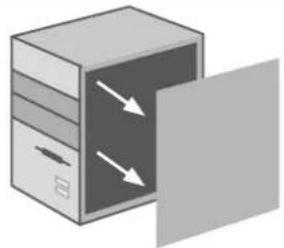
Illustration of a layered rectangular box with internal arrows indicating flow or movement, no text or symbols present.EN Disconnect the mains and open the cabinet of your computer.
NL Ontkoppel de stroom van de computer en open de systeemkast.
FR Débranchez l'alimentation principale et ouvrez le boîtier de votre ordinateur.
Spegnere l'alimentazione del PC e rimuovere i pannelli laterali del vostro computer.
DF Schließen Sie Ihren Computer von der Stromversorgung ab und öffnen Sie dessen Gehäuse.
ES Apagar la alimentación del PC y quitar los paneles laterales de su ordenador.
HV Válassza le a tápkábelt és nyissa ki a számítógépházat.
APagar a alimentação do PC e remover os painéis laterais do seu computador.
FL Odlącz kable zasilania i otwórz obudowę komputera.
2
natural_image
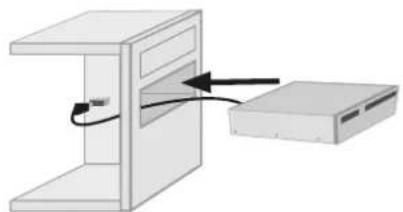
Diagram showing a computer setup with an open box and a folder, no text or symbols presentEN Install the internal card reader in a free 3,5" bay.
NL Monteer de kaartlezer in een vrij 3,5" slot.
FR Installez le lecteur de carte interne dans une baie 3,5".
Inserire il lettore interno EW1077 all'interno di uno slot da 3,5" libero.
DF Installieren Sie den internen Kartenleser in einem freien 3,5-Zoll-Einschub.
35 Introducir el lector interno EW1077 dentro de un slot de 3.5" libre
HU Szerelje a belső kártyaolvasót egy szabad 3,5°-es bővítőhelyre.
Introduzir o leitor interno EW1077 dentro de um slot de 3.5" livre.
PL Zainstaluj wewnętrzny czytnik kart w wolnym gnieżdzie 3,5 cała.
3
text_image
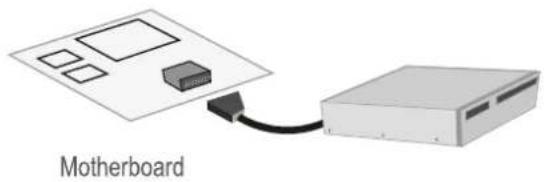
MotherboardEN Connect the connector of your card reader to the USB port of your motherboard. Please note! Consult the manual of your mainboard to find out which connector pins need to be connected to what connector.
NL Sluit de connector van je kaartlezer aan op de USB aansluiting van het moederbord. Let opl Controleer met behulp van de moederbord handleiding welke pinnen waar aangesloten dienen te worden.
FR Connectez le connecteur de votre lecteur de cartes sur la connexion USB de la carte mère. Attention! Contrôlez, à l'aide du manuel de la carte mère, quels pins doivent être connectés
IT Connettere il cavo del card reader al connettore USB della scheda madre del PC. Si prega di fare riferimento al manuale della scheda madre per trovare il giusto connettore.
DE Verbinden Sie die Anschlüsse des Kartenlesers mit den USB-Port-Verbindungsstiften Ihres Motherboards. Hinweis! Finden Sie anhand der Dokumentation Ihres Motherboards heraus, welche Verbindungsstifte mit welchem Anschluss verbunden werden müssen.
35 Conectar el cable del cardreader al conector USB de la placa madre del PC. Por favor consultar el manual de la placa madre para encontrar el conector justo.
HU Csatlakoztassa az EW1077 csatlakozóját az alaplap USB-portjához. Megjegyzés: Tekintse meg az alaplap használati útmutatóját a csatlakozótük kiosztását illetően.
PT Conectar o cabo do cardreader ao conector USB da placa mãe do PC. Por favor consultar o manual da placa mãe para encontrar o conector certo.
PL Podłącz złącze czytnika kart do portu USB płyty głównej.
Uwaga! Zapoznaj się z instrukcją obsługi płyty głównej, aby uzyskać informacje na temat podłączania złączy.
4
natural_image
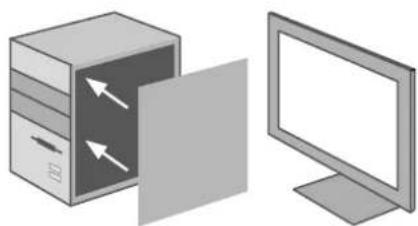
Illustration of a server cabinet with an open door and a computer monitor, both without any text or symbols.IN Close the cabinet, reconnect the mains and start your computer.
NL Sluit de systeemkast, verbind de stroom en start de computer op.
FR Fermez le boîtier, rebranchez l'alimentation principale et allumez votre ordinateur.
IT Chiudere il computer, ricollegare l'alimentazione e accendere il PC.
DE Schließen Sie das Gehäuse, stellen Sie die Stromversorgung wieder her und schalten Sie den Computer ein.
Cerrar el ordenador, reconectar la alimentación y ligar el PC.
HU Zárja be a számítógépházat, csatlakoztassa a tápkábelt és indítsa el a számítógépet.
PT Desligar o computador, reconectar a alimentação e ligar o PC.
PL Zamontuj obudowę, podłącz kable zasilania i uruchom komputer.
5
natural_image
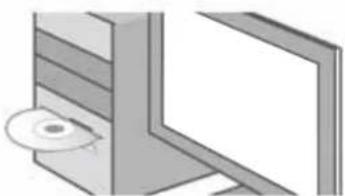
Pure technical diagram of a mechanical assembly with no visible text, numbers, or symbolsEN Insert the CD-Rom in your pc and follow the installation wizards.
Doe de CD-rom in je pc en volg de installatie wizard.
FR Insérez le CD-rom dans votre ordinateur portable ou de bureau et suivez les instructions de l'assistant d'installation.
Inserire il CD-rom nel tuo PC o notebook e seguire la procedura guidata d'installazione.
DE Legen Sie die CD-ROM in Ihren Desktop- oder Notebook-PC ein und befolgen Sie den Installationsassistenten.
55 Inserte el CD-ROM en un ordenador de escritorio o portátil y siga las instrucciones del asistente de instalación.
HU Helyezze a CD-ROM lemezt a PC-be vagy laptopba és kövesse a telepítő varázsló utasításait.
PT Insira o CD-rom no seu PC e siga o assistente de instalação.
PL Wlóż płytę CD-ROM do komputera i postępuj zgodnie ze wskazówkam kreatora instalacji.
EN Please check www.ewent-online.com for the helpdesk phone number and opening hours. For service, manuals, firmware updates or support visit www.ewent-online.com | Multilingual helpdesk | Multilingual manual | 5 Years Warranty |