
D4 - Receiver Audac - Free user manual and instructions
Find the device manual for free D4 Audac in PDF.


| Product Type | Dual Channel Power Amplifier |
| Model | D4 |
| Dimensions (W x H x D) | 483 mm x 88 mm (2HE) x 495 mm |
| Weight | 24.0 kg |
| Power Supply | 230 V AC, 50-60 Hz |
| Fuse Rating | T10AL/250V |
| RMS Power @ 8Ω (per channel) | 2 x 400 W |
| RMS Power @ 4Ω (per channel) | 2 x 600 W |
| RMS Power @ 8Ω Bridged | 1 x 1200 W |
| Input Impedance | 20 kΩ balanced |
| Frequency Response | 20 Hz - 20 kHz |
| THD+N (1 kHz) | Less than 0.05% @ 8Ω |
| Signal-to-Noise Ratio | >93 dB |
| Damping Factor | >400 |
| Input Connectors | 2 x Balanced XLR (female) |
| Output Connectors | 2 x 4-pole Speakon |
| Operating Modes | Stereo or Bridge Mono (switchable) |
| Protection Circuits | DC, Short Circuit, Overheating, Overload |
| Front Panel Indicators | Power (blue), Signal (green), Clip (yellow), Protect (red) |
| Gain Control | Rotary knobs per channel |
| Ground Lift Switch | Yes (to eliminate ground loops) |
| Cleaning | Use a dry cloth; do not use liquids or solvents |
| Safety | Use grounded outlet; do not open unit; no user-serviceable parts |
| Warranty / Repair | Refer to qualified service personnel only |
Frequently Asked Questions - D4 Audac
User questions about D4 Audac
0 question about this device. Answer the ones you know or ask your own.
Ask a new question about this device
Download the instructions for your Receiver in PDF format for free! Find your manual D4 - Audac and take your electronic device back in hand. On this page are published all the documents necessary for the use of your device. D4 by Audac.
USER MANUAL D4 Audac
PROFESSIONAL AUDIO EQUIPMENT
Dual Channel Power Amplifier D2 – D3 – D4 – D5

natural_image
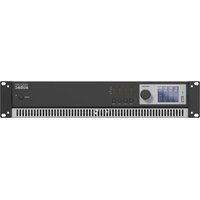
Front panel of a rack-mounted audio output unit (D5 AUDAC) with hexagonal grid and three rotary switches (no text or symbols on the main body)User Manual & Installation Guide
AUDAC PROFESSIONAL AUDIO EQUIPMENT
User Manual & Installation Guide
© AUDAC
http://www.audac.bc
info@audac.be
Index
INTRODUCTION....3
ENVIRONMENT 4
SAFETY REQUIREMENTS 5
CAUTION - SERVICING 5
OVERVIEW FRONT AND REAR PANEL 6
FRONT PANEL OVERVIEW 6
FRONT PANEL DESCRIPTION....6
REAR PANEL OVERVIEW 7
REAR PANEL DESCRIPTION 7
CONNECTING THE AMPLIFIER....9
INPUT CONNECTIONS....9
OUTPUT CONNECTIONS....11
CONNECTION STANDARDS....12
ADDITIONAL INFORMATION....13
TECHNICAL SPECIFICATIONS 13
PERSONAL NOTES....14
Introduction
This section briefly describes the possibilities of the D-Series Dual Channel Power Amplifiers.
The D-Series Dual Channel Power Amplifiers are developed as an easy to use, flexible flexible solution for multifunctional use.
During the development of the D2 - D3 - D4 - D5 power amplifier, the AUDAC-engineers wanted to achieve three goals:
- Easy to use
- Excellent sound quality
- Modern and advanced design
AUDAC's D-series professional power amplifiers are suitable for the most common low impedance high power sound systems. The amplifiers are built as a 2 channel amplifier. The amplifiers are equipped with a multipurpose protection circuit which detects DC malfunction, short circuit, overheating and signal overload.
The amplifiers are equipped with a balanced XLR input and Speakon output connector for every channel.
Chapter 1
Environment
Do not place this unit in an enclosed environment such as a bookshelf or closet. Ensure there is adequate ventilation to cool the unit. Do not block the ventilation openings.
Do not place the unit in environments which contain high levels of dust, heat, moisture or vibration.
Do not use the unit near water or other liquids. Make sure no water or other liquids can be spilled, dripped or splashed on the unit.
Do not place objects on top of the unit.
Place the unit on a stable base.
Safety Requirements
Always handle the unit with care.
Only use a grounded socket outlet and a power cord with grounding plug.
This unit is not a toy. It should not be operated by children.
Do not stick objects through the openings of the D2-D3-D4-D5.
Do not open the unit (risk for electrical shock).
Always read the user manual before getting started.

CAUTION - SERVICING
This unit contains no user serviceable parts. Refer all servicing to qualified service personnel. Do not perform any servicing unless you are qualified to do so.
Note
This product conforms to the following European Standards: EN 50081-1: 1992, EN 50082-1: 1992, EN 60065: 1994

Overview front and rear panel
Front panel overview
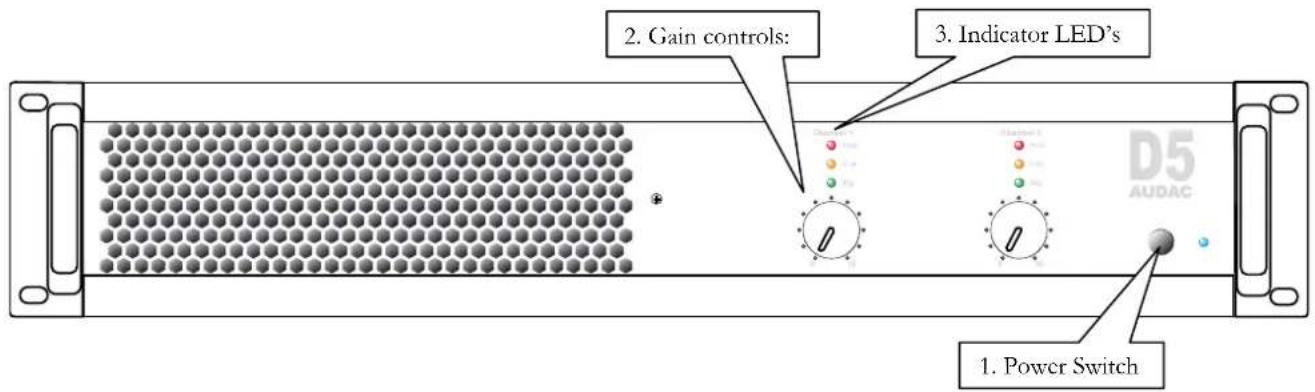
Description
1. Power switch:
By means of the power switch, the amplifier can be turned ON and OFF. When the amplifier is switched on, the blue LED located next to the power button will illuminate.
2. Gain control knobs:
These rotary gain control knobs allow you to adjust the level for each individual channel.
3. Indicator LED's:
These LED's indicate the operation of the amplifier. There are three LED's provided. A signal indicator, a Clip indicator, and a Protect indicator. The green signal indicator LED will illuminate when a signal is available on the corresponding channel. The yellow clip LED will illuminate when the channels output is being overdriven, and the red protection indicator will illuminate when the protection circuit of the corresponding channel is activated. The protection circuit will intervene during the startup procedure of the amplifier, when a problem occurs. The output signal will be interrupted when this LED is lit.
Rear panel overview

Description
4. Power inlet:
The mains power supply (230\~240V / 50\~60 Hz) has to be applied to this AC power inlet. The connection is made by an IEC power connector and is fitted with a fuse. When replacing the fuse, make sure the value of the replacement fuse matches the value of the original fuse. (T6.3AL/250V for D2, T8AL/250V for D3, T10AL/250V for D4 & T12AL/250V for D5)
5. Loudspeaker connections:
The loudspeakers should be connected to these output connectors. The loudspeaker output connections are performed using Speakon connectors. For standard stereo applications, the loudspeakers should be connected to the +1 and -1 terminals of the Speakon connectors. More information about the connection possibilities can be found in the next chapter, connecting the amplifier.
6. Input connections:
The input connections of the amplifier are performed using balanced XLR connectors. Every channel has an XLR input connector where to the signal coming from the source should be connected. The wiring should be done according to international standards. (Pin 1: Ground, Pin 2: Hot (Signal +), Pin 3: Cold (Signal -))
7. Operation mode switch:
By means of this switch, the operation mode of the amplifier can be selected between stereo mode or bridge mode. For most standard applications the amplifier will be used in stereo mode whereby this switch should be turned to the left position. When using in bridged mode, the power of both channels will be merged with each other and this switch should be turned to the right position.
8. Ground lift switch:
By means of this switch, the ground of the amplifier can be detached to interrupt ground loops. This can be useful when unwanted hum and buzz is caused by current flow along the cable shield between different devices.
Chapter
3
Connecting the Amplifier
Input connections
The input connections of the amplifier are performed using balanced XLR connectors. Every channel has an XLR input connector. The input signal from the signal source, pre-amplifier or mixer should be connected to the XLR input connections.

Channel 2 Channel 1
INPUT

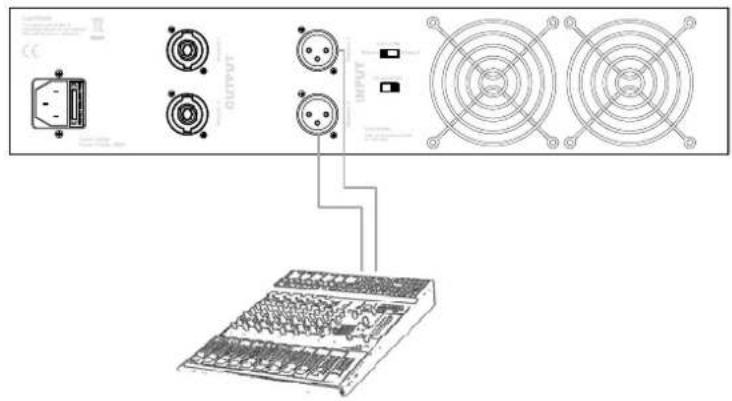
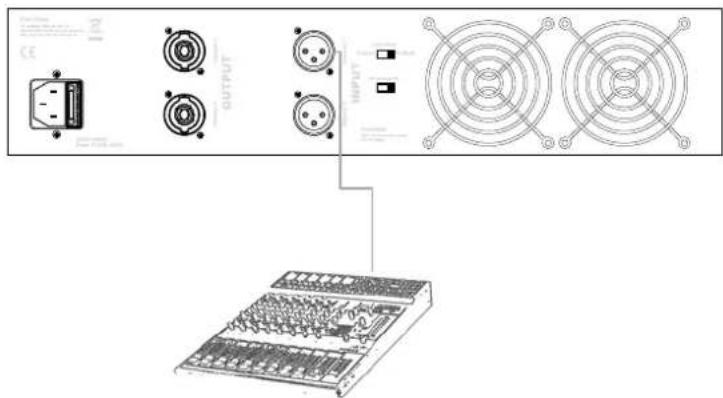
By means of the operation mode switch, the operational mode for the amplifier can be selected between Stereo mode and Bridge mode. The diagrams below show the connection possibilities for both Stereo and Bridge mode.
1) Stereo Mode:
This is the default mode of how the amplifier is set in the factory, and will be the most common used setting for most applications (Left position of the switch).
Connect both outputs from the stereo signal source to the Channel 1 and Channel 2 XLR input connectors of the amplifier.
2) Bridge mono Mode:
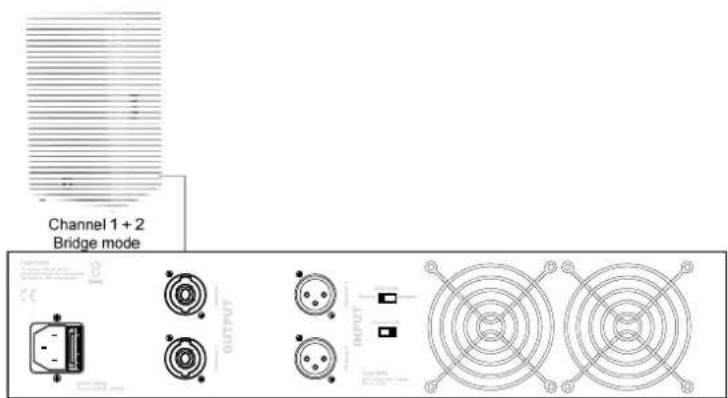
In bridged mono mode, the power of both output channels is merged to deliver double the power to one single load. The operation mode switch should be positioned in the Bridge position (Right position of the switch).
The output of the signal source should only be connected with the Channel 1 XLR input connector of the amplifier.
For more information about how the loudspeakers should be connected in bridge mode, refer to the “Output Connections” section of this user manual.
Output connections
The loudspeaker connections are performed by using Speakon connectors. The loudspeakers should be connected to the corresponding Speakon connector.

Channel 2 Channel 1
OUTPUT

The used Speakon connectors are 4-pole versions. At the contacts of Speakon 1 (Channel 1), are the output signals available for both output channels. Contacts +1 and -1 contain the signal for output Channel 1, while contacts +2 and -2 contain the signal for output Channel 2. The contacts of Speakon 2 (Channel 2) only contain the signals of Channel 2, which are available on contacts +1 and -1.
| Speakon 1 (Channel 1) | Speakon 2 (Channel 2) | |
| Pin +1 | Channel 1 + Channel 2 + | |
| Pin -1 | Channel 1 - Channel 2 - | |
| Pin +2 | Channel 2 + n/c | |
| Pin -2 | Channel 2 - n/c |
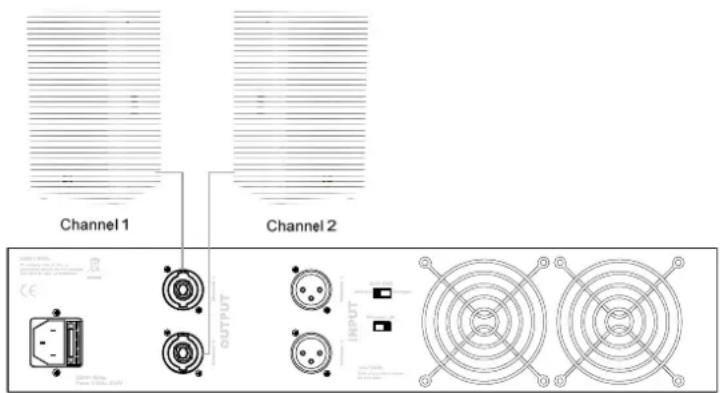
1) Stereo Mode:
Stereo mode will be the most common operation method for this amplifier. The loudspeakers of each channel can be connected with a separate two-core connection cable. (or one four-core connection cable, carrying both signals for Channel 1 and Channel 2 when connecting by connector Speakon 1)
2) Bridge mono Mode:
When the amplifier is switched in bridge mode, there will be one single load connected to the amplifier outputs. This load should be connected between the + terminal of Channel 1 and the + terminal of Channel 2. This can be done by connecting the loudspeaker between the +1 and +2 terminals of Speakon connector one.
Connection standards
The in- and output connections of AUDAC audio equipment are performed corresponding to international wiring standards for professional audio equipment.
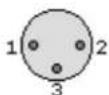
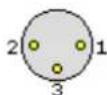
XLR:
1 = ground / shield
2 = +sig
3 = -sig
XLR female:
XLR male:
Chapter
4
Additional Information
Technical specifications
Input Impedance 20 kΩ balanced
Input Sense 0.775 V
Frequency Response 20 Hz - 20 kHz
THD+N (1 kHz) Less than 0.05% @ 8 Ω
Signal to Noise ratio >93 dB
Slew Rate 40V/μsec
Cross Talk (1 kHz) >70 dB @ 8 Ω
Damping Factor D2 - D3 >200
Damping Factor D4 - D5 >400
RMS Power @ 8 Ω D2 2 x 200 W
RMS Power @ 4 Ω D2 2 x 300 W
RMS Power @ 8 Ω Bridged D2 1 x 600 W
RMS Power @ 8 Ω D3 2 x 300 W
RMS Power @ 4 Ω D3 2 x 450 W
RMS Power @ 8 Ω Bridged D3 1 x 900 W
RMS Power @ 8 Ω D4 2 x 400 W
RMS Power @ 4 Ω D4 2 x 600 W
RMS Power @ 8 Ω Bridged D4 1 x 1200 W
RMS Power @ 8 Ω D5 2 x 500 W
RMS Power @ 4 Ω D5 2 x 750 W
RMS Power @ 8 Ω Bridged D5 1 x 1500 W
Protection
DC, Short Circuit, Overheating, Overload
Power Supply 230V AC, 50-60Hz
Weight D2
Weight D3
Weight D4
Weight D5
21.3 kg
22.7 kg
24.0 kg
26.0 kg
Dimensions (W x H x D)
Unit height
483 mm × 88mm × 495 mm
2HE
Personal Notes

- PROFESSIONAL AUDIO EQUIPMENT
- User Manual & Installation Guide
- Index
- Introduction
- Chapter 1
- Environment
- Safety Requirements
- CAUTION - SERVICING
- Note
- Overview front and rear panel
- Front panel overview
- Description
- Power switch:
- Gain control knobs:
- Indicator LED's:
- Rear panel overview
- Power inlet:
- Loudspeaker connections:
- Input connections:
- Operation mode switch:
- Ground lift switch:
- Chapter
- 3
- Connecting the Amplifier
- Input connections
- 1) Stereo Mode:
- 2) Bridge mono Mode:
- Output connections
- Connection standards
- XLR:
- 4
- Additional Information
- Technical specifications
- Personal Notes
Brand : Audac
Model : D4
Category : Receiver