1054 - Watch Skmei - Free user manual and instructions
Find the device manual for free 1054 Skmei in PDF.


User questions about 1054 Skmei
0 question about this device. Answer the ones you know or ask your own.
Ask a new question about this device
Download the instructions for your Watch in PDF format for free! Find your manual 1054 - Skmei and take your electronic device back in hand. On this page are published all the documents necessary for the use of your device. 1054 by Skmei.
USER MANUAL 1054 Skmei
Operation instruction
A. Features
➢ 12 Digits, Hour, Minutes, Seconds, Month, Day and Week
Daily Alarm and Chime hourly
12 / 24H, Auto Calendar
➢ 1/100 second Chronograph with split count
EL backlight
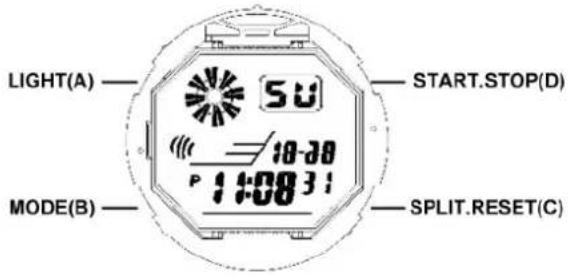
B. Operational Manual
At any station, press A key, the EL back light on for 3 seconds.
➢ Press B key to convert MODE:
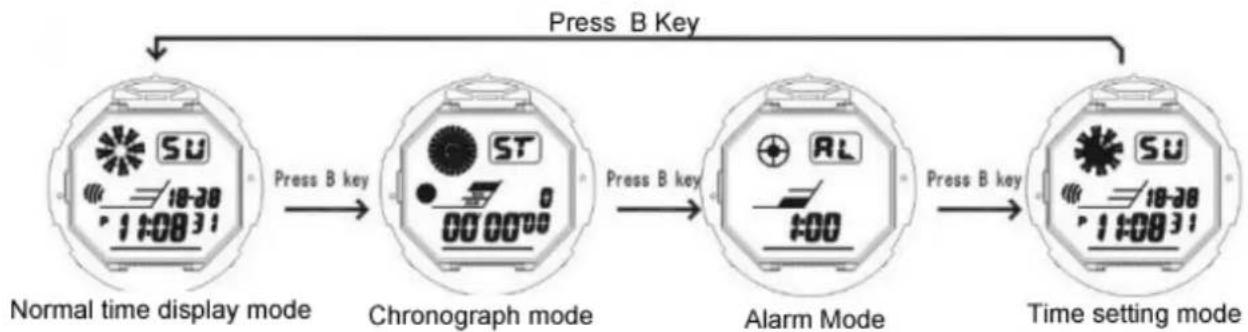
flowchart
graph LR
    A["Normal time display mode"] -->|Press B key| B["Chronograph mode"]
    B -->|Press B key| C["Alarm Mode"]
    C -->|Press B key| D["Time setting mode"]
    style A fill:#f9f,stroke:#333
    style B fill:#ccf,stroke:#333
    style C fill:#cfc,stroke:#333
    style D fill:#fcc,stroke:#333
Chronograph functions
In normal display mode: press B key once, enter Chronograph mode
➢ Press D to start, press D again to suspend, press D again to continue, press D to suspend again,.....when suspend, press C key back to 0:00:00.
In Chronograph mode, press D key to start, press C key enter into split function, and the "SPL" symbol appear, press C key again to get the first group record, but the second group still processing in the back ground, press C key again to continue the second group, press C key again to read the second group record.....when the final group finished, Press D key to stop the SPL function, press C key read the final group(SUM) record, press C key again to clear the record to zero.

flowchart
graph TD
    A["In normal mode press B"] --> B["chronograph"]
    B --> C["press D to start"]
    C --> D["press D to suspend"]
    D --> E["press C for SPL"]
    E --> F["press C to zero"]
    F --> G["press D to stop"]
    G --> H["Press B exit"]
    H --> A
    style A fill:#f9f,stroke:#333
    style B fill:#f9f,stroke:#333
    style C fill:#f9f,stroke:#333
    style D fill:#f9f,stroke:#333
    style E fill:#f9f,stroke:#333
    style F fill:#f9f,stroke:#333
    style G fill:#f9f,stroke:#333
    style H fill:#f9f,stroke:#333
Alarm & Chime ON/OFF
In normal mode, press B key twice to enter to Alarm Mode, Then press D to ON/OFF "ALM" / "SIG" function.
If "ALM/SIG" symbol appears, means ALM/SIG function ON, otherwise means OFF
“ALM/ ” appear means ALARM Function ON."SIG/CHI/ ” appear means HOURLY CHIME function ON
Alarm setting
in normal Mode, press B twice to enter Alarm mode and press C then "Hours" flashing
➢ Press D to adjust "Hour" for your Alarm. Pay attention to AM/PM
➢ Press C then "Minutes" flashing, Press D to adjust "Minutes" for your alarm. Press B key to exit.
Time & date setting
In Normal Mode, press B three times enter into setting mode and the "Seconds" flashing, Press D to zero.
➢ Press C the "Hours" will flash. Press D to adjust "Hours"
➢ Press C the "Minutes" will flash. Press D to adjust "Minutes".
➢ Press C the “Month” will flash. Press D to adjust “Month”
➢ Press C the "Date" will flash. Press D to adjust "date"
➢ Press C the "Week" will flash. Press D to adjust "Day"
➢ Press B key to exit.