
D405n L90 - Smartphone LG - Free user manual and instructions
Find the device manual for free D405n L90 LG in PDF.


| Product Type | Smartphone |
| Brand | LG |
| Model | D405n L90 |
| Dimensions | 131.6 x 66 x 9.9 mm |
| Weight | 129 g |
| Battery Capacity | 2540 mAh (removable Li-Ion) |
| Operating System | Android 4.4.2 KitKat |
| Processor | Qualcomm Snapdragon 400, quad-core 1.2 GHz |
| RAM | 1 GB |
| Internal Storage | 8 GB (expandable via microSD up to 32 GB) |
| Display | 4.7 inch IPS LCD, 540x960 pixels |
| Rear Camera | 8 MP with LED flash |
| Front Camera | 1.3 MP |
| Connectivity | Wi-Fi 802.11 b/g/n, Bluetooth 4.0, GPS, microUSB 2.0 |
| Sensors | Accelerometer, proximity, compass |
| Main Functions | Calls, messaging, internet browsing, camera, GPS navigation, multimedia playback, app support |
| Maintenance | Wipe with a dry cloth; avoid liquids and harsh chemicals |
| Safety | Do not disassemble; use only LG-approved chargers; avoid extreme temperatures |
| Spare Parts & Repairability | Battery and back cover user-replaceable; screen and internal repairs by LG service centers |
Frequently Asked Questions - D405n L90 LG
User questions about D405n L90 LG
0 question about this device. Answer the ones you know or ask your own.
Ask a new question about this device
Download the instructions for your Smartphone in PDF format for free! Find your manual D405n L90 - LG and take your electronic device back in hand. On this page are published all the documents necessary for the use of your device. D405n L90 by LG.
USER MANUAL D405n L90 LG
natural_image
Line drawing of a smartphone with LG logo on top screen (no text or symbols beyond branding)Spis treści
Opis telefonu
natural_image
Diagram of a smartphone showing internal components and a close-up view of the device (no text or symbols present)UWAGA:
natural_image
Two views of a smartphone internal circuit board with red arrows pointing to specific components (no text or symbols present)UWAGA:
natural_image
Line drawing of a hand holding a smartphone (no text or symbols present)LUB
natural_image
Mobile phone interface with a red downward arrow overlay (no text or symbols)
natural_image
User interface toolbar with icons for zoom, refresh, file, and photo (no readable text or symbols)LUB
natural_image
Black-and-white illustration of a handheld electronic device with earbuds and leads (no text or symbols)natural_image
Illustration of a coiled cable with connectors (no text or symbols)Bateria
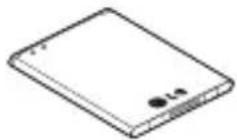
UWAGA:
- Screen displays and illustrations may differ from those you see on actual phone.
- Some of the contents of this guide may not apply to your phone, depending on the software and your service provider. All information in this document is subject to change without notice.
- This handset is not suitable for people who have a visual impairment due to the tap screen keyboard.
- Copyright ©2015 LG Electronics, Inc. All rights reserved. LG and the LG logo are registered trademarks of LG Group and its related entities. All other trademarks are the property of their respective owners.
- Google™, Google Maps™, Gmail™, YouTube™, Hangouts™ and Play Store™ are trademarks of Google, Inc.
natural_image
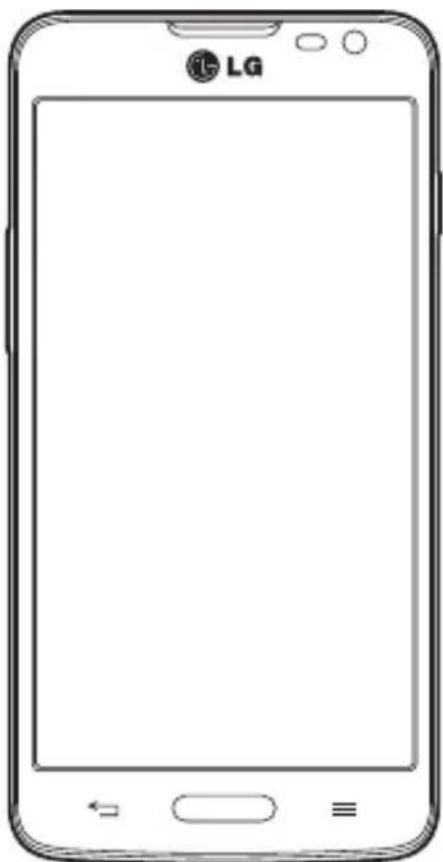
Front view line drawing of a LG smartphone with blank screen and buttons (no text or symbols on body)Table of contents
Guidelines for safe and efficient use....5
Important notice....12
Getting to know your phone....17
Phone overview....17
Installing the SIM card and battery .....19
Charging your phone 21
Using the memory card....22
Locking and unlocking the screen .....23
Your Home screen....24
Touch screen tips....24
Home screen....24
Extended home screen....25
Customizing the Home screen 25
Returning to recently-used applications......26
Notifications panel....26
Opening the notifications panel....27
Indicator icons on the Status Bar....28
On-screen keyboard....29
Entering accented letters....29
Google account setup......30
Connecting to Networks and Devices......31
Wi-Fi 31
Connecting to Wi-Fi networks ....31
Turning Wi-Fi on and connecting to a Wi-Fi network....31
Bluetooth 32
Sharing your phone's data connection......33
Wi-Fi Direct....34
PC connections with a USB cable ....34
Calls 36
Making a call 36
Calling your contacts....36
Answering and rejecting a call....36
Adjusting the in-call volume 36
Making a second call ....37
Viewing your call logs......37
Call settings....37
Contacts....38
Searching for a contact 38
Adding a new contact....38
Favorites contacts....38
Creating a group 39
Messaging....40
Sending a message....40
Threaded box 41
Changing your message settings....41
E-mail.....42
Managing an email account 42
Working with account folders 42
Composing and sending email......42
Camera....43
Getting to know the viewfinder....43
Using the advanced settings....44
Taking a quick photo 45
Using Time catch shot mode 45
Once you've taken a photo 46
From your Gallery....47
Video camera....48
Getting to know the viewfinder 48
Using the advanced settings....49
Recording a quick video 49
After recording a video 50
From your Gallery....50
Function 51
Knock Code....51
QuickMemo+ 51
Using the QuickMemo+ options....52
Viewing the saved QuickMemo+....53
QSlide 53
QuickRemote 54
Multimedia....55
Gallery 55
Viewing pictures ....55
Playing videos....55
Editing photos....55
Deleting photos/videos....55
Setting as wallpaper....56
Videos....56
Playing a video 56
Music....57
Playing a song....57
Add music files to your phone....58
Transfer music using Media device (MTP)......58
FM radio 59
Utilities....60
Setting your alarm....60
Using your calculator....60
Adding an event to your calendar 60
Voice Recorder....61
Recording a sound or voice 61
Tasks 61
ThinkFree Viewer....62
Google+....62
Voice Search 62
Downloads....62
LG SmartWorld 63
How to Get to LG SmartWorld from Your Phone... 63
How to use LG SmartWorld....63
The Web 64
Internet 64
Using the Web toolbar 64
Viewing webpages....64
Opening a page 64
Searching the web by voice 65
Bookmarks....65
History 65
Chrome....65
Viewing webpages....65
Settings......66
Networks 66
Sound 68
Display....69
General 70
PC software (LG PC Suite)....74
Phone software update ....76
Phone software update....76
About this user guide ....77
About this user guide 77
Trademarks....77
DivX HD....77
Dolby Digital Plus 78
Table of contents
Accessories....79
Troubleshooting....80
FAQ 83
Guidelines for safe and efficient use
Please read these simple guidelines. Not following these guidelines may be dangerous or illegal.
Should a fault occur, a software tool is built into your device that will gather a fault log.
This tool gathers only data specific to the fault, such as signal strength, cell ID position in sudden call drop and applications loaded. The log is used only to help determine the cause of the fault. These logs are encrypted and can only be accessed by an authorized LG Repair centre should you need to return your device for repair.
Exposure to radio frequency energy
Radio wave exposure and Specific Absorption Rate (SAR) information.
This mobile phone model LG-D405n has been designed to comply with applicable safety requirements for exposure to radio waves. These requirements are based on scientific guidelines that include safety margins designed to assure the safety of all persons, regardless of age and health.
- The radio wave exposure guidelines employ a unit of measurement known as the Specific Absorption Rate (SAR). Tests for SAR are conducted using standardised methods with the phone transmitting at its highest certified power level in all used frequency bands.
- While there may be differences between the SAR levels of various LG phone models, they are all designed to meet the relevant guidelines for exposure to radio waves.
- The SAR limit recommended by the International Commission on Non-Ionizing Radiation Protection (ICNIRP) is 2 W/kg averaged over 10g of tissue.
- The highest SAR value for this model phone tested for use at the ear is 0.467 W/kg (10g) and when worn on the body is 0.443 W/Kg (10g).
- This device meets RF exposure guidelines when used either in the normal use position against the ear or when positioned at least 1.5 cm away from the body. When a carry case, belt clip or holder is used for body-worn operation, it should not contain metal and should position the product at least 1.5 cm away from your body. In order to transmit data files or messages, this device requires a quality connection to the network. In some cases, transmission of data files or messages may be delayed until such a connection is available. Ensure the above separation distance instructions are followed until the transmission is completed.
Guidelines for safe and efficient use
Product care and maintenance

WARNING
Only use batteries, chargers and accessories approved for use with this particular phone model. The use of any other types may invalidate any approval or warranty applying to the phone and may be dangerous.
- Do not disassemble this unit. Take it to a qualified service technician when repair work is required.
- Repairs under warranty, at LG's discretion, may include replacement parts or boards that are either new or reconditioned, provided that they have functionality equal to that of the parts being replaced.
- Keep away from electrical appliances such as TVs, radios and personal computers.
- The unit should be kept away from heat sources such as radiators or cookers.
- Do not drop.
- Do not subject this unit to mechanical vibration or shock.
- Switch off the phone in any area where you are required to by special regulations. For example, do not use your phone in hospitals as it may affect sensitive medical equipment.
- Do not handle the phone with wet hands while it is being charged. It may cause an electric shock and can seriously damage your phone.
- Do not charge a handset near flammable material as the handset can become hot and create a fire hazard.
- Use a dry cloth to clean the exterior of the unit (do not use solvents such as benzene, thinner or alcohol).
• Do not charge the phone when it is on soft furnishings.
• The phone should be charged in a well ventilated area.
• Do not subject this unit to excessive smoke or dust. - Do not keep the phone next to credit cards or transport tickets; it can affect the information on the magnetic strips.
- Do not tap the screen with a sharp object as it may damage the phone.
• Do not expose the phone to liquid or moisture. - Use accessories like earphones cautiously. Do not touch the antenna unnecessarily.
- Do not use, touch or attempt to remove or fix broken, chipped or cracked glass. Damage to the glass display due to abuse or misuse is not covered under the warranty.
-
Your phone is an electronic device that generates heat during normal operation. Extremely prolonged, direct skin contact in the absence of adequate ventilation may result in discomfort or minor burns. Therefore, use care when handling your phone during or immediately after operation.
-
If your phone gets wet, immediately unplug it to dry off completely. Do not attempt to accelerate the drying process with an external heating source, such as an oven, microwave or hair dryer.
- The liquid in your wet phone, changes the color of the product label inside your phone. Damage to your device as a result of exposure to liquid is not covered under your warranty.
Efficient phone operation
Electronics devices
All mobile phones may receive interference, which could affect performance.
- Do not use your mobile phone near medical equipment without requesting permission. Avoid placing the phone over pacemakers, for example, in your breast pocket.
• Some hearing aids might be disturbed by mobile phones.
• Minor interference may affect TVs, radios, PCs etc. - Use your phone in temperatures between 0°C and 40°C, if possible. Exposing your phone to extremely low or high temperatures may result in damage, malfunction, or even explosion.
Road safety
Check the laws and regulations on the use of mobile phones in the area when you drive.
- Do not use a hand-held phone while driving.
- Give full attention to driving.
- Pull off the road and park before making or answering a call if driving conditions so require.
- RF energy may affect some electronic systems in your vehicle such as car stereos and safety equipment.
- When your vehicle is equipped with an air bag, do not obstruct with installed or portable wireless equipment. It can cause the air bag to fail or cause serious injury due to improper performance.
- If you are listening to music whilst out and about, please ensure that the volume is at a reasonable level so that you are aware of your surroundings. This is of particular importance when near roads.
Guidelines for safe and efficient use
Avoid damage to your hearing

To prevent possible hearing damage, do not listen at high volume levels for long periods.
Damage to your hearing can occur if you are exposed to loud sound for long periods of time. We therefore recommend that you do not turn on or off the handset close to your ear. We also recommend that music and call volumes are set to a reasonable level.
- When using headphones, turn the volume down if you cannot hear the people speaking near you, or if the person sitting next to you can hear what you are listening to.
NOTE: Excessive sound pressure from earphones and headphones can cause hearing loss
Glass Parts
Some parts of your mobile device are made of glass. This glass could break if your mobile device is dropped on a hard surface or receives a substantial impact. If the glass breaks, do not touch or attempt to remove it. Stop using your mobile device until the glass is replaced by an authorised service provider.
Blasting area
Do not use the phone where blasting is in progress. Observe restrictions and follow any regulations or rules.
Potentially explosive atmospheres
• Do not use your phone at a refueling point.
• Do not use near fuel or chemicals.
- Do not transport or store flammable gas, liquid or explosives in the same compartment of your vehicle as your mobile phone or accessories.
In aircraft
Wireless devices can cause interference in aircraft.
- Turn your mobile phone off before boarding any aircraft.
- Do not use it on the ground without permission from the crew.
Children
Keep the phone in a safe place out of the reach of small children. It includes small parts which may cause a choking hazard if detached.
Emergency calls
Emergency calls may not be available on all mobile networks. Therefore you should never depend solely on your phone for emergency calls. Check with your local service provider.
Battery information and care
- You do not need to completely discharge the battery before recharging. Unlike other battery systems, there is no memory effect that could compromise the battery's performance.
- Use only LG batteries and chargers. LG chargers are designed to maximise the battery life.
- Do not disassemble or short-circuit the battery.
- Replace the battery when it no longer provides acceptable performance. The battery pack may be recharged hundreds of times before it needs replacing.
- Recharge the battery if it has not been used for a long time to maximise usability.
- Do not expose the battery charger to direct sunlight or use it in high humidity, such as in the bathroom.
- Do not leave the battery in hot or cold places, as this may deteriorate battery performance.
- There is risk of explosion if the battery is replaced with an incorrect type.
- Dispose of used batteries according to the manufacturer's instructions. Please recycle when possible. Do not dispose as household waste.
- If you need to replace the battery, take it to the nearest authorised LG Electronics service point or dealer for assistance.
Guidelines for safe and efficient use
- Always unplug the charger from the wall socket after the phone is fully charged to save unnecessary power consumption of the charger.
- Actual battery life will depend on network configuration, product settings, usage patterns, battery and environmental conditions.
- Make sure that no sharp-edged items such as animal's teeth or nails, come into contact with the battery. This could cause a fire.
DECLARATION OF CONFORMITY
Hereby, LG Electronics declares that this LG-D405n product is in compliance with the essential requirements and other relevant provisions of Directive 1999/5/EC. A copy of the Declaration of Conformity can be found at http://www.lg.com/global/declaration
Contact office for compliance of this product :
LG Electronics Inc.
EU Representative, Krijgsman 1,
1186 DM Amstelveen, The Netherlands

Disposal of your old appliance
1 All electrical and electronic products should be disposed of separately from the municipal waste stream via designated collection facilities appointed by the government or the local authorities.
2 The correct disposal of your old appliance will help prevent potential negative consequences for the environment and human health.
3 For more detailed information about disposal of your old appliance, please contact your city office, waste disposal service or the shop where you purchased the product.

Disposal of waste batteries/accumulators
1 This symbol may be combined with chemical symbols for mercury (Hg), cadmium (Cd) or lead (Pb) if the battery contains more than 0.0005% of mercury, 0.002% of cadmium or 0.004% of lead.
2 All batteries/accumulators should be disposed separately from the municipal waste stream via designated collection facilities appointed by the government or the local authorities.
3 The correct disposal of your old batteries/accumulators will help to prevent potential negative consequences for the environment, animal and human health.
4 For more detailed information about disposal of your old batteries/ accumulators, please contact your city office, waste disposal service or the shop where you purchased the product.
Important notice
Please read this before you start using your phone!
Please check to see whether any problems you encountered with your phone are described in this section before taking the phone in for service or calling a service representative.
1. Phone memory
When there is less than 10% of space available in your phone memory, your phone cannot receive new messages. You need to check your phone memory and delete some data, such as applications or messages, to make more memory available.
To uninstall applications:
1 Press > Apps tab > Settings > General tab > Apps.
2 Once all applications appear, scroll to and select the application you want to uninstall.
3 Tap Uninstall.
2. Optimizing battery life
Extend your battery's power by turning off features that you don't have to run constantly in the background. You can monitor how applications and system resources consume battery power.
Extending your phone's battery life:
- Turn off radio communications when you are not using. If you are not using Wi-Fi, Bluetooth or GPS, turn them off.
- Reduce screen brightness and set a shorter screen timeout.
- Turn off automatic syncing for Gmail, Calendar, Contacts and other applications.
• Some applications you have downloaded may reduce battery power. - While using downloaded applications, check the battery charge level.
To check the battery power level:
- Press > Apps tab > Settings > General tab > About phone > Battery.
The battery status (charging or discharging) and battery level (percentage charged) is displayed at the top of the screen.
To monitor and control how battery power is being used:
- Press > Apps tab > Settings > General tab > About phone > Battery > Battery usage.
Battery usage time is displayed on the screen. It tells you how long it has been since you last connected your phone to a power source or, if currently connected, how long the phone was last running on battery power. The screen shows the applications or services using battery power, listed in order from the greatest to smallest amount used.
3. Before installing an open source application and OS

WARNING
If you install and use an OS other than the one provided by the manufacturer it may cause your phone to malfunction. In addition, your phone will no longer be covered by the warranty.

WARNING
To protect your phone and personal data, only download applications from trusted sources, such as Play Store™. If there are improperly installed applications on your phone, the phone may not work normally or a serious error may occur. You must uninstall those applications and all associated data and settings from the phone.
4. Using an unlock pattern
Set an unlock pattern to secure your phone. Press > Apps tab > Settings > Display tab > Lock screen > Select screen lock > Pattern. This opens a screen that will guide you through how to draw a screen unlock pattern. You have to create a Backup PIN as a safety measure in case you forget your unlock pattern.
Caution: Create a Google account before setting an unlock pattern and remember the Backup PIN you created when creating your pattern lock.
Important notice

WARNING
Precautions to take when using pattern lock.
It is very important to remember the unlock pattern you set. You will not be able to access your phone if you use an incorrect pattern 5 times. You have 5 opportunities to enter your unlock pattern, PIN or password. If you have used all 5 opportunities, you can try again after 30 seconds.
When you can't recall your unlock Pattern, PIN or Password:
< If you have forgotten your pattern >
If you logged in to your Google account on the phone but failed to enter the correct pattern 5 times, tap the Forgot pattern? button at the bottom of the screen. You are then required to log in with your Google Account or you have to enter the Backup PIN which you entered when creating your Pattern Lock.
If you have not created a Google account on the phone or you forgot Backup PIN, you have to perform a hard reset.
< If you have forgotten your PIN or Password >
If you forget your PIN or Password, you will need to perform a hard reset.
Caution: If you perform a hard reset, all user applications and user data will be deleted.
NOTE: If you have not logged into your Google Account and have forgotten your Unlock Pattern, you will need to enter your Backup PIN.
5. Using the Hard Reset (Factory Reset)
If your phone does not restore to its original condition, use a Hard Reset (Factory Reset) to initialize it.
1 Turn the power off.
2 Press and hold the Power/Lock Key + Volume Down Key on the phone.
3 Release the Power/Lock Key only when the LG logo is displayed, then immediately press and hold the Power/Lock Key again.
4 Release all keys when the Factory data reset screen is displayed.
5 Press the Volume Key to scroll to the desired option, then press the Power/Lock Key to confirm.

WARNING
If you perform a Hard Reset, all user applications, user data and DRM licenses will be deleted. Please remember to backup any important data before performing a Hard Reset.
6. Opening and switching applications
Multi-tasking is easy with Android, you can keep more than one application running at the same time. There is no need to quit an application before opening another one. Use and switch between several open applications. Android manages each application, stopping and starting them as needed to ensure that idle applications don't consume resources unnecessarily.
1 Touch and hold the Menu Key ≡. A list of recently used applications will be displayed.
2 Tap the application you want to access. This does not stop the previous app running in the background on the phone. Make sure to tap Back Key ←→ to exit an app after using it.
• To stop applications, tap Task Manager from the recent apps list, then tap Stop or Stop all.
- To remove an app from the recent apps list, swipe the app preview to the left or right. To clear all apps, tap Clear all.
7. Transferring music, photos and videos using Media device (MTP)
1 Press > Apps tab > Settings > General tab > Storage to check out the storage media.
2 Connect the phone to your PC using the USB cable.
3 Slide down the status bar and select the Media device (MTP) option.
4 Open the memory folder on your PC. You can view the mass storage content on your PC and transfer the files from PC to Device memory folder or vice versa.
8. Hold your phone upright
Hold your cell phone vertically, as you would a regular phone. Your phone has an internal antenna. Be careful not to scratch or damage the back of the phone, as this may affect performance.
When making/receiving calls or sending/receiving data, avoid holding the lower part of the phone where the antenna is located. Doing so may affect call quality.
Important notice
9. When the screen freezes
If the screen freezes or the phone does not respond when you try to operate it:
Press and hold the Power/Lock Key for 10 seconds to turn your phone off. If it still does not work, please contact the service center.
Getting to know your phone
Phone overview
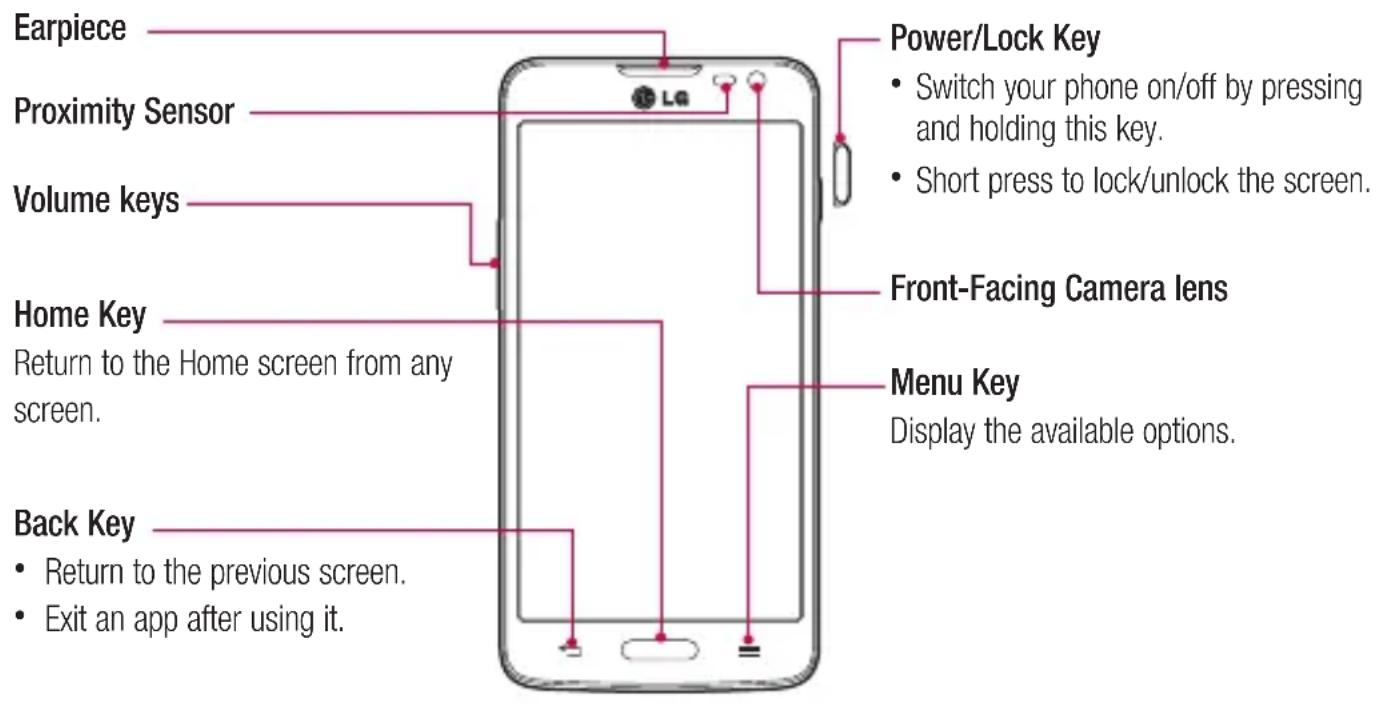
NOTE: Proximity sensor
When receiving and making calls, the proximity sensor automatically turns the backlight off and locks the touch screen by sensing when the phone is near your ear. This extends battery life and prevents you from unintentionally activating the touch screen during calls.

WARNING
Placing a heavy object on the phone or sitting on it can damage the LCD and touch screen functions. Do not cover the LCD proximity sensor with protective film. This could cause the sensor to malfunction.
Getting to know your phone
Volume keys
• In the Home screen: Control ringer volume.
• During a call: Control your earpiece volume.
- When playing a song: Control volume continuously.

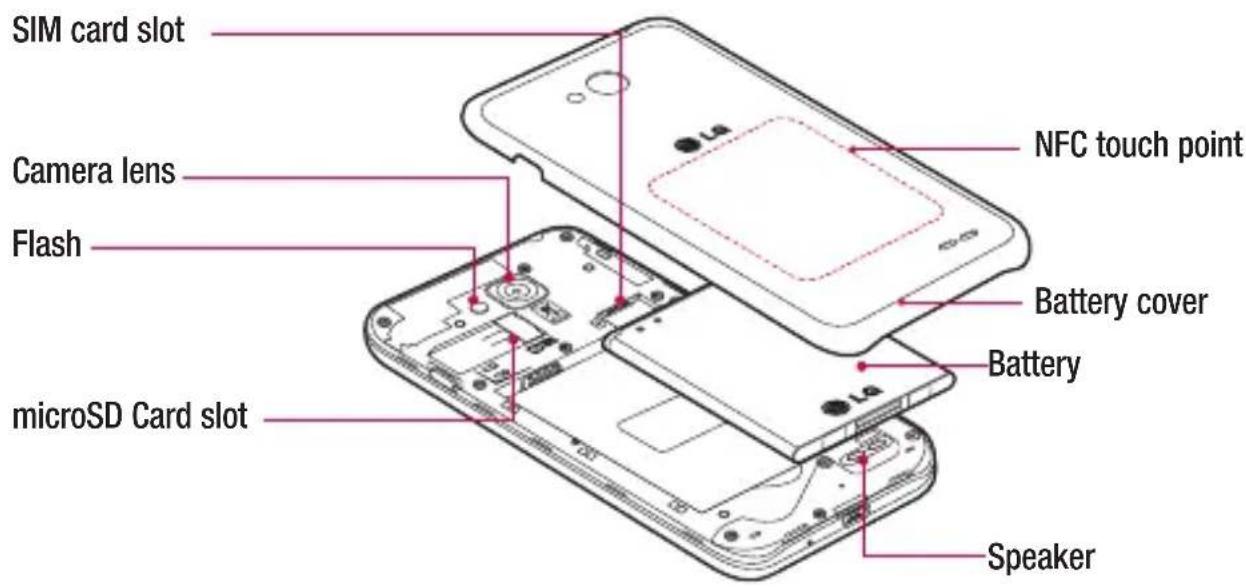

WARNING
• The NFC antenna for this model is on the back cover.
- Be careful not to damage the NFC touch point on the phone, which is part of the NFC antenna.
Installing the SIM card and battery
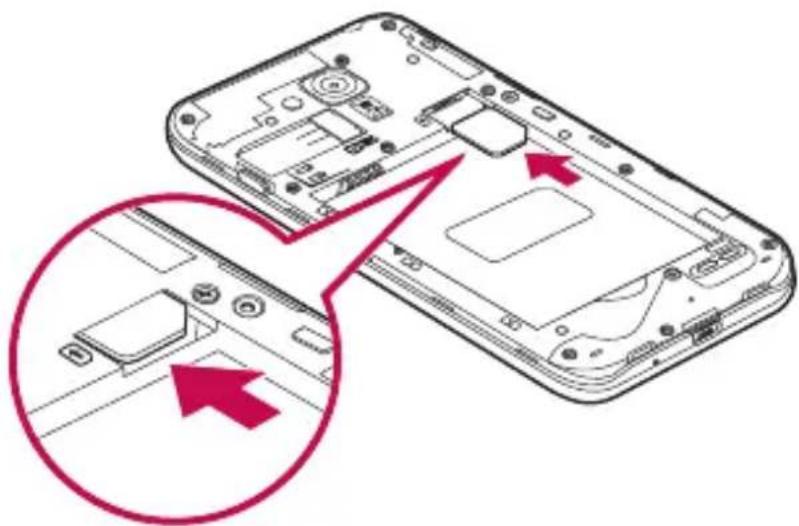
Before you can start exploring your new phone, you'll need to set it up. To insert the SIM card and battery.
1 To remove the battery cover, hold the phone firmly in one hand. With your other hand, lift off the battery cover with your thumbnail as shown in figure.

Getting to know your phone
2 Slide the SIM card into its slots as shown in the figure. Make sure the gold contact area on the card is facing downwards.
natural_image
Diagram of a smartphone showing internal components and a close-up view of the device's internal structure (no text or symbols present)3 Insert the battery into place by aligning the gold contacts on the phone and the battery (1) and pressing it down until it clicks into place (2).

4 Align the battery cover over the battery compartment (1) and press it down until it clicks into place (2).

Charging your phone
Charge the battery before using it for the first time. Use the charger to charge the battery. A computer can be also used to charge the device by connecting them via the USB cable.

WARNING
Use only LG-approved chargers, batteries, and cables. When using unapproved chargers or cables, it may cause battery charging delay or pop-up message regarding slow charging. Or, unapproved chargers or cables can cause the battery to explode or damage the device, which are not covered by the warranty.
The charger connector is at the bottom of the phone. Insert the charger and plug it into an electrical outlet.
Getting to know your phone

NOTE:
- The battery must be fully charged initially to improve battery lifetime.
- Do not open the back cover while your phone is charging.
Using the memory card
Your phone supports the use of microSD™ or microSDHC™ memory cards of up to 32 GB capacity. These memory cards are specifically designed for mobile phones and other ultra-small devices, and are ideal for storing media-rich files such as music, programs, videos, and photographs for use with your phone.
To insert a memory card:
Insert the memory card into the slot. Make sure the gold contact area is facing downwards.
To safely remove the memory card:
Touch > Apps tab > Settings > General tab > Storage > Unmount SD card.

natural_image
Two views of a smartphone internal structure showing internal components and connectors, with red arrows pointing to specific areas (no text or symbols present)NOTE:
- Use only compatible memory cards with your phone. Using incompatible memory cards may damage the card and data stored on the card, as well as the phone.
- As the device uses FAT32, the maximum size for any given file is 4 GB.

WARNING
Do not insert or remove the memory card when the phone is ON. Doing so may damage the memory card as well as your phone, and the data stored on the memory card may become corrupt.
To format the memory card:
Your memory card may already be formatted. If it isn't, you must format it before you can use it.
NOTE: All files on your memory card are deleted when it is formatted.
1 Touch to open the application list.
2 Scroll and touch Settings > General tab > Storage.
3 Touch Unmount SD card.
4 Touch Erase SD card > Erase SD card > Erase everything.
5 If you have set a pattern lock, input the pattern lock then select Erase everything.
NOTE: If there is content on your memory card, the folder structure may be different after formatting, as all the files will have been deleted.
Locking and unlocking the screen
If you do not use the phone for a while, the screen will be automatically turned off and locked. This helps to prevent accidental taps and saves battery power.
When you are not using the phone, press the Power/Lock key ☐ to lock your phone.
If there are any programs running when you lock your screen, they may be still running in Lock mode. It is recommended that you exit all programs before entering Lock mode to avoid unnecessary charges (e.g. phone calls, web access and data communications).
To wake up your phone, press the Power/Lock key ☐. The Lock screen will appear. Touch and slide the Lock screen in any direction to unlock your Home screen. The last screen you viewed will open.
Your Home screen
Touch screen tips
Here are some tips on how to navigate on your phone.
Tap or touch – A single finger tap selects items, links, shortcuts and letters on the on-screen keyboard.
Touch and hold – Touch and hold an item on the screen by tapping it and not lifting your finger until an action occurs. For example, to open a contact's available options, touch and hold the contact in the Contacts list until the context menu opens.
Drag – Touch and hold an item for a moment and then, without lifting your finger, move your finger on the screen until you reach the target position. You can drag items on the Home screen to reposition them.
Swipe or slide – To swipe or slide, quickly move your finger across the surface of the screen, without pausing when you first tap it (so you don't drag an item instead). For example, you can slide the screen up or down to scroll through a list, or browse through the different Home screens by swiping from left to right (and vice versa).
Double-tap – Double-tap to zoom on a webpage or a map. For example, quickly double-tap a section of a webpage to adjust that section to fit the width of the screen. You can also double-tap to zoom in and out while viewing the picture.
Pinch-to-Zoom – Use your index finger and thumb in a pinching or spreading motion to zoom in or out when using the browser or Maps, or when browsing pictures.
Rotate the screen – From many applications and menus, the orientation of the screen adjusts to the device's physical orientation.
NOTE:
• To select an item, tap the center of the icon.
- Do not press too hard; the tap screen is sensitive enough to pick up a light, yet firm tap.
- Use the tip of your finger to tap the option you want. Be careful not to tap any other keys.
Home screen
The Home screen is the starting point for many applications and functions, and it allows you to add items like application shortcuts, or Google widgets to give you instant access to information and applications. This is the default canvas and accessible from any menu by tapping

Status Bar
Shows phone's status information including the time, signal strength, battery status, and notification icons.
Widget
Widgets are self-contained applications that can be accessed through the Apps screen or on the Home screen or an extended home screen. Unlike a shortcut, the Widget appears as an on-screen application.
Application Icons
Tap an icon (application, folder, etc.) to open and use it.
Location Indicator
Indicates which Home screen canvas you are viewing.
Quick Key Area
Provides one-touch access to the function in any home screen canvas.
Extended home screen
The operating system provides multiple Home screen canvases to provide more space for adding icons, widgets, and more.
▶ Slide your finger left or right across the Home screen.
Customizing the Home screen
You can customize your Home screen by adding apps, widgets or changing wallpapers.
To add items on your Home screen
1 Touch and hold the empty part of the Home screen.
2 In the Add Mode menu, select the item you wish to add. You will then see this added item on the Home screen.
3 Drag it to the desired location and lift your finger.
Your Home screen
TIP! To add an application icon to the Home screen from the Apps menu, touch and hold the application you want to add.
To remove an item from the Home screen
▶ Home screen > touch and hold the icon you want to remove > drag it to

Remove
To add an app as a Quick key
▶ From the Apps menu or on the Home screen, touch and hold an application icon and drag it to the Quick key area.
To remove an app from the Quick key area
▶ Touch and hold the desired quick key and drag it to Remove.
NOTE: Apps key cannot be removed.
To customize apps icons on the Home screen
1 Touch and hold an application icon until it is unlocked from its current position. Then drop it on the screen.
The editing icon 📄 will appear in the upper right corner of the application.
2 Tap the application icon again and select the desired icon design and size.
3 Tap OK to save the change.
Returning to recently-used applications
1 Touch and hold . A list of recently used applications will be displayed.
2 Tap an icon to open the application. Or tap ← to return to your previous screen.
Notifications panel
Notifications alert you the arrival of new messages, calendar events, and alarms, as well as to ongoing events, such as when you are on a call.
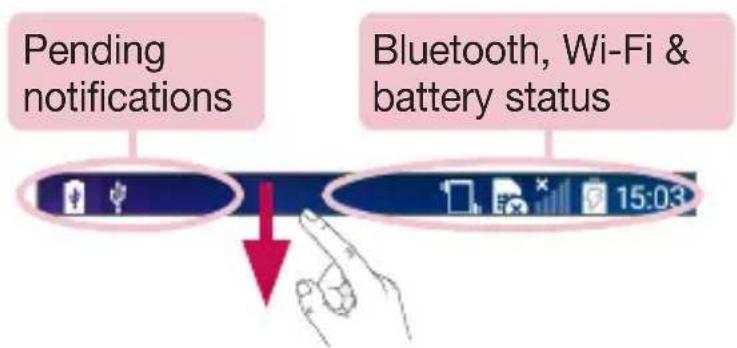
When a notification arrives, its icon appears at the top of the screen. Icons for pending notifications appear on the left, and system icons such as Wi-Fi or battery strength shown on the right.
NOTE: The available options may vary depending on the region or service provider.
flowchart
graph TD
    A["Pending notifications"] --> B["Bluetooth, Wi-Fi & battery status"]
    B --> C["15:03"]
Opening the notifications panel
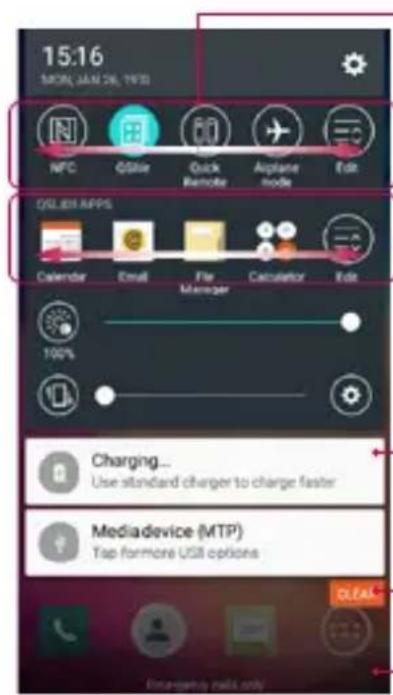
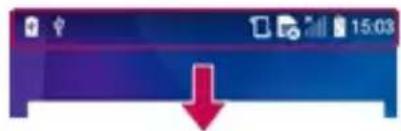
Swipe down from the status bar to open the notifications panel.
Quick Toggle Area
Tap each quick toggle key to turn it on/off. Touch and hold the key to access the settings menu of the function. To see more toggle keys, swipe left or right. Tap ☐ to remove, add, or rearrange toggle keys.
QSlide apps
Tap a QSlide app to open as a small window on your screen. Tap Ecto remove, add, or rearrange QSlide apps.
Notifications
The current notifications are listed, each with a brief description. Tap a notification to view it.
Tap to clear all the notifications.
To close the notifications panel, touch and drag the tab toward the top of the screen.
Your Home screen
Indicator icons on the Status Bar
Indicator icons appear on the status bar at the top of the screen to report missed calls, new messages, calendar events, device status and more.

The icons displayed at the top of the screen provide information about the status of the device. The icons listed in the table below are some of the most common ones.
| Icon Description Icon Description | |||
 | No SIM card inserted Ringer is silenced | ||
 | No network signal available Vibrate mode is on | ||
 | Airplane mode is on Battery fully charged | ||
 | Connected to a Wi-Fi network Battery is charging | ||
 | Wired headset connected | Phone is connected to PC via USB cable | |
 | Call in progress Downloading data | ||
 | Missed call Uploading data | ||
 | Bluetooth is on GPS is on | ||
 | System warning Data is synchronizing | ||
 | An alarm is set New Gmail message available | ||
 | New voicemail available New Hangouts message available | ||
 | New text or multimedia message Choose input [3XWS] and | |
 | A song is currently playing Mobile hotspot is act  | |
 | NFC is on |
NOTE: The icons location in the status bar may differ according to the function or service.
On-screen keyboard
You can enter text using the on-screen keyboard. The on-screen keyboard appears automatically on the screen when you need to enter text. To manually display the keyboard, simply tap a text field where you want to enter text.
Using the keypad & entering text
Tap once to capitalize the next letter you type. Double-tap for all caps.
Tap to switch to the symbols keyboard.
Tap to enter a space.
Tap to create a new line.
Tap to delete the previous character.
Entering accented letters
When you select French or Spanish as the text entry language, you can enter special French or Spanish characters (e.g. "á").
For example, to input "a", touch and hold the "a" key until the zoom-in key grows bigger and displays characters from different languages.
Then select the special character you want.
Google account setup
When you first turn on your phone, you have the opportunity to activate the network, to sign into your Google Account and select how you want to use certain Google services.
To set up your Google account:
• Sign into a Google Account from the prompted set-up screen.
OR
- Press > Apps tab > select a Google application, such as Gmail > Tap GOT IT > select Add an email address to create a new account or add your account.
Once you have set up your Google account on your phone, your phone automatically synchronizes with your Google account on the Web.
Your contacts, Gmail messages, Calendar events and other information from these applications and services on the Web are synchronized with your phone. (This will depend on your synchronization settings.)
After signing in, you can use Gmail ^™ and take advantage of Google services on your phone.
Connecting to Networks and Devices
Wi-Fi
With Wi-Fi, you can use high-speed Internet access within the coverage of the wireless access point (AP). Enjoy wireless Internet using Wi-Fi, without extra charges.
Connecting to Wi-Fi networks
To use Wi-Fi on your phone, you need to access a wireless access point or 'hotspot'. Some access points are open and you can simply connect to them. Others are hidden or use security features; you must configure your phone to be able to connect to them.
Turn off Wi-Fi when you're not using it to extend the life of your battery.
NOTE: If you are out of the Wi-Fi zone or have set Wi-Fi to OFF, additional charges may be applied by your mobile operator for mobile data use.
Turning Wi-Fi on and connecting to a Wi-Fi network
1 Press > Apps tab > Settings > Networks tab > Wi-Fi.
2 Set Wi-Fi to ON to turn it on and start scanning for available Wi-Fi networks.
3 Tap the Wi-Fi menu again to see a list of active and in-range Wi-Fi networks.
• Secured networks are indicated by a lock icon.
4 Tap a network to connect to it.
- If the network is secured, you are prompted to enter a password or other credentials. (Ask your network administrator for details)
5 The status bar displays icons that indicate Wi-Fi status.
Connecting to Networks and Devices
Bluetooth
You can use Bluetooth to send data by running a corresponding application, but not from the Bluetooth menu as on most other mobile phones.
NOTE:
- LG is not responsible for the loss, interception or misuse of data sent or received via the Bluetooth wireless feature.
- Always ensure that you share and receive data with devices that are trusted and properly secured. If there are obstacles between the devices, the operating distance may be reduced.
- Some devices, especially those that are not tested or approved by Bluetooth SIG, may be incompatible with your device.
Turning on Bluetooth and pairing up your phone with a Bluetooth device
You must pair your device with another device before you connect to it.
1 Press > Apps tab > Settings > Networks tab > set Bluetooth to ON.
2 Tap the Bluetooth menu again. You will see the option to make your phone visible and option to search devices. Now tap Search for devices to view the devices in the Bluetooth Range.
3 Choose the device you want to pair with from the list.
Once the paring is successful, your device will connect to the other device.
NOTE: Some devices, especially headsets or hands-free car kits, may have a fixed Bluetooth PIN, such as 0000. If the other device has a PIN, you will be asked to enter it.
Send data using the Bluetooth wireless feature
1 Select a file or item, such as a contact, calendar event or media file, from an appropriate application or from Downloads.
2 Select the option for sending data via Bluetooth.
NOTE: The method for selecting an option may vary by data type.
3 Search for and pair with a Bluetooth-enabled device.
Receive data using the Bluetooth wireless feature
1 Press > Apps tab > Settings > Networks tab > set Bluetooth to ON.
2 Tap the Bluetooth menu again and mark the checkbox at the top of the screen to make your phone visible to other devices.
NOTE: To select the length of time that your device will be visible, tap ≡ > Visibility timeout.
3 Select Accept to confirm that you are willing to receive data from the device.
Sharing your phone's data connection
USB tethering and portable Wi-Fi hotspot are great features when there are no wireless connections available.
You can share your phone's mobile data connection with a single computer via a USB cable (USB tethering). You can also share your phone's data connection with more than one device at a time by turning your phone into a portable Wi-Fi hotspot.
When your phone is sharing its data connection, an icon appears in the status bar and as an ongoing notification in the notifications drawer.
For the latest information about tethering and portable hotspots, including supported operating systems and other details, visit http://www.android.com/tether.
To share your phone's data connection as a portable Wi-Fi hotspot
1 Press > Apps tab > Settings > Networks tab > Tethering & networks > Wi-Fi hotspot switch to activate.
2 Enter a password and tap Save.
TIP! If your computer is running Windows 7 or a recent distribution of some flavours of Linux (such as Ubuntu), you will not usually need to prepare your computer for tethering. But, if you are running an earlier version of Windows or another operating system, you may need to prepare your computer to establish a network connection via USB. For the most current information about which operating systems support USB tethering and how to configure them, visit http://www.android.com/tether.
Connecting to Networks and Devices
To rename or secure your portable hotspot
You can change the name of your phone's Wi-Fi network name (SSID) and secure its Wi-Fi network.
1 Press > Apps tab > Settings > Networks tab > Tethering & networks > Wi-Fi hotspot.
2 Tap Set up Wi-Fi hotspot.
- The Set up Wi-Fi hotspot dialogue box will open.
- You can change the Wi-Fi name (SSID) that other devices see when scanning for Wi-Fi networks.
- You can also tap the Security menu to configure the network with Wi-Fi Protected Access 2 (WPA2) security using a pre-shared key (PSK).
- If you touch the WPA2 PSK security option, a password field is added to the Set up Wi-Fi hotspot dialogue box. If you enter a password, you will need to enter that password when you connect to the phone's hotspot with a computer or other device. You can set Open in the Security menu to remove security from your Wi-Fi network.
3 Tap Save.
ATTENTION! If you set the security option as Open, you cannot prevent unauthorised usage of online services by other people and additional charges may be incurred. To avoid unauthorized usage, you are advised to keep the security option active.
Wi-Fi Direct
Wi-Fi Direct supports a direct connection between Wi-Fi enabled devices without an access point. Due to the high battery usage of Wi-Fi direct, it is recommended that you plug your phone into a power outlet while using the Wi-Fi Direct feature. Check your Wi-Fi & Wi-Fi Directed network in advance and make sure the users are connected to the same network.
PC connections with a USB cable
Learn to connect your device to a PC with a USB cable in USB connection modes.
Transferring music, photos and videos using the USB mass storage mode
1 Connect your phone to a PC using a USB cable.
2 If you haven't installed the LG Android Platform Driver on your PC, you will need to manually change the settings. Slide down the status bar and select the Media device (MTP).
3 You can now view the mass storage content on your PC and transfer the files.
Synchronize with Windows Media Player
Ensure that Windows Media Player is installed on your PC.
1 Use the USB cable to connect the phone to a PC on which Windows Media Player has been installed.
2 Select the Media device (MTP) option. When connected, a pop-up window will appear on the PC.
3 Open Windows Media Player to synchronize music files.
4 Edit or enter your device's name in the pop-up window (if necessary).
5 Select and drag the music files you want to the sync list.
6 Start synchronization.
- The following requirements must be satisfied to synchronize with Windows Media Player.
| Items Requirement | |
| OS Microsoft Windows XP SP2, Vista or higher | |
| Window Media Player version Windows Media Player 10 or higher | |
Calls
Making a call
1 Tap to open the keypad.
2 Enter the number using the keypad. To delete a digit, tap the
3 Tap to make a call.
4 To end a call, tap the End icon
TIP! To enter "+" to make international calls, touch and hold 0+.
Calling your contacts
1 Tap to open your contacts.
2 Scroll through the contact list or enter the first few letters of the contact you want to call by tapping Search contacts.
3 In the list, tap 📞 you want to call.
Answering and rejecting a call
Swipe the in any direction to Answer the incoming call.
Swipe the ⏻ in any direction to Decline an incoming call.
Swipe the Decline with message icon in any direction if you want to send a message.
TIP! Decline with message
You can send a message quickly using this function. This is useful if you need to reject a call with message during a meeting.
Adjusting the in-call volume
To adjust the in-call volume during a call, use the Volume up and down keys on the left side of the phone.
Making a second call
1 During your first call, tap ≡ > Add call and dial the number. You can also go to the recently dialled numbers list by tapping Call logs or can search contacts by tapping Contacts and selecting the contact you want to call.
2 Tap to make the call.
3 Both calls are displayed on the call screen. Your initial call is locked and put on hold.
4 Tap the displayed number to toggle between calls. Or tap ⚠ Merge calls to start a conference call.
5 To end active calls, tap End or press □ and slide the notification bar down and select the End call icon 📁.
NOTE: You are charged for each call you make.
Viewing your call logs
On the Home screen, tap and choose the Call logs.
View a complete list of all dialled, received and missed calls.
TIP!
- Tap any call log entry to view the date, time and duration of the call.
- Tap ≡, then tap Delete all to delete all the recorded items.
Call settings
You can configure phone call settings such as call forwarding, as well as other special features offered by your carrier.
1 On the Home screen, tap
2 Tap .≡
3 Tap Call settings and choose the options that you wish to adjust.
Contacts
Add contacts to your phone and synchronize them with the contacts in your Google account or other accounts that support contact syncing.
Searching for a contact
1 Tap to open your contacts.
2 Tap Search contacts and enter the contact name using the keyboard.
Adding a new contact
1 Tap 📞, enter the new contact's number, then tap ≡. Tap Add to Contacts > New contact.
2 If you want to add a picture to the new contact, tap the image area.
Choose from Take photo, Select from Gallery.
3 Tap a category of contact information and enter the details about your contact.
4 Tap Save.
Favorites contacts
You can classify frequently called contacts as favorites.
Adding a contact to your favorites
1 Tap to open your contacts.
2 Tap a contact to view its details.
3 Tap the star to the right corner of the contact's name. The star will turn yellow color.
Removing a contact from your favorites list
1 Tap 🔥 to open your contacts.
2 Tap the Favorites tab, and choose a contact to view its details.
3 Tap the yellow color star to the right corner of the contact's name. The star turns grey color and the contact is removed from your favorites.
Creating a group
1 Tap to open your contacts.
2 Tap Groups and tap ≡. Select New group.
3 Enter a name for the new group. You can also set a ringtone for the newly created group.
4 Tap Save to save the group.
NOTE: If you delete a group, the contacts assigned to that group will not be lost. They will remain in your contacts.
Messaging
Your phone combines SMS and MMS into one intuitive, easy-to-use menu.
WARNING: LG message should be set up to default SMS app. If not, some message functions will be limited.
Sending a message
1 Tap on the Home screen and tap to open a blank message.
2 Enter a contact name or contact number in the To field. As you enter the contact name, matching contacts will appear. You can tap a suggested recipient. You can add more than one contact.
NOTE: You will be charged for a text message for every person to whom you send the message.
3 Tap the Message field and begin composing your message.
4 Tap ≡ to open the Options menu. Choose from Quick message, Insert smiley, Schedule sending, Add subject and Discard.
TIP! You can tap the icon to attach the file, that you want to share with message.
5 Tap Send to send your message.
6 Responses will appear on the screen. As you view and send additional messages, a message thread is created.

WARNING:
- The 160-character limit may vary from country to country, depending on the language and how the SMS is coded.
- If an image, video or audio file is added to an SMS message, it is automatically converted into an MMS message and you are charged accordingly.
Threaded box
Messages (SMS, MMS) exchanged with another party can be displayed in chronological order so that you can conveniently see an overview of your conversation.
Changing your message settings
Your phone message settings are pre-defined, so you can send messages immediately. You can change the settings according to your preferences.
- Tap the Messaging icon on the Home screen, tap ≡ and then tap Settings.
You can use the E-mail application to read emails from services like Gmail. The E-mail application supports the following account types: POP3, IMAP and Exchange.
Your service provider or system administrator can provide you with the account settings you need.
Managing an email account
The first time you open the E-mail application, a set-up wizard opens to help you to set up an email account. After the initial set-up, E-mail displays the contents of your inbox.
To add another email account:
- Press > Apps tab > E-mail > tap > Settings > Add account.
To change an email account's settings:
- Press > Apps tab > E-mail > tap > Settings > General settings.
To delete an email account:
- Press > Apps tab > E-mail > tap ≡ > Settings > tap ≡ > Remove account > Select the account to delete > Remove > select Yes.
Working with account folders
Press > Apps tab > E-mail > tap ≡ and select Folders.
Each account has an Inbox, Outbox, Sent and Drafts folder. Depending on the features supported by your account's service provider, you may have additional folders.
Composing and sending email
To compose and send a message
1 While in the E-mail application, tap the
2 Enter an address for the message's intended recipient. As you enter text, matching addresses will be proposed from your Contacts. Separate multiple addresses using semicolons.
3 Tap the to add a Cc/Bcc and tap to attach files, if required.
4 Enter the text of the message.
5 Tap
TIP! When a new email arrives in your Inbox, you will be notified by a sound or vibration.
Camera
To open the Camera application, press > > Apps tab >
Getting to know the viewfinder

1 Flash – Choose from Off On Auto
2 Swap camera – Switch between the rear-facing camera lens and the front-facing camera lens.
3 Shot mode – Choose from Normal, Panorama, Continuous shot, Time catch shot or Sports.
4 Settings – Tap this icon to open the settings menu.
5 Video mode – Tap and slide down this icon to switch to video mode.
6 Capture button
7 Gallery – Tap to view the last photo you captured. This enables you to access your gallery and view saved photos while in camera mode.
NOTE: Please ensure the camera lens is clean before taking pictures.
Camera
Using the advanced settings
In the viewfinder, tap 📄 to open the advanced options. You can change the camera settings by scrolling through the list. After selecting the option, tap ←
 | To take a photo, say one of the following words: Cheese, Smile, Kimchi or LG. |
 | Defines and controls the amount of sunlight entering the photo. |
 | Tap to select the focus mode. |
 | Selects photo resolution. If you choose high resolution, file size will increase, which means you will be able to store fewer photos in the memory. |
 | The ISO rating determines the sensitivity of the camera's light sensor. The higher the ISO, the more sensitive the camera. This is useful in darker conditions when you cannot use the flash. |
 | Improves color quality in various lighting conditions. |
 | Applies artistic effects to your pictures. |
 | Sets a delay after the capture button is pressed. This is ideal if you want to be in the photo. |
 | Activate this to use your phone's location-based services.NOTE: This function is available when the GPS function is active or connected network. |
 | Selects a shutter sound. |
 | Set the Volume Key whether to use for the capture or zoom. |
 | Select storage to save images. |
 | Opens the help guide to know how a function operates. |
 | Restores all camera default settings. |
TIP!
- When you exit the camera, some settings return to their defaults, such as white balance, color effect, timer and shot mode. Check these before you take your next photo.
- The setting menu is superimposed over the viewfinder, so when you change photo color or quality elements, you will see a preview of the changed image behind the Settings menu.
Taking a quick photo
1 Open the Camera application and point the lens toward the subject your want to photograph.
2 Focus boxes will appear in the center of the viewfinder screen. You can also tap anywhere on the screen to focus on that spot.
3 When the focus box turns green, the camera has focused on your subject.
4 Tap to capture the photo.
Using Time catch shot mode
Sets the camera to capture missing moments by taking five sequential pictures before tapped.
1 Open the Camera application.
2 Tap MODE > Time catch shot.
3 Tap to take a picture.
4 To view the moments just before the picture was taken, tap the image thumbnail at the bottom of the Camera screen.
5 Select the pictures that you want to keep, then tap 📋 at the top of the screen.
Camera
Once you've taken a photo
Tap the image thumbnail at the bottom of the Camera screen to view the last photo you took.


Tap to edit the photo.
Tap to take another photo immediately.
Tap to send your photo to others or share it via social network services.
Tap to delete the photo.
TIP! If you have an SNS account set up on your phone, you can share your photo with your SNS community.
NOTE: Additional charges may apply when MMS messages are downloaded while roaming.
Tap ≡ to open all advanced options.
Set image as – Tap to use the photo as a Contact photo, Home screen wallpaper, Lock screen wallpaper, Wallpaper.
Move – Tap to move the photo to another place.
Copy - Tap to copy the selected photo and save it to another album.
Copy to Clip Tray – Tap to copy the photo and store in the Clip Tray.
Slideshow – Automatically shows you the images in the current folder one after the other.
Rotate left/right – To rotate left or right.
Crop – Crop your photo. Move your finger across the screen to select the area to be cropped.
Add location – To add the location information.
Rename – Tap to edit the name of the selected photo.
Print – Tap to print the photo.
Details – Find out more information about the file.
From your Gallery
Tap Gallery.
• To view more photos, scroll left or right.
- To zoom in or out, double-tap the screen or place two fingers and spread them apart (move your fingers closer together to zoom out).
Video camera
Getting to know the viewfinder

1 Flash – Choose from Off On Auto
2 Swap camera – Switch between the rear-facing camera lens and the front-facing camera lens.
3 Settings – Tap this icon to open the settings menu.
4 Camera mode – Tap and slide up this icon to switch to camera mode.
5 Start recording
6 Gallery – Tap to view the last video you recorded. This enables you to access your gallery and view your saved videos while in video mode.
TIP!
When recording a video, place two fingers on the screen and pinch to use the Zoom function.
Using the advanced settings
Using the viewfinder, tap 📋 to open all the advanced options.
 | Tap to set the size (in pixels) of the video you are recording. |
 | Defines and controls of the amount of sunlight entering the lens. Slide the brightness indicator along the bar towards “-” for a lower brightness video or towards “+” for a higher brightness video. |
 | Improves color quality in various lighting conditions. |
 | Choose a colour tone to use for your new view. |
 | Activate this to use your phone's location-based services.NOTE: This function is available when the GPS function is active or connected network. |
 | Set the Volume Key whether to use for the record or zoom. |
 | Select storage to save videos. |
 | Opens the help guide to know how a function operates. |
 | Restores all camera default settings. |
Recording a quick video
1 Open the Camera application and slide the Video mode button.
2 The video camera viewfinder appears on the screen.
3 Holding the phone, point the lens towards the subject you wish to capture in your video.
4 Tap once to start recording.
5 A red light will appear at the top left corner of the viewfinder with a timer showing the length of the video.
6 Tap on the screen to stop recording.
Video camera
TIP!

- Tap to capture an image during recording a video.
- Tap to pause recording a video.
After recording a video
In the viewfinder, tap the video thumbnail at the bottom of the screen to view the last video you took.

Tap to record another video immediately.

Tap to send your video to others or share it via social network services.

Tap to delete the video.

Tap for more options.
NOTE: Additional charges may apply when MMS messages are downloaded while roaming.
From your Gallery
Tap Gallery. Tap on video play icon ▶ to play the video.
Function
Knock Code
You can unlock the screen when screen is off by taping the correct area and sequence.
To activate Knock Code feature
1 Press > Apps tab > Settings > Display tab > Lock screen > Select screen lock > Knock Code.
2 This opens a screen that will guide you through how to select the unlock sequence. You have to create a Backup PIN as a safety measure in case you forget your unlock sequence.
QuickMemo+
The QuickMemo+ allows you to create memos and capture screen shots. Capture screens, draw on them and share them with family and friends with QuickMemo+.

natural_image
Line drawing of a hand holding a smartphone (no text or symbols present)OR
1 Enter the QuickMemo+ screen by pressing both the Volume up and down keys for one second on the screen you want to capture.
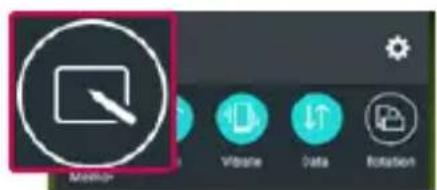
OR
Touch and slide the status bar downward and tap

Function

2 Select the desired menu option from Pen type, Colour, Eraser and create a memo.

3 Tap In the Edit menu to save the memo with the current screen. To exit QuickMemo+ at any time, tap .
NOTE: Please use a fingertip while using the QuickMemo+. Do not use your fingernail.
Using the QuickMemo+ options
You can easily use the QuickMenu options when using the QuickMemo+.
 | Tap to keep the current QuickMemo+ as a text overlay on the screen and continue to use the phone. |
 | Undo or Redo. |
 | Use complex concept function. |
 | Select the pen type and the colour. |
 | Erase the memo that you created. |
 | Save the memo with the current screen in the Gallery or QuickMemo+. |
 | Option: Tap to choose Share, Paper style for the memo. |
Viewing the saved QuickMemo+
Tap Gallery and select the QuickMemo+ album.
QSlide
From any screen, bring up a notepad, calendar, and more as a window inside your screen.
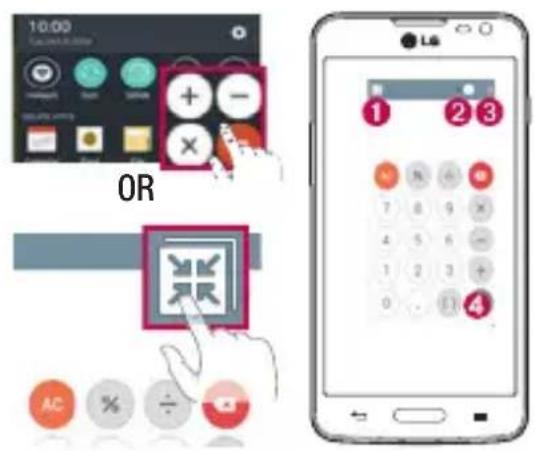
| 1 | Tap to exit the QSlide and return to full window. | |
| 2 | Tap to adjust transparency. | |
| 3 | Tap to end the QSlide. | |
| 4 | Tap to adjust the size. |
1 Touch and slide the status bar downwards > tap QSlide apps or while using applications that support QSlide, tap 📄. The function will be continuously displayed as a small window on your screen.
2 You can make a call, browse the Web, or choose other phone options. You can also use and tap the screen under the small windows when the transparency bar is not full.
NOTE: The QSlide can support up to two windows at the same time.
Function
QuickRemote
QuickRemote turns your phone into a Universal Remote for your home TV and DVD/Blue-ray.


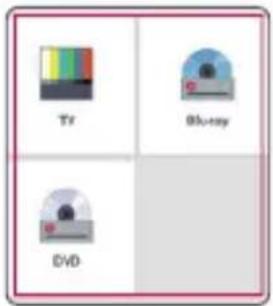
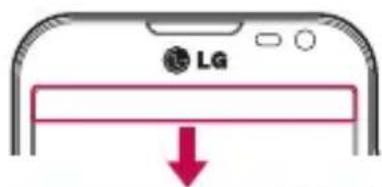

1 Touch and slide the status bar downwards and tap > ADD REMOTE.

2 Select the type and brand of device, then follow the on-screen instructions to configure the device(s).
3 Touch and slide the status bar downwards and use QuickRemote functions.
Tap the Menu key ≡ to select Magic Remote setting, Edit remote name, Move remote, Delete remote, Settings and Help.
NOTE: The QuickRemote operates the same way as an ordinary remote control infrared (IR) signals. Be careful not to cover the infrared sensor at the top of the phone when you use the QuickRemote function. This function may not be supported depending on the model, the manufacturer or service company.
Multimedia
Gallery
Open the Gallery application to view albums of your pictures and videos.
1 Press > > Apps tab > Gallery.
You can manage and share all your image and video files with Gallery.
NOTE:
- Some file formats are not supported, depending on the software installed on the device.
• Some files may not play properly, depending on how they are encoded.
Viewing pictures
Launching Gallery displays your available folders. When another application, such as Email, saves a picture, the download folder is automatically created to contain the picture. Likewise, capturing a screenshot automatically creates the Screenshots folder. Select a folder to open it.
Pictures are displayed by creation date in a folder. Select a picture to view it full screen. Scroll left or right to view the next or previous image.
Zooming in and out
Use one of the following methods to zoom in on an image:
• Double-tap anywhere to zoom in.
- Spread two fingers apart on any place to zoom in. Pinch to zoom out, or double-tap to return.
Playing videos
Video files show the ▶ icon in the preview. Select a video to watch it and tap ▶. The Videos application will launch.
Editing photos
When viewing an photo, tap .
Deleting photos/videos
Use one of the following methods:
- In a folder, tap 📋 and select photos/videos by ticking, and then tap on Delete.
- When viewing a photo, tap .
Multimedia
Setting as wallpaper
When viewing a photo, tap ≡ > Set image as to set the image as wallpaper or assign to a contact.
NOTE:
• Some file formats are not supported, depending on the device software.
- If the file size exceeds the available memory, an error can occur when you open files.
Videos
Your phone has a built-in video player that lets you play all of your favorite videos. To access the video player, touch 📋 > Apps tab > Gallery.
Playing a video
1 Touch > Apps tab > Gallery.
2 Select the video you want to play.
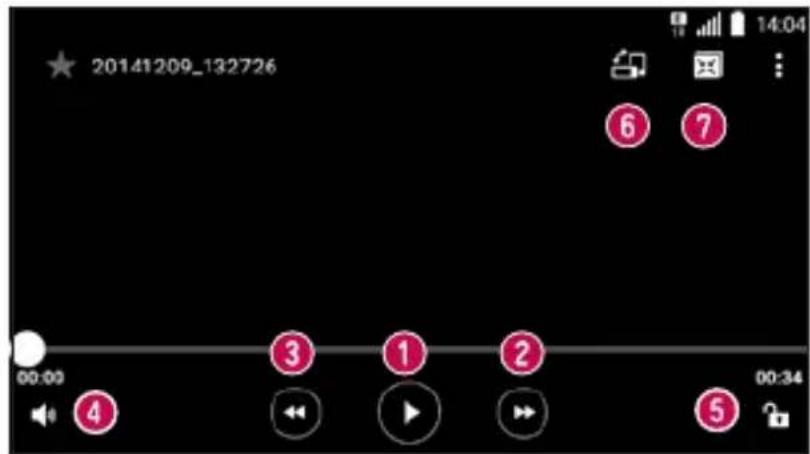
| 1 | // | Touch to pause/resume video playback. |
| 2 | Touch to go 10 seconds forward. | |
| 3 | Touch to go 10 seconds backward. | |
| 4 | Touch to manage the video volume. | |
| [KE30] |  / /  | Touch to lock/unlock a video screen. |
 |  | Touch to change the screen orientation. |
 |  | Touch to use QSlide. |
Music
Your phone has a built-in music player that lets you play all your favorite tracks. To access the music player, press > Apps tab > Music.
Playing a song
1 Press > Apps tab > Music.
2 Tap Songs.
3 Select the song you want to play.


Tap to pause/ resume playback.
Multimedia
 |  | Tap to skip to the next track in the album, playlist, or shuffle. Touch and hold to fast forward. |
| 3 | [HXXC] | Tap to restart the current track or skip to the previous track in the album, playlist, or shuffle. Touch and hold to rewind. |
| 4 | [C8GS] | Tap to display the Volume slider bar, then adjust the playback volume on the slider bar. |
| 5 |  | Tap to set audio effects. |
| 6 | [CZ3S] | Tap to add the song to your favorites. |
| 7 |  | Tap to open the current playlist. |
| 8 |  | Tap to play the current playlist in shuffle mode (tracks are played in random order). |
| 9 | Tap to toggle through the repeat modes to repeat all songs, repeat current song, or repeat off. |
To change the volume while listening to music, press the up and down volume keys on the left-hand side of the phone.
Touch and hold any song in the list. The Play, Add to playlist, Delete, Share, Set as ringtone, Details and Search. options will be displayed.
Add music files to your phone
Start by transferring music files to your phone:
• Transfer music using Media device (MTP).
• Download from the wireless Web.
• Synchronize your phone to a computer.
• Receive files via Bluetooth.
Transfer music using Media device (MTP)
1 Connect the phone to your PC using the USB cable.
2 Select the Media device (MTP) option. Your phone will appear as another hard drive on your computer. Click on the drive to view it. Copy the files from your PC to the drive folder.
3 When the files have been transferred, you can safely unplug your phone.
NOTE:
- Some file formats are not supported, depending on the device software.
- If the file size exceeds the available memory, an error can occur when you open files.
- Music file copyrights may be protected by international treaties and national copyright laws. Therefore, it may be necessary to obtain permission or a licence to reproduce or copy music. In some countries, national laws prohibit private copying of copyrighted material. Before downloading or copying the file, check the national laws of the relevant country concerning the use of such material.
FM radio
Your phone has a built-in FM radio so you can tune in to your favorite stations and listen on the go.
NOTE: You need to use your headphones to listen to the radio. Insert it into the headphone jack.
Utilities
Setting your alarm
1 Press > Apps tab > Clock > Alarm > +
2 After you set the alarm, your phone lets you know how much time is left before the alarm will go off.
3 Set Repeat, Snooze duration, Alarm with vibration, Alarm sound, Alarm volume, Auto app starter, Puzzle lock and Memo.
4 Tap Save.
NOTE: To change alarm settings in the alarm list screen, tap the Menu key ≡ and select Settings.
Using your calculator
1 Press > Apps tab > Calculator.
2 Tap the number keys to enter numbers.
3 For simple calculations, tap the function you want to perform (+, -, x or ÷) followed by =.
4 To check the history, touch ≡ and select the Calculation history.
5 For more complex calculations, touch ≡ and select the Scientific calculator, then choose sin, cos, tan, log etc.
Adding an event to your calendar
1 Press > Apps tab > Calendar.
2 On the screen, you can find the different view types for the Calendar (Day, Week, Month, Year, Agenda).
3 Tap on the date for which you wish to add an event and tap +.
4 Tap Event name and enter the event name.
5 Tap Location and enter the location. Check the date and enter the time you wish your event to start and finish.
6 If you wish to repeat the alarm, set REPEAT and set REMINDERS, if necessary.
7 Tap Save to save the event in the calendar.
Voice Recorder
Use the voice recorder to record voice memos or other audio files.
Recording a sound or voice
1 Press > Apps tab > Voice Recorder.
2 Tap ● to begin recording.
3 Tap ■ to end the recording.
4 Tap ▶ to listen to the recording.
NOTE: Tap ≡ to access your album. You can listen to the saved recording. The available recording time may differ from actual recording time.
Tasks
This task can be synchronized with MS Exchange account. You can create task, revise it and delete it in MS outlook or MS Office Outlook Web Access.
To Synchronize MS Exchange
1 From the Home Screen, press > > Apps tab > Settings.
2 Tap General tab > Accounts & sync > Add account.
3 Tap Microsoft Exchange to create Email address and Password.
4 Make sure if you checkmark Sync task.
NOTE: MS Exchange may not be supported depending on email server.
Utilities
ThinkFree Viewer
ThinkFree Viewer is a professional mobile office solution that lets users conveniently view various types of office documents, including Word, Excel and PowerPoint files, anywhere or anytime, using their mobile devices.
Press > Apps tab > ThinkFree Viewer.
Viewing files
Mobile users can now easily view a wide variety of file types, including Microsoft Office documents and Adobe PDF, right on their mobile devices. When viewing documents using ThinkFree Viewer, the objects and layout remain the similar in the original documents.
Google+
Use this application to stay connected with people via Google's social network service.
- Press > Apps tab > Google > Google+.
NOTE: This application may not be available depending on the region or service provider.
Voice Search
Use this application to search webpages using voice.
1 Press > Apps tab > Google > Voice Search.
2 Say a keyword or phrase when Speak now appears on the screen. Select one of the suggested keywords that appear.
NOTE: This application may not be available depending on the region or service provider.
Downloads
Use this application to see what files have been downloaded through the applications.
- Press > Apps tab > Downloads.
NOTE: This application may not be available depending on the region or service provider.
LG SmartWorld
LG SmartWorld offers an assortment of exciting content - games, applications, wallpaper and ringtones - giving LG phone users the chance to enjoy richer "Mobile Life" experiences.
How to Get to LG SmartWorld from Your Phone
1 Press > > Apps tab > tap the LG icon to access LG SmartWorld.
2 Tap Sign in and enter ID/PW for LG SmartWorld. If you have not signed up yet, tap Register to receive your LG SmartWorld membership.
3 Download the content you want.
NOTE: What if there is no LG icon?
1 Using a mobile Web browser, access LG SmartWorld (www.lgworld.com) and select your country.
2 Download the LG SmartWorld App.
3 Run and install the downloaded file.
4 Access LG SmartWorld by tapping the LG icon.
How to use LG SmartWorld
• Participate in monthly LG SmartWorld promotions.
| Q | Search content. |
| ≡ | Find content by category (e.g. Games, Education, Entertainment etc). |
- Try the easy Menu buttons to find what you're looking for fast.
Settings— Set Profile and Display.
Signin – Set your ID and Password.
• Try other useful functions as well. (Content Detail screen)
NOTE: LG SmartWorld may not be available from all carriers or in all countries.
The Web
Internet
Use this application to browse the Internet. Browser gives you a fast, full-color world of games, music, news, sports, entertainment and much more, right on your mobile phone wherever you are and whatever you enjoy.
NOTE: Additional charges apply when connecting to these services and downloading content. Check data charges with your network provider.
1 Press > Apps tab > Internet.
Using the Web toolbar
Tap slide it downwards with your finger to open.


Tap to go back one page.
Tap to go forward one page, to the page you connected to after the current one. This is the opposite of what happens when you tap ← which takes you to the previous page.
Tap to go to the Home page.
Tap to add a new window.
Tap to access bookmarks.
Viewing webpages
Tap the address field, enter the web address and tap Go.
Opening a page
To go to new page, tap ▷ . + To go to another webpage, tap 2, scroll up or down, and tap the page to select it.
Searching the web by voice
Tap the address field, tap ☐ speak a keyword, and then select one of the suggested keywords that appear.
NOTE: This feature may not be available depending on the region or service provider.
Bookmarks
To bookmark the current webpage, tap ≡ > Add to bookmarks > OK. To open a bookmarked webpage, tap 📁 and select one.
History
Tap 📷 > History to open a webpage from the list of recently-visited webpages.
Chrome
Use Chrome to search for information and browse webpages.
1 Press > > Apps tab > Chrome.
NOTE: This application may not be available, depending on your region and service provider.
Viewing webpages
Tap the Address field, and then enter a web address or search criteria.
Settings
This section provides an overview of items you can change using your phone's System settings menus.
To access the Settings menu:
Press > > System settings.
- or -
Press > Apps tab > Settings.
Networks
Wi-Fi – Turns on Wi-Fi to connect to available Wi-Fi networks.
TIP! How to obtain the MAC address
To set up a connection in some wireless networks with MAC filters, you may need to enter the MAC address of your phone in the router.
You can find the MAC address in the following user interface: press > Apps tab > Settings > Networks tab > Wi-Fi > Advanced Wi-Fi > MAC address.
Turn the Bluetooth wireless feature on or off to use Bluetooth.
< Mobile data >
Displays the data usage and set mobile data usage limit.
< Call >
Configure phone call settings such as call forwarding and other special features offered by your carrier.
Voicemail – Allows you to select your carrier's voicemail service.
Fixed dialing numbers – Turn on and compile a list of numbers that can be called from your phone. You'll need your PIN2, which is available from your operator. Only numbers within the fixed dial list can be called from your phone.
Incoming call pop-up – Display incoming call popup when using camera and videos.
Call reject – Allows you to set the call reject function. Choose from Call reject mode or Reject calls from.
Decline with message – When you want to reject a call, you can send a quick message using this function.
Privacy keeper – Hides the caller name and number for an incoming call.
Home button answers call – Checkmark to enable answering incoming calls by pressing the Home button.
Call forwarding – Choose whether to divert all calls when the line is busy, when there is no answer or when you have no signal.
Auto answer – Set the time before a connected hands-free device automatically answers an incoming call. Choose from Off, 1 sec, 3 sec and 5 sec.
Connection vibration – Vibrates your phone when the other party answers the call.
Save unknown numbers – Add unknown numbers to contacts after a call.
Power Key ends call – Allows you to select your end call.
Call barring – Lock incoming, outgoing or international calls.
Call duration – View the duration of calls including Last call, Outgoing calls, Incoming calls and All calls.
Additional settings – Allows you to change the following settings:
CallerID: Choose whether to display your number in an outgoing call.
Call waiting: If call waiting is activated, the handset will notify you of an incoming call while you are on a call (depending on your network provider).
NFC – NFC (Near Field Communication) is a wireless technology that enables data transmission between two objects when they are brought within a few inches of each others. When you enable NFC on your phone, your phone can exchange data with other NFC-enabled devices or read information from smart tags embedded in posters, stickers, and other products.
Android Beam – When this feature is turned on, you can beam app contents to another NFC-capable device by holding the devices close together. For example, you can beam Browser pages, YouTube videos, contacts, and more. Just bring the devices together (typically back to back) and then touch your screen. The app determines what gets beamed.
LG PC Suite – Connect LG PC Suite with your phone to easily manage multimedia content and apps.
< Tethering & networks >
USB tethering – Share your phone's mobile data connection using a USB connection.
Wi-Fi hotspot – You can also use your phone to provide a mobile broadband connection. Create a hotspot and share your connection. Please read "Sharing your phone's data connection" for more information.
Bluetooth tethering – Allows you to set your phone whether you are sharing the Internet connection or not.
Help – Tap to view help information on the USB tethering, Wi-Fi hotspot and Bluetooth tethering functions.
Airplane mode – After switching to Airplane mode, all wireless connections are disabled.
NOTE: You must set a lock screen PIN or password before you can use credential storage.
Settings
Mobile networks – Set options for data roaming, network mode & operators, access point names (APNs) etc.
VPN – Displays the list of Virtual Private Networks (VPNs) that you've previously configured. Allows you to add different types of VPNs.
Sound
Sound profile – Choose Sound, Vibrate only or Do not disturb.
Volume – Adjust the phone's volume settings to suit your needs and your environment.
Ringtone – Set the ringtone for calls. You can also add a ringtone by tapping + at the top right corner of the screen.
Notification sound – Set the notification sound. You can also add a notification sound by tapping + at the top right corner of the screen.
Sound with vibration – Checkmark to set the phone to vibrate in addition to the ringtone when you receive calls.
Vibration type – Allows you to set the vibration type for incoming calls. Choose from Long Lasting, Rapid, Short repeated, Standard, or Ticktock.
Do not disturb – Set a time and mode when your phone doesn't let you know about notifications coming in. Choose from All, Priority only or None.
PRIORITY ONLY – Allow certain features to interrupt when Priority only. Alarms always have priority. Choose from Apps with Calendar events, Incoming calls, New messages, or Allowed contacts.
SCHEDULE— Only notification with priority interrupt on repeat even when set to all.
Lock screen – Set to Show all notifications, Hide sensitive only, Hide all notifications on the lock screen.
Apps – Set notification from Apps. Choose from None to show no notifications form the Apps, and Priority to show notifications with priority on top of others and when Do not disturb set to Priority only.
Vibrate on tap – Checkmark to vibrate when tapping the Home touch buttons and during other UI interactions.
Sound effects – Tap to set the dialpad touch sounds, touch sounds, and screen lock sound.
Dialpad touch sounds – Checkmark to play tones while using dial pad.
Touchsound— Checkmark to play sound when making screen selection.
Screen lock sound – Checkmark to play sound when locking and unlocking the screen.
Message/call voice notifications – Tap the Message/call voice notification switch to toggle it On or Off. On allows your device to incoming call and message events automatically.
Display
Set the Select Home, Theme, Wallpaper, Screen swipe effect, Allow Home screen looping, Home backup & restore, Help.
< Lock screen >
Select screen lock – Set a screen lock type to secure your phone. Opens a set of screens that guide you through drawing a screen unlock pattern. Set None, Swipe, Knock Code, Pattern, PIN or Password.
If you have enabled a Pattern lock type when you turn on your phone or wake up the screen, you will be asked to draw your unlock pattern to unlock the screen.
Smart Lock – Set when to automatically unlock phone by Trusted devices (BT device or NFC), Trusted places or Trusted face. This function is available when the Lock screen is set to one of the Knock Code, Pattern, PIN and Password.
NOTE: To use this feature, Smart Lock must be On.
Settings > General > Security > Trust agents > Smart Lock.
Screen swipe effect – Sets the screen swipe effect options. Choose from Light particle, Vector circle, Mosaic and Soda.
NOTE: Screen swipe effect becomes Pattern effect if the screen lock is set to Pattern.
Wallpaper – Sets your Lock screen wallpaper. Select it from Gallery or Wallpaper gallery.
Shortcuts – Allows you to change the shortcuts on the Swipe Lock screen.
Contact info for lost phone – Select whether to display the owner information on the lock screen and customize the owner information.
Lock timer – Sets the amount of time before the screen automatically locks after the screen has timed-out.
Power button instantly locks – Checkmark to instantly lock the screen when the Power/Lock Key is pressed. This setting overrides the Security lock timer setting.
Font type – Sets the type of font used for the phone and menus.
Font size – Sets the size of the font displayed in the phone and menus.
< OTHER SCREEN SETTINGS >
Brightness – Adjusts the brightness of the screen. For best battery performance, use the dimmest comfortable brightness.
Settings
Auto-rotate screen – Checkmark to set the phone to automatically rotate the screen based on the phone orientation (portrait or landscape).
Screen timeout – Sets the amount of time before the screen times out.
Smart screen – Checkmark to keep the screen from timing-out when the device detects your eyes looking at the screen.
Screen-off effect – Sets the screen-off effect. Choose from Retro TV, Black hole and Fade out.
Daydream – Tap the Daydream switch to toggle it On or Off. On allows the set screensaver to be displayed when the phone is sleeping while docked and/or charging. Choose from Clock and Google Photos.
General
< Language & input >
Use the Language & input settings to select the language for the text on your phone and to configure the on-screen keyboard, including words you've added to its dictionary.
< Location >
Turn on location service, your phone determines your approximate location using GPS, Wi-Fi and mobile networks.
Mode – Set the location mode from High accuracy (GPS and networks), Battery saving (Networks only) and Device sensors only (GPS only).
RECENT LOCATION REQUEST – Display apps that have recently requested location information.
LOCATION SERVICES
Google Location Reporting – Select whether to turn on or off Google Location Reporting options. For further information, tap ≡ > Help & feedback.
< Accounts & sync >
Permits applications to synchronize data in the background, whether or not you are actively working in them. Deselecting this setting can save battery power and lower (but not eliminate) data usage.
Use the Accessibility settings to configure accessibility plug-ins you have installed on your phone.
< One-handed operation >
Dial keypad – Checkmark to enable you move the dial keypad to the right or left side of the device. Simply tap the arrow to move it to one side or the other.
LG keyboard – Checkmark to enable you move the keyboard to the right or left side of the device. Simply tap the arrow to move it to one side or the other.
Lock screen – Checkmark to enable you move the PIN Lock screen keypad to the right or left side of the device.
Simply tap the arrow to move it to one side or the other.
Help – Displays information regarding one-handed operation.
< Shortcut key >
Get quick access to apps by pressing and holding the Volume keys when screen is off or locked. Tap the Shortcut key switch at the top right corner of the screen to toggle it On or Off.
< Menu key >
Select the items to execute with Menu key.
< Security >
Encrypt phone – Allows you to encrypt data on the phone for security. You will be required to enter a PIN or password to decrypt your phone each time you power it on.
Encrypt SD card storage – Allows you to encrypt SD card data on the phone for security.
Set up SIM card lock – Set up SIM card lock or change the SIM card PIN.
Password typing visible – Show the last character of the hidden password as you type.
Phone administrators – View or deactivate phone administrators.
Unknown sources – Default setting to install non-Play store applications.
Verify apps – Disallow or warn before installation of apps that may cause harm.
Storage type – Display the storage type.
Trusted credentials – Display trusted CA certificates.
Install from storage – Choose to install certificates.
Clear credentials – Remove all certificates.
Trust agents – Select apps to use without unlocking the screen.
Screen pin – Allow an app to be the only one used when you pin the screen of an app.
App usage access – Allow apps to view the usage information of apps on your phone.
< Guest mode >
When you let someone else use your phone, you can set to show only apps that you've selected.
< Gestures >
Screen on/off – Checkmark to enable KnockON to turn the screen on and off. Quickly double-tap center screen to turn it on. Double-tap the Status Bar, an empty area on the Home screen, or the Lock screen to turn the screen off. For the best results, do not move the phone while using the KnockON feature.
Settings
Silence incoming calls – Checkmark to enable you to flip the phone to silence incoming calls.
Snooze or stop alarm – Checkmark to enable you to simply flip the device to snooze or stop the alarm.
Pause video – Checkmark to enable you to simply flip the device to pause the currently playing video.
Help – Opens a help guide on how to use the Gestures features of your device.
Motion sensor calibration – Allows you to improve the accuracy of the tilt and speed of the sensor.
< QuickWindow case >
Activate to make features, such as music, weather, and clock, available in small view when using the QuickWindow case.
< Date & time >
Use Date & time settings to set how dates will be displayed. You can also use these settings to set your own time and time zone rather than obtaining the current time from the mobile network.
< Storage >
INTERNAL STORAGE – View the internal storage usage.
SD CARD – Check total available SD card space. Touch Unmount SD card for safe removal. Touch Erase SD card if you want to delete all data from the SD card.
< Battery >
BATTERY INFORMATION
The Battery charge information is shown on a battery icon along with the percentage of the remaining charge and its status.
Battery usage – Shows which components and applications are using the most battery power.
Battery percentage on status bar – Checkmark to display the battery level percentage on the Status Bar next to the battery icon.
BATTERY SAVER
Tap the Battery saver switch to toggle it On or Off. Tap Battery saver to access the following settings:
Battey saver – Sets the battery charge percent level that will automatically turn on Battery saver. Choose from Immediately, 5% battery and 15% battery.
Help – Tap to view help information on the battery saver tips.
< Apps >
View and manage your applications.
< Default message app >
Set Messaging or Hangouts as default app.
< Backup & reset >
Change the settings for managing your settings and data.
Back up my data – Set to backup your settings and application data to the Google server.
Backup account – Set to backup your account.
Automatic restore – Set to restore your settings and application data when the applications are reinstalled on your device.
LG Backup service – Backs up all information on the device and restores it in the event of data loss or replacement.
Factory data reset – Reset your settings to the factory default values and delete all your data. If you reset the phone this way, you are prompted to re-enter the same information as when you first started Android.
< Printing >
Allows you to print the content of certain screens (such as web pages displayed in Chrome) to a printer connected to the same Wi-Fi network as your Android device.
< About phone >
View legal information and check your phone status and software version.
PC software (LG PC Suite)
"LG PC Suite" PC software is a program that helps you connect your device to a PC via a USB cable and Wi-Fi. Once connected, you can use the functions of your device from your PC.
With your "LG PC Suite" PC Software, You Can...
- Manage and play your media contents (music, movie, picture) on your PC.
- Send multimedia contents to your device.
- Synchronizes data (schedules, contacts, bookmarks) in your device and PC.
• Backup the applications in your device. - Update the softwares in your device.
• Backup and restore the device data. - Play multimedia contents of your PC from your device.
• Backup and create and edit the memos in your device
NOTE: You can use the Help menu from the application to find out how to use your "LG PC Suite" PC software.
Installing "LG PC Suite" PC Software
"LG PC Suite" PC software can be downloaded from the webpage of LG.
1 Go to www.lg.com and select a country of your choice.
2 Go to Support > MOBILE SUPPORT > LG Mobile Phones > Select the Model or
Go to Support > Mobile > Select the Model.
3 Click PC SYNC from MANUALS & DOWNLOAD and click DOWNLOAD to download "LG PC Suite" PC software.
System Requirements for "LG PC Suite" PC software
• OS: Windows XP (Service pack 3) 32bit, Windows Vista, Windows 7, Windows 8
• CPU: 1 GHz or higher processors
• Memory: 512 MB or higher RAMs
• Graphic card: 1024 x 768 resolution, 32 bit color or higher
- HDD: 500 MB or more free hard disk space (More free hard disk space may be needed depending on the volume of data stored.)
- Required software: LG integrated drivers, Windows Media Player 10 or later
NOTE: LG Integrated USB Driver
LG integrated USB driver is required to connect an LG device and PC and is installed automatically when you install "LG PC Suite" PC software application.
Synchronizing your Device to a PC
Data from your device and PC can be synchronized easily with "LG PC Suite" PC software for your convenience.
Contacts, schedules and bookmarks can be synchronized.
The procedure is as follows:
1 Connect your device to PC. (Use a USB cable or Wi-Fi connection.)
2 The Select USB connection method will appear, then select LG software.
3 After connection, run the program and select the device section from the category on the left side of the screen.
4 Click Personal information to select.
5 Select the checkbox of contents to synchronize and click the Sync button.
NOTE: To synchronize your phone with your PC, you need to install LG PC Suite onto your PC. Please refer to previous pages to install LG PC Suite.
Moving contacts from your Old Device to your New Device
1 Export your contacts as a CSV file from your old device to your PC using a PC sync program.
2 Install "LG PC Suite" on the PC first. Run the program and connect your Android mobile phone to the PC using a USB cable.
3 On the top menu, select Device > Import to device > Import contacts.
4 A popup window to select the file type and a file to import will appear.
5 On the popup, click the Select a file and Windows Explorer will appear.
6 Select the contacts file to import in Windows Explorer and click the Open.
7 Click OK.
8 A Field mapping popup to link the contacts in your device and new contacts data will appear.
9 If there is a conflict between the data in your PC contacts and device contacts, make the necessary selections or modifications in LG PC Suite.
10 Click OK.
Phone software update
Phone software update
LG Mobile phone software update from the Internet
For more information about using this function, please visit http://www.lg.com/common/index.jsp → select your country and language.
This feature allows you to conveniently update the firmware on your phone to a newer version from the Internet without needing to visit a service center. This feature will only be available if and when LG makes a newer firmware version available for your device.
Because the mobile phone firmware update requires the user's full attention for the duration of the update process, please make sure you check all instructions and notes that appear at each step before proceeding.
Please note that removing the USB data cable during the upgrade may seriously damage your mobile phone.
NOTE: LG reserves the right to make firmware updates available only for selected models at its own discretion and does not guarantee the availability of the newer version of the firmware for all handset models.
LG Mobile Phone software update via Over-the-Air (OTA)
This feature allows you to conveniently update your phone's software to a newer version via OTA, without connecting using a USB data cable. This feature will only be available if and when LG makes a newer firmware version available for your device.
You should first check the software version on your mobile phone: Settings > General tab > About phone >
Update Center > Software Update > Check now for update.
NOTE: Your personal data from internal phone storage—including information about your Google account and any other accounts, your system/application data and settings, any downloaded applications and your DRM licence—might be lost in the process of updating your phone's software. Therefore, LG recommends that you backup your personal data before updating your phone's software. LG does not take responsibility for any loss of personal data.
NOTE: This feature depends on your network service provider, region and country.
About this user guide
About this user guide
- Before using your device, please carefully read this manual. This will ensure that you use your phone safely and correctly.
- Some of the images and screenshots provided in this guide may appear differently on your phone.
- Your content may differ from the final product, or from software supplied by service providers or carriers. This content may be subject to change without prior notice. For the latest version of this manual, please visit the LG website at www.lg.com.
- Your phone's applications and their functions may vary by country, region, or hardware specifications. LG cannot be held liable for any performance issues resulting from the use of applications developed by providers other than LG.
- LG cannot be held liable for performance or incompatibility issues resulting from registry settings being edited or operating system software being modified. Any attempt to customize your operating system may cause the device or its applications to not work as they should.
- Software, audio, wallpaper, images, and other media supplied with your device are licensed for limited use. If you extract and use these materials for commercial or other purposes, you may be infringing copyright laws. As a user, you are fully and entirely responsible for the illegal use of media.
- Additional charges may be applied for data services, such as messaging, uploading and downloading, auto-syncing, or using location services. To avoid additional charges, select a data plan that is suitable for your needs. Contact your service provider to obtain additional details.
Trademarks
• LG and the LG logo are registered trademarks of LG Electronics.
- All other trademarks and copyrights are the property of their respective owners.
DivX HD

ABOUT DIVX VIDEO: DivX® is a digital video format created by DivX, LLC, a subsidiary of Rovi Corporation. This is an official DivX Certified® device that has passed rigorous testing to verify that it plays DivX video. Visit divx.com for more information and software tools to convert your files into DivX videos.
ABOUT DIVX VIDEO-ON-DEMAND: This DivX Certified ^® device must be registered in order to play purchased DivX Video-on-Demand (VOD) movies. To obtain your registration code, locate the DivX VOD section in your device setup menu. Go to vod.divx.com for more information on how to complete your registration.
About this user guide
DivX Certified ^® to play DivX ^® video up to HD 720p, including premium content.
DivX ^® , DivX Certified ^® and associated logos are trademarks of Rovi Corporation or its subsidiaries and are used under license.
Dolby Digital Plus

DOLBY DIGITAL PLUS
Manufactured under license from Dolby Laboratories. Dolby, Dolby Digital Plus, and the double-D symbol are trademarks of Dolby Laboratories.
Notice: Open Source Software
To obtain the corresponding source code under GPL, LGPL, MPL and other open source licences, please visit http://opensource.lge.com/
All referred licence terms, disclaimers and notices are available for download with the source code.
Accessories
These accessories are available for use with the your phone. (Items described below may be optional.)
Travel adaptor

Stereo headset
natural_image
Black-and-white illustration of a medical or electronic device with earbuds and clamps (no text or symbols visible)Quick Start Guide Data cable


natural_image
Illustration of a flexible network cable with connectors (no text or symbols)Battery

NOTE:
• Always use genuine LG accessories.
- Failure to do this may void your warranty.
• Accessories may vary in different regions.
Troubleshooting
This chapter lists some problems you might encounter when using your phone. Some problems require you to call your service provider, but most are easy to fix yourself.
| Message Possible causes Possible corrective measures | ||
| SIM card error | There is no SIM card in the phone or it is inserted incorrectly. | Make sure that the SIM card is correctly inserted. |
| No network connection/ Dropped network | Signal is weak or you are outside the carrier network. | Move toward a window or into an open area. Check the network operator coverage map. |
| Operator applied new services. | Check whether the SIM card is more than 6~12 months old. If so, change your SIM card at your network provider's nearest branch. Contact your service provider. | |
| Codes do not match | To change a security code, you will need to confirm the new code by re-entering it. | If you forget the code, contact your service provider. |
| The two codes you have entered do not match. | ||
| No applications can be set | Not supported by service provider or registration required. | Contact your service provider. |
| Calls not available | Dialling error New network not authorized. | |
| New SIM card inserted. | Check for new restrictions. | |
| Pre-paid charge limit reached. | Contact service provider or reset limit with PIN2. | |
| Phone cannot be switched on | On/Off key pressed too briefly. | Press the On/Off key for at least two seconds. |
| Battery is not charged. | Charge battery. Check the charging indicator on the display. | |
| Charging error | Battery is not charged. | Charge battery. |
| Outside temperature is too hot or cold. | Make sure phone is charging at a normal temperature. | |
| Contact problem | Check the charger and its connection to the phone. | |
| No voltage Plug the charger into a different socket. | ||
| Charger defective Replace the charger. | ||
| Wrong charger Use only original LG accessories. | ||
Troubleshooting
| Message Possible causes Possible corrective measures | ||
| Number not allowed | The Fixed dialling number function is on. | Check the Settings menu and turn the function off. |
| Impossible to receive / send SMS & photos | Memory full Delete some messages from your phone. | |
| Files do not open | Unsupported file format | Check the supported file formats. |
| The screen does not turn on when I receive a call. | Proximity sensor problem | If you use a protection tape or case, make sure it has not covered the area around the proximity sensor. Make sure that the area around the proximity sensor is clean. |
| No sound Vibration mode | Check the settings status in the sound menu to make sure you are not in vibration or silent mode. | |
| Hangs up or freezes | Intermittent software problem | Try to perform a software update via the website. |
FAQ
| Category Sub-Category | Question Answer | |
| BTBluetooth Devices | What are the functions available via Bluetooth | You can connect a Bluetooth audio device such as a Stereo/Mono headset or Car Kit. Also, when the FTP server is connected to a compatible device, you can share content stored on the storage media. |
| Data Contacts Backup | How can I backup Contacts? | The Contacts data can be synchronized between your phone and Gmail^TM . |
| Data Synchronization | Is it possible to set up one-way sync with Gmail? | Only two-way synchronization is available. |
| Data Synchronization | Is it possible to synchronize all email folders? | The Inbox is automatically synchronized. You can view other folders by tapping the Menu Key ≡ and select Folders to choose a folder. |
| Google^TM Service Gmail Log-In | Do I have to log into Gmail whenever I want to access Gmail? | Once you have logged into Gmail, no need to log into Gmail again. |
| Google^TM Service Google Account | Is it possible to filter emails? | No, email filtering is not supported via the phone. |
| Phone Function Email | What happens when I execute another application while writing an email? | Your email will automatically be saved as a draft. |
FAQ
| Category Sub-Category | Question Answer | |
| Phone Function Ringtone | Is there a file size limitation for when I want to use MP3 file as ring tone? | There is no file size limitation. |
| Phone Function Message Time | My phone does not display the time of receipt for messages older than 24 hrs. How can I view the time? | Open the conversation and touch and hold the desired message. Then tap Details. |
| Phone Function Navigation | Is it possible to install another navigation application on my phone? | Any application that is available at Play StoreTM and is compatible with the hardware can be installed and used. |
| Phone Function Synchronisation | Is it possible to synchronize my contacts from all my email accounts? | Only Gmail and MS Exchange server (company email server) contacts can be synchronized. |
| Phone Function Wait and Pause | Is it possible to save a contact with Wait and Pause in the numbers? | If you transferred a contact with the W & P functions saved into the number, you will not be able to use those features. You will need to re-save each number.How to save with Wait and Pause:1. From the Home screen, tap the Phone icon 📞.2. Dial the number, then tap the Menu Key ≡.3. Tap Add 2-sec pause or Add wait. |
| Phone Function Security | What are the phone's security functions? | You are able to set the phone to require that an Unlock Pattern be entered before the phone can be accessed or used. |
| CategorySub-Category | Question Answer | |
| Phone FunctionUnlockPattern | How do I create the Unlock Pattern? | 1. From the Home screen, tap the Menu Key ≡2. Tap System settings > Display tab > Lock screen.3. Tap Select screen lock > Pattern. The first time you do this, a short tutorial about creating an Unlock Pattern will appear.4. Set up by drawing your pattern once, and once again for confirmation.Precautions to take when using the pattern lock.It is very important to remember the unlock pattern you set. You will not be able to access your phone if you use an incorrect pattern five times. You have five chances to enter your unlock pattern, PIN or password. If you have used all 5 opportunities, you can try again after 30 seconds. (Or, if you preset the backup PIN, you can use the backup PIN code to unlock the pattern.) |
FAQ
| Category Sub-Category | Question Answer | |
| Phone Function Unlock Pattern | What should I do if I forget the unlock pattern and I didn't create my Google account on the phone? | If you have forgotten your pattern: If you logged into your Google account on the phone but failed to enter the correct pattern 5 times, tap the forgot pattern button. You are then required to log in with your Google account to unlock your phone. If you have not created a Google account on the phone or you have forgotten it, you will have to perform a hard reset. Caution: If you perform a factory reset, all user applications and user data will be deleted. Please remember to backup any important data before performing a factory reset. |
| Phone Function Memory | Will I know when my memory is full? | Yes, you will receive a notification. |
| Phone Function Language Support | Is it possible to change my phone's language? | The phone has multilingual capabilities. To change the language: 1. From the Home screen, tap the Menu Key ≡ and tap System settings. 2. Tap General tab >Language & input >Language. 3. Tap the desired language. |
| Phone Function VPN | How do I set up a VPN? | VPN access configuration is different for each company. To configure VPN access from your phone, you must obtain the details from your company's network administrator. |
| Category Sub-Category | Question Answer | |
| Phone FunctionScreen time out | My screen turns off after only 15 seconds. How can I change the amount of time for the backlight to turn off? | 1. From the Home screen, tap the Menu Key ≡2. Tap System settings > Display tab.3.TapScreen timeout.4. Tap the preferred screen backlight timeout time. |
| Phone FunctionWi-Fi & mobile network | When Wi-Fi and mobile network are both available, which service will my phone use? | When using data, your phone may default to the Wi-Fi connection (if Wi-Fi connectivity on your phone is set to On). However, there will be no notification when your phone switches from one to the other.To know which data connection is being used, view the mobile network or Wi-Fi icon at the top of your screen. |
| Phone FunctionHome screen | Is it possible to remove an application from the Home screen? | Yes. Just touch and hold the icon until the dustbin icon appears at the top right hand side of the screen. Then, without lifting your finger, drag the icon to the trash can. |
| Phone FunctionApplication | I downloaded an application and it causes a lot of errors. How do I remove it? | 1. From the Home screen, tap the Menu Key ≡2. Tap System settings > General tab > Apps > DOWNLOADED.3. Tap the application, then tap Uninstall. |
| Phone FunctionCharger | Is it possible to charge my phone using a USB data cable without installing the necessary USB driver? | Yes, the phone will be charged by the USB cable regardless of whether the necessary drivers are installed or not. |
| Phone FunctionAlarm | Can I use music files for my alarm? | Yes. In the Alarm clock setting, select the song as the Alarm sound. |
FAQ
| Category Sub-Category | Question Answer | |
| Phone Function Alarm | Will my alarm be audible if the phone is turned off? | No, this is not supported. |
| Phone Function Alarm | If my ringer volume is set to Vibrate, will I hear my alarm? | Your alarm is programmed to be audible even in these scenarios. |
| Recovery Solution Hard Reset (Factory Reset) | How can I perform a factory reset if I can’t access the phone’s setting menu? | If your phone does not restore to its original condition, use a hard reset (factory reset) to initialize it. |
[Non-Text]
(1)基因通过控制 通过控制
......
[Non-Text]
......
广力云智慧零售收银系统
[Non-Text]
[Non-Text]
......
(1)在过去的几十年里,人工智能技术取得了显著的进步。
[Non-Text]
(1) AD = BD = 1
• • • • • • • • • • • • • • • • • • • • • • • • • • • • • • • • • • • • • • • • • • • • • • • • • • • • • • • • • • • • • • • • • • • • • • • • • • •
(1)在相同时间内, NaOH 在每一琼脂块内扩散的深度基本,例如,说明 NaOH 在每一琼脂块内扩散的体积大小。
[Non-Text]
(1) 2017年,公司与上海浦东发展银行股份有限公司签订了《关于使用部分闲置募集资金进行现金管理的协议》。
[Non-Text]
[Non-Text]
(1) 2017年1月1日至2018年1月1日,公司与关联方累计发生的交易金额为人民币4,500万元,较上年末增加3.6%。
(1) 本说明仅供参考。
(1) 2017年1月1日至2018年1月1日,公司与关联方发生的交易金额在30万元以下的关联交易事项发生。
The Ground Truth image displays a single, solid horizontal line. According to Rule 2 (UNDERSCORE & LINE RULES), this is a stylistic or background line, not a placeholder underscore. Therefore, the OCR result must ignore it and output nothing or only meaningful text. The provided OCR content is "____", which consists of four underscores. This is an incorrect interpretation of the line as a placeholder, violating the rule that stylistic lines must be ignored. The OCR has hallucinated placeholder underscores where none exist in the GT. Hence, the OCR result is inconsistent with the Ground Truth.
(1) 2017年,公司与上海浦东发展银行股份有限公司签订了《关于使用部分闲置募集资金进行现金管理的协议》。
(1) AD = AC = B^ ,且 AD = AC = B^ 。
(一)公司董事会及全体董事保证本公告内容不存在任何虚假记载、误导性陈述或者重大遗漏,并对其内容的真实性、准确性和完整性承担个别及连带责任。
The Ground Truth image displays a single, solid horizontal line, which is a stylistic or background element (like a rule line on paper). According to Rule 2, such lines must be ignored by the OCR result. The OCR content provided is "", which consists of no characters. Since the OCR output correctly ignores the stylistic line, it complies with Rule 2. Therefore, the OCR result is consistent with the Ground Truth.
(1) AD = BD = 1 ,故 AC = DE = 1
......
(1) AD = BD = 1 ,故 AC = DE = 1
[Non-Text]
[Non-Text]
......
(1) AD = BD = 1
......
[Non-Text]
[Non-Text]
[Non-Text]
......
广力云智慧零售收银系统
......
(1)在相同时间内, NaOH 在每一琼脂块内扩散的深度基本,例如,说明 NaOH 在每一琼脂块内扩散的体积与整个琼脂块的体积之比。
The Ground Truth image displays a single, solid horizontal line, which is a stylistic or background element (like a rule line on paper). According to Rule 2, such lines must be ignored by the OCR result. The OCR content provided is "", which consists of no characters. Since the OCR output correctly ignores the stylistic line, it complies with Rule 2. Therefore, the OCR result is consistent with the Ground Truth.
(一)本次股东大会的召集和召开程序符合《中华人民共和国公司法》、《中华人民共和国证券法》、《上市公司股东大会规则》等法律法规,且不构成《上市公司股东大会规则》中规定的事项。本次股东大会的召集、召开程序符合《中华人民共和国公司法》、《中华人民共和国证券法》、《上市公司股东大会规则》等法律法规,且不构成《上市公司股东大会规则》中规定的事项。本次股东大会的召集、召开程序符合《中华人民共和国公司法》、《中华人民共和国证券法》、《上市公司股东大会规则》等法律法规,且不构成《上市公司股东大会规则》中规定的事项。
Theorem 1.2. (A) Let be a finite field and let (x) be the set of all elements of such that x (x) . Then
2.2.1.1.3.4.5.6.7.8.9.10.11.12.13.14.15.16.17.18.19.20.21.22.23.24.25.26.27.28.29.30.31.32.33.34.35.36.37.38.39.40.41.42.43.44.45.46.47.48.49.50.51.52.53.54.55.56.57.58.59.60.61.62.63.64.65.66.67.68.69.70.71.72.73.74.75.76.77.78.79.80.81.82.83.84.85.86.87.88.89.90.91.92.93.94.95.96.97.98.99.100
Pytania ogólne
Infolinia LG Electronics Polska
0801-54-54-54
022-4-54-54-54
- Spis treści
- Opis telefonu
- UWAGA:
- LUB
- Table of contents
- Guidelines for safe and efficient use....5
- Important notice....12
- Getting to know your phone....17
- Your Home screen....24
- Google account setup......30
- Connecting to Networks and Devices......31
- Calls 36
- Contacts....38
- Messaging....40
- E-mail.....42
- Camera....43
- Video camera....48
- Function 51
- Multimedia....55
- Utilities....60
- The Web 64
- Settings......66
- PC software (LG PC Suite)....74
- Phone software update ....76
- About this user guide ....77
- Guidelines for safe and efficient use
- Exposure to radio frequency energy
- Product care and maintenance
- WARNING
- Efficient phone operation
- Electronics devices
- Road safety
- Avoid damage to your hearing
- Glass Parts
- Blasting area
- Potentially explosive atmospheres
- In aircraft
- Children
- Emergency calls
- Battery information and care
- DECLARATION OF CONFORMITY
- Contact office for compliance of this product :
- Disposal of your old appliance
- Disposal of waste batteries/accumulators
- Important notice
- Please read this before you start using your phone!
- Phone memory
- To uninstall applications:
- Optimizing battery life
- Extending your phone's battery life:
- To check the battery power level:
- To monitor and control how battery power is being used:
- Before installing an open source application and OS
- Using an unlock pattern
- When you can't recall your unlock Pattern, PIN or Password:
- Using the Hard Reset (Factory Reset)
- Opening and switching applications
- Transferring music, photos and videos using Media device (MTP)
- Hold your phone upright
- When the screen freezes
- Getting to know your phone
- Phone overview
- NOTE: Proximity sensor
- Volume keys
- Installing the SIM card and battery
- Charging your phone
- NOTE:
- Using the memory card
- To insert a memory card:
- To safely remove the memory card:
- To format the memory card:
- Locking and unlocking the screen
- Your Home screen
- Touch screen tips
- Home screen
- Status Bar
- Widget
- Application Icons
- Location Indicator
- Quick Key Area
- Extended home screen
- Customizing the Home screen
- To add items on your Home screen
- To remove an item from the Home screen
- To add an app as a Quick key
- To remove an app from the Quick key area
- To customize apps icons on the Home screen
- Returning to recently-used applications
- Notifications panel
- Opening the notifications panel
- Quick Toggle Area
- QSlide apps
- Notifications
- Indicator icons on the Status Bar
- On-screen keyboard
- Using the keypad & entering text
- Entering accented letters
- Google account setup
- To set up your Google account:
- Connecting to Networks and Devices
- Wi-Fi
- Connecting to Wi-Fi networks
- Turning Wi-Fi on and connecting to a Wi-Fi network
- Bluetooth
- Turning on Bluetooth and pairing up your phone with a Bluetooth device
- Send data using the Bluetooth wireless feature
- Receive data using the Bluetooth wireless feature
- Sharing your phone's data connection
- To share your phone's data connection as a portable Wi-Fi hotspot
- To rename or secure your portable hotspot
- Wi-Fi Direct
- PC connections with a USB cable
- Transferring music, photos and videos using the USB mass storage mode
- Synchronize with Windows Media Player
- Calls
- Making a call
- Calling your contacts
- Answering and rejecting a call
- TIP! Decline with message
- Adjusting the in-call volume
- Making a second call
- Viewing your call logs
- TIP!
- Call settings
- Contacts
- Searching for a contact
- Adding a new contact
- Favorites contacts
- Adding a contact to your favorites
- Removing a contact from your favorites list
- Creating a group
- Messaging
- Sending a message
- WARNING:
- Threaded box
- Changing your message settings
- Managing an email account
- To add another email account:
- To change an email account's settings:
- To delete an email account:
- Working with account folders
- Composing and sending email
- To compose and send a message
- Camera
- Getting to know the viewfinder
- Using the advanced settings
- Taking a quick photo
- Using Time catch shot mode
- Once you've taken a photo
- From your Gallery
- Tap Gallery.
- Video camera
- Recording a quick video
- After recording a video
- Function
- Knock Code
- To activate Knock Code feature
- QuickMemo+
- Using the QuickMemo+ options
- Viewing the saved QuickMemo+
- QSlide
- QuickRemote
- Multimedia
- Gallery
- Viewing pictures
- Zooming in and out
- Playing videos
- Editing photos
- Deleting photos/videos
- Setting as wallpaper
- Videos
- Playing a video
- Music
- Playing a song
- Add music files to your phone
- Transfer music using Media device (MTP)
- FM radio
- Utilities
- Setting your alarm
- Using your calculator
- Adding an event to your calendar
- Voice Recorder
- Recording a sound or voice
- Tasks
- To Synchronize MS Exchange
- ThinkFree Viewer
- Viewing files
- Google+
- Voice Search
- Downloads
- LG SmartWorld
- How to Get to LG SmartWorld from Your Phone
- NOTE: What if there is no LG icon?
- How to use LG SmartWorld
- The Web
- Internet
- Using the Web toolbar
- Viewing webpages
- Opening a page
- Searching the web by voice
- Bookmarks
- History
- Chrome
- Settings
- Networks
- TIP! How to obtain the MAC address
- < Tethering & networks >
- Sound
- Display
- General
- BATTERY INFORMATION
- BATTERY SAVER
- < Backup & reset >
- < Printing >
- < About phone >
- PC software (LG PC Suite)
- With your "LG PC Suite" PC Software, You Can...
- Installing "LG PC Suite" PC Software
- System Requirements for "LG PC Suite" PC software
- NOTE: LG Integrated USB Driver
- Synchronizing your Device to a PC
- Moving contacts from your Old Device to your New Device
- Phone software update
- LG Mobile phone software update from the Internet
- LG Mobile Phone software update via Over-the-Air (OTA)
- About this user guide
- Trademarks
- DivX HD
- Dolby Digital Plus
- Notice: Open Source Software
- Accessories
- Troubleshooting
- FAQ
- Pytania ogólne
Brand : LG
Model : D405n L90
Category : Smartphone