STE-1000 BSW - Pregnant HUMAX - Free user manual and instructions
Find the device manual for free STE-1000 BSW HUMAX in PDF.


User questions about STE-1000 BSW HUMAX
0 question about this device. Answer the ones you know or ask your own.
Ask a new question about this device
Download the instructions for your Pregnant in PDF format for free! Find your manual STE-1000 BSW - HUMAX and take your electronic device back in hand. On this page are published all the documents necessary for the use of your device. STE-1000 BSW by HUMAX.
USER MANUAL STE-1000 BSW HUMAX
natural_image
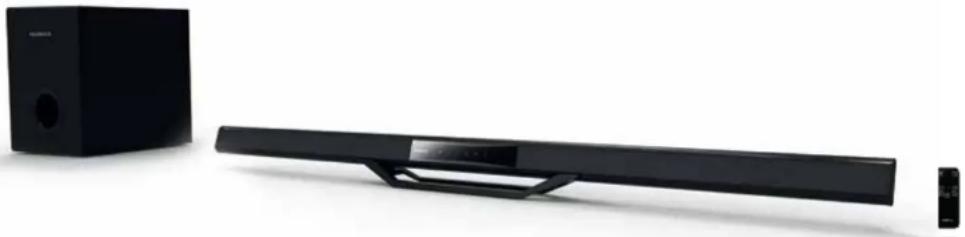
Exterior view of a black audio streaming setup with speaker and monitor (no text or symbols visible)HUMAX
• Welcome to Humax Audio
Thank you for purchasing this Humax product.
This manual will provide operation instructions and safety information please follow carefully so that you can enjoy many hours of audio pleasure.
General Information
- Humax is the trademark of Humax Co.Ltd.
- This manual has the copyright of Humax Co.Ltd and it is prohibited to distribute the whole or the part of the manual without notice.
- This manual was written on the basis of present product specifications. Each and every example original which is written, tables and example photos, detailed function of the product and hardware & software specs can be changed with no special prediction.
- The information in this User operation manual is subject to change without notice.
B-class device (home broadcasting communication device)
This product is an electronic goods that have registered electronic wave suitability for home use, and it is mainly used at homes and can be used in any region.
- Model name: STE1000BSW
2 Company name certified: Humax Co Ltd - Produced date: Written on the product box
- Manufacturer/Manufacturing country: Humax Co.Ltd / Republic of Korea
• Package components

STE1000BSW
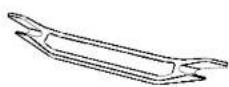
1. Stand
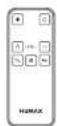
2. Remote Control & battery
natural_image
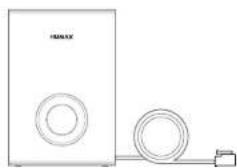
Simple line drawing of a speaker with two circular components connected by a cable (no text or symbols)- Sub Woofer
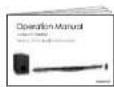
4. Operation Manual
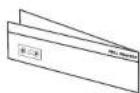
5. Wall bracket install guide
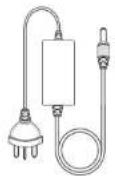
5. DC Adapter
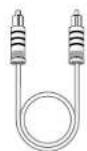
6. Optical Cable
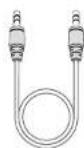
7. Aux Cable
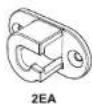
8. Wall Bracket

9. Screw-25mm(H)

10. Plastic wall plug fixing
- Check the enclosed accessories inside package.
-
Images are for illustration purposes only.
-
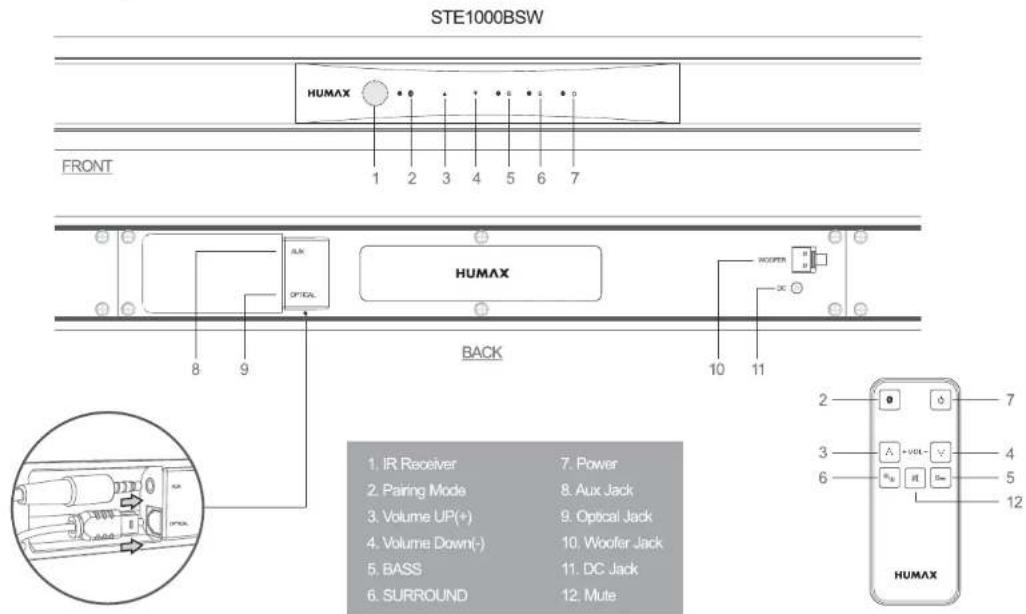
Touch Keys and function
text_image
STE1000BSW HUMAX FRONT 1 2 3 4 5 6 7 HUMAX BACK 10 11 2 3 4 5 6 7 AIR OPTICAL WOOFER 1. IR Receiver 7. Power 2. Pairing Mode 8. Aux Jack 3. Volume UP(+) 9. Optical Jack 4. Volume Down(-) 10. Woofer Jack 5. BASS 11. DC Jack 6. SURROUND 12. Mute HUMAX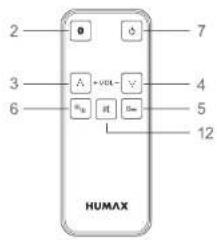
text_image
2 3 6 A +ver B R H 7 4 5 12 HUMAXRemote Controller
- Connections
flowchart
graph TD
    A["Smart TV"] -->|②| B["Monitor"]
    A -->|④| C["Sensor"]
    C --> D["Display"]
    D -->|①| E["Monitor"]
    B --> F["Power outlet"]
    E --> G["Power outlet"]
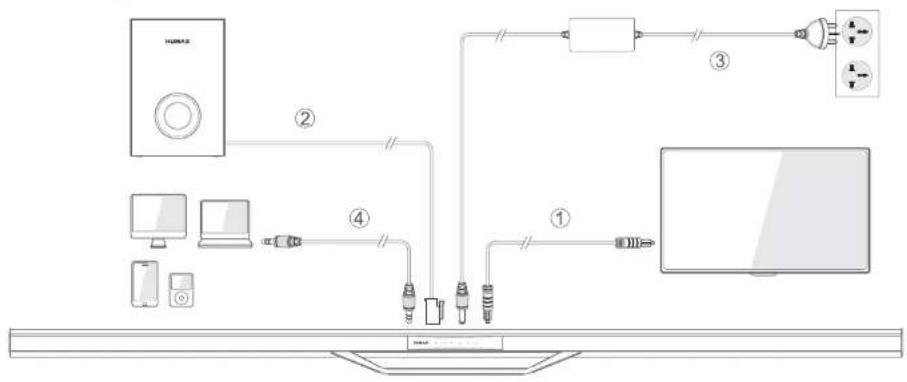
① TV Connection: Connect the "Optical cable" supplied to the Digital Audio Out (Optical / SPDIF) connection of your TV or STB to the Optical connection of your Humax Soundbar.
② Sub Woofer Connection: Connect the "Woofer Cable Jack" to the "Woofer" connection of your Humax Soundbar.
③ Power Connection: Connect the "DC Adapter Jack" to the "DC" connection of your Humax Soundbar.
④ If your TV set does not have a Optical connection please connect the "AUX cable" supplied to the "AUX" connection of your Humax Soundbar to the TV set.
* Note: please only use one connection to your TV set, Optical or AUX; if you connect both connections the AUX connection will take precedence.
* Warning: Only Power On the Humax Soundbar after all of the require connections above are connected.
• LED Indicator

text_image
HUMAX 1 2 3 4| LED color | Motion frequency | Function |
| 1. Blue | Blinked continuously | Bluetooth Pairing mode |
| Blue | Turned on continuously | Bluetooth operation mode |
| 2. Green | Turned on continuously | Bass Booster |
| 3. Orange | Turned on continuously | Surround Mode |
| 4. Red | Turned on continuously | Power on |
| Red | Binked once | Volume Up, Down |
| Red | Binking continuously | Mute has been pressed |
• Bluetooth connection methods
text_image
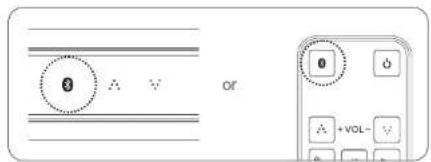
8 A V of 0 A +VOL-Press the "Pairing mode" button on the remote control or on the control panel of the Humax Soundbar.

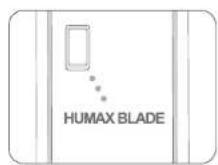
Turn on "Bluetooth" of Phone/Notebook Select Bluetooth ID "HUMAX BLADE" on Phone/Notebook in "Bluetooth Device Searching Mode".
text_image
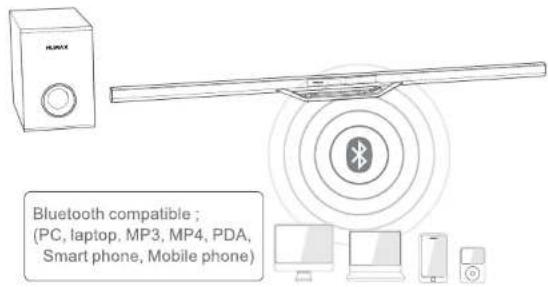
Bluetooth compatible ; (PC, laptop, MP3, MP4, PDA, Smart phone, Mobile phone)After pairing is completed the LED will stay Blue on the control panel of the Humax Soundbar.

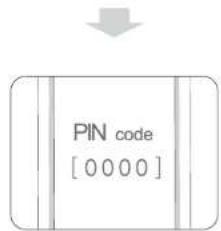
text_image
PIN code [0000]Pairing PIN code is '0000'.
If requested the Pairing PIN Code is "0000"
• Product Specification
| STE1000BSW | |
| Impedance | 8 ohm |
| Frequency Range | 40Hz ~ 14KHz |
| Sound Pressure Level | 90dB ± 3dB |
| Speaker System | 160W(Front 60W x Sub Woofer 100W) |
| Sound Effect | Bass Booster / Surround |
| Connectivity | Wireless : Bluetooth 3.0 / Wire : Optical Cable, AUX Cable |
| In-put | Optical cable(1) / AUX(1) / Power Supply(1) |
| Out-put | AV Jack(1) to Sub Woofer |
| Adapter In-put | 100 - 240V ~ 5060Hz |
| Adapter Out-put | DC 18V 3.0A |
| Dimension | Front : 1000(W) x 44 (H) x 20(D) mm, Sub Woofer : 195(W) x 266(H) x 265(D) mm |
| Remote Controller | ○ |
| Color | ● Black |
| Operating ambient temperature | -20° to 40°C |
Note: The specifications are subject to change without notice.
Troubleshooting
Before contacting us for help please check the following useful information to resolve any issues you may be experiencing:
No Sound / Distorted Sound
- No audio coming from the soundbar.
- Check that the cable (Optical or AUX) is connected correctly between the soundbar and the TV set
- Check that the soundbar is powered on (RED light)
- Check that the neither the soundbar or the TV are on Mute and the volume is turned up
- Check the Audio settings on your TV and if required change the audio output or PCM or Stereo
- Check that you do not have a Bluetooth device connected as this will take priority over the other connections
- If connected via Optical cable, connect the soundbar to your TV using the AUX cable
- No Power / Soundbar not switching on.
- Check that the mains cable is connected to the AC Adapter, when powered there is a blue light on the AC Adapter
- Check that the cable from the AC Adapter to the soundbar is connected correctly
- Check that the soundbar is powered on, either using the power button on the remote or touching the power button on the soundbar control panel
- When powered up the power button on the soundbar control panel will be red.
Remote control is not working
- Check that the battery inserted correctly
- Use the remote in a direct line with the soundbar, so nothing is obstructing it
- Change the battery in the remote control
Can I connect multiple items to the soundbar?
- Multiple items can be connected however the soundbar will output audio in the following priority order:
-
Bluetooth - when paired with a device this will take priority over any other connected devices
-
AUX
-
Optical
Note: If you have a TV connected or multiple devices connected with Optical and AUX then AUX will always be outputted.
If you wish to use Optical please remove the AUX cable from the soundbar.
I cannot find the Humax soundbar when trying to connect via Bluetooth.
- Check that the Bluetooth is switched on by press the Bluetooth button on the remote or soundbar control panel
- Check that the Bluetooth light is flashing blue continuously (if no devices have been paired) or is constantly blue when a device is paired and connected
- When searching for the soundbar it will appear as "Humax Blade" on your Device List
- If prompted for a password / Pin code to pair the Bluetooth device please enter 0000
- If the soundbar is already listed as Paired please remote / un-pair the device and try pairing again
Service and Support
Information concerning troubleshooting, software upgrade and product support is provided in the following websites and call centers. Should your product require warranty service, please contact HUMAX to obtain the appropriate authorisation.
HUMAX Call Centre
Tel: 0344 318 8800
Opening Hours: Mon - Fri 09:00 - 17:30 (excluding Bank Holidays)
Email: uksupport@humax-digital.co.uk
website: www.humax-digital.co.uk
Language: English
HUMAX Warranty
Humax warrants this product to be free of defects in material and workmanship subject to conditions set below.
CONDITIONS
- In the event that this product fails to function properly during the 12 month warranty period, Humax will make this product capable of operating for the purpose of which it was designed, without charging for labour and parts.
- This warranty will be honoured only if a valid receipt or proof of purchase is presented confirming the date and retailer of purchase.
Humax reserves the right to refuse repairing the product if the above document is not available or the information is not complete or illegible. - This warranty does not cover shipping or transportation charges from you to us.
- The obligations of the distributor are limited to the repair of defect parts.
- Costs and risks of transport to the retailer as well as removal and installation of the product, and any other costs directly or indirectly related to its repair, are not covered by the warranty.
- All warranty repairs performed by non-authorized repair shops will not be reimbursed and if such repairs damage this product such damage will not be covered by this warranty.
- This warranty is not applicable in cases other than defects in materials or workmanship and, in particular, does not cover:
a) periodic check-ups, adjustments, maintenance or conversions as well as replacement of parts due to normal wear and tear;
b) damage caused by accidents, negligence, modifications, use of non-HUMAX parts, improper use, installation or package;
c) damage caused by lightning, water, fire, acts of war, public disturbances, incorrect mains voltages, incorrect ventilation or any other cause beyond
the control of the distributor.
d) products where the label bearing the serial number has been removed, defaced or is illegible.
HUMAX's maximum liability shall not exceed the actual purchase price paid by you for the product. In no event shall HUMAX be liable for special, incidental, consequential or indirect damages.
EU regulatory conformance
Hereby, HUMAX Co., Ltd, declares that this STE1000BSW is in compliance with the essential requirements and other relevant provisions of Directive 1999/5/EC. The product carries the CE mark applied onto it

text_image
CEThe Declaration of conformity made under EC Directives and is available for viewing at the following location in the EU community: http://www.humaxdigital.com/global/support/support.html
Wireless equipment use information
- In France
Authorization for outdoor usage is limited to Channels 1\~7 (2.400 - 2.454 Ghz).
- In Italy
For outdoor usage a general authorization is required from the national spectrum authorities
- In Latvia
For outdoor usage an authorization is required from the Electronic Communications Office.
- 5GHz Radio Local Area Networks (RLANs) Band only indoor use.
SafetyWarning
Thisproducthasbeenmanufacturedtocomplywithininternationalsafetystandards.Pleasereadthe followingsafetyprecautionscarefully.
SafetyInstructionsandPrecautions
1.MAINSSUPPLY
Operate this product only from the type of power supply indicated on the marking label. If you are not sure of the type of power supplied to your home, consult your local power company. Disconnect the product from the mains before you start any maintenance or installation procedures.
2.OVERLOADING
Do not overload a wall outlet, extension cord or adapter as this may result in electric fire or shock.
3.LIQUID
The product should not be exposed to liquid of any kind. In addition, no objects filled with liquid should be placed on the apparatus.
4.CLEANING
Disconnect the product from the wall outlet before cleaning. Use a light damp cloth (no solvents) to dust the product.
5. VENTILATION
The slots on top of the product must be left uncovered to allow proper airflow into the unit. Do not stand the product on soft furnishings or carpets. Do not stack electronic equipment on top of the product.
6. ATTACHMENTS
Do not use any unsupported attachments as these may be hazardous or cause damage to the product.
7. LIGHTNING, STORMORNOTINUSE
Unplug the product from the wall outlet and disconnect the antenna during a thunderstorm or when left unattended and unused for long periods of time. This will prevent damage to the unit due to lightning and power-surges.
8.EXTRANEOUSOBJECTS
Do not insert anything through the openings in the unit, where they can touch dangerous voltage points or damage parts.
9.REPLACEMENTOFPARTS
When replacement of parts is required, be sure the service technician uses replacement parts specified by the manufacturer or those that have the same characteristics as the original part. Unauthorized substitution may result in additional damage to the unit.
Installation Guide
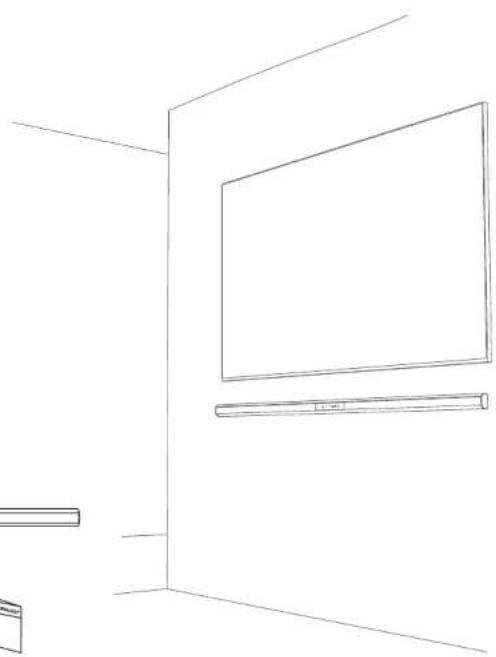
HOW TO INSTALL SOUNDBAR ON THE WALL
Before mounting soundbar on the wall.
Please plug in all cables connected tightly.
Please refer to below installation guide.
Warning!
When the soundbar mounted on wall,
it may cause product damaged...
—Do not fix soundbar upside down.
—Do not place something on soundbar mounted on the wall
—Please fix soundbar tightly not to be dropped down.
—Please keep children not to shake soundbar or hang something on it.
Necessary Accessories

SOUNDBAR

Wall Bracket

Screw-25mm(H)

Plastic wall plug fixing

Wall Bracket Install Guide
natural_image
Line drawing of a room interior with a large TV and wall-mounted monitor (no text or symbols)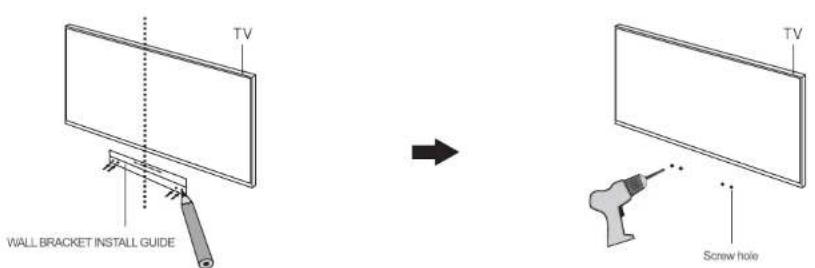
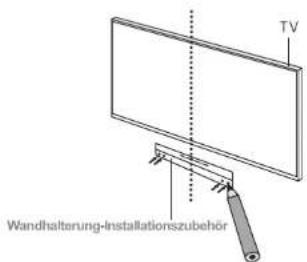
1. Please keep "WALL BRACKET INSTALL GUIDE" with center position of Television horizontally. Please mark screw position of Wall Bracket on "WALL BRACKET INSTALL GUIDE".
2. Please make holes for screws on wall by using drill.
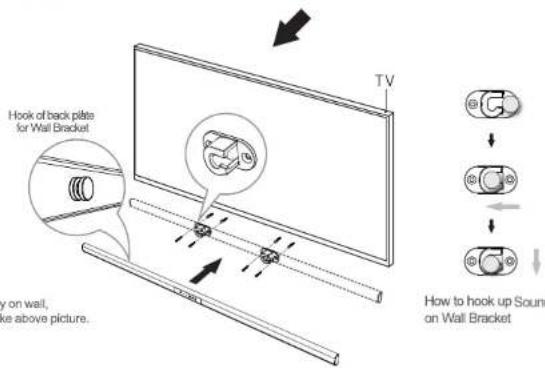
text_image
Hook of back plate for Wall Bracket y on wall, ke above picture. TV How to hook up Sound on Wall Bracket- Please fix the screws and wall plugs enclosed tightly on wall, Please mount hooks of back plate on wall bracket like above picture.
HUMAX

CE


The product specifications may change without predictions for improvements of performances, and the image within the manual may be somewhat different from the real product image.
Manuale dell'utente
Humax STE1000BSW
2.1Ch Slim & Stylish Soundbar
natural_image
Exterior view of a black audio streaming setup with speaker and control panel (no text or symbols visible)HUMAX
• Benvenuto in Humax
- Humax is the trademark of Humax Co.Ltd.
- This manual has the copyright of Humax Co.Ltd and it is prohibited to distribute the whole or the part of the manual without notice.
- This manual was written on the basis of present product specifications. Each and every example original which is written, tables and example photos, detailed function of the product and hardware & software specs can be changed with no special prediction.
- The information in this User operation manual is subject to change without notice.
B-class device (home broadcasting communication device)
This product is an electronic goods that have registered electronic wave suitability for home use, and it is mainly used at homes and can be used in any region.
- Model name: STE1000BSW
2 Company name certified : Humax Co Ltd. - Produced date: Written on the product box
- Manufacturer/Manufacturing country: Humax Co Ltd. / Republic of Korea
natural_image
Line drawing of a white speaker with circular buttons and a separate cable (no text or symbols)- Sub Woofer
text_image
Diagram of a smart TV setup with labeled components including speaker, monitor, power plug, and screentext_image
PIN code [0000]EU regulatory conformance
Hereby, HUMAX Co., Ltd, declares that this STA1200BSW is in compliance with the essential requirements and other relevant provisions of Directive 1999/5/EC. The product carries the CE mark applied onto it.

text_image
CEThe Declaration of conformity made under EC Directives and is available for viewing at the following location in the EU community: http://www.humaxdigital.com/global/support/support.html
Wireless equipment use information
- In France
Authorization for outdoor usage is limited to Channels 1\~7 (2.400 \~ 2.454 Ghz).
2 In Italy
For outdoor usage a general authorization is required from the national spectrum authorities.
- In Latvia
For outdoor usage an authorization is required from the Electronic Communications Office.
- 5GHz Radio Local Area Networks (RLANs) Band only indoor use.

4EA
Tassello in plastica
natural_image
Line drawing of a blank flat-screen monitor with a small rectangular base (no text or symbols)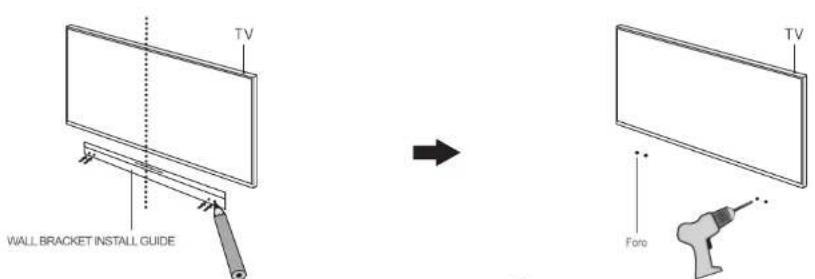
The product specifications may change without predictions for improvements of performances, and the image within the manual may be somewhat different from the real product image.
Benutzerhandbuch
STE1000BSW
natural_image
Exterior view of a black audio streaming device with a speaker and control panel (no text or symbols visible)HUMAX
natural_image
Line drawing of a white speaker with two circular components connected to a cable (no text or symbols)- Tieftonlaufsprecher
4. Benutzerhandbuch
text_image
Diagram showing a device with labeled buttons and an 'or' label, likely from a software interface or control panel.text_image
PIN code [0000]EU regulatory conformance
Hereby, HUMAX Co., Ltd, declares that this STE1000BSW is in compliance with the essential requirements and other relevant provisions of Directive 1999/5/EC. The product carries the CE mark applied onto it.

text_image
CEThe Declaration of conformity made under EC Directives and is available for viewing at the following location in the EU community: http://www.humaxdigital.com/global/support/support.html
Wireless equipment use information
- In France
Authorization for outdoor usage is limited to Channels 1\~7 (2.400 \~ 2.454 Ghz).
- In Italy
For outdoor usage a general authorization is required from the national spectrum authorities.
- In Latvia
For outdoor usage an authorization is required from the Electronic Communications Office.
- 5GHz Radio Local Area Networks (RLANs) Band only indoor use.
natural_image
Simple line drawing of a blank rectangular panel with a base labeled '100mm' (no other text or symbols)