SP-B1806K - Docking Station Vakoss - Free user manual and instructions
Find the device manual for free SP-B1806K Vakoss in PDF.


| Product Type | Docking Station |
| Brand | Vakoss |
| Model | SP-B1806K |
| Dimensions (Approx.) | 10 x 5 x 2 cm |
| Weight (Approx.) | 100 g |
| Power Supply | USB-C (PD supported) |
| USB Ports | 3x USB-A 3.0, 1x USB-C |
| Video Output | HDMI (up to 4K@30Hz) |
| Ethernet Port | RJ45 Gigabit |
| Audio Jack | 3.5mm combo |
| Memory Card Reader | SD/TF card slot |
| Compatibility | Windows, macOS, Linux |
| Data Transfer Speed | Up to 5 Gbps (USB 3.0) |
| Charging Capability | Pass-through charging up to 60W |
| Housing Material | Aluminum alloy |
| Operating Temperature | 0°C to 45°C |
| Storage Temperature | -20°C to 60°C |
| Certifications | CE, FCC, RoHS |
| Maintenance | Wipe with dry cloth; keep away from liquids |
| Safety Features | Overcurrent, overvoltage, short circuit protection |
| Spare Parts Availability | Contact Vakoss support for replacement cables |
| Repairability Index | Not user-serviceable; professional repair recommended |
Frequently Asked Questions - SP-B1806K Vakoss
User questions about SP-B1806K Vakoss
0 question about this device. Answer the ones you know or ask your own.
Ask a new question about this device
Download the instructions for your Docking Station in PDF format for free! Find your manual SP-B1806K - Vakoss and take your electronic device back in hand. On this page are published all the documents necessary for the use of your device. SP-B1806K by Vakoss.
USER MANUAL SP-B1806K Vakoss

SP-B1806
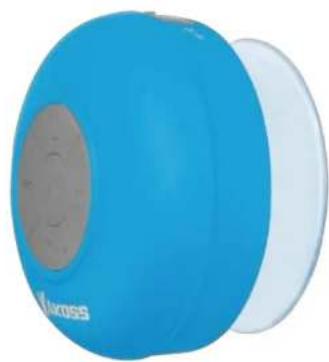
Portable Bluetooth Speaker
Instruction Manual
Speaker use only after reading the manual!
natural_image
Blue and white portable sound wave device with 'Stoross' branding (no additional text or symbols visible)English English
-
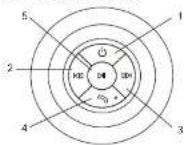
Main Components
-
On end off switch indicator
- Previous song / volume down key
- Next song/ volume up key
- Handstrae key/MIC
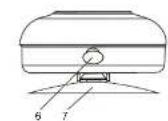
- Play / Pause
- MICRO USB Charging
- Suction-type base
2. Product Features
- Small, portable, shall features rubber paint technique
- 5 button operation, easy to operate.
- Wireless Bluetooth channel
- Micro USB shrads
3. Usage Instructions
- On/off switch and function keys description:
- Power on: Press and hold the on/off switch until the blue LED light flashes to power on. Then a new will soon
- Power off: Press and hold the on/off switch until the blue LED light flashes off to power off.
Then, a tone will sound.
- Playpause: Tap the playpause key to control your music.
- Private volume book: Tap this key to skip to the previous song, or press and hold this key to decrease the volume.
- Next/volume up: Tag this button to skip to the next song, or press and hold this key to
increase the volume.
- Bluetooth functions:
- Pairing: The product enters Bluetooth mode automatically after activation, the blue light.
lasties, it beeps, and after searching the pairing name of the product BT-SPEAKER , it can be paired, an password is required.
- Re-connect. When the product is switched on it will automatically re-connect with the last
paired devio
- Bluetooth point-to-point connection can only operate one connected device.
- Call functions:
- Incoaring calls: When a phone call arrives, the Bluetooth speaker and the phone will ring at
the same time. You can press the speaker phone key to answer the cell.
.1..2
- End call: During a phone call, tap the handset key to end the call.
- Call back: Tap the handefree key twice to quickly dial the last number called.
- Call reject: When a phone call arrives, press and hold the handstree button for about three seconds to predict how call.
4. Playing Music:
- In Bluetooth movie, press the pause/play button to pause/play music. Short press the previous next song button to control your phone/TF card previous next song function. Press and hold the "volume up/volume down" key to adjust the volume.
5. Charging functions:
Charging Standard: When charging, the red indicator light is illuminated. This product accepts DC-5V / 500mA, please use a compatible standard charger to avoid damage to the device or battery.
4. Technical parameters
- Speaker Impedance: 40
- Rated power: 3W
- Input voltage: 5V
- Frequency range: 100 Hz-20kHz
- Disasior (2)
- Bluetooth transmission distance: about 10m
- Lithium Battery: Built in DC5V 300mAh
5. Notes
- You can only make hands free calls while in Bluetooth connection status.
- This product has a Bluetooth signal anti-interference design which can effectively prevent signal interference, but in a strong high frequency and magnetic field environment, there may still be interference with the product, please appropriately avoid use in such an environment. - The Bluetooth transmission difference will be different for terminal devices from different years.
- Keep product away from fire, water, etc., do not use in a high temperature, high humidity or
- On not gnarously inest or enough the project, do not disagree with
- If you will not be using the product for a long time, please charge it at least once a month in order to prevent battery damage caused by excessive consumption.
Declaration:
The possibility of omissions or mistakes in the writing and technical aspects of this manual can not be completely ruled out; such errors or omissions will be corrected in a subsequent edition. The Company has the right and obligation to change any content of the manual at any time without notice.
natural_image
Blue and white portable phone with a circular screen and speaker grille (no visible text or symbols)Polski Polski