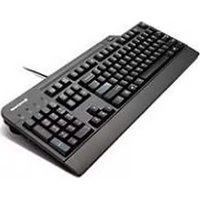
4X30E51035 - Keyboard LENOVO - Free user manual and instructions
Find the device manual for free 4X30E51035 LENOVO in PDF.


| Product Type | Full-sized keyboard with integrated smart card reader |
| Number of Keys | 104–109 (varies by country) |
| Color | Black |
| Dimensions (H x W x D) | 457.13 x 185.3 x 25 mm (18 x 7.3 x 0.98 inches) |
| Weight | 965 g (2.13 lb) |
| System Interface | USB 2.0 full speed |
| Connector Type | 4-pin USB Type A |
| Cable Length | 2 m (6.56 ft) |
| Power Consumption | 250 mA maximum |
| Supported Operating Systems | Windows XP (32-bit), Windows 7 (32/64-bit), Windows 8 (32/64-bit), Windows 8.1 (32/64-bit) |
| Smart Card Reader | Compact, lightweight reader; supports most memory and microprocessor cards |
| Card Compatibility | ISO 7816-1,2,3,4 memory and microprocessor smart cards (T=0, T=1); supports 3V and 5V cards |
| Secure PIN Entry | Yes (Class 2 terminal, PIN not transmitted to host) |
| ThinkVantage Button | Provides quick access to preinstalled Lenovo programs or Windows System Information |
| Cable Slot | Left or right routing for cable management |
| Tilt Feet Positions | Three positions: 4°, 6°, and 9° |
| Smart Card Insertion Cycles | Up to 100,000 inserting cycles |
| Communication Speed (Card to Computer) | Programmable from 9600 to 115200 baud |
| Communication Speed (Computer to Card) | Up to 38400 baud |
| LED Indicators | Num Lock, Caps Lock, Scroll Lock, Smart Card Status (dual-color green/amber) |
| Included Accessories | Setup and warranty poster |
Frequently Asked Questions - 4X30E51035 LENOVO
User questions about 4X30E51035 LENOVO
0 question about this device. Answer the ones you know or ask your own.
Ask a new question about this device
Download the instructions for your Keyboard in PDF format for free! Find your manual 4X30E51035 - LENOVO and take your electronic device back in hand. On this page are published all the documents necessary for the use of your device. 4X30E51035 by LENOVO.
USER MANUAL 4X30E51035 LENOVO
LenovoUSBSmartcardKeyboard UserGuide
i http://www.lenovo.com/safety
Note: Before installing the product, besuretoreadthewarrantyinformationinAppendixC“LenovoLimited Warranty”onpage17.
FirstEdition(October2013)
©CopyrightLenovo2013.
LIMITEDANDRESTRICTEDRIGHTSNOTICE: If dataorsoftware is delivered pursuant to General Services Administration "GSA" contract, use, reproduction, or disclosure is subject to restrictions set forth in Contract No. GS-35F-05925.
Contents
Chapter1.Aboutthekeyboard.....1
Productdescription......1
Systemrequirements......3
Chapter2.Installingthekeyboard andusingthesmartcardreader....5
Installingthedevicedrivers......5
Installingthekeyboard......5
Uninstallingthedevicedrivers......6
Usingthesmartcardreader......8
Chapter3.Troubleshooting......9
AppendixA.Productspecifications3
AppendixB.ServiceandSupport15
Onlinetechnicalsupport.....15..
Telephonetechnicalsupport.15..
AppendixC.LenovoLimited Warranty.....17
Part1-GeneralTerms.....17...
Part2-Country-specificTerms..19..
Part3-WarrantyServiceInformation22..
FederalCommunicationsCommissionDeclaration of Conformity.....25..
AppendixE.Notices.....29
Recyclinginformation.....29..
RecyclinginformationforBrazil..29..
ExportClassificationNotice30..
Trademarks......30..
AppendixF.RestrictionofHazardous SubstancesDirective(RoHS).3.1
EuropeanUnionRoHS.....31...
ChinaRoHS......31...
TurkishRoHS.....31...
UkraineRoHS......31...
IndiaRoHS......31...
Chapter1.Aboutthekeyboard
TheLenovo ® USBSmartcardKeyboard(hereaftercalledthekeyboard)isafull-sizedkeyboardequippedwithasmartcardreaderandtheThinkVantage ® buttontoenhanceyourcomputingsecurityandconvenience.
Thekeyboardenablesauthorizedusers'singlelogintothecomputerandpreventsunauthorizedaccess tothenetworkofanorganization.Typically,theuser-accessverificationofthekeyboardsecuresthe environmentfortransactionsperformedonbothpublicandprivatenetworks.TheThinkVantagebuttonon thekeyboardprovidesquickaccesstosomeoftheprogramsinstalledonyourcomputerortheWindows SystemInformationwindow.
Theoptionpackagecontains:
•LenovoUSBSmartcardKeyboard
- Setupandwarrantyposter
Productdescription
The following illustrations show the overview of the keyboard.
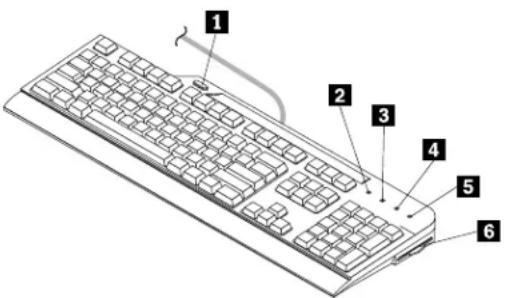
Figure1. Keyboardoverview
1ThinkVantagebutton
4 ScrollLockLED
2umeridLockight-Smättragblatt(LED)

3apsLockLED

ThinkVantagebutton
Depending on your operating system, you can do the following bypassing the Think Vantage button:
Note: Before using the Think Vantage button, ensure that you install the Lenovo USB Smart card Keyboard hot key driver (hereafter called the hot key driver).
- FortheMicrosoft Windows XPoperatingsystem,wheneveryouhaveaquestionaboutyourcomputer orwanttoviewLenovoWebsites,presstheThinkVantagebuttontoopentheThinkVantageProductivity Centerprogramforcomprehensivehelpandinformationforyourcomputer.
- FortheMicrosoftWindows7operatingsystems, press the ThinkVantage button to open the Lenovo SimpleTap, Lenovo Solution Center, or Lenovo ThinkVantage Toolbox program. The Lenovo SimpleTap program provides a quick way to customize the basic settings and personalized features of the computer.
The Lenovo ThinkVantage Toolboxprogram is your one-stop diagnostics solution for quickly identifying and resolving system performance and security problems.
- FortheMicrosoftWindows8orMicrosoftWindows8.1operatingsystems, press theThinkVantagebutton to open the LenovoDeviceExperienceprogram.
Note:TheThinkVantageProductivityCenterprogram,LenovoSimpleTap,LenovoSolutionCenter,LenovoThinkVantageToolbox,orLenovoDeviceExperienceprogramcomeswithyourcomputer.Ifyoudonot haveanyoftheprogramsinstalledonyourcomputer,pressingtheThinkVantagebuttonwillopentheWindowsSystemInformationwindow.
2NumericLockLED
WhentheLEDison, thenumerickeypadonthekeyboarddisenabled. WhentheLEDisoff, thecursor controlonthenumerickeypadisenabled. PresstheNumericLockkeytoswitchbackandforthbetween thesetwomodes.
3 CapsLockLED
WhentheLEDison,theCapsLockmodeisenabled.Inthismode,youcantypeallalphabeticcharacters (A-Z)inuppercasetextdirectly.WhentheLEDisoff,theCapsLockmodeisdisabled.Toenableordisable theCapsLockmode,presstheCapsLockkey.
4 ScrollLockLED
WhentheLEDison, theScrollLockmodeisenabled. Thearrowkeyscanbeusedasscreen-scrollfunction keysandthecursorcannotbemovedwiththearrowkeys. Thefunctionisonlyavailableforcertain applicationprograms. WhentheScrollLockLEDisoff, thearrowkeyscanbeusedforcursorcontrol, notas screen-scrollfunctionkeys. PresstheScrollLockkeytoswitchbackandforthbetweenthesetwomodes.
5SmartcardstatusLED
ThesmartcardstatusLEDisadual-colorLED, which indicate the working status of the smartcardreader in green and amber.
FormoreinformationaboutthesmartcardstatusLED,seeTable1"SmartcardstatusLED"onpage9
6 Smartcardreader
Thesmartcardreaderisacompact, lightweight, high-performedevicethatenhancescomputerand networksecurity. Itsupportsmostmemorymodulesandmicroprocessorcards.
Thesmartcardreadersupportsthefollowing:
- Readingfromandwritingtoallmemoryandmicroprocessorsmartcards(T=0,T=1)thatconformto InternationalOrganizationforStandardization(ISO)7816-1,2,3,4standards
Note: Lenovodesnotprovidesmartcardwiththisoption.
- Securepersonalidentificationnumber(PIN)entrymode(PINauthenticationwithouttransmittingthePIN tothehostcomputer)
- Userauthenticationthroughthird-partyapplications
•ThinkVantageClientSecuritySolution
FormoreinformationaboutusingsmartcardswiththeThinkVantageClientSecuritySolutionprogram, refertothehelpinformationsystemfortheprogram.
Note: For the smart card reader specifications, see Appendix A "Product specifications" on page 13.
Cableslot
Thecableslotprovidesaconvenientwaytochangethelocationwherethecableleavesthekeyboard.You canroutethekeyboardcableintotheleftorrightslottoreducecableclutterandoptimizedeskspace.
Tiltfeet
Therearethreetiltfeetpositionsforsettingthekeyboardtoacomfortabledegree.Youcanplacethe keyboardatanangleoffourdegrees,sixdegrees,orninedegreesatyourpreference.
Systemrequirements
Tousethekeyboard, yourcomputermusthaveanavailableUniversalSerialBus(USB)connectorand oneofthefollowingoperatingsystemsinstalled:
•MicrosoftWindowsXP(32-bit)
- MicrosoftWindows7(32-bitor64-bit)
•MicrosoftWindows8(32-bitor64-bit)
•MicrosoftWindows8.1(32-bitor64-bit)
Chapter2. Installingthekeyboardandusingthesmartcard reader
Thischapterprovidesinformationaboutinstallingthekeyboardandusingthesmartcardreader.
Installingthedevicedrivers
Beforeinstallingthekeyboard,youmustinstallthehotkeydriverandthesmart-card-readerdriver. Otherwise,youcannotusesomefunctionsofthekeyboard.Forexample,ifyouareusingaWindows XPoperatingsystem,youmustinstallthesmart-card-readerdrivertousethesmartcardreaderofthe keyboard;ifyouareusingaWindows7,Windows8,orWindows8.1operatingsystem,youmustinstallthe smart-card-readerdrivertousesomespecificfunctionslikethesecurePINentry.
Note: If the hot key driver and the smart card reader driver are already installed on your computer, uninstall the drivers before you install thenewones. See "Uninstall the device drivers" on page 6 for more information.
Toinstallthedevicedrivers,dothefollowing:
- Gotohttp://www.lenovo.com/support/keyboards.
- Locateanddownloadtheinstallationfiles.
- Double-clickeachinstallationfile, and then follow the instructions on the screent o complet the installation.
Installingthekeyboard
Thistopicprovidesinstructionsonhowtoinstallthekeyboardafteryouinstallthedrivers.
Toinstallthekeyboard,dothefollowing:
- Adjust the tilt feet to set the keyboard near your computer to your preference.
- Routethekeyboardcableintotherightorleftcableslotaccordingtoyourpreference.
- ConnectthekeyboardcabletoanavailableUSBconnectoronthecomputer.Theoperatingsystemwill identifythekeyboardandthesmartcardreader.Then,thekeyboarddisreadyforuse.

natural_image
Diagram of a USB connector with internal pinout and external connector (no text or symbols)Figure2. Connectingthekeyboardtothecomputer
Uninstallingthedevicedrivers
Touninstallthehotkeydriverandthesmart-card-readerdriver,dothefollowing:
Note: Touninstallthekeyboardfromyourcomputer, itisrecommended that you uninstall both the hot key driver and the smart-card-reader driver. Then, restart the computer to have then new changestotake effect.
FortheWindowsXPoperatingsystem:
1Depending you Start menu mode click Start-ControPanel Start-Settings-Control Panel.
2DependingryouControPanemodeclickdouble-clickAddRemovePrograms.
3SelectLenovdUSESmartcardKeyboardHotkeyDriverandherclickRemove.
- Follow the instructions on the screentoun install the hot key driver.
5theAddRemoveProgramswindowselecLenovdKeyboardSmartcardReaderandhenclickRemove.
- Follow the instructions on the screentoun install the smart-card-reader driver.
7.Restartyourcomputer.
FortheWindows7operatingsystem:
1Depending your Start menuode click Start-ControPanelStart-Settings-Control Panel.
- Depending on your Control Panel mode, do one of the following:
Click the Uninstallprogram option under the Program menu.
- ClickProgramsandFeatures.
3SelectLenovdUSESmartcardKeyboardHotkeyDriverandhenright-clickyoumouse.
4ClickUninstallandollowthenstructionsonthescreertuninstalthenotkeydriver.
5 the Uninstalbchangeprogramwindowselec LenovdKeyboardSmartcardReaderand thenright-clickyourmouse.
6ClickUninstallandfollowtheinstructionsorthescreertouninstalthsmart-card-readedriver.
7.Restartyourcomputer.
FortheWindows8operatingsystem:
- GotoControlPanelbydoingoneofthefollowing:
- From the desktop, mov the point to the top-right bottom-right corner of the screen display the harms and her click Settings - Control Panel.
•FromtheStartscreen,dothefollowing:
a.Movethepointertothetop-rightorbottom-rightcornerofthescreentodisplaythecharms.
b.ClickSearch.
OrthAppscreenscrolltheightsideandclickControPaneltheWindowsSystem section.
- Depending on your Control Panel mode, do one of the following:
Click the Uninstallprogram option under the Program menu.
- ClickProgramsandFeatures.
Select Lenovd USB Smartcard Keyboard Hotkey Drive and hen right-click you mouse The Uninstallation is displayed.
4ClickUninstallandfollowthenstructionsorthescreertuninstalthenotkeydriver.
5SelectLenovdKeyboardSmartcardReaderandhenight-clickyoumouseTheUninstalptions displayed.
6ClickUninstallandfollowtheinstructionsorthescreertuninstalthsmart-card-readedriver.
7.Restartyourcomputer.
FortheWindows8.1operatingsystem:
- GotoControlPanelbydoingoneofthefollowing:
- From the desktop, mov the point to the top-right bottom-right corner of the screen display the harms and her click Settings - Control Panel.
- FromtheStartscreen,dothefollowing:
a. Click the arrow icon in the bottom-left corner of the screen. Scroll the height side and click a control panel in the Windows System section.
- Depending on your Control Panel mode, do one of the following:
Click the Uninstallprogram option under the Program menu.
- ClickProgramsandFeatures.
SelectLenovdJSSmartcardKeyboardHotkeyDriverandthemight-clickyoumouseTheUninstallationisdisplayed.
4ClickUninstallandollowthenstructionsorthescreertuninstalthenotkeydriver.
5SelectLenovoKeyboardSmartcardReaderandhenright-clickyoumouseTheUninstalptions displayed.
6ClickUninstallandfollowtheinstructionsorthescreertuninstalthesmart-card-reader.
7.Restartyourcomputer.
Usingthesmartcardreader
Thistopicprovidesinstructionsonhowtousethesmartcardreaderofthekeyboard.
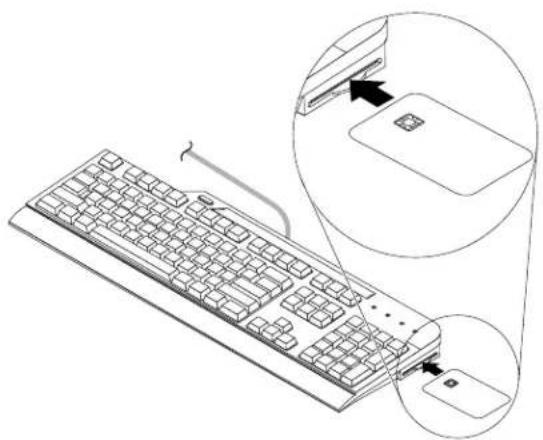
Tousethesmartcardreaderofthekeyboard,insertasmartcardintothesmartcardreaderwiththecontact padfacingup.ThesmartcardstatusLEDwillbeoningreenforawhile.Thenthesmartcardreader isreadyforuse.
natural_image
Line drawing of a computer keyboard with an inset showing a device being inserted (no text or symbols present)Figure3.Insertingasmartcardintothesmartcardreader
Note: Formoreinformationaboutusingthesmartcard,contactthesmartcardmanufacturer.
Attention: To avoid transmission errors and loss of data, donotremovethesmartcard when the smart card reader is active.
Chapter3.Troubleshooting
Thischapterprovidestroubleshootinghintsandtipstoassistyouifyouexperienceanyproblemswiththe keyboard.
Problem: Thesmartcardreaderdoesnotworkcorrectly.
Solution: Ensure that the hot key driver and the smart-card-reader are installed correctly. Then, check the smart card status LED by referring to the following table.
Table1. SmartcardstatusLED
| SmartcardstatusLEDColor | Description | |
| Off | None | Smartcardnotinsertedornotdetected |
| Onfor1.5secondsGreenSmartcardinitiallyinsertedanddetected | ||
| Blinkingat0.5secondintervals | GreenSecurePINauthenticationrequested | |
| On | Amber | SecurePINentryerrororinvalidsecurePIN |
| OnGreenSuccessfulsecurePINauthentication(remainsOnwhileasmartcardisinserted) | ||
| Blinkingat0.1secondintervals | GreenSmartcardcommunicationinprogress | |
| Blinkingat0.5secondintervals | Smartcardcommunicationerror | |
Note: Contact your Lenovoservicerepresentative if the problempersists.
Problem:TheThinkVantagebuttondoesnotworkcorrectly.
Solution: Ensure that one of the following programs is installed on your computer, or the Window system information window will be displayed when you press the Think Vantage button:
LenovoDeviceExperience
LenovoSimpleTap
LenovoSolutionCenter
LenovoThinkVantageToolbox
ThinkVantageProductivityCenter
Problem: lpressakeyonce, but the computer responds as if pressed the key twice.
SolutionYou might need change you keyboard repeat delay repeats settings.
Tochangetherepeatdelayorrepeatratesettings,dothefollowing:
FortheWindowsXPoperatingsystem:
1Depending you Start menuodeclickStart-ControPanelStart-Settings-Control Panel.
- Depending on your Control Panel mode, do one of the following:
- Double-clickKeyboard.
GliclPrintersandtheHardwareKeyboard.
30thSpeedabmove the Repeatelayslideleft increase the repeatdelaytime move the Repeatratesliderlefttosetaslowerrepeatrate.
- Click OK to savethesettings.
FortheWindows7operatingsystem:
1Depending you Start menuodeclickStart-ControlPanelStart-Settings-Control Panel.
- Depending on your Control Panel mode, do one of the following:
- ClickKeyboard.
GlickHardwareandSound-DevicesandPrintersThen, right-clickthekeyboardcorand selectKeyboardsettings.
30thSpeedabmovtheRepeatdelayslideleftincreasetherepeatdelaytimemovetheRepeatratesliderlefttosetaslowerrepeatrate.
- Click OK to savethesettings.
FortheWindows8operatingsystem:
- GotoControlPanelbydoingoneofthefollowing:
- From the desktop, mov the point to the top-right bottom-right corner of the screen display the charms and her click Settings > ControPanel.
- FromtheStartscreen,dothefollowing:
a.Movethepointertothetop-rightorbottom-rightcornerofthescreentodisplaythecharms. b.ClickSearch. @theAppscreenscrolltheightsideandclickControPaneltheWindowsSystem section.
- Depending on your Control Panel mode, do one of the following:
- ClickKeyboard.
GlickHardwareandSound-DevicesandPrintersThen,right-clickthekeyboardcorand selectKeyboardsettings.
30thSpeedabmove the Repeatelayslideleft increase the repeatdelaytime move the Repeatratesliderlefttosetaslowerrepeatrate.
- ClickOKtosavethesettings.
FortheWindows8.1operatingsystem:
- GotoControlPanelbydoingoneofthefollowing:
- From the desktop, mov the point to the top-right bottom-right corner of the screen display the charms and her click Settings > ControPanel.
•FromtheStartscreen,dothefollowing:
a.ClickthearrowiconinthBottom-leftcornerofthescreentogototheAppsscreen.
lScrolltheightsideandclickControPaneltheWindowsSystemsection.
- Depending on your Control Panel mode, do one of the following:
- ClickKeyboard.
ClickHardwareandSound-DevicesandPrintersThen,right-clickthekeyboardcorand selectKeyboardsettings.
30th Speedabmove the Repeatdelayslide left increase the repeat delay time moved the
Repeatratesliderlefttosetaslowerrepeatrate.
4.ClickOKtosavethesettings.
Problem:Thekeyboarddoesnotfunctioncorrectly.
Solution: Ensure that the keyboard cable is firmly connected to the USB connector on your computer, or reconnect the keyboard cable to another USB connector on your computer.
Note: Contact your Lenovoservicerepresentative if the problempersists.
AppendixA.Productspecifications
Thisappendix includedd specificationsforthekeyboardandthesmartcardreader.
The following table provides the specifications for the keyboard.
Table2. LenovoUSBSmartcardKeyboardspecification
| Keys | 104-109(variesbycountry) |
| Color | Black |
| Dimensions(heightxwidthxdepth) | 457.13mmx185.3mmx25mm(18inchesx7.3inchesx0.98inch) |
| Weight | 965grams(2.13pounds) |
| SysteminterfaceUSB2.0fullspeed | |
| Connectortype4-pinUSBTypeA | |
| Cablelength2meters(6.56feet) | |
| Powerconsumption250mA maximum | |
| Supportedoperatingsystems•WindowsXP(32-bit) | •Windows7(32-bitor64-bit)•Windows8(32-bitor64-bit)•Windows8.1(32-bitor64-bit) |
The following table provides the specifications for the smart card reader.
Table3Smartcardreaderspecification
| Features | SupportforallISO7816-1,2,3,4memoryand microprocessorsmartcards(T=0,T=1)SupportforSecurePINEntrymode(Class2terminal)Supportfor3Vand5VsmartcardsSupportforstandardapplicationprograminterfaces(API):-Personalcomputer/smartcard(PC/SC)-EMV2000Level1(EMVistheacronymforEuropay, MasterCard,andVISA)-Chip/SmartCardInterfaceDevices(CCID) |
| Power | USBconnectorShortcircuitdetectionPowersupplycompliantwithISO7816andEMV |
| Communicationspeed | Fromsmartcardtocomputerprogrammablefrom9 600baudto115200baudFromcomputertosmartcardupto38400baud |
| Landingmechanism | Smartcardinsertionratingupto100000inserting cycles |
Frictioncontact
Table3. Smartcardreaderspecification(continued)
| Interfacemodes | •USBcommunicationthroughtheUSBconnector•Automaticdetectionforsmartcardinsertionandremoval |
| Readerperformanceinterface | USBconnection |
AppendixB.ServiceandSupport
The following information describes the technical support that is available for your product, during the warranty period throughout the life of your product. Referto the Lenovo Limited Warranty for a full explanation of Lenovowarranty terms.
Onlinetechnicalsupport
Onlinetechnicalsupportisavailableduringthelifetimeofaproductat: http://www.lenovo.com/support
Productreplacementassistanceorexchangeofdefectivecomponentsalsoisavailableduringthewarranty period.Inaddition,ifyuroptionisinstalledinaLenovocomputer,youmightbeentitledtoserviceatyour location.ALenovotechnicalsupportrepresentativecanhelpyoudeterminethebestalternative.
Telephonetechnicalsupport
InstallationandconfigurationsupportthroughtheCustomerSupportCenterwillbeavailableuntil90days aftertheoptionhasbeenwithdrawnfrommarketing.Afterthattime,thesupportiscancelled,ormade availableforafee,atLenovo'sdiscretion.Additionalsupportisalsoavailableforanominalfee.
BeforecontactingaLenovotechnicalsupportrepresentative,pleasehavethefollowinginformationavailable: optionnameandnumber,proofofpurchase,computermanufacturer,model,serialnumberandmanual, theexactwordingofanyerrormessage,descriptionoftheproblem,andthehardwareandsoftware configurationinformationforyoursystem.
Your technical support represents a very might walkyouth through the problem while you are at your computer during the call.
Telephonenumbersaresubjecttochangewithoutnotice. Themostup-to-datetelephonelistforLenovo Supportisalwaysavailableathttp://www.lenovo.com/support/phone____. Ifthetelephonenumberforyour countryorregionisnotlisted,contactyourLenovoresellerorLenovomarketingrepresentative.
AppendixC.LenovoLimitedWarranty
L505-0010-0208/2011
ThisLenovoLimitedWarrantyconsistsofthefollowingparts:
Part1-GeneralTerms
Part2-Country-specificTerms
Part3-WarrantyServiceInformation
The terms: Part replace modify terms: Part as specified for particular country.
Part1-GeneralTerms
ThisLenovoLimitedWarrantyappliesonlytoLenovohardwareproductsyoupurchasedforyouwnuseand notforresale.ThisLenovoLimitedWarrantyisavailableinotherlanguagesatwww.lenovo.com/warranty.
WhatthisWarrantyCovers
LenovowarrantsthateachLenovohardwareproductthatyoupurchaseisfreefromdefectsinmaterialsand workmanshipundernormaluseduringthewarrantyperiod. Thewarrantyperiodfortheproductstartson theoriginaldateofpurchaseasshownonyoursalesreceptorinvoiceorasmaybeotherwisespecified by Lenovo. Thewarrantyperiodandtypeofwarrantyservicethatapplytoyourproductareasspecified in'Par&WarrantyServicdInformationbelowThiswarrantyonlyappliesproductsirthecountry orregionofpurchase.
THISWARRANTYISYOUREXCLUSIVEWARRANTYANDREPLACESALLOTHERWARRANTIES ORCONDITIONS, EXPRESSORIMPLIED, INCLUDING, BUTNOTLIMITEDTO, ANYIMPLIED WARRANTIESORCONDITIONSOFMERCHANTABILITYORFITNESSFORAPARTICULARPURPOSE. ASSOMESTATESORJURISDICTIONSDONOTALLOWTHEEXCLUSIONOFEXPRESSOR IMPLIED WARRANTIES, THEABOVEEXCLUSIONMAYNOTAPPL YTOYOU.INTHATEVENT ,SUCH WARRANTIESAPPL YONL YTOTHEEXTENTANDFORSUCHDURATIONASREQUIREDBYLAWAND ARELIMITEDINDURATIONTOTHEWARRANTYPERIOD.ASSOMESTATESORJURISDICTIONSDO NOTALLOWLIMITATIONSONTHEDURATIONOFANIMPLIEDWARRANTY, THEABOVELIMITATION ONDURATIONMAYNOTAPPL YTOYOU.
HowtoObtainWarrantyService
If the product does not function as warranted during the warranty period, you may obtain warranty service by contacting Lenovoora Lenovo-approved Service Provider. A list of approved Service Providers and their telephonenumber is available at: www.lenovo.com/support/phone.
Warrantyservicemaynotbeavailableinalllocationsandmaydifferfromlocationtolocation.Chargesmay applyoutsideaServiceProvider'snormalservicearea.ContactalocalServiceProviderforinformation specifictoyourlocation.
CustomerResponsibilitiesforWarrantyService
Beforewarrantyserviceisprovided,youmusttakethefollowingsteps:
- followtheservicerequestproceduresspecifiedbytheServiceProvider;
- backuporsecureallprogramsanddatacontainedintheproduct;
- providetheServiceProviderwithallsystemkeysorpasswords;
•providetheServiceProviderwithsufficient,free,andsafeaccesstoyourfacilitiestoperformservice; - removealldata,includingconfidentialinformation,proprietaryinformationandpersonalinformation,from theproductor,ifyouareunabletoremoveanysuchinformation,modifytheinformationtopreventits accessbyanotherpartyorsothatitisnotpersonaldataunderapplicablelaw.TheServiceProvidershall notberesponsibleforthelossordisclosureofanydata,includingconfidentialinformation,proprietary information,orpersonalinformation,onaproductreturnedoraccessedforwarrantyservice;
- removeallfeatures,parts,options,alterations,andattachmentsnotcoveredbythewarranty;
- ensure that the product or part is free of any legal restriction that prevents replacement;
- ifyouarenottheownerofaproductorpart,obtainauthorizationfromtheownerfortheServiceProvider toprovidewarrantyservice.
WhatYourServiceProviderWillDotoCorrectProblems
When you contact a Service Provider, you must follow the specified problem determination and resolution procedures.
TheServiceProviderwillattempttodiagnoseandresolveyourproblembytelephone,e-mailorremote assistance.TheServiceProvidermaydirectyoutodownloadandinstalldesignatedsoftwareupdates.
Someproblemsmayberesolvedwithareplacementpartthatyouinstallyourselfcalleda"Customer ReplaceableUnit"or"CRU."Ifso,theServiceProviderwillshiptheCRUtoyouforyoutoinstall.
If your problem cannot be resolved over the telephone; through the application of software updates or the installation of a CRU, the Service Provider will arrange for service under the type of warranty service designated for the product under "Part3-Warranty Service Information" below.
If the Service Provider determines that it is unable to repair your product, the Service Provider will replace it with one that is at least functionally equivalent.
If the Service Provider determines that it is unable to either repair or replace your product, your sole remedy under this Limited Warranty is to return the product to your place of purchase to Lenovo for refund of your purchase price.
ReplacementProductsandParts
When warranty service involves thereplacement of a product part, thereplaced product part becomes Lenovo's property and thereplacement product part becomes your property. Only unaltered Lenovo products and parts are eligible for replacement. Thereplacement product part provided by Lenovo may not be new, but it will being good working order and least functionally equivalent to the original product part. Thereplacement product part shall be warranted for the balance of the period remaining on the original product.
UseofPersonalContactInformation
If you obtain service under this warranty, you authorize Lenovotostore, use and process information about your warranty service and your contact information, including name, phonenumbers, address, and e-mail address. Lenovomayusethisinformation to perform service under this warranty. Wemaycontact youto inquire about your satisfaction with our warranty service on to notify you about any product recalls safety issues. In accomplishing these purposes, you authorize Lenovototransferyourinformation to any country wherewedobusiness and to provide it to entities acting on our behalf. Wemayalsodiscloseitwhere required by law. Lenovo's privacy policy is available at www.lenovo.com/.
WhatthisWarrantyDoesnotCover
Thiswarrantydoesnotcoverthefollowing:
- uninterruptederror-freeoperationofaproduct;
- lossof, ordamageto, yourdatabyaproduct;
- anysoftwareprograms,whetherprovidedwiththeproductorinstalledsubsequently;
- failureordamageresultingfrommisuse,abuse,accident,modification,unsuitablephysicaloroperating environment,naturaldisasters,powersurges,impropermaintenance,orusenotinaccordancewith productinformationmaterials;
- damagecausedbyanon-authorizedserviceprovider;
- failureof,ordamagecausedby,anythirdpartyproducts,includingthosethatLenovomayproviderintegrateintotheLenovoproductatyourrequest;
- anytechnicalorthersupport,suchasassistancewith“how-to”questionsandthoseregardingproduct set-upandinstallation;
- productsorpartswithanalteredidentificationlabelorfromwhichtheidentificationlabelhasbeen removed.
LimitationofLiability
LenovoisresponsibleforlossordamagetoyourproductonlywhileitisintheServiceProvider'spossession orintransit,iftheServiceProviderisresponsibleforthetransportation.
Neither LenovonortheServiceProvider is responsible for loss or disclosure of any data, including confidential information, proprietary information, or personal information, contained in a product.
UNDERNOCIRCUMSTANCES,ANDNOTWITHSTANDINGTHEFAILUREOFESSENTIALPURPOSE OFANYREMEDYSETFORTHHEREIN,SHALLLENOVO,ITSAFFILIATES,SUPPLIERS,RESELLERS, ORSERVICEPROVIDERSBELIABLEFORANYOFTHEFOLLOWINGEVENIFINFORMEDOFTHEIR POSSIBILITYANDREGARDLESSOFWHETHERTHECLAIMISBASEDINCONTRACT,WARRANTY, NEGLIGENCE,STRICTLIABILITYOROTHERTHEORYOFLIABILITY:1)THIRDPARTYCLAIMS AGAINSTYOUFORDAMAGES;2)LOSS,DAMAGEORDISCLOSUREOFYOURDATA;3)SPECIAL, INCIDENTAL,PUNITIVE,INDIRECTORCONSEQUENTIALDAMAGES,INCLUDINGBUTNOTLIMITED TOLOSTPROFITS,BUSINESSREVENUE,GOODWILLORANTICIPATEDSAVINGS.INNOCASE SHALLTHETOTALLIABILITYOFLENOVO,ITSAFFILIATESS,SUPPLIERS,RESELLERSORSERVICE PROVIDERSFORDAMAGESFROMANYCAUSEEXCEEDTHEAMOUNTOFACTUALDIRECT DAMAGES,NOTTOEXCEEDTHEAMOUNTPAIDFORTHEPRODUCT.
THEFOREGOINGLIMITATIONSDONOTAPPL YTODAMAGESFORBODIL YINJURY(INCLUDING DEATH), DAMAGETOREALPROPERTYORDAMAGETOTANGIBLEPERSONALPROPERTYFOR WHICHLENOVOISLIABLEUNDERLAW.ASSOMESTATESORJURISDICTIONSDONOTALLOW THEEXCLUSIONORLIMITATIONOFINCIDENTALORCONSEQUENTIALDAMAGES, THEABOVE LIMITATIONOREXCLUSIONMAYNOTAPPL YTOYOU.
YourOtherRights
THISWARRANTYGIVESYOUSPECIFICLEGALRIGHTS.YOUMAYHAVEOTHERRIGHTS ACCORDINGTOTHEAPPLICABLELAWSOFYOURSTATEORJURISDICTION.YOUMAYALSO HAVEOTHERRIGHTSUNDERAWRITTENAGREEMENTWITHLENOVO.NOTHINGINTHIS WARRANTY AFFECTSSTATUTORYRIGHTS, INCLUDINGRIGHTSOFCONSUMERSUNDERLAWS ORREGULATIONSGOVERNINGTHESALEOFCONSUMERGOODSTHATCANNOTBEWAIVED ORLIMITEDBYCONTRACT.
Part2-Country-specificTerms
Australia
"Lenovo" means Lenovo (Australia & New Zealand) Pty Limited ABN70112394411. Address: Level 10, North Tower, 1-5 Railway Street, Chatswood, NSW, 2067. Telephone: +61280038200. Email: lensyd_au@lenovo.com
The followingreplacesthesamesectioninPart1:
WhatthisWarrantyCovers:
Lenovowarrantsthateachhardwareproductthatyoupurchaseisfreefromdefectsinmaterialsand workmanshipundernormaluseandconditionsduringthewarrantyperiod.Iftheproductfailsduetoa covereddefectduringthewarrantyperiod,LenovowillprovideyouaremedyunderthisLimitedWarranty. Thewarrantyperiodfortheproductstartsontheoriginaldateofpurchasesspecifiedonyoursalesreceptor invoiceunlessLenovoinformsyouotherwiseinwriting.Thewarrantyperiodandtypeofwarrantyservice thatapplyyouproductarseforthbelowPar&WarrantyServicdInformation.
THEBENEFITSGIVENBYTHISWARRANTYAREINADDITIONTOYOURRIGHTSANDREMEDIESAT LAW, INCLUDINGTHOSEUNDERTHEAUSTRALIANCONSUMERLAW.
The followingreplacesthesamesectioninPart1:
ReplacementProductsandParts:
Whenwarrantyserviceinvolvesthereplacementofaproductorpart,thereplacedproductpartbecomes Lenovo'spropertyandthereplacementproductorpartbecomesyourproperty.OnlyunalteredLenovo productsandpartsareeligibleforreplacement.ThereplacementproductorpartprovidedbyLenovomay notbenew,butwillbeingoodworkingorderandatleastfunctionallyequivalenttotheoriginalproduct part.Thereplacementproductorpartshallbewarrantedforthebalanceoftheperiodremainingonthe originalproduct.Productsandpartspresentedforrepairmaybereplacedbyrefurbishedproductsorparts ofthesametyperatherthanbeingrepaired.Refurbishedpartsmaybeusedtorepairtheproduct;andrepair oftheproductmayresultinlossofdata,iftheproductiscapableofretaininguser-generateddata.
The following is added to the same section in Part 1:
UseofPersonalContactInformation:
Lenovowillnotbeabletoperformourserviceunderthiswarrantyifyourefusetoprovideyourinformation ordonotwishustotransferyourinformationtoouragentorcontractor.Youhavetherighttoaccess yourpersonalcontactinformationandrequestcorrectionofanyerrorsinitpursuanttothePrivacyAct 1988bycontactingLenovo.
The followingreplacesthesamesectioninPart1:
LimitationofLiability:
LenovoisresponsibleforlossordamagetoyourproductonlywhileitisintheServiceProvider'spossession orintransit,iftheServiceProviderisresponsibleforthetransportation.
Neither Lenovon or the Service Provider is responsible for loss or disclosure of any data, including confidential information, proprietary information, or personal information, contained in a product.
TOTHEEXTENTPERMITTEDBYLAW,UNDERNOCIRCUMSTANCESANDNOTWITHSTANDING THEFAILUREOFESSENTIALPURPOSEOFANYREMEDYSETFORTHHEREIN,SHALLLENOVO, ITSAFFILIATES,SUPPLIERS,RESELLERS,ORSERVICEPROVIDERSBELIABLEFORANYOFTHE FOLLOWINGEVENIFINFORMEDOFTHEIRPOSSIBILITYANDREGARDLESSOFWHETHERTHE CLAIMISBASEDINCONTRACT ,WARRANTY,NEGLIGENCE,STRICTLIABILITYOROTHERTHEORY
OFLIABILITY:1)THIRDPARTYCLAIMSAGAINSTYOUFORDAMAGES;2)LOSS,DAMAGEOR DISCLOSUREOFYOURDATA;3)SPECIAL,INCIDENTAL,PUNITIVE,INDIRECTORCONSEQUENTIAL DAMAGES,INCLUDINGBUTNOTLIMITEDTOLOSTPROFITS,BUSINESSREVENUE,GOODWILLOR ANTICIPATEDSAVINGS.INNOCASESHALLTHETOTALLIABILITYOFLENOVO,ITSAFFILIATESS, SUPPLIERS,RESELLERSORSERVICEPROVIDERSFORDAMAGESFROMANYCAUSEEXCEEDTHE AMOUNTOFACTUALDIRECTDAMAGES,NOTTOEXCEEDTHEAMOUNTPAIDFORTHEPRODUCT.
THEFOREGOINGLIMITATIONSDONOTAPPL YTODAMAGESFORBODIL YINJURY(INCLUDING DEATH), DAMAGETOREALPROPERTYORDAMAGETOTANGIBLEPERSONALPROPERTYFOR WHICHLENOVOISLIABLEUNDERLAW.
The following replaces the same section in Part 1:
YourOtherRights:
THISWARRANTYGIVESYOUSPECIFICLEGALRIGHTS.YOUALSOHAVEOTHERRIGHTSATLAW, INCLUDING UNDERTHEAUSTRALIANCONSUMERLAW.NOTHINGINTHISWARRANTYAFFECTS STATUTORYRIGHTSORRIGHTSATLAW, INCLUDINGRIGHTSTHATCANNOTBEWAIVEDOR LIMITEDBYCONTRACT.
Forexample, our products comewith guarantee esthat cannot be excluded under the Australian Consumer Law. You are entitled to a replacement or refund for a major failure and compensation for any other reasonably foreseeable loss or damage. You are also entitled to have the products repaired or replaced if the products fail to be of acceptable quality and the failure does not amount to a major failure.
NewZealand
The following is added to the same section in Part 1:
UseofPersonalInformation:
Lenovowillnotbeabletoperformourserviceunderthiswarrantyifyourefusetoprovideyourinformationor donotwishustotransferyourinformationtoouragentorcontractor.Youhavetherighttoaccessyour personalinformationandrequestcorrectionofanyerrorsinitpursuanttothePrivacyAct1993bycontacting Lenovo(Australia&NewZealand)PtyLimitedABN70112394411.Address:Level10,NorthTower,1-5 RailwayStreet,Chatswood,NSW,2067.Telephone:61280038200.Email:lensyd_au@lenovo.com
Bangladesh, Cambodia, India, Indonesia, Nepal, Philippines, Vietnam and Sri Lanka
The following is added to Part 1:
DisputeResolution
Disputesarisingoutoforinconnectionwiththiswarrantyshallbefinallysettledbyarbitrationheldin Singapore.Thiswarrantyshallbegoverned,construedandenforcedinaccordancewiththelawsof SingaporewithoutegardoconflicbfawslyouacquiredheproductIndiadisputesarisingpubbr inconnectionwiththiswarrantyshallbefinallysettledbyarbitrationheldinBangalore,India.Arbitration inSingaporeshallbeheldinaccordancewiththeArbitrationRulesofSingaporeInternationalArbitration Center("SIACRules")thenineffect.ArbitrationinIndiashallbeheldinaccordancewiththelawsofIndia thenineffect.Thearbitrationawardshallbefinalandbindingonthepartieswithoutappeal.Anyaward shallbeinwritingandsetforththefindingsoffactandtheconclusionsoflaw.Allarbitrationproceedings, includingalldocumentspresentedinsuchproceedingsshallbeconductedintheEnglishlanguage.The Englishlanguageversionofthiswarrantyprevailsoveranyotherlanguageversioninsuchproceedings.
EuropeanEconomicArea(EEA)
The following is added to Part 1:
CustomersintheEEAmaycontactLenovoatthefollowingaddress:EMEAServiceOrganisation, Lenovo (International)B.V.,Floor2,Einsteinova21,85101,Bratislava,Slovakia.Serviceunderthiswarrantyfor LenovohardwareproductspurchasedinEEAcountriesmaybeobtainedinanyEEAcountryinwhichthe producthasbeenannouncedandmadeavailablebyLenovo.
Russia
The following is added to Part 1:
ProductServiceLife
Theproductservicelifeisfour(4)yearsfromtheoriginaldateofpurchase.
Part3-WarrantyServiceInformation
| ProductTypeCountry | yorRegionofPurchaseWarranty | PeriodTypeofWarrantyService | |
| LenovoUSBSmartcard Keyboard | WestEuropeandNorthAmerica3years | 1,4 | |
| LenovoUSBSmartcard Keyboard | Others | 1year1,4 |
If required, yourServiceProvider will provide repairorexchangeservicedependingonthetypeofwarranty services specified for your product and the available service. Scheduling of service will depend upon the time of your call, parts availability, and other factors.
TypesofWarrantyService
1.CustomerReplaceableUnit("CRU")Service
UnderCRUService,theServiceProviderwillshipCRUstoyouatitscostforinstallationbyyou.CRU informationandreplacementinstructionsareshippedwithyourproductandareavailablefromLenovoatany timeuponrequest.CRUsthatareaseasilyinstalledbyyouarecalled"Self-serviceCRUs"."Optional-service CRUs"areCRUsthatmayrequiresometechnicalskillandtools.InstallationofSelf-serviceCRUsisyour responsibility.YoumayrequestthataServiceProviderinstallOptional-serviceCRUsunderoneoftheother typesofwarrantyservicedesignatedforyourproduct.Anoptionalserviceofferingmaybeavailablefor purchasefromaServiceProviderorLenovounderwhichSelf-serviceCRUswouldbeinstalledforyou.YoumayfindalistofCRUsandtheirdesignationinthepublicationthatwasshippedwithyourproduct oratwww.lenovo.com/CRUs.ThererequirementtoreturnadefectiveCRU,ifany,willbespecifiedinthe instructionsshippedwithareplacementCRU.Whenreturnisrequired:1)returninstructions,aprepaid returnshippinglabel,andacontainerwillbeincludedwiththereplacementCRU;and2)youmaybecharged forthereplacementCRUiftheServiceProviderdoesnotreceivethedefectiveCRUfromyouwithinthirty (30)daysofyourreceiptofthereplacementCRU.
2On-siteService
UnderOn-SiteService,aServiceProviderwilleitherrepairorexchangetheproductatyourlocation.You mustprovideasuitableworkingareatoallowdisassemblyandreassemblyoftheproduct.Somerepairs mayneedtobecompletedataservicecenter.Ifso,theServiceProviderwillsendtheproducttothe servicecenteratitsexpense.
3. CourierorDepotService
UnderCourierorDepotService,yourproductwillberepairedorexchangedatadesignatedservicecenter, withshippingattheexpenseoftheServiceProvider.Youareresponsiblefordisconnectingtheproductand packingitinashippingcontainerprovidedtoyoutoreturnyourproducttoadesignatedservicecenter. Acourierwillpickupyourproductanddeliverittothedesignatedservicecenter.Theservicecenterwill returntheproducttyouatitsexpense.
4.CustomerCarry-InService
UnderCustomerCarry-InService,yourproductwillberepairedorexchangedafteryoudeliverittoa designatedservicecenteratyourriskandexpense.Aftertheproducthasbeenrepairedorexchanged,itwill bemadeavailabletoyouforcollection.Ifyoufailtocollecttheproduct,theServiceProvidermaydisposeof theproductasitseesfit,withnoliabilitytoyou.
5.Mail-InService
UnderMail-InService,yourproductwillberepairedorexchangedatadesignatedservicecenterafteryou deliveritayourriskandexpense.Aftertheproducthasbeenrepairedorexchanged,itwillbereturnedto youatLenovo'sriskandexpense,unlesstheServiceProviderspecifiesotherwise.
6.CustomerTwo-WayMail-InService
UnderCustomerTwo-WayMail-InService, your product will berepairedorexchanged after you deliver it to a designated service center at your risk and expense. After the product has been repaired over exchanged, it will be made available to you for return shipping at your risk and expense. If you fail to arranger return shipment, the Service Provider may dispose of the product as it sees fit, with no liability to you.
7.ProductExchangeService
UnderProductExchangeService, Lenovowillshipareplacementproducttoyourlocation. You are responsibleforitsinstallationandverificationofitsoperation.Thereplacementproductbecomesyour propertyinexchangeforthefailedproduct, whichbecomesthepropertyofLenovo. You must pack the failedproductintheshippingcartoninwhichyoureceivedthereplacementproductandreturnittoLenovo. Transportationcharges, bothways, shallbeatLenovo'sexpense.If you failtousethecartoninwhichthe replacementproductwasreceived,you maybe responsibleforanydamagetothefailedproductoccurring duringshipment.You may be charged for thereplacementproductif Lenovodoesnotreceivetheailed productwithinthirty(30)daysof your receipt of thereplacementproduct.
The following information refer to the Lenovo USB Smartcard Keyboard.
FederalCommunicationsCommissionDeclarationofConformity
LenovoUSBSmartcardKeyboard-KUS0866
This equipment has been tested and found to comply with the limits for a Class B digital device, pursuant to Part 15 of the FCC Rules. These limits are designed to provide reasonable protection against harmful interference in a residential installation. This equipment generates, uses, and can radiate radio frequency energy and, if not installed and used in accordance with the instructions, may cause harmful interference or radiocommunication. However, there is no guarantee that interference will not occur in particular installation. If this equipment does cause harmful interference or radio television reception, which can be determined by turning the equipment off and on, the user is encouraged to try to correct the interference by one or more of the following measures:
•Reorientorrelocatethereceivingantenna.
- Increase these separation between the equipment and receiver.
- Connecttheequipmentintoanoutletonacircuitdifferentfromthattowhichthereceiverisconnected.
- Consultanaauthorizeddealerorservicerepresentativeforhelp.
Lenovoisnotresponsibleforanyradioortelevisioninterferencecausedbyusingotherthanspecifiedor recommendedcablesandconnectorsorbyunauthorizedchangesormodificationstothisequipment. Unauthorizedchangesormodificationscouldvoidtheuser'sauthoritytooperatetheequipment.
This device complies with Part 15 of the FCC Rules. Operation is subject to the following two conditions: (1) this device may not cause harmful interference, and (2) this device must accept any interference received, including interference that may cause undesired operation.
ResponsibleParty:
Lenovo(UnitedStates)Incorporated
1009ThinkPlace-BuildingOne
Morrisville, NC27560
PhoneNumber:919-294-5900

IndustryCanadaClassBemissioncompliancestatement
ThisClassBdigitalapparatuscomplieswithCanadianICES-003.
CetappareilnumériquedelaclasseBestconformeàlanormeNMB-003duCanada.
EuropeanUnion-CompliancetotheElectromagneticCompatibilityDirective
ThisproductisinconformitywiththeprotectionrequirementsofEUCouncilDirective2004/108/EConthe approximationofthelawsoftheMemberStatesrelatingtoelectromagneticcompatibility.Lenovocannot acceptresponsibilityforanyfailuretosatisfytheprotectionrequirementsresultingfromanon-recommended modificationoftheproduct,includingtheinstallationofoptioncardsfromothermanufacturers.
ThisproducthasbeentestedandfoundtocomplywiththelimitsforClassBInformationTechnology EquipmentaccordingtoEuropeanStandardEN55022.ThelimitsforClassBequipmentwerederived fortypicalresidentialenvironmentstoprovidereasonableprotectionagainstinterferencewithlicensed communicationdevices.
Lenovo, Einsteinova21, 85101 Bratislava, Slovakia
CE
GermanClassBcompliancestatement
KoreaClassBcompliancestatement
B급 기기(가정용 방송통신기자재)
Lenovomaynotoffertheproducts,services,orfeaturesdiscussedinthisdocumentinallcountries.Consult yourlocalLenovorepresentativeforinformationontheproductsandservicescurrentlyavailableinyour area.AnyreferencetoaLenovoproduct,program,orserviceisnotintendedtostateorimplythatonlythat Lenovoproduct,program,orservicemaybeused.Anyfunctionallyequivalentproduct,program,orservice thatdoesnotinfringeanyLenovointellectualpropertyrightmaybeusedinstead.However,itistheuser's responsibilitytoevaluateandverifytheoperationofanyotherproduct,program,orservice.
Lenovomayhavepatentsorpendingpatentapplicationscoveringsubjectmatterdescribedinthis document. Thefurnishingofthisdocumentdoesnotgiveyouanylicensetothesepatents.Youcansend licenseinquiries,inwriting,to:
Lenovo(UnitedStates), Inc.
1009ThinkPlace-BuildingOne
Morrisville, NC27560
U.S.A.
Attention: LenovoDirectorofLicensing
LENOVOPROVIDESTHISPUBLICATION“ASIS”WITHOUTWARRANTYOFANYKIND,EITHEREXPRESS ORIMPLIED,INCLUDING,BUTNOTLIMITEDTO,THEIMPLIEDWARRANTIESOFNON-INFRINGEMENT, MERCHANTABILITYORFITNESSFORAPARTICULARPURPOSE.Somejurisdictionsdonotallow disclaimerofexpressorimpliedwarrantiesincertaintransactions,therefore,thisstatementmaynotapply toyou.
This information could include technical inaccuracies in typographical errors. Changes are periodically made to the information herein; these changes will be incorporated in new editions of the publication. Lenovomay make improvements and/or changes in the product(s) and/or the program(s) described in this publication at any time without notice.
Recyclinginformation
Lenovoencouragesownersofinformationtechnology(IT)equipmenttoresponsiblyrecycletheirequipment whenitisnolongerneeded.Lenovooffersavietyofprogramsandservicestoassistequipmentownersin recyclingtheirITproducts.ForinformationonrecyclingLenovoproducts,goto: http://www.lenovo.com/recycling
RecyclinganddisposalinformationforJapanisavailableat: http://www.lenovo.com/recycling/japan
RecyclinginformationforBrazil
The following terms are trademark of Lenovoin the United States, other countries, or both:
Lenovo
TheLenovologo
ThinkVantage
MicrosoftandWindowsaretrademarksoftheMicrosoftgroupofcompanies.
Othercompany, product, or servicenames may be trademarks or servicemark so to others.
AppendixF.RestrictionofHazardousSubstancesDirective (RoHS)
EuropeanUnionRoHS
LenovoproductssoldintheEuropeanUnion,onorafter3January2013meettherequirementsofDirective 2011/65/EUontherestrictionoftheuseofcertainhazardoussubstancesinelectricalandelectronic equipment("RoHSrecast"or"RoHS2").
FormoreinformationaboutLenovoprogressonRoHS, goto: http://www.lenovo.com/social_responsibility/us/en/RoHS_Communication.pdf
ChinaRoHS
The information in the following table is applicable for products manufactured on or after March 1, 2007 for sale in the People's Republic of China.
The Lenovoproductmeetstherequirements of the Republic of Turkey Directive on the Restriction of the Use of Certain Hazardous Substances in Electrical and Electronic Equipment (EEE).



- Contents
- Chapter1.Aboutthekeyboard.....1
- Chapter2.Installingthekeyboard andusingthesmartcardreader....5
- Chapter3.Troubleshooting......9
- AppendixA.Productspecifications3
- AppendixB.ServiceandSupport15
- AppendixC.LenovoLimited Warranty.....17
- AppendixE.Notices.....29
- AppendixF.RestrictionofHazardous SubstancesDirective(RoHS).3.1
- Chapter1.Aboutthekeyboard
- Productdescription
- ThinkVantagebutton
- 2NumericLockLED
- CapsLockLED
- ScrollLockLED
- 5SmartcardstatusLED
- Smartcardreader
- Cableslot
- Tiltfeet
- Systemrequirements
- Chapter2. Installingthekeyboardandusingthesmartcard reader
- Installingthedevicedrivers
- Installingthekeyboard
- Uninstallingthedevicedrivers
- FortheWindowsXPoperatingsystem:
- FortheWindows7operatingsystem:
- FortheWindows8operatingsystem:
- FortheWindows8.1operatingsystem:
- Usingthesmartcardreader
- Chapter3.Troubleshooting
- AppendixA.Productspecifications
- AppendixB.ServiceandSupport
- Onlinetechnicalsupport
- Telephonetechnicalsupport
- AppendixC.LenovoLimitedWarranty
- Part1-GeneralTerms
- WhatthisWarrantyCovers
- HowtoObtainWarrantyService
- CustomerResponsibilitiesforWarrantyService
- WhatYourServiceProviderWillDotoCorrectProblems
- ReplacementProductsandParts
- UseofPersonalContactInformation
- WhatthisWarrantyDoesnotCover
- LimitationofLiability
- YourOtherRights
- Part2-Country-specificTerms
- WhatthisWarrantyCovers:
- THEBENEFITSGIVENBYTHISWARRANTYAREINADDITIONTOYOURRIGHTSANDREMEDIESAT LAW, INCLUDINGTHOSEUNDERTHEAUSTRALIANCONSUMERLAW.
- ReplacementProductsandParts:
- UseofPersonalContactInformation:
- LimitationofLiability:
- YourOtherRights:
- NewZealand
- UseofPersonalInformation:
- DisputeResolution
- EuropeanEconomicArea(EEA)
- Russia
- ProductServiceLife
- TypesofWarrantyService
- 1.CustomerReplaceableUnit("CRU")Service
- 2On-siteService
- CourierorDepotService
- 4.CustomerCarry-InService
- 5.Mail-InService
- 6.CustomerTwo-WayMail-InService
- 7.ProductExchangeService
- FederalCommunicationsCommissionDeclarationofConformity
- EuropeanUnion-CompliancetotheElectromagneticCompatibilityDirective
- CE
- GermanClassBcompliancestatement
- KoreaClassBcompliancestatement
- Recyclinginformation
- RecyclinginformationforBrazil
- AppendixF.RestrictionofHazardousSubstancesDirective (RoHS)
- EuropeanUnionRoHS
- ChinaRoHS
Brand : LENOVO
Model : 4X30E51035
Category : Keyboard