L25MW10 - Microwave Logik - Free user manual and instructions
Find the device manual for free L25MW10 Logik in PDF.
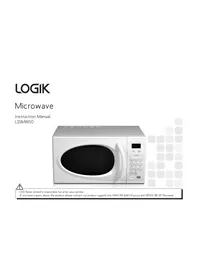


| Product Type | Microwave Oven |
| Brand | Logik |
| Model | L25MW10 |
| Capacity | 25 Liters |
| Dimensions (W x D x H) | Approx. 48 x 38 x 28 cm |
| Weight | Approx. 12 kg |
| Power Supply | 230 V, 50 Hz |
| Power Consumption | Approx. 1200 W |
| Microwave Power Output | 800 W |
| Controls | Digital touch panel with LED display |
| Main Functions | Defrost, Auto Cook, Timer, Express Cooking |
| Turntable | Glass turntable (removable) |
| Child Lock | Yes |
| Cleaning | Wipe interior with damp cloth; avoid abrasive cleaners |
| Safety Features | Auto shut-off, door interlock |
| Spare Parts | Glass plate, turntable roller ring |
| Repair Index | Score: 7.5/10 (based on user rating) |
| Documentation | Manual available in PDF (23 pages, EN) |
Frequently Asked Questions - L25MW10 Logik
User questions about L25MW10 Logik
0 question about this device. Answer the ones you know or ask your own.
Ask a new question about this device
Download the instructions for your Microwave in PDF format for free! Find your manual L25MW10 - Logik and take your electronic device back in hand. On this page are published all the documents necessary for the use of your device. L25MW10 by Logik.
USER MANUAL L25MW10 Logik

DSG Retail Limited is responsible for after-sales service.
If you have a query about the product, please contact our product support line: 0844 561 6263 (Currys) and 08700 118 117 (Pixmania).
Safety
First aid
Treat scalding by:
1. Quickly place the scald under cold running water for at least 10 minutes. 2. Cover with a clean, dry dressing. Do not use creams, oils, or lotions.

Fire
In the event of fire:
1. Keep the oven door closed. 2. Turn off the power. 3. Unplug from mains.

This appliance is not intended for use by persons (including children) with reduced physical, sensory, or mental capabilities, or lack of experience and knowledge, unless they have been given supervision or instruction concerning use of the appliance by a person responsible for their safety.
Children should be supervised to ensure that they do not play with the appliance.
If the supply cord is damaged, it must be replaced by the manufacturer, its service agent, or similarly qualified persons in order to avoid a hazard.
Important Safety Instructions
Please Read Carefully and Keep for Future Reference
Maintenance of your Microwave
It is hazardous for anyone other than a qualified technician to carry out any service or repair operation which involves the removal of a cover which gives protection against exposure to microwave energy.
If the door or door seals are damaged, the oven must not be operated until it has been repaired by a qualified technician. If smoke is observed, switch off or unplug the appliance and keep the door closed in order to contain any flames. If the supply cord is damaged, it must be replaced by a service agent or similar qualified technician. If you have a pacemaker, please contact your doctor before using a microwave oven.
Microwave use
This microwave is not intended for commercial use. It should never be used for drying clothes or other non-food purposes. The microwave should not be left unattended when in use. The temperature of accessible surfaces may be high when the appliance is operating. To prevent high moisture content gathering inside the oven cavity, open the door immediately after the cooking function has stopped to allow steam to escape. 1 Only use utensils that are suitable for microwave use. Refer to the section on the correct utensils to use in this appliance.
Care should be taken so metal objects are not left in the microwave. These include: metal cooking utensils, metal plates or trays, wire twist ties, crockery with metal trims, most thermometers, meat thermometer. Care should be taken when using paper, plastic, wooden or other combustible materials in the oven as they can catch fire. Oil and fat for deep frying should not be heated in the microwave. 1 Only use cling film designed for microwave use and take extra care when removing the film to avoid steam burns. 1 Only heat popcorn that has been designed for microwave use.
Cooking use
As the power of different microwave ovens can vary considerably, care must be taken when first using this appliance as it may cook faster than your old unit.
Do not leave the appliance unattended during use. Only allow children to use the oven without supervision when adequate instructions have been given so that the child is able to use the oven in a safe way and understands the hazards of improper use; DO NOT assume that because a child has mastered one cooking skill he/she can cook everything without close supervision. The microwave MUST NOT be treated nor used like a toy. Take care when cooking food with a high sugar or fat content, such as Christmas pudding or fruitcake. The sugar or fat can overheat and in some cases catch fire.
Cleaning
The oven should be cleaned regularly and food deposits removed. Failure to maintain the oven in a clean condition can affect the life of the appliance and possibly result in a hazardous situation.
(See cleaning your microwave)
Containers
Pressure will build up in sealed containers and can cause them to explode. Therefore, do not use the following in your microwave: sealed containers, capped bottles, vacuum containers, sealed jars, hard-boiled eggs, eggs in their shells, nuts. Always pierce the skin of fruit and vegetables, such as potatoes.
Delayed boiling
Liquids heated in a microwave can boil up when removing them from the microwave.
Take the following precautions
Always stir liquids, before and after cooking. Allow them to stand. Use containers that are wider at the top than the bottom.
Preparing food for babies
Extra care must be taken when preparing food or drink for babies and small children.
Always test the food or liquid temperature before giving it to baby. When using a baby bottle, ensure the teat is removed before heating. When warming milk, ensure the bottle is shaken.
Caution

During cooking, the outer surface will become hot. Do not touch the outer casing of the appliance. Care should be taken not to store any items on top of your microwave oven.
Electrical information
Before using this appliance, ensure that the voltage of your electricity supply is suitable for that indicated on the rating plate of the appliance. The ultimate disconnection from the power source is the mains plug. Always make sure it is easily accessible to be unplugged in the event of an emergency.

Earthing instructions
WARNING: THIS APPLIANCE MUST BE EARTHED.
- This appliance is equipped with a cord having an earthed plug.
- The plug must be plugged into an appropriate outlet that is installed and earthed in accordance with all local standards and requirements.
Warning!
- Improper connection of the appliance-earthing conductor can result in a risk of an electric shock.
- Check with a qualified electrician or service representative if you are in doubt whether the appliance is properly earthed.
- Never modify the plug provided with the appliance.
- If the plug does not fit properly in the mains socket, have a qualified electrician install a proper mains socket.
Contents
Contents
Unpacking and getting ready page 5
Getting to know your microwave
page 6
Introducing microwave cooking page 7
Setting the child lock page 12
Using the microwave page 13
Quick Start Cooking page 15
Auto Cook page 16
Defrosting page 18
Cleaning your microwave page 19
Using aluminium foil in your microwave page 20
Questions and answers page 21
Specification page 23
Unpacking and getting ready
1 After unpacking your oven, check that it hasn't been damaged whilst in the box. Make sure there are no dents, that the door closes properly, and that the door seal is not damaged. A dented or damaged oven could allow microwave energy to escape.
Make sure that you've removed all the packaging from inside the oven.
2 Choose a flat work surface for your microwave away from heat sources such as radiators or fires, and away from anywhere that's very cold.
You should allow a 10cm space all around the oven and 30cm above so that warm air can escape from the vents during cooking – it is not designed to be built in.

3 Plug your oven into a standard household electrical socket (240 volt, 13 amp rated).
Avoid using a socket that also has an adaptor and other equipment plugged in.
4 Put the turntable ring inside the oven and place the glass turntable on top of the ring. The turntable is shaped to sit securely on the spindle.
You must always use the turntable and ring whenever you use the microwave.

Unpacking
This microwave oven is designed for home use. It should not be used for commercial catering.
Getting to know your microwave
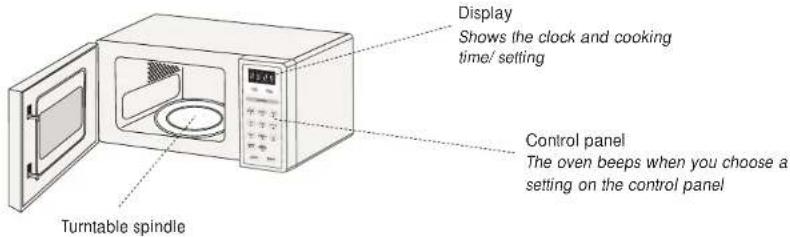
Accessories: (included)
Clock/pre-set button
Use this button for setting the clock and preset
Auto cook button
To quickly set cooking times for certain foods
Power Level button
Use this button to select the desired microwave power
Stop button
This button will stop cooking. If you press the button again, this clears the cooking settings
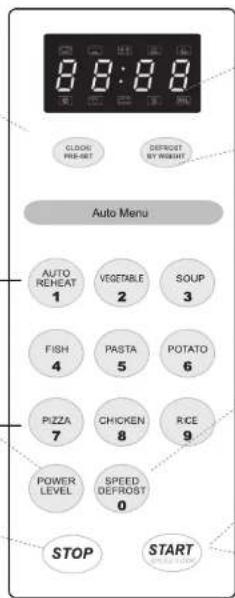
LED display
Shows the clock or cooking time/ setting
Defrost by weight button
Use this button to select the defrost by weight function.
Speed defrost button.
Use this button to select the speed defrost function.
Speed cook button.
Use this button to start full power cooking instantly, adding 30 seconds for each press.
Start button.
To start cooking.
Introducing microwave cooking.
Always remember the basic safeguards you would follow when using any cooking equipment or handling hot food.
This page gives some of the basic guidelines for microwave cooking.
Cooking with a microwave.

Cooking with a microwave is much faster than conventional cooking and, whilst you should make sure that food is fully cooked, you should be careful not to overcook it.

If you're cooking a number of individual foods at the same time, such as baked potatoes or small cakes, arrange them evenly on the turntable so that they cook evenly. Never stack food in your microwave.

Meat and poultry which is cooked for 15 minutes or more will brown lightly in its own fat. Anything cooked for a shorter time can be brushed with a browning sauce to give an appetising colour.
You should always have your microwave checked if it is dropped or damaged.

Microwave energy can heat unevenly, so stirring to distribute heat is very important. Always stir from the outside towards the centre.

Turn larger foods such as meat roasts and poultry during cooking so that the top and bottom cook evenly. It's also a good idea to turn chops and chicken pieces, especially if they contain the bone.

Strips of aluminium foil can be used to cover the thinner pieces of food to stop them overcooking before the thicker parts of the food have had a chance to cook. Use the foil sparingly and wrap around the food or container carefully to stop it touching the inside of the oven which could cause sparks.
Introducing microwave cooking
Safety
Never use equipment made of metal, except foil in your microwave oven.
The microwave energy can't pass through the metal so it bounces off and sparks against the inside of the oven.
Stop the microwave straight away if any equipment does cause sparks.
Remember that some crockery has a metal trim around the edge. Even this trim can cause sparks.
Safety
Never use scratched, cracked or damaged glass in a microwave. Damaged glass can explode.

Microwave ovens cook food using microwave energy that is similar to naturally occurring radio waves. Normally, these "waves" would fade as they disappeared into the atmosphere but in a microwave oven they are concentrated onto food causing it to heat up.
Microwave energy can't pass through metal – so it can't escape from inside your microwave oven – but it can pass through materials like glass, porcelain, plastic and paper. These are the things used to make microwave-safe cooking equipment.
Microwave-safe cooking equipment will still get hot as the food it contains heats up.

The microwave energy focuses on the moisture in the food causing lots of tiny vibrations. The vibrations get so great that the moisture – and the food – heat up.
Checking your cooking utensils
Most heat-resistant, non-metallic cooking utensils are safe to use in your microwave. If you're not sure you can use a utensil in your microwave, follow this simple test:
1. Put the utensil into the oven next to a cup of water – use a cup that you know is microwave-safe. Close the door. 2. Press the START button once, this will microwave the water for 30 seconds. 3. At the end of the time, carefully check to see if the water has warmed up. If the water hasn't warmed up but the utensil has, the utensil is not microwave-safe and should not be used in the oven.
More about getting the most from microwave cooking
Microwave heating categories
Your oven has been tested and labelled to meet the government's voluntary agreement on the reheating of pre-cooked food.

The heating characteristics and output power levels of microwave ovens are usually calculated using a relatively large portion of food (a 1000 gram load, IEC 705) but many packs of pre-cooked food are sold in smaller packs, often about 350 grams. The government, in partnership with food companies and microwave manufacturers, have set up a system of heating categories to help you choose the reheating time for pre-cooked food.
Introducing microwave cooking
Remember
Always check that the food is evenly cooked and piping hot before you serve it.
Introducing microwave cooking
Steam
When you microwave food, steam is created as water in the food heats up and evaporates.
The steam formed during microwave cooking is entirely safe. It has to escape from the microwave to prevent pressure from building up inside the oven. It does this through the vents on the back of the oven and from around the door.
Condensation
As the steam cools, you may find the condensation gathers in small pools inside your microwave and on the work surface beneath the door and vents.
Always dry the oven after cooking foods with a high moisture content.

Your microwave is designed to let steam escape from the vents and around the door without microwave energy escaping. There is no danger of microwave energy escaping with the steam.
Checking your microwave
Check your microwave after unpacking and whenever you think it might not be working properly.
1 Pull handle to open door. Put the turntable ring inside the oven and place the glass turntable on top of the ring. The turntable is shaped to sit securely on the spindle. You must always use the turntable and ring whenever you use the microwave. Place a cup of water on the turntable. Make sure the cup is microwave-safe – it shouldn't have any decorative metal trim.

2 Close the oven door.
3 Press the STOP button to clear any settings that have already been made.

4 Press the START/SPEED COOK button once.
The oven light comes on during cooking.

5 When cooking finishes, 5 beeps can be heard and 0:00 will be displayed.
At the end of the 30 seconds the water should be hot - be careful when you take the cup out of the oven.
Introducing microwave cooking

Safety
For your safety, the microwave stops if the oven door is opened during cooking. Close the door to continue the cooking cycle.
Setting the child lock
If the oven is turned off from the mains supply, the child-lock setting will be cancelled.
Hint
Your oven has a safety feature that prevents children from using your oven. Once the child lock is set, you will be unable to use any functions and no cooking can take place. However your child can still open the oven door.

Setting the Child Lock
The child lock is a safety feature which will lock all of the buttons on your microwave. This prevents your microwave being used accidentally. Your microwave door can still be opened.
1 Lock: In waiting state, press " STOP " for 3 seconds, there will be a long "beep" denoting entering into the child-lock state and LED will display "
STOP
2 Lock quitting: In locked state, press "STOP" for 3 seconds, there will be a long "beep" denoting that the lock is released.
STOP
Using the microwave
Basic microwave cooking
1 Make sure the glass turntable and the turntable ring are inside the oven.
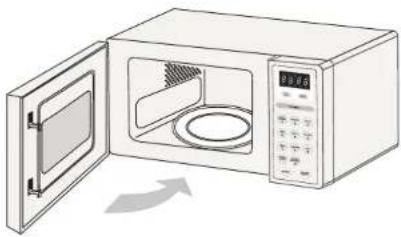
2 Choose the power level that you want to cook by pressing the POWER LEVEL button.
Note: 1) There are five power settings
(see the table on next page). High power is
automatically selected and repeated presses of the
POWER LEVEL key will select a different power level.
2) Once the desired power is selected, key in the cooking
time required using the numeral key pad. The maximum
microwave cooking time is 99 minutes and 99 seconds.
POWER LEVEL
3 Press START/ SPEED COOK
START
Example: choose 50% power for a cooking time of 10 minutes (1) Press " POWER LEVEL " 3 times; (2) Press the numeral pads of "1", "0", "0", "0" in sequence; (3) Press " START/ SPEED COOK " to start cooking, timing counts down.


Microwave Power Chart
| Press "Power level" | Mcirowave Power | Display | Application |
| Once | 100% | Reheat, boil water, cook vegetable and chicken | |
| Twice | 80% | Cook rice, fish and seafood, meats | |
| 3 times | 50% | Cook milk, cake, stew food | |
| 4 times | 30% | Defrost | |
| 5 times | 10% | Keep warm, soften ice cream |
Hint
When cooking has finished the microwave will beep 5 times.

Quick start cooking
This function is useful when heating small amounts of food or drink, Or adding extra time during cooking in the speed cook mode.
1 Put the turntable ring inside the oven and place the glass turntable on top of the ring. The turntable is shaped to sit securely on the spindle. You must always use the turntable and ring whenever you use the microwave.

2 Press the STOP button.
3 When the unit is in waiting state, press "START/SPEED COOK" to start cooking for 30 seconds with 100% microwave power. Each additional press will increase the cooking time by 30 seconds until the accrued time reaches 2 minutes or less. By then, each press will increase cooking time by 1 minute.

Example: set 3 minutes speedy cooking:
(1) Press "START/SPEED COOK" once; (2) Cooking begins; cooking time begins to countdown. (3) Press "START/SPEED COOK" 4 times

Microwave cooking
Hint

The quick start feature allows you to set 30 seconds intervals of HIGH power cooking with the touch of the START button.
Auto cook
Auto cook allows you to cook most of your favourite food easily by selecting the food type and weight of the food.
The numeral pads 1–9 matches nine different types respectively;
| Pad | CookDisplay | Pad | CookDisplay | Pad CookDisplay | ||||
| 1 | Auto Reheat | 4 | Fish | 7 | Pizza | |||
| 2 | Vegetable | 5 | Pasta | 8 | Chicken | |||
| 3 | Soup | 6 | Potato | 9 | Rice | |||
Example: to cook vegetable of 350g:
(1) Press pad "2" (2) Press pad "2" twice (3) Press START/SPEED COOK



Refer to the chart for the automatic menu procedure: After selecting the menu, continue to press to select the desired weight before pressing START/SPEED COOK
| Menu | Weight(g) | Times | Press | Display | Comments |
| 1Auto Reheat | 150 | 1m 20s | 1 | Make sure food is thoroughly heated through. | |
| 250 | 1m 50s | 2 | |||
| 350 | 2m 20s | 3 | |||
| 400 | 3m | 4 | |||
| 2Vegetable | 150 | 2m 20s | 1 | Add a few table spoons of water, cover with cling film,(suitable for microwaves ), and pierce with a fork before cooking | |
| 350 | 4m | 2 | |||
| 500 | 5m 50s | 3 | |||
| 3Soup | 150 | 2m 10s | 1 | Stir before serving. | |
| 250 | 3m 10s | 2 | |||
| 350 | 4m 20s | 3 | |||
| 400 | 5m 20s | 4 | |||
| 450 | 6m | 5 | |||
| 4Fish | 150 | 3m | 1 | Make sure food is cooked through before consuming,additional cooking maybe required, especially if thick pieces are used. | |
| 300 | 4m 30s | 2 | |||
| 450 | 6m | 3 | |||
| 600 | 7m 20s | 4 | |||
| 5Pasta | 50 | 18m | 1 | Pasta 50g + Cold water 450mlPasta 100g + Cold water 800mlPasta 150g + Cold water 1200ml | |
| 100 | 21m | 2 | |||
| 150 | 24m | 3 | |||
| 6Potato | 1 | 4m 30s | 1 | 1=200g For best results once the potatoes are2=400g cooked · wrap them in tin foil for at least3=600g 5 minutes to cook through | |
| 2 | 7m 10s | 2 | |||
| 3 | 9m 10s | 3 | |||
| 7Pizza | 1 | 50s | 1 | 1=80g This setting is designed for fresh pizza slices2=160g ( not frozen pizza )3=250g | |
| 2 | 1m 30s | 2 | |||
| 3 | 2m 10s | 3 | |||
| 8Chicken | 500 | 20m | 1 | Make sure food is cooked through before consuming,additional cooking maybe required, especially if thick pieces are used. | |
| 750 | 22m | 2 | |||
| 1000 | 24m 30s | 3 | |||
| 9Rice | 550 | 9m | 1 | Rice 200g+Boiling water 350ml | |
| 1100 | 15m | 2 | Rice 400g+Boiling water 700ml |
Note: The density and thickness of food can affect its cooking time, make sure all food is piping hot and cooked through before serving.
Microwave cooking
Defrosting
Be sure to remove any metallic ties or wraps.
1. Make sure the glass turntable and turntable ring are inside the oven. After putting your frozen food in the oven, close the door.

2. Defrost by Weight
Example: defrosting 500g of beef. (1) Press "DEFROST BY WEIGHT"; (2) Press "5", "0", "0" in sequence; (3) Press "START/SPEED COOK" to start defrosting.

DEFROST BY WEIGHT
PASTA 5
SPEED DEFROST 0
START SPEED COOK
3. Speed Defrost
Example: defrosting 500g of beef.
(1) Press "SPEED DEFROST"; (2) Press "5", "0", "0" in sequence; (3) Press "START/SPEED COOK" to start defrosting. Note: Time needed for defrosting under "Speed Defrost" is less than "Defrost by Weight" for the food with the same weight.
SPEED DEFROST 0
PASTA 5
START
Cleaning your microwave
Cleaning your oven each time you use it will help to prevent stubborn marks that can be difficult to clean.

Using aluminium foil in your microwave
It's safe to use aluminium foil in your microwave oven as long as you follow these safety guidelines.
As with all metal, microwave energy can't pass through foil, but provided that you keep the foil away from the side of the oven it won't cause sparks and there won't be any damage to your oven.
Using foil is a good way of shielding parts of food that you don't want to cook as quickly as others – perhaps where the food is narrower and would otherwise overcook.
Place the foil over the area you want to shield, taking care that the foil won't touch the sides of the oven when the turntable rotates. Only use one piece of foil at a time so that you don't get sparks between the separate pieces.
Follow these guidelines when using foil in your microwave:
Remove foil lids from containers before using in the microwave. Some lids are made of card with a foil covering – these should be removed too.
Use a microwave-safe transparent lid if possible.
Stir food during cooking if the container has a lid or film cover.
Always use the glass turntable.
Use shallow containers with a large surface area. Do not use containers that are more than 1.25in (3.5cm) deep.
Use oven gloves when handling hot foil containers.
Do not completely cover food with foil. The microwave energy cannot pass through the foil so the food won't cook.
Do not let aluminium foil touch the inside of the oven.
Do not use more than one piece of foil in the oven at the same time.
Questions and answers

Why doesn't food seem to cook?

Check that:
• the cooking time has been set - the door is closed - the power socket is not overloaded causing a fuse to blow.

Why does the food seem undercooked or overcooked?

Check that:
• the correct cooking time has been set • the correct power setting has been used.

How can I stop eggs from popping?

When you bake or poach eggs in the microwave, the yolk can sometimes pop as steam builds up inside it. You can stop the egg from popping by piercing the yolk with a toothpick before cooking.
Never cook eggs that are still in their shell.

Why is it so important that I allow standing time after cooking?

With microwave cooking, many foods build up enough heat inside them to continue cooking even after they've been taken out of the oven. Because microwave cooking works from the outside of food inwards, standing time lets you cook the centre of the food just right without the outside being overcooked.

Why does my oven sometimes take longer to cook than it says in the recipe?

First check that the oven was set just as the recipe said.
Cooking times and heat settings are suggestions to help prevent overcooking, but differences in the weight, size, shape, and starting temperature of food will all affect how long it takes to cook – just as it does with a conventional oven.
Use your judgement along with the recipe to check whether food has been cooked properly.

Why do I get condensation on the inside of the oven door?

Condensation is perfectly normal, especially when you're cooking food with a high moisture content such as potatoes.
Questions and answers
Does the microwave energy get through the window on the door?
A No. The door has a special metal screen with holes in it that lets you see inside but stops microwave energy from getting out.
Q Steam comes out of the side of the door and vents. Can microwave energy get out too?
A No. The door and vents are carefully designed to let steam out during cooking but keep microwave energy in. The gaps are not big enough for microwave energy to escape.
Q What happens if the microwave is switched on while the oven is empty?
A The microwave will be damaged. Don't switch the microwave on when there's nothing inside the oven. It's a good idea to keep a cup of water in the oven just in case someone accidentally starts the microwave.
Why won't the oven light come on?
A Open the door. If the light doesn't come on, the bulb has probably blown. Call a qualified repairer – don't try to change the bulb yourself.
There are sparks inside the oven when I use the microwave. Will this cause any damage?
A Yes. Make sure that you are not using any metal utensils and that your containers don't have a metal trim. You must not use metal in your microwave, except foil, when you cook.
Light is showing through the vents and door. Does this mean the microwave energy can escape?
A No. It's normal for the light to be visible and is nothing to be concerned about.
Why do I get interference on my TV and radio when I use the microwave?
A Microwave ovens use radio waves similar to those received by TVs and radios. You can lessen the interference by moving your microwave further away from the TV or radio.
Specification
Input 230V - 240V~, 50Hz
Output
850 - 900 Watts
Microwave frequency 2450MHz
Outside dimensions
511mm wide x 283mm high x 440mm deep
Power consumption
Microwave 1450 - 1550 Watts
Complies with EEC directives 89/336/EEC and 92/31/EEC.
Dimensions shown are approximate.
Because we continually strive to improve our products, we may change specifications without prior notice.
Partmaster.co.uk
Visit Partmaster.co.uk today for the easiest way to buy electrical spares and accessories.
With over 1 million spares and accessories available we can deliver direct to your door the
very next day.
Visit www.partmaster.co.uk
or call
0870 6001 338
(UK customers only)
Calls charged at National Rate.

This symbol on the product or in the instructions means that your electrical and electronic
equipment should be disposed at the end of its life separately from your household waste.
There are separate collection systems for recycling in the EU.
For more information, please contact the local authority or your retailer where you purchased
the product.

DSG Retail Limited is responsible for after sales services.
If you have a query about the product please contact our product support line
0844 561 6263 (Currys) and 08700 118 117 (Pixmania).
- SAFETY
- FIRST AID
- FIRE
- IMPORTANT SAFETY INSTRUCTIONS
- PLEASE READ CAREFULLY AND KEEP FOR FUTURE REFERENCE
- MAINTENANCE OF YOUR MICROWAVE
- MICROWAVE USE
- COOKING USE
- CLEANING
- CONTAINERS
- DELAYED BOILING
- PREPARING FOOD FOR BABIES
- CAUTION
- ELECTRICAL INFORMATION
- EARTHING INSTRUCTIONS
- WARNING: THIS APPLIANCE MUST BE EARTHED
- WARNING
- CONTENTS
- UNPACKING AND GETTING READY
- UNPACKING
- INTRODUCING MICROWAVE COOKING
- COOKING WITH A MICROWAVE
- CHECKING YOUR COOKING UTENSILS
- MORE ABOUT GETTING THE MOST FROM MICROWAVE COOKING
- MICROWAVE HEATING CATEGORIES
- REMEMBER
- STEAM
- CONDENSATION
- CHECKING YOUR MICROWAVE
- SETTING THE CHILD LOCK
- HINT
- USING THE MICROWAVE
- BASIC MICROWAVE COOKING
- QUICK START COOKING
- MICROWAVE COOKING
- AUTO COOK
- DEFROSTING
- DEFROST BY WEIGHT
- SPEED DEFROST
- CLEANING YOUR MICROWAVE
- USING ALUMINIUM FOIL IN YOUR MICROWAVE
- QUESTIONS AND ANSWERS
- WHY DOESN'T FOOD SEEM TO COOK
- WHY DOES THE FOOD SEEM UNDERCOOKED OR OVERCOOKED
- HOW CAN I STOP EGGS FROM POPPING
- WHY IS IT SO IMPORTANT THAT I ALLOW STANDING TIME AFTER COOKING
- WHY DOES MY OVEN SOMETIMES TAKE LONGER TO COOK THAN IT SAYS IN THE RECIPE
- WHY DO I GET CONDENSATION ON THE INSIDE OF THE OVEN DOOR
- SPECIFICATION
- PARTMASTER.CO.UK
Brand : Logik
Model : L25MW10
Category : Microwave