MCP20GRA - Pregnant Pure Acoustics - Free user manual and instructions
Find the device manual for free MCP20GRA Pure Acoustics in PDF.


| Product Type | Active Bookshelf Speaker |
| Brand | Pure Acoustics |
| Model | MCP20GRA |
| Color | Gray |
| Dimensions (W x H x D) | 6.3 x 9.1 x 7.5 inches (16 x 23 x 19 cm) |
| Weight | 5.5 lbs (2.5 kg) |
| Power Output | 30W RMS |
| Impedance | 8 ohms |
| Frequency Response | 60 Hz - 20 kHz |
| Driver Size | 4-inch woofer and 1-inch tweeter |
| Inputs | AUX (3.5mm), Bluetooth 5.0 |
| Power Supply | AC 100-240V, 50/60Hz |
| Standby Power Consumption | < 0.5W |
| Main Features | Bluetooth streaming, built-in amplifier, bass reflex port |
| Controls | Volume knob, power button, source selector |
| Cleaning Instructions | Wipe with a soft, dry cloth. Do not use solvents. |
| Safety Warnings | Do not expose to water or high humidity. Keep away from heat sources. |
| Spare Parts Availability | Contact Pure Acoustics support for replacement drivers or power supply. |
| Repairability | Designed for service by qualified technicians only. |
| Warranty | 1 year limited warranty |
Frequently Asked Questions - MCP20GRA Pure Acoustics
User questions about MCP20GRA Pure Acoustics
0 question about this device. Answer the ones you know or ask your own.
Ask a new question about this device
Download the instructions for your Pregnant in PDF format for free! Find your manual MCP20GRA - Pure Acoustics and take your electronic device back in hand. On this page are published all the documents necessary for the use of your device. MCP20GRA by Pure Acoustics.
USER MANUAL MCP20GRA Pure Acoustics
natural_image
White portable electronic device with two red speaker reels and a black handle (no visible text or symbols)MCP-20 Supreme Portable Karaoke Machine
pure acoustics® THE PURE SOUNDS OF LIFE
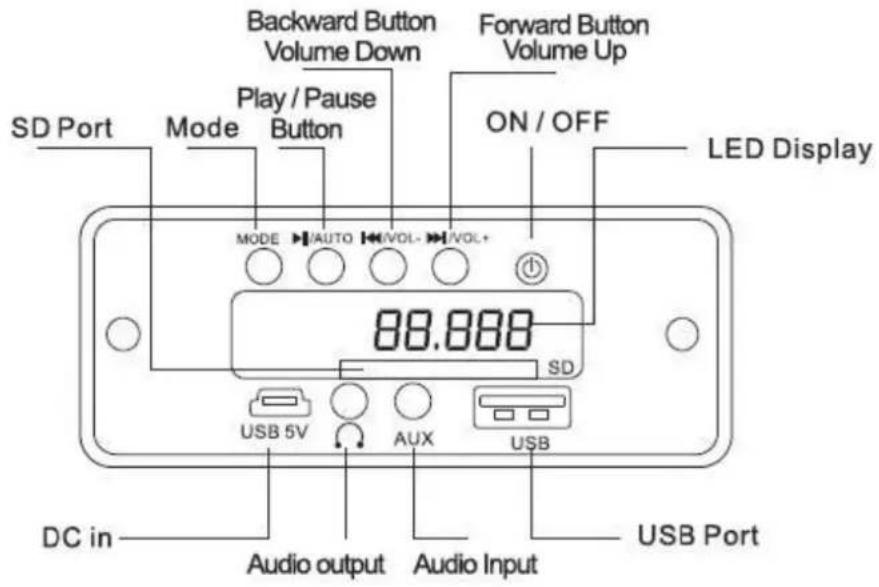
Control Panel
t
FEATURES
- Plays MP3 Files stored on your SD Card or USB Flash drive
• *Max Capacity 8GB for SD Card or USB Port
• Rechargeable Lithium Ion ba ery - Play/Pause /Forward/Rewind Bu ons on unit & remote for easy access.
• Full Func on Infrared Remote Control - On/O Power switch
- AUX IN to connect to External Audio Players (ipods®/iphones®/ipads®/smartphones® etc.)
• Audio output/Headphone port
Charging the Unit
- Place the supplied Rechargeable Lithium-ion battery (BL-5C) into the battery compartment on the back of the unit. Connect one end of the supplied USB cable to your computer or Compa ble USB AC/DC Adaptor (not included) & the other end o he cable to the speaker to charge the speaker unit. The Red charging light on the control panel will come on. Do not charge the unit for more than 5 hours as this will a ect the Battery Life.
- DO NOT USE THE UNIT WHILE CHARGING THE BATTERY.
- You can use the Unit without the ba ery in the ba ery compartment, as long as the unit is connected to a compa ble USB power source.
Playing MP3 les through the speaker using the SD Card or USB S ck
The control panel is located on the front of the Speaker Unit.
- Plug in your USB connec ble device and/or SD Card in the slots provided. Please make sure to you use the correct le format in your media devices — MP3 FILES ONLY.
- Turn the power switch to the on posi on; the LED display will come on. Press the "MODE" bu on on the Unit or Remote to switch between USB, SD, FM Radio or AUX modes. The les from your media should start playing, If music does not play, press the PLAY/PAUSE bu on to ensure that the device is in PLAY mode. Please ensure that your speaker is fully charged & that your les are in MP3 format, & that the Mode bu on is on the correct source.
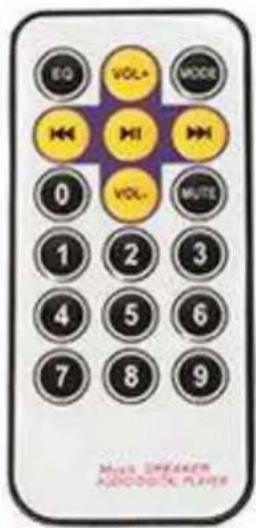
- Turn up the volume to the desired level, either from the unit's volume control on the control panel by pressing & holding (2-3 Seconds) PREV/VOL- for Volume Down or NEXT/ VOL + for Volume up, or from the remote by pressing Vol- for Down or Vol+ for up. The Sound Output quality o the speakers will depend on the quality of the MP3 les not the device itself
- Short Press the PREV/ VOL - to listen to the previous track or NEXT/ VOL + to skip to the next track or press | 4 4 bu on to listen to the previous track or F > | on the Remote Control.
- To PAUSE a track, press the PLAY/PAUSE bu on from the Control Panel or the > signal | from the Remote Control.
- Please remember to power o the Speaker before removing the USB Disk or SD Card as this may damage the unit and/or the storage device.
- FAILURE TO FOLLOW ANY or ALL OF THESE INSTRUCTIONS MAY DAMAGE THE SPEAKER SYSTEM & WILL VOID THE WARRANTY .For external Devices such as iPods ^® , iPhones ^® , iPads ^® , smartphones, MP3, MP4 players or other audio devices, use the included 3.5mm to 3.5mm cable and connect it to the AUX input port. Press AUX on the unit or press MODE on the remote control to switch to AUX mode.
PLEASE NOTE THAT WHILE IN AUX MODE, THE VOLUME CAN ALSO BE CONTROLED FROM YOUR EXTERNAL DEVICE OR FROM THE SPEAKER/REMOTE.
USING THE FM Radio Func on from the Speaker
- Press the Mode bu on on the speaker unit or Remote Control to receive FM Frequency.
- Press & hold (2-3 seconds) the PLAY/ PAUSE bu on on the unit to auto scan and the unit will store the frequencies with strong signal recep on into the preset sta ons. Use PREV/VOL - & NEXT/VOL + bu ons to switch between preset sta ons.
- From the Remote Control, Press I 4 4 or V P | to switch between the preset sta ons.
- To Tune into a speci c frequency, please use the remote control number pad by directly entering a frequency number.
Using a microphone
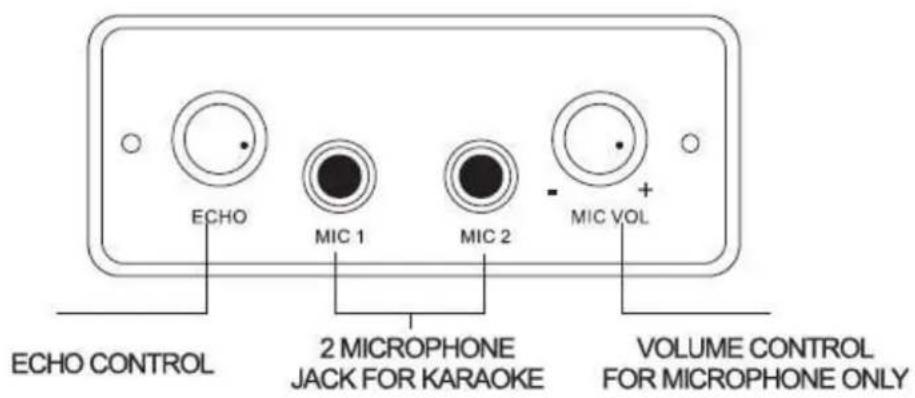
- When using a Microphone — plug your microphone into one of the 2 microphone ports on the front of the unit.
- Use the ROUND DIALS to control the Voice Level & Echo of the microphones.
- For Karaoke use USB/SD/FM and for Mic solo use "Line in" selection in "Mode".
REMOTE CONTROL
iPod ^® , iPhone ^® & iPad ^® , are registered Trademarks of Apple Computer Inc. This product is not Designed, Manufactured or Distributed by Apple Computer Inc. All other Trademarks & Trade Names belong to their respective owners.
Please keep this manual in a safe place for future reference.