
BIC95T - Cooker BLANCO - Free user manual and instructions
Find the device manual for free BIC95T BLANCO in PDF.


| Product Type | Built-in Induction Cooktop |
| Brand | BLANCO |
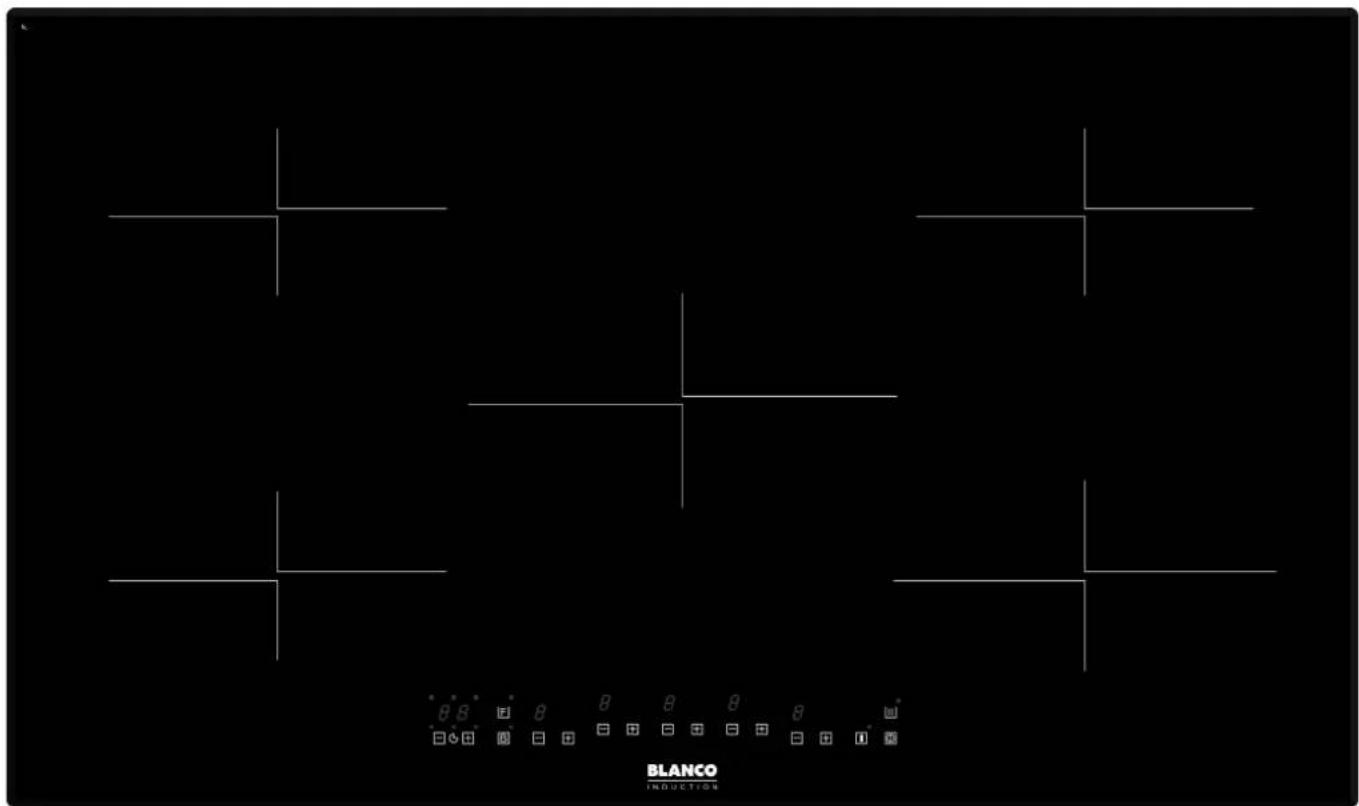
| Model | BIC95T |
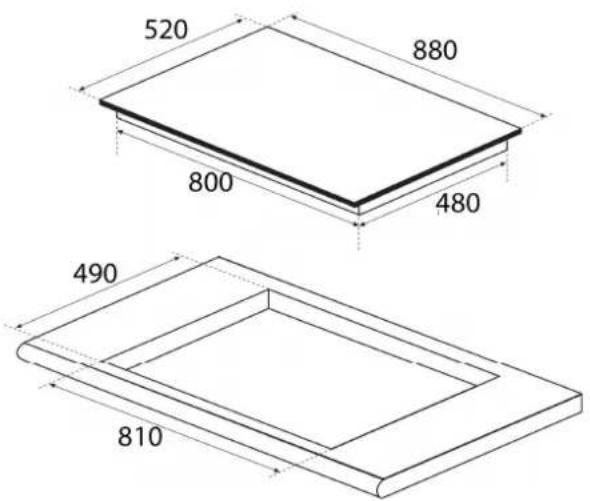
| Dimensions (Cooktop) | 880 x 520 x 50 mm (L x W x H) |
| Dimensions (Cut-out) | 810 x 490 mm (L x W) |
| Rated Voltage | 220-240V~ 50Hz (single phase) or 380-415V 2-phase 50Hz |
| Total Power | 7400 W |
| Power Supply Connection | Hardwired (no plug) |
| Number of Cooking Zones | 5 |
| Zone Positions and Nominal Power | Front Left: 1850 W (Boost 2300 W, Super Boost 3000 W, Ø220 mm) Rear Left: 1850 W (Boost 2300 W, Super Boost 3000 W, Ø220 mm) Middle: 2600 W (Boost 3300 W, Super Boost 3700 W, Ø280 mm) Rear Right: 1850 W (Boost 2300 W, Super Boost 3000 W, Ø220 mm) Front Right: 2100 W (Boost 2600 W, Super Boost 3700 W, Ø250 mm) |
| Minimum Pan Detection Diameter | 100 mm (for front left, rear left, rear right); 110 mm (for middle and front right) |
| Key Functions | Boost, Super Boost, Key Lock, Stop N Go, Minute Minder, Timer, Auto Cooking, Melting, Keep Warm, Recall |
| Control Type | Touch controls with LED displays |
| Safety Features | Pan detection, residual heat indicator (H), overheat protection, automatic shut-off, key lock |
| Cleaning | Clean with warm damp cloth and mild soap; avoid abrasive cleaners and scrapers; remove spills promptly |
| Installation Requirements | Minimum 50 mm from walls; workbench thickness 30-40 mm; ventilation gap of at least 20 mm below; heat-resistant materials (min 80°C) |
| Electrical Installation | Must be done by licensed electrician; all-pole disconnection with 3 mm contact opening; cable type H05RN-F, H07RN-F, etc. |
| Warranty | 24 months (Australia/NZ); additional 36 months on sealed system parts for refrigeration/dishwasher (labour not included) |
| User Manual Pages | 20 pages |
Frequently Asked Questions - BIC95T BLANCO
User questions about BIC95T BLANCO
0 question about this device. Answer the ones you know or ask your own.
Ask a new question about this device
Download the instructions for your Cooker in PDF format for free! Find your manual BIC95T - BLANCO and take your electronic device back in hand. On this page are published all the documents necessary for the use of your device. BIC95T by BLANCO.
USER MANUAL BIC95T BLANCO
Instruction Manual for
Induction Cooktops
BIC95T
Dear Customer,
Thank you for buying a BLANCO Induction Cooktop.
Before we continue telling you about this cooktop, we cordially invite you to become part of the Blanco family by subscribing online. Please visit our website where you can easily register for product/cooking demonstrations, and request Blanco's gourmet recipes. Go to www.blanco-australia.com and fill in the subscription details in the contact us/showrooms section.
You will find that the clean lines and modern look of your Blanco Induction cooktop blends in perfectly with your kitchen décor. It is easy to use and performs to a high standard.
Blanco also makes a range of products that will enhance your kitchen such as ovens, rangehoods, dishwashers, microwaves, sinks and taps. There are models to complement your new Blanco Induction cooktop.
Of course, we make every effort to ensure that our products meet all your requirements, and our Customer Relations department is at your disposal, to answer all your questions and to listen to all your suggestions.
Please complete the warranty card and keep your receipt as proof of purchase. Retain all documents relating to the purchase of this product.
Blanco is committed to providing increasingly efficient products that are easy to use.
Read these instructions carefully before using your cooktop and keep them in a safe place.
If you follow the instructions, your cooktop will provide you with many years of good service.
TABLE OF CONTENTS
| SECTION | PAGE | NO. | ||
| Appliance Details | Important | Safety | Instructions | ...... |
| Operating | Instructions | 3-7 | ||
| Cleaning | 8 | |||
| Electrical Connections | 9 | |||
| Installation | 10-11 | |||
| Trouble Shooting and Error Codes | 12 | |||
| Warranty | 16 | |||
IMPORTANT SAFETY INSTRUCTIONS
IMPORTANT: Read the assembly instruction section and safety precautions of this booklet carefully before removing the contents of this carton.
- This appliance is not intended for use by persons (including children) with reduced physical, sensory or mental capabilities, or lack of experience or knowledge, unless they have been given supervision or instruction concerning the use of the appliance by a person responsible for their safety. Children should be supervised to insure that they do not play with the appliance.
- After removing the packaging, make sure to check if there is any damage to the appliance. If there is any damage, never attempt to use the appliance and immediately contact your Authorised Service Centre. As packaging materials can be dangerous to children, they need to be collected immediately and put out of reach.
- In certain circumstances electrical appliances may be a danger hazard. Check the conformity of voltage and power settings, which are specified on the information plate attached to the appliance and/or packaging, with the usage conditions available.
- Do not place heavy objects in or on these appliances, use for storage or as a cutting surface as sharp edges can damage the surface. This appliance is designed for cooking food only. Use flat based, stable, inductive cooking rated cooking vessels only.
- This appliance is designed for domestic household use only and for the cooking of domestic food products. Use as a commercial appliance will void the warranty. It should not be used in a marine environment or outdoors and must be fully built in. Do not use the appliances until fully installed.
- A means for disconnection must be incorporated in the fixed wiring in accordance with the wiring rules.
- The electrical connection must be accessible after installation. The appliance must be electrically isolated before any maintenance can be performed.
- The appliance is not intended to be operated by means of an external timer or separate remote control system.
- Electrical connection must be made as per local wiring rules and regulations. Do not disconnect the appliance with wet hands or bare feet, and do not disconnect the power cord with extreme force.
- Ensure that the kitchen is well ventilated or mechanical ventilation is in use while cooking on this appliance.
- Do not store or use flammable materials or aerosols near the cooktop. Items made from aluminium, plastic, plastic film & sugar based foods should also be kept away from the appliance, as they may fuse to the surface.
- Heat from the underside of the unit will be expelled by inbuilt fans – do not block. It is essential that the installation instructions relating to ventilation are followed, otherwise the appliance can fail.
- WARNING - The cooktop will become hot during and directly after use. Do not touch the surface during this time, as it may be hot and can cause burns. To avoid burns, children should be kept away.
- Cleaning may only be commenced on the appliance once it has cooled down and is turned off. Failure to clean properly can damage the unit. Do not use a steam jet or any other high pressure cleaning equipment to clean the appliance.
- When the appliance is not being used, turn the appliance off. Do not cover with any type of protection sheet or cloth, as these may ignite and burn.
- Where this appliance is installed in a caravan, it shall NOT be used as a space heater.
- Do not modify this appliance. Remove all labels from the glass cooktop before operating.
- Do not use harsh abrasive cleaners or sharp metal scrapers to clean the glass surface as they can scratch the surface, which may result in the glass shattering. Clean the glass using a warm damp cloth (e.g. dishcloth) and dry it with a soft dry tea towel.
- Do not install this appliance above a dishwasher or clothes dryer, as the steam may damage the internal circuitry.
-
If any cracking or chipping is noticed on the cooktop, turn the appliance off immediately and call your Authorised Service Centre.
-
All cabinetry and materials used in the installation must be able to withstand a minimum temperature of 80irc C whilst in use. Certain types of vinyl or laminate kitchen furniture are particularly prone to heat damage or discolouration at temperatures below the guidelines given above. Any damage caused by the appliance being installed without adhering to the temperature limits set out above will be the liability of the owner. To avoid any hazards, limit access to the under-bench section of the cooktop.
- The appliance must be installed and put into operation by an authorised person under the conditions provided by the manufacturer in this manual. The manufacturer cannot be held responsible for any damage that might occur due to faulty installation.
- Damage can occur to bench tops if pots and pans are allowed to overlap the bench top. This can result in heat being transferred to the bench top. Ensure that correct sized pots & pans are used. Pans should be lifted on and off the cooktop surface and not dragged. Cooking zones should not be switched on without cookware placed on it. Do not place empty cookware onto the cooking zones when in use.
- Do not leave the cooktop unattended while cooking with solid or liquid oils. There may be flaming up in conditions of extreme heating. Never pour water onto the flames occurring from oil. Immediately turn the cooktop off and cover the pan with a lid or fire blanket in order to smother the flame.
- Users with pacemakers should keep their upper body at least 30cm away from any operational inductive cooking zone. If in doubt, please consult your doctor before use.
- Do not place metal objects such as spoons or pan lids onto the cooktop as they may become hot or cause damage to the surface.
- A small amount of noise will sometimes be heard as elements turn on & off during operation. This is normal & not a fault. The sound of the fans will vary depending on cooking zone usage.

DO NOT OPERATE THIS APPLIANCE BEFORE READING THE INSTRUCTION BOOKLET
DO NOT PLACE ARTICLES ON OR AGAINST THIS APPLIANCE DO NOT STORE CHEMICALS OR FLAMMABLE MATERIALS OR SPRAY AEROSOLS NEAR THIS APPLIANCE
APPLIANCE DETAILS
ELECTRICAL DETAILS:
COOKTOPS:
Rated Voltage: Single phase 220-240Vac 50Hz, 2-phase 380-415Vac 50Hz: 7400W.
This information can be found on the rating plate (identification plate) affixed to the underside of the appliance.
| Type | Total Power | Position of the heating zone | Nominal Power* | Booster Power* | Super Boost Power* | Diameter | Minimum diameter detection |
| Induction | 7400 W | Front left | 1850 W | 2300 W | 3000 W | 220 mm | 100 mm |
| Rear left | 1850 W | 2300 W | 3000 W | 220 mm | 100 mm | ||
| Middle | 2600 W | 3300 W | 3700 W | 280 mm | 110 mm | ||
| Rear Right | 1850 W | 2300 W | 3000 W | 220 mm | 100 mm | ||
| Front Right | 2100 W | 2600 W | 3700 W | 250 mm | 110 mm |
* The given power may change according to the dimensions and material of the pan. Nominal power on cooking zones may adjust lower when the boost function is being used on other cooking zones, to keep the appliance from exceeding the rated total power.
COOKTOP – Directly wired to mains supply.
SIZES:
| Relevant Sizes: | LENGTH (mm) | WIDTH (mm) | HEIGHT (mm) |
| Cooktop Size (BIC95T) 880 520 50 | |||
| Cut-out Size (BIC95T) 810 490 - |
OPERATING INSTRUCTIONS
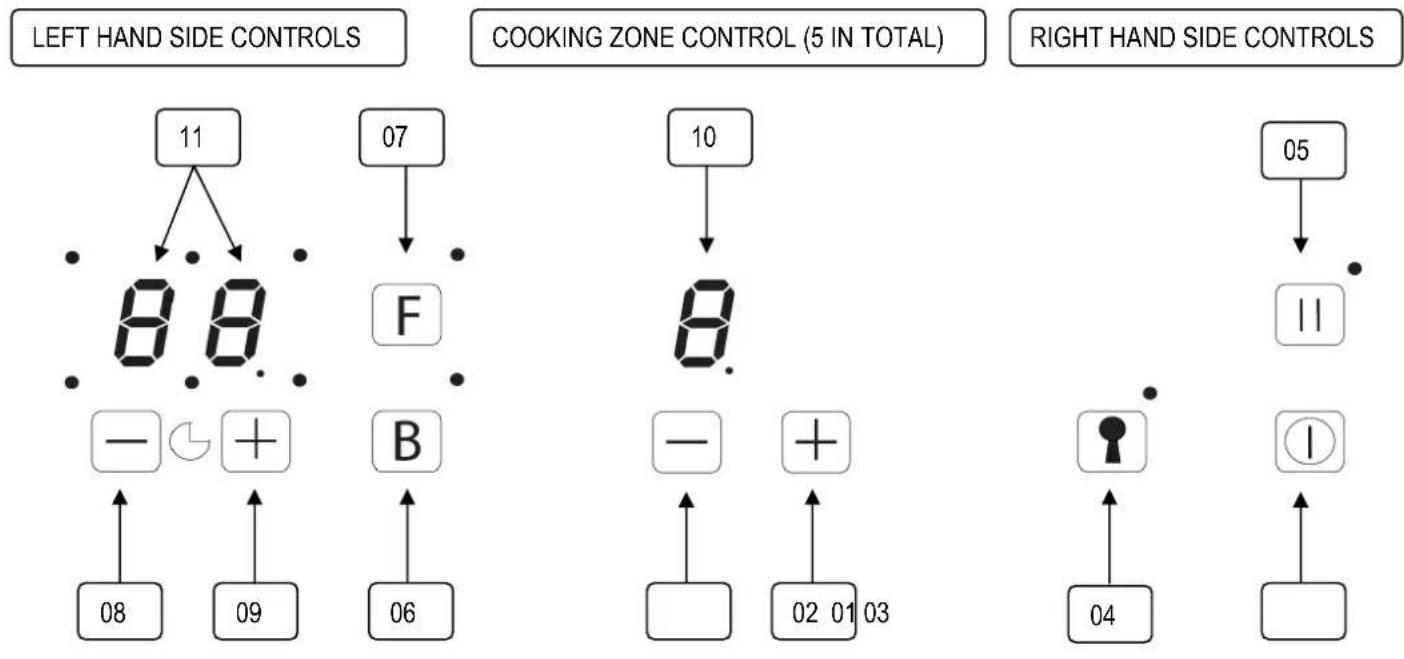
The basic layout of the induction cooktop is shown in the diagrams below.
flowchart
graph TD
    A["LEFT HAND SIDE CONTROLS"] --> B["11"]
    B --> C["88"]
    C --> D["07"]
    D --> E["F"]
    E --> F["10"]
    F --> G["8"]
    G --> H["-"]
    H --> I["02 01 03"]
    I --> J["+"]
    J --> K["04"]
    K --> L["1"]
    L --> M["RIGHT HAND SIDE CONTROLS"]
    N["COOKING ZONE CONTROL (5 IN TOTAL)"] --> O["05"]
    O --> P["II"]
    P --> Q["•"]
    Q --> R["•"]
    R --> S["•"]
    S --> T["•"]
    T --> U["•"]
    U --> V["•"]
    V --> W["•"]
    W --> X["•"]
    X --> Y["•"]
    Y --> Z["•"]
| DESCRIPTION | DESCRIPTION | ||
| 01 | On/off power touch control 07 Melting and Keep Warm Functions touch control & indicator | ||
| 02 | Cooking Zone Increase Power touch control 08 Increase Timer touch control | ||
| 03 | Cooking Zone Decrease Power touch control 09 Decrease Timer touch control | ||
| 04 | Key Lock Function touch control & indicator 10 Cooking Zone Power LED display | ||
| 05 | Stop N Go Function touch control & indicator 11 Timer LED display & Zone indicators | ||
| 06 | Boost Power touch control | ||
The induction cooktop appliance is operated by touching the control buttons, with the functions confirmed by LED displays and acoustic signals. Clean glass surface with a damp cloth and dry before use.
Note: All cooking zones have a pre-set limit on the length of time they will run without any setting changes (table further in the manual).
Turning On and Turning Off the Cooktop Appliance
NOTE: Do not operate the cooktop without first placing a suitably sized cooking vessel on the appropriate cooking zone. If the correct sized cooking vessel is not placed on the cooking zone, the Cooking Zone Power display will indicate pan not detected. Settings can be changed, but the zone will not work until the pot is replaced.
If the appliance is in Stand-By-Mode, it is put into Operating-Mode by pressing the On/Off touch control for at least 1 second. A beep signal indicates the successful operation acoustically.
On all Cooking Zone Power LED Displays a '0' will appear.
- If there is no operation within 10 seconds, all the Cooking Zone Power LED Displays will automatically turn off and the appliance will be re-set into Stand-By-Mode.
- If On/Off is pressed for more than 1 second (in Operating-Mode), the appliance is switched off and is set into the Stand-By-Mode again. The appliance can be turned off by pressing On/Off at any time.
- If there is any residual heat remaining in a cooking zone, this will be indicated in the corresponding Cooking Zone Power LED Display as a red "H".
- Note: All cooking zones have a pre-set limit on the length of time they will run without any setting changes (table further in the manual).
Operating A Cooking Zone
Each cooking zone has its own controls (between the left hand side controls and right hand side controls). From left to right, they are left front, left rear, centre, right rear and right front.
- A cooking zone can be activated by pressing either the Cooking Zone Increase Power touch control (02) which sets the power level at 4 or Cooking Zone Decrease Power touch control (03) which sets the power level to 9. The power level is displayed in the Cooking Zone Power LED display (10) above the touch sensors.
- The values can then be increased or decreased (from 0-9) using the same touch sensors. All of the other cooking zone displays will have a visible 'O', value (if in use) or 'H' (if recently used).
- The Cooking Zone Power touch Controls can be pressed at any time to adjust the power level.
- The Cooking Zone Power LED Display (10) works on a thermostat system. This means that the cooking zone will switch on and off in order to remain at the chosen Power Level. NOTE the cooking zone will remain on for longer periods if a higher Power Level is chosen, alternatively the cooking zone will be on less regularly on lower Power Level Settings.
Turning Off Individual Cooking Zones
A particular cooking zone can be turned off in 2 different ways:
- Simultaneously press the Cooking Zone Increase Power touch control (02) and the Cooking Zone Decrease Power touch control (03). A beep signal will sound and "0" appears in the Cooking Zone Power LED Display of the selected cooking zone.
- Reduction of the power level to "0" by operating the Cooking Zone Decrease Power touch control. If there is residual heat from this hotplate remaining, a red 'H' will be shown in the Cooking Zone Power LED Display.
The Boost and Super Boost Functions
The Boost and Super Boost functions are available on all of the cooking zones. They are used to speed up the initial heat up time (say boil a pot of water) and only runs for a short time (10 minutes).
- Place the cookware on the appropriate cooking zone.
- Press the Boost Power touch control (06) once for the boost function (the indicator above the touch control will be lit) or twice for the Super boost function (the indicator above the touch control will flash). While the indicator is on, press the Cooking Zone Increase Power touch control (02) of the cooking zone, and its Cooking Zone Power LED Display (10) will show "P" (Boost function) or it will flash II, II, P (Super Boost function.
- Once the 10 minutes has passed the Cooking Zone Power LED Display will change to 9 and the cooking zone power level will drop to 9.
- Note: The Boost and Super Boost functions use significantly more power than the nominal power (see appliance details). If used in conjunction with other cooking zones, the max power available on the other cooking zones may be reduced to keep power usage within the total allowed.
To disable the Boost functions, press the Cooking Zone Decrease Power touch control (03) and the power level will turn down to 9. The power level can now be adjusted as normal.
Activating The Key Lock
The key lock is used to set the appliance up so that it cannot be operated without disabling the lock. This is a useful feature when cleaning down the glass, or to stop children playing with the controls while in use.
- Put into Operating-Mode by pressing the On/Off touch control for at least 1 second.
- Set any cooking zone power levels and functions (if needed).
- Press the Key Lock Function touch control (04) for 2 seconds until the indicator above the touch control lights up. The Key Lock is now active, and the only touch sensor that will work is the On/Off touch control.
- The Key Lock function remains active if the appliance is sent into Stand-By-Mode, and turned back on (note the cooking zones and functions will be turned off, but the Recall function can be used).
- To unlock the control panel, put the appliance into Operating-Mode and press the Key Lock Function touch control (04) for 2 seconds until the indicator above the touch control turns off. The Key Lock will stay active even if the power is disconnected for a short period of time.
Minute Minder Function
The Minute Minder function is a timer that does not affect any operation on the appliance, but can be used as a reminder to take action (add a spice, turn meat etc.).
- The appliance must be in Operating-Mode (any cooking zone can be running).
- Press the Increase Timer touch control (08) and Decrease Time touch control (09) simultaneously for a second. The Timer LED display (11) will display "00" (the current set time), its decimal point will be lit (the timer is active and can be adjusted) and the indicator between and below the Timer LED display will flash (Minute Minder function is active and is being displayed).
- Within 5 seconds, adjust the time setting by using the Increase Timer touch control (08) and Decrease Timer touch control (09) (from 00 to 99 minutes) until the desired length of time is set. The timer starts as the last button is pressed. 10 seconds after the last button is pressed, the Timer LED display decimal point will turn off (Timer is no longer active), the Minute Minder indicator will continue to flash and the Timer LED display will start counting down to "00". If no cooking zone is active, the appliance will change to the Stand-By-Mode, but the Minute Minder function will continue to operate.
- When the set time has passed, the appliance starts to beep, and the Timer LED display will flash "00". Press either Timer touch sensor to turn the sound off and return the appliance to display its operations as before.
- The Minute Minder time can be adjusted at any point by activating the function and adjusting as above. To disable the function, adjust the time to "00".
- The Minute Minder function can be used in conjunction with other Timer functions.
Timer Function
The timer function differs from the Minute Minder function in that it will turn off a cooking zone at the end of the time. It can be set for one or more cooking zones (each working independently). The Timer functions are set up in the same way as the Minute minder function.
- First set up the appliance with cookware placed on cooking zones and set all power levels (the timer function cannot be set up if the cooking zone is inactive).
- Press the Increase Timer touch control (08) and Decrease Time touch control (09) simultaneously for a second (as per the Minute Minder function, the Minute Minder indicator will be flashing).
- Repeat the operation. A new Timer Zone indicator will begin to flash which is for the first active cooking zone (this cycles through clockwise from the Left Front cooking zone around to the Right Front cooking zone, and back to the Minute Minder). Once the correct indicator is flashing, the time can be set as per the Minute Minder function.
- Multiple timers can be set at the same time, as well as the Minute Minder function.
- When all timers are set, leave the touch sensors for 10 seconds. The Timer LED display decimal point will turn off and the Timer Zone indicator (or Minute Minder indicator) with the shortest time will start to flash, and the shortest time will be displayed.
- When a timer function finishes, the appliance will start to beep indicating the cooking zone has finished. The cooking zone will turn off and the Timer LED display will flash "00" for 2 minutes (unless a button is pressed). The Timer will then swap to the next shortest timer function. If all timer functions finish and there are no other cooking zones active, the appliance will return to the Stand-By-Mode after the alarm finishes.
Auto Cooking Function
The Auto Cooking Function allows you to set any or all cooking zones up so that they run at a high power level for a period of time, and then drop the power down to a lower level.
- The appliance must be in set to Operating-Mode with cookware in place (the cooking zone can be off or running).
- Press the Cooking Zone Increase Power touch control (02) until the power level reaches 9, then press 9 again (Cooking Zone Power LED Display (10) changes to "A").
- Press the Cooking Zone Decrease Power touch control (03) until the lower power level is displayed. The Cooking Zone Power LED Display will start to alternate between "A" and the lower power level. See table for times on next page.
- The lower power level can be adjusted higher once, and after that, any adjustment will reset the power level to 9.
Melting and Keep Warm Functions
The Melting and Keep Warm Functions can be used to keep food at a certain temperature for long periods of time (up to 2 hours). The cookware can be removed from the element for up to 10 minutes without disabling the function.
- The appliance must be set to Operating-Mode.
- Press the Melting and Keep Warm Functions touch control (07) once to select the Melting Function (temperature set at approximately 42irc C), and select a cooking zone by pressing the Cooking Zone Increase Power touch control (02). The Cooking Zone Power LED Display (10) of the selected cooking zone will change to “u”.
- Press the Melting and Keep Warm Functions touch control (07) twice to select the Keep Warm Function (temperature set at approximately 70irc C), and select a cooking zone by pressing the Cooking Zone Increase Power touch control (02). The Cooking Zone Power LED Display (10) of the selected cooking zone will change to “U”.
- The function can be disabled by adjusting the cooking zone power level.
Stop N Go Function
The Stop N Go Function allows you to stop all activity on the appliance (cooking, timers) and restart for where you left off at a later time.
- While the appliance is in Operating-Mode, press the Stop N Go function touch control (05). A pause symbol "II" will appear in all of the Cooking Zone Power LED Displays (10), indicating that operation has been put on hold. Additionally, the indicator above the touch sensor will be lit. All functions will pause, and all touch sensors disabled (except for On/Off Power touch control).
- Once ready to restart, press the Stop N Go function touch control again. The indicator will flash for 5 seconds. Press any Cooking Zone Power touch control within that time and the pause symbols will disappear. The appliance will then continue to work as it was before.
Recall Function
There may be times when you are cooking and press the On/Off Power touch control by mistake, deleting all functions and timers. If the On/Off Power touch control is pressed again (within 6 seconds of the appliance being set to Stand-By-Mode), the indicator above the Stop N Go function touch control (05) will flash for 5 seconds. Press the Stop N Go function touch control within the 5 seconds, and the previous settings for the appliance will be recalled.
TOUCH CONTROL SAFETY FUNCTIONS
The following safety functions are available to avoid unintended operations of the cooktop control:
Pan Detection Failure
If a cooking zone is activated and undersized cookware, incorrect material cookware or no cookware is detected, the symbol U will be displayed on the cooking zone LED display and the cooking zone will be disabled. Place or replace cookware on the cooking zone.
Residual Heat Functions
After all cooking processes there is some heat stored in the glass top called residual heat. The control can calculate roughly how hot the glass is in the worst case. If the calculated temperature is higher than +60 °C, then this will be indicated in the corresponding Cooking zone power LED display with a red “H” after the cooktop has turned off. The residual heat display is shown as long as the calculated cooking zone temperature is >+60 °C.
EXAMPLES OF COOKING ZONE POWER SETTINGS
(The values below are indicative)
| 1 to 2 MeltingReheating | Sauces, butter, chocolate, gelatine.Dishes prepared beforehand. | |
| 2 to 3 SimmeringDefrosting | Rice, pudding, sugar syrup.Dried vegetables, fish, frozen products. | |
| 3 to 4 Steam Vegetables, fish, meat. | ||
| 4 to 5 Water Steamed potatoes, soups, pasta, fresh vegetables. | ||
| 6 to 7 Medium cookingSimmering | Meat, eggs, sausages.Goulash, roulade, tripe. | |
| 7 to 8 Cooking Potatoes, fritters, wafers. | ||
| 9 | Frying,Boiling water | Roatings, omelettes, fried dishes.Water. |
| P | Frying,Boiling water | RoStarlops, steaks.Boiling large quantities of water. |
AUTO COOKING FUNCTION HIGH POWER TIMES
| SELECTED POWER | TIME AT HIGH (MM:SS) |
| 1 00:40 | |
| 2 01:12 | |
| 3 02:00 | |
| 4 02:56 | |
| 5 04:16 | |
| 6 07:12 | |
| 7 02:00 | |
| 8 03:12 | |
| 9 - : - |
COOKING ZONE TIME LIMITS (BY POWER LEVEL)
| POWER LEVEL OPERATING TIME (HRS:MIN) | |
| 1 8:36 | |
| 2 6:42 | |
| 3 5:18 | |
| 4 4:18 | |
| 5 3:30 | |
| 6 2:18 | |
| 7 2:18 | |
| 8 1:48 | |
| 9 1:30 | |
CLEANING

NOTE: Cleaning and maintenance operations must only be carried out when the cooktop is cool (all residual heat indicators are off).
The appliance should be disconnected from the power outlet or turned off at your isolation switch before commencing any cleaning process.
Do not use plastic, plastic coated or aluminium cooking equipment on this appliance.
CLEANING THE COOKTOP
All cookware used on this appliance should be rated for induction cooking by the manufacturer. Cookware with rough bases should not be used as they can scratch the glass ceramic surface. The base of the good cookware should be as thick and flat as possible. Before use, make sure that cookware bases are clean and dry.
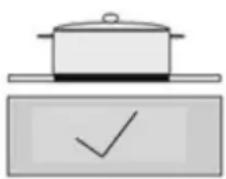
Always place the cookware on the cooking zone before it is switched on. If possible, always place the lids on the cookware. The base of any cookware used must not be smaller or larger than the cooking zones; they should be the proper size as indicated below, so as not to waste energy.
natural_image
Simple line drawing of a cooking pot and a checkmark inside a rectangular box (no text or symbols)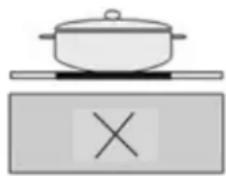
natural_image
Simple line drawing of a pot on a stove with an X mark symbol (no text or labels)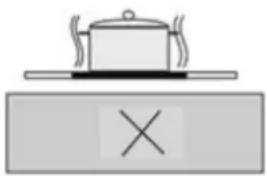
natural_image
Simple line drawing of a steaming pot on a saucer with an 'X' mark below, no text or symbols present.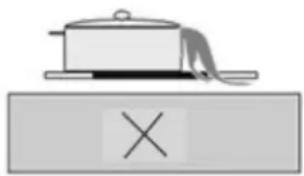
natural_image
Simple line drawing of a pot on a tray with an 'X' symbol below (no text or labels)Before cleaning the cooktop, first isolate the cooktop from the power. Once done, ensure that there is no residual heat stored in the appliance. The glass is very resistant to high temperature and overheating. If there is residual heat stored in the appliance, the related residual heat indicator lamp will be on. In order to avoid burns, let the appliance cool down.
Remove all spilt food and fat with a clean damp, warm, slightly soapy, dishcloth. Rinse cloth and wipe cooktop again until clean, then wipe the cooktop dry with a clean tea towel or dry soft cloth.
If aluminium foil or plastic items are accidentally melted on the glass surface, they should be immediately removed from the hot cooking area with a scraper specifically for glass. This will avoid any possible damage to the surface. This also applies to sugar or food containing sugar that may be spilled on the cooktop. Enamelled steel, aluminium & copper will leave a residue on the surface that should be removed immediately or permanent damage may occur.
In the event of other food melted on the cooktop surface, remove the dirt when the appliance has cooled down. Use cleaner for glass ceramic or stainless steel when cleaning the surface.
Do not use abrasive sponges to clean the glass surface. These materials may damage the surface.
Do not use chemical detergents, sprays or spot removers on the glass surface. These materials may cause fire or the glass colour to fade. Clean with a damp, warm, slightly soapy, dishcloth.
WARNING: Using cookware that is too large can cause discolouration or damage to the cooktop surface around the cooking zones, which is NOT covered under warranty.
ELECTRICAL CONNECTIONS

Installation is only permitted by a licensed electrician, and carried out according to instructions provided by the manufacturer. Incorrect installation might cause harm and damage, for which the manufacturer accepts no responsibility.
ELECTRICAL INSTALLATION
Before carrying out the connection to the power supply, the voltage rating of the appliance (stamped on the appliance identification plate) must be checked for correspondence to the available mains supply voltage, and the mains electric wiring should be capable of handling the oven's power rating (also indicated on the identification plate). If you have any doubts, call in a qualified technician.
NOTE: For connections to the mains power supply, never use adapters, reductions or multiple power points as these may overheat and catch fire. Do not install separate timers.
After having installed the appliance, the switched outlet must always be in an accessible position.
The electrical safety of this appliance can only be guaranteed if the cooktop is correctly and efficiently earthed, always ensure that the earthing is efficient; if you have any doubts call in a licensed electrician to check the system. The manufacturer declines all responsibility for damage resulting from an installation which has not been correctly earthed.
WARNING: If any damage occurs to the power cable during or after installation, it must be replaced immediately by a licensed electrician with a replacement cable from your Service Centre.
The cooktops can be connected to either a single phase 220-240Vac 50 Hz supply, or 2 phase 380-415Vac 50Hz.
SINGLE PHASE CONNECTION
First, a bridge connection must be made between terminals 1 and 2 (live) and between 3 and 4 (neutral). Connect the pairs to the live and neutral power supply cables. Connect the ground terminal to the ground supply cable.
TWO PHASE CONNECTION
First remove any bridge connection between terminals 1 and 2 (live). Place a bridge connection between 3 and 4 (neutral). Connect terminals 1 and 2 to the live power supply cables. Connect either terminal 3 or 4 to the neutral power supply cable. Connect the ground terminal to the ground supply cable.
The mains terminal block is located on the underside of the cooktop and the terminals are accessible by removing the terminal block cover using a small flat screwdriver.
The appliance is designed for fixed connection to the mains. During installation, an all pole disconnector should be included inside the supply circuit with a contact opening of at least 3mm (rated 32A, delay functioning type). The power supply cord must not touch against any hot surfaces and must be placed so that its temperature does not exceed 75 °C at any point along its length.
IMPORTANT: The appliance must NOT be connected to the mains supply by means of a 10A, 15A or 20A plug and socket.
The maximum current drawn in a single phase installation is 32A, and 2x16A for a two phase installation. Only use cables Tmax 90C types H05RN-F, H07RN-F, H05RR-F, H07RR-F etc.
INSTALLATION

The adjacent furniture must be able to withstand a minimum temperature rise of 100irc C above the ambient temperature of the room it is located in, during periods of use. The power supply to the appliance must be cut off before any adjustments or maintenance work is done on it. The appliance must be well ventilated (as per this manual) otherwise the appliance will overheat.
PREPARATION FOR INSTALLATION AND USE
Manufactured with best quality parts and materials, this modern, functional and practical cooktop will meet your needs in all respects. Make sure to read the manual to obtain successful results so as not to experience any problems in the future. The information given below contains rules that are necessary for correct positioning and service operations. They should be read without fail, especially by the technician who will position the appliance.
CHOOSING A LOCATION FOR THE APPLIANCE
There are several points to pay attention to when choosing a location for your cooktop. Make sure to take into account our recommendations below in order to prevent any problems and dangerous situations, which might occur later!
When choosing a location for the cooktop, attention should be paid that there are no flammable or combustible materials in the close vicinity, such as curtains, oil, cloth etc. which quickly catch fire. Ensure a distance between the cooktop edge and rear or side walls of at least 50mm.
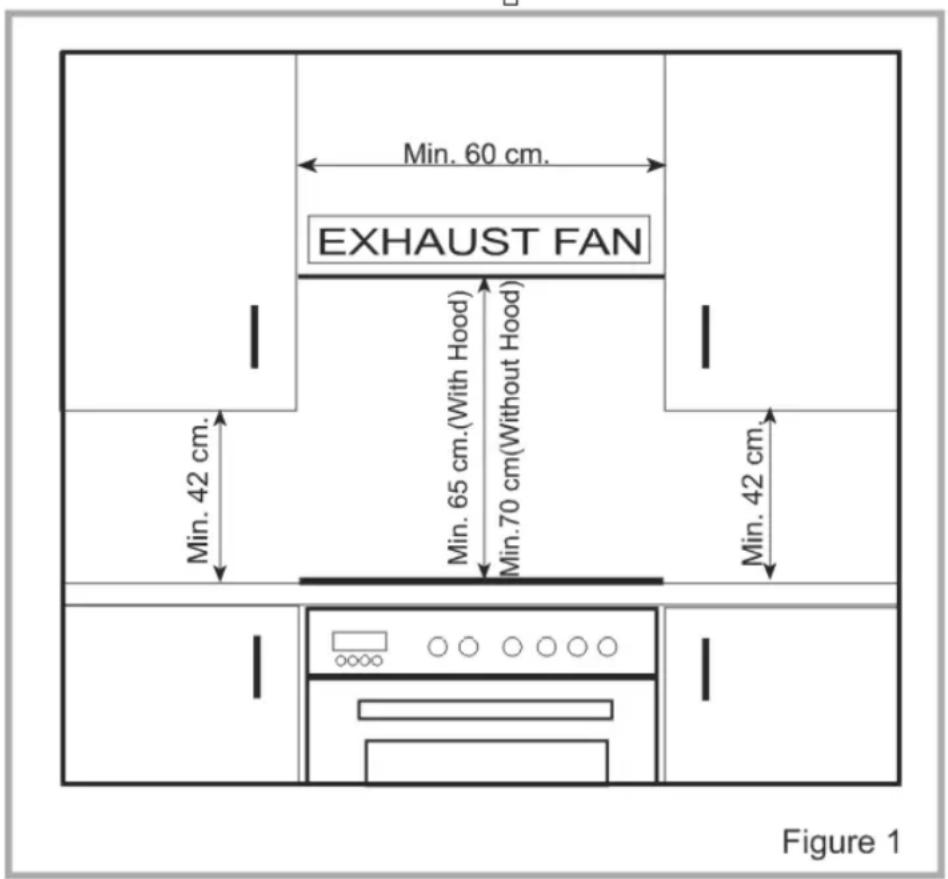
Furniture surrounding the cooktop must be made of materials resistant to temperatures above 100 ircC . Required changes to wall cabinets and exhaust fans above a built-in cooktop as well as minimum heights from the oven board are shown in Figure 1. Accordingly, the exhaust fan should be at a minimum height of 65 cm from the cooktop. If there is no exhaust fan the height should not be less than 70 cm.
INSTALLATION OF BUILT IN COOKTOP
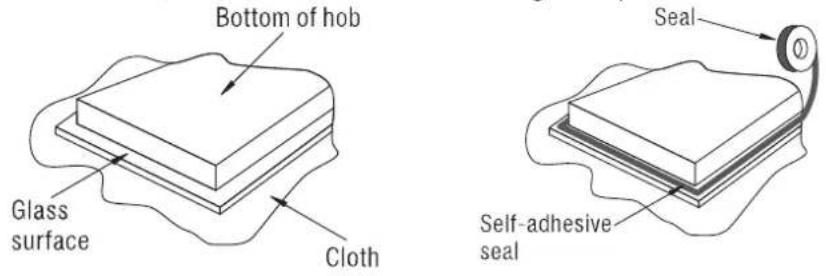
In order to prevent leakage of any liquids on the work bench and fix the appliance to the bench, a special sealing tape is supplied together with your oven. Place the cooktop glass down on a clean cloth on a stable flat surface & apply this seal around the bottom edge of the cooktop (see below). Remove the backing from the sealing tape and then place the appliance in position. If the sealing tape is not enough to fully seal the appliance to the bench, use a small bead of clear high temperature resistant silicone sealant.
This appliance can be installed into a workbench 30-40mm thick. When cutting the hole in the work bench, keep in mind the correct space and ventilation which are shown in the diagrams below.
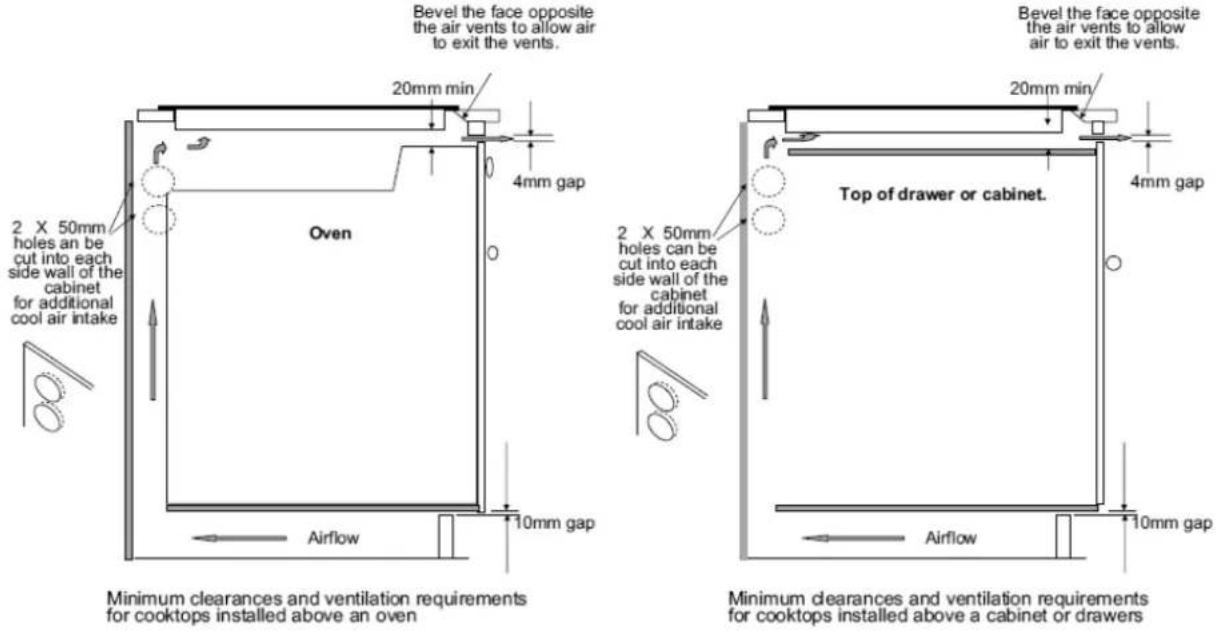
A board must be placed a minimum of 20mm below the cooktop that prevents anyone from touching the underside of the cooktop. Take care that there is adequate ventilation for air exchange to the inductive elements (at least 20mm).
NOTE: INDUCTIVE COOKTOPS GENERATE A LOT OF HEAT INTERNALLY WHEN IN OPERATION. THE BOTTOM OF THE APPLIANCE MUST HAVE A CLEAR PATHWAY TO VENT THIS HEAT OUT VIA THE BOTTOM FANS TO THE OPEN AIR IN ORDER TO KEEP ITSELF COOL. FAILING TO PROVIDE ADIQUATE VENTILLATION WILL DAMAGE THE APPLIANCE AND VOID YOUR WARRANTY. THE ABOVE DIMENSIONS SHOULD BE CONSIDERED THE MINIMUM VENTILLATION REQUIRED.
TROUBLESHOOTING AND ERROR CODES
The appliance or a cooking zone doesn't start:
- The electrical connection to the power is faulty – Call an electrician.
- A fuse has blown – Check fuse box.
- The Key Lock function is active – reset as per the manual.
- The control panel buttons are coated in grease or water – clean as per the manual.
- An object is covering a control button – in general only one button can be pressed at a time, so remove object to free-up buttons.
The control panel displays a "U" in one of the Cooking Zone Power LED displays:
- There is no cookware on the cooking zone – replace cookware on cooking zone.
- Cookware cannot be used with induction cooktops - replace cookware.
- The size of the base of the cookware is too small - replace cookware.
The appliance or a cooking zone cuts out:
- A fuse has blown – Check fuse box.
- A cooking zone has run unattended for a long period of time so has turned off – reset.
- A control panel button has been pressed or covered – remove object and reset.
- Cookware is empty and base has overheated – turn off appliance, let cool then restart with cookware refilled.
The control panel LED displays show "☐" or "Er03":
- An object or liquid is covering some or all of the buttons – remove object or carefully clean the liquid away from the control panel.
The control panel LED displays show "E":
- There is an internal software fault in the appliance – disconnect the appliance from the power source for a few minutes, and then reconnect to reset the software.
If the problem persists, please contact Blanco using the contact details at the end of the manual.
We appreciate your feedback. Please review our products on www.blanco-australia.com
AUSTRALIAN & NEW ZEALAND PRODUCT WARRANTY STATEMENT OF STANDARD WARRANTY CONDITIONS
AUSTRALIAN CUSTOMERS
Our goods come with guarantees that cannot be excluded under the Australian Consumer Law. You are entitled to a replacement or refund for a major failure and for compensation for any other reasonably foreseeable loss or damage. You are also entitled to have the goods repaired or replaced if the goods fail to be of acceptable quality and the failure does not amount to a major failure.
NEW ZEALAND CUSTOMERS
Nothing herein contained shall be construed in any way as excluding or limiting your rights under the Consumer Guarantee Act 1993.
OUR WARRANTY
This product is also covered by the manufacturer's warranty set out in this document (Our Warranty). Our Warranty is for a period of twenty four (24) months from the date of purchase and for dishwasher & refrigeration appliances will have an additional thirty six (36) months after the first twenty four (24) months on the wash motor for dishwashers & on the Sealed System (PARTS only Compressor & condenser etc) for refrigeration appliances. The labour cost to replace these parts is the responsibility of the customer. This is in addition to (and does not exclude, restrict or modify) any rights or remedies to which you may already be entitled under the Australian consumer Law or the New Zealand Consumer Guarantee Act 1993 relating to this product.
Our Warranty (which is subject to the conditions below) covers rectification free of charge of any fault arising from defective materials or components, or faulty workmanship. The product will be repaired or replaced at the option of Blanco, and all costs of installation, removal, cartage, freight travelling expenses and insurance are to be paid by the customer. Our Warranty is subject to the following conditions:
- That the purchaser contact Blanco prior to any product repair.
- That the purchaser carefully follows all instructions provided with the product and complies with all relevant electrical & plumbing regulations in their State when installing the product.
- That the purchaser carefully follows the instructions provided in the owner's handbook relating to the proper use and care of the product and does not use the product for any purpose other than the DOMESTIC use for which it has been designed. If the appliance is used in commercial applications or for rental purposes, Our Warranty is limited to a warranty of Twelve (12) months covering all parts with Three (3) months on any labour cost of service or repair.
SERVICE AREA
The provision of service under Our Warranty is limited by the boundary / territory area of the nearest service centre. Travelling cost incurred for service outside this area is not covered by Our Warranty and service will incur commercial cost to be paid by the customer regulated by the number of kilometres travelled beyond the service area. These costs will be disclosed to you for acceptance by you prior to your claim being processed. Microwave ovens must be returned to your nearest Authorised Service Centre for repair as they are a carry in serviceable appliance.
WHAT IS COVERED: By Our Warranty
During the warranty period, Blanco or its authorised Service Centre will at no extra charge, if your appliance is readily accessible without the need of special equipment and subject to the terms and conditions of this warranty, repair or replace any parts which it considers defective.
WHAT IS NOT COVERED: By Our Warranty
- Products installed damaged or incomplete or not in compliance with the relevant electrical & plumbing regulations in their State.
- Normal wear and tear e.g. cleaning, light globes, filters etc.
- Failure resulting from power surges and electrical storms.
- Insect or vermin infestation.
- Unauthorised repairs or use of non genuine Blanco parts.
- Any failure caused by the product not being used in accordance with the instruction and the installation manual provided with the product.
- Misuse or abuse, including failure to properly maintain or service.
- The clearing of blockages in pumps and hoses.
- Damage which occurs during delivery or installation.
- Claims to product surface coating due to liquid or solid spill-overs, accidental damage or damage caused from cleaning products not recommended by Blanco.
HOW TO CLAIM OUR WARRANTY
You will need to contact Blanco in Australia or New Zealand by using the contact details below.
IN AUSTRALIA
Blanco is distributed by Shriro Australia Pty Ltd
Locked Bag 5002, Kingsgrove, NSW, 2208
Phone: 1300 795 572 Fax: 1800 686 413
Email: customercare@shriro.com.au
Web: http://www.blanco-australia.com/
IN NEW ZEALAND
Blanco is distributed by Monaco Corporation
(Member of Shriro Australia Pty Ltd)
PO Box 4399, Shortland St, Auckland, 1140
Phone: 09 415 6000 Fax: 09 415 7060
Email: service@shriro.com.au
Web: http://www.blanco-australia.com/
Note: Please complete the following details when you have unpacked the product and staple this card with the purchase invoice or sales docket.
Model No.
Date of Purchase
Serial No.
Retailer
WBA2Y 9/2012
- IMPORTANT SAFETY INSTRUCTIONS
- IMPORTANT: Read the assembly instruction section and safety precautions of this booklet carefully before removing the contents of this carton.
- APPLIANCE DETAILS
- ELECTRICAL DETAILS:
- COOKTOPS:
- OPERATING INSTRUCTIONS
- Turning On and Turning Off the Cooktop Appliance
- Operating A Cooking Zone
- Turning Off Individual Cooking Zones
- The Boost and Super Boost Functions
- Activating The Key Lock
- Minute Minder Function
- Timer Function
- Auto Cooking Function
- Melting and Keep Warm Functions
- Stop N Go Function
- Recall Function
- TOUCH CONTROL SAFETY FUNCTIONS
- Pan Detection Failure
- Residual Heat Functions
- EXAMPLES OF COOKING ZONE POWER SETTINGS
- CLEANING
- CLEANING THE COOKTOP
- ELECTRICAL CONNECTIONS
- ELECTRICAL INSTALLATION
- SINGLE PHASE CONNECTION
- TWO PHASE CONNECTION
- INSTALLATION
- PREPARATION FOR INSTALLATION AND USE
- CHOOSING A LOCATION FOR THE APPLIANCE
- INSTALLATION OF BUILT IN COOKTOP
- TROUBLESHOOTING AND ERROR CODES
- AUSTRALIAN & NEW ZEALAND PRODUCT WARRANTY STATEMENT OF STANDARD WARRANTY CONDITIONS
- AUSTRALIAN CUSTOMERS
- NEW ZEALAND CUSTOMERS
- OUR WARRANTY
- SERVICE AREA
- WHAT IS COVERED: By Our Warranty
- WHAT IS NOT COVERED: By Our Warranty
- HOW TO CLAIM OUR WARRANTY
- IN AUSTRALIA
- IN NEW ZEALAND
Brand : BLANCO
Model : BIC95T
Category : Cooker