Q1244S - Washing machine SAMSUNG - Free user manual and instructions
Find the device manual for free Q1244S SAMSUNG in PDF.


| Product Type | Washing Machine (Front-Load) |
| Brand | Samsung |
| Model | Q1244S |
| Capacity | 7.5 kg |
| Dimensions (W x D x H) | 600 x 600 x 850 mm |
| Weight | 70 kg |
| Power Supply | 220-240 V, 50 Hz |
| Energy Efficiency Class | A++ |
| Maximum Spin Speed | 1400 rpm |
| Number of Programs | 14 |
| Noise Level (Wash) | 48 dB |
| Noise Level (Spin) | 74 dB |
| Water Consumption per Cycle | 50 L |
| Key Features | Eco Bubble, Add Wash, Smart Control, VRT Plus |
| Safety | Child Lock, Overflow Protection, Unbalanced Load Detection |
| Maintenance | Drum Clean, Drain Filter, Detergent Drawer Cleaning |
| Spare Parts Availability | Yes (authorized service centers) |
| Repairability Index | 8.5 / 10 |
Frequently Asked Questions - Q1244S SAMSUNG
User questions about Q1244S SAMSUNG
0 question about this device. Answer the ones you know or ask your own.
Ask a new question about this device
Download the instructions for your Washing machine in PDF format for free! Find your manual Q1244S - SAMSUNG and take your electronic device back in hand. On this page are published all the documents necessary for the use of your device. Q1244S by SAMSUNG.
USER MANUAL Q1244S SAMSUNG
Washing Machine Owner's Instructions
Q1244(C/S/V)
Q1044(C/S/V)
Q844(C/S/V)
natural_image
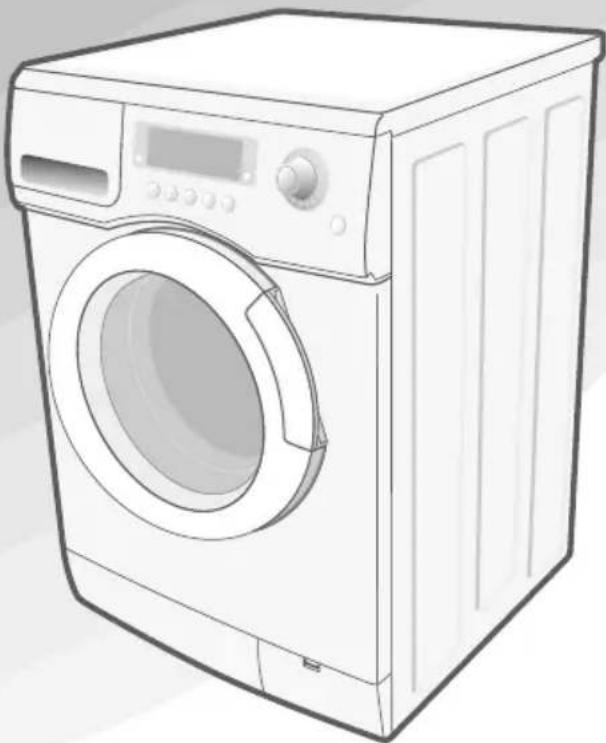
Line drawing of a front-loading washing machine with digital display and control panel (no text or symbols)Safety Precautions
Congratulations on your purchase of this Samsung washing machine. These Owner's Instructions contain valuable information on the installation, use, and care of this appliance. Please take the time to read these instructions so that you can take full advantage of the washing machine's features and enjoy this appliance for many years to come.
Before using the appliance
- Packing materials can be dangerous to children; keep all packing material (plastic bags, polystyrene, etc.) well out of the reach of children.
• The appliance is designed for home use only. - Make sure that water and electrical connections are made by qualified technicians, observing the manufacturer's instructions (see "Installing the Washing Machine" on page 2) and local safety regulations.
- All packaging and shipping bolts must be removed before the appliance is used. Serious damage may occur if they are not removed. See "Removing the shipping bolts" on page 3.
- Before washing clothes for the first time, you must run a complete cycle without clothes. See "Washing for the first time" on page 7.
Safety instructions
- Before cleaning or carrying out maintenance, unplug the appliance from the electrical outlet or set the (On/Off) button to Off.
- Make sure that the pockets of all clothing to be washed are empty. Hard, sharp objects, such as coins, safety pins, nails, screws, or stones can cause extensive damage to the appliance.
• Always unplug the appliance and turn off the water after use. - Before you open the door of the appliance, check that the water has drained. Do not open the door if you can still see water.
- Pets and small children may climb into the appliance. Check the appliance before each use.
- The glass door becomes very hot during the washing cycle. Keep children away from the appliance while it is in use.
- Do not attempt to repair the appliance yourself. Repairs made by inexperienced or unqualified persons may cause injury and/or make more serious repairs to the appliance necessary.
- If the plug (power supply cord) is damaged, it must be replaced by the manufacturer or its service agent or a similarly qualified person in order to avoid a hazard.
- This appliance should only be serviced by an authorized service center, and only genuine spare parts should be used.
- This appliance is not intended for use by young children or infirm persons unless they have been adequately supervised by a responsible person to ensure that they can use the appliance safely.
- If this appliance is supplied from a cord extension set or an electrical portable outlet device, the cord extension set or electrical portable outlet device must be positioned so that it is not subject to splashing or ingress of moisture.
• SAVE THESE INSTRUCTIONS
Table of Contents
Safety Precautions---- inside cover
Installing the Washing Machine 2
Unpacking the washing machine 2
Overview of the washing machine 2
Selecting a location 3
Adjusting the leveling feet 3
Removing the shipping bolts 3
Connecting the water supply hose 4
Connecting the water supply hose(option) 5
Positioning the drain hose 5
Plugging in the machine 6
Washing a Load of Laundry 7
Washing for the first time 7
Putting detergent in the washing machine ---- 7
Overview of the control panel 8
Washing clothes using Fuzzy Logic 10
Washing clothes manually 11
Using delay start 11
Washing tips and hints 12
Maintaining the Washing Machine 13
Draining the washing machine in an emergency 13
Repairing a frozen washing machine 13
Cleaning the exterior 13
Cleaning the detergent drawer and recess 14
Cleaning the debris filter 14
Cleaning the water hose mesh filter 15
Troubleshooting 16
Problems and solutions 16
Understanding error messages 16
Cautions of Duvet course 17
Programme chart 18
Appendix 20
Fabric care chart 20
Electrical warnings 20
Protecting the environment 21
Declaration of conformity 21
Specification 21
Installing the Washing Machine
Unpacking the Washing Machine
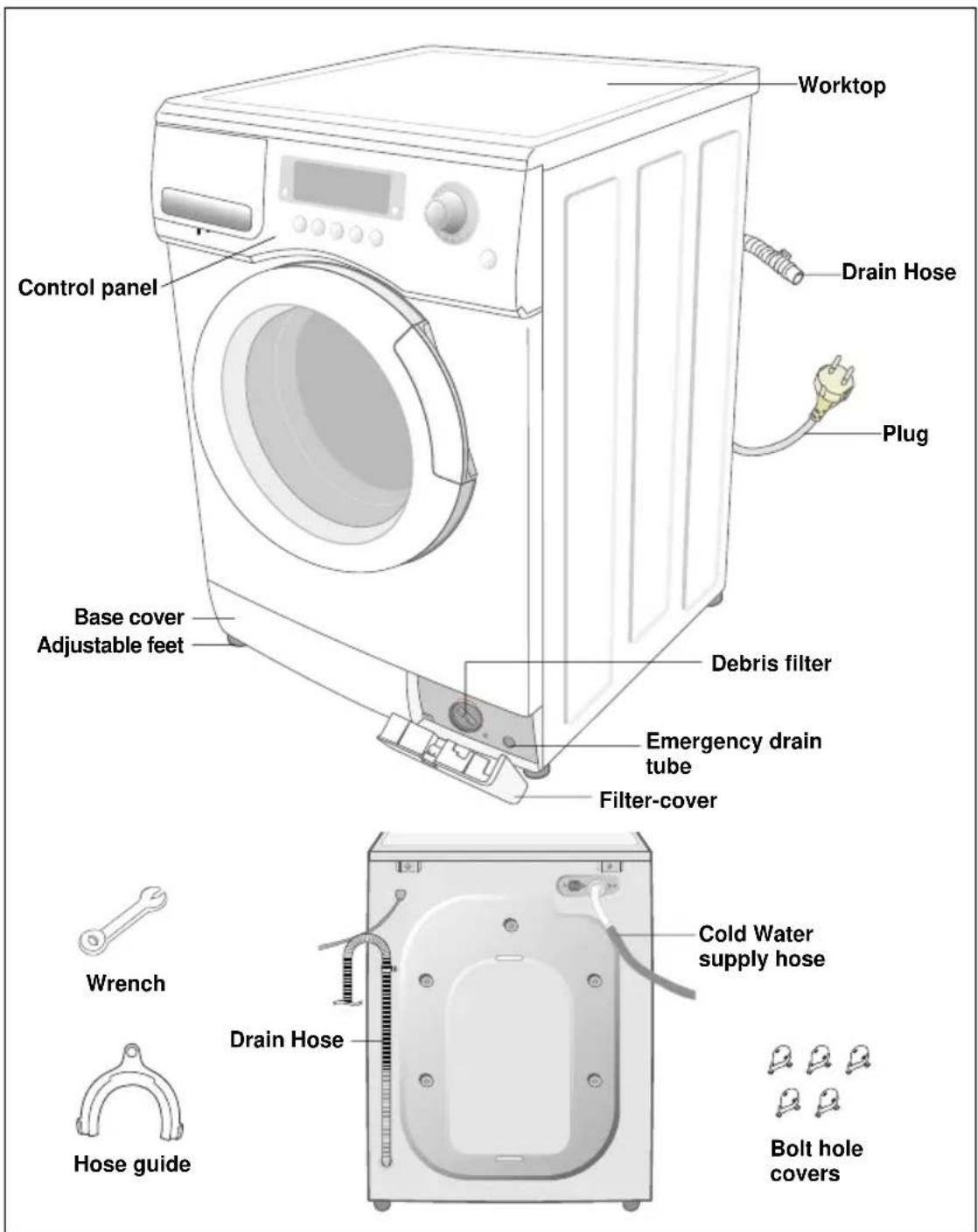
Unpack your washing machine and inspect it for shipping damage. Also make sure that you have received all of the items shown below. If the washing machine was damaged during shipping or you do not have all of the items, contact your Samsung dealer immediately.
Overview of the washing machine
text_image
Worktop Drain Hose Plug Control panel Base cover Adjustable feet Debris filter Emergency drain tube Filter-cover Wrench Cold Water supply hose Drain Hose Hose guide Bolt hole coversInstalling the Washing Machine
Selecting a location
Before you install the washing machine, select a location with the following characteristics:
- A hard, level surface (if the surface is uneven, see "Adjusting the leveling feet," below)
• Away from direct sunlight. - Adequate ventilation
• Room temperature that will not fall below 0 °C - Away from sources of heat such as coal or gas
Make sure that the washing machine does not stand on its power cord.
Ventilation openings must not be obstructed by carpeting when the washing machine is installed on a carpeted floor.
Adjusting the leveling feet
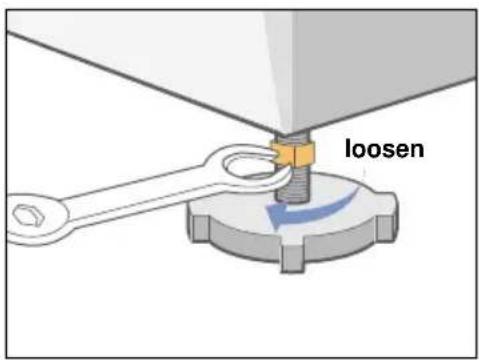
If the floor is uneven, adjust the feet (do not insert pieces of wood or any other objects under the feet):
- Loosen the leg bolt by turning it with your hand until it is at the desired height.
- Tighten the locking nut by turning it with the supplied wrench.
If the washer is placed on an uneven or weak surface, noise or vibration occurs.
(Only 1 degree angle is allowed.)
text_image
loosenRemoving the shipping bolts
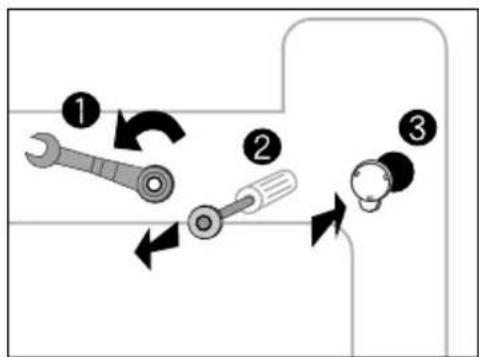
Before using the washing machine, you must remove the five shipping bolts from the back of the unit. To remove the bolts:
- Loosen all bolts with the supplied wrench before removing them.
- Take each bolt head and pull it through the wide part of the hole. Repeat for each bolt.
- Fill the holes with the supplied plastic covers.
- Keep the shipping bolts for future use.
flowchart
graph TD
    A["1: wrench"] --> B["2: screwdriver"]
    B --> C["3: nut"]
Installing the Washing Machine
Connecting the water supply hose
The water supply hose must be connected to the washing machine at one end and to the water faucet at the other. Do not stretch the water supply hose. If the hose is too short replace the hose with a longer, high pressure hose.
To connect the water supply hose:
- Take the L-shaped arm fitting for the cold water supply hose and connect to the cold water supply intake on the back of the machine. Tighten by hand.
- Connect the other end of the cold water supply hose to your sink's cold water faucet and tighten it by hand. If necessary, you can reposition the water supply hose at the washing machine end by loosening the fitting, rotating the hose, and retightening the fitting.
NOTICE The appliance is to be connected to the water mains using new hose-sets and that old hose-sets should not be used.
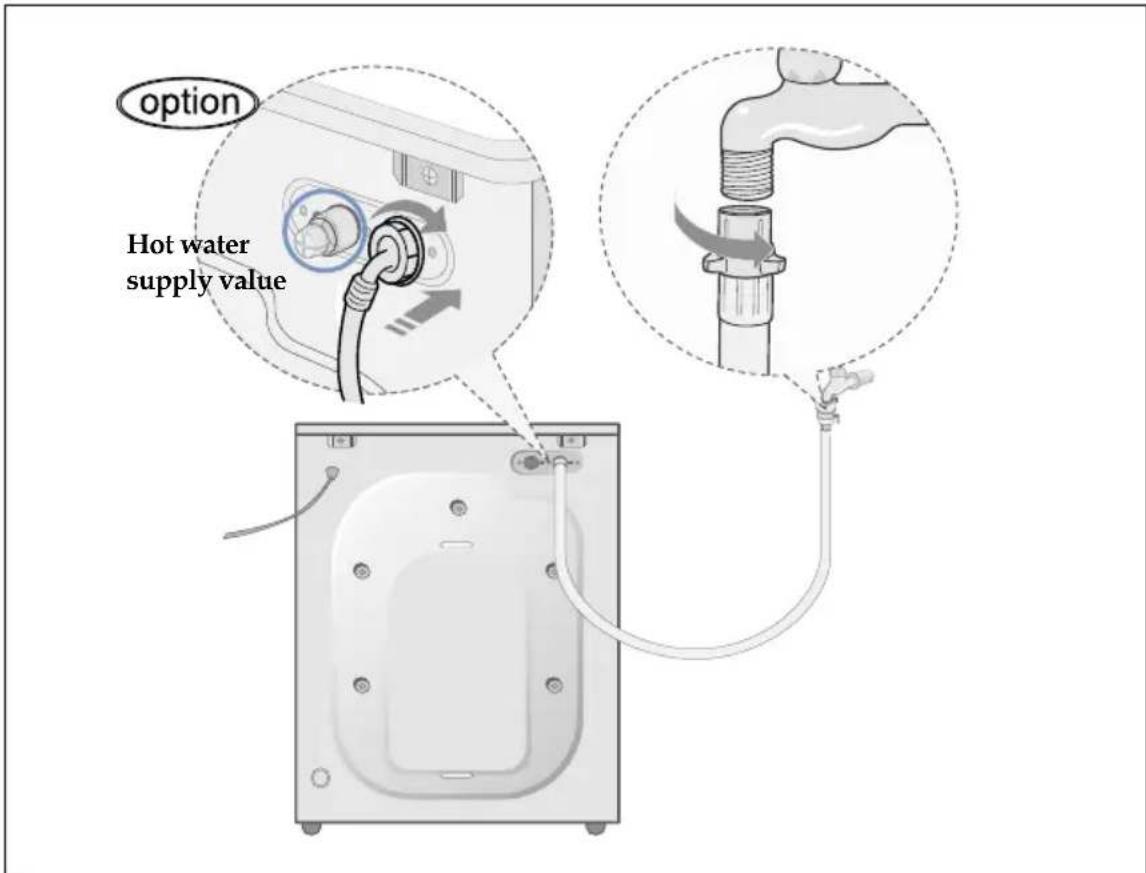
text_image
option Hot water supply valueOption:
- Take the red L-shaped arm fitting for the hot water supply hose and connect to the red hot water supply intake on the back of the machine. Tighten by hand.
- Connect the other end of the hot water supply hose to your sink's hot water faucet and tighten it by hand.
- Use a Y-piece if you only want to use cold water.
Installing the Washing Machine
Connecting the water supply hose(Option)
| 1. Remove the adaptor from the water supply hose. | 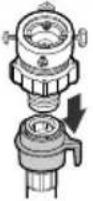 | 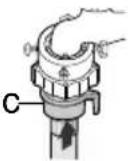 | 4. Connect the water supply hose to the adaptor. Pull down part (c) of the water supply hose. When you release part (c) the hose automatically connects to the adaptor making a 'click' sound. |
| 2. First, using a "+" type screw driver, loosen the four screws on the adaptor. Next, take the adaptor and turn part(b) following the arrow until there is a 5mm gap. | 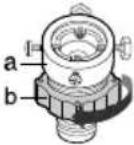 | 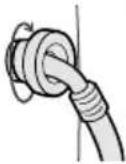 | 5. Connect the other end of the water supply hose to the inlet water valve at the rear of the washer. Screw the hose clockwise all the way in. |
| 3. Connect adaptor to the water tap by tightening the screws firmly.Then, turn part (b) following the arrow and put(a) and (b) together. |
NOTICE After completing connection, if water leaks from the hose, then repeat the same steps. Use the most conventional type of faucet for water supply. In case the faucet is square or too big, remove the spacing ring before inserting the faucet into the adaptor.
Positioning the drain hose
The end of the drain hose may be positioned in three ways:
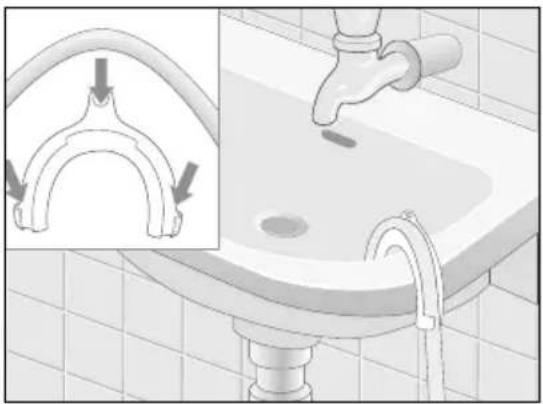
Over the edge of a wash basin.
The drain hose must be placed at a height of between 60 and 90 cm. To keep the drain hose spout bent, use the supplied plastic hose guide. Secure the guide to the wall with a hook or to the faucet with a piece of string to prevent the drain hose from moving.
natural_image
Illustration of a faucet cleaning a sink with an inset showing the pipe being inserted (no text or symbols present)In a sink drain pipe branch
The drain pipe branch must be above the sink siphon so that the end of the hose is at least 60 cm above the ground.
In a drain pipe
Samsung recommends that you use a 65 cm high vertical pipe; it must be no shorter than 60 cm and no longer than 90 cm.
Installing the Washing Machine
Plugging in the machine
For European Users. You will NOT need to ground the plug of the washing machine.
For U.S. Users. You MUST ground the plug of the washing machine.
Check with a licensed electrician before using the machine to make sure it is properly grounded.
For U.K. Users.
Wiring Instructions
WARNING THIS APPLIANCE MUST BE EARTHED.
This appliance must be earthed. In the event of an electrical short circuit, earthing reduces the risk of electric shock providing an escape wire for the electric current.
The appliance is equipped with a mains lead which includes an earth wire for connecting to the earth terminal of your mains plug.
The plug must be plugged into a socket that is properly installed and earthed.
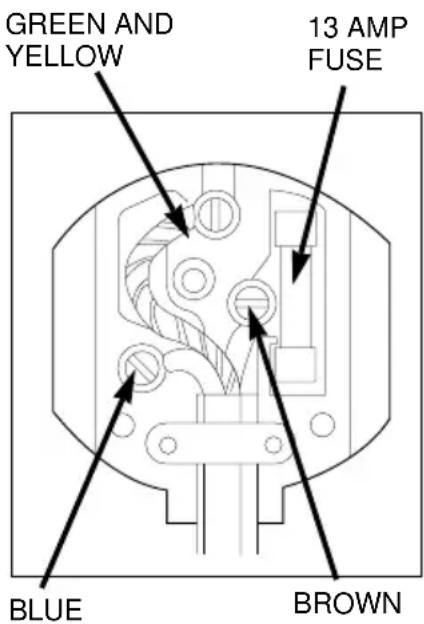
*The wires in this mains lead are coloured in accordance with the following code:
- Green and yellow: Earth
- Blue: Neutral
-
Brown: Live
-
AS the colours of the wires in the mains lead of this appliance may not correspond with the coloured markings indentifying the terminals in your plug, proceed as follows.
- Connect the green and yellow wire to the terminal in the plug marked with the letter E or the earth symbol (or coloured green or green-and-yellow.
- Connect the blue wire to the terminal marked with the letter N or coloured black.
- Connect the brown wire to the terminal marked with the letter L or coloured red.
* Consult a qualified electrician or service technician if in doubt about any of these instructions.
The manufacturer of this washing machine will not accept any liability for damage to persons or material for non observance of these requirements. There are no user serviceable parts inside the washing machine and if the mains lead of this appliance is damaged, it must only be replaced by qualified service personnel approved by the
manufacturer because special tools are required.
text_image
GREEN AND YELLOW 13 AMP FUSE BLUE BROWNWARNING
Ensure that the plug and power cord are not damaged before use. If you have any reason to remove the moulded plug from this appliance, immediately remove the fuse and dispose of the plug.
Do not connect the plug to a mains socket under any circumstances as there is a danger of electric shock.
CIRCUITS
Your washing machine should be operated on a separate circuit from other appliances. Failure to do this may cause the circuit breaker to trip or the fuse to blow.
Washing a Load of Laundry
Washing for the first time
Before washing clothes for the first time, you must run a complete cycle without clothes. To do this:
- Press the (On/Off) button.
- Pour a little detergent into compartment in the detergent drawer.
- Turn on the water supply to the washing machine.
- Press the Temperature button repeatedly until 40^ C is displayed.
- Press the Start/Pause button.
- This will remove any water from the manufacturer's test run remaining in the machine.
text_image
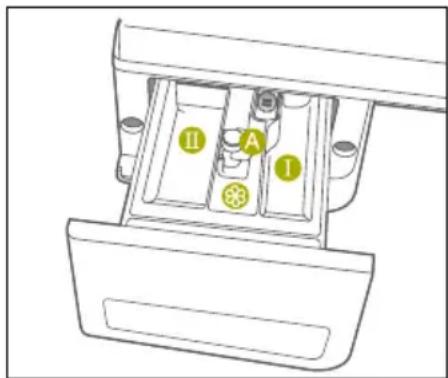
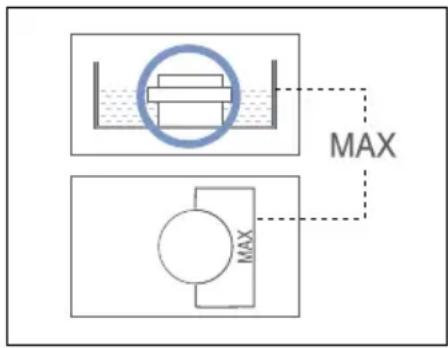
I II ADispender ①: Detergent for prewash or starch.
Dispenser Ⅲ: Detergent for main wash, water softener, pre-soaking agent, bleach and stain removal product.
Dispenser Ⓞ: Additives, e.g. fabric softener or former (fill no higher than lower edge of insert “A”)
Putting detergent in the washing machine
- Pull out the detergent drawer.
- Add laundry detergent into compartment ⑪
- Add softener into compartment (if you desire).
- Add prewash detergent into compartment (if you desire).
Caution :
Concentrated or thick fabric softener and conditioner must be diluted with a little water before being poured into the dispenser (prevents the overflow from becoming blocked.)
text_image
MAX MAXWashing a Load of Laundry
Overview of the control panel
Q1244/Q1044/Q844
text_image
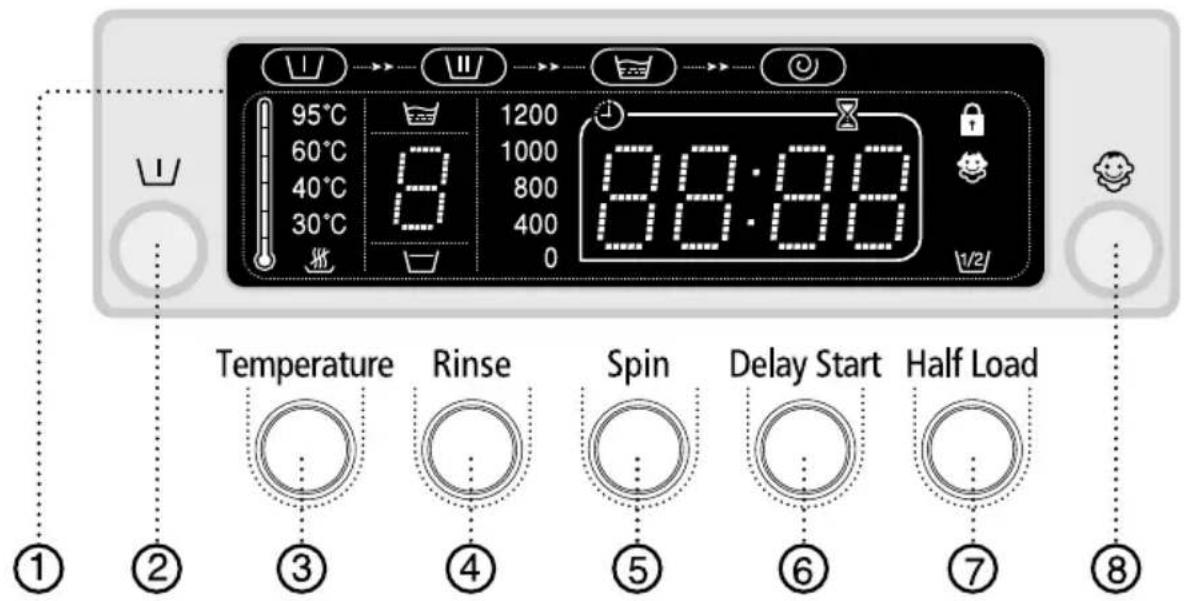
95°C 60°C 40°C 30°C 8 1200 1000 800 400 0 88:88 Temperature Rinse Spin Delay Start Half Load ① ② ③ ④ ⑤ ⑥ ⑦ ⑧1. Digital graphic display
Displays the remaining wash cycle time, all of washing information and error messages.
2.Prewash selection button
Press the button to select pre-wash. Pre-wash is available only with Duvet, Bedding, Towel, Curtain, Cotton, Coloureds, Synthetics and Delicates programs.
3. Temperature selection button
Press the button repeatedly to cycle through the available water temperature options (cold water( ℃ ), 30 °C, 40 °C, 60 °C and 95 °C).
4. Rinse selection button
Press the rinse button to add rinse cycles. Maximum number of rinse cycles is five.
5. Spin selection button
Press the button repeatedly to cycle through the available spin speed options.
| Q1244 | , , 400, 800, 1000, 1200 rpm |
| Q1044 | , , 400, 600, 800, 1000 rpm |
| Q844 | , , 400, 600, 800 rpm |
⊗: no spin,
□: rinse hold
No spin
The laundry remains in the drum without being spun after the final drain
Rinse Hold
The laundry remains soaking in the final rinse water.
Before the laundry can be unloaded, either "Drain" or the "Spin" program must be run.
Washing a Load of Laundry
text_image
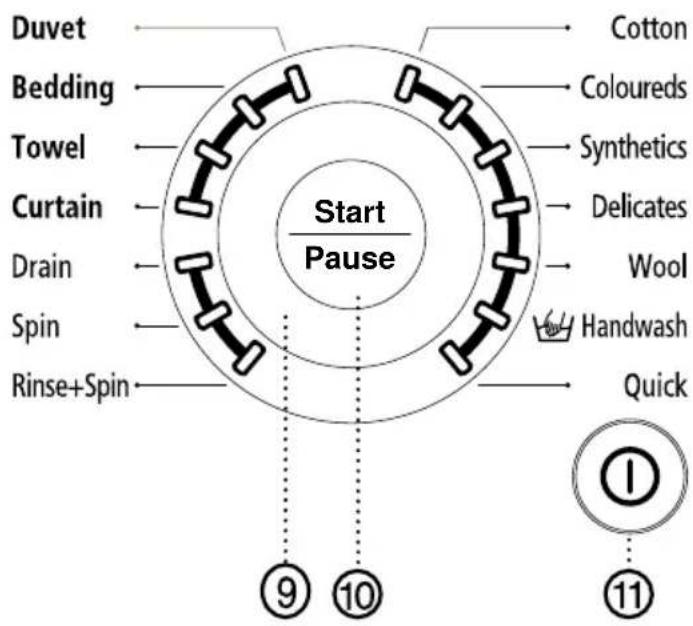
Duvet Bedding Towel Curtain Drain Spin Rinse+Spin Start Pause Cotton Coloureds Synthetics Delicates Wool Handwash Quick ⑨ ⑩ ⑪6. Delay Start selection button
Press the button repeatedly to cycle through the available delayed start options (from 3 hour to 24 hours in one hour increments).
Displayed hours means the time of finished washing-cycle.
7. Half Load selection button
Press the button in case of half load (about 1\~4kg) washing. This function saves washing time and energy.
8. Child Lock selection button
Press the button for 2\~3 seconds to prevent mis-operation of child. When child lock is on, other buttons are not selected. To cancel the child lock, press the button for 2\~3 seconds once more.
9. Fuzzy Control dial
Turn the dial to select one of the 14 available wash programs.
Cotton, Coloureds, Synthetics, Delicates, Wool, Hand wash, Quick, Rinse+Spin, Spin, Drain, Curtain, Towel, Bedding, Duvet
10. Start/Pause selection button
Press to pause and restart programs.
11. (On/Off) selection button
Press once to turn the washing machine on, press again to turn the washing machine off. If the washing machine power is left on for longer than 10 minutes without any buttons being touched, the power automatically turns off.
Washing a Load of Laundry
Washing clothes using Fuzzy Logic
Your new washing machine makes washing clothes easy, using Samsung's "Fuzzy Logic" automatic control system. When you select a wash program, the machine will set the correct temperature, washing time, and washing speed.
To wash clothes using the Fuzzy Logic programs:
- Turn on your sink's water faucet.
- Press the (On/Off) button.
- Open the door.
- Load the articles one at a time loosely into the drum, without overfilling.
- Close the door.
- Add the detergent, softener, and pre-wash detergent (if necessary) into the appropriate compartment.
Note: Pre-wash is only available when washing Duvet, Bedding, Towel, Curtain, Cotton, Coloureds, Synthetics and Delicates programs. It is only necessary if your clothing is heavily soiled.
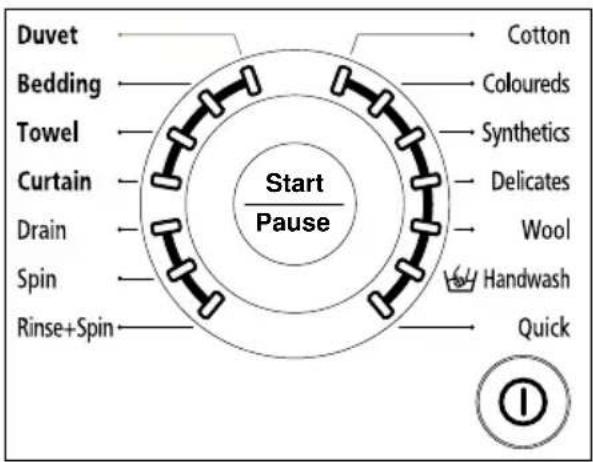
- Turn the Fuzzy Control dial to select the appropriate program for the type of clothes Cotton, Coloureds, Synthetics, Delicates, Wool, Handwash, Quick, Duvet, Bedding, Towel, Curtain.
You will see the indicators light up on the control panel.
text_image
Duvet Bedding Towel Curtain Drain Spin Rinse+Spin Start Pause Cotton Coloureds Synthetics Delicates Wool Handwash Quick- At this time, you can control the wash temperature, rinsing times, spin speed, delay time by pressing the appropriate option button.
- Press the Start/Pause button on the Fuzzy Control dial and the wash cycle will begin. The process indicator will light up and the remaining time for the cycle will appear in the display.
When the cycle is finished:
After the total cycle has finished, the power will turn off automatically.
- Open the door.
Note: The door will not open until 3 minutes after the machine stops or the power turns off.
- Remove laundry.
Washing a Load of Laundry
Washing clothes manually
You can wash clothes manually without using the Fuzzy Logic feature. To do so:
- Turn the water supply on.
- Press the (On/Off) button on the washing machine.
- Open the door.
- Load the articles one at a time loosely into the drum, without overfilling.
- Close the door.
- Put the detergent and, if necessary, softener or prewash detergent, in the appropriate compartments.
- Press the Temperature button to select the temperature (cold water, 30^ C, 40^ C, 60^ C, 95^ C)
-
Press to rinse button to select the required number of rinse cycles.
Maximum number of rinse cycles is five.
The washing duration will be prolonged accordingly. -
Press the Spin button to select the spin speed.
Note: The rinse hold program allows you to take clothes that are dripping wet out of the washing machine.
☒: No Spin, :Rinse Hold.
-
Press the button repeatedly to cycle through the available delayed start options (from 3 hour to 24 hours in one hour increments). Displayed hours means the time of finished washing-cycle.
-
Press the Start/Pause button and the machine will begin the cycle.
Using Delay Start
You can set the washing machine to finish your wash automatically at a later time, choosing from 3 to 24 hour delay (in 1 hour increments). Displayed hours means the time of finished washing-cycle.
To do this:
- Manually or automatically set your washing machine for the type of clothes you are washing.
- Press the Delay Start button repeatedly until the delay time is set.
- Press the Start/Pause button. The Delay Start indicator will light, and the clock will begin counting down until it reaches your finish time.
- To cancel Delay Start, press the (On/Off) button, then turn the washing machine on again.
Washing a Load of Laundry
Washing tips and hints
Sorting your laundry : Sort your laundry according to the following characteristics:
- Type of fabric care label symbol: Sort laundry into cottons, mixed fibers, synthetics, silks, wools and rayon.
• Colour : Divide whites and colours. Wash new, coloured items separately. - Size: Placing items of different sizes in the same load will improve the washing action.
- Sensitivity: Wash delicate items separately, using the Delicate wash program for pure new wool, curtains and silk articles. Check the labels on the items you are washing or refer to the fabric care chart in the appendix.
Emptying pockets : Coins, safety pins and similar items can damage linen, the washing machine drum, and the water tank.
Securing fasteners : Close zippers and fasten buttons or hooks; loose belts or ribbons should be tied together.
Prewashing cotton : Your new washing machine, combined with modern detergents, will give perfect washing results, thus saving energy, time, water and detergent. However, if your cotton is particularly dirty, use a prewash with a protein-based detergent.
Determining load capacity: Do not overload the washing machine or your laundry may not wash properly. Use the chart below to determine the load capacity for the type of laundry you are washing.
| Fabric Type | Load Capacity |
| Cotton /Coloured 7.5 kg | |
| Synthetics /Towel 4.0 kg | |
| Quick 3.0 kg | |
| Delicates 2.5 kg | |
| Wools /Handwash 2.0 kg | |
| Curtain /Bedding 5.0 kg | |
| Duvet 1 king size (9 Tog) |
Detergent tips: The type of detergent you should use is based on the type of fabric (cotton, synthetic, delicate items, wool), colour, wash temperature, degree and type of soiling. Always use "low suds" laundry soap, which is designed for automatic washing machines.
Follow the detergent manufacturer's recommendations based upon the weight of the laundry, the degree of soiling, and the hardness of the water in your area. If you do not know how hard your water is, ask your water authority.
Note:
Keep detergents and additives in a safe, dry place out of the reach of children.
Maintaining the Washing Machine
Draining the washing machine in an emergency
- Unplug the washing machine from the power supply.
-
Open the filter-cover by using a coin or a key.
-
Unscrew the emergency drain cap by turning left. Grip the cap on the end of the emergency drain tube and slowly pull it out about 15 cm.
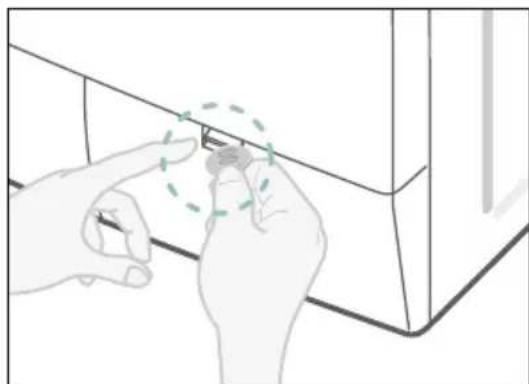
natural_image
Illustration of hands installing or adjusting a small component on a cabinet (no text or symbols visible)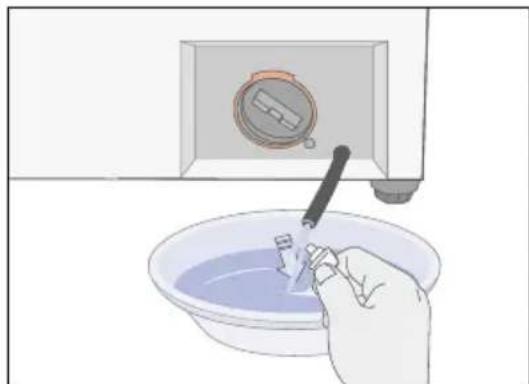
natural_image
Illustration of a hand washing a small object into a bowl with a tool, next to a microwave oven (no text or symbols)- Allow all the water to flow into a bowl.
- Reinsert the drain tube and screw the cap back on.
- Replace the filter-cover.
Repairing a frozen washing machine
If the temperature drops below freezing and your washing machine is frozen:
- Unplug the washing machine.
- Pour warm water on the source faucet to loosen the water supply hose.
- Remove the water supply hose and soak it in warm water.
- Pour warm water into the washing machine drum and let it sit for 10 minutes.
- Reconnect the water supply hose to the water faucet and check if the water supply and drain operations are normal.
Cleaning the exterior
- Wipe the washing machine surfaces, including the control panel, with a soft cloth and non-abrasive household detergents.
- Use a soft cloth to dry the surfaces.
- Do not pour water on the washing machine.
Maintaining the Washing Machine
Cleaning the detergent drawer and recess
-
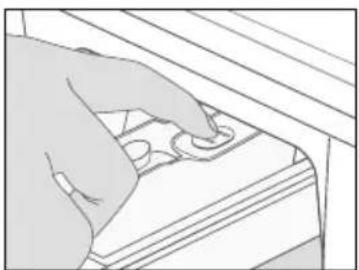
Press the release lever on the inside of the detergent drawer and pull it out.
-
Remove the cap from compartment.
-
Wash all of the parts under running water.
-
Clean the drawer recess with an old toothbrush.
-
Reinsert the cap (Pushing it firmly into place) and replace the liquid detergent divider into the drawer.
-
Push the drawer back into place.
-
Run a rinse program without any laundry in the drum.
natural_image
Illustration of a hand pressing down on a wooden shelf with a circular button (no text or symbols)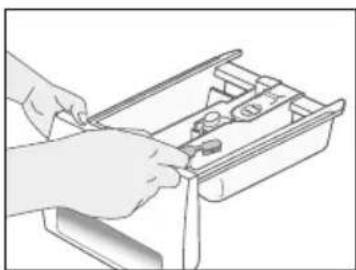
natural_image
Illustration of hands using a tool to adjust or install a drawer (no text or symbols visible)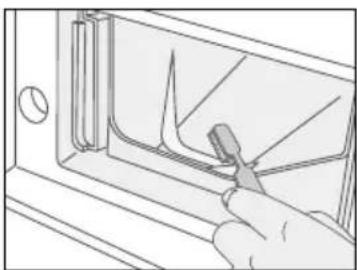
natural_image
Line drawing of a hand using a tool to cut or remove a component inside a container (no text or symbols)Cleaning the debris filter
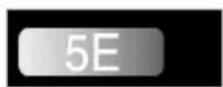
Clean the debris filter 5 or 6 times a year, or when you see the following error message on the display:
-
Open the filter-cover, See "Draining the washing machine in an emergency" on page 13.
-
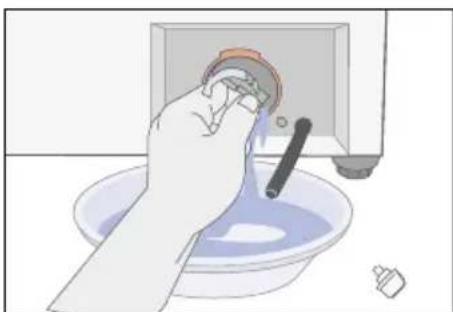
Unscrew emergency drain cap by turning left and drain off all the water. See "Draining the washing machine in an emergency" on page 13.
-
Unscrew the filter cap and take it out.
natural_image
Illustration of a hand washing a basin with a pipe and tool (no text or symbols)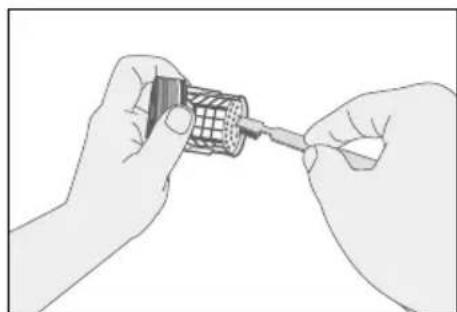
natural_image
Illustration of two hands assembling a cylindrical component with a screwdriver (no text or symbols visible)-
Wash any dirt or other material from the filter. Make sure the drain pump propeller behind the filter is not blocked. Replace the filter cap.
-
Replace the filter-cover.
Maintaining the Washing Machine
Cleaning the water hose mesh filter
You should clean the water hose mesh filter at least one time per year, or when you see the following error message on the display:
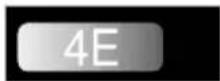
To do this:
-
Turn off the water source to the washing machine.
-
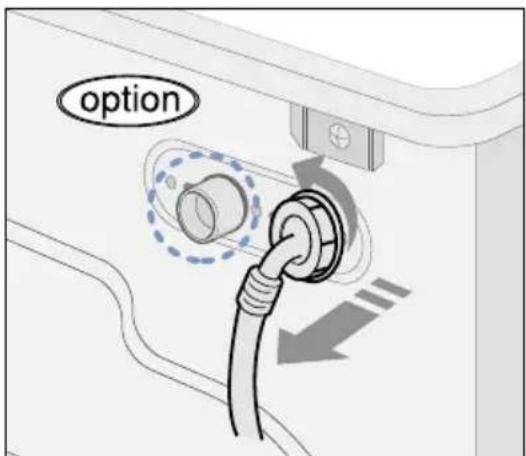
Unscrew the hose from the back of the washing machine.
-
With a pair of pliers, gently pull out the mesh filter from the end of the hose and rinse it under water until clean. Also clean the inside and outside of the threaded connector.
text_image
option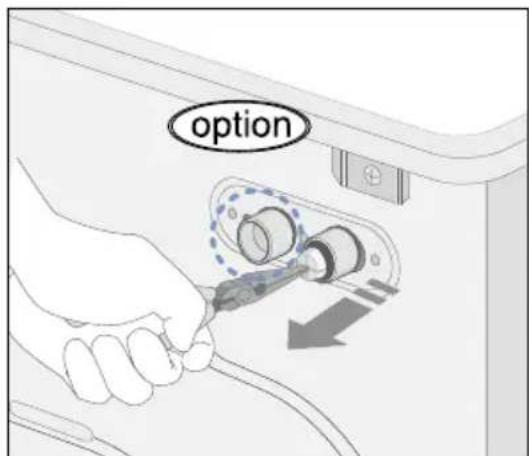
text_image
option-
Push the filter back into place.
-
Screw the hose back onto the washing machine.
-
Turn on the faucet and make sure the connections are watertight.
Troubleshooting
Problems and solutions
The washing machine will not start
- Make sure the door is firmly closed.
- Make sure the washing machine is plugged in.
- Make sure the water source faucet is turned on.
- Make sure to press the Start/Pause button.
No water or insufficient water supply
- Make sure the water source faucet is turned on.
- Make sure the water source hose is not frozen.
- Make sure the water intake hose is not bent.
- Make sure the filter on the water intake hose is not clogged.
Detergent remains in the detergent drawer after the wash program is complete
- Make sure the washing machine is running with sufficient water pressure.
- Put the detergents in the inner parts of the detergent drawer(away from the outside edges).
Washing machine vibrates or is too noisy
- Make sure the washing machine is set on a level surface. If the surface is not level, adjust the washing machine feet to level the appliance (see page 3).
- Make sure that the shipping bolts are removed (see page 3).
- Make sure the washing machine is not touching any other object.
- Make sure the laundry load is balanced.
The washing machine does not drain and/or spin
- Make sure the drain hose is not squashed or bent.
- Make sure the debris filter is not clogged (see page 14).
The Door does not open
- The door will not open until 3 minutes after the machine stops or the power turns off.
Understanding error messages
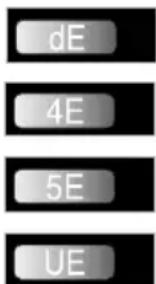
Error displayed Solution
text_image
dE 4E 5E UE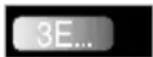
Close the door.
- Make sure the source water faucet is turned on.
- Check the water pressure.
- Clean the debris filter.
- Make sure the drainage hose is installed correctly.
Laundry load is unbalanced; loosen any tangled laundry. If only one item of clothing needs washing, such as a bathrobe or jeans, the final spin result might be unsatisfactory and an "UE" error message will be shown in the display window.
- Call after-sales service.
Before contacting After-Sales service:
- Try to remedy the problem (See "Troubleshooting" on this page).
- Restart the programme to see if the fault is repeated.
- If the malfunction persists, call after-sales service and describe the problem.
Troubleshooting
Cautions of Duvet course
Use of Detergents in Duvet Course
When washing larger volume laundry items, including duvet, do not put the following detergents directly into the drum:
. Tablet and capsule type detergents
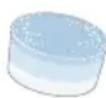


. Detergents using ball and net.


natural_image
3D wireframe model of a bag with two blue liquid droplets on its side (no text or symbols)Detergents not fully dissolved may bring about imperfect washing. For deffective washing, add detergent into the detergent drawer.
Do not wash a duvet by spreading detergent directly on it.
Cautions in Putting Duvet in the Drum
- Do not use unnecessary force or too large Duvet.
- Make sure that a corner or folded part of the duvet directs inwards.
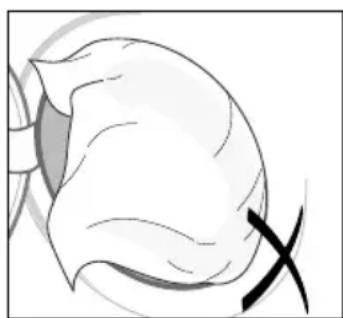
natural_image
Medical illustration of a surgical incision with an X mark, showing anatomical structures without any text or symbols.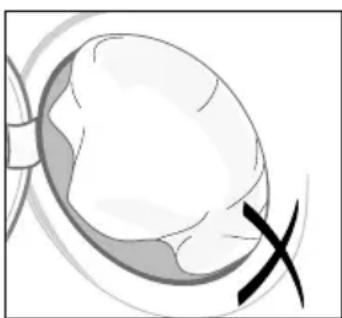
natural_image
Illustration of a human eye with a cross mark, no text or symbols present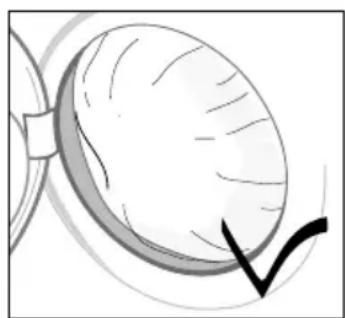
natural_image
Illustration of a human eye with visible eyelid and eyelid, no text or symbols presentPicture of Being Put Properly
Programme Chart
(* user option)
| PRO-GRAM | Max load (kg) | DETERGENT AND ADDITIVES | Tem (°C) | Spin Speed(MAX)rpm | Delay start | Half Load | Water (1) | Electricity (kWh) | |||||
| Pre-wash | wash | Sof-tener | de-fault | Max | Q1244 Q | 1044 Q844 | |||||||
| Cotton | 7.5 | * | yes | * | 60 | 95 | 1200 | 1000 | 800 | * | * | 70 | 1.42 |
| Coloureds | 7.5 | * | yes | * | 40 | 60 | 1200 | 1000 | 800 | * | * | 70 | 1.42 |
| Synthetics | 4.0 | * | yes | * | 40 | 60 | 800 | 800 | 800 | * | * | 65 | 0.85 |
| Delicates | 2.5 | * | yes | * | 40 | 40 | 800 | 600 | 600 | * | * | 65 | 0.85 |
| Wool | 2.0 | - | yes | * | 30 | 40 | 400 | 400 | 400 | * | * | 65 | 0.75 |
| Handwash | 2.0 | - | yes | * | 30 | 40 | 400 | 400 | 400 | * | * | 65 | 0.75 |
| Quick | 3.0 | - | yes | * | 30 | 60 | 1200 | 1000 | 800 | * | - | 45 | 0.45 |
| PROGRAM | Type of WASH |
| Cotton | Average or lightly soiled cottons, bed linen, table linen, underwear, towels, shirts, etc. |
| Coloureds | Average or lightly soiled cottons, bed linen, table linen, underwear, towels, shirts, etc. |
| Synthetics | Average or lightly soiled blouses, shirts, etc., which are made of polyester (diolen, trevira), polyamide (perlon, nylon) or other similar blends. |
| Delicates | Delicate curtains, dresses, skirts, shirts and blouses. |
| Wool | Only machine washable woolens with pure new wool label. |
| Handwash | Very light wash course like hand wash. |
| Quick | Lightly soiled cottons or linen blouses, shirts, dark coloured terry cloth, coloured linen articles, jeans, etc. |
- Programme with prewash lasts approx. 15 minutes longer.
- The programme duration data has been measured under the conditions specified in Standard IEC 456.
- Consumption in individual homes may differ from the values given in the table due to variations in the pressure and temperature of the water supply, the load and the type of laundry.
Programme Chart
(*user option)
| PROGRAM | Max load (kg) | DETERGENT AND ADDITIVES | Tem (°C) | Spin Speed(MAX)rpm | Delay start | Half Load | Water (1) | Electricity (kWh) | |||||
| Pre-wash | wash | Sof-tener | de-fault | Max | Q1244 | Q1044 | Q844 | ||||||
| Duvet | 1 king size (9 Tog) | * | yes | * | 40 | 60 | 800 | 800 | 800 | * | * | 85 | 0.62 |
| Bedding | 5.0 | * | yes | * | 60 | 95 | 1200 | 1000 | 800 | * | * | 65 | 1.25 |
| Towel | 4.0 | * | yes | * | 60 | 95 | 1200 | 1000 | 800 | * | * | 85 | 1.80 |
| Curtain | 5.0 | * | yes | * | 40 | 60 | 1200 | 1000 | 800 | * | * | 85 | 0.60 |
| PROGRAM | Type of WASH |
| Duvet Cotton | bedding with filling, duvet, pillow, blanket, sofa cover with light filling. |
| Bedding Cotton | bedding, bed linen, bed sheet, duvet cover, pillow cover etc. |
| Towel Pile | weave cotton towels, bath towel, bath gown. |
| Curtain Cotton | or mixed cotton thick curtain, tow-face curtain(face, lining), lightly soiled furniture linen, sofa cover without filling etc. |
Appendix
Fabric care chart

Resistant material

Can be ironed at 100^ max

Delicate fabric

Do not iron


Item may be washed at 95 °C

Can be dry cleaned using any solvent


Item may be washed at 60 °C

Dry clean with perchloride, lighter fuel, pure alcohol or R113 only


Item may be washed at 40 °C

Dry clean with aviation fuel, pure alcohol or R113 only


Item may be washed at 30 °C

Do not dry clean

Item may be hand washed

Dry flat

Dry clean only

Can be hung to dry

Can be bleached in cold water

Dry on clothes hanger

Do not bleach

Tumble dry, normal heat

Can be ironed at 200 °C max

Tumble dry, reduced heat

Can be ironed at 150 °C max

Do not tumble dry
Electrical warnings
To reduce the risk of fire, electrical shock, and other injuries, keep these safety precautions in mind:
- Operate the appliance only from the type of power source indicated on the marking label. If you are not sure of the type of power supplied to your home, consult your appliance dealer or local power company.
- Use only a grounded or polarized outlet. For your safety, this appliance is equipped with a polarized alternating current line plug having one blade wider than the other. This plug will fit into the power outlet only one way. If you are unable to insert the plug fully into the outlet, try reversing the plug. If the plug still doesn't fit, contact your electrician to replace your outlet.
- Protect the power cord. Power supply cords should be routed so that they are unlikely to be walked on or pinched by items placed on or against them. Pay particular attention to cords at plugs, convenience receptacles, and the point where they exit from the unit.
- Do not overload the wall outlet or extension cords. Overloading can result in fire or electric shock.
Appendix
Protecting the environment
- This appliance is manufactured from recyclable materials. If you decide to dispose of this appliance, please observe local waste disposal regulations. Cut off the power cord so that the appliance cannot be connected to a power source. Remove the door so that animals and small children cannot get trapped inside the appliance.
- Do not exceed the detergent quantities recommended in the detergent manufacturers' instructions.
- Use stain removal products and bleaches before the wash cycle only when strictly necessary.
- Save water and electricity by only washing full loads (the exact amount depends upon the program used).
Declaration of conformity
This appliance complies with European safety standards, EC directive 93/68 and EN Standard 60335.
Specification
| TYPE FRONT LOADING WASHER | |||||
| DIMENSION | W600mm · D600mm · H850mm | ||||
| WATER PRESSURE 50 kPa ~ | 800 kPa | ||||
| WEIGHT 75 | kg | ||||
| WASH and SPIN CAPACITY 7.5kg (DRY LAUNDRY) | |||||
| POWER CONSUMPTION 240V 2400W | WASHING 220V 180W | ||||
| 240V 180W | |||||
| WASHING AND HEATING | 220V 2000W | ||||
| SPIN | MODEL Q1244 | Q1044 | Q844 | ||
| 230V 550W 500W 430W | |||||
| PUMPING 34W | |||||
| WATER VOLUME | 70l (STANDARD COURSE) | ||||
| SPIN REVOLUTION | MODEL | Q1244 | Q1044 | Q844 | |
| rpm | 1200 | 1000 800 | |||
| PACKAGE Wt | PAPER | 2.5 kg | |||
| PLASTIC | 1.0 kg | ||||
IN CASE THE NEED FOR SERVICING ARISES
-Don't hesitate to call any AS center nearby with your name, address, telephone number, model number and serial number of your machine when anything wrong with your product occurs.
SAMSUNG
ELECTRONICS
Manufacturer:
SAMSUNG ELECTRONICS CO.,LTD
12th FL, Samsung Main Bldg., 250, 2-Ka,
Taepyung-Ro, Seoul Korea
TEL: +82 31 200 6772
FAX: +82 31 200 6986
LVD:
VDE Testing and Certification Institute
Merianstrasse 28, D-63069 Offenbach,
Germany
TEL: +49 69 83 06 425
FAX: +49 69 83 06 320
EMC:
SAMSUNG Electronics Co., Ltd.
EMC Test Laboratory
416, Maetang-3Dong, Yeongtong-Gu
Suwon,Korea
TEL: +82 31 200 2185
FAX: +82 31 200 2189
CE
Code No.: DC68-01959C-01
English