
PAD625 - Car Mount Kunft - Free user manual and instructions
Find the device manual for free PAD625 Kunft in PDF.


| Product Type | Car Phone Mount |
| Brand | Kunft |
| Model | PAD625 |
| Compatible Phone Width | 4.7 to 6.9 inches |
| Installation Method | Vent clip or suction cup |
| Rotation | 360-degree swivel |
| Material | ABS plastic and silicone pad |
| Dimensions (W x H x D) | 10 x 12 x 8 cm |
| Weight | 120 g |
| Key Features | One-hand operation, anti-slip grip, easy access to ports |
| Cleaning and Maintenance | Wipe with dry cloth; avoid liquids |
| Safety Features | Secure locking mechanism, non-slip pad |
| Spare Parts and Repairability | Not user-repairable; contact support for replacement |
| General Information | Intended for use in vehicles, not for wall mounting |
Frequently Asked Questions - PAD625 Kunft
User questions about PAD625 Kunft
0 question about this device. Answer the ones you know or ask your own.
Ask a new question about this device
Download the instructions for your Car Mount in PDF format for free! Find your manual PAD625 - Kunft and take your electronic device back in hand. On this page are published all the documents necessary for the use of your device. PAD625 by Kunft.
USER MANUAL PAD625 Kunft
MANUAL DE INSTRUÇÕES

natural_image
Black and white photo of a mounted optical instrument with adjustable lens and stand, set against a red and blue background (no text or symbols visible)universal car mount
PAD625
Dear client,
We thank you for purchasing this product.
This appliance was submitted to several laboratorial tests, which certify its quality. To simplify the use of this appliance, this instruction manual has been provided. The instructions must ensure a quick and safe use.
Please read carefully the instructions and safety measures described in this manual.
We wish our clients great satisfaction in using their new appliance.
INDEX
- SAFETY INSTRUCTIONS ..... 4
1.1. General Precautions ...... 8
- UTILIZATION AND FUNCTIONING ..... 9
2.1. Introduction ...... 9
2.2. Product Description .....10
2.3. Mounting .....10
2.3.1. Air Vent Mounting .....11
2.3.2. Windshield Mounting .....12
2.3.3. Dashboard Mounting with the Round Disc .....13
-
AFTERMARKET .....14
-
ENVIRONMENT CONSERVATION .....15
2
3
1. SAFETY INSTRUCTIONS
 | ATTENTION |  |
| Risk of Electric ShockDo Not Open | ||
| Attention: to avoid the risk of electric shock, do not remove the cover. The interior does not contain any parts that may be repaired by the user. Ask for assistance to qualified personnel. | ||
Important Warnings
Before using your appliance, read carefully this instruction manual and keep it in a safe place, as you may need it for future consultations.
Before you start your appliance, and to ensure a correct use, do not use it if:
- It has fallen on the ground;
- You notice any evidence of damage;
- Any anomaly occurs during its operation;
To avoid hazards and deterioration of your appliance by an incorrect use, it is advisable to read the instructions carefully and attentively.
Your appliance must not be used to other ends than the ones fore-
seen in the instructions manual. Your safety is only guaranteed in a household use and not for commercial use. The incorrect use will not be covered and automatically cancels the right to warranty.
Assistance
Be sure that, in case of malfunction, you take your appliance to a qualified technician for assistance.
This appliance can be used by children from 8 years old and above and persons with reduced physical,
sensory or mental capabilities or lack of experience and knowledge if they have been given instruction concerning use of the appliance in a safe way and understand the hazards involved. Children shall not play with the appliance. Cleaning and maintenance shall not be made by children without supervision.
These instructions are also available on
www.suporteworten.pt
1.1. General Precautions
- Please follow the instructions of the user manual, which helps properly installing and operating this product and enjoying its advanced features. Please keep the instructions for future reference.
- Read all instructions before using the product.
- This product was designed to be installed on the windshield,
on the dashboard or on the air vent of the air conditioner.
- Before installing make sure the supporting surface will support the combined load of the equipment and hardware.
2. UTILIZATION AND FUNCTIONING
2.1. Introduction
This product is very easy to install. You can install it completely within one minute.
This product has a universal application as the mount is adjustable and the connector is 360^ rotatable for you to have best viewing angle.
Its universal design is compatible with different tablet brands.

area
| Value | Description | |---|---| | 8 | Be installed on the windshield, | | 9 | The chart displays a single data point (blue area) with a red line representing the upper boundary of the curve. The label 'be installed on the windshield,' is in English. |
2.2. PRODUCT DESCRIPTION
2.3. Mounting
There are three mounting options for the mobile phone holder: on the windshield, on the dashboard or on the air vent of the air conditioner.

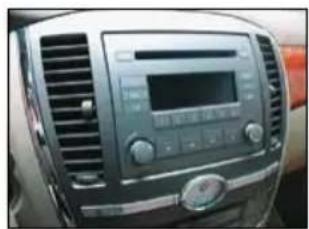
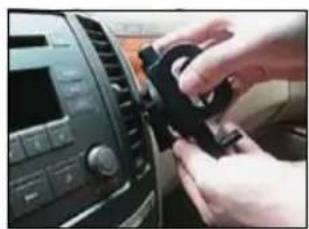
2.3.1. Air Vent Mounting
-
Find the correct mounting position on your car.
-
Insert the two air vent hooks on the air vent.
natural_image
Interior view of a car dashboard with air vent and control panel (no visible text or symbols)
natural_image
Close-up of hands interacting with a car dashboard and camera module (no visible text or symbols)-
Adjust the angle with the flexible support feet.
-
Overall view after everything is set.
natural_image
Close-up of hands adjusting a black plastic component on a car infotainment panel (no visible text or symbols)
natural_image
Interior view of a car dashboard with a mounted camera module (no visible text or symbols)2.3.2. Windshield Mounting
-
Attach the suction cup mount to the back of the bracket.
-
Peel the protective film under the suction cup.

natural_image
Close-up of a hand holding a black mechanical device with a bracket (no visible text or symbols)
natural_image
Close-up of hands holding a small transparent object with a metallic edge, possibly a lens or container (no visible text or symbols)-
Attach the suction cup on the windshield and lock the lever down.
-
Press the button to open the clamp arm, put the mobile phone in the holder area and grip the clamp arm.

natural_image
Close-up of a black mug held by a mechanical device, with no visible text or symbols.
natural_image
Illustration of a smartphone mounted on a stand with a black plastic device attached (no text or symbols visible)2.3.3. Dashboard Mounting with the Round Disc
-
Peel the film under the round disc.
-
Stick the round disc on the dashboard.

natural_image
Close-up of hands holding a red object with a black circular frame (no visible text or symbols)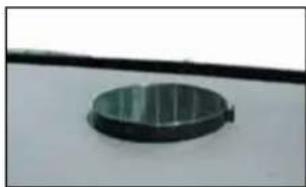
natural_image
Circular metallic object with horizontal stripes mounted on a white surface (no text or symbols visible)-
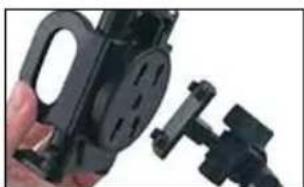
Attach the suction cup mount to the back of the bracket.
-
Press the button to open the clamp arm, put the mobile phone in the holder area and grip the clamp arm.
natural_image
Close-up of a hand holding a black mechanical device with a handle and bracket (no visible text or symbols)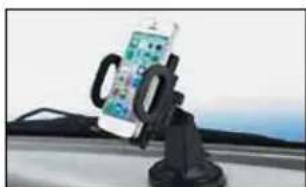
natural_image
Close-up of a smartphone mounted on a black stand, showing the front wheel and rear seat (no visible text or symbols)3. AFTERMARKET
KUNFT has designed this appliance in order to guarantee the maximum reliability. However, if a problem occurs, by following the procedures suggested in this section you may be able to determine its cause.
Do not attempt to open the appliance - there is a risk of electrical shock.
If you are not able to solve the problem, please contact your seller or manufacturer.
All users must be familiarized with this section. Knowing what could go wrong can help you avoid the occurrence of problems.
WARNING: any attempt of fixing the appliance without contacting the manufacturer will nullify the warranty.
In case the problem persists, take your appliance to an aftermarket section of any Worten, Modelo or Continente store in order to solve the problem.
Worten Equipamentos para o Lar ensures for a period of 2 years, counting from the date of purchase of this appliance, a warranty against any
found manufacturing defect. The warranty supposes a correct use and maintenance of the appliance, namely according to the instructions expressed in this manual. In case otherwise identified, the malfunctions will not be under the warranty.
The repairing of electrical appliances must only be made by qualified technicians, as otherwise there may occur future complications on the appliances.
To avoid unnecessary risks, in case there are any malfunctions on the wires or on another type of components, repairing must be made on the specialized locations of technical assistance, as appropriate tools are needed.
4. ENVIRONMENT CONSERVATION
Aiming to protect the environment, we try to reduce to a maximum the volume of the packages which are confined to three easy separation materials: cardboard, paper and plastic.

The appliance is made of recyclable material, once disassembled by a specialized company. Follow the local legislation concerning recycling of all materials.
natural_image
Interior view of a car dashboard with air vent and digital display (no visible text or symbols)
natural_image
Close-up of a hand adjusting a car dashboard panel with a small black clip (no visible text or symbols)natural_image
Close-up of hands adjusting a car dashboard and seatbelt (no visible text or symbols)natural_image
Interior view of a car dashboard and air conditioner unit (no visible text or symbols)natural_image
Close-up of a hand holding a black handheld device with a bracket and cable (no visible text or symbols)natural_image
Close-up of hands using a power tool to clean or store plastic, no visible text or symbolsnatural_image
Close-up of a black mug held by a hand gripping a small object, with no visible text or symbols.
natural_image
Illustration of a smartphone with a lock and a smartphone displaying a grid, floating above a laptop (no text or symbols visible)natural_image
Close-up of a hand holding a black circular object with red ribbon, no visible text or symbols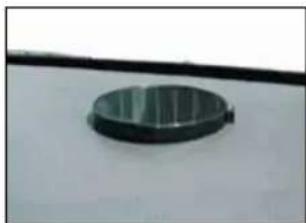
natural_image
Circular metallic object mounted on a white surface, possibly a knob or dial (no text or symbols visible)natural_image
Close-up of a hand holding a black handheld device with a handle, next to a mechanical bracket (no visible text or symbols)
natural_image
Close-up of a smartphone on a car (no visible text or symbols)3. POSTVENTA
natural_image
Interior view of a car dashboard with air conditioner and digital display (no visible text or symbols)
natural_image
Close-up of a hand adjusting a car dashboard panel with a black clip (no visible text or symbols)natural_image
Close-up of hands adjusting a car dashboard and gear component (no visible text or symbols)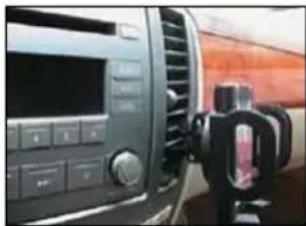
natural_image
Interior view of a car dashboard and air conditioner unit (no visible text or symbols)2.3.2. Montagem no Pára-Brisas
natural_image
Close-up of a hand holding a black mechanical device with a bracket (no visible text or symbols)
natural_image
Close-up of hands holding a small object with a green label, partially visible through a dark container (no text or symbols)natural_image
Close-up of a black mug held by a hand holding a red and gold coin, with no visible text or symbols.
natural_image
Illustration of a smartphone being lifted by a black plastic stand (no text or symbols visible)natural_image
Close-up of hands holding a red object over a black circular object (no visible text or symbols)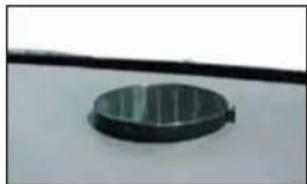
natural_image
Circular metallic object mounted on a surface, possibly a knob or dial (no visible text or symbols)natural_image
Close-up of a hand holding a black handheld device with a small bracket (no visible text or symbols)
natural_image
Close-up of a car trunk-mounted smartphone on a lift, no visible text or symbols3. PÓS-VENDA
Imported, produced and distributed by:
- MANUAL DE INSTRUÇÕES
- INDEX
- SAFETY INSTRUCTIONS
- Important Warnings
- Assistance
- General Precautions
- UTILIZATION AND FUNCTIONING
- Introduction
- PRODUCT DESCRIPTION
- Mounting
- Air Vent Mounting
- Windshield Mounting
- Dashboard Mounting with the Round Disc
- AFTERMARKET
- ENVIRONMENT CONSERVATION
- POSTVENTA
- Montagem no Pára-Brisas
- PÓS-VENDA
Brand : Kunft
Model : PAD625
Category : Car Mount