DGL373 - Unspecified CLARION - Free user manual and instructions
Find the device manual for free DGL373 CLARION in PDF.


User questions about DGL373 CLARION
0 question about this device. Answer the ones you know or ask your own.
Ask a new question about this device
Download the instructions for your Unspecified in PDF format for free! Find your manual DGL373 - CLARION and take your electronic device back in hand. On this page are published all the documents necessary for the use of your device. DGL373 by CLARION.
USER MANUAL DGL373 CLARION
This manual is published by Clarion, without any warranty. Improvements any changes to this manual necessitated by typographical errors, inaccuracies of current information or improvements to programs and/or equipment, may be made by Clarion at any time and without notice. Such changes will, however, be incorporated into new editions of this manual.
iPod is for legal or right holder-authorized copying only. Don't steal music.
iPod is a trademark of Apple Inc., registered in the U.S. and other countries.
The Bluetooth® word mark and logos are owned by the Bluetooth® SIG, Inc. and any use of such marks by Clarion is under license. Other trademarks and trade names are those of their respective owners.
CONTENTS
- WHAT IS INCLUDED IN THIS PACKAGE? 4
- PRODUCT FEATURES OVERVIEW ....5
Clarion Bluetooth ^® Audio Transmitter (DGL373) with iPod ^® Cradle Support 5
- SETTING UP ....7
Setting Up DGL373 7
- INTRODUCTION TO BLUETOOTH® "PAIRING" 10
Pairing Sequence ....10 Automatic Connection ....11
- OPERATIONS FOR BLUETOOTH® AUDIO TRANSMITTER .....12
Buttons Terminology ....12 Understanding The Transmitter Unit Indicators ....13 Basic Operations ....14 Music Streaming and Playback Control ....17
- COMPATIBLE MODELS ......18
- TROUBLESHOOTING ....19
- SPECIFICATION ......20
- ADDITIONAL INFORMATION ......21
1. WHAT IS INCLUDED IN THIS PACKAGE?

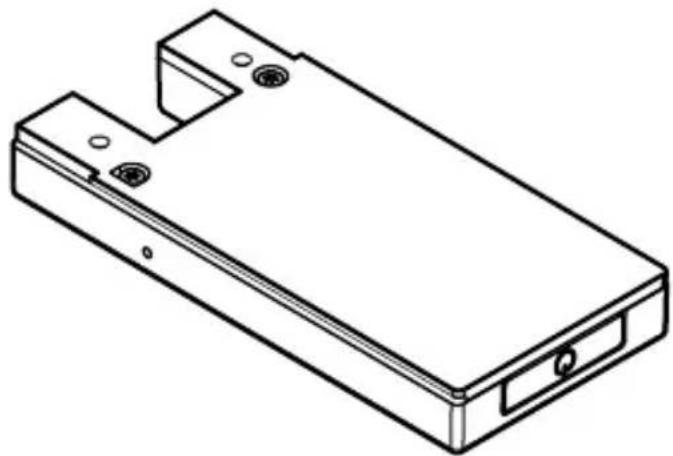
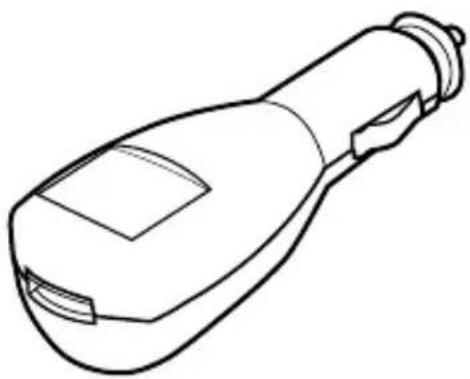
A complete DGL373 package consists of the following items:
natural_image
Technical line drawing of a rectangular electronic device casing with mounting holes and a central slot (no text or symbols)Bluetooth® Audio Transmitter
natural_image
Line drawing of a handheld device with a bulb and handle (no text or symbols)Cigarette charger

natural_image
Diagram of a USB connector showing two connected ports with cable (no text or symbols)Transmitter and charger connecting cable (500mm)
2. PRODUCT FEATURES OVERVIEW
Clarion Bluetooth® Audio Transmitter (DGL373) with iPod Cradle Support
The DGL373 is a Audio Transmitter featuring Bluetooth® wireless technology that support iPod Cradle ^1 to allow you to stream your favourite music from your iPod or alternative music source to your car's audio system. It can also be used for streaming audio to your wireless headset withBluetooth® technology when you are out of your car for a full wireless music experience.
- Auto features:
- Auto-power off after 3 minutes of no activity state.
- iPod will auto-power off when Bluetooth® Audio Transmitter (used with iPod Cradle) is powered off.
- Auto-connect with last paired device.
• Music streaming features:
- Music streaming from any music source (e.g. MP3 player, laptop) using audio stereo cable.
- Music streaming and remote control with iPod when used with iPod Cradle.
- Charging features:
- Dual charging (Transmitter and iPod) when used with iPod Cradle.
- Uninterrupt streaming when charging.
The DGL373 can be used as:
- iPod transmitter with Bluetooth® wireless technology
You can dock your iPod onto the Transmitter unit (used with iPod Cradle) and stream music directly from your iPod to your car stereo with Clarion Bluetooth ^® Audio/Mobile-phone Transceiver for AUX Input (BLT373) ^2 or compatible wireless headset ^3 .
2. PRODUCT FEATURES OVERVIEW
- General purpose transmitter with Bluetooth ^® wireless technology
You can connect any external audio player to the Transmitter unit via an audio stereo cable. Music can be streamed through the car stereo with Clarion Bluetooth® Audio/Mobile-phone Transceiver for AUX Input or compatible wireless headset.
Notes:
^1 iPod Cradle is an iPod docking base, which is one of the Clarion products (sold separately) that works best with DGL373 to provide wireless audio streaming capability for iPod. Cradle will be vary depends on iPod model. Please make sure you get the correct Cradle for your iPod.
2 Clarion Bluetooth® Audio/Mobile-phone Transceiver for AUX Input (BLT373) is one of the Clarion products (sold separately) that allows music streaming via Bluetooth® wireless technology in the car stereo. Please consult your local authorized Clarion dealer for more information about the product.
^3 Please consult your local authorized Clarion dealer for more information about compatible wireless headset.
Setting Up DGL373
Bluetooth® Audio Transmitter
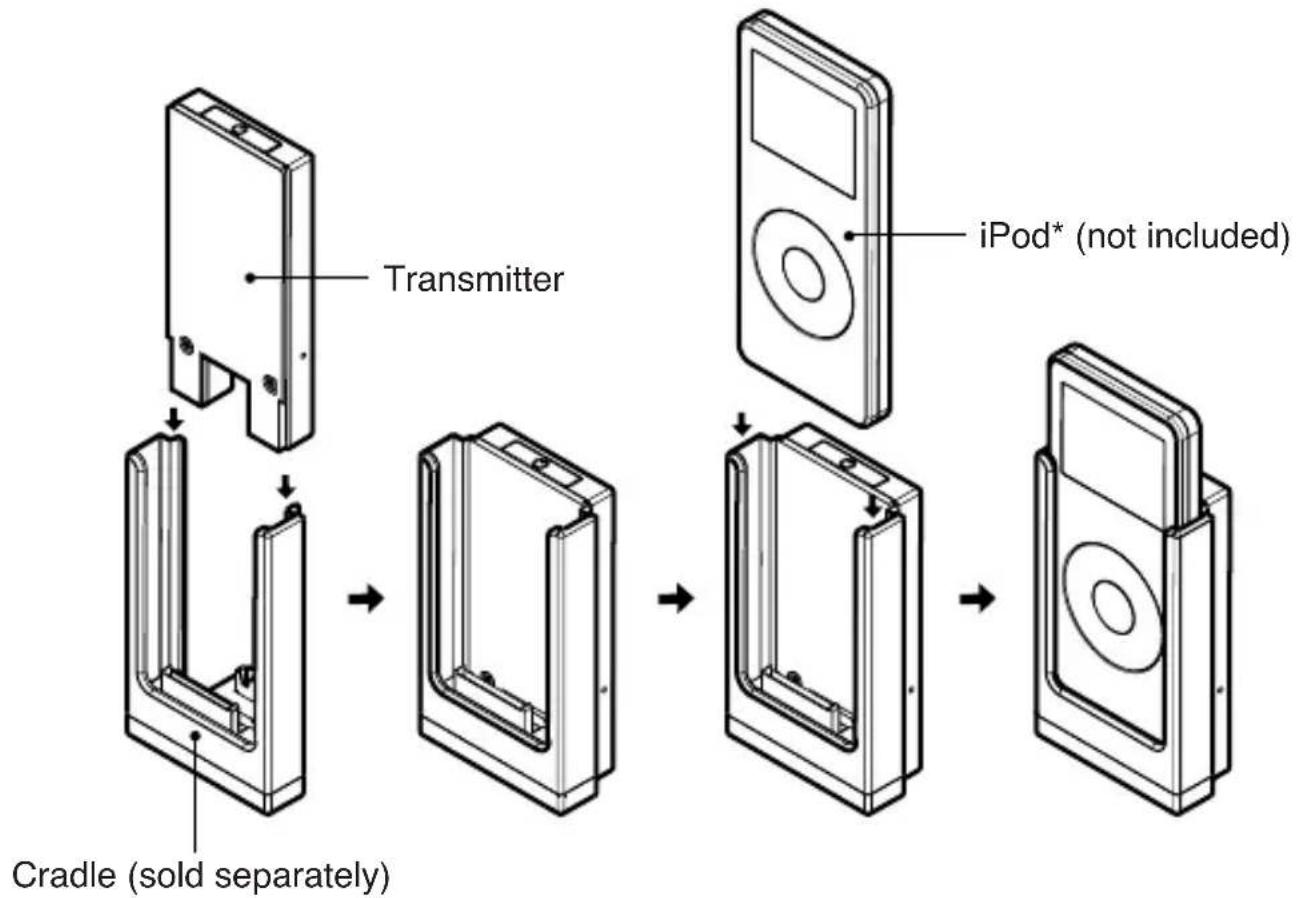
The DGL373 is designed to work with iPod Cradle for ultimate wireless iPod playback support. Appropriate Cradle must be selected to hold different model of iPod. Please consult your local authorized Clarion dealer for the Cradle provided.
The Transmitter unit can be latched with the iPod Cradle to form an iPod Bluetooth® Audio Transmitter unit.
- Slide in the Transmitter unit to the Cradle unit. Make sure the 14-pin outlet socket is connected properly.
- Optional step for iPod Video model: Slide in the gap filler for using 30GB iPod Video with Cradle (shown in Fig. 1). 60/80GB iPod Video is used without the adaptor gap filler.
- Dock the iPod to the Cradle.
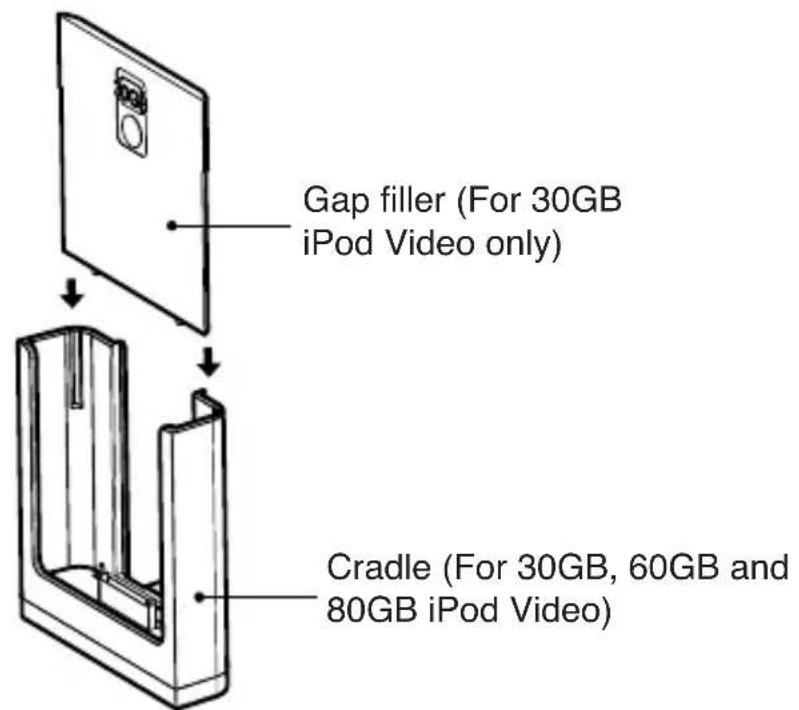
Figure 1: Use the iPod Cradle (BC003V) with Cradle gap filler (For 30GB iPod Video only)
3. SETTING UP

flowchart
graph TD
    A["Transmitter"] --> B["Cradle (sold separately)"]
    B --> C["iPod* (not included)"]
    C --> D["CD-ROM with iPod"]
Figure 2: Use the DGL373 with iPod and iPod Cradle (BC001N)
* Illustration shown above is using the 1st generation of iPod nano, BC001N is not compatible with 2nd generation of iPod nano. Different iPod model will require a different Cradle.
General purpose Bluetooth® wireless transmitter
-
Select an external audio source (e.g. line-out of a laptop, PC or any MP3 player). The audio jack output for external source may vary depends on the device.
-
Use an audio stereo cable to connect the output of external audio source to the input (2.5mm stereo jack) of the Transmitter.
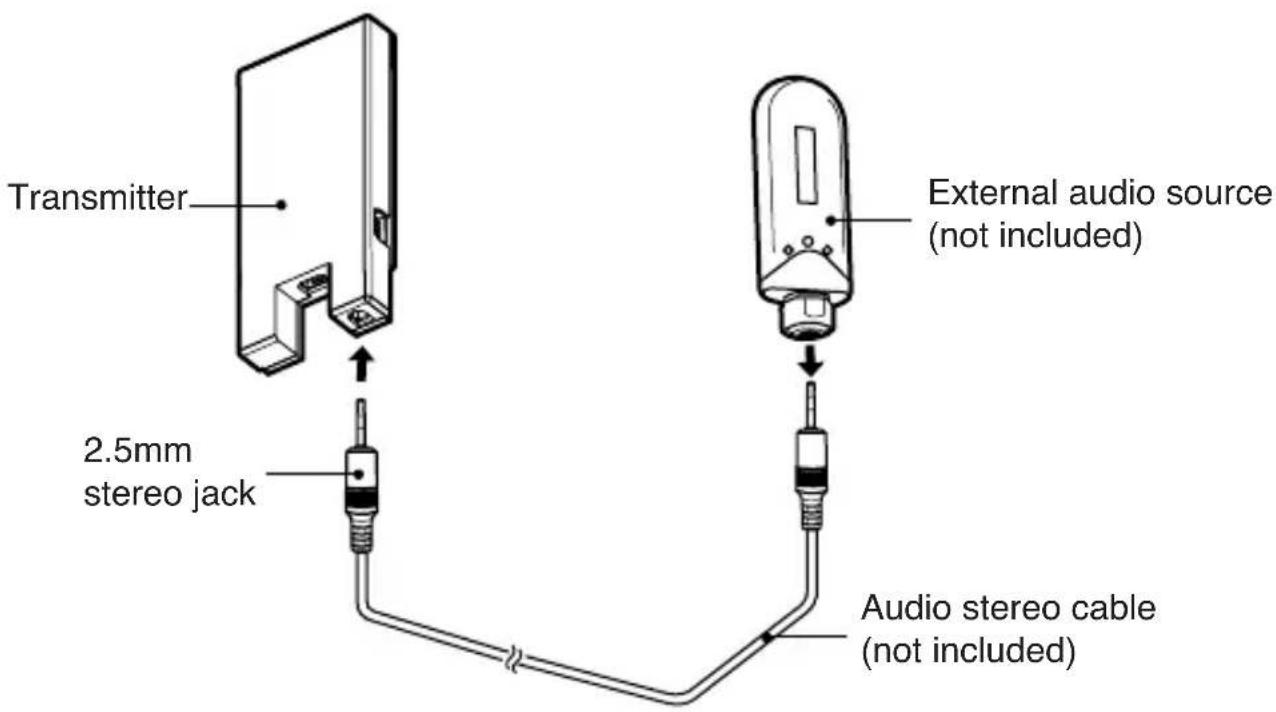
Figure 3: Use the DGL373 with alternative audio source
4. INTRODUCTION TO BLUETOOTH ^® “PAIRING”
What is Bluetooth® wireless technology?
Bluetooth ^® wireless technology is a radio technology that connects devices, such as mobile phones and headsets, without wires or cords over a short distance of approximately 10 meters (approx. 33 feet). Get more information at www.bluetooth.com.
What is Bluetooth ^® wireless profiles?
Bluetooth ^® wireless profiles are the different ways that Bluetooth ^® devices communicate with other devices. The Transmitter supports A2DP and AVRCP in order to allow music streaming and playback control. Please refer chapter “Music Streaming and Playback Control” on page 17 for more description on these profiles.
What is pairing?
Pairing creates a unique and encrypted link between two Bluetooth ^® devices and lets them communicate with each other. Bluetooth ^® devices will not work if the devices have not been paired.
Pairing Sequence
Note: Please refer to Clarion Bluetooth® Audio/Mobile-phone Transceiver for AUX Input owner's manual for the relevant operation below.
Between Bluetooth ^® Audio/Mobile-phone Transceiver and Bluetooth ^® Audio Transmitter
- Make sure the Transmitter is connected to an audio source. Please refer "Setting Up DGL373" on page 7.
- Make sure the car stereo source mode is switched to "AUX" mode.
- Set the Transceiver unit in pairing mode.
- Set the Transmitter unit in pairing mode. Please refer "ActivatiBluetooth® Audio Transmitter pairing mode" on page 14.
- Music starts automatically upon successful pairing.
4. INTRODUCTION TO BLUETOOTH® "PAIRING"
Notes:
- You cannot pair the Transmitter with your mobile phone.
- You do not have to enter a dedicated pin code for pairing these two devices, as you do with a mobile phone.
- During pairing mode, the Transmitter unit should show a quick alternate red/blue LED. Make sure that the Transmitter and Transceiver are not paired to any other Transceiver or Transmitter respectively.
- Please refer "Understanding The Transmitter Unit Indicators" on page 13 for further details.
Automatic Connection
When the Transmitter is switched on, it will automatically try to re-connect with the last paired device (Transceiver unit). It may take up to several seconds for the re-connection. If there is no connection detected after 3 minutes, Transmitter will be automatically powered off.
If the device (Transceiver unit) already has connection with another device using the same Bluetooth ^® profile (A2DP), automatic connection will be failed.
Notes:
- If the Transceiver is switched off and on, it may require 20-30 seconds for the Transmitter to detect disconnection before re-connection.
- Music streaming may be discontinued if the Transmitter and Transceiver are moved out of range of each other.
5. OPERATIONS FORBLUETOOTH® AUDIO TRANSMITTER
Buttons Terminology
The Transmitter unit with Power/pairing button (with LEDs) and a reset switch.
![[O] [RESET] 14-pin outlet socket USB mini-B port 2.5mm audio jack input](/content/2026/05/1143680/images/9e144664d0e664b8e5cddd2494a4f97b54ddefd57e4d8f33b5ddbc24e4038078.jpg)
[⏻] button
- Use the button to power on/off.
- During power on, use the button to perform Bluetooth® pairing.
[RESET] switch
- Use the switch to reset the unit.
USB mini-B port
- Use USB mini-B cable through this port to charge the Transmitter.
2.5mm audio jack input
- Connect to external audio player.
14-pin outlet socket
- Connect to iPod Cradle.
5. OPERATIONS FOR BLUETOOTH ^® AUDIO TRANSMITTER
Understanding The Transmitter Unit Indicators
| Event | LEDs | |
| Red Blue | ||
| During power on | Blink 3 times | Lights up for 1-2 seconds |
| During power off | Blink 3 times, Blink 1 more time after iPod is off | Blink dimly until iPod is switched off (~ 2 sec) |
| Powered (No activity) | Blink dimly quicklyBlink once | every 5 sec |
| Bluetooth® pairing mode | Blink alternately | |
| Receiver connected, Music streaming | - | Blink once every 5 sec Blink dimly quickly |
| Battery Low Blink twice | every 4 sec - | |
| Charging On - | ||
| Charging completed - | On | |
Notes:
- “Blink” refers to the LED is blinking brightly.
- “Blink dimly” refers to the LED is blinking not brightly.
5. OPERATIONS FOR BLUETOOTH ^® AUDIO TRANSMITTER
Basic Operations
Please make sure you have read through chapter "Setting Up DGL373" on page 7 before proceed to the following operations. For iPod/external audio player operations, please refer to your corresponding product owner's manual.
Turning on/off the Transmitter power
- Press the [⏻] button once to power on.
- Press and hold the [⏻] button for 3 seconds or longer to power off.
Note:
- When the Transmitter is powered off, iPod will be turned off as well when used with iPod Cradle.
Automatic power off
Transmitter will be automatically powered off in the following situations:
- Three minutes of inactivity or without any connected device to conserve energy. iPod will be turned off as well if it is connected to the Cradle.
- Battery is very low or exhausted.
Note:
- If the Transmitter is automatically shut down due to battery exhaustion, all pairing information will be erased. Thus, it is recommended to recharge the Transmitter when battery is low.
Activating Bluetooth® Audio Transmitter pairing mode
- Press the [💡] button once to power on.
- Press the [⏻] button to activate Bluetooth® pairing mode.
Notes:
- If no device is paired after 3 minutes, pairing mode will be cancelled and Transmitter unit will shut down.
- For more information on Bluetooth® pairing, please see chapter “Pairing Sequence” on page 10.
5. OPERATIONS FOR BLUETOOTH® AUDIO TRANSMITTER
Resetting the Transmitter unit
This function is used to restore to factory default setting and clear all pairing information.
- Press the [RESET] switch once to perform reset function. Device will be automatically powered off.
Notes:
- iPod will not be turned off in this case and iPod will not be reset.
- User needs to press the [ √] button again to restart the device.
Charging the Transmitter
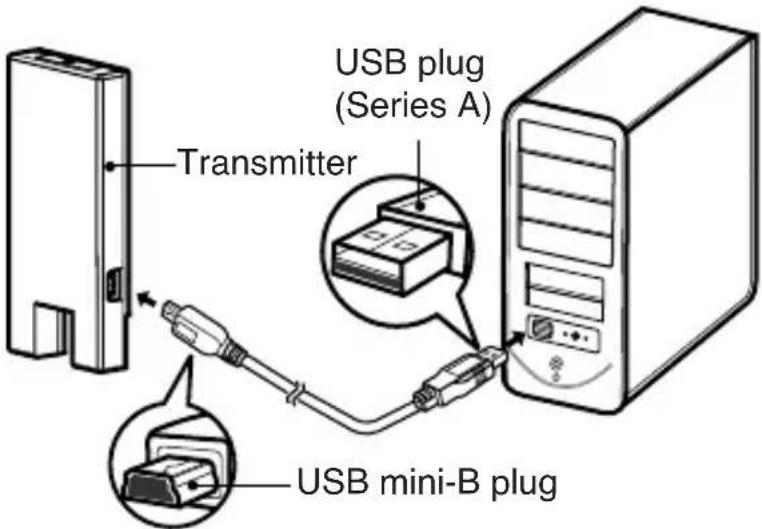
The Transmitter can be charged through several ways. The charging time may require up to 2 hours for 8 hours of continuous music playing.
• Via USB mini-B cable (Included)
- Connect the USB mini-B plug to the Transmitter (through USB mini-B port).
- Connect the normal USB plug (Series A) to the computer USB port.
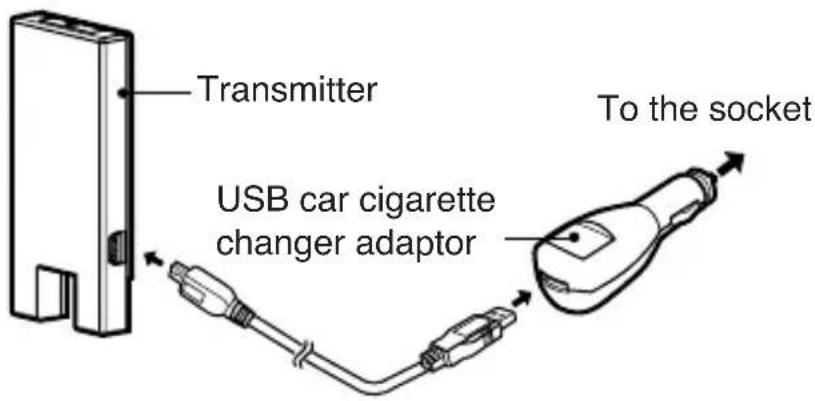
• Via USB car cigarette charger adaptor (Included)
- Remove the car cigarette lighter head from the socket.
- Connect the USB car cigarette charger adaptor to the socket.
5. OPERATIONS FOR BLUETOOTH® AUDIO TRANSMITTER

- Connect the normal USB plug to the charger adaptor.
- Connect the USB mini-B plug to the Transmitter.
Notes:
- While charging, the following activities will be observed.
i) Both Transmitter (when attached with iPod Cradle) and iPod are charged at the same time.
ii) Music streaming is not affected.
iii) Red LED remains ON.
• After charging is completed, blue LED remains ON. - USB mini-B port is used for charging only, it cannot be used to transfer files to the iPod when used with iPod Cradle.
5. OPERATIONS FOR BLUETOOTH ^® AUDIO TRANSMITTER
Music Streaming and Playback Control
Music streaming is a technique for transferring audio data such that it can be processed as a steady and continuous stream.
Users can stream music from their iPod or other external audio player to their car stereo and listen to the tracks through the car's speakers.
WHAT IS A2DP?
A2DP (Advanced Audio Distribution Profile) is aBluetooth® profile that allows you to send CD quality stereo music from one device to another without wires. A2DP is able to provide crystal clear music without the hassle of plugging cables. Bluetooth® wireless technology with A2DP makes this Transmitter unit capable of streaming music.
WHAT IS AVRCP?
AVRCP (Audio Video Remote Control Profile) is anotherBluetooth® profile that enables music from external audio player to be controlled remotely. AVRCP allows some basic playback control functions such as play/pause, volume up/down and next/previous track to an external audio player.

CAUTION
- The Transceiver works as one way communication to the Transmitter. Thus, please avoid controlling the iPod (when Transmitter is used with iPod Cradle) and Transceiver at the same time as this might cause some incorrespondence operations between the both devices.
Notes:
- Please refer the Transceiver unit owner's manual for more information on AVRCP control operations. This Transmitter only supports play/pause and next/previous track for iPod.
- There is no volume control support from the analog output of 30-pin iPod connector interface. Changing the volume on the iPod through the “wheel” control will have no effect on the music streaming.
- There is no remote control to external audio player that connected to Transmitter through 2.5mm audio jack input.
6. COMPATIBLE MODELS
Supported iPod Cradle models
This Transmitter unit is specially designed to work with Clarion iPod Cradle. Different iPod models will require different type of iPod Cradle. Please consult your nearest Clarion dealer for more details.
Supported other external audio player
The audio player must be able to output audio to the 2.5mm audio jack input of this Transmitter unit.
Supported device with Bluetooth® wireless technology
DGL373 is specially designed and work best with Clarion Bluetooth® Audio/Mobile-phone Transceiver for AUX Input (BLT373).
Make sure your headset supports the following Bluetooth ^® profiles:
- A2DP (stereo music streaming)
- AVRCP (remote control function)
Please take note that wireless headset from other brands may not be fully compatible with this Transmitter unit.
Please consult your nearest Clarion dealer for the Transceiver unit and headset offer.
7. TROUBLESHOOTING
| Problem | Description Cause | |
| During power off, the LED blinks whenever the on/off button is pressed. | Power on illusion It | can be powered up after the button is pressed once. However, this sequence may fail sometimes. If it happens, release the button and retry again. |
| The device does not start up properly upon power up. | Power on failure User | may execute following steps to recover the situation. a) Press the [RESET] switch if the red LED is on. b) Try to switch on the Transmitt again. |
| iPod control (AVRCP) does not work, but music is streaming. (used with iPod Cradle). | This could be due to a loose connection between Transmitter Cradle and iPod. | Make sure the Transmitter and the iPod are securely connected to the Cradle. |
| The AVRCP profile might not be connected. | Power off and power on the Transmitter to auto re-establish connection. |
8. SPECIFICATION
| Compliance | Bluetooth® 1.2 |
| Profiles A2DP (stereo music streaming)AVRCP (remote control function, e.g. play/pause, next/previous track) | |
| Wireless range Class 2: | Up to 10m (line of sight) |
| Tx/Rx radio sensitivity -80dBm | |
| Data rate Forward: 723kbps Reverse: 57kbps | |
| Antenna 2.45 GHz chip type | |
| Compression SBC (sub-band coding) | |
| Compression ratio 4:1-6:1 typical | |
| Bit rate Programmable (<350kbps typical) | |
| Stereo audio 16kHz-48kHz, 16bit (for music) | |
| iPod support MMI support for iPod e.g. play/pause, next/previous track etc | |
| Operating temperature | -20°C~60°C |
| Storage temperature | -40°C~85°C |
| Dimensions | Approx. 35mm (Width) x 74mm (Height) x 10mm (Depth) |
| Weight | Approx. 26g |
| Audio bandwidth 30Hz-20kHz | |
| Signal-to-Noise Ratio | ~84dB |
| Analog in Line level (1 Vrms) | |
| Voltage 3.7V | |
| Max current 60mA | |
| Battery life (full running) | ~8hr on 3.7v 500mAh polymer lithium ion battery |
| Charging time | ~2hr on 3.7v 500mAh polymer lithium ion battery |
| Power source | 4.5-6.5V DC |
Safe and efficient use
Note:
Read this information before using this product.
Changes or modifications to this product not expressly approved by Clarion may void the user's authority to operate the equipment.
Please check for any exceptions, due to national requirements or limitations, in usage of equipment with Bluetooth® wireless technology before using this product.
Product care
- Do not expose your product to liquid or moisture or to humidity.
- Do not expose your product to extreme high or low temperatures.
- Do not expose your product to lit candles, cigarettes, or cigars, or to open flames etc.
- Do not drop, throw or try to bend the product as rough treatment could damage it.
- Do not use any other accessories than Clarion originals intended for use with this product. Use of non-original accessories may result in loss of performance, damage to the product, fire, electric shock or injury. The warranty does not cover product failures which have been caused by use of non-original accessories.
- Do not attempt to disassemble your product. The product does not contain consumer serviceable or replaceable components. Only Clarion service partners should perform service.
- Do not keep the product in an area prone to dust and dirt. Only use a soft damp cloth to clean your product.
- If you will not be using the product for a while, store it in a place that is dry, free from damp, dust and extreme temperatures.
- To reduce risk of electric shock, unplug the unit from any power source before attempting to clean it.
9. ADDITIONAL INFORMATION

This Product uses the lithium polymer ion battery
CAUTION
- Do not use or store the battery near sources of heat such as a fire or heater.
- Do not use or store the battery where is exposed to extremely hot, such as under window of a car in direct sunlight in a hot day. Otherwise, the battery may be overheated. This can also reduce battery performance and/or shorten service life.
- Do not use any chargers other than those recommended by Clarion.
- Do not attempt to disassemble or modify the battery in any way.
- Do not recharge the battery near a fire or in extremely hot conditions.

! CAUTION
If you want to dispose this product, do not mix it with general household waste. There is a separate collection system for used electronic products in accordance with legislation that requires proper treatment, recovery and recycling.
Private households in the 25 member states of the EU, in Switzerland and Norway may return their used electronic products free of charge to designated collection facilities or to a retailer (if you purchase a similar new one). For countries not mentioned above, please contact your local authorities for the correct method of disposal. By doing so you will ensure that your disposed product under goes the necessary treatment, recovery and recycling and thus prevent potential negative effects on the environment and human health.
EC DECLARATION OF CONFORMITY
We : Clarion Europa GmbH
Hessenring 19-21, 64546 Mörfelden-Walldorf, Germany.
Declare under our sole responsibility that the following Product(s)
Model : Bluetooth ^* Audio Transmitter Part No(s) : DGL 373
is (are) conformity with the following relevant harmonized standards:
EN 300 328 V1.6.1 : 2004 - Electromagnetic compatibility and radio spectrum matters(ERM); Wideband Transmission systems operation in the 2.4GHz ISM band. Part 2 Essential requirements under Article 3.2 of the RTTE directive.
EN 301 489-1 V1.6.1 : 2005 – EMC standard for radio equipment and services. Part 1: Common technical requirements.
EN 301 489-17 V1.2.1 : 2002 – EMC standard for radio equipment and services. Part 17 : Specific conditions for Wideband and HIPERLAN equipment.
Following the provisions of Council Directive 89/336/EEC relating to electromagnetic compatibility on a voluntary basis.
Mörfelden-Walldorf, Germany.
Date : 06 April 2007
On behalf of Clarion Europa GmbH
S. Yamakawa: President
Clarion Co., Ltd.
All Rights Reserved. Copyright © 2007: Clarion Co., Ltd.
Printed in Malaysia
EA-1317E
280-8527-00