
DCMV45U6S - Computing Black Box - Free user manual and instructions
Find the device manual for free DCMV45U6S Black Box in PDF.


| Product Type | Deluxe Vertical Cable Manager |
| Brand | Black Box |
| Model | DCMV45U6S |
| Height | 84 in (45U) |
| Width | 6 in |
| Depth | 9.75 in (24.8 cm) |
| Weight | 45 lb (20.4 kg) |
| Construction | Channel body: Steel; Front cover: Multiformed lightweight aluminum; Hinge points and supporting fingers: High-strength composite material |
| Finish | RAL 9005 black low-gloss, light-textured powder-coat |
| Compliance | EIA 310-D |
| Included Components | Cable manager, 6 bolts, 6 nuts, 2 grommets, 4 snap hinge A, 4 snap hinge B, 1 cover, 4 cover snap hinges, 6 snap-on cable guides, user manual |
| Available Models | DCMV45U35S (4" single-sided), DCMV45U35D (4" double-sided), DCMV45U6D (6" double-sided) |
| Accessories | Rear Post and Gate Kit (DCMVPG6 for 6" models), Deluxe Cover (DCMRC6) |
| Mounting | Rack mount using included bolts and nuts |
| Assembly Required | Yes, instructions included |
| Intended Use | Manage cables for rackmounted networking equipment |
Frequently Asked Questions - DCMV45U6S Black Box
User questions about DCMV45U6S Black Box
0 question about this device. Answer the ones you know or ask your own.
Ask a new question about this device
Download the instructions for your Computing in PDF format for free! Find your manual DCMV45U6S - Black Box and take your electronic device back in hand. On this page are published all the documents necessary for the use of your device. DCMV45U6S by Black Box.
USER MANUAL DCMV45U6S Black Box
Deluxe Vertical Cable Manager
Supports and manages cables connected to rackmounted networking equipment.

natural_image
Black vertical rack with multiple slots and a central slot, no visible text or symbolsTrademarks Used in this Manual
Black Box and the Double Diamond logo are registered trademarks of BB Technologies, Inc.
Any other trademarks mentioned in this manual are acknowledged to be the property of the trademark owners.
We're here to help! If you have any questions about your application
or our products, contact Black Box Tech Support at 724-746-5500
or go to blackbox.com and click on "Talk to Black Box."
You'll be live with one of our technical experts in less than 30 seconds.
- Specifications 4
- Overview....5
2.1 Available Models 5
2.2 Accessories 5
2.3 What's Included 5 - Assembly Instructions ...... 6
1. Specifications
Compliance: EIA 310-D
Construction: Channel body: Steel; Front cover: Multiformed lightweight aluminum; Hinge points and supporting fingers: High-strength composite material
Finish: Aluminum components: RAL 9005 black low-gloss, light-textured RAL 9005 powder-coat finish; Composite parts: Matching black
Size: DCMV45U35S: 84"H (45U) x 4"W x 9.75"D (213.4 x 10.2 x 24.8 cm); DCMV45U35D: 84"H (45U) x 4"W x 16"D (213.4 x 10.2 x 40.6 cm); DCMV45U6S: 84"H (45U) x 6"W x 9.75"D (213.4 x 15.2 x 24.8 cm); DCMV45U6D: 84"H (45U) x 6"W x 16"D (213.4 x 15.2 x 40.6 cm);
Weight: DCMV45U35S: 40 lb. (18.1 kg); DCMV45U35D: 42 lb. (19 kg); DCMV45U6S: 45 lb. (20.4 kg); DCMV45U6D: 47 lb. (21.4 kg)
2. Overview
The Deluxe Vertical Cable Manager supports and manages cables of rackmounted networking equipment. It arrives unassembled, and assembly instructions are described in this manual.
2.1 Available Models
Four models are available:
- Deluxe Vertical Cable Manager, 45U x 4"W single-sided (part number DCMV45U35S)
- Deluxe Vertical Cable Manager, 45U x 4"W double-sided (part number DCMV45U35D)
- Deluxe Vertical Cable Manager, 45U x 6"W single-sided (part number DCMV45U6S)
- Deluxe Vertical Cable Manager, 45U x 6"W double-sided (part number DCMV45U6D)
2.2 Accessories
- 3.5" Rear Post and Gate Kit (DCMVPG35) for DCMV45U35S or DCMV45U35D
- 6" Rear Post and Gate Kit (DCMVPG6) for DCMV45U6S or DCMV45U6D
• 3.5" Deluxe Cover (DCMRC35) - 6" Deluxe Cover (DCMRC6)
2.3 What's Included
DCMV45U35S and DCMV45U6S: DCMV45U35D and DCMV45U6D:
• (1) cable manager • (1) double-sided cable manager
• (6) b o l t s
• (6) n u t s
• (2) grommets • (2) grommets
• (4) snap hinge "A" • (4) snap hinge "A"
• (4) snap hinge "B" • (4) snap hinge "B"
• (1) c o v e r
• (4) cover snap hinges • (4) cover snap hinges
- This user's manual - (6) snap-on cable guides, 6.25 "D
• (6) s n
• ( 3 ) B r
• T h i s u
3. Assembly Instructions
The Deluxe Vertical Cable Manager is shipped unassembled. Follow the instructions here to assemble the cable manager. The cover can be set up in two ways: snap or hinged.
STEP 1: Attach the four cover snap hinges to the cable manager's cover. See Figure 3-1.

Figure 3-1. Attach the snap or hinged covers to the cable manager's cover.
STEP 2: Snap cover configuration.
2A: Position (1) snap hinge "A" and (1) snap hinge "B" on the third cable finger from the top and snap together. Be sure that snap hinge "A" is on the outside of the cable manager.
2B: Repeat this step on all four corners as shown in Figure 3-2.
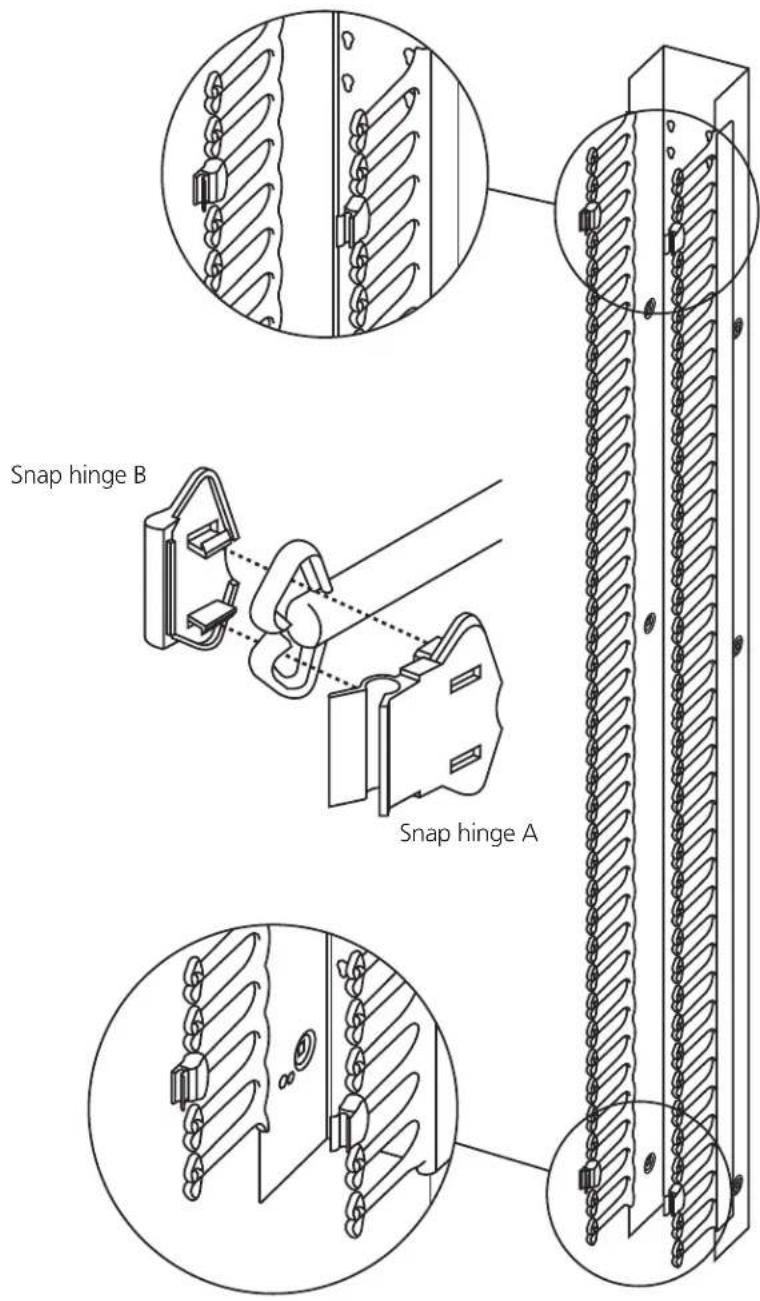
Figure 3-2. Snap covers configuration.
STEP 3: Hinged cover configuration.
3A: Position the cover next to the cable manager to find the correct cable finger to install the snap hinges. Once the correct cable finger is found, position (1) snap hinge "A" (outside) and (1) snap hinge "B" (inside) on the finger and snap together.
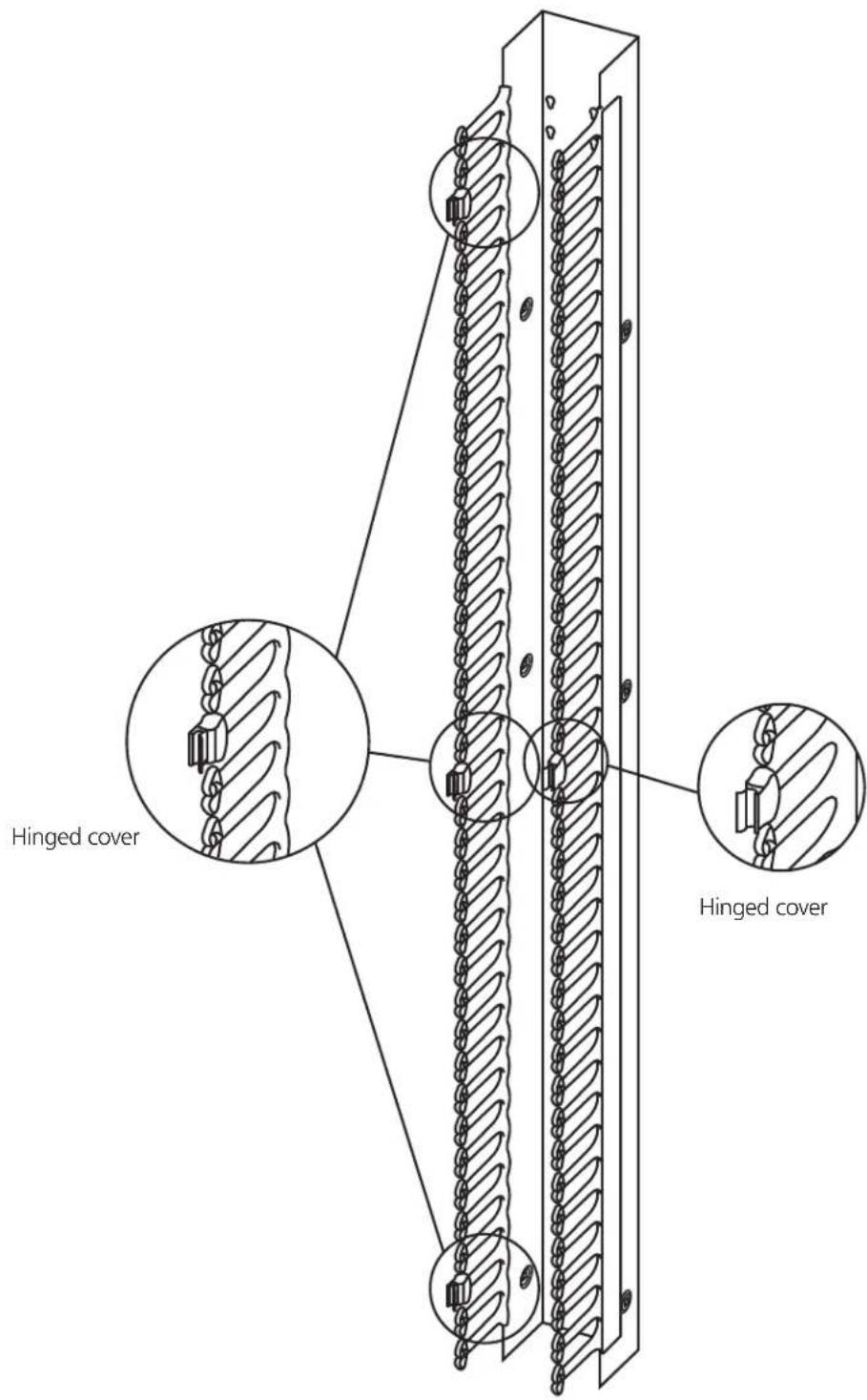
Figure 3-3. Hinged covers configuration.
STEP 4: Attach the two cover snap hinges to secure the cover to the cable manager. See Figure 3-4.

Figure 3-4. Attach the cover snap hinges.
STEP 5: Connect the two grommets to the cable manager. See Figure 3-5.

Figure 3-5. Connect the grommets.
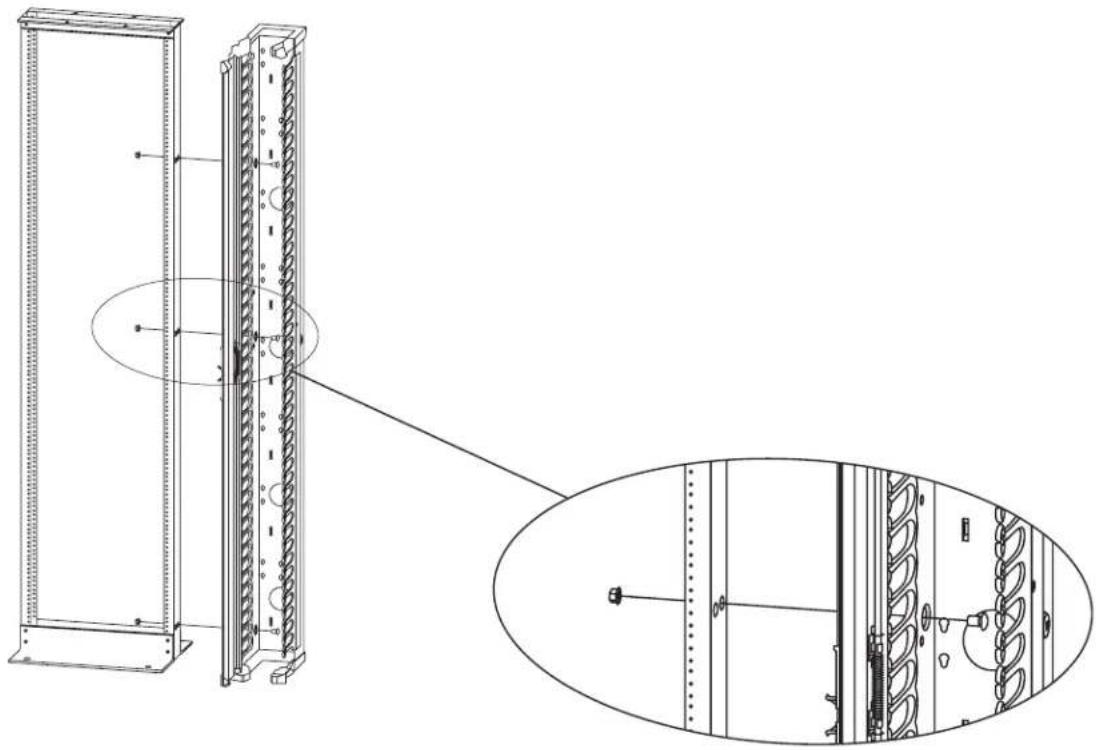
STEP 6: Connect the cable manager to the rack. Using the (6) bolts and (6) nuts, attach the cable manager to a rack. See Figure 3-6.
natural_image
Technical line drawing of a server rack cabinet with internal components and mounting holes (no text or symbols)Figure 3-6. Attaching the cable manager to a rack.
Optional Accessories
Cables are routed from the outside of the cable manager through the cable manager's inside channel. Optionally, you can use Post and Gate Kits (DCMVPG6, DCMVPG35) to secure the outside portion of the cable to the cable manager.
For Double-Sided Models Only
STEP 1: Insert the first snap-on cable guide into the mounting holes on the back of the cable manager as shown in Figure 3-7. Press down to lock into place and insert the snap-on hinges into the cable guides. Repeat Step 1 to install the second snap-on cable guide. Be sure to use the mounting holes on the outsides of the cable manager.

natural_image
Technical line drawing of a mechanical assembly with a bracket and spring-loaded housing (no text or symbols)Figure 3-7. Install the snap-on cable guides.
STEP 2: Snap the cable gate into place as shown in Figure 3-8.

natural_image
Technical line drawing of a mechanical assembly with spring-loaded components and mounting brackets (no text or symbols)Figure 3-8. Install the cable gate.
Black Box Tech Support: FREE! Live. 24/7.
Tech support the way it should be.

natural_image
Black-and-white portrait of a smiling woman wearing a headset and collared shirt (no text or symbols visible)Great tech support is just 30 seconds away at 724-746-5500 or blackbox.com.

BLACK BOX®
NETWORK SERVICES
About Black Box
Black Box Network Services is your source for more than 118,000 networking and infrastructure products. You'll find everything from cabinets and racks and power and surge protection products to media converters and Ethernet switches all supported by free, live 24/7 Tech support available in 30 seconds or less.
© Copyright 2011. All rights reserved.
DCMV45U35S, rev. 1


- Deluxe Vertical Cable Manager
- Supports and manages cables connected to rackmounted networking equipment.
- Specifications
- Overview
- Available Models
- Accessories
- What's Included
- Assembly Instructions
- STEP 2: Snap cover configuration.
- STEP 3: Hinged cover configuration.
- Optional Accessories
- For Double-Sided Models Only
- Black Box Tech Support: FREE! Live. 24/7.
- BLACK BOX®
- NETWORK SERVICES
- About Black Box
Brand : Black Box
Model : DCMV45U6S
Category : Computing