
SRCABLETRAY - Computer accessory Tripp Lite - Free user manual and instructions
Find the device manual for free SRCABLETRAY Tripp Lite in PDF.


| Product Type | Cable Management Tray |
| Brand | Tripp Lite |
| Model | SRCABLETRAY |
| Compatible With | SmartRack Enclosures |
| Material | Steel |
| Color | Black |
| Mounting | Roof-mounted inside enclosure |
| Grounding | Included ground cable with lock washers and hex nut |
| Included Components | Trough section (1), support sections (2), Phillips screws (8), lock washers (4), hex nuts (2), ground cable (1) |
| Expansion Option | SRCABLETRAYEXP (sold separately) adds vertical sections |
| Optional Accessory | SRCABLELADDER for spanning aisles between enclosures |
| Installation Tools Required | Phillips screwdriver; 13 mm open-end or crescent wrench (for grounding) |
| Storage Temperature | Less than 40°C (104°F) |
| Storage Humidity | Less than 90% non-condensing |
| Warranty | 5 years limited |
| Country of Origin | China |
| Safety Compliance | Must be grounded per local electrical codes |
Frequently Asked Questions - SRCABLETRAY Tripp Lite
User questions about SRCABLETRAY Tripp Lite
0 question about this device. Answer the ones you know or ask your own.
Ask a new question about this device
Download the instructions for your Computer accessory in PDF format for free! Find your manual SRCABLETRAY - Tripp Lite and take your electronic device back in hand. On this page are published all the documents necessary for the use of your device. SRCABLETRAY by Tripp Lite.
USER MANUAL SRCABLETRAY Tripp Lite
SmartRack™ Accessories
Models: SRCABLETRAY, SRCABLETRAYEXP

1 – Introduction
2
1-1 Parts List 2
1-2 Tools Required 2
2 – Important Safety Instructions 2
3 – SRCABLETRAY Installation 3
4 – SRCABLETRAYEXP Installation 3
4-1 One Expansion Section 3
4-2 Two Expansion Sections 4
5 – Storage and Service 4
6 – Warranty and Warranty Registration 4

1111 W. 35th Street, Chicago, IL 60609 USA
+1.773.869.1234 • www.tripplite.com
1 - Introduction
SRCABLETRAY provides roof-mounted cable routing and power/data cable segregation for Tripp Lite's SmartRack Enclosures. SRCABLETRAYEXP provides vertical expansion for SRCABLETRAY. (SRCABLETRAY also provides secure mounting points for Tripp Lite's SRCABLELADDER accessory, sold separately. SRCABLELADDER allows cable bundles to span aisles and/or spaces between enclosures. See the SRCABLELADDER manual for more information.)
1-1 Parts List
SRCABLETRAY
A1ough Section (1)
B1 support Sections (2)
C1-32 x 1/4 Phillips Screws (8)
D16 Lock Washers (4)
E1 6 Hex Nuts (2)
F1-inch Ground Cable (1)
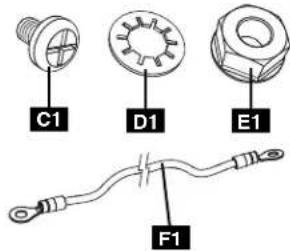
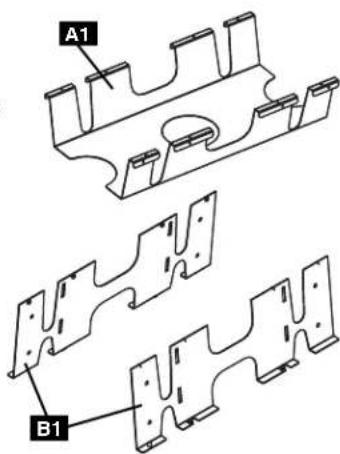
SRCABLETRAYEXP
■ expansion Sections (2)
B2-32 x 1/4 Phillips Screws (8)
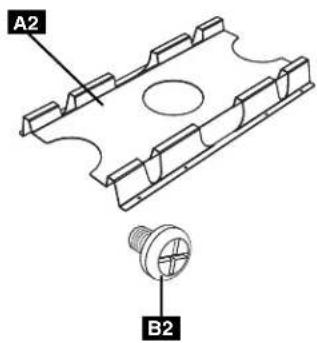
If anything is missing, call Tripp Lite for assistance at +1.773.869.1234. Note: SRCABLETRAY and SRCABLETRAYEXP are sold separately.
1-2 Tools Required
• Phillips Screwdriver
- 13 mm Open-End Wrench or Crescent Wrench (For SRCABLETRAY installation only.)
2 – Important Safety Instructions
SAVE THESE INSTRUCTIONS
This manual contains instructions and warnings that must be followed during the installation and operation of the products described in this manual. Read all instructions and warnings thoroughly before attempting installation. Failure to comply may invalidate the warranty and cause property damage and/or personal injury.
• Install in a controlled indoor environment, away from moisture, temperature extremes, flammable liquids and gasses, conductive contaminants, dust and direct sunlight.
- Provide suitable grounding in accordance with all applicable electrical wiring regulations.
- Use of this equipment in life support applications where failure of this equipment can reasonably be expected to cause the failure of the life support equipment or to significantly affect its safety or effectiveness is not recommended. Do not use this equipment in the presence of a fl ammable anesthetic mixture with air, oxygen or nitrous oxide.
3 - SRCABLETRAY Installation
Note: You can remove the roof panel to aid installation, but this step is not required.
1 assemble the cable tray by attaching the support sections A to the trough section B with the included screws. Note: The support sections should be attached inside the ft angles of the trough section, not outside.

3ompress the unattached cable tray support section A until you can insert the remaining tabs E into the matching roof panel slots F. When you release pressure from the cable tray support sections, they will expand to provide a secure fi t.
2 insert the tabs C at one side of the cable tray into the matching roof panel slots D. (Several sets of slots are compatible, allowing you to adjust the cable tray's position to match your preference.)

4 se the included hex nut G and lock washers H to connect one end of the included ground cable I to a grounding post J at the corner of the cable tray. Connect the other end of the ground cable to the metal frame of the rack enclosure. (Follow the ground wires connected to the rack enclosure's doors to locate several convenient ground connection points on the frame.)

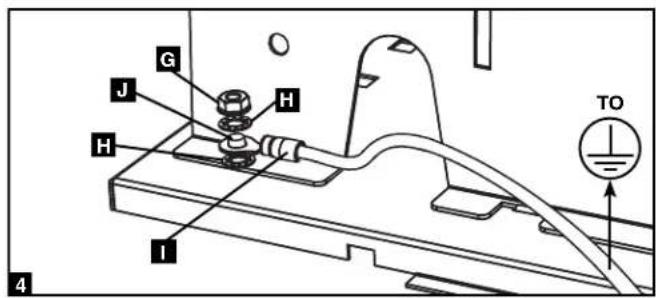
4 - SRCABLETRAYEXP Installation
Note: You must install SRCABLETRAY before installing SRCABLETRAYEXP. SRCABLETRAYEXP includes two expansion sections; you may install one or both, depending on your needs.
4-1 One Expansion Section
1 Attach the expansion section A to the cable tray B with the included screws.

natural_image
Technical line drawing of a mechanical assembly with labeled parts A and B (no text or symbols beyond labels)4 - SRCABLETRAYEXP Installation (continued)
4-2 Two Expansion Sections
1 Place the first expansion section
A on the cable tray B as shown.
P2c the second expansion section
C on the first expansion
section A as shown. Align the screw holes of the cable tray and expansion sections, then connect the expansion sections to the cable tray with the included screws.


5 – Storage and Service
Storage
The unit must be stored in a clean, secure environment with a temperature less than 40^ C ( 104^ F) and a relative humidity less than 90% (non-condensing). Store the unit in its original shipping container if possible.
Service
The unit is covered by the limited warranty described in this manual. For more information, call Tripp Lite Customer Service at +1.773.869.1234.
6 – Warranty and Warranty Registration
Limited Warranty
Seller warrants this product, if used in accordance with all applicable instructions, to be free from original defects in material and workmanship for a period of 5 years from the date of initial purchase. If the product should prove defective in material or workmanship within that period, Seller will repair or replace the product, in its sole discretion.
THIS WARRANTY DOES NOT APPLY TO NORMAL WEAR OR TO DAMAGE RESULTING FROM ACCIDENT, MISUSE, ABUSE OR NEGLECT. SELLER MAKES NO EXPRESS WARRANTIES OTHER THAN THE WARRANTY EXPRESSLY SET FORTH HEREIN. EXCEPT TO THE EXTENT PROHIBITED BY APPLICABLE LAW, ALL IMPLIED WARRANTIES, INCLUDING ALL WARRANTIES OF MERCHANTABILITY OR FITNESS, ARE LIMITED IN DURATION TO THE WARRANTY PERIOD SET FORTH ABOVE; AND THIS WARRANTY EXPRESSLY EXCLUDES ALL INCIDENTAL AND CONSEQUENTIAL DAMAGES. (Some states do not allow limitations on how long an implied warranty lasts, and some states do not allow the exclusion or limitation of incidental or consequential damages, so the above limitations or exclusions may not apply to you. This Warranty gives you specific legal rights, and you may have other rights which vary from jurisdiction to jurisdiction.)
Tripp Lite; 1111 W. 35th Street; Chicago IL 60609; USA
WARNING: The individual user should take care to determine prior to use whether this device is suitable, adequate or safe for the use intended. Since individual applications are subject to great variation, the manufacturer makes no representation or warranty as to the suitability or fitness of these devices for any specific application.
Warranty Registration
Visit www.tripplite.com/warranty today to register the warranty for your new Tripp Lite product. You'll be automatically entered into a drawing for a chance to win a FREE Tripp Lite product!* No purchase necessary. Void where prohibited. Some restrictions apply. See website for details.
Tripp Lite has a policy of continuous improvement. Specifications are subject to change without notice.
Made in China.

1111 W. 35th Street, Chicago, IL 60609 USA
+1.773.869.1234 • www.tripplite.com
200804131
93-2907

- SmartRack™ Accessories
- - Introduction
- 1-1 Parts List
- SRCABLETRAY
- SRCABLETRAYEXP
- 1-2 Tools Required
- – Important Safety Instructions
- SAVE THESE INSTRUCTIONS
- - SRCABLETRAY Installation
- - SRCABLETRAYEXP Installation
- 4-1 One Expansion Section
- - SRCABLETRAYEXP Installation (continued)
- 4-2 Two Expansion Sections
- – Storage and Service
- Storage
- Service
- – Warranty and Warranty Registration
- Limited Warranty
- Warranty Registration
Brand : Tripp Lite
Model : SRCABLETRAY
Category : Computer accessory