AOC-STG-B4S - Network card Supermicro - Free user manual and instructions
Find the device manual for free AOC-STG-B4S Supermicro in PDF.


| Product Type | Network Interface Card |
| Model | AOC-STG-B4S |
| Brand | Supermicro |
| Form Factor | Standard height, PCIe add-on card |
| Host Interface | PCI Express 3.0 x8 |
| Ports | 4 x 10GBASE-T RJ45 |
| Chipset | Intel XL710 |
| Data Rate | 10 Gbps per port (100M/1G/10G auto-negotiation) |
| Dimensions | 167.6 x 111.1 mm (6.6 x 4.4 in) |
| Weight | Approx. 190 g (6.7 oz) |
| Power Consumption | Typically 15 W (max 25 W) |
| Operating Temperature | 0°C to 55°C (32°F to 131°F) |
| Storage Temperature | -40°C to 70°C (-40°F to 158°F) |
| Operating Humidity | 10% to 90% non-condensing |
| Supported Standards | IEEE 802.3ae 10GBASE-T, IEEE 802.3ab 1000BASE-T, IEEE 802.3u 100BASE-TX |
| Jumbo Frame Support | Up to 9.5 KB (9,500 bytes) |
| VLAN Support | 802.1Q VLAN tagging |
| PXE Boot | Yes |
| iSCSI Support | Yes (iSCSI boot option) |
| Management | Intel PROSet, SNMP, DMI |
| Safety | Keep away from moisture, static discharge; install in a grounded chassis. |
| Maintenance | Clean with dry cloth; no user-serviceable parts inside. |
| Spare Parts & Repairability | Refer to Supermicro support for replacement; card is not field-repairable. |
Frequently Asked Questions - AOC-STG-B4S Supermicro
User questions about AOC-STG-B4S Supermicro
0 question about this device. Answer the ones you know or ask your own.
Ask a new question about this device
Download the instructions for your Network card in PDF format for free! Find your manual AOC-STG-B4S - Supermicro and take your electronic device back in hand. On this page are published all the documents necessary for the use of your device. AOC-STG-B4S by Supermicro.
USER MANUAL AOC-STG-B4S Supermicro
natural_image
Close-up of a green PCI expansion card with visible heat sink and cooling elements (no text or symbols)User's Guide
Revision 1.0b
The information in this User's Guide has been carefully reviewed and is believed to be accurate. The vendor assumes no responsibility for any inaccuracies that may be contained in this document, and makes no commitment to update or to keep current the information in this user's guide, or to notify any person or organization of the updates. Please Note: For the most up-to-date version of this user's guide, please see our Website at www.supermicro.com.
Super Micro Computer, Inc. ("Supermicro") reserves the right to make changes to the product described in this user's guide at any time and without notice. This product, including software and documentation, is the property of Supermicro and/or its licensors, and is supplied only under a license. Any use or reproduction of this product is not allowed, except as expressly permitted by the terms of said license.
IN NO EVENT WILL SUPER MICRO COMPUTER, INC. BE LIABLE FOR DIRECT, INDIRECT, SPECIAL, INCIDENTAL, SPECULATIVE OR CONSEQUENTIAL DAMAGES ARISING FROM THE USE OR INABILITY TO USE THIS PRODUCT OR DOCUMENTATION, EVEN IF ADVISED OF THE POSSIBILITY OF SUCH DAMAGES. IN PARTICULAR, SUPER MICRO COMPUTER, INC. SHALL NOT HAVE LIABILITY FOR ANY HARDWARE, SOFTWARE, OR DATA STORED OR USED WITH THE PRODUCT, INCLUDING THE COSTS OF REPAIRING, REPLACING, INTEGRATING, INSTALLING OR RECOVERING SUCH HARDWARE, SOFTWARE, OR DATA.
Any disputes arising between the manufacturer and the customer shall be governed by the laws of Santa Clara County in the State of California, USA. The State of California, County of Santa Clara shall be the exclusive venue for the resolution of any such disputes. Supermicro's total liability for all claims will not exceed the price paid for the hardware product.
FCC Statement: This equipment has been tested and found to comply with the limits for a Class A digital device pursuant to Part 15 of the FCC Rules. These limits are designed to provide reasonable protection against harmful interference when the equipment is operated in a commercial environment. This equipment generates, uses, and can radiate radio frequency energy and, if not installed and used in accordance with the manufacturer's instruction manual, may cause harmful interference with radio communications. Operation of this equipment in a residential area is likely to cause harmful interference, in which case you will be required to correct the interference at your own expense.
California Best Management Practices Regulations for Perchlorate Materials: This Perchlorate warning applies only to products containing CR (Manganese Dioxide) Lithium coin cells. "Perchlorate Material-special handling may apply. See www.dtsc.ca.gov/hazardouswaste/perchlorate".
WARNING: Handling of lead solder materials used in this product may expose you to lead, a chemical known to the State of California to cause birth defects and other reproductive harm.
User's Guide Revision 1.0b
Release Date: December 29, 2014
Unless you request and receive written permission from Super Micro Computer, Inc., you may not copy any part of this document.
Information in this document is subject to change without notice. Other products and companies referred to herein are trademarks or registered trademarks of their respective companies or mark holders.
Copyright © 2014 by Super Micro Computer, Inc.
All rights reserved.
Printed in the United States of America
Preface
About this User's Guide
This user's guide is written for system integrators, IT technicians and knowledgeable end users. It provides information for the installation and use of the AOC-STG-b4S add-on card.
About this Add-on Card
The Supermicro AOC-STG-b4S is the most energy-efficient and cost-effective 4-port 10GbE adapter solution for data centers in today's market. The AOC-STG-b4S supports a wide range of popular networking features. These features include TCP Offload, PXE boot, Virtualization technology (VMDq and PC-SIG SR-IOV), and Energy Efficient Ethernet (IEEE 802.3az). The Supermicro AOC-STG-b4S add-on card offers the highest performance with the lowest power consumption currently available on the market. This add-on card is intended to be used with Supermicro's servers or motherboards as an integrated solution package. For more information regarding product support or updates, please refer to our website at http://www.supermicro.com/products/nfo/networking.cfm#adapter.
An Important Note to the User
All images and layouts shown in this user's guide are based upon the latest PCB Revision available at the time of publishing. The card you have received may or may not look exactly the same as the graphics shown in this user's guide.
Returning Merchandise for Service
A receipt or copy of your invoice marked with the date of purchase is required before any warranty service will be rendered. You can obtain service by calling your vendor for a Returned Merchandise Authorization (RMA) number. When returning the motherboard to the manufacturer, the RMA number should be prominently displayed on the outside of the shipping carton, and the shipping package is mailed prepaid or hand-carried. Shipping and handling charges will be applied for all orders that must be mailed when service is complete. For faster service, You can also request a RMA authorization online http://www.supermicro.com/RmaForm/.
This warranty only covers normal consumer use and does not cover damages incurred in shipping or from failure due to the alternation, misuse, abuse or improper maintenance of products.
During the warranty period, contact your distributor first for any product problems.
Conventions Used in the User's Guide
Pay special attention to the following symbols for proper system installation and for safety instructions to prevent damage to the system or injury to yourself:

Warning: Important information given to ensure proper system installation or to prevent damage to the components or injury to yourself.

Note: Additional information given for proper system setup.
Naming Convention
Naming Convention
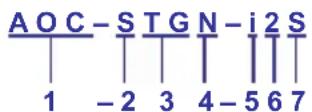
| Character Representation | Options | |
| 1st | Product Family | AOC: Add On Card |
| 2nd | Form Factor | U: UIO, S: Standard, P: Proprietary, C: MicroLP |
| 3rd | Product Type/Speed | G: GbE (1Gb/s), TG: 10GbE (10Gb/s), IBF: IB FDR (56Gb/s) IBQ: IB QDR (40Gb/s), INF: InfiniBand DDR (20Gb/s) |
| 4th | Chipset Model (Optional) | N: Niantec (82599ES), P: Powerville (i350) |
| 5th | Chipset Manufacturer | i: Intel, m: Mellanox, b: Broadcom |
| 6th | Number of Ports | 1: 1 port, 2: 2 ports, 4: 4 ports |
| 7th | Connector Type (Optional) | S: SFP+, T: 10GBase-T |
SMC Networking Add-on Cards
| Model | Type | Form Factor | Interface | Controller | Connection | Dimension (w/o Brackets) (L x H) |
| S40G-i2Q | 40GbE | Standard LP | PCI-E x8 | Intel® XL710 | 2 QSFP+ (40Gb/port) | 5.9" (14.9cm) x 2.73" (6.9cm) |
| SGP-i2 | GbE | Standard LP | PCI-E x4 | Intel® i350AM2 | 2 RJ45 (1Gb/port) | 3.9" (9.91cm) x 2.73" (6.9cm) |
| SGP-i4 | GbE | Standard LP | PCI-E x4 | Intel® i350 | 4 RJ45 (1Gb/port) | 3.9" (9.9cm) x 2.73" (6.9cm) |
| STG-b4S | 10GbE | Standard LP | PCI-E x8 | Broadcom® BCM57840S | 4 SFP+ (10Gb/port) | 5.4" (13.7cm) x 2.73" (6.9cm) |
| STG-i2T | 10GbE | Standard LP | PCI-E x8 | Intel® X540 | 2 RJ45 (10Gb/port) | 6.4" (16.3cm) x 2.73" (6.9cm) |
| STGN-i2S | 10GbE | Standard LP | PCI-E x8 | Intel® 82599ES | 2 SFP+ (10Gb/port) | 4.0" (10.2cm) x 2.73" (6.9cm) |
| STGN-i1S | 10GbE | Standard LP | PCI-E x8 | Intel® 82598EN | 1 SFP+ (10Gb/port) | 4.0" (10.2cm) x 2.73" (6.9cm) |
| STG-i2 | 10GbE | Standard LP | PCI-E x8 | Intel® 82598EB | 2 CX4 (10Gb/port) | 5.6" (14.1cm) x 2.73" (6.9cm) |
| PG-i2+ | GbE | Proprietary LP | PCI-E x4 | Intel® 82576EB | 2 RJ45 (1Gb/port) | 3.8" (9.6cm) x 2.5" (6.4cm) |
| PTG-i1S | 10GbE | Proprietary | PCI-E x8 | Intel 82599EN | 1 SFP+ (10Gb/port) | 10.04" (25.5cm) x .78" (2.0cm) |
| UG-i4 | GbE | UIO FH | PCI-E x8 | Intel® 82571EB | 4 RJ45 (1Gb/port) | 6.6" (16.7cm) x 3.9" (9.8cm) |
| UIBF-m1 | FDR IB | UIO LP | PCI-E x8 | Mellanox® ConnectX-3 | 1 QSFP (56Gb/port) | 5.6" (14.0cm) x 2.5" (6.4cm) |
| UIBQ-m1 | QDR IB | UIO LP | PCI-E x8 | Mellanox® ConnectX-2 | 1 QSFP (40Gb/port) | 5.6" (14.3cm) x 2.5" (6.4cm) |
| UIBQ-m2 | QDR IB | UIO LP | PCI-E x8 | Mellanox® ConnectX-2 | 2 QSFP (40Gb/port) | 5.6" (14.3cm) x 2.5" (6.4cm) |
| CGP-i2 | GbE | MicroLP | PCI-E x4 | Intel® i350 | 2 RJ45 (1Gb/port) | 4.4" (11.3cm) x 1.3" (3.4cm) |
| CG-i2 | GbE | MicroLP | PCI-E x4 | Intel® 82580 | 2 RJ45 (1Gb/port) | 4.4" (11.3cm) x 1.3" (3.4cm) |
| CIBF-m1 | FDR IB | MicroLP | PCI-E x8 | Mellanox® ConnectX-3 | 1 QSFP (56Gb/port) | 4.4" (11.3cm) x 1.3" (3.4cm) |
| CIBQ-m1 | QDR IB | MicroLP | PCI-E x8 | Mellanox® ConnectX-3 | 1 QSFP (40Gb/port) | 4.4" (11.3cm) x 1.3" (3.4cm) |
| CTG-i1S | 10GbE | MicroLP | PCI-E x8 | Intel® 82599EN | 1 SFP+ (10Gb/port) | 4.4" (11.3cm) x 1.3" (3.4cm) |
| CTG-i2S | 10GbE | MicroLP | PCI-E x8 | Intel® 82599ES | 2 SFP+ (10Gb/port) | 4.4" (11.3cm) x 1.3" (3.4cm) |
| CTG-i2T | 10GbE | MicroLP | PCI-E x8 | Intel® X540 | 2 RJ45 (10Gb/port) | 4.9" (12.3cm) x 3.0" (7.7cm) |
Contacting Supermicro
Headquarters
Address: Super Micro Computer, Inc.
980 Rock Ave.
San Jose, CA 95131 U.S.A.
Tel: +1 (408) 503-8000
Fax: +1 (408) 503-8008
Email: marketing@supermicro.com (General Information)
support@supermicro.com (Technical Support)
Website: www.supermicro.com
Europe
Address: Super Micro Computer B.V.
's-Hertogenbosch, The Netherlands
Tel: +31 (0) 73-6400390
Fax: +31 (0) 73-6416525
Email: sales@supermicro.nl (General Information)
support@supermicro.nl (Technical Support)
rma@supermicro.nl (Customer Support)
Website: www.supermicro.nl
Asia-Pacific
Address: Super Micro Computer, Inc.
3F, No. 150, Jian 1st Rd.
Zhonghe Dist., New Taipei City 235
Taiwan (R.O.C)
Tel: +886-(2) 8226-3990
Fax: +886-(2) 8226-3992
Email: support@supermicro.com.tw
Website: www.supermicro.com.tw
Table of Contents
Preface
Chapter 1 Overview
1-1 Overview 1-1
1-2 Product Highlights.... 1-1
1-3 Technical Specifications.... 1-2
General....1-2
Ethernet Features 1-2
Network Features.... 1-2
Remote Boot Options.... 1-3
Virtualization Features.... 1-3
Cable Support 1-3
OS Support 1-3
Physical Dimensions....1-4
Optional Accessories 1-4
Operating Conditions 1-4
1-4 Compliance/Operating Environment 1-5
1-5 SMC Platform Support.... 1-5
Chapter 2 Hardware Components
2-1 Add-On Card Image and Layout....2-1
2-2 Major Components....2-1
2-3 Connectors: LAN Ports and LAN LED Indicators 2-2
LAN Ports 2-2
LAN Port LED Indicators 2-2
Chapter 3 Installation
3-1 Static-Sensitive Devices.... 3-1
Precautions 3-1
Unpacking 3-1
3-2 Before Installation 3-1
3-3 Installing the Add-on Card 3-2
3-4 Installing the Windows Operating System 3-4
3-5 Installing Other Operating Systems 3-4
Chapter 1
Overview
1-1 Overview
Congratulations on purchasing your add-on card from an acknowledged leader in the industry. Supermicro products are designed with the utmost attention to detail to provide you with the highest standards in quality and performance. For product support and updates, please refer to our website at http://www.supermicro.com/products/nfo/networking.cfm#adapter.
1-2 Product Highlights
The product highlights of this add-on card include the following:
- Quad SFP+ Ports
• Low-Profile Standard Form Factor
• PCI Express 3.0 (8GT/s)
• TCP Offload Engine (TOE)
• VMDq and PC-SIG SR-IOV for Virtualized Environments - Jumbo Frame Support
• IEEE 802.3az Energy Efficient Ethernet (EEE)
• Low Power Consumption (about 14W)
• iSCSI Remote Boot Support - PXE Boot Support
• RoHS Compliance 6.6
1-3 Technical Specifications
General
• Broadcom BMC57840S controller
• Compact size low-profile standard form factor
• PCI-E 3.0 x8 (8GT/s) interface
• Quad SFP+ connectors
Ethernet Features
• Energy Efficient Ethernet IEEE 802.az supported
• Traffic Steering for MAC address and VLAN Tag
- Up to 32 queues/port supported for RSS (Receive Side Scaling)
• Congestion Notification 802.1au
• Large Send Offload (LSO) and Large Receive Offload (LRO)
• Link Aggregation 802.3ad
Network Features
• Jumbo Frames up to 9600 Bytes
• Clause 73 Auto-negotiation
- IEEE 801.2q VLAN
• External PHY support
- TCP Offload Engine (TOE) reduces host CPU utilization while preserving the rich and flexible nature of soft OS stack implementation
- iSCSI Acceleration
• IPv6 Acceleration
• Support port aggregation, failover, load balancing
Remote Boot Options
• Preboot eXecution Environment (PXE) support
- iSCSI remote boot
Virtualization Features
• Up to 128 per port for VMDq
- SR-IOV with up to 64 Virtual Functions (VFs) for Guest Operating Systems (GOS) per port
• Supports NetQueue and VMQueue
- Supports Data Center Bridging which provides secure data delivery, lower latency, and standards-based bandwidth sharing of data center physical links
• Supports up to 68 Rx/Tx Descriptor Queues for Virtualization per port
• Supports up to 136 MAC Addresses per port
• Supports EEE 802.1Qau Congestion Notification
Cable Support
- SFP+ direct attached twin axial cables, up to 5 meters
• LC-LC fiber-optic cables (with required optional transceivers)
OS Support
The AOC-STG-b4S add-on card supports the following operating systems (OS):
- Windows® 2008 Server R2 (with HyperV), Server 2012 (with HyperV)
• Linux: RedHat EL 5, 6, and 7
• SuSE SLES 10, 11, and 12
• VMware ESX 5.0 (vSphere 5.0), 5.1 (vSphere 5.1), and 6.0 (vSphere 6.0)
- Solaris 11
Physical Dimensions
• Card PCB dimensions: 13.72cm (5.4in) x 6.90cm (2.73in) (L x H)
• Height of end brackets: Standard 12cm (4.725in), low-profile 7.94cm (3.13in)
Optional Accessories
- AOC-E10GSFPSR: SFP+ transceiver module for short range fiber cables (up to 300m)
- AOC-E10GSFPLR: SFP+ transceiver module for long range fiber cables (up to 3000m)
- AOC-TSR-FS: SFP+ transceiver module for short range fiber cables (up to 300m)
- AOC-GBIC-FSR2: SFP+ transceiver module for short range fiber cables (up to 300m), single speed (10Gb)
• CBL-0347L: 39.37" (100cm) 10GbE SFP+ to SFP+, Twinax copper cable
• CBL-0456L: 78.74" (200cm) 10GbE SFP+ to SFP+, Twinax copper cable
• CBL-0348L: 118.11" (300cm) 10GbE SFP+ to SFP+, Twinax copper cable
• CBL-0349L: 196.85" (500cm) 10GbE SFP+ to SFP+, Twinax copper cable
Operating Conditions
- Operating temperature: 0°C to 55°C (32°F to 131°F)
• Storage temperature: -40^ to 70^ ( -40^ to 158^ )
Note: This product is intended to be used with Supermicro server systems or motherboards as an integrated solution package.
1-4 Compliance/Operating Environment
The AOC-STG-b4S add-on card is compliant with the following environmental regulations:
• RoHS Compliant 6/6, Pb Free

1-5 SMC Platform Support
The following platforms are supported by the AOC-STG-b4S add-on card:
• Supermicro motherboards with minimum PCI-E x8 slot with enough clearance
- Supermicro Server systems with low-profile or full-height PCI-E x8 expansion slot with enough clearance
• Supermicro chassis as specified in the Matrix below:
| AOC-STGN-b4S Fitment Matrix | |||
| Chassis | FH Slot | LP Slot | Notes |
| F627R3-RTB+/72B+ | Top** slot is blocked by a rivet, other 3 can be used | ||
| F617R2-RT+/R72+* | Top** slot is blocked by a rivet, other 3 can be used | ||
| F617R3/2-FT+ | Top** slot is blocked by a rivet, other 3 can be used | ||
| F627R2-F73 | Cannot be installed | ||
| F627G2-FT+/F73+ | x | ||
| 118G(Q) | x | Will work with SFP+ cable in all 4 slots, but rivet keeps transceiver from working in top** slot | |
| 213-LPB | x | ||
| 213-WIO | x x | ||
| 216-LPB | x | ||
| 417-LPB | x | ||
| 819TQ-WIO | x x | ||
| 825-LPB | x | ||
| 825-WIO | x x | ||
| 825M LPB | x | ||
| 826-LPB | x | ||
| 827H | Cannot be installed | ||
| 827HQ | Cannot be installed | ||
| 847-LPB | x | ||
| 847-WIO | x x | ||
| 938H | Cannot be installed | ||
x = can be installed
* = There will be a tooling change for the low-profile slot.
** = Top slot is the SFP+ port farthest from the PCI-Express Goldfinger on the PCB.
Notes
Chapter 2
Hardware Components
2-1 Add-On Card Image and Layout
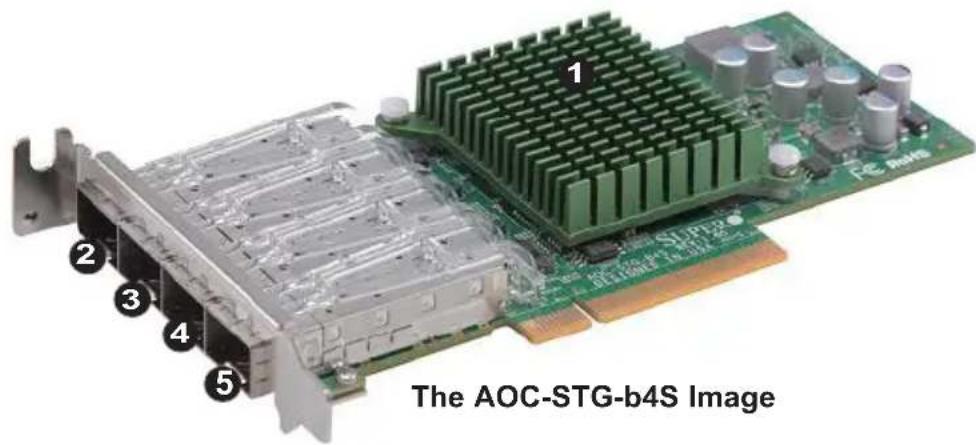
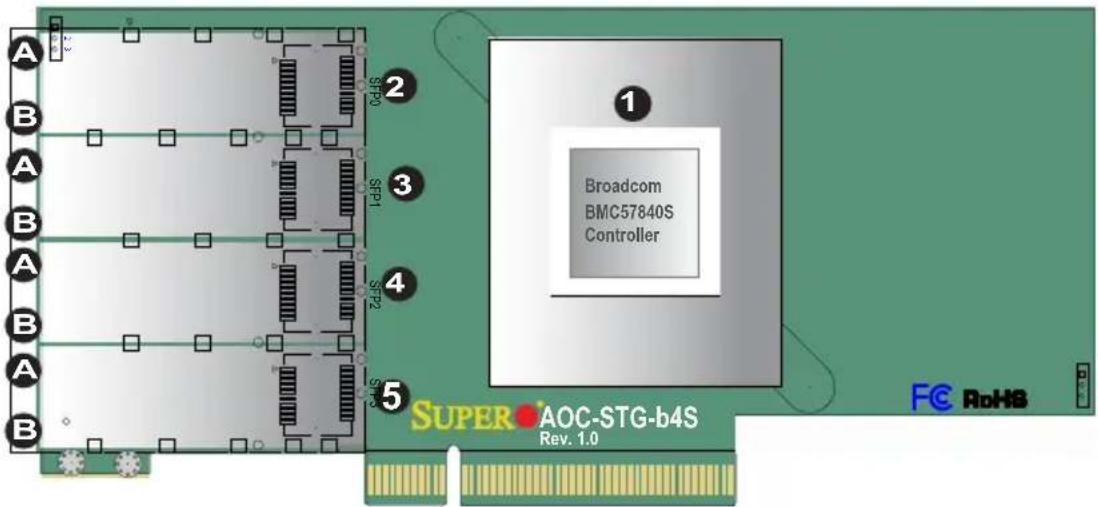
The AOC-STG-b4S Layout
2-2 Major Components
The following major components are installed on the AOC-STG-b4S:
- SFP+ Connector 1
- SFP+ Connector 2
- SFP+ Connector 3
-
SFP+ Connector 4
-
Broadcom BMC57840S Controller
2-3 Connectors: LAN Ports and LAN LED Indicators
LAN Ports
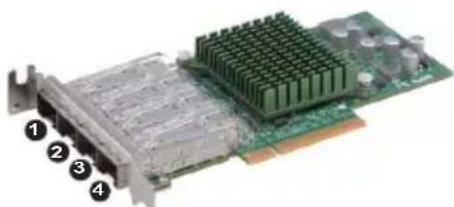
Four network LAN ports (SFP+1-SFP+4) are located on the add-on card. These LAN ports support connection speeds of 10Gbps and 1Gbps. Plug the Direct Attached Copper (DAC) cables into the SFP+ ports for network connections.

Note 1: To make sure that LAN ports function properly, be sure to use the following cables specified by the manufacturer:
• Direct-attached twin-axial copper cables, or
- Short Range or Long Range fiber optic cables used in conjunction with optional optical transceiver.

Note 2: For detailed information on the cables and transceivers recommended by the manufacturer, please refer to "Optional Accessories" on Page 1-4 or SMC product information posted online.
natural_image
Close-up of a green PCI expansion card with internal cooling module (no text or symbols visible)The AOC-STG-b4S Card
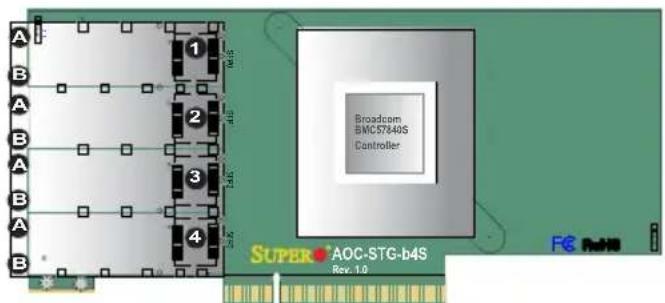
The AOC-STG-b4S Layout
LAN Port LED Indicators
Four LAN ports (SFP+1-SFP+4) are located on the add-on card. Each LAN port has two LEDs. The LED on the left indicates link speeds, and the other LED on the right indicate the status of activity of the connector.
See the table below for more information.
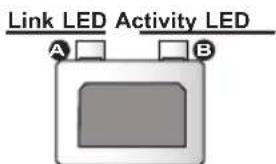
SFP+
| Link Speed | Link LED (Left Side of the Port) | Activity LED (Right Side of the Port) |
| 10Gb Green: | On Green: Blinking | |
| 1Gb Orange: | On Orange: Blinking |
LAN Ports
-
SFP+ Port 1
-
SFP+ Port 2
-
SFP+ Port 3
-
SFP+ Port 4
LAN LED Indicators
A. Link LED
B. Activity LED
Chapter 3
Installation
3-1 Static-Sensitive Devices
Electrostatic Discharge (ESD) can damage electronic components. To avoid damaging your add-on card, it is important to handle it very carefully. The following measures are generally sufficient to protect your equipment from ESD.
Precautions
- Use a grounded wrist strap designed to prevent static discharge.
- Touch a grounded metal object before removing the add-on card from the antistatic bag.
- Handle the add-on card by its edges only; do not touch its components, or peripheral chips.
- Put the add-on card back into the antistatic bags when not in use.
- For grounding purposes, make sure that your system chassis provides excellent conductivity between the power supply, the case, the mounting fasteners and the add-on card.
Unpacking
The add-on card is shipped in antistatic packaging to avoid static damage. When unpacking your component or your system, make sure that the person handling it is static protected.

Note: To avoid damaging your components and to ensure proper installation, be sure to always connect the power cord last, and always remove it before adding, removing or changing any hardware components.
3-2 Before Installation
To install the add-on card properly, be sure to follow the instructions below.
-
Power down the system.
-
Remove the power cord from the wall socket.
- Use industry-standard anti-static equipment (such as gloves or wrist strap) and follow the instructions listed on Page 3-1 to avoid damage caused by ESD.
- Familiarize yourself with the server, motherboard, and/or chassis documentation.
- Confirm that your operating system includes the latest updates and hotfixes.
3-3 Installing the Add-on Card
Follow the steps below to install the add-on card into your system.
- Remove the server cover and, if necessary, set aside any screws for later use.
- Remove the add-on card slot cover. If the case requires a screw, place the screw aside for later use.
- Position the add-on card in the slot directly over the connector, and gently push down on both sides of the card until it slides into the PCI connector.
- Secure the add-on card to the chassis. If required, use the screw that you previously removed.
- Attach any necessary external cables to the add-on card.
- Replace the chassis cover.
- Plug the power cord into the wall socket, and power up the system.
- Replace the chassis cover.

Note: This add-on card is designed to support the standard low-profile PCI-Express form factor; however, it may not fit in your chassis due to the physical dimensions of the card. See the drawing below for illustration.
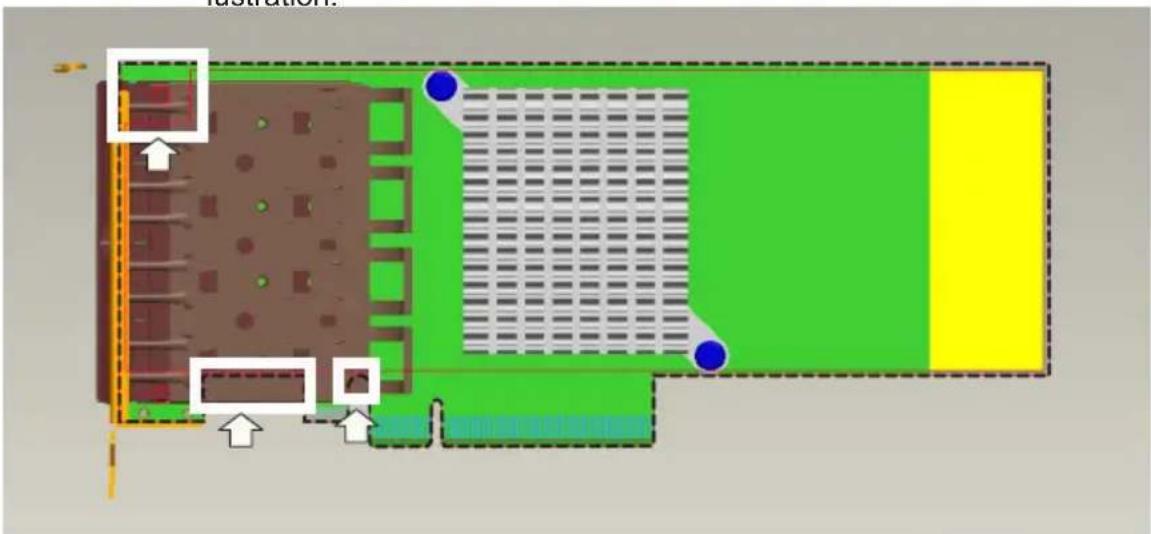

Note: The area enclosed by the dotted line indicates the dimensions of the standard low-profile PCI-Express form factor. The areas that are enclosed in white rectangles might interfere with the components on your motherboard and prevent the card from being integrated into your system.
3-4 Installing the Windows Operating System
Follow the steps below to install the drivers needed for your Windows OS support. The controller comes with a driver on the CD-ROM CDR-NIC.
- Run the CDR-NIC. (If you do not have a product CD-ROM, download drivers from the Supermicro Support Website and then transfer them to your system.)
- When the SUPERMICRO window appears, click on the computer icon next to the product model.
![SUPERMICRO Add-On Card Drivers and Tools (Win7) SUPERMICRO® Drivers & Tools Intel 10GbE Adopters UTG-i2. STG-i2. STGN-i2S. STG-i2T. CTG-i1S. CTG-i2S IB Adopters UINF-m2. UIBG-m1. UIBG-m2. RTUG-IBQ. OBF-m1. OBF-m1. UIBF-m1 [IB drivers] IB Adopters UINF-m2. UIBG-m1. UIBG-m2. RTUG-IBQ. OBF-m1. OBF-m1. UIBF-m1 [Ethernet drivers] Intel 1GbE Adapters UG-i4. PG-i2+. SG-i2. SG-i4. SGP-i4. CGP-i2. SGP-i2. CG-i2 Broadcom 10GbE Adapters STG-b45 Read Product Description and Manual For more information, please visit SUPERMICRO's web site. SUPERMICRO Computer Inc.](/content/2026/05/1143426/images/d483e34647a0beb3747d3184c40f5b710edeacd8c966b9642a799d74186e9e51.jpg)
Note: If the FOUND NEW HARDWARE WIZARD screen displays on your system, click CANCEL.
- Click on INSTALL DRIVERS AND SOFTWARE.
- Follow the prompts to complete the installation.
3-5 Installing Other Operating Systems
For detailed instructions on how to install the driver to an operating system other than the Windows OS, please refer to the Driver CD that came with this add-on card or refer to the Broadcom\Manuals section posted in Supermicro's ftp site.
(Disclaimer Continued)
The products sold by Supermicro are not intended for and will not be used in life support systems, medical equipment, nuclear facilities or systems, aircraft, aircraft devices, aircraft/emergency communication devices or other critical systems whose failure to perform be reasonably expected to result in significant injury or loss of life or catastrophic property damage. Accordingly, Supermicro disclaims any and all liability, and should buyer use or sell such products for use in such ultra-hazardous applications, it does so entirely at its own risk. Furthermore, buyer agrees to fully indemnify, defend and hold Supermicro harmless for and against any and all claims, demands, actions, litigation, and proceedings of any kind arising out of or related to such ultra-hazardous use or sale.
- User's Guide
- Preface
- About this User's Guide
- About this Add-on Card
- An Important Note to the User
- Returning Merchandise for Service
- Conventions Used in the User's Guide
- Naming Convention
- Contacting Supermicro
- Headquarters
- Europe
- Asia-Pacific
- Table of Contents
- Chapter 1 Overview
- Chapter 2 Hardware Components
- Chapter 3 Installation
- Chapter 1
- Overview
- 1-1 Overview
- 1-2 Product Highlights
- 1-3 Technical Specifications
- General
- Ethernet Features
- Network Features
- Remote Boot Options
- Virtualization Features
- Cable Support
- OS Support
- Physical Dimensions
- Optional Accessories
- Operating Conditions
- 1-4 Compliance/Operating Environment
- 1-5 SMC Platform Support
- Notes
- Chapter 2
- Hardware Components
- 2-1 Add-On Card Image and Layout
- 2-2 Major Components
- 2-3 Connectors: LAN Ports and LAN LED Indicators
- LAN Ports
- LAN Port LED Indicators
- Chapter 3
- Installation
- 3-1 Static-Sensitive Devices
- Precautions
- Unpacking
- 3-2 Before Installation
- 3-3 Installing the Add-on Card
- 3-4 Installing the Windows Operating System
- 3-5 Installing Other Operating Systems
- (Disclaimer Continued)
Brand : Supermicro
Model : AOC-STG-B4S
Category : Network card