PD24TS - Dishwasher Dacor - Free user manual and instructions
Find the device manual for free PD24TS Dacor in PDF.


| Product Type | Built-in Dishwasher |
| Brand | Dacor |
| Model | PD24TS |
| Width | 24 inches (approximately) |
| Height | 34.5 inches (approximately) |
| Depth | 24 inches (approximately) |
| Power Supply | 120 VAC, 60 Hz, 15 A circuit |
| Water Pressure | 20 – 120 psi, flow rate min. 1.0 gpm |
| Operating Temperature | 50°F to 158°F (10°C to 70°C) |
| Storage Temperature | -4°F to 185°F (-20°C to 85°C) |
| Cycles | Normal, Heavy, Crystal, Rinse |
| Special Features | Sani-Rinse, Delay (up to 12 hours), Secure (child lock), Cycle Memory |
| Dispensers | Detergent dispenser (pre-wash and main wash), Rinse aid dispenser (adjustable) |
| Filtration System | Three-stage filter (strainer, small particle, medium particle) |
| Spray Arms | Upper and lower rotating spray arms |
| Rack Material | Coated wire with adjustable tines |
| Silverware Basket | Split basket with hinged covers |
| Control Panel | Electronic with numeric display and button controls |
| In-Process Light | Blue light on floor, flashes during operation, solid when cycle complete |
| Interior Material | Stainless steel |
| Safety Features | Door switch, child lock (SECURE), anti-tip, automatic power-off |
| Maintenance | Clean filters and strainer regularly; wipe exterior with mild detergent |
| Warranty | 1 year full, 25 years on stainless steel tank rust-through (USA/Canada) |
| Certification | UL listed (implied) |
| Noise Level | Not specified, typical for built-in dishwashers (approx. 50 dBA) |
Frequently Asked Questions - PD24TS Dacor
User questions about PD24TS Dacor
0 question about this device. Answer the ones you know or ask your own.
Ask a new question about this device
Download the instructions for your Dishwasher in PDF format for free! Find your manual PD24TS - Dacor and take your electronic device back in hand. On this page are published all the documents necessary for the use of your device. PD24TS by Dacor.
USER MANUAL PD24TS Dacor
natural_image
Front view of a white rectangular electronic device with a small tab and 'dacor' logo on the side (no text or symbols on the device itself)Covers Models:
ED24, ID24, MDH24, MDV24, PD24AG, PD24BK, PD24BU, PD24GN, PD24SG, PD24TS
Appearance varies with model number. Model ED24 shown.
dacor®
The Life of the Kitchen.®

To Our Valued Customer: The very latest in Dacor products! Our unique combination of features, style and
Congratulations on your purchase of the Kitchen, and a great addition to your new distinctive appliance, we perform make us The Life of the Kitchen, and a great addition to your new distinctive appliance, we will continue to use their products, functions, and full potential of your new distinctive appliance, we will continue to use their products, functions, and full potential of your new distinctive appliance, we will continue to use their products, functions, and full potential of your new distinctive appliance.
In order to familiarize yourself with the controls, I think that you should be able to suggest that you thoroughly read this use & care manual, beginning with the following:
All Dacor appliances are designed and manufactures with our products, please call for company value. Should you ever experience a problem with your product, please call for service section of this manual for guidance. It provides useful suggestions and remedies prior to calling for services.
Valuable customer input helps us to continuously improve our Customer Service Team for assistance with any of your product support needs.
Decor Customer Service
1440 Bridge Gate Drive
Diamond Bar, CA 91765
Telephone:
(800) 793-0093
(626) 403-3130
Fax:
Hours of Operation.
Monday through Friday
Monday to 5:00 P.M. Pacific Time
6:00 A.M. 10 5:30
Web Site:
www.Dacor.com
Web Site:
Thank you for choosing Dacor for your home. We are a company to serving yours. We are confident that your new Dacor product will deliver a high level of performance enjoyment for many years to come.
Sincerely,
Cheryl Crowe
Director, Customer Satisfaction
Table of Contents
Important Safety Instructions....4
Symbols in this Manual 4
General Safety Precautions 4
Getting to Know Your Dishwasher 6
Parts of Your Dishwasher 6
Parts of the Control Panel 8
Other Features on Your Dishwasher 9
Specifications 9
Loading Your Dishwasher....10
What Can Be Washed....10
What Should Not Be Washed....10
Loading the Silverware Basket......11
Loading the Racks....12
Operating Your Dishwasher....14
Filling the Detergent Dispenser....14
Filling the Rinse Aid Dispenser....15
Adjusting the Rinse Aid Dispenser 15
Starting Your Dishwasher....16
Adding a Dish After You Start 16
Stopping Your Dishwasher During Operation.....17
CANCEL....17
Pausing Dishwasher Operation....17
STOP 17
Sanitizing the Dishes....17
SANI-RINSE....17
The DELAY Feature....18
Changing the Cycle After You Start 18
The Cycle Memory Feature....19
Draining Standing Water 19
The SECURE Feature 19
Cleaning and Maintenance ....20
Cleaning the Interior Surfaces 20
Filters and Strainer Baskets 20
Cleaning the Exterior Surfaces....20
Problem Solving 22
Problem Solution Guide 22
Warranty Information 27
Getting Help 27
Notes ......29
Model Information:
All models covered by this manual have the same features. The difference between models is the style of door.
| Model Number | Description Model Number Description | ||
| ED24 | Epicure®stainless steel trim PD24BK Preference | * black trim | |
| ID24 | Custom, customer provided trim | PD24BU | Preference* blue water trim |
| MDV | Millennia® vertical stainless steel trim | PD24GN | Preference* slate green trim |
| MDH | Millennia® horizontal stainless steel trim | PD24SG | Preference* sterling gray trim |
| PD24AG | Preference® anthracite gray trim | PD24TS Preference | * titanium silver trim |
Please enter the information requested in the spaces provided below. This information will be required in the unlikely event that a service call becomes necessary:
Model No. ____ Serial No. ____
Date Purchased Date Installed
Purchased From ____
Address ____
Phone ____
The model and serial number label is located inside the dishwasher's left door jam. Open the door to expose it.
Important Safety Instructions
Safety is everyone's responsibility. All Dacor appliances are designed and constructed to give you many years of safe operation. Operation is further enhanced if proper care and judgment are exercised in the use and maintenance of this appliance.
Symbols in this Manual

WARNING
Alerts you to a hazardous situation, that if not avoided, may cause death or injury to you or others. Property damage, including damage to the dishwasher, may also result.

CAUTION
Alerts you to a situation, that if not avoided, may cause property damage, including damage to the dishwasher.

IMPORTANT
Tips that help you to get the most out of the dishwasher.
General Safety Precautions

WARNING:
- Read all instructions before using the dishwasher. Use and care for the dishwasher only as instructed in this manual.
- Keep this manual for future reference.
- If you receive a damaged product, immediately contact your dealer or builder. Do not install or use a damaged appliance.
- To avoid electrical shock, make sure that the dishwasher has been properly installed and grounded by a qualified installer according to the accompanying installation instructions. The dishwasher must be mounted in a completely enclosed cabinet. Have the installer show you where the fuse or junction box is located so that you know where and how to turn off the power.
- Do not repair or replace any part of the dishwasher unless specifically recommended in the literature accompanying it. A qualified service technician should perform all other service.
- Make sure individuals who use the dishwasher are able to operate it properly.
- Do not leave children alone or unattended in the area around the dishwasher. Do not allow children to play with the controls or other parts of the dishwasher.

WARNING:
- Never allow anyone, including children, to sit or stand on any part of the dishwasher. Stepping or sitting on any part of it may result in tipping, damage and serious injury.
- Many surfaces within the dishwasher achieve high temperatures. Do not touch interior surfaces or items inside the dishwasher during or immediately after use. Exercise caution when opening the door. Let hot air and steam escape before looking or reaching inside.
- Do not operate the dishwasher without the door completely closed and the toe kick panel in place.
- Do not store or use combustible materials, liquids or gases near this or any other appliance?
- Clean only those parts of the dishwasher listed in this manual. Clean them only in the manner specified in the Cleaning and Maintenance section.
- Use only the cleaning solutions specified in this manual to clean the dishwasher. Other cleaning solutions could produce dangerous fumes, cause corrosion of the metal parts and could permanently damage the finishes.
- Use only detergents and rinse aids designed for use with a residential dishwasher.
- Store all detergents and rinse aids out of the reach of children.
Important Safety Instructions

WARNING:
- During loading, insert all sharp or pointed objects with the handles up. Locate these items where they will not damage the door seal or cause personal injury.
- Do not tamper with the controls.
- Under certain conditions hydrogen gas may be produced in a hot water system that has not been used for two weeks or more. Hydrogen gas is explosive. If the hot water system has not been used for a period of time, turn on all hot water faucets and let the water flow for several minutes to release any accumulated hydrogen gas. Do not smoke or use an open flame during this process.
- To prevent child entrapment, always remove the door from an old dishwasher when removing it from service.
- This dishwasher is not intended for commercial use.

CAUTION:
- Use the dishwasher to wash flatware and cookware ONLY. Washing other items may damage or discolor the dishwasher. Wash only the types of dishes and cooking utensils indicated in this manual.
- Do not wash plastic items unless they are marked "dishwasher safe". Always check the manufacturer's recommendation before washing plastic items that are not marked.
- To prevent household mold and mildew damage, periodically check the inlet and drain hoses for leaks.
- If the dishwasher outlet is connected to a garbage disposal, make sure the disposal is completely empty before running the dishwasher.
- Always place large or heavy items in the bottom rack.
- To avoid damage to the racks, do not let sharp edges come into contact with them.
- To avoid breakage, secure all glassware by adjusting the tines.
Getting to Know Your Dishwasher
Before You Start, Become Familiar with Your Dishwasher

IMPORTANT: See the Operating Your Dishwasher section, starting on page 14 for complete instructions on how to use your dishwasher.
Parts of Your Dishwasher
| ❖ Control Panel: | Located on top of the door. The buttons control your dishwasher. |
| ❖ Detergent Dispenser: | Automatically releases the soap during the wash part of the cycle (see page 14). |
| ❖ Dishwashing Compartment: | The compartment where tableware and cookware are loaded for washing. |
| ❖ Door Switch: | Located in the door. Automatically pauses dishwashing when the door is opened. |
| ❖ In-Process Light: | The blue in-process light shines on the floor below the dishwasher. It flashes when the dishwasher is operating. It turns solid when the selected cycle is complete. It turns off when the selected cycle is complete and the door is opened and closed. |
| ❖ Filter System: | Traps food and debris that could damage or plug up the mechanical parts of your dishwasher. See page 20 for cleaning instructions. |
| ❖ Racks: | The racks are coated with a durable coating that protects the finish of tableware and cookware. They each have rows of adjustable tines that allow you to make room for large items (see page 13). |
| ❖ Rinse Aid Dispenser: | Automatically releases rinse aid during the rinse part of the cycle. Rinse aid is a fluid that helps the dishes dry properly and helps prevent water spots. The amount of rinse aid dispensed is adjustable (see page 15). |
| ❖ Silverware Basket: | Use the silverware basket to hold silverware and kitchen utensils. It has 2 compartments that snap closed to hold small items (see page 11). |
| ❖ Spray Arms: | The spray arms spray water on the dishes at high pressure to remove soil. |
| ❖ Toe Kick Panel: | Covers the internal mechanics of the dishwasher located below the door. It must always be in place during operation. |
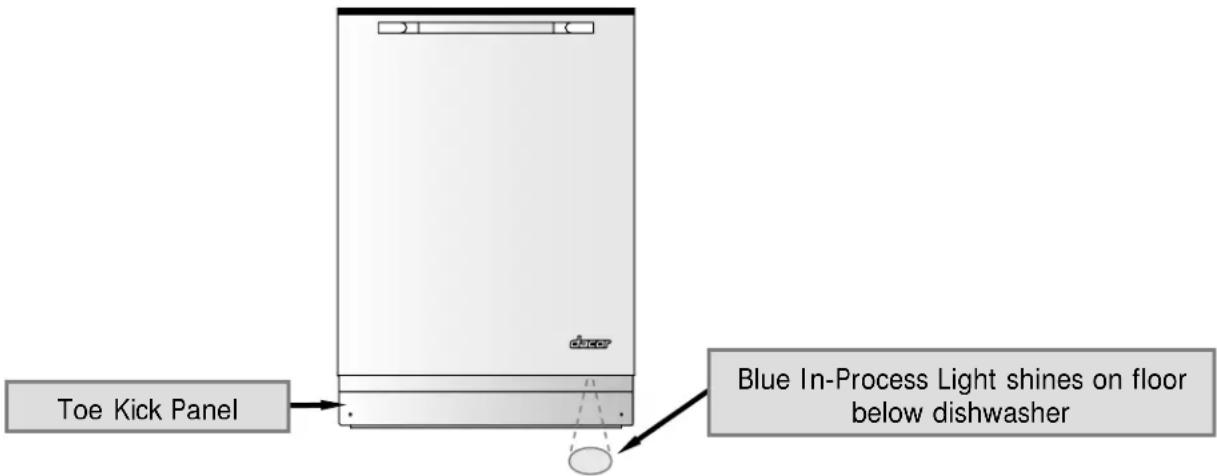
Getting to Know Your Dishwasher

Getting to Know Your Dishwasher
Parts of the Control Panel
◆ Numeric Display:
Displays the approximate number of minutes until the end of the cycle. If you are using the delay feature, it shows the number of hours before the dishwasher will start.
BUTTONS
| START STOP | ton to start the dishwasher after selecting a wash cycle or the rinse cycle (see page 16). It can also be used to pause the dishwasher in the middle of a wash or rinse cycle (see page 17). |
| NORMAL | setting is best for normal soil. |
| HEAVY | setting is best for very dirty tableware and cookware. |
| CRYSTAL | setting is best for china, crystal or glass. It is also good for lightly soiled items that have been pre-rinsed. |
| RINSE | button if you want to run the rinse portion of the cycle only.The dry cycle will not run. Also, use this setting to rinse tableware you do not want to wash right away. |
| DELAY | allows you to set the dishwasher to start at a later time (see page 18). |
| SANI RINSE | rinses the dishware with rinse water that is 5°F (3°C) hotter than the regular cycle rinse water for maximum sanitization and (see page 17). It can be used with the normal wash cycle only. |
| CANCEL | ton to stop the dishwasher in the middle of a cycle (see page 17). |
| SECURE | ture. This button locks the control panel to prevent children from tampering with it (see page 19). |

Getting to Know Your Dishwasher
Other Features on Your Dishwasher
✿ Turbidity Sensor: Automatically decreases or increases the wash and rinse time, as well as water usage, for more consistent cleaning and energy savings.
Pressure Sensor System: Senses the water level for consistent and complete draining of the dishwashing compartment.
Digital Temperature Sensor: Continuously monitors and controls water temperature.
In-line Water Heater: The dual thermal safety in-line water heater is located safely out of the touch of hands or plastic dishware in the water circulation system. It is monitored by an automatically resetting thermostat and element, which protect the heating element against burnout due to operation without water in the appliance.
Specifications
Operating temperature range: 50° to 158°F (10° to 70°C)
Storage temperature range: -4^ to 185^ F ( -20^ to 85^ C)
Line voltage and tolerance: 120VAC (60Hz), +10% -15%
Loading Your Dishwasher


WARNING: Load all sharp or pointed objects with the handles up.
IMPORTANT: If the load will sit for a while before washing, run the rinse cycle to reduce the chance of food hardening. Doing so will also reduce the risk of acidic foods damaging metal surfaces.

natural_image
3D wireframe illustration of a basket with a knife inserted (no text or symbols)What Can Be Washed
Items that you can safely wash in your dishwasher:
• Aluminum (except for disposables)
• China (except delicate china)
• Cookware with non-stick coatings
• Crystal (except antique crystal)
- Glass
- Plastic (dishwasher safe only)
• Silver and silver plate - Stainless steel
- Stoneware
What Should Not Be Washed
For safety reasons, and to prevent damage, do not wash the following items in your dishwasher:
- Antique crystal
- Brass
- Bronze
- Cast iron
- Delicate china
- Disposable aluminum
-
Disposable plastic items
-
Flatware with bonded handles
- Gold
- Pewter
- Sharp kitchen carving knives
- Tin
- Wood
Loading Your Dishwasher
Loading the Silverware Basket

IMPORTANT:
• For the best results do not nest utensils in the silverware basket.
- Do not load silver next to stainless steel. Damage to the silver may result.
- Make sure the tines around the silverware basket are in the up position to prevent it from falling over.

natural_image
Two simple line drawings: one showing three spoons, the other showing a crossed spoon with an 'X' symbol (no text or labels)To prevent small, light items from falling out of the rack when sprayed with water:
- Put small items into a compartment with a hinged cover.
- Snap the cover shut.

natural_image
Line drawing of a mechanical device with internal compartments and a handle, showing no text or symbols.Silverware Basket Placement
➢ Put the silverware basket in the bottom rack near the front, in the space between the tines.
Or you may put the basket anywhere it will fit on the lower rack. The silverware basket may be split into two parts for a better fit. To reattach, insert the tabs into the holes and snap into place.
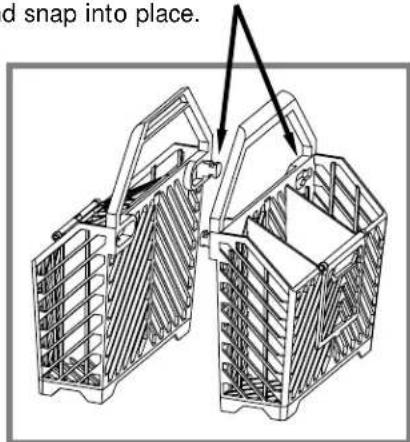
Place silverware basket as shown

Loading Your Dishwasher
Loading the Racks

IMPORTANT:
- It is best to place sharp objects in the silverware basket to prevent damage to the rack coating.
- The spray arms must spin freely. Do not allow items sticking out of the racks to block them. Raise the top rack to prevent objects on the bottom rack from blocking the upper spray arm (see Adjusting the Top Rack, below).
- Do not load cookie sheets and large platters in the front of the bottom rack. Doing so will prevent water from dissolving the detergent in the detergent dispenser.
• After loading, push in firmly on the top rack. - Put items that could fall through the rack into the silverware basket or on the silverware tray (see diagram, bottom right).
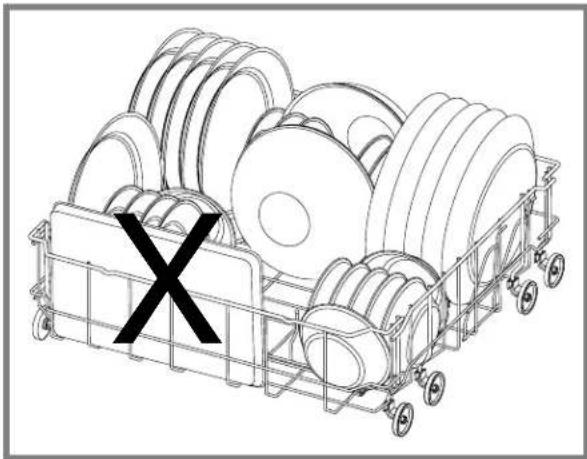
natural_image
Line drawing of a cart loaded with multiple spools and a black 'X' symbol on the side (no text or labels)Adjusting the Top Rack
If there are large items in the bottom rack that could interfere with the upper spray arm, move the top rack to the high position. Otherwise, put the top rack in the low position.
To change the top rack position:
- Pull up on both of the handles on the sides of the rack.
- Move the rack to the new position.
- Release the handles.


flowchart
graph TD
    A["Handle"] --> B["Silverware Tray"]
    B --> C["Final Handle"]
    style A fill:#f9f,stroke:#333
    style B fill:#ccf,stroke:#333
    style C fill:#cfc,stroke:#333
Loading Your Dishwasher
Loading the Racks
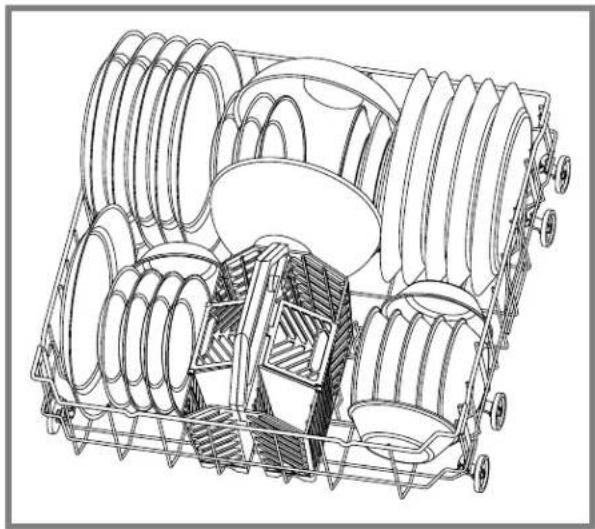
➢ Always use the top rack for delicate items.
➢ Scrape off leftover food items and non-food items, like toothpicks and napkins, before loading.
Always load large or heavy items (such as pots, pans, and large dishware) in the bottom rack.
Do not stack dishes, glasses or pots and pans. Stacking will prevent water from getting to soiled surfaces.
Load all items so that the open ends face down as much as possible. Good drainage provides the best drying. It is not necessary to rinse objects before loading them.
To minimize breakage and chipping, secure all glassware and china by adjusting the tines. Do not allow fragile items to touch each other.
To adjust the tines, push the tine adjustment lever away from the edge of the rack and swivel the tines to the desired position.
To minimize noise, do not allow pots and pans to touch and keep large items from touching the sides of your dishwasher.
Load glasses and cups on the top rack.
natural_image
Technical line drawing of a mechanical assembly with multiple rollers and housing (no text or symbols)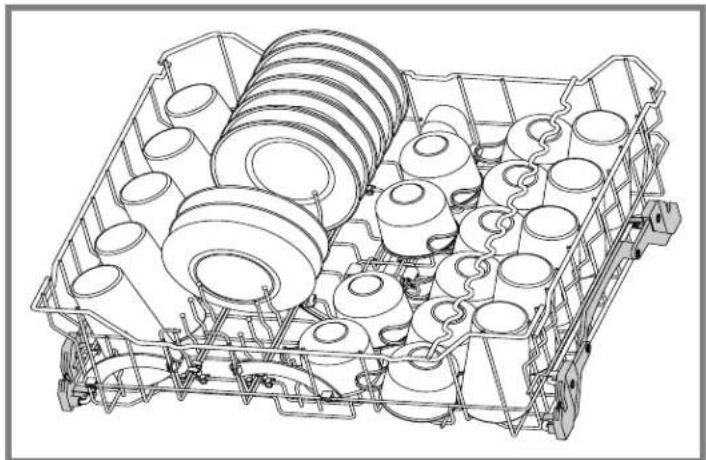
natural_image
Technical line drawing of a mechanical assembly with multiple cylindrical components and mounting brackets (no text or symbols)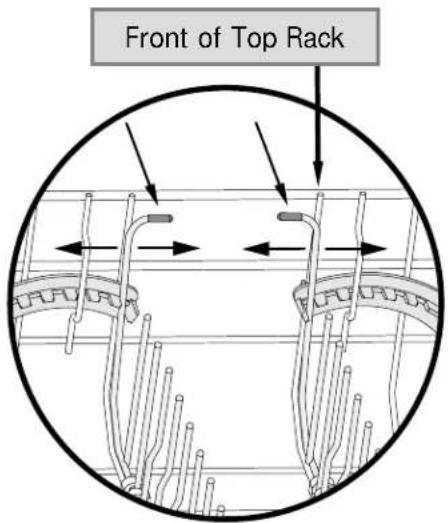
Top Rack Tine Adjustment
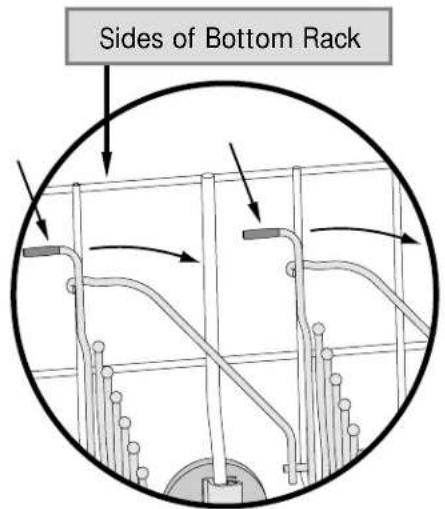
Bottom Rack Tine Adjustment
Operating Your Dishwasher
Filling the Detergent Dispenser

IMPORTANT:
- Do not use hand dishwashing detergents. They will create excessive foaming that interferes with proper operation.
- To make sure the detergent dissolves properly, fill the detergent dispenser just prior to starting your dishwasher. Detergent will harden if it sits too long.
- Store dry detergent in a cool dry place to prevent caking.
- Use a liquid rinse aid for best results (See page 15).
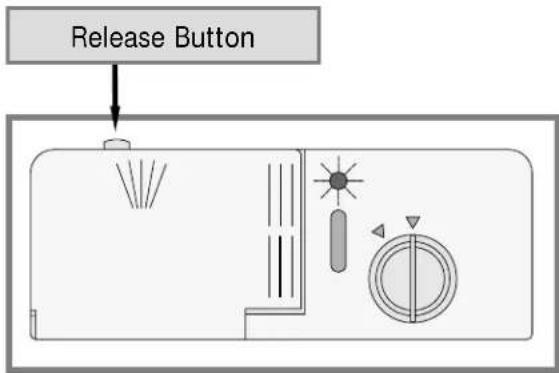
If the detergent dispenser lid is closed, press the release button to open it.
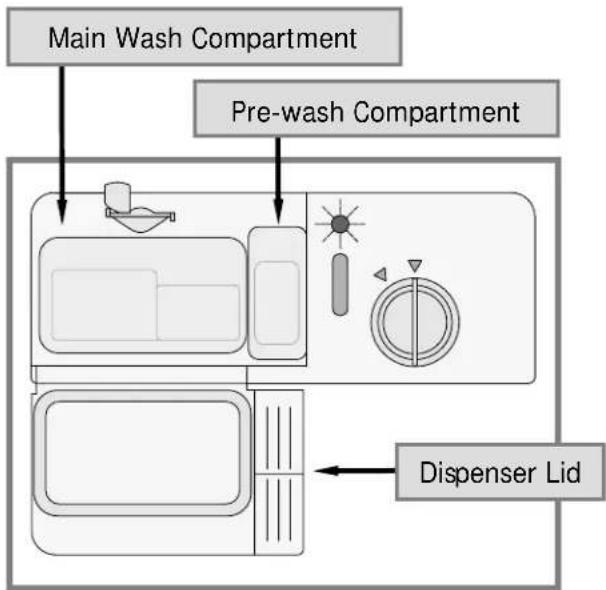
The detergent dispenser has two compartments: The smaller pre-wash compartment, and the main wash compartment.
The pre-wash compartment empties into the dishwasher when the door is closed. The main wash compartment releases detergent automatically during the main wash cycle.
➢ Fill the pre-wash cup to the top.
➢ See the table below for the amount of detergent to use in the main wash cup. The amount of detergent required depends on the hardness of the water in your area. Harder water requires more detergent. Water hardness is measured in grains per gallon (gpg). Do not use too little detergent for your water hardness. Doing so can cause poorly cleaned dishes, filming or spotting. If you use too much detergent, you can cause a permanent film called etching. To find out the water hardness in your area, contact your water company.
➢ After loading both compartments, close the dispenser lid.
Detergent alone may not be enough for water hardness above 12. For maximum cleanness you may need to use a water softener. Or you may add additional detergent about 20 minutes after starting your dishwasher. As a rule, add 1 teaspoon for each grain above 12:
- Open the door. The dishwasher will stop operating.
- Wait a moment for the steam to clear.
- Without touching any of the hot surfaces or racks, pour additional dishwashing detergent into the bottom of the dishwashing compartment.
- Close the door. Push on the door handle to make sure that the door is completely shut. After a short pause, operation will resume.
| Water Hardness (gpg) | Amount of Detergent |
| Soft (0-3) 3 tsp. | |
| Medium (4-9) 4 - 9 tsp. | |
| Hard (10-12) 10 -12 tsp. |
Operating Your Dishwasher
Filling the Rinse Aid Dispenser

IMPORTANT:
- Rinse aid is important to the drying process of the dishware. It also reduces spotting. Dacor recommends that you keep the rinse aid dispenser full at all times.
-
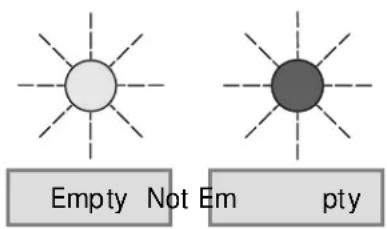
The rinse aid indicator on the dispenser turns “clear” when it is empty.
The rinse aid dispenser must be properly adjusted. Too little rinse aid will allow spotting and drying problems. Too much rinse aid will cause foaming and streaking.
A rinse aid containing citric acid may be used to remove the white or gray film caused by very hard water.
To refill the rinse aid dispenser: -
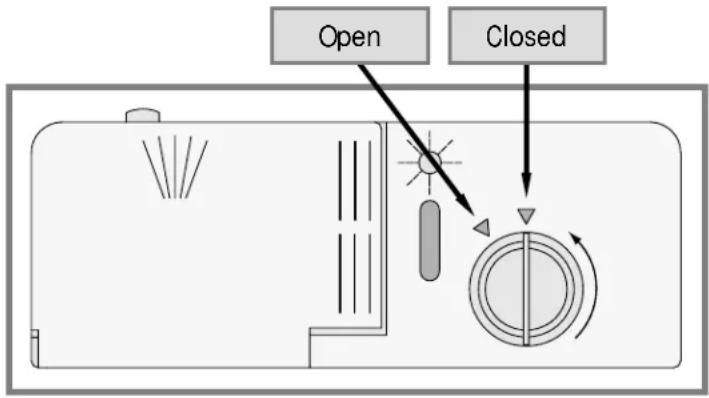
Turn the rinse aid cap counterclockwise to the open position and lift it out.
- Carefully pour the rinse aid into the filler hole until the rinse aid level is even with the bottom of the hole. Do not overfill.
- Wipe up any spillage.
- Replace the rinse aid cap and turn it clockwise to the closed position.
Adjusting the Rinse Aid Dispenser
The rinse aid setting is located under the rinse aid cap. It is set at the factory to 4.
To change the setting:
- Remove the rinse aid cap.
- If you have spotty or improperly dried dishes, move the rinse aid setting to the next higher number. If you have streaks on your dishes, move the rinse aid setting to the next lower number. The harder the water, the more rinse aid required for acceptable results.
- Replace the cap.
- Check the dishes after the next wash load. Continue adjusting the rinse aid dispenser up or down according to the guidelines above until you have spot free, streak free, dry dishes.
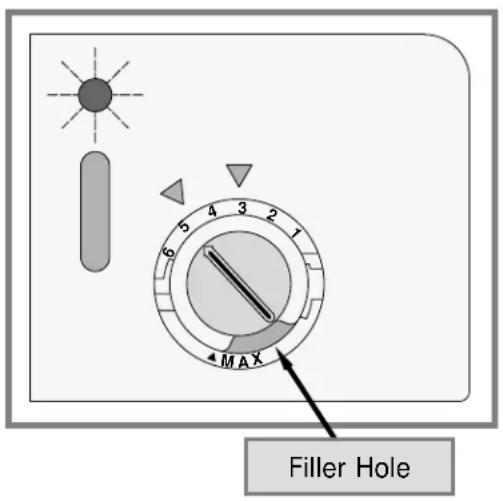
If you have very soft water and still experience streaking when the dispenser is set to 1, you can dilute the rinse aid with water before pouring it into the dispenser to get acceptable results.
Operating Your Dishwasher
Starting Your Dishwasher

IMPORTANT:
- See the Getting to Know Your Dishwasher section for a description of the various wash settings.
- If the dishwasher drain line is connected to a garbage disposal, run the disposal before operating the dishwasher for proper drainage.


HEAVY

RINSE

SANI RINSE

SECURE

To wash or rinse the dishes:
- For best performance, turn on the hot water at a nearby faucet until the running water is hot. Doing so clears cold water from the pipes.
- Press one of the wash cycle buttons or the rinse button on the control panel.
- Press START/ STOP. The numeric display will show the length of the cycle in minutes.
- Close the door.
- Push on the door handle to make sure that the door is completely shut. After a brief pause, the dishwasher will start.




Adding a Dish After You Start
You can add a dish, if needed, after starting your dishwasher. Dacor recommends that you only add items during the first five minutes of operation to make sure they get clean.
To add a dish:
- Open the door. The dishwasher will stop operating.
- Wait a moment for the steam to clear.
- Without touching any of the hot surfaces or racks, insert the item into one of the racks, following normal loading instructions.
- Close the door.
- Push on the door handle to make sure that the door is completely shut. After a short pause, operation will resume.
Operating Your Dishwasher
Stopping Your Dishwasher During Operation
CANCEL
To stop the current cycle and drain your dishwasher:
- Open the door. The dishwasher will stop operating.
- Press CANCEL.
- Close the door. After a short pause, you will hear the water in the dishwasher begin to drain. Once the water is drained, the dishwasher will stop.
CANCEL

IMPORTANT: If you press the CANCEL button twice, the dishwasher will stop completely. The water inside the dishwasher will not drain.
Pausing Dishwasher Operation
STOP
To temporarily pause dishwasher operation:
- Open the door. The dishwasher will stop operating.
- Press the START/ STOP button.
- The door may be closed and the dishwasher will not start.
To resume the dishwasher cycle:
- Open the door.
- Press the START/ STOP button.
- After a brief pause, the dishwasher will resume the previous cycle.
Sanitizing the Dishes
SANI - RINSE
If you want a high temperature rinse after the wash cycle for maximum sanitization:
- Press the NORMAL button to select the normal wash cycle.
- Press SANI - RINSE. (Pressing SANI - RINSE a second time will turn sani-rinse off again.)
- Press START/ STOP.
- Close the door. After a short pause, the dishwasher will start.

IMPORTANT: SANI - RINSE can only be selected when the NORMAL wash cycle is selected.
START STOP
START STOP
NORMAL
SANI RINSE
START STOP
Operating Your Dishwasher



EAVY CR
STAL RIN
E DELAY

SANI RINSE
CANCEL
ECURE
The DELAY Feature
To set your dishwasher to start automatically at a later time:
- Press one of the wash cycle buttons or the rinse button.
- If you have selected NORMAL, you may press the SANI-RINSE button for maximum sanitization.
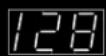
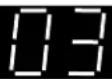
- Repeatedly press the DELAY button until the number of hours you want to delay operation appears on the numeric display. You can delay the start of your dishwasher up to 12 hours.
- After you select the delay time, press START/ STOP.
- Close the door completely. The dishwasher will start after the selected number of hours.
NORMAL
HEAVY
CRYSTAL
RINSE
DELAY
START STOP
To cancel the delay function, open the door and press CANCEL.
Changing the Cycle After You Start
You can change the cycle and option selections after you start your dishwasher.
To change the cycle:
- Open the door. The dishwasher stops operating.
- Press the CANCEL button twice.
- Press the button for the desired wash or rinse cycle (NORMAL, HEAVY, CRYSTAL or RINSE).
- If you have selected NORMAL, you may press the SANI-RINSE button for maximum sanitization.
- Press the START/ STOP button.
- Close the door.
- After a short pause, operation will resume.
CANCEL
X2
NORMAL
HEAVY
CRYSTAL
RINSE
START STOP
Operating Your Dishwasher
The Cycle Memory Feature
Your dishwasher remembers the settings for the last cycle it ran.
If you want your dishwasher to run the same cycle as it ran the previous time:
- Press the START/ STOP button once.
The START/ STOP button light will flash and the lights on the buttons for the last cycle and options run will be lit.
- Press the START/ STOP button again to run the previous cycle (or you may select a different cycle, then press START/ STOP if you don't want to run the previous cycle).


- Close the door. After a short pause, the dishwasher will begin to operate.
If the delay feature was used during the previous cycle, your dishwasher will start after the number of hours originally selected.
Draining Standing Water
To drain standing water from the bottom of your dishwasher:
- Press NORMAL.
- Press START/ STOP.
- Press CANCEL.
- Close the door. After a short pause, you will hear the water in the dishwasher begin to drain. Once the water is drained, the dishwasher will stop.




IMPORTANT: Your dishwasher also drains the water in the bottom at the start of each wash and rinse cycle.
The SECURE Feature
To secure the control panel:
- Press and hold the SECURE button down for three seconds. All control panel lights are deactivated and none of the buttons operate.
- To turn off the secure feature, press and hold the SECURE button down for three seconds.

The control panel beeps when you turn this feature on and off.
Cleaning and Maintenance

CAUTION: Exercise caution when cleaning around the control panel area and the exterior indicator light on the front of the door. Do not use spray cleaners of any kind on these areas.
Cleaning the Interior Surfaces
The dishwashing compartment of your Dacor dishwasher is constructed of high quality stainless steel. It remains clean during normal use.
The control panel and the racks may be wiped clean, if necessary, with a soft damp rag.
➢ Food particles on the silverware basket can be rinsed clean under a faucet with warm water.
Filters and Strainer Baskets

CAUTION: Do not operate the dishwasher without the strainer and the two filters in place. The strainer and filter system is designed to keep large food particles out of the mechanical parts.
When you observe food in the strainer basket or filters, clean them as follows:
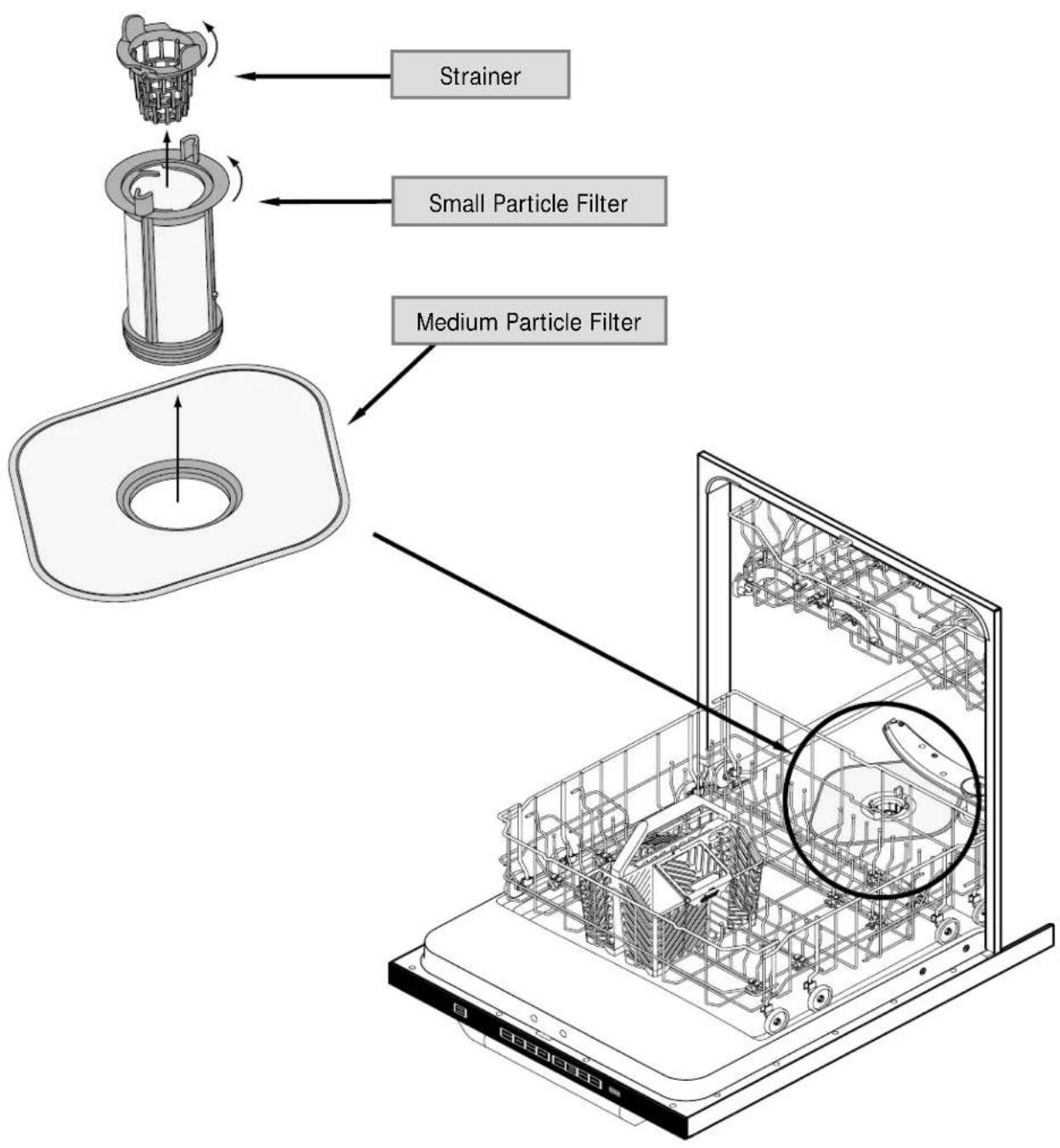
- Remove the strainer by turning it counterclockwise and lifting it straight up (see page 21).
- Remove the small particle filter by turning it counterclockwise and lifting it straight up.
- Lift out the medium particle filter.
- Clean the filters in the kitchen sink with a soft sponge and mild kitchen detergent under warm water.
- Replace the filters. Tighten the small particle filter and the strainer snugly.
Cleaning the Exterior Surfaces

IMPORTANT: Always wipe stainless steel surfaces with the grain.
Clean exterior surfaces with a solution of mild detergent and warm water. Rinse and dry with a soft, lint-free cloth.
You may also use Dacor Stainless Steel Cleaner (Part No. A-302) on stainless steel surfaces. Use it according to the directions on the package.

natural_image
Front view of a white electronic device with a small display and 'decor' branding on the side (no readable text or symbols beyond branding)Cleaning and Maintenance
Removing the Strainer and Filters
Problem Solving
Unnecessary service calls may be expensive, frustrating, and time-consuming. Before you call for service, please review the Problem Solution Guide below.
Problem Solution Guide
| Problem: May be caused by: What to do: | ||
| Spotting and filming | Hard water | Use maximum recommended amount of dishwasher detergent. |
| You may need a home water softener. | ||
| To remove hard water spots, try a vinegar rinse:Wash and rinse load as usual.Remove all metal items from dishwasher. Do not add detergent.Pour 2 cups of vinegar into a bowl and set it on bottom rack.Run dishes through an entire wash program. If the vinegar rinse does not work, repeat process substituting 1⁄4 cup of citric acid crystals (available at most drug stores) for the vinegar. | ||
| Wiping metal items with a damp cloth should remove spots. For sterling and silver plated flatware, rub with a towel or use a good cream silver polish. | ||
| Garbage disposal or sink trap full Run garbage disposal to eliminate food and obstructions in sink. Make sure sink drains properly. | ||
| No rinse aid Make sure rinse aid dispenser is full. | ||
| Water not hot enough Check hot water supply temperature. Minimum recommended incoming temperature to the dishwasher is 120°F. | ||
| Too little water Make sure water valve is fully open. Make sure that water pressure is between 20 and 120psi and flow rate is a minimum of 1.0 gpm. | ||
| Incorrect use of dishwasher detergent Use only correct amount of dishwasher detergent according to water hardness (see page 14) and the wash program selected. Fill dispenser only when ready to start the dishwasher. Do not use old or caked detergent. Store dishwasher detergent in dry place and in a closed container. Change the dishwasher detergent if results are still poor. | ||
| Items not loaded properly Make sure dishwasher is loaded according to instructions starting on page 10. Do not overload. Make sure spray can reach all soiled surfaces. | ||
Problem Solving
| Problem: May be caused by: What to do: | ||
| Spotting and filming (cont.) | Spray arms do not rotate properly | Make sure that both spray arms rotate freely. Make sure that items do not obstruct movement of spray arms. If necessary, clear any obstructions. |
| Make sure holes in spray arms are not blocked. If necessary, clear holes with a pointed object and rinse under water. | ||
| Strainer blocked Check strainer. Clean if necessary. | ||
| Use only “dishwasher” detergent. Excessive foam in the mach | ||
| Too much rinse aid in final rinse cycle. Adjust rinse aid dispenser (see page 15). | ||
| Flatware incorrectly loaded Make sure items are not nested (see page 11). | ||
| Clean-ability (Small particles deposited on items) | Spray arms do not rotate properly | Make sure that both spray arms rotate freely. Make sure that items do not obstruct movement of spray arms. If necessary, clear any obstructions. |
| Make sure holes in spray arms are not blocked. If necessary, clear holes with a pointed object and rinse under water. | ||
| Incorrect detergent use Use only correct amount of dishwasher detergent according to water hardness (see page 14) and the wash program selected. Fill dispenser only when ready to start the dishwasher. Do not use old or caked detergent. Store dishwasher detergent in dry place and in a closed container. Change the dishwasher detergent if results are still poor. | ||
| Filter system Make sure filter system is clean and properly installed. | ||
| Low water pressure Check that water valve is fully open. Make sure water pressure is between 20 and 120psi and flow rate is 1.0 gpm minimum. | ||
| Detergent left in detergent compartment (Detergent compartment will not open) | Dispenser lid blocked The lid may not be opening. Check for items blocking it. | |
| Old detergent Do not use detergent that is hard or caked in the box. Use only fresh detergent. Add detergent to dishwasher just before starting it. | ||
| Spray arms do not rotate properly | Make sure that both spray arms rotate freely. Make sure that items do not obstruct movement of spray arms. If necessary, clear any obstructions. | |
| Make sure holes in spray arms are not blocked. If necessary, clear holes with a pointed object and rinse under water. | ||
Problem Solving
Problem Solution Guide (continued)
| Problem: May be caused by: What to do: | ||
| Chipping or breaking of glassware | Improper loading Do not overload. Load between rack prongs, not over them. Glasses loaded over prongs will not be supported and may chip or break. Make sure glassware is secure and can't come loose. Always use the top rack for delicate items. Use the crystal cycle for china. | |
| Unusual noise Improper loading Utensils may not be secure or something small may have dropped from the rack. Water may cause utensils to rattle. Make sure dishware is secure. | ||
| Water left in bottom of dishwasher near filters | Dishwashing cycle not complete Allow dishwasher to complete cycle. | |
| CANCEL button pressed twice in middle of cycle. | Restart (page 17) or drain (page 19) dishwasher. | |
| Some water is normal Water left in strainer is normal. | ||
| Dishwasher will not drain | Air gap plugged Be sure the air gap is not blocked or plugged. The air gap is a vent located on top of the sink. It is connected to the dishwasher. It is required by some local codes. | |
| Drain hose Check for kink in drain hose. | ||
| Filter system Be sure there is no blockage in filter system. | ||
| Dishwasher will not start | Blown fuse or tripped circuit breaker Replace fuse or reset circuit breaker. Remove other appliances from the circuit. | |
| Door not completely closed Push in on door handle until you hear a click. | ||
| Not plugged in incorrectly Make sure plug is inserted in the wall socket or dishwasher is wired correctly. | ||
| Dishwasher will not fill | Door not completely closed Push in on door handle until you hear a click. | |
| Controls not set Make sure dishwasher is on (see Page 16). | ||
| Water feed line blocked Make sure water feed line to dishwasher is not kinked. | ||
| No water supply Make sure water valve is turned on. | ||
| Water backs up in sink when dishwasher drains | Garbage disposal or sink trap full | Run garbage disposal to eliminate food and obstructions in sink. Make sure sink drains properly. |
| Marks and discoloration | Aluminum utensils rubbing against items during wash cycle | Be sure aluminum utensils, especially light weight, foil-type pans, do not touch dishes. |
| Yellow or brown marks | Iron or manganese in water | To remove spots, use a non-abrasive cleaner. |
| Temporary solution: Pour teaspoon to tablespoon of citric acid crystals in place of the pre-wash detergent in the detergent dispenser. Follow this pre-wash with a full detergent wash. Use the heavy wash program. | ||
| Permanent solution: Install an iron removal system in the water supply. | ||
Problem Solving
| Problem: May be caused by: What to do: | ||
| Yellow or brown marks (cont.) | Washing copper with sterling silver Yellow | film on sterling silver results when you wash copper utensils in same load. Silver polish will usually remove this type of stain. |
| Tea or coffee (tannic acid) stains Remove | tea or coffee stains by hand using a solution of 1⁄2 cup bleach and 3 cups warm water. (Do not use on sterling silver or silver plate.) | |
| Discoloration of stainless steel, silver plate | Allowing salty or acidic foods to remain on flatware | Rinse flatware that is to stand several hours before washing. |
| Stainless steel contacting silver | Do not put stainless steel and silver flatware in the same silverware basket compartment. Direct contact to stainless steel can cause permanent damage to silver. | |
| Clean stained items with silver polish. | ||
| Do not use abrasives on stainless steel or silver. | ||
| Distortion of plastics | Plastic item not dishwasher safe Do not wash plastic items in dishwasher that are not “dishwasher safe”. | |
| Marks on melamine and plastics | Porous material Use a special cleaner for plastic. | |
| Cloudy film on glassware - etching of glass | Too much detergent, especially in soft water | Do not use bleach or scouring powder on these materials. |
| To remove cloudy film, try a vinegar rinse: ·Wash and rinse load as usual. ·Remove all metal items from dishwasher. Do not add detergent. ·Pour 2 cups of vinegar into a bowl and set it on bottom rack. ·Run dishes through an entire wash program. If the vinegar rinse does not work, repeat process substituting 1⁄4 cup of citric acid crystals (available at most drug stores) for the vinegar. | ||
| If vinegar or citric acid rinse does not remove film, the cloudiness is "etching". This is permanent. To prevent etching, if you have soft water, try using only 1 teaspoon of recommended dishwasher detergent. | ||
| Use a good quality dishwasher detergent and rinse-aid. Do not overload dishwasher. Water should circulate freely to assure adequate rinsing and draining. | ||
| Rinse aid used with soft water Set rinse aid levels to minimum. | ||
Problem Solving
Problem Solution Guide (continued)
| Problem: May be caused by: What to do: | ||
| Dishes not dry | No rinse aid Fill rinse aid dispenser. Rinse | aid helps dishes to dry faster. |
| Plastic items Certain plastic materials are | difficult to dry. Plastics may need to be towel dried. | |
| Improper loading or unloading Do not overload or nest items. Make sure dishwasher is loaded according to instructions starting on page 10. | ||
| Water not hot enough Dishes washed with the sani-rinse setting will dry the fastest. | ||
| Dry cycle interrupted Door opened too soon. Make sure dry portion of cycle is complete before opening door. | ||
| Delay will not work | Door not closed completely | Push firmly on door until it clicks into place. |
Warranty Information
Getting Help
Before obtaining service, please review the Problem Solution Guide starting on page 22. If you have performed the checks in the Problem Solution Guide and the problem has not yet been remedied, please visit our website or contact our Customer Service Team for a listing of Dacor authorized service agents. Prior to requesting service, it is helpful to be familiar with the warranty terms and conditions listed on the next page.
Contact us through our web site at:
www.Dacor.com
Dacor Customer Service:
Tel: (800) 793-0093
Fax: (626) 403-3130
Business Hours: 6:00 A.M. - 5:00 P.M. Pacific Time
You may also write us at:
Dacor Customer Service
1440 Bridge Gate Drive
Diamond Bar, CA 91765
At Dacor, we believe that our quality of service equals that of our product. Should your experience with our service network or product be different, please contact our Customer Service Team and share your encounter with us. We will do our utmost to resolve the situation for you and deliver on our Dacor promise.
If you need anything clarified, just let us know.
Warranty Information
What is Covered:
CERTIFICATE OF WARRANTIES: DACORDI SHWASHERS
DACOR DISHWASHERS WITHIN THE FIFTY STATES OF THE U.S.A., THE DISTRICT OF COLUMBIA AND CANADA\*:
FULL ONE-YEAR WARRANTY
If your DACOR product fails to function within one year of the original date of purchase, due to a defect in material or workman-ship, DACOR will remedy the defect without charge to you or subsequent users. The owner must provide proof of purchase upon request and have the appliance accessible for service.
TWENTY-FIVE YEAR WARRANTY
On rust-through of stainless steel tank and door.
* Warranty is null and void if non-CUL approved product is transported from the U.S.
OUTSIDE THE FI FTY STATES OF THE U.S.A., THE DISTRICT OF COLUMBI A AND CANADA:
LIMITED FIRST-YEAR WARRANTY
If your DACOR product fails to function within one year of the original date of purchase, due to a defect in material or workmanship, DACOR will furnish a new part, F.O.B. factory, to replace the defective part. All delivery, installation, and labor costs are the responsibility of the purchaser. The owner must provide proof of purchase upon request and have the appliance accessible for service.
What is Not Covered:
- Failure of the product caused by faulty installation, improper usage, or neglect of required maintenance.
■ Service calls to educate the customer in the proper use and care of the product. - Failure of the product when used for commercial, business, rental or any application other than for residential consumer use.
- Replacement of house fuses or fuse boxes, or resetting of circuit breakers.
- Damage to the product caused by accident, fire, flood or other acts of God.
- Breakage, discoloration or damage to glass, metal surfaces, plastic components, trim, paint, porcelain or other cosmetic finish, caused by improper usage or care, abuse, or neglect.
THE REMEDIES PROVIDED FOR THE ABOVE EXPRESS WARRANTIES ARE THE SOLE AND EXCLUSIVE REMEDIES. THEREFORE, NO OTHER EXPRESS WARRANTIES ARE MADE, AND OUTSIDE THE FIFTY STATES OF THE UNITED STATES AND THE DISTRICT OF COLUMBIA, ALL IMPLIED WARRANTIES, INCLUDING BUT NOT LIMITED TO, ANY IMPLIED WARRANTY OF MERCHANTABILITY OR FITNESS FOR A PARTICULAR USE OR PURPOSE ARE LIMITED IN DURATION TO ONE YEAR FROM THE DATE OF ORIGINAL PURCHASE. IN NO EVENT SHALL DACOR BE LIABLE FOR INCIDENTAL EXPENSE OR CONSEQUENTIAL DAMAGES. NO WARRANTIES, EXPRESSED OR IMPLIED, ARE MADE TO ANY BUYER FOR RESALE.
Some states do not allow limitations on how long an implied warranty lasts or do not allow the exclusion or limitation of incidental or consequential damages, so the above limitations or exclusions may not apply to you. This warranty gives you specific legal rights, and you may also have other rights that vary from state to state.
Notes
Notes
fold here
NO POSTAGE
NECESSARY
IF MAILED
IN THE
UNITED STATES
BUSINESS REPLY MAIL
FIRST-CLASS MAIL
PERMIT NO. 4507
DIAMOND BAR CA
POSTAGE WILL BE PAID BY ADDRESSEE
DACOR INC.
ATTN: WARRANTY PROCESSING DEPT
1440 BRIDGE GATE DR STE 200
PO BOX 6532
DIAMOND BAR CA 91765-9861

IMPORTANT:
Your warranty will not be activated until you activate it online or return this form to Dacor. If you have purchased more than one Dacor product, please return all forms in one envelope or activate the warranty for each product online.
Please rest assured that under no conditions will Dacor sell your name or any of the information on this form for mailing list purposes. We are very grateful that you have chosen Dacor products for your home and do not consider the sale of such information to be a proper way of expressing our gratitude!
Owner's Name:
Street: Last (Please Print or Type) First Middle
City: ____ State: ____ Zip: ____
Purchase Date: ____ Email: ____ Telephone: ____
Dealer:
City: ____ State: ____ Zip: ____
Your willingness to take a few seconds to fill in the section below will be sincerely appreciated. Thank you.
- How were you first exposed to Dacor products? (Please check one only y.)
A. T.V. Cooking Show
F Builder
B. Magazine
G. Architect/Designer
C. Appliance Dealer Showroom
H. Another Dacor Owner
D. Kitchen Dealer Showroom
- Model Home
E. Home Show
J. Other
- Where did you buy your Dacor appliances?
A. Appliance Dealer
D. Builder
B. Kitchen Dealer
E. Other
C. Builder Supplier
- For what purpose was the product purchased?
A. Replacement only
C. New Home
B. Part of a Remodel
D. Other
- What is your household income?
A. Under \$75,000
D. \150,000 - \200,000
B. \75,000 - \100,000
E. \200,000 - \250,000
C. \100,000 - \150,000
F. Over \$250,000
- What other brands of appliances do you have in your kitchen?
A. Cooktop
C. Dishwasher
B. Oven
D. Refrigerator
- Would you buy or recommend another Dacor product?
□ Yes □ No
Comments:
Thank you very much for your assistance. The information you have provided will be extremely valuable in helping us plan for the future and giving you the support you deserve.
- Table of Contents
- Important Safety Instructions....4
- Getting to Know Your Dishwasher 6
- Loading Your Dishwasher....10
- Operating Your Dishwasher....14
- Cleaning and Maintenance ....20
- Problem Solving 22
- Warranty Information 27
- Notes ......29
- Model Information:
- Important Safety Instructions
- Symbols in this Manual
- WARNING
- CAUTION
- IMPORTANT
- General Safety Precautions
- WARNING:
- CAUTION:
- Getting to Know Your Dishwasher
- Before You Start, Become Familiar with Your Dishwasher
- Parts of the Control Panel
- ◆ Numeric Display:
- Other Features on Your Dishwasher
- Specifications
- Loading Your Dishwasher
- What Can Be Washed
- What Should Not Be Washed
- Loading the Silverware Basket
- IMPORTANT:
- To prevent small, light items from falling out of the rack when sprayed with water:
- Silverware Basket Placement
- Loading the Racks
- Adjusting the Top Rack
- To change the top rack position:
- Operating Your Dishwasher
- Filling the Detergent Dispenser
- Filling the Rinse Aid Dispenser
- Adjusting the Rinse Aid Dispenser
- To change the setting:
- Starting Your Dishwasher
- To wash or rinse the dishes:
- Adding a Dish After You Start
- To add a dish:
- Stopping Your Dishwasher During Operation
- CANCEL
- Pausing Dishwasher Operation
- STOP
- Sanitizing the Dishes
- SANI - RINSE
- The DELAY Feature
- Changing the Cycle After You Start
- To change the cycle:
- The Cycle Memory Feature
- Draining Standing Water
- The SECURE Feature
- Cleaning and Maintenance
- Cleaning the Interior Surfaces
- Filters and Strainer Baskets
- When you observe food in the strainer basket or filters, clean them as follows:
- Cleaning the Exterior Surfaces
- Problem Solving
- Warranty Information
- Getting Help
- Contact us through our web site at:
- Dacor Customer Service:
- You may also write us at:
- What is Covered:
- CERTIFICATE OF WARRANTIES: DACORDI SHWASHERS
- DACOR DISHWASHERS WITHIN THE FIFTY STATES OF THE U.S.A., THE DISTRICT OF COLUMBIA AND CANADA\*:
- FULL ONE-YEAR WARRANTY
- TWENTY-FIVE YEAR WARRANTY
- OUTSIDE THE FI FTY STATES OF THE U.S.A., THE DISTRICT OF COLUMBI A AND CANADA:
- LIMITED FIRST-YEAR WARRANTY
- What is Not Covered:
- Notes
- BUSINESS REPLY MAIL
Brand : Dacor
Model : PD24TS
Category : Dishwasher