Distinctive DDW24S - Dishwasher Dacor - Free user manual and instructions
Find the device manual for free Distinctive DDW24S Dacor in PDF.


User questions about Distinctive DDW24S Dacor
0 question about this device. Answer the ones you know or ask your own.
Ask a new question about this device
Download the instructions for your Dishwasher in PDF format for free! Find your manual Distinctive DDW24S - Dacor and take your electronic device back in hand. On this page are published all the documents necessary for the use of your device. Distinctive DDW24S by Dacor.
USER MANUAL Distinctive DDW24S Dacor
DISTINCTIVE® BUILT-IN DISHWASHER
Model DDW24S

natural_image
Front view of a white industrial appliance with a control panel and 'DACOR' branding (no readable text or symbols beyond branding)Table of Contents
Important Safety Instructions....1
Getting to Know Your Dishwasher....3
Loading Your Dishwasher ....4
Operating Your Dishwasher 8
Care and Cleaning 13
Before You Call for Service 16
Warranty and Service....20
Warranty Card......Back Cover

To Our Valued Customer:
To Our Valued Customer: Congratulations on your purchase of the very latest in Dacor® products! Our unique combination of features, style and performance make us The Life of the Kitchen™, and a great addition to your home. In order to familiarize yourself with the controls, functions and full potential of your new Distinctive Appliance, read this use and care manual thoroughly, beginning with the instructions section.
All Dacor appliances are designed and manufactured with quality and pride, while working within the framework of our company value. Should you ever experience a problem with your product, please first check the Before You Call for Service section of this manual for guidance. It provides useful suggestions and remedies prior to calling for service.
Valuable customer input helps us to continuously improve our products and services, so please feel free to contact our Customer Service Team for assistance with any of your product support needs.
Dacor Customer Service Team 14425 Clark Avenue City of Industry, CA 91745
Telephone: (800) 793-0093 Fax: (626) 403-3130 Hours of Operation: Monday through Friday 6:00 A.M. to 5:00 P.M. Pacific Time
Web Site: www.dacor.com Thank you for choosing Dacor for your home. We are a company built by families for families and we are dedicated to serving yours. We are confident that your new Dacor product will deliver a high level of performance and enjoyment for many years to come.
Sincerely,
The Dacon Customer Service Team
Important Safety Instructions
Installer: Leave these instructions with the appliance.
Consumer: Read this use and care manual completely before using this appliance. Save it for future reference. It contains important use and care information.
For warranty and service information, see page 20.
If you have any questions (other than warranty questions), call:
Dacor Customer Service
(800) 793-0093 (U.S.A. and Canada)
Monday - Friday 6:00 AM to 5:00 PM Pacific Time
Web site: www.dacor.com
Have the complete model and serial number identification of your appliance ready. The model and serial number are on the product data label. See page 3 for location. Record these numbers below for easy access.
Model number
Serial number
Date of purchase ____
Since we continuously improve the quality and performance of our products, we may make changes to the appliance without updating this manual. Visit www.dacor.com to download the latest version of this manual.
About Safety Instructions
The Important Safety Instructions and warnings in this manual are not meant to cover all possible problems and situations that can occur. Use common sense and caution when installing, maintaining or operating this or any other appliance.
Always contact the Dacor Customer Service Team about problems or situations that you do not understand.

DANGER
Immediate hazards that WILL result in severe personal injury or death.

WARNING
Hazards or unsafe actions that COULD result in severe personal injury or death.

CAUTION
Hazards or unsafe actions that COULD result in minor personal injury or property damage.

IMPORTANT
Tips that help you to get the most out of your dishwasher.

WARNING
- Make sure that the dishwasher has been properly installed and grounded by a qualified installer according to the accompanying installation instructions. Have the installer show you the location of the electrical outlet or circuit breaker and the water supply valve so that you know where and how to turn off power and the water supply.
- To prevent child entrapment, always remove the door from an old dishwasher when removing it from service. Leave the racks in place. Cut the prongs off of the power cord. Cut off the power cord completely and discard.
State of California Proposition 65 Warnings:
WARNING: This product contains one or more chemicals known to the State of California to cause cancer.
WARNING: This product contains one or more chemicals known to the State of California to cause birth defects or other reproductive harm.
READ AND SAVE THESE INSTRUCTIONS
General Safety Precautions
WARNING - To reduce the risk of fire, electric shock, serious injury or death when using your appliance, follow basic safety precautions, including the following:

WARNING WARNING
- Read all instructions before using the dishwasher. Use the dishwasher only for its intended purpose (to wash dishes, flatware, pots and pans). This appliance is not intended for commercial use.
- If you receive a damaged product, immediately contact your dealer or builder. Do not install or use a damaged appliance.
- The dishwasher must be mounted in a completely enclosed cabinet.
- Repairs should be performed only by a qualified technician. Disconnect the power before servicing.
- Make sure individuals who use the dishwasher are able to operate it properly.
- Do not leave children alone or unattended in the area around the dishwasher, even when it is not in use. Do not allow children to play with the controls or other parts of the dishwasher.
- Never allow anyone, including children, to sit, stand or climb on any part of the dishwasher. Stepping or sitting on any part of it may result in tipping, damage, serious injury or death.
- Many surfaces within the dishwasher achieve high temperatures. Do not touch the interior surfaces or items inside the dishwasher during or immediately after use. Exercise caution when opening the door. Let hot air and steam escape before looking or reaching inside.
- Clean the dishwasher only as instructed in this manual.
- Do not operate the dishwasher unless all enclosure panels (guard plate, access panel, toe kick etc.) are in place.
- Do not store or use combustible materials, liquids or gases near this or any other appliance.
- Store all detergents and rinse agents out of the reach of children.
- Use only detergents and rinse agents designed for use with a residential dishwasher.
- Do not tamper with the controls.

- Do not run the dishwasher when you are out of the building.
- Under certain conditions hydrogen gas may be produced in a hot water system that has not been used for two weeks or more. Hydrogen gas is explosive. If the hot water system has not been used for a period of time, turn on all hot water faucets and let the water flow for several minutes to release any accumulated hydrogen gas. Do not smoke or use an open flame during this process.

CAUTION
- Use the dishwasher to wash flatware and cookware ONLY. Washing other items may damage or discolor the dishwasher. Wash only the types of dishes and cooking utensils indicated in this manual. Take care with certain materials. Read the Loading Your Dishwasher section before use.
- To prevent household mold and mildew damage, periodically check the inlet and drain hoses for leaks.
- Turn off the water supply valve if the appliance will not be used for an extended period of time.
- When loading items to be washed:
◇ Locate sharp items so that they are not likely to damage the door seal.
◇ Load sharp knives with the handles up to reduce the risk of cut-type injuries. - Store the dishwasher where the temperature remains above freezing. Avoid long transport distances in very cold weather.
- Transport the dishwasher only in the upright position or laying on its back.
Getting to Know Your Dishwasher
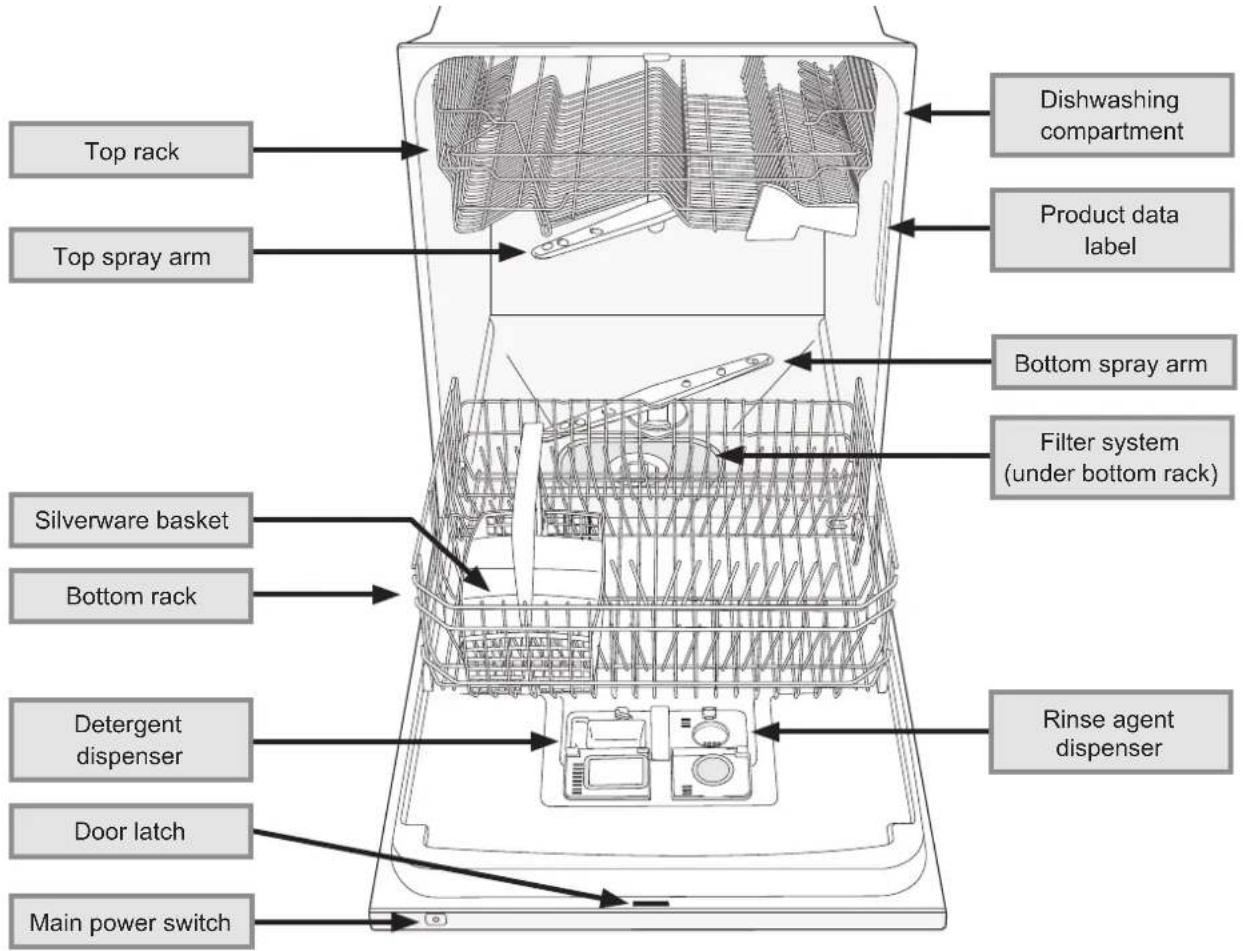
text_image
Top rack Top spray arm Silverware basket Bottom rack Detergent dispenser Door latch Main power switch Dishwashing compartment Product data label Bottom spray arm Filter system (under bottom rack) Rinse agent dispenser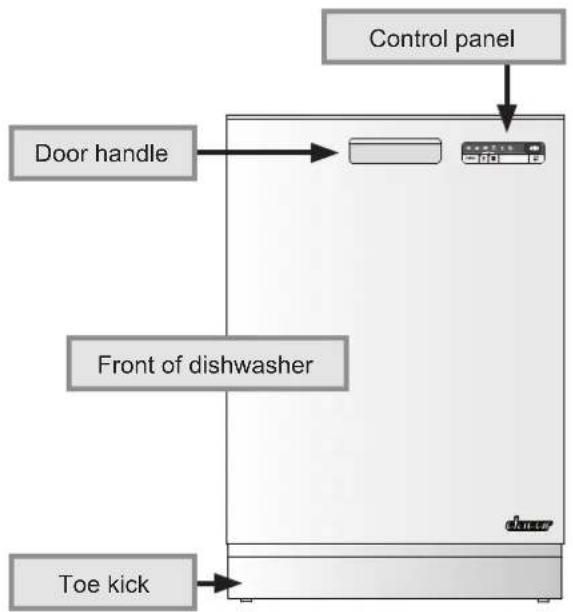
text_image
Control panel Door handle Front of dishwasher Toe kickChild Safety Lock
This dishwasher is equipped with an electronic child safety lock. When the child safety lock is engaged, the dishwasher touch keys do not work normally, making it more difficult to program and start. If you touch any of the control panel keys when the lock is activated, "LOC" will appear on the display, with no other effect on the control panel.
See page 12 for child lock activation instructions. To start the dishwasher while the lock is activated:
Touch the TEMPERATURE and DRY keys at the same time. The child safety lock will deactivate for two minutes, allowing you to set and start the dishwasher normally. The lock will re-engage automatically after two minutes.

text_image
PROGRAM START STOP Temperature DryLoading Your Dishwasher

WARNING
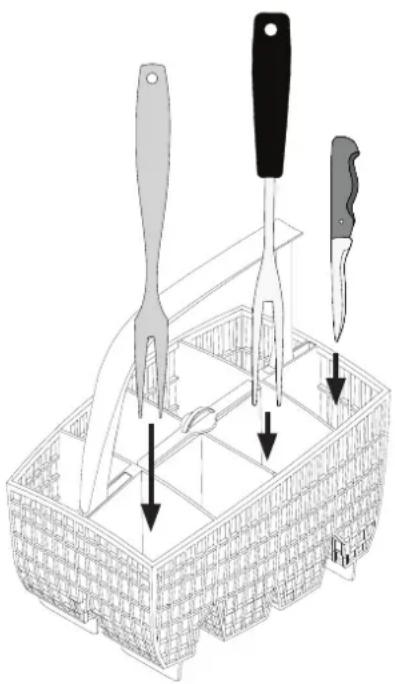
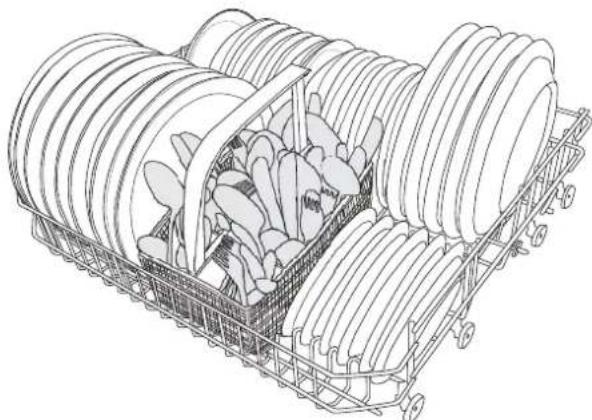
- Place sharp objects in the silverware basket or knives in the knife stand (see page 6). If it is not possible to load sharp objects in the silverware basket, load them with the sharp end toward the back of the dishwasher. Locate these items where they will not damage the door seal or cause personal injury.
- When loading the silverware basket, insert all sharp or pointed objects with the handles up.

CAUTION
Do not wash plastic items unless they are marked “dishwasher safe.” Always check the manufacturer’s recommendation before washing plastic items that are not marked.

IMPORTANT
If the load will sit for a while before washing, run the Rinse and Hold cycle to reduce the chance of food hardening. Doing so will also reduce the risk of acidic foods damaging metal surfaces.
What Can Be Washed
Some cookware is not dishwasher safe. Other materials (especially glassware) cannot withstand high temperatures, others can be damaged by dishwasher detergent. Items that you can safely wash in your dishwasher are:
■ China (except delicate china)
■ Cookware with non-stick coatings
■ Crystal (except antique crystal)
Glass
■ Plastic (dishwasher safe only)
■ Silver and silver plate
■ Stainless steel
■ Stoneware
■ Wood (dishwasher safe only)
natural_image
Line drawing of a food kit with cutlery and utensils, no text or symbols presentLoad sharp objects with handles up
What Should Not Be Washed
For safety reasons and to prevent damage, do not wash the following items in your dishwasher:
Aluminum
■ Antique crystal
■ Any item with fragile or unglazed decorations
Brass
Bronze
■ Cast iron
■ Cutlery and flatware with bonded handles
■ Delicate china
■ Disposable plastic items
Gold
■ Pewter
Tin
■ Wood that is not dishwasher safe
Loading Your Dishwasher
Loading the Silverware Basket

IMPORTANT
- To prevent damage, do not load utensils and silverware made of different materials (for example silver and stainless steel) in the same compartment of the silverware basket.
- For best results:
Do not nest utensils in the silverware basket.
◇ Load silverware with the handles down.
◇ Spread knives and large utensils out as much as possible.

natural_image
Line drawing of three elongated spoons (no text or symbols)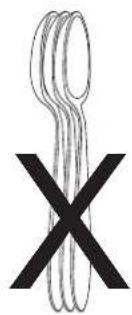
text_image
XCovered Compartment
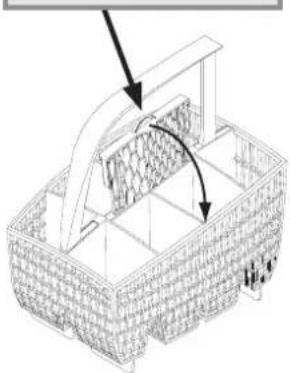
To prevent small, light items from falling out of the rack when sprayed with water, put them in the covered compartment. To cover the compartment:
- Put small items into one of the middle compartments of the silverware basket.
- Lift up on the tab in the center of the basket to expose the cover.
- Snap the cover shut over the compartment.
NOTE: For convenience, you may also insert silverware or small utensils into the slots on top of the covered compartment. Insert them with the handles down.
Pull up on tab in center, then fold down
Silverware slots in top (see note)
natural_image
Line drawing of a woven basket with an open lid and internal mesh structure, no text or symbols present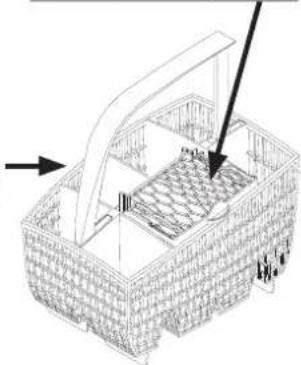
natural_image
Line drawing of a woven basket with an open lid and internal grid pattern, no text or symbols presentSilverware Basket Placement
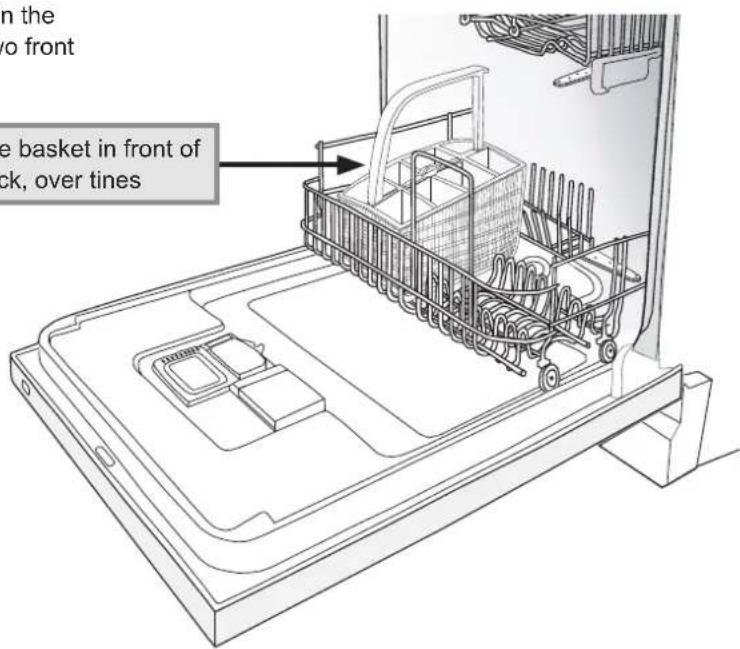
Put the silverware basket in the bottom rack in the front, in the direction shown. It fits over the two front sets of tines.
Place silverware basket in front of bottom rack, over tines
text_image
on the o front the basket in front of ck, over tinesLoading Your Dishwasher
Loading the Racks

CAUTION
• Always place large or heavy items (such as pots, pans and large dishware) in the bottom rack.
- To avoid damage to the racks, do not let sharp edges come into contact with them.
- To minimize breakage and chipping, do not allow fragile items to touch each other.

IMPORTANT
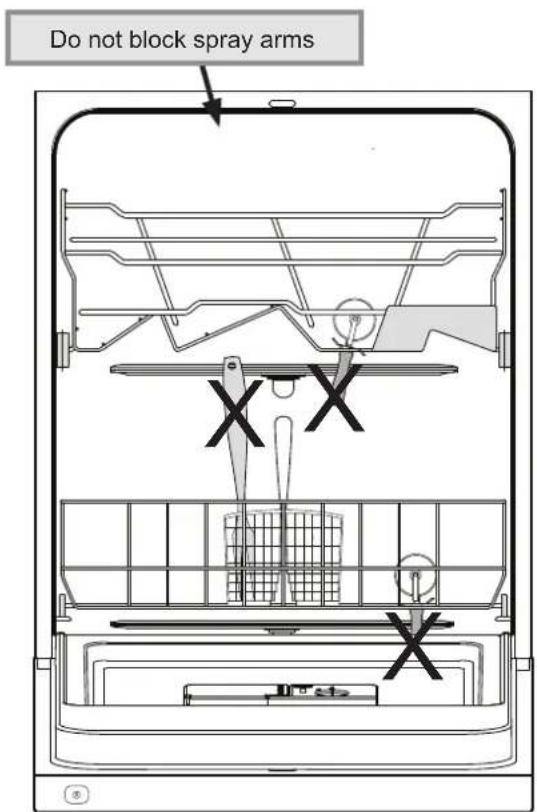
- The spray arms must spin freely. Do not allow items sticking out of the racks to block them.
- Do not load cookie sheets and large platters in the front of the bottom rack. Doing so will prevent water from dissolving the detergent in the detergent dispenser. See diagram below.

natural_image
Illustration of a cart loaded with large spools and a black 'X' symbol, no text or labels present.Do not put cookie sheets or large platters in the front of bottom rack
text_image
Do not block spray arms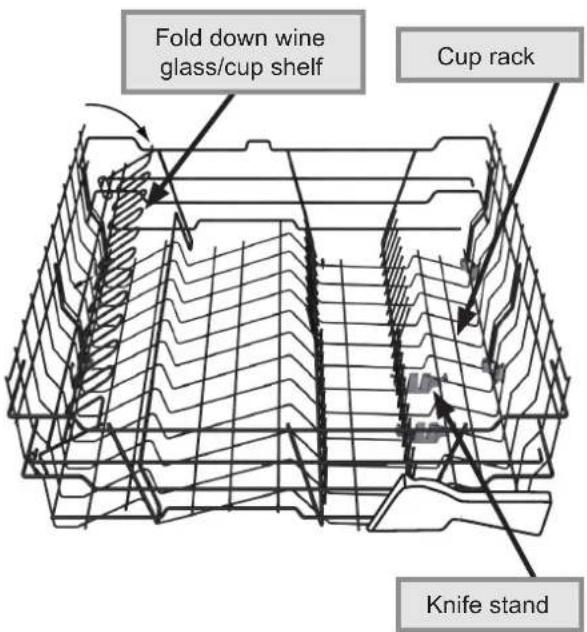
text_image
Fold down wine glass/cup shelf Cup rack Knife standTop Rack Features
Loading Your Dishwasher
- Place glasses, cups, bowls, small plates and saucers in the top rack. Put wine glasses on the wine glass shelf or lean them against it. Place long knives in the knife stand.
- Scrape off leftover food items and non-food items, like toothpicks and napkins, before loading. It is not necessary to rinse items under running water before loading them.
- Do not stack dishes, glasses or pots and pans. Stacking will prevent water from getting to soiled surfaces.
- Load all items so that the open ends face down as much as possible. Load items that are not completely face down so that the open end is toward the center of the rack. Good drainage provides the best drying.
- Place dinner plates, side plates, serving dishes, pots and pans on the bottom rack.
- Load crystal and glass so that it does not knock together during the wash cycle. Use the lowest wash temperature and shortest wash and dry cycles possible.
• To minimize noise, do not allow pots and pans to touch. Also keep large items from touching the sides of your dishwasher.

natural_image
Line drawing of a multi-tiered plastic crate filled with various ceramic pieces (no text or symbols)Top Rack
natural_image
Isometric line drawing of a shopping cart filled with plastic containers, no text or symbols presentBottom Rack
Operating Your Dishwasher
Filling the Detergent Dispenser

CAUTION
- Do not use hand dishwashing detergents. They will create excessive foaming that interferes with proper operation.
- Using too much dishwashing detergent, can cause a permanent film called etching.

IMPORTANT
- Do not use detergent that is clumped or has been wet. Store dry detergent in a cool dry place to prevent caking.
- Fill the detergent dispenser just prior to starting your dishwasher. Detergent will harden if it sits too long. Also check the package for detergent that is expired.
- Dacor recommends granular (powdered), unscented automatic dish washing detergent. "All-in-one", "multi-purpose" or "complete" dish washing detergents are not recommended.
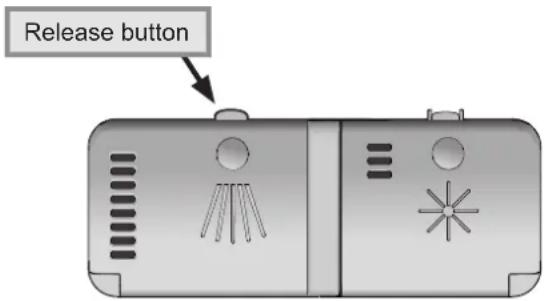
- If the detergent dispenser lid is closed, press the (left) release button to open it.
text_image
Release button- The detergent dispenser has two compartments; the smaller pre-wash compartment, and the main wash compartment (see diagram at right). The pre-wash compartment empties into the dishwasher when the door is closed. The main wash compartment releases detergent automatically during the main wash cycle. NOTE: When running the Quick Wash cycle, Dacor recommends that you do not add detergent to the pre-wash compartment.
-
See the Detergent Usage Table for the amount of detergent recommended. The recommended amounts shown are intended to provide properly cleaned dishes, free of film and spotting for the water hardness in your area. You may need to adjust the detergent by small amounts until you get the best results. Harder water requires more detergent.
-
Water hardness is measured in grains per gallon (gpg). Contact your water company for the water hardness in your area. 12 gpg and higher is extremely hard water and detergent alone may not be enough. You may need to use a water softener to maximize dishwasher performance at a water hardness above 12 gpg. Also, in areas with 9 gpg and higher water hardness, you may need to wash at a lower temperature to prevent hard water deposits from forming in the dishwasher.
- Different brands of dishwasher detergent have different amounts of phosphorous for softening water. In some areas with hard water, you may need to use more detergent if it has less than an 8.7% phosphorous content or change to a granular (powdered) detergent with more phosphorus.
• After loading both compartments according to the table below, close the detergent dispenser lid.

text_image
Pre-wash compartment Main wash compartment Detergent Dispenser lid| Detergent Usage Table | |
| Water Hardness (gpg) | Amount of Detergent |
| Soft (0-3) | Pre-wash: 1 teaspoonMain wash:1 - 112 tablespoons |
| Medium (4-8) | Pre-wash: 1 teaspoonMain wash: 1 - 2 tablespoons |
| Hard (9 and over) | Pre-wash: 1 teaspoonMain wash:2 - 3 tablespoons |
Operating Your Dishwasher
Filling the Rinse Agent Dispenser

IMPORTANT
- Rinse agent is important to the drying process of the dishware. It also reduces spotting. Dacor recommends that you keep the rinse agent dispenser full at all times. However, some customers with soft water may not need rinse agent. If you have soft water, your dishes may dry better without rinse agent.
- If you use a dishwashing detergent containing a rinse agent additive, do not fill the rinse agent dispenser to avoid a film on the dishes.
- When the rinse aid dispenser needs to be refilled, this symbol appears on the display.
- The rinse agent dispenser must be properly adjusted. Too little rinse agent will allow spotting and drying problems. Too much rinse agent will cause foaming and streaking.
- When the water hardness exceeds 3 gpg, you should use rinse agent with citric acid (acid rinse agent).
To refill the rinse agent dispenser:
- Press the (right) release button to open the rinse agent compartment lid.

text_image
Release button- Carefully pour the rinse agent into the filler hole until the rinse agent level is even with the end of the MAX arrow inside. Do not overfill.
- Wipe up any spillage.
- Close the rinse agent compartment lid firmly.
NOTE: After filling the rinse agent dispenser, it may take a few washes before the rinse agent indicator on the display goes off.

natural_image
Illustration of a hand inserting a component into a device with a circular dial labeled 'max' (no text or symbols beyond the label)Changing the Amount of Rinse Agent Dispensed
See page 12 for instructions to change the amount of rise agent dispensed.
When to increase the amount dispensed:
- When the dishes have water marks.
When to decrease the amount dispensed:
- When the dishes have a sticky white/blue film.
- When the dishes are streaked.
• If heavy foaming occurs.
NOTE: If you have very soft water and still experience streaking when the dispenser is set to 1, you can dilute the rinse agent with water up to a 50:50 mix before pouring it into the dispenser to get acceptable results.
Operating Your Dishwasher
Starting Your Dishwasher

IMPORTANT
If the dishwasher drain line is connected to a garbage disposal, run the disposal before operating the dishwasher for proper drainage.
- Open the door and push in on the main power switch on the top of the door so that it is in the on position. The control panel on the front of the dishwasher is lit when the switch is on.
- Close the door. Push in gently on the top of the door until it clicks shut.
- Touch the PROGRAM touch key repeatedly until the indicator light for the desired wash cycle is lit. See the facing page for a description of the wash cycles.
- If you want to change the wash temperature setting, touch the Wash Temperature key repeatedly to toggle between the "normal" setting and the "high" setting. The light on the Wash Temperature key is lit when the temperature is set to "high." See the facing page for a description of the temperature settings.
- If you want to change the dish drying time, touch Dry repeatedly to toggle between the "normal" and "high" setting. The light on the Dry cycle key is lit when the dry time is set to "high." NOTE: When set to "normal", the rinse water temperature is lower, causing the dishes to take longer to dry. Change the setting to "high" if the dishes do not dry properly.
- Touch the START/STOP touch key for 3 seconds. The display will flash three times to indicate that the dishwasher is starting. If only horizontal lines appear on the display, the door is ajar. Push in gently on the top of the door until it clicks shut.
During Operation
- Once you have selected a cycle and options, the display indicates how long the cycle took the last time it was used. Once you start the dishwasher, the display shows the estimated time until the end of the new cycle. The display changes periodically as the dishwasher recalculates the cycle time based on water temperature.
- If power to the dishwasher is turned off at the main power switch or if there is a power outage before the wash cycle completes, the selected cycle will continue when the power is restored. However, if power is interrupted or the door is open more than two minutes during drying, the cycle will end.
Adding a Dish After You Start
You can add a dish, if needed, after starting your dishwasher. Dacor recommends that you only add items during the first five minutes of operation to make sure they get clean.
To add a dish:
- Slowly open the door. The dishwasher will stop operating. Wait a moment for the steam to clear.
- Without touching any hot surfaces, dishes or racks, insert the item into one of the racks, following the normal loading instructions.
- Close the door. Push in on the top of the door to make sure that it is completely shut. Operation will resume.
Standby Mode
Once the cycle is finished, the dishwasher will beep and End will appear on the display. When the cycle completes, the dishwasher draws a very small amount of power. Open the door and push the main power switch to turn power off completely.
Stopping Your Dishwasher During Operation
Touch the START/STOP touch key for five seconds. The dishwasher will stop operating.
Changing the Wash Cycle After You Start
You can change the cycle, the wash temperature or the dry setting after you start your dishwasher.
- Open the door, then touch the START/STOP key for five seconds. The dishwasher will stop operating.
- If the detergent dispenser door has opened, add more detergent.
- Touch the PROGRAM key repeatedly to select the new wash cycle (the indicator for the desired wash cycle will light).
- If you want to change the wash temperature or dry setting, touch the key for that function repeatedly to toggle between settings.
- Touch START/STOP for 3 seconds, wait for the display to flash three times, then close the door.
Operating Your Dishwasher

flowchart
graph TD
    A["Wash cycle indicator lights (see table below)"] --> B["PROGRAM"]
    B --> C["PROGRAM key"]
    B --> D["Wash Temperature key Dry cycle key"]
    B --> E["START STOP"]
    C --> F["Display"]
    D --> G["START/STOP key"]
Control Panel
Wash Cycles
| Heavy Wash |  | Use for very dirty dishes, such as pans, pots and casserole dishes. If these dishes do not completely fill the dishwasher, you can add plates and other dishes that can withstand a heavy wash for a full load. |
| Sanitation Wash |  | Use for extra dirty dishware and sanitation. This cycle has a high final rinse temperature for good sanitation and drying. IMPORTANT: Do not use for dishware that cannot withstand high wash or rinse temperatures. |
| Normal Wash |  | Use for normally soiled plates, glasses, bowls, serving dishes and lightly soiled pans. This cycle is best for normally soiled mixed loads. |
| Eco Wash |  | Use when you want to save energy when washing normally soiled loads. |
| Quick Wash |  | Use for very lightly soiled loads that are washed immediately after use. This cycle can also be used for very lightly soiled glass, coffee cups, china or other delicate items. |
| Rinse and Hold |  | Use to rinse dishes that you plan to wash later that day or for rinsing the dishes while waiting for the machine to be filled. The wash temperature setting cannot be changed for this cycle. |
| Wash Water Temperature | ||
| Wash Cycle | “Normal” Setting | “High” Setting |
| Heavy Wash 140°F (55°C) 150°F | (65°C) | |
| Sanitation Wash 140°F (60°C) 160°F | (70°C) | |
| Normal Wash 130°F (55°C) 150°F | (65°C) | |
| Eco Wash 120°F (50°C) 140°F | (60°C) | |
| Quick Wash 85°F (30°C) 140°F | (60°C) | |
Saving on Water and Energy Costs
- To save energy, wait to run the wash cycle until the dishwasher is full.
- Use the Rinse and Hold cycle to rinse the dishes if there are any unpleasant odors while you wait for the dishwasher to become fully loaded.
- If the dishes are only lightly soiled, wash at a lower temperature.
- Do not rinse dishes under running water. Simply scrape off large food particles before loading.
Operating Your Dishwasher
Control Panel Settings
flowchart
graph TD
    A["Program"] --> B["Program Icon"]
    C["Menu #Rinse & SettingDaily"] --> D["2:3 Display"]
    E["Start STOP"] --> F["2:3 Display"]
    G["Dry"] --> H["Program Icon"]
    I["Display"] --> J["2:3 Display"]
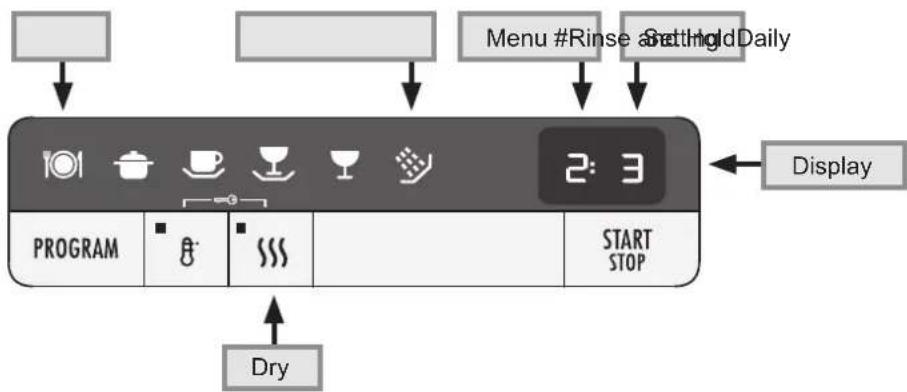
Various functions and settings on your dishwasher can be configured by the user. To change one of the settings:
- Open the door slightly. If the main power switch is on, turn it off and wait about five seconds.
- Turn on the main power switch. Wait for the numbers to appear on the display.
-
Within five seconds of the numbers appearing on the display, hold your finger on the PROGRAM touch key. Wait for the beep confirming the key touch, then touch the Dry key at the same time. Touch both keys until the Daily and Rinse and Hold indicator lights flash.
-
While the Daily and Rinse and Hold lights are flashing, touch START/STOP repeatedly until the menu number for the desired function appears on the left side of the display.
- Touch PROGRAM repeatedly until the desired setting for the function being set appears on the right side of the display.
- Touch START/STOP repeatedly to save the setting and exit the menu. Repeat the above steps to change the settings for a different function.
| Function Menu # Settings Description | |||
| Child lock 1 | 0 (off)/1 (on) | When the child safety lock is engaged, the control panel touch keys do not work normally, making it more difficult to program and start. See page 3 for instructions on how to temporarily bypass the child lock. | |
| End beep volume | 2 0 (off) to 4 | Changes the volume of the beep used to indicate when a cycle is finished or when a fault has occurred. | |
| Key touch beep volume | 3 0 (off) to 4 | Changes the volume of the beep emitted each time a key on the control panel is touched. | |
| Display contrast | 4 -1 to 3 | Adjusts the contrast of the display. | |
| Rinse aid dispenser | 5 0 (off) to 6 | Adjusts the amount of rinse aid dispensed during each cycle. | |
Care and Cleaning
WARNING
Clean only those parts of the dishwasher listed in this manual. Clean them only in the manner instructed. Use only the cleaning solutions specified. Other cleaning solutions may produce dangerous fumes, cause corrosion of the metal parts and could permanently damage the finishes.
Cleaning the Door
WARNING
-
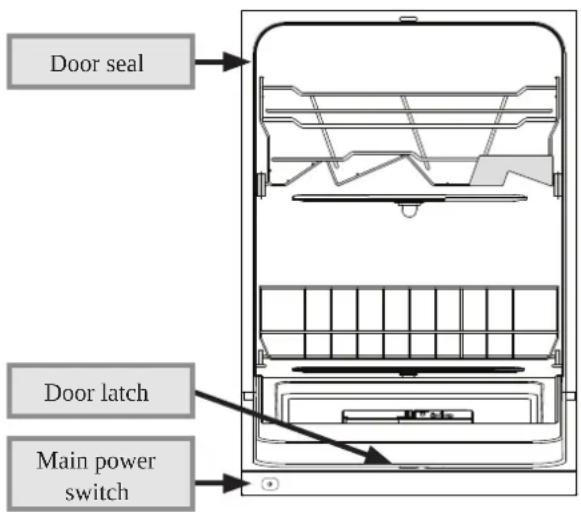
Exercise caution when cleaning around the main power switch, the control panel and door latch areas. Do not spray water or cleaners of any kind around these areas. Doing so may create an electric shock hazard and damage the electrical parts.
• Always wipe stainless steel surfaces with the grain. -
Make sure the main power switch is off to avoid activating any touch keys unintentionally.
- Wipe the touch keys and display clean with a dry or slightly damp cloth. To prevent scratches, never use cleaners. Keep the display and keys clean and free from grease.
- To clean the rest of the door, use only a soft cloth dampened slightly with a solution of mild detergent and warm water. Do not use a spray bottle especially around the main power switch, the door latch and the control panel.
- To prevent odors caused by food build up, gently clean around the door seal and corners at the front edge of the dishwashing compartment. Use a dish brush and a low-lather detergent.
text_image
Door seal Door latch Main power switchCleaning the Interior
- The dishwashing compartment of your Dacor dishwasher is constructed of high quality stainless steel. It remains clean during normal use. However, if you have hard water, a white or gray film may form inside over time. To remove these hard water deposits, run a normal wash cycle with two tablespoons of citric acid or dishwasher cleaner in the dishwasher detergent compartment (with no dishes loaded).
- The control panel and the racks may be wiped clean, if necessary, with a soft damp rag.
- Food particles on the silverware basket can be rinsed clean under a faucet with warm water.
Strainer Basket and Filter System
CAUTION
Do not operate the dishwasher without the strainer, the drain outlet cover and the filter system completely in place. The strainer, the drain outlet cover and filter system are designed to keep large food particles out of the mechanical parts.
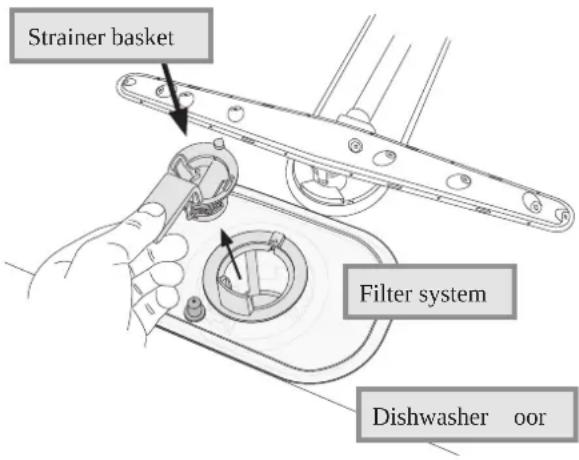
The strainer basket portion of the iter system should be cleaned whenever food particles begin to build up. Food that builds up in the other parts of the iter system is rinsed away during each wash cycle so that the entire iter system only needs to be cleaned twice a year.
Cleaning the Strainer Basket
- Open the door and remove the bottom rack.
- Lift the strainer basket straight up by the handle.
- Rinse it out under running water in the sink. Replace it by pressing it rmly into the hole in the center of the lter system. The handle goes toward the door. Replace the rack.
text_image
Strainer basket Filter system Dishwasher oorCare and Cleaning
Cleaning the Entire Filter System

WARNING
To avoid an electric shock hazard, disconnect power to the dishwasher when cleaning the entire filter system.
- Disconnect the dishwasher power plug from the electrical outlet or turn off power at the circuit breaker panel.
- Open the door and remove the bottom rack.
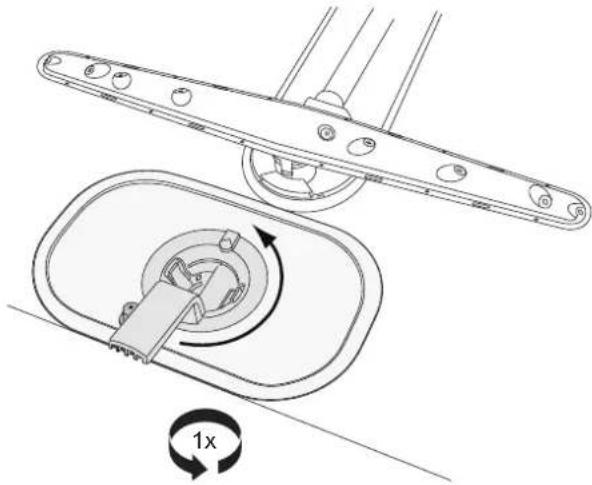
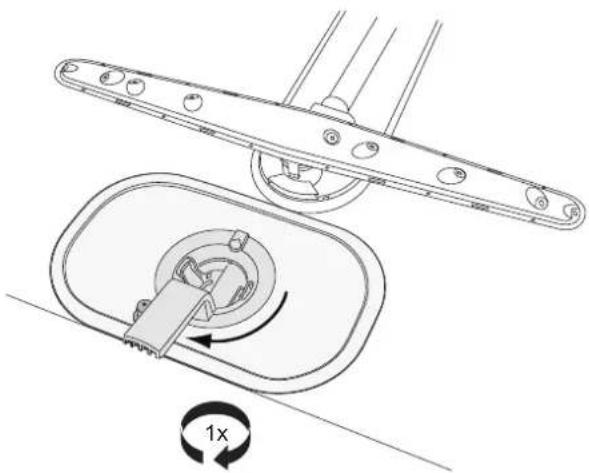
- Turn the handle on the strainer basket once counter-clockwise.
natural_image
Technical diagram of a mechanical assembly with a 1x rotational speed indicator (no text or symbols present)- Pull the strainer basket and the attached tubular filter up and out.

natural_image
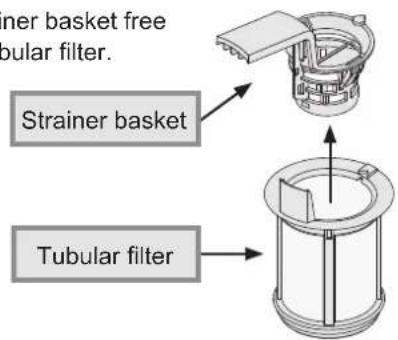
Line drawing of a hand using a wrench to adjust a mechanical component (no text or symbols present)- Pull the strainer basket free from the tubular filter.
text_image
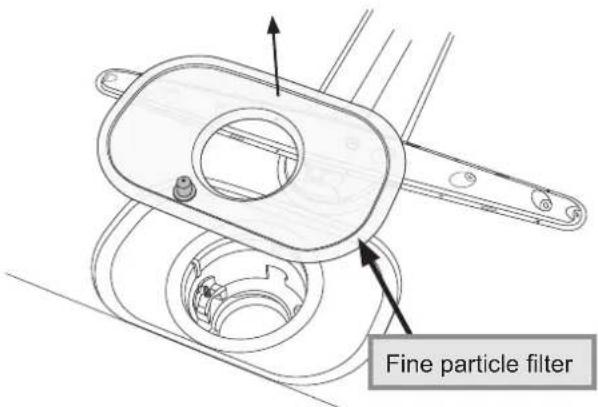
Inner basket free tubular filter. Strainer basket Tubular filter- Lift the fine particle filter out of the dishwasher.
text_image
Fine particle filter-
Clean the filters in the kitchen sink with a soft sponge and mild kitchen detergent under warm water. Rinse any food particles out of the strainer basket.
-
Remove the drain outlet cover located to the left of the drain bottom (see diagram below). To remove it, grasp it and pull it to the right, out of the hole.
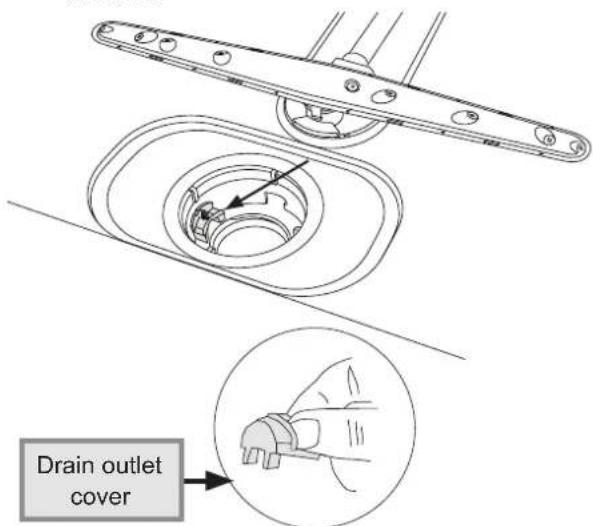
text_image
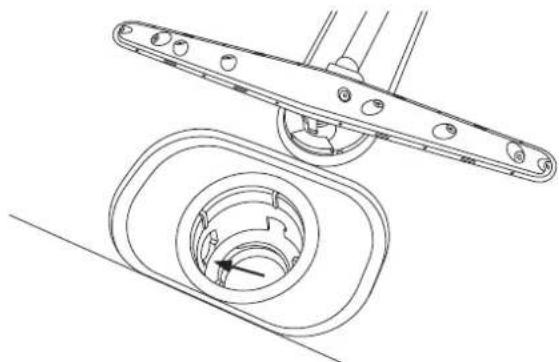
Drain outlet cover- Insert your finger into the drain outlet hole. Turn the pump blade inside the hole with your finger to loosen anything clogging it. Pull out any large bits of food that are loosened.
natural_image
Technical line drawing of a mechanical assembly with two views: top shows a bracket and bottom shows a circular component (no text or symbols)Care and Cleaning
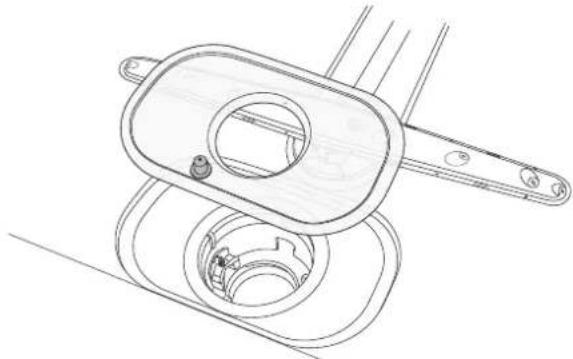
- Reinstall the drain outlet cover.
- Center the fine particle filter over the hole in the bottom of the dishwasher.
natural_image
Technical line drawing of a mechanical device with internal components (no text or symbols)- Re-attach the strainer basket to the tubular filter.

- Insert the tubular filter assembly into the hole with the handle pointing toward the front of the dishwasher. Turn the handle once clockwise until it stops to secure it in place.
natural_image
Technical diagram of a mechanical assembly with a rotating component and a 1x speed indicator (no text or symbols)- Replace the bottom rack.
- Reconnect power to the dishwasher.
Cleaning the Spray Arms
The holes and bearings on the spray arms can sometimes become blocked. Clean them as follows to restore proper operation.
- Open the door and remove the bottom rack.
- Pull the bottom spray arm straight up to release.

natural_image
Technical line drawing of a mechanical assembly with no visible text or symbols- Remove any deposits using a needle or something similar. The washer arms also have holes underneath.
- To reinstall, center the base of the spray arm in the hole and push straight down until it clicks into place.
- Replace the bottom rack.
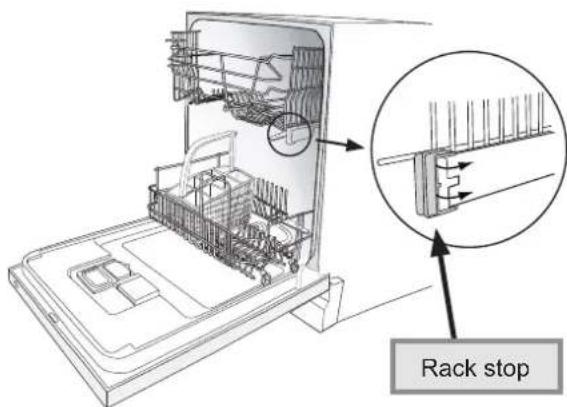
- To release the top spray arm, first remove the top rack. Pull the top rack out until it stops. Turn both rack stops outwards on the rack mounting rails (see diagram). Pull the rack toward you to remove it.
text_image
Rack stop- Remove the top spray arm in the same way as the bottom arm and clean it. Reinstall the top spray arm the same way as the bottom one.
- Reinstall the top rack by inserting the rollers on the base of the rack into the slots on the rack mounting rails. Turn both rack stops inward to lock the rack into place.
Before You Call for Service
Error messages
Below is a list of the possible error messages that may appear on the display in some cases and the suggested action.
| Error Message May Be Caused By What to Do | ||
| F:10 Overfilling Call Dacor Customer Service. | ||
| F:11 Water outlet fault See “Water left in bottom of dishwasher” below. | ||
| F:12 Water inlet fault Make sure water supply valve is on. | ||
| F:40 Inlet valve leakage Turn off the water supply valve and call DacorCustomer Service. | ||
Problem Solution Guide
Before you call for service, please review the Problem Solution Guide below.
| Problem May Be Caused By What to Do | ||
| Dishwasher will not start (control panel is not lit) | Main power switch is off Open door and turn on main power switch on top of door before selecting cycle. See page 10. | |
| Power is disconnected Make sure power is on at the circuit breaker panel and that the power plug is properly connected to electrical outlet (if applicable). | ||
| Blown fuse or tripped circuit breaker | Replace fuse or reset circuit breaker. Remove other appliances from circuit. | |
| Power failure Contact electric company. | ||
| Dishwasher will not start (control panel is lit) | Door not completely closed (horizontal lines appear on display) | Gently push in on front of door until you hear a click. |
| Controls not set | Make sure dishwasher controls are properly set and door is closed. See page 10. | |
| Child lock activated | See page 3 to bypass. See page 12 to deactivate. | |
| Control panel keys dirty | Clean keys with soft, slightly damp cloth. | |
| No water supply | Make sure water valve is turned on. | |
| Water supply line blocked | Make sure water supply line to dishwasher is not kinked. | |
| Drain pump clogged (loud buzzing sound) | Disconnect power and clean entire filter system and drain pump. See page 13. Reconnect power and attempt to restart. If problem persists, shut off the water supply, disconnect power and call for service. | |
| Water left in bottom of dishwasher near filters, dishwasher will not drain | Dishwashing cycle not complete | Allow dishwasher to complete cycle. |
| Obstruction in the drain hose or air gap is plugged | Check for kinked drain hose. Disconnect end of drain hose. Check for debris in hose or any other part of drain/plumbing system. NOTE: The cone-shaped part of the hose must be at least 1/2" (1.3 cm). | |
| Filter system clogged | Clean entire filter system. See page 13. | |
| Debris in the drain pump | Clean the drain pump/filter system. See page 13. | |
Before You Call for Service
| Problem May Be Caused By What to Do | ||
| Water backs up in sink when dishwasher drains | Garbage disposal or sink trap full | Run garbage disposal to eliminate food and obstructions in sink. Make sure sink drains properly. |
| Door will not close Racks not slid in all the way Check to m | make sure there is nothing blocking the rack(s) from rolling all the way into the dishwasher. | |
| 1 minute appears on the display | The cycle is taking longer than estimated. | None. Next time the cycle is run, the corrected time will be displayed. |
| Unusual noise Improper loading Utensils may not be secure or something small may have dropped from the rack. Water may cause utensils to rattle. Make sure dishware is secure. | ||
| Overflow protection has engaged and is pumping water out of the dishwasher. Turn off water valve, disconnect power and call for service. | ||
continued....
Before You Call for Service
Problem Solution Guide (cont.)
| Problem May | Be Caused By What to Do | |
| Chipping or breaking of glassware | Improper loading Do not over | load. Load between rack prongs, not over them. Glasses loaded over prongs will not be supported and may chip or break. Make sure glassware is secure and can't come loose. Always use the top rack for delicate items. |
| Dishes are not clean Spray | arms do not rotate properly | Make sure that both spray arms rotate freely. Make sure that items do not obstruct movement of spray arms. If necessary, clear any obstructions. |
| Make sure holes in spray arms are not blocked. If necessary, clean spray arms. See page 15. | ||
| Incorrect detergent use Use | only correct amount of dishwasher detergent according to water hardness. See page 8. Fill dispenser only when ready to start the dishwasher. Do not use old or caked detergent. Store dishwasher detergent in dry place and in a closed container. Change the dishwasher detergent if results are still poor. | |
| Cycle selected is too short | Select normal or heavy wash cycle. | |
| Incorrect loading Make sure | dishes and flatware are loaded properly.See Loading Your Dishwasher section. Make sure all items are loaded securely and do not tip over. Avoid placing very tall glasses in the corners of the rack. | |
| Filter system clogged or not installed properly | Make sure filter system is clean and properly installed. See page 13. | |
| Detergent build-up in dishwashing compartment | Pour a teaspoon to tablespoon of citric acid crystals or white vinegar into the pre-wash compartment in the detergent dispenser. Run a normal cycle with no dishes. | |
| Chucks of food left on dishes or in dishwasher compartment due to drain outlet cover being removed | Check to make sure drain outlet cover is in place. See page 14. | |
| Whitish-blue sticky film on dishes | To much rinse agent See page 12 to change rinse agent dispenser setting. If water is very soft, you may need to dilute the rinse agent, see page 9. | |
| Using liquid rinse agent with a detergent that already contains rinse agent | Do not use rinse agent with detergent that contains rinse agent or change detergent type. | |
| Spotting and filming Hard | water/incorrect use of dishwasher detergent | Use correct amount of dishwasher detergent or change detergent type. See page 8. NOTE: phosphate free detergents do not work well with hard water. |
| You may need a home water softener. | ||
| No rinse agent Make sure rinse agent dispenser is full. | ||
| Rinse agent dispenser not set correctly | See pages 9 and 12. | |
| Too little water Make sure water valve is fully open. Make sure that water pressure is between 4.2 and 140 psi and flow rate is a minimum of 3.0 gpm. | ||
Before You Call for Service
| Problem May Be Caused By What to Do | ||
| Spotting and filming (cont.) | Spray arms do not rotate properly | Make sure that both spray arms rotate freely. Make sure that items do not obstruct movement of spray arms. If necessary, clear any obstructions. |
| Make sure holes in spray arms are not blocked. If necessary, clear holes with a pointed object and rinse under water. | ||
| Strainer blocked Check strainer. Clean if necessary. | ||
| Etching Washing at too high | a temperature and/or using too much detergent can cause etching on (crystal) glass (a permanent condition). To prevent damage, wash (crystal) glass at “normal” temperature and dispense dishwasher detergent according to page 8. | |
| Marks, discoloration or other stains | Aluminum utensils rubbing against items during wash cycle | Be sure aluminum utensils, especially light weight, foil-type pans, do not touch dishes. |
| Lipstick and tea can be difficult to remove | Change to a dishwashing detergent with bleach. | |
| Yellow or brown marks Iron or manganese in water | To remove spots, use a non-abrasive cleaner. | |
| Temporary solution:Pour a teaspoon to tablespoon of citric acid crystals in place of the pre-wash detergent in the detergent dispenser. Follow this pre-wash with a full detergent wash. Use the Heavy Wash cycle. | ||
| Permanent solution: Install an iron removal system in the water supply. | ||
| Yellow film on sterling silver results when you wash copper utensils in the same load. Silver polish will usually remove this type of stain. | ||
| Remove tea or coffee stains by hand using a solution of 12 cup bleach and three cups warm water. Do not use on sterling silver or silver plate. | ||
| Discoloration of stainless steel, silver plate | Allowing salty or acidic foods to remain on flatware | Rinse flatware that is to stand several hours before washing or run Rinse and Hold cycle. |
| Silver contacting stainless steel or aluminum | Do not put flatware made of different materials in the same silverware basket compartment. Direct contact to stainless steel can cause permanent damage to silver. | |
| Distortion of plastics Plastic item not dishwasher safe | Do not wash plastic items in dishwasher that are not “dishwasher safe.” | |
| Marks on melamine and plastics | Porous material Use a special cleaner for plastic. | |
Warranty and Service
Getting Help
Before you request service:
- Review the Before You Call For Service section of this manual starting on page 16.
- Use the helpful tips found in our Problem Solution Guide
- Become familiar with the warranty terms and conditions of your product.
- If none of these tips or suggestions resolves your problem, call our Customer Service center at the number below.
Dacor's Customer Service center is available
6:00 AM - 5:00 PM Pacific Time.
For warranty repairs or questions and for Dacor Distinctive Service (DDS) in the US and Canada Phone: (800) 793-0093, extension 2822
For non-warranty repairs or questions in the US and Canada
Phone: (800) 793-0093, extension 2813
Contact us through our web site at:
www.dacor.com/contact-us
Warranty
What is Covered:
CERTIFICATE OF WARRANTIES: DACOR DISHWASHERS
WITHIN THE FIFTY STATES OF THE U.S.A., THE DISTRICT OF COLUMBIA AND CANADA:
FULL ONE-YEAR WARRANTY
The warranty applies only to the Dacor appliance sold to the first use purchaser, starting from the date of original retail purchase or closing date for new construction, whichever period is longer. Warranty is valid on products purchased brand new from a Dacor Authorized Dealer or other seller authorized by Dacor.
If your Dacor product fails to function within one year of the original date of purchase, due to a defect in material or workmanship, Dacor will remedy it without charge to you.
All cosmetic damage (such as scratches on stainless steel, paint/porcelain blemishes, etc.) to the product or included accessories must be reported to Dacor within 60 days of the original purchase date to qualify for warranty coverage.
Consumable parts such as filters and light bulbs are not covered and are the responsibility of the purchaser.
TWENTY-FIVE YEAR WARRANTY
On rust-through of stainless steel tank and door.
LIMITATIONS OF COVERAGE
Service will be provided by a Dacor designated service company during regular business hours. Please note service providers are independent entities and are not agents of Dacor.
Dealer display and model home display products with a production date greater than 5 years, products sold "As Is," and products installed for non-residential use, which include but are not limited to religious organizations, fire stations, bed and breakfast and spas carry a one year parts warranty only. All delivery, installation, labor costs and other service fees are the responsibility of the purchaser.
Warranty will be null and void on product that has altered, defaced or missing serial numbers and tags.
The owner must provide proof of purchase or closing statement for new construction upon request. All Dacor products must be accessible for service.
Warranty is null and void if non-ETL, non-CUL or non-CSA approved product is transported from the U.S.A.
OUTSIDE THE FIFTY STATES OF THE U.S.A., THE DISTRICT OF COLUMBIA AND CANADA: LIMITED FIRST-YEAR WARRANTY
LIMITED FIRST YEAR WARRANTY
If your Dacor product fails to function within one year of the original date of purchase due to a defect in material or workmanship, Dacor will furnish a new part, F.O.B. factory to replace the defective part.
All delivery, installation, labor costs and other service fees are the responsibility of the purchaser.
Warranty and Service
Warranty
What is Not Covered:
- Slight color variations may be noticed because of differences in painted parts, kitchen lighting, product placement and other factors; this warranty does not apply to color variation.
- Service calls to educate the customer on proper use and care of the product.
- Service fees for travel to islands and remote areas, which include but are not limited to, ferries, toll roads or other travel expenses.
- Consequential or incidental damage, including but not limited to food or medicine loss, time away from work or restaurant meals.
- Failure of the product when used for commercial, business, rental or any application other than for residential consumer use.
- Failure of the product caused by improper product installation.
- Replacement of house fuses, fuse boxes or resetting of circuit breakers.
- Damage to the product caused by accident, fire, flood, power interruption, power surges or other acts of God.
- Liability or responsibility for damage to surrounding property including cabinetry, floors, ceilings and other structures or objects around the product.
- Breakage, discoloration or damage to glass, metal surfaces, plastic components, trim, paint or other cosmetic finish caused by improper usage, care, abuse or neglect.
Out of Warranty
Should you experience a service issue beyond the standard warranty period, please contact us. Dacor reviews each issue and customer concern to provide the best possible solution based on the circumstances.
THE REMEDIES PROVIDED IN THE ABOVE EXPRESS WARRANTIES ARE THE SOLE AND EXCLUSIVE REMEDIES. THEREFORE, NO OTHER EXPRESS WARRANTIES ARE MADE, AND OUTSIDE THE FIFTY STATES OF THE UNITED STATES, THE DISTRICT OF COLUMBIA AND CANADA, ALL IMPLIED WARRANTIES, INCLUDING BUT NOT LIMITED TO, ANY IMPLIED WARRANTY OF MERCHANTABILITY OR FITNESS FOR A PARTICULAR USE OR PURPOSE, ARE LIMITED IN DURATION TO ONE YEAR FROM THE DATE OF ORIGINAL PURCHASE. IN NO EVENT SHALL DACOR BE LIABLE FOR INCIDENTAL EXPENSE OR CONSEQUENTIAL DAMAGES. IN THE EVENT DACOR PREVAILS IN ANY LAWSUIT, DACOR SHALL BE ENTITLED TO REIMBURSEMENT OF ALL COSTS AND EXPENSES, INCLUDING ATTORNEY'S FEES, FROM THE DACOR CUSTOMER. NO WARRANTIES, EXPRESS OR IMPLIED, ARE MADE TO ANY BUYER FOR RESALE.
Some states do not allow limitations on how long an implied warranty lasts, or do not allow the exclusion or limitation of inconsequential damages, therefore the above limitations or exclusions may not apply to you. This warranty gives you specific legal rights, and you may also have other rights that vary from state to state.
Notes
Notes
Notes
fold here

NO POSTAGE
NECESSARY
IF MAILED
IN THE
UNITED STATES
BUSINESS REPLY MAIL
FIRST-CLASS MAIL CITY OF INDUSTRY CAPERMIT NO 1600
POSTAGE WILL BE PAID BY ADDRESSEE
DACOR
ATTN WARRANTY PROCESSING DEPT
PO BOX 90070
CITY OF INDUSTRY CA 91715-9907

IMPORTANT:
Your warranty will not be activated until you activate it online or return this form to Dacor. If you have purchased more than one Dacor product, please return all forms in one envelope or activate the warranty for each product online.
Please rest assured that under no conditions will Dacor sell your name or any of the information on this form for mailing list purposes. We are very grateful that you have chosen Dacor products for your home and do not consider the sale of such information to be a proper way of expressing our gratitude!
Owner's Name:
Last (Please Print or Type)
First
Middle
Street:
City:
State:
Zip:
Purchase Date:
Email:
Telephone:
Dealer:
City:
State:
Zip:
Your willingness to take a few seconds to fill in the section below will be sincerely appreciated. Thank you.
- How were you first exposed to Dacor products? (Please check one only.)
A. T.V. Cooking Show F Builder
B. Magazine G. Architect/Designer
C. Appliance Dealer Showroom
H. Another Dacor Owner
D. Kitchen Dealer Showroom
I. Model Home
E. Home Show
J. Other
- Where did you buy your Dacor appliances?
A. Appliance Dealer
D. Builder
B. Kitchen Dealer
E. Other
C. Builder Supplier
- For what purpose was the product purchased?
A. Replacement only
C. New Home
B. Part of a Remodel
D. Other
- What is your household income?
A. Under \$75,000
D. \150,000 - \200,000
B. \75,000 - \100,000
E. \200,000 - \250,000
C. \100,000 - \150,000
F. Over \$250,000
- What other brands of appliances do you have in your kitchen?
A. Cooktop
C. Dishwasher
B. Oven
D. Refrigerator
- Would you buy or recommend another Dacor product?
□ Yes
No
Comments:
Thank you very much for your assistance. The information you have provided will be extremely valuable in helping us plan for the future and giving you the support you deserve.