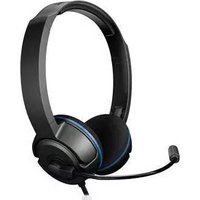
ZBX0HW68220 - Headphones TURTLE BEACH - Free user manual and instructions
Find the device manual for free ZBX0HW68220 TURTLE BEACH in PDF.


| Product Type | Amplified Stereo Gaming Headset |
| Model | TBS-3005-01 |
| Compatibility | PlayStation 3, PC, Mac |
| Speaker Driver | 40mm neodymium magnets |
| Frequency Response | 20Hz - 20kHz |
| Sound Pressure Level | 120dB SPL @ 1kHz |
| Amplified Audio | Enhances game sounds for immersive experience |
| Bass Boost | Built-in bass boost adds depth and realism |
| Volume Controls | Independent game and chat volume wheels |
| Microphone Monitor | Lets you hear your own voice during chat |
| Power Source | USB powered (no batteries required) |
| Connectivity | USB for chat/power, RCA for game audio (PS3) |
| Cable Length | 4.5m (15 ft) |
| Ear Cushions | Noise-isolating design |
| Microphone | Adjustable with mute switch |
| Twist-Cup Design | Folds flat to rest on shoulders |
| Compliance | FCC Part 15 Class B, CE, KCC |
| Warranty | 1 year limited hardware warranty |
| Cleaning | Dry or slightly damp cloth |
| Storage | Dry location, avoid heat and heavy items |
| Weight (estimated) | Approx. 300g |
Frequently Asked Questions - ZBX0HW68220 TURTLE BEACH
User questions about ZBX0HW68220 TURTLE BEACH
0 question about this device. Answer the ones you know or ask your own.
Ask a new question about this device
Download the instructions for your Headphones in PDF format for free! Find your manual ZBX0HW68220 - TURTLE BEACH and take your electronic device back in hand. On this page are published all the documents necessary for the use of your device. ZBX0HW68220 by TURTLE BEACH.
USER MANUAL ZBX0HW68220 TURTLE BEACH
also works with PC/Mac®

TURTLE BEACH®
EAR FORCE®
PLa
AMPLIFIED STEREO
GAMING HEADSET

natural_image
Line drawing of a pair of hardcover headphones with mesh head cover and cable (no text or symbols)User Guide


About the PLa Headset
The Ear Force® PLa is the ideal headset for Playstation® 3 gamers seeking a more immersive experience compared to standard PS3™ communicators. Unlike basic communicator headsets that only let you hear chat in one ear, the PLa combines high-fidelity, amplified game sound with crystal-clear PSN chat in a sleek, compact design with independent game and chat volume controls. Noise-isolating ear cushions help to block out distractions so you can concentrate on the game. If you're serious about gaming, then get serious about the sound. Step up to the PLa and experience game audio like never before.
Features
Amplified Audio
Enhances game sounds for a more immersive experience.
Bass Boost
Built-in bass boost adds depth and realism to the game audio.
Independent Volume Controls
Allows for personalized balancing of game and chat audio.
Microphone Monitor
Let's you hear what you're saying while gaming.
USB Powered
No batteries required.
PC/Mac Compatible
Integrated USB stereo audio for PC and Mac gaming.

watch Turtle Beach product training videos at:
youtube.com/TurtleBeachVideos
product support and warranty information:
TurtleBeach.com/support
Table of Contents
| PLa Headset pg 1 |
| PS3TM Setup pg 3 |
| PS3 Audio Settings pg 5 |
| PS3 Chat Settings pg 6 |
| PC/Mac® Setup pg 7 |
| Technical Specifications / Important Safety Information pg 8 |
What's in the Box

natural_image
Line drawing of a pair of headphones (no text or symbols visible)PLa Headset Turtle Beach Sticker
User Guide

PLa Headset

natural_image
Line drawing of a multi-band earphone with 'PLA' branding and headband (no text or symbols on the headset body)Twist-cup design rests flat on your shoulders
PLa Headset

natural_image
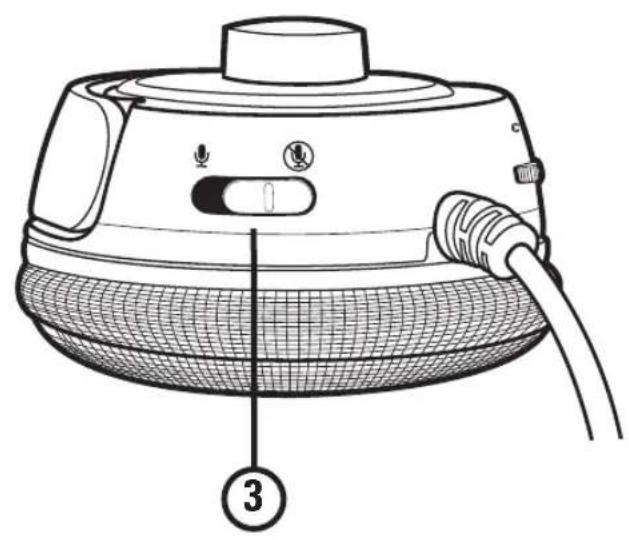
Line drawing of a portable electronic device with mesh base and cable, labeled with number 3 (no text or symbols on the device itself)- Chat Volume Control: Adjusts the chat level.
- Game Volume: Adjusts the game level.
- Mic Mute Switch: Turns the mic on or off.
PS3™ Setup (HDMI)
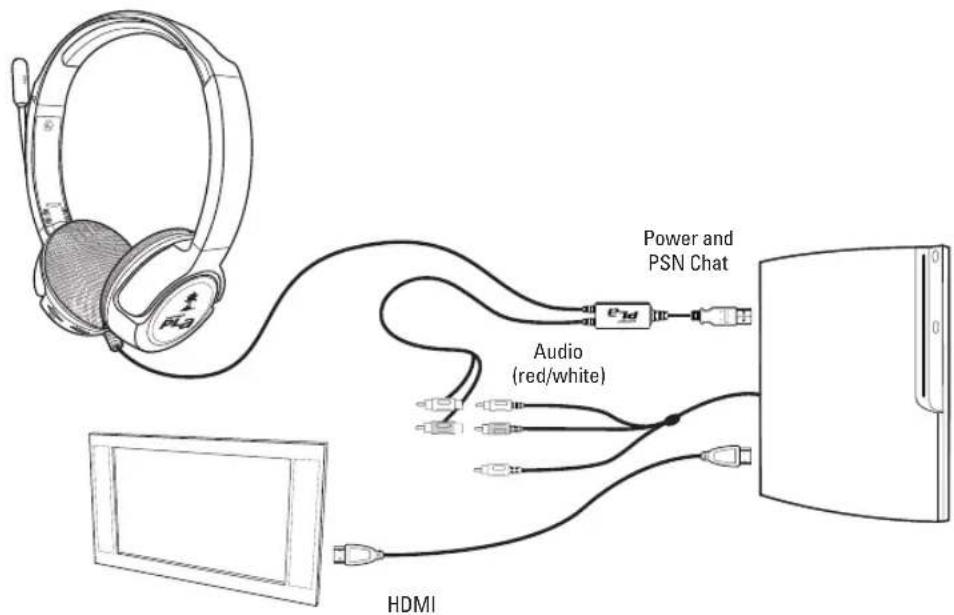
Note: The HDMI cable does not affect the setup or audio of the PLA headset. The HDMI cable should still be connected from the PS3 to your TV HDMI input.
PS3 Setup (RCA)
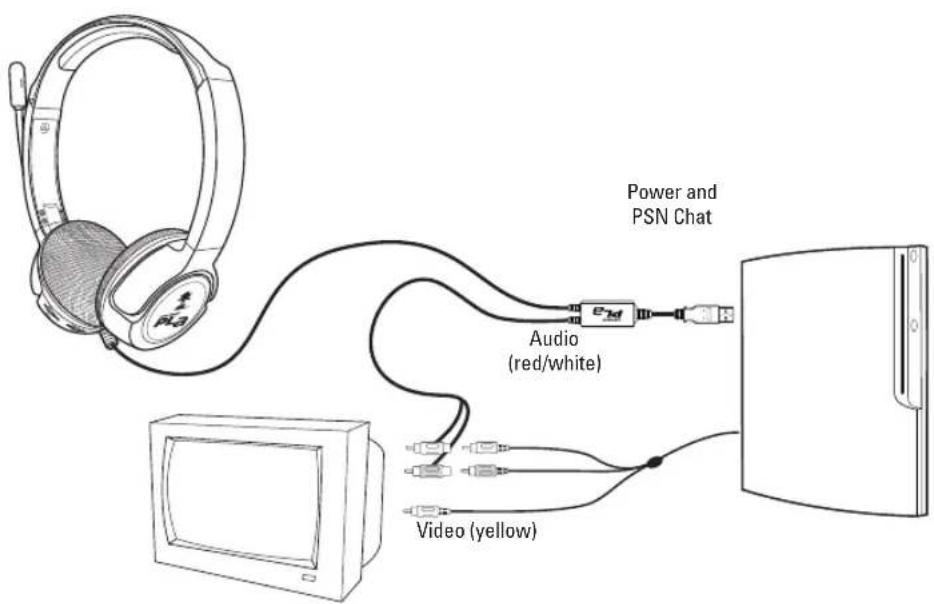
Note: The yellow RCA (composite) video cable does not affect the setup or audio of the PLa headset. This cable should still be connected to the yellow RCA (composite) video input jack on your TV.
PS3 Audio Setup
Analog
Step 1
After powering on the PS3, go to "Settings" > "Sound Settings" > "Audio Output Settings".
Step 2
Select "Audio Input Connector / SCART / AV Multi" to send the audio output to the PLA.
Step 3
Press "X" to save this setting.

HDMI or Digital (optical)
Step 1
After powering on the PS3, go to "Settings" > "Sound Settings" > "Audio Multi-Output". This will allow you to use the standard PS3 AV cable simultaneously with an HDMI or digital (optical) audio output.
![0 12/14 12:15 PM Audio Output Settings Audio Multi-Output On Sets to output audio through multiple connectors simultaneously. Audio output to connectors that are not selected in [Audio Output Settings] is downscaled to 2 Ch.](/content/2026/05/1142306/images/0310c49266657dd75e2570f652737631f4e626ae7587fe72c88e81ce4d47262d.jpg)
PS3 Chat Settings
Step 1:
After powering on the PS3, go to "Settings" > "Accessory Settings" > "Audio Device Settings".
Step 2:
Click on "Input Device" and select "Turtle Beach PLa Headset" from the options.
Step 3:
Click on "Output Device" and select "Turtle Beach PLa Headset" from the options.
Step 4:
Click on "Microphone Level" and adjust the level of your chat output so that the bar graph barely reaches the red area when you speak loudly. Click "OK" to save.
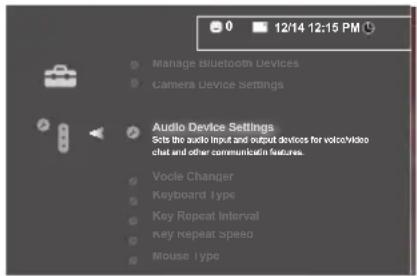


Connecting to a PC or Mac®

natural_image
Line drawing of a laptop connected to a multi-pin audio headset, showing cable routing (no text or symbols)Insert the PLA's USB/Power connector to an open USB port on your PC/Mac to power the headset/amplifier.
USB Stereo Headset:
The USB connection is used for mic and audio signals and appears as "Turtle Beach PLa Headset" in Windows® and Mac operating systems.
*Please note that the chat volume wheel controls all audio when connected to a PC/Mac. Also make sure that the game volume is at the lowest setting to avoid any possible noise.
Connecting to a PC or Mac® (OPTIONAL)
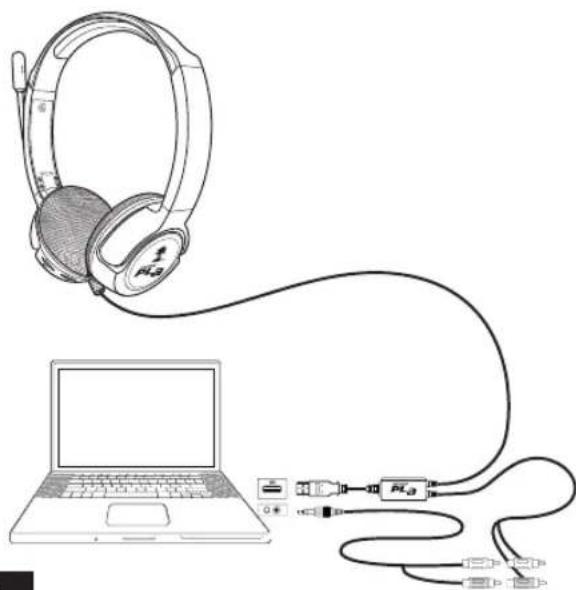
natural_image
Line drawing of a laptop connected to an earphone and cable via a network (no text or symbols)An optional RCA to 3.5mm adapter cable* can be used to connect the game sound to the PC sound card output. This lets you use the game volume to control the game level and the chat volume to control Skype, Ventrillo or other chat program routed to the USB channel.
*Click on the "Parts & Accessories" tab on the PLa product page via Turtlebeach.com/PLa
Technical Specifications / Maintaining Your Headset
Headset
- Speakers: 40mm with neodymium magnets
- Speaker Frequency Response: 20Hz - 20kHz, 120dB SPL @ 1kHz
- PS3 connection: RCA
• Cable length: 4.5m (15ft)
• PS3 chat output: USB
• Power: USB - Chat connection: USB
Avoid Heat: Avoid resting or storing the headset or cables in or on top of units that generate heat. Gaming consoles are known to generate and dissipate unusually high levels of heat, and the heat can degrade the plastic resulting in twisting and eventual exposure of the internal wiring.
Storage: To help prevent damage to your Turtle Beach Headset, store it in a dry location where there is no risk of heavy items falling on your headset. Do not leave your headset or any accessories in a location where people or pets might accidentally trip over it.
Cleaning: Only use a dry cloth or slightly damp cloth. Cleaning solutions may damage your headset.
Transporting: Always disconnect all cables when transporting your headset.
Wire Management: Use the Velcro attached to your headset cable to avoid tangles when not in use.
Pets: Pets love to chew cords. To prevent this, keep your headset out of the reach of your pets.
Safety Notice
To avoid potential damage to the device, always disconnect all cables before transporting it.
WARNING: Permanent hearing damage can occur if a headset is used at high volumes for extended periods of time, so it is important to keep the volume at a safe level. Over time, your ears adapt to loud volume levels, so a level that may not cause initial discomfort can still damage your hearing. If you experience ringing in your ears after listening with the headset, it means the volume is set too loud. The louder the volume is set, the less time it takes to affect your hearing. So, please take care to listen at moderate levels.
- Before placing a headset on your ears, turn the volume down completely, then slowly increase it to a comfortable level.
- Turn down the volume if you can't hear people speaking near you.
- Avoid turning up the volume to block out noisy surroundings.
Declaration of Conformity
We, Voyetra Turtle Beach,
150 Clearbrook Rd. Suite 162,
Elmsford, NY 10523
declare under sole responsibility that the product(s)
Ear Force PLa
to which this declaration relate(s) is (are) in conformance with:
The provisions of Directive 2004/108/EC governing electromagnetic compatibility using the following standards:
EN 55022:2010 Class B
EN61000-3-2:2006+A1:2009+A2:2009
EN61000-3-3:2008
EN55024:2010
EN61000-4-2:2009
EN61000-4-3:2006+A1:2008+A2:2010
EN61000-4-4:2004+A1:2010
EN61000-4-5:2006
EN61000-4-6:2009
EN61000-4-8:2010
EN61000-4-11:2004
4/23/12
Place and Date of issue.
Printed Name: Frederick Romano
Title: Executive Vice President
Paul & Wayne
FCC Declaration of Conformity
Product Name Ear Force PLa
Model Number TBS-3006-01
FCC Rules FCC Part 15, Class B
Operating Environment: GENERAL OFFICE AND HOME USE
FCC COMPLIANT STATEMENT
This device complies with part 15 of the FCC rules. Operation is subjected to the following conditions:
(1) This device may not cause harmful interference, and
(2) This device must accept any interference received including interference that may cause undesired operation.
INFORMATION TO USER
This equipment has been tested and found to comply with the limits for a Class B digital device, pursuant to Part 15 of FCC rules. These limits are designed to provide reasonable protection against harmful interference in a residential installation. This equipment generates, uses and can radiate radio frequency energy and, if not installed and used in accordance with the instructions, may cause harmful interference to radio communications. However, there is no guarantee that interference will not occur in a particular installation. If this equipment does cause harmful interference to radio or television reception, which can be determined by turning the equipment off and on, the user is encouraged to try to correct the interference by one or more of the following measures:
1) Reorient or relocate the receiving antenna.
2) Increase the separation between the equipment and receiver.
3) Connect the equipment into an outlet on a circuit different from that to which the receiver is connected.
4) Consult the dealer or an experienced radio/TV technician for help.
The user's manual or instruction manual for an intention or unintentional radiator shall caution the user that the changes or modifications not expressly approved by the party responsible for compliance could void the user's authority to operate the equipment.
WARNING: Changes or modifications made to this equipment not expressly approved by VOYETRA TURTLE BEACH, INC. may void user's authority to operate this equipment.
Limited Warranty for Turtle Beach Products
Voyetra Turtle Beach, Inc. ("VTB") warrants to the original end-user purchaser ("Purchaser") that the retail Turtle Beach hardware product herein ("Product") will be free of defects in materials and workmanship for a period of one year from the date of purchase by the Purchaser ("Warranty Period"). Any Extended Warranty or Service Plans purchased through a Retail store are not honored by VTB. The Warranty refers to the repair/replacement of a defective product during this period and not a refund.
This limited warranty extends only to the Purchaser and is not transferable or assignable to any subsequent purchaser. This limited warranty is applicable only in the country or territory where the Product was purchased from an authorized VTB retailer and does not apply to a Product that has been purchased as used or refurbished (except refurbished by VTB) or was included as part of a non-VTB product. WARRANTY SERVICE
In the USA and CANADA Warranty Service is provided by our TURTLE BEACH OFFICES and in all other Countries it is provided by our local International Distributors.
VTB does not warrant uninterrupted or error-free operation of the Product and is under no obligation to support the Product for all computer operating systems or future versions of such operating systems.
If a defect should occur during the Warranty Period, Purchaser must contact VTB to obtain a Return Merchandise Authorization ("RMA") number. Purchaser will be responsible for shipping costs incurred in returning the defective Product to an authorized VTB service center, or to the repair facility located at VTB's corporate headquarters. A copy of the dated proof of purchase and a description of the problem must be included with the defective Product. VTB will not be responsible for other products or accessories included with the defective Product sent to VTB. The RMA number must be clearly indicated on the outside of the package. Packages without an RMA number will be refused by VTB or its representatives and returned to sender at the sender's expense.
In the event of a defect, Purchaser's sole and exclusive remedy, and VTB's sole liability, is expressly limited to the correction of the defect by adjustment, repair, or replacement of the Product at VTB's sole option and expense. VTB owns all Products it has replaced and all parts removed from repaired Products. VTB uses new and reconditioned parts made by various manufacturers in performing warranty repairs and building replacement products. If VTB repairs or replaces a product, the original Warranty Period is not extended, however, VTB warrants that repaired or replacement parts will be free from defects in material and workmanship for a period of thirty (30) days from the date of repair or replacement, or for the remainder of the Warranty Period, whichever is greater.
Limited Warranty for Turtle Beach Products
This warranty does not apply to any Product that has had its serial number altered, removed or defaced, or any Product damage caused by shipping, improper storage, accident, problems with electrical power, abuse, misuse, neglect, ordinary wear, acts of God (e.g. flood), failure to follow directions, improper maintenance, use not in accordance with product instructions, unauthorized modification or service of the Product or damage resulting from the use of the Product with hardware, software or other products not provided by or specifically recommended by VTB.
THIS LIMITED WARRANTY IS PURCHASER'S SOLE AND EXCLUSIVE REMEDY AND IS IN LIEU OF ALL OTHER WARRANTIES, EXPRESS OR IMPLIED. TO THE EXTENT PERMITTED BY APPLICABLE LAW, VTB HEREBY DISCLAIMS THE APPLICABILITY OF ANY IMPLIED WARRANTY OF MERCHANTABILITY, FITNESS FOR A PARTICULAR PURPOSE OR USE FOR THE PRODUCT. IF SUCH A DISCLAIMER IS PROHIBITED BY APPLICABLE LAW, THE IMPLIED WARRANTY IS LIMITED TO THE DURATION OF THE FOREGOING LIMITED WRITTEN WARRANTY.
IN NO EVENT SHALL VTB BE LIABLE FOR ANY INDIRECT, INCIDENTAL, SPECIAL, PUNITIVE OR CONSEQUENTIAL DAMAGES, OR DAMAGES, INCLUDING BUT NOT LIMITED TO ANY LOST PROFITS, DATA, OR LOSS OF USE, ANY THIRD PARTY CLAIMS, AND ANY INJURY TO PROPERTY OR BODILY INJURY (INCLUDING DEATH) TO ANY PERSON, ARISING FROM OR RELATING TO THE USE OF THIS PRODUCT OR ARISING FROM BREACH OF THE WARRANTY, BREACH OF CONTRACT, NEGLIGENCE, TORT, OR STRICT LIABILITY, EVEN IF VTB HAS BEEN ADVISED OF THE POSSIBILITY OF SUCH DAMAGES.
This warranty supersedes all prior agreements or understandings, oral or written, relating to the Product, and no representation, promise or condition not contained herein will modify these terms. Some states do not allow the exclusion or limitation of incidental or consequential damages, so the above exclusion or limitation may not apply to you. This warranty gives you specific legal rights. You may also have other rights, which vary from state to state. Any action or lawsuit for breach of warranty must be commenced within eighteen (18) months following the purchase of the Product.
EXCLUSIONS FROM LIMITED WARRANTY:
This Limited Warranty shall not apply and VTB has no liability under this Limited Warranty if the Turtle Beach Product:
- is used for commercial purposes such as "LAN Centers" (including rental or lease);
- is modified or tampered with;
- is damaged by Acts of God, power surge, misuse, abuse, negligence, accident, wear and tear, mishandling, misapplication, or other causes unrelated to defective materials or workmanship;
- serial number is defaced, altered or removed;
- is not used in accordance with the documentation and use instructions; or
- is repaired, modified or altered by other than authorized repair centers.
- product is no longer available because it was discarded.

For more products, accessories and general product information, please visit TurtleBeach.com
For warranty information and product support, please visit TurtleBeach.com/support


N21006

KCC-REM-VTB-TB300-3005-01
MODEL: TBS-3005-01
This product is compliant with the Consumer Product Safety Improvement Act of 2008, Public Law 110-314 (CPSIA)
Copyright © 2012 Voyetra Turtle Beach, Inc. (VTB, Inc.) All rights reserved. Turtle Beach, the Turtle Beach Logo, Voyetra, Ear Force, and Engineered for Gaming are either trademarks or registered trademarks of VTB, Inc. PlayStation is a registered trademark and PS3 is a trademark of Sony Computer Entertainment. Mac is a registered trademark of Apple, Inc. All other trademarks are properties of their respective companies and are hereby acknowledged. Assembled in China.
- TURTLE BEACH®
- PLa
- About the PLa Headset
- Features
- Amplified Audio
- Bass Boost
- Independent Volume Controls
- Microphone Monitor
- USB Powered
- PC/Mac Compatible
- PLa Headset
- PS3™ Setup (HDMI)
- PS3 Setup (RCA)
- PS3 Audio Setup
- Analog
- Step 1
- Step 2
- Step 3
- HDMI or Digital (optical)
- PS3 Chat Settings
- Step 1:
- Step 2:
- Step 3:
- Step 4:
- Connecting to a PC or Mac®
- USB Stereo Headset:
- Connecting to a PC or Mac® (OPTIONAL)
- Technical Specifications / Maintaining Your Headset
- Headset
- Safety Notice
- Declaration of Conformity
- Ear Force PLa
- FCC Declaration of Conformity
- FCC COMPLIANT STATEMENT
- INFORMATION TO USER
- Limited Warranty for Turtle Beach Products
- EXCLUSIONS FROM LIMITED WARRANTY:
Brand : TURTLE BEACH
Model : ZBX0HW68220
Category : Headphones