DS-GTC-402 - Docking Station Havis - Free user manual and instructions
Find the device manual for free DS-GTC-402 Havis in PDF.


| Product Type | Docking Station |
| Brand | Havis |
| Model | DS-GTC-402 |
| Compatible Devices | Getac T800 Rugged Tablet |
| Dimensions (H x W x D) | 8.1 in x 7.0 in x 3.5 in (20.7 cm x 17.8 cm x 8.9 cm) |
| Weight | 1.6 lbs (0.75 kg) |
| Input Voltage | 19 V DC |
| Power Supply | Requires certified 95W power supply (Havis LPS-116 or equivalent) |
| Operating Temperature Range | -20°C to 60°C (-4°F to 140°F) |
| Storage Temperature Range | -51°C to 71°C (-60°F to 160°F) |
| Mounting Type | Screw mount with M4 screws (included) |
| Security | Integrated lock with included keys for theft deterrence |
| Port Replication | Yes (exact ports not specified; see manual) |
| Docking Mechanism | Alignment posts and sockets, latch handle with audible click |
| Included Accessories | Power supply, hardware kit (screws, washers, zip ties, keys) |
| Certifications | CE (EN 50498), RoHS compliant |
| Material | Durable plastic and metal construction |
| Color | Black |
| Manufacturer | Havis, Inc. |
| Country of Origin | USA |
| Warranty | Limited warranty (details not provided; damage from misuse not covered) |
| Maintenance | Keep dry, avoid dust and moisture; clean with soft cloth |
Frequently Asked Questions - DS-GTC-402 Havis
User questions about DS-GTC-402 Havis
0 question about this device. Answer the ones you know or ask your own.
Ask a new question about this device
Download the instructions for your Docking Station in PDF format for free! Find your manual DS-GTC-402 - Havis and take your electronic device back in hand. On this page are published all the documents necessary for the use of your device. DS-GTC-402 by Havis.
USER MANUAL DS-GTC-402 Havis
Owner's Manual Havis Docking Station For Getac T800 Rugged Tablet
DS-GTC-400 Series
DS-GTC-401
DS-GTC-402
DS-GTC-403
DS-GTC-401-3
DS-GTC-402-3
DS-GTC-403-3
natural_image
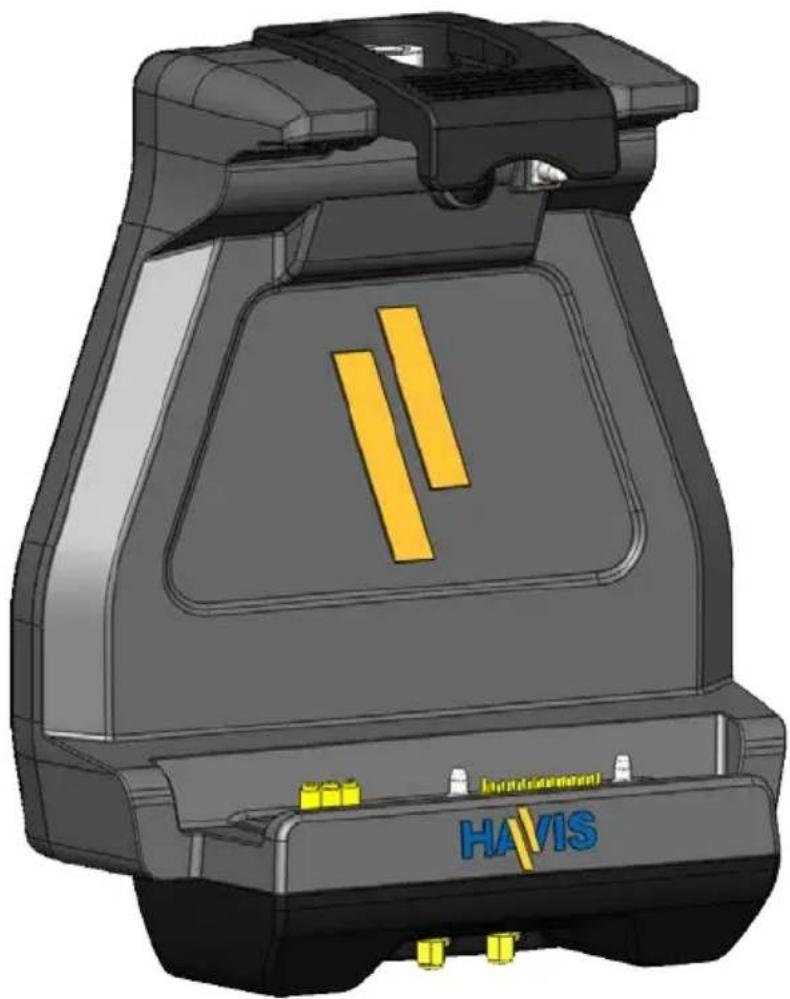
3D CAD model of a mechanical device with yellow and blue components, labeled 'HAVIS' and 'Intelligent', no readable text or symbols beyond branding.Havis is pleased to provide this Owner's Manual to aid in the proper installation and use of the DS-GTC-400 Series Docking Station for the Getac T800 Rugged Tablet.
For questions regarding the set-up of your DS-GTC-400 Series Docking Station, please contact Havis at 1-800-524-9900 or visit www.havis.com for additional product support and information.
This Owner's Manual applies to the following Part Numbers:
DS-GTC-401
DS-GTC-402
DS-GTC-403
DS-GTC-401-3
DS-GTC-402-3
DS-GTC-403-3
WARNING
- NEVER STOW OR MOUNT THE DOCKING STATION DIRECTLY IN A VEHICLE AIRBAG DEPLOYMENT ZONE.
• DO NOT USE COMPUTER WHILE DRIVING.
CAUTION
- READ ALL INSTRUCTIONS THOROUGHLY BEFORE BEGINNING INSTALLATION.
- DO NOT DOCK OR UNDOCK YOUR COMPUTER UNLESS IT IS POWERED OFF. DOCKING OR UNDOCKING WITH YOUR COMPUTER IN ON, STANDBY, HIBERNATION, OR SLEEP MODES CAN CAUSE PERMANENT DAMAGE.
- FOR THE DS-GTC-401, DS-GTC-401-3, DS-GTC-402 & DS-GTC-402-3 DOCKING STATIONS: DO NOT CONNECT DIRECTLY TO VEHICLE VOLTAGE SOURCE: This product requires a certified, automotive grade, Getac approved 95W power source rated for a continuous, regulated 19VDC output (Havis Part Number LPS-116 or equivalent). Failure to comply with this requirement will cause product damage that is NOT repairable and is NOT covered under warranty.
- FOR THE DS-GTC-403 & DS-GTC-403-3 DOCKING STATION: DO NOT CONNECT DIRECTLY TO VEHICLE VOLTAGE SOURCE: The Getac T800 tablet requires a certified, Getac approved power source rated for a continuous, regulated 19VDC output. Failure to comply with this requirement will cause product damage that is NOT repairable and is NOT covered under warranty.
NOTICE
• FOR DOCKING STATION MODELS EQUIPPED WITH A BUNDLED POWER SUPPLY (DS-GTC-402, DS-GTC-402-3) REFER TO THE SUPPLIED LIND POWER SUPPLY REFERENCE GUIDE.
- WHEN TABLET IS DOCKED, THE BATTERY WILL ONLY CHARGE BETWEEN 0°C to 50°C (32°F to 122°F).
PLEASE REFER TO GETAC T800 OWNER'S MANUAL FOR MORE INFORMATION.
Table of Contents
Specifications 3
Parts Included 4
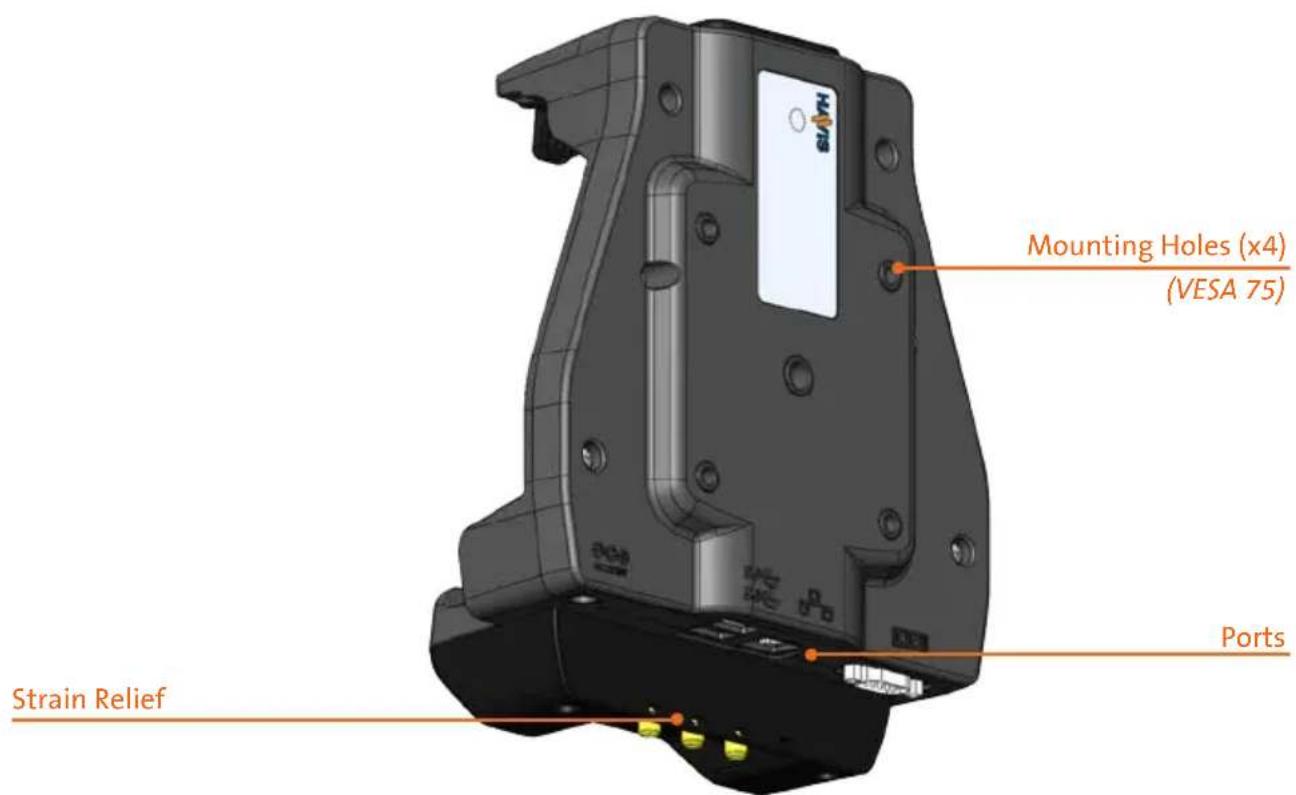
Port Replication Capability 5
Antenna Identification....5
Installation 6
Cable Management 7
Operation - Docking 8
Operation - Undoing 10
Precautions
- Do not place metal objects or containers of liquid on top of the Docking Station
- If a malfunction occurs, immediately unplug the Power Supply and remove the laptop
- Use only the specified Power Supply (Part # LPS-116) with this Docking Station
- Do not store the Docking Station where water, moisture, steam, dust, etc. are present
- Do not connect cables into ports other than what they are specified for
- Do not leave the Docking Station in a high temperature environment (greater than 85^, 185^ ) for a long period of time
Specifications
| Power Supply Input 19.0V DC-In | |
| Dimensions 8.1” (20.7 cm) | H x 7.0” (17.8 cm) W x 3.5” (8.9 cm) D |
| Weight 1.6 lbs (0.75 kg) | |
| Operating Environment -20°C to 60°C (-4°F to 140°F) | |
| Storage Environment -51°C to 71°C (-60°F to 160°F) | |
EC DECLARATION OF CONFORMITY in accordance with EN 50498
Manufacturers Name: Havis, Inc.
Manufacturers Address: 75 Jacksonville Road, Warminster, PA 18974 USA
Declares under our sole responsibility that the product:
Product name: Havis Docking Station For Getac T800 Fully Rugged Tablet
Model: DS-GTC-40X, where 'X' may be any alphanumeric character and which describes product options.
May be followed by any alphanumeric characters which describe product options.
Product Options: This declaration covers all options of the above product which bear the CE Marking.
Is in conformity with the following standards or other normative documents:
Automotive EMC Directive EN 50498:2010, Electromagnetic compatibility (EMC) - 2004/108/EC: Product family standard for aftermarket electronic equipment in vehicles Directive 2011/65/EU Restriction of the use of certain hazardous substances (RoHS)
Supplementary Information:
The product herewith complies with the requirements of the Automotive EMC Directive 2004/108/EC, Annex I, 6.5, 6.6, 6.8, and 6.9. This product requires the use of a recommended e-Marked automotive power supply when used within vehicles.
Plymouth twp, MI, USA August 21, 2014 Bruce Jonik, Director of Engineering, Havis, Inc.
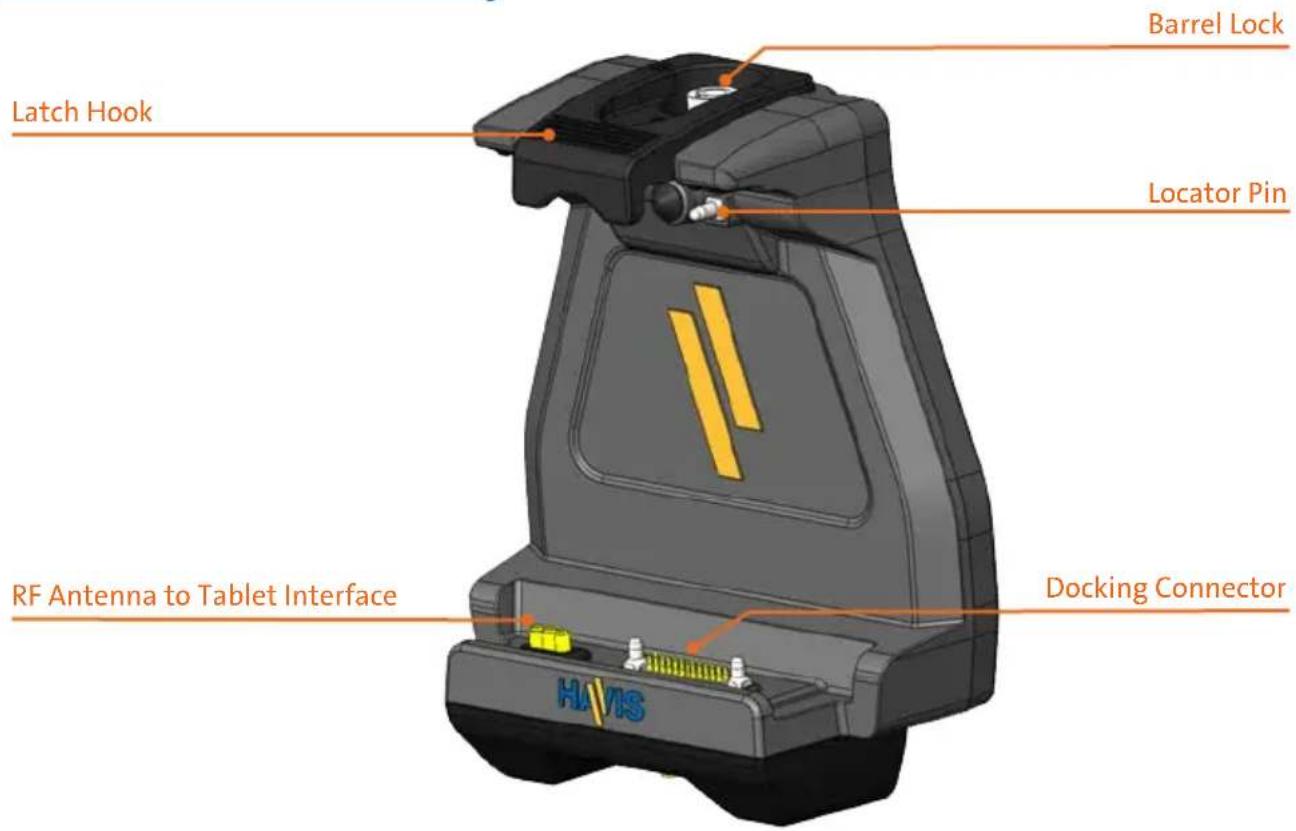
Docking Station
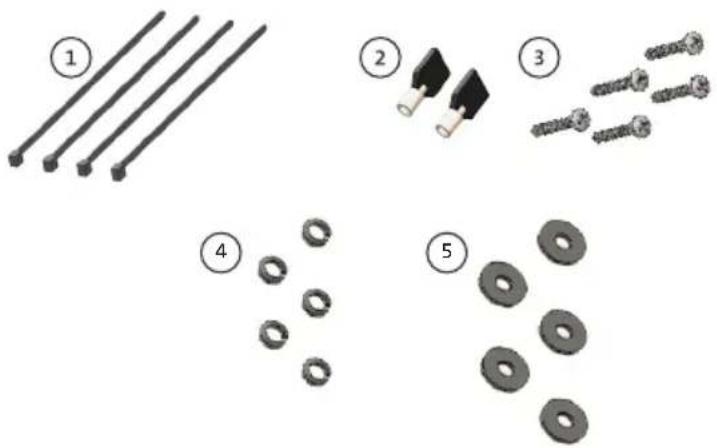
Hardware Kit
This Hardware Kit includes:
- Zip Ties (4)
- Keys (2)
- M4 x 0.7 x 20mm long Pan Head Screws (5)
- Split Lock Washers (5)
- Washers, M4 (5)
Tools required for installation:
- #2 Phillips
(For M4 Pan Head Screws)
natural_image
Illustration of five different types of electrical connectors and components, including wires, batteries, screws, washers, and washers (no text or symbols present)Port Replication Capability
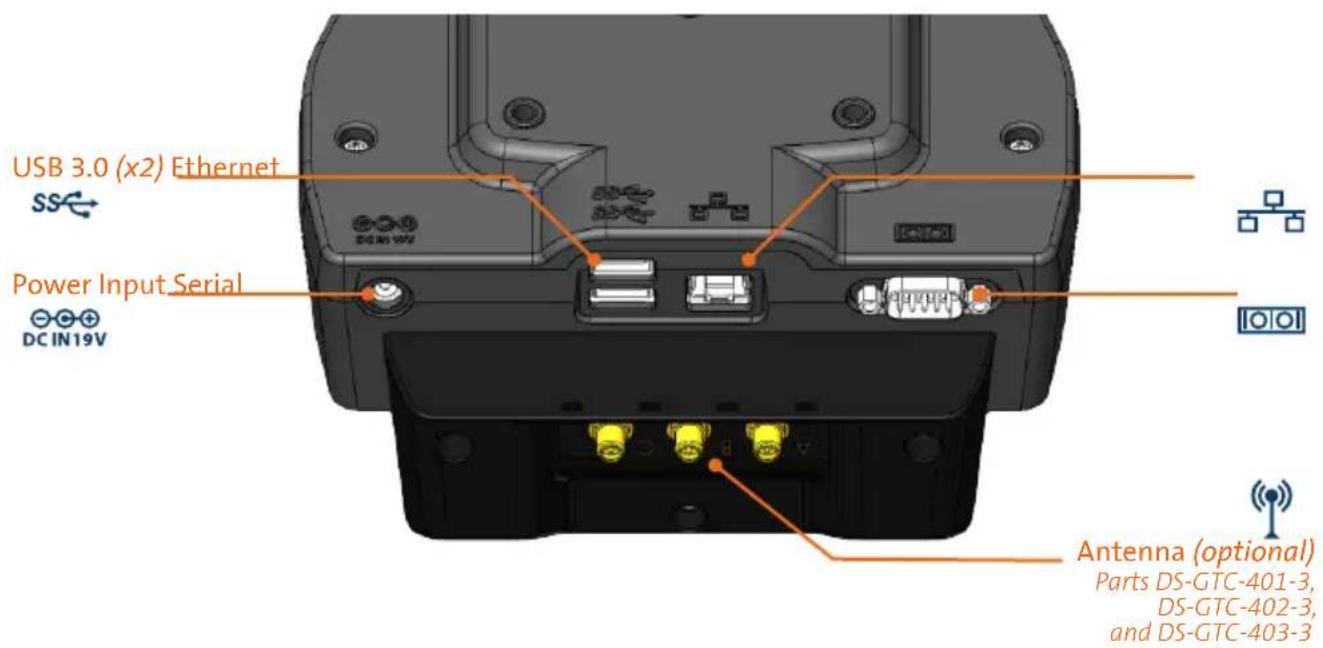
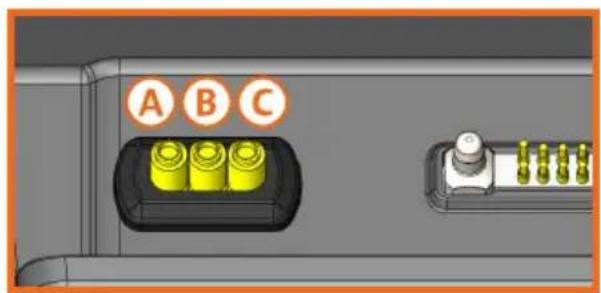
Antenna Identification (DS-GTC-401-3, DS-GTC-402-3, & DS-GTC-403-3)
natural_image
Close-up of a black electronic device rear panel with three gold connector ports labeled A, B, and C (no additional text or symbols visible)Tablet InterfaceDownward Facing Antenn
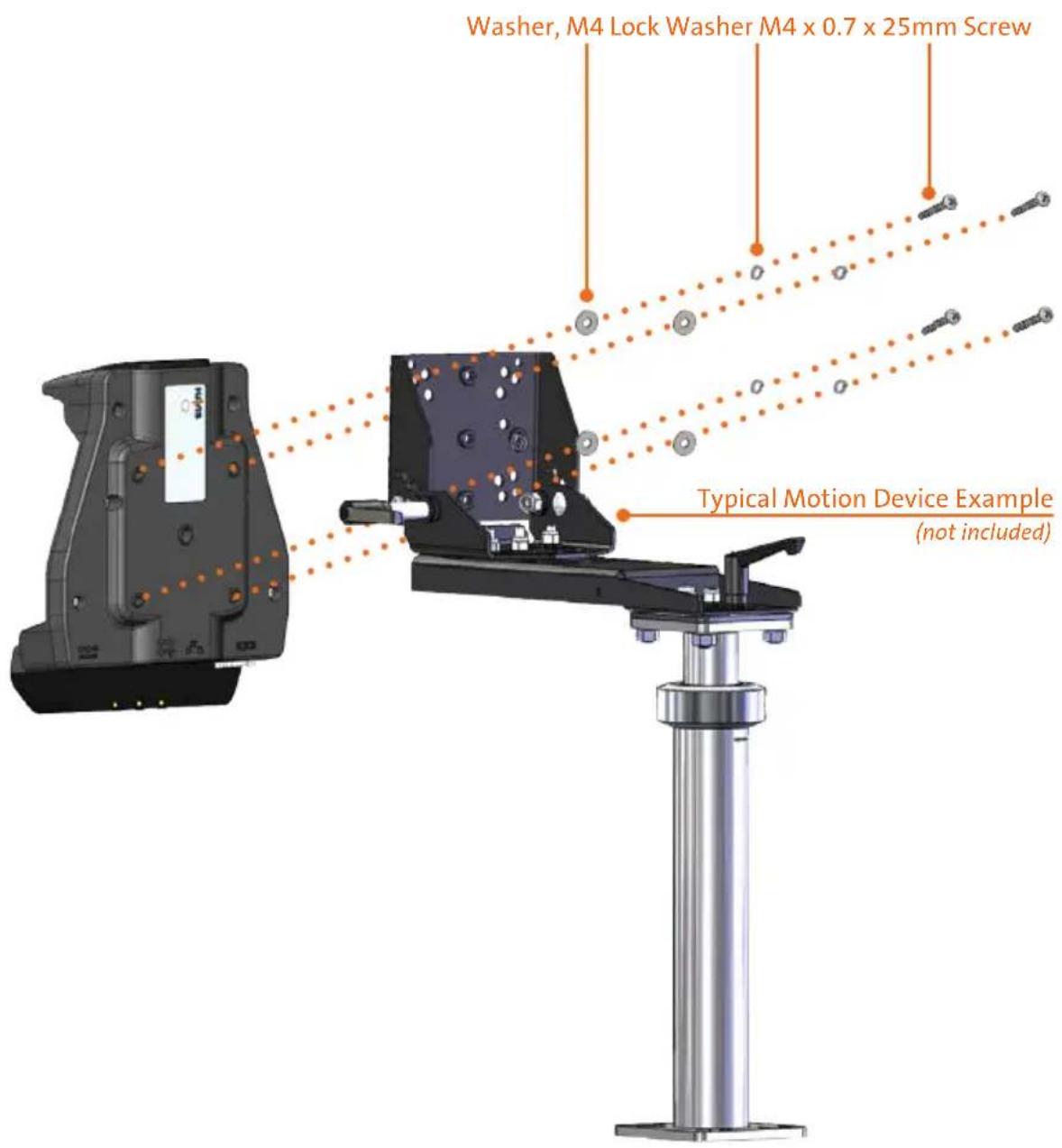
1) Install the Docking Station to the Motion Device using four (4) M4 x 0.7 x 20mm long Pan Head Screws (Hardware Kit Item 3), four (4) Split Lock Washers (Hardware Kit Item 4), and four (4) Washers, M4 (Hardware Kit Item 5). Torque screws to 20 in-lbs (2.3Nm) ± 10%.
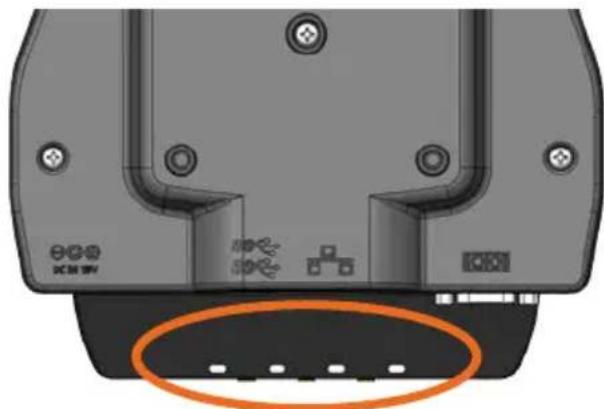
1) Tip the Docking Station to a position that is comfortable to work with.
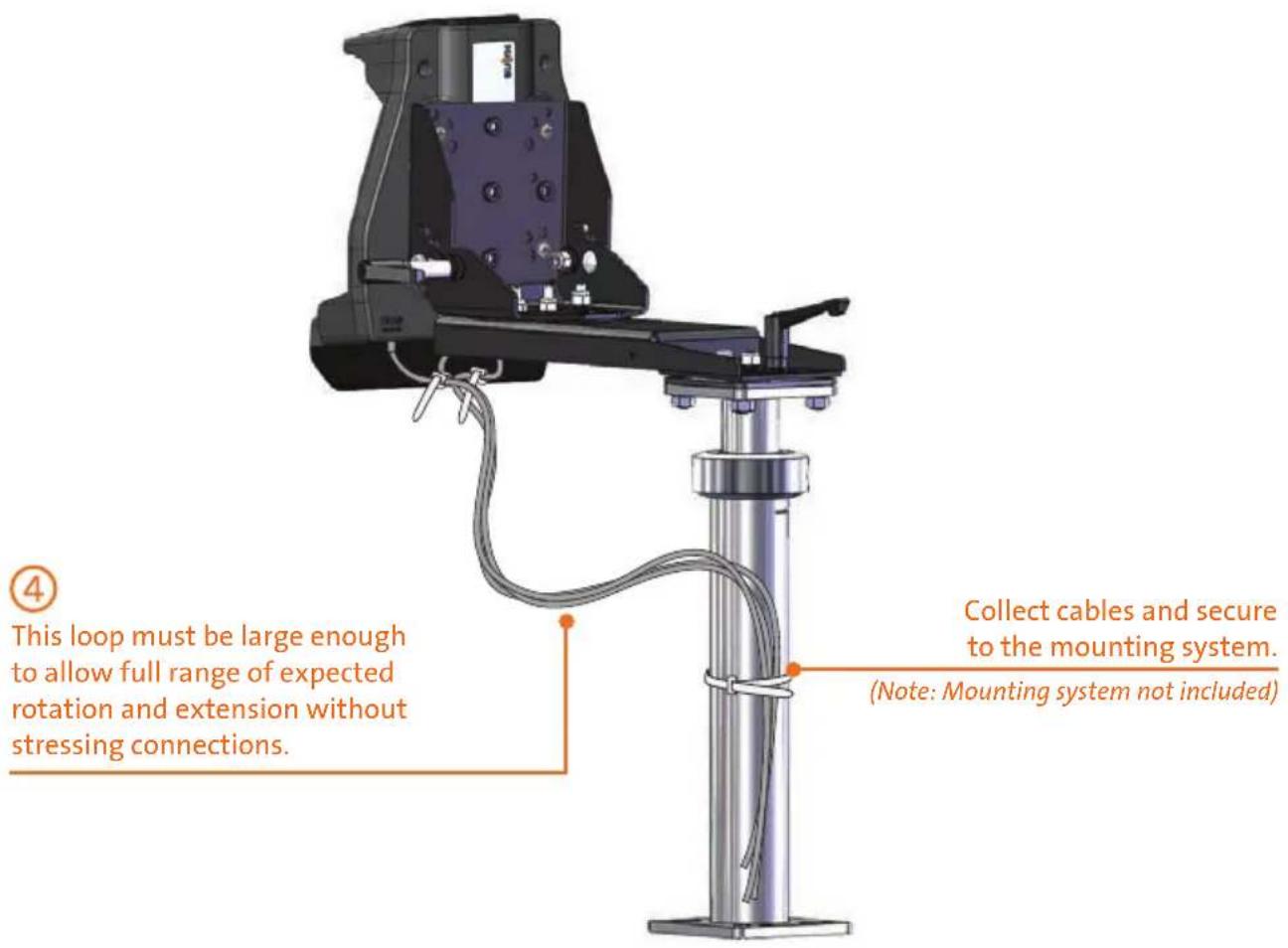
2) Install all cables that are necessary for computing needs.
3) Use Zip Ties (Hardware Kit Item 1) and the Strain Relief Points on the bottom of the Docking Station to secure cables and reduce risk of accidental disconnects.
natural_image
Top-down view of a mechanical component with mounting holes and a highlighted circular feature (no text or symbols)4) Create a service loop with cables to ensure that no tension is on the connectors and to enable intended motion.
5) Tie off cables onto a stationary part of the mounting system.
CAUTION
DO NOT FORCE TABLET ONTO DOCKING STATION. IF THERE IS RESISTANCE, CHECK ALIGNMENT OF TABLET ON DOCKING STATION.
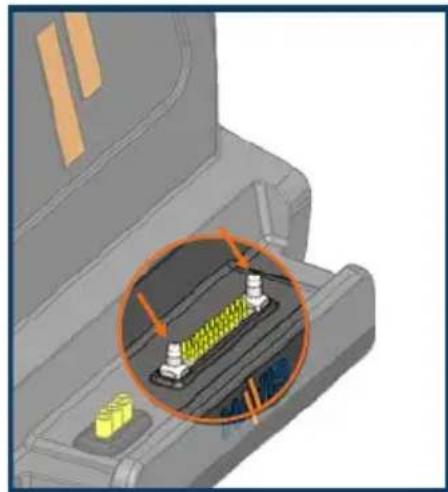
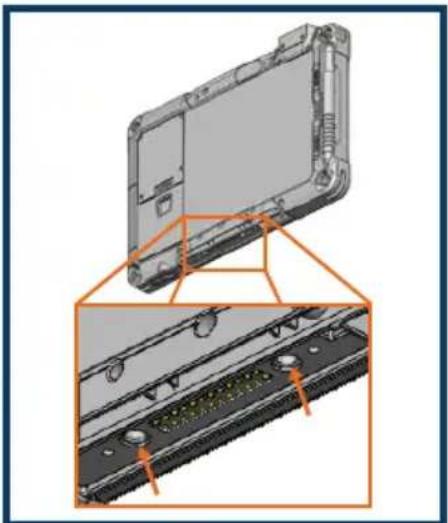
NOTE: Ensure a proper connection by aligning the tablet's Alignment Sockets with the Docking Station's Alignment Posts
natural_image
3D mechanical component diagram showing internal structure with highlighted section (no text or symbols)Alignment Posts
DS-GTC-400 Series Docking Station

natural_image
3D CAD model of a laptop with an orange zoomed-in section showing internal components (no text or symbols visible)Alignment Sockets
Bottom of Getac T800 Rugged Tablet
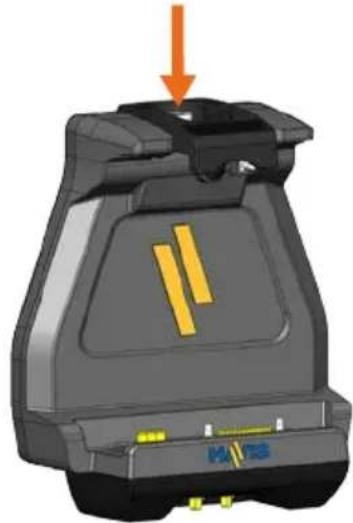
1) Docking Station must be unlatched before docking your tablet. Push down on the Barrel Lock button and release slowly. Without a tablet present you may have to lift up lightly on the front of the Latch Hook to fully release.
natural_image
3D model of a mechanical device with orange arrow indicating downward motion (no text or symbols)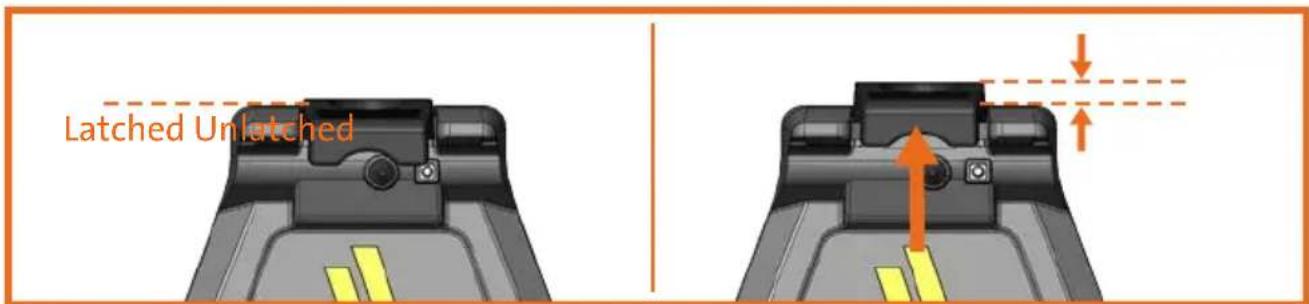
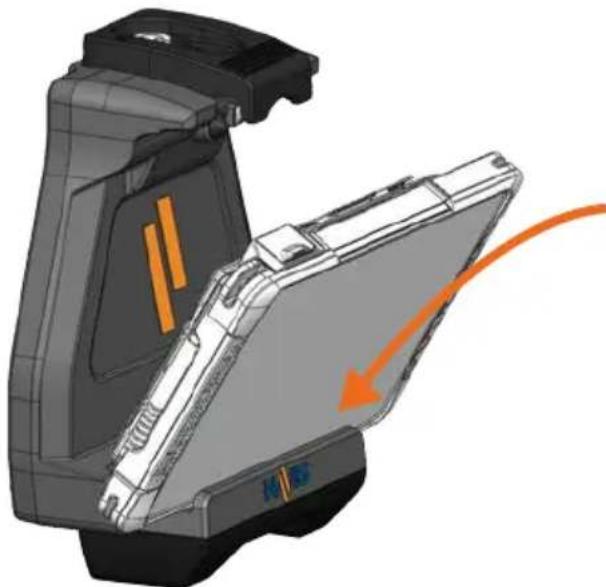
2) Hold tablet in landscape orientation, with bottom mounted docking connector angled toward Docking Station. Lower tablet into the bottom of the Docking Station.
natural_image
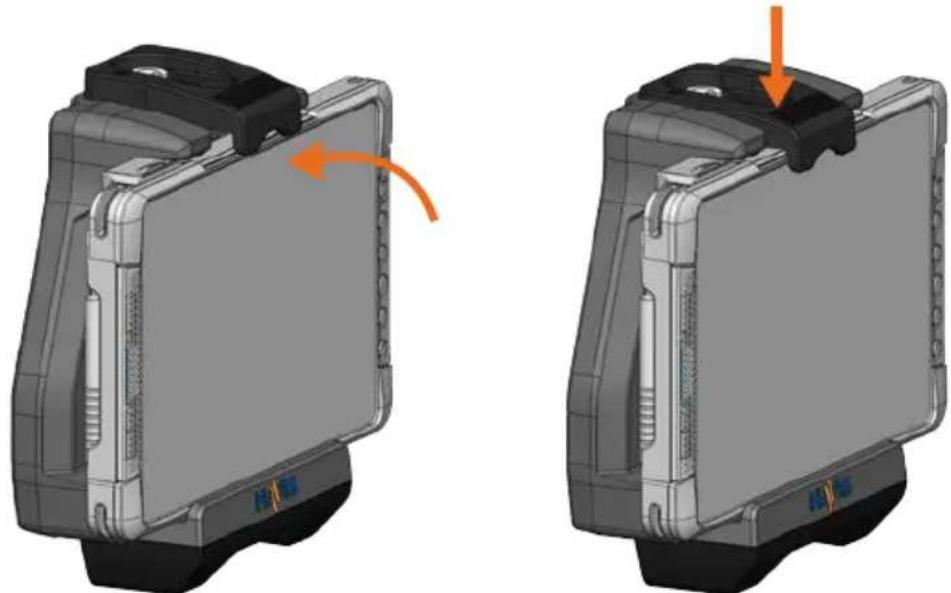
3D mechanical assembly diagram showing internal components and an orange arrow indicating a motion or force (no text or symbols present)3) Pivot tablet so the top aligns with the Locator Pin at the top of the Docking Station. Depress the Latch Handle to secure tablet in place. You will hear an audible click when Latch Hook is fully engaged.
natural_image
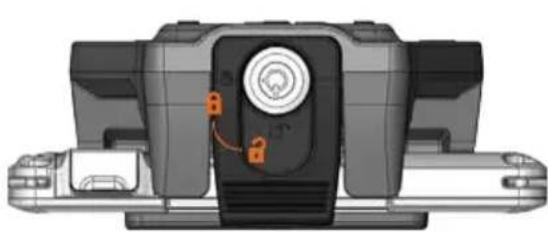
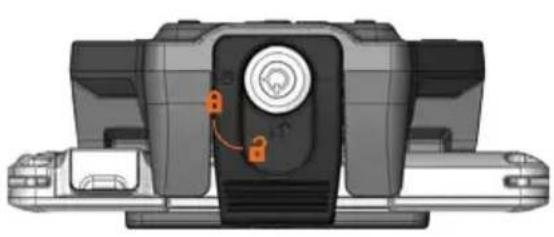
3D mechanical component diagrams showing a device with orange arrows indicating rotation or movement (no text or symbols)4) For theft deterrence, secure tablet by locking Docking Station with supplied key (Hardware Kit Item 2).
natural_image
3D mechanical component diagram showing a central knob with orange control buttons (no text or symbols)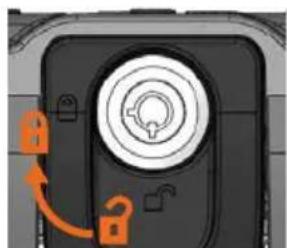
natural_image
Close-up of a black mechanical component with a circular dial and orange arrows indicating rotation or adjustment (no text or symbols)1) If previously locked, unlock Docking Station using supplied key.
natural_image
3D mechanical component diagram showing internal components with orange arrows indicating flow or movement (no text or symbols)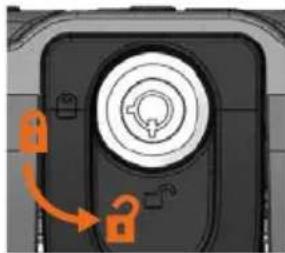
natural_image
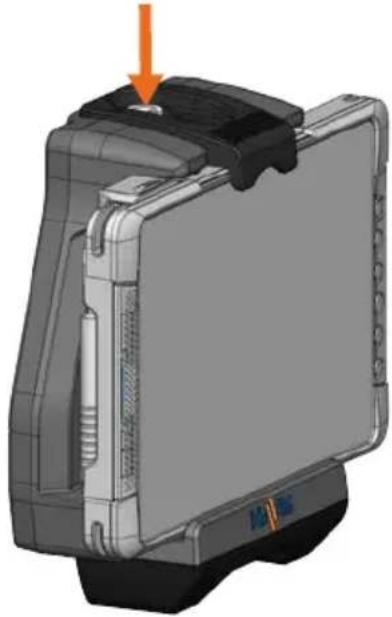
Close-up of a mechanical component with orange arrows indicating rotation or adjustment (no text or symbols visible)2) Secure tablet to avoid inadvertent ejection from Docking Station. Push down on the Barrel Lock button and release quickly taking care not to obstruct the travel of the Latch Hook. If the Latch Hook does not extend fully to its unlatched position, lift up lightly on the front of the Latch Hook to fully release.
natural_image
3D model of a mechanical device with an orange arrow pointing to a component (no visible text or symbols)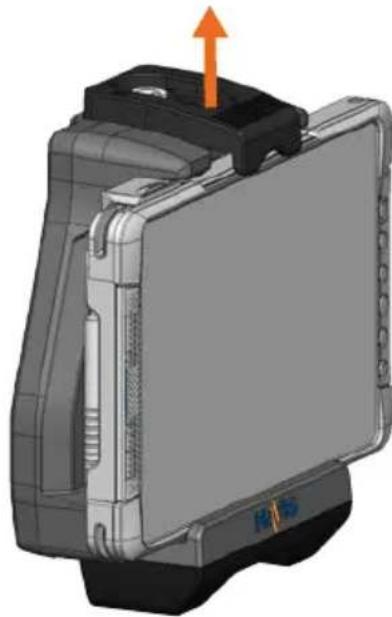
natural_image
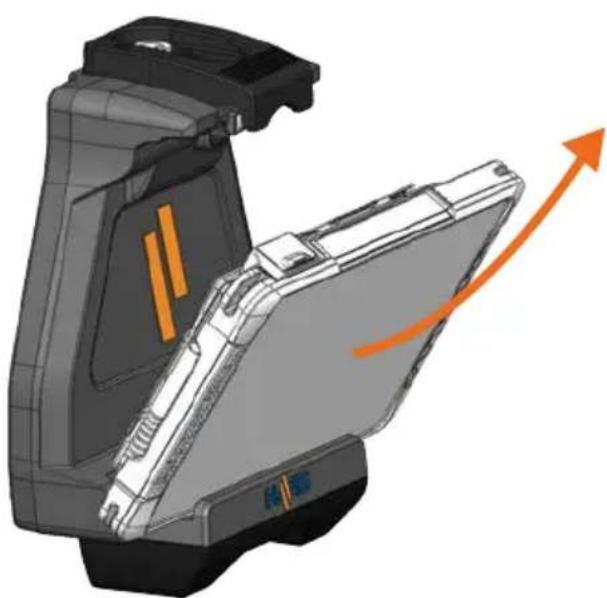
3D mechanical component diagram showing a device with an orange arrow indicating upward motion (no text or symbols present)3) Once unlatched grab both sides of tablet, rock the top forward and carefully lift out of Docking Station, top end first.
natural_image
3D mechanical assembly diagram showing internal components and an orange arrow indicating direction (no text or symbols)Havis offers a wide variety of accessory products specifically for use with the DS-GTC-400 Series Docking Station. For more information or to order, please visit www.havis.com.

natural_image
Black electronic device with two cables and a power adapter, no visible text or symbolsLPS-116
95W Power Supply
External in-vehicle power supply and cable for Getac T800 Rugged Tablet with cigarette lighter adaptor.
natural_image
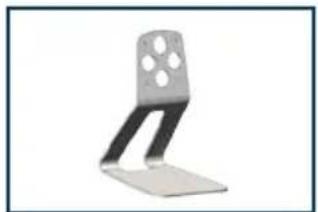
Metal bracket with four holes, no visible text or symbolsDS-DA-218
Desktop Stand for Tablet Docking Stations
Durable stand for mounting tablet Docking Stations for use in the home or office.

natural_image
Close-up of a metallic key with a handle and circular base (no visible text or symbols)DS-DA-502
Replacement Keys
Set of two (2) replacement keys for DS-GTC-400
Series Docking Stations.
Havis, Inc.
75 Jacksonville Road
Warminster, PA 18974
www.havis.com 1-800-524-9900
- Owner's Manual Havis Docking Station For Getac T800 Rugged Tablet
- WARNING
- CAUTION
- NOTICE
- Table of Contents
- Precautions
- Specifications
- EC DECLARATION OF CONFORMITY in accordance with EN 50498
- Docking Station
- Hardware Kit
- This Hardware Kit includes:
- Tools required for installation:
- Port Replication Capability
- Antenna Identification (DS-GTC-401-3, DS-GTC-402-3, & DS-GTC-403-3)
Brand : Havis
Model : DS-GTC-402
Category : Docking Station