
347209 - Electronics ENERGY SISTEM - Free user manual and instructions
Find the device manual for free 347209 ENERGY SISTEM in PDF.


| Product Type | E-book Reader (Color Book Series) |
| Model Variants | 1052 (2GB), 1054 (4GB), 1058 (8GB) |
| Display | 5.0 inch TFT LCD Color, 800x480 pixels |
| Dimensions (WxHxD) | 154 mm × 98 mm × 10 mm |
| Weight | 181 g (without pouch) |
| Battery Type | Built-in Li-Polymer, 1800 mAh |
| Battery Life | eBook mode: 7-9 h; Audio mode: 7 h (with earphones); Video mode: 4 h |
| Charging Time (USB) | 6-8 hours via USB port; 4-6 hours via DC port with USB-DC cable |
| Supported e-Book Formats | TXT, HTML, PDF, EPUB, FB2, RTF, MOBI, CHM, DOC |
| Supported Audio Formats | MP3, WMA |
| Supported Video Formats | MP4, WMV, AVI, RMVB, FLV, ASF, 3GP, MOV |
| Supported Image Formats | JPEG, BMP, PNG, GIF |
| Memory | Internal: 2/4/8 GB; External: microSD up to 32 GB |
| File System for microSD | FAT/FAT32 |
| Power Supply | USB 5V DC via USB port or DC port (with included cable) |
| Care and Cleaning | Clean screen with soft cloth; do not use chemicals or abrasive materials |
| Safety Precautions | Avoid strong magnetic fields, moisture, drops, disassembly; do not press screen |
| Warranty | 36 months from date of purchase |
| Manufacturer | Energy Sistem Soyntec S.A., Spain |
Frequently Asked Questions - 347209 ENERGY SISTEM
User questions about 347209 ENERGY SISTEM
0 question about this device. Answer the ones you know or ask your own.
Ask a new question about this device
Download the instructions for your Electronics in PDF format for free! Find your manual 347209 - ENERGY SISTEM and take your electronic device back in hand. On this page are published all the documents necessary for the use of your device. 347209 by ENERGY SISTEM.
USER MANUAL 347209 ENERGY SISTEM
User Manual
1. PRECAUTIONS
We strongly recommend reading the points below before operating this product:
- Back up the data periodically to another safe media. Under no circumstances there is any liability regarding to data damage or loss.
Do not place the reader near devices that emit strong magnetic fields. It may cause data damage or loss. - Do not disassemble or remodel the device.
- Do not let the device drop or shock.
- Do not use the device under heavy moisture or wet.
▶ Do not press the device screen. - Do not use the device in a dirty or dusty environment.
Do not use chemicals to clean the device screen. Clean the screen with a soft cloth; be careful not to wipe it with anything abrasive.
Do not remove microSD card or turn off the device during data writing or reading to prevent damage to data and to the device.
Make sure the microSD card is unlocked before writing or deleting data in the microSD card.
2. INTRODUCTION
Thank you for purchasing Energy Book 1160/2160. You are reading the welcome section of the Energy Book's User's Manual. This section provides an overview of the device and its basic features.
3. GENERAL VIEW
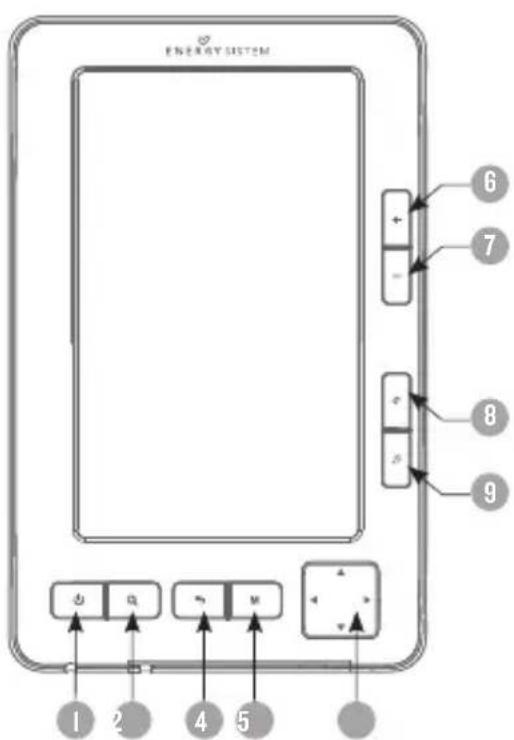
- Power on/off: Power on and off the device, or change it to sleep mode with a short pressing.
- Zoom Button: Zoom in and out eBooks font sizes and photos.
- Return/Cancel button: Cancel a selection or return to a previous menu.
- M button: Confirm a selection or open a file. Access submenu or options menu in reading mode. Pause/Play in video mode.
- Directional Pad: Turn pages and browse menu options. Up key for previous page and Down for next page.
- Vol+: Increase volume.
- Vol-: Decrease volume.
- Rotation button: Switch screen orientation when you are reading horizontal/vertical.
- Music button: Access the music player interface.
- Reset button: To reset the device back to factory settings.
- USB port: Connect to computer for data transfer / charging via USB.
- MicroSD slot: Supports microSD cards.
- Earphone jack: Connect to earphones.
- DC Port: To charge the device with the USB-DC cable included or through a USB charger (optional). We strongly recommend to use the DC port (I4) to charge the device that provides a shorter charging time than the standard USB port (II).
- Built-in Speaker.

4. GETTING STARTED
- Fully charge the E-book's battery prior to the first use, as there might be insufficient power in the battery for normal operations.
- Please handle the device with care to prevent damage to the display screen.
- Read the User Manual.
When the device is powered off, press and hold the ⏻On/Off button for 3 seconds to turn it on.
When the device is powered on, press and hold the ⏻ On/Off button for 3 seconds to turn it off.
6. FILE MANAGEMENT
6.1 ConnECT To ThE PC
You should press Power button to turn on the player, then connect the player to the PC with the USB cable (included). A dialogue box will appear, select "OK" and press [M] button to confirm and wait until your computer recognizes the reader as a mass storage device ready for data transfer.
6.1.2 MAnAGInG FILES
From the browser of your computer you can copy, delete and organize files or folders. When you connect the device to the computer, is not possible to use the device at the same time.
The files on the memory card are organized in various folders that come from factory default options. You can create, delete and organize internal folders.
The device will compile all the information stored on the microSD card. The process can take several minutes depending on the number of available files on the memory card and the capacity.
6.1.3 USING MICROSD CARDS:
The eBook supports standard microSD cards for storing thousands of books, music and pictures. MicroSD card must be in FAT/FAT32 format.
- To begin, slide in the card into the slot.
- The contacts of the card face up, label face down.
- Push the card gently until it clicks into place.
- To eject the card, just push it in slightly.
Initial Charge and Subsequent Charges
We recommend that your first three charges take up to 12 hours each; this will extend the battery life as well as provide a longer usage time. Subsequent charges will only need about 4 to 6 hours (USB-DC connection).
Recharging the Battery
The player is powered by a special Li-ion polymer rechargeable battery. When the battery becomes low,
Connect the reader via DC port to your computer free USB port.
Note: Only use a specific external USB charger with same power specifications. Use of an inappropriate external power supply may cause failure of the device and will void the warranty.
7. PRINCIPAL MENU
To display the Main Menu, turn the device on by pressing and holding the power button for 3 seconds. The Main Menu consists of the following sections:
Energy Color Book
| Recent files list | |
| Favorite | |
| Ebook | |
| Picture | |
| Music | |
| Video | |
| Explore | |
| Settings | |
| User's manual |
03:10 AM Nov, 03, 2023

7.1 RECENT FILES LIST
- LItems read by the user recently will be shown. Use the arrow keys to select, and press "M" key to open the desired file.
If files are saved in the microSD card, they will still be displayed in "Recent Files List" even if the microSD card is removed. They cannot be opened if the microSD card is not inserted.
7.2 FAVORITE
Include the list of all the books that have recently been marked as favorites.
To mark a book as a favorite you have to open the eBook, press [M] for options and select FAVORITE to confirm.
note: The books marked as favorites always kept the open mark from the page location that was selected as a favorite.
7.3 EBOOK
This option allows you to access your eBook library stored in reader's internal memory or microSD card.
- Press UP/DOWN buttons to select the file, then press the [M] key or Right button to enter in the file list, press UP/DOWN buttons to select the eBook you want to read and press M button to open.
The player supports: TXT, HTML, PDF, EPUB, FB2, RTF, MOBI, CHM, DOC.
note: Some files larger than 500KB may cause device malfunction due to memory consumption. In these cases we recommend to convert the file to another suitable format.
Energy Color Book
Energy Color Book
03:10AM
Nov,03,2023

05:39AM
May,20,2008

FUNCTIONS AVAILABLE WHEN READING AN EBOOK:
- Press UP/DOWN buttons to turn page (previous/next).
- Press Zoom button, select the desired zoom level and press M button to zoom in or out.
- Press Rotation button to switch screen orientation horizontal/vertical when you are reading.
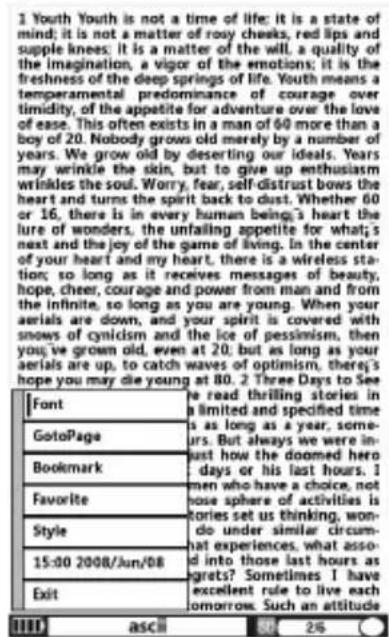
- Press M button to access option menu listed as below, then press UP/DOWN buttons to select the option, press M button to confirm your selection.
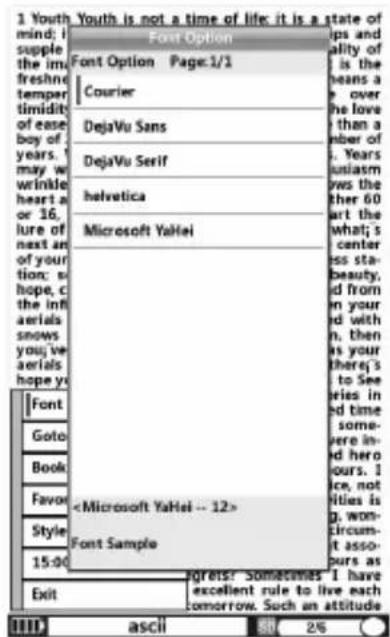
7.3.1 FonT:
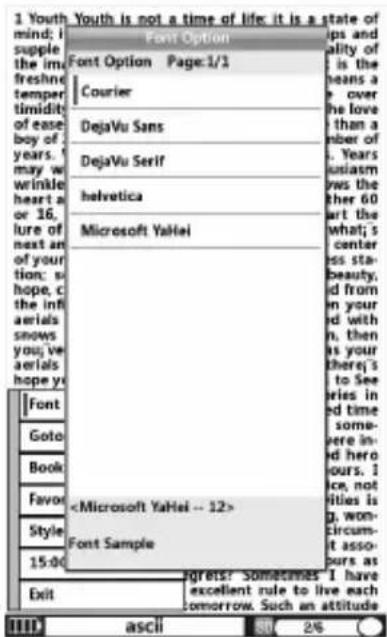
Change the font you want to use for reading. (Courier, DejaVu Sans, DejauVu Serif, Helvetica, Microsoft YaHei). Followed by pressing the letter [M] to confirm your selection and choose the font size.
7.3.2 Go To PAGE:
Jump to a desired page. There are three options: First page, Last page, Go to page. After you confirm "Go to page" option, you can set the specific page number you want to go to. Press Directional pad to move cursor to select the number, then press M button to confirm.
7.3.3 BOOKMARK:
For readability, you can set markers. Bookmarks are sorted and accessible for easy eBook access.
Add a Bookmark:
Select "Add bookmark" on the menu to add a bookmark on the current reading page.
Open a Bookmark:
Select "Go to bookmark" from the menu. Press [Up/Down] to select the desired bookmark and press M to read the bookmark
Delete a Bookmark:
Select "Delete bookmark" from the menu, select the bookmark that you want to delete and press M to confirm.
7.3.4 Favorite:
Store the eBook as Favorite, accessible through the main menu.
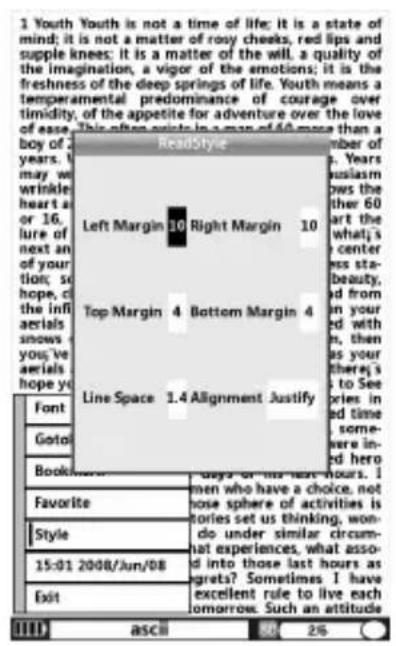
7.3.5 Style:
▶ Set the margin, space and alignment.
7.3.6 Time:
▶ Set the time (hour, minutes and zone).
Note: Press Music button to access the music player, then press Return button to return to the reading mode.
7.4 PICTURE
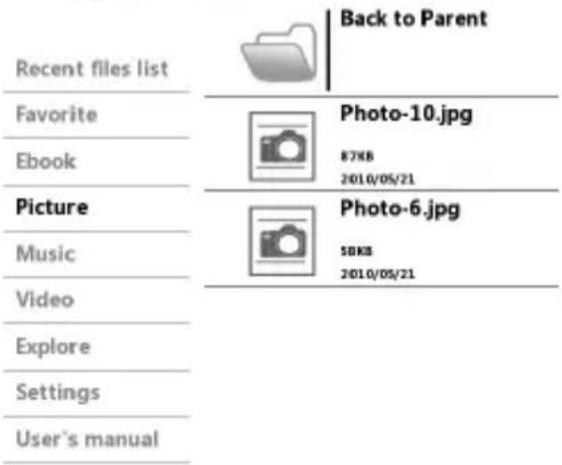
Select Picture on Main Menu and press UP/DOWN buttons to select the desired image and press M button to open.
- Press Rotation button to switch screen orientation horizontal/vertical.
- Press Zoom button, then select the desired zoom level and finally press M button to zoom in or out.
- Press UP/DOWN buttons to select previous/next photo.
Press M button to access options menu listed as below:
A. Zoom: Normal, Fit to Height, Fit to Width, Zoom +.
B. Rotate: Normal, Rotate 90°, Rotate 180°, Rotate 270°.
C. Exit: exit to previous menu.
Press Music button to access the music player, then press Return button to go back to photo mode.
Press Return button to return to the previous menu in any interface.
The player supports: JPEG, BMP, PNG, GIF formats.
7.5 MUSIC
This option starts the music application, to play audio files stored on the device.
- Select the file that you want to listen and press [M] to confirm.
- The list will show all the songs stored in the selected folder (internal memory or microSD card).
- You can enjoy music files while you read a book or see pictures. To do this, click the [music] button to start the audio interface, and then select the song and press [back] to return to the main menu. You can access books or pictures and the music will continue playing. To change the song or stop playback, select again the music player

note: In order that the music files displays the track info, their artist, album and genre information must be stored into the file (information known as ID3-Tag).
You can find freeware utilities to create or modify ID3-Tags.
The player supports: MP3, WMA formats.
7.6 VIDEO
Press UP/DOWN keys to select the option you want and press M button to open.
During video playback, press M button to play/pause.
▶ Press and hold then loose LEFT/RIGHT button to keep fast rewind /fast forward.
▶ Press Return button to return to the previous menu.
The player supports: MP4, WMV, AVI, RMVB, FLV, ASF, 3GP, MOV formats.
note: You can play AVI (Divx/Xvid) / FLV / RM / RMVB videos directly without conversion. On some exceptional occasions (like uncommon codecs or bitrates), to ensure a correct visualization and compatibility, you can play videos previously converted to AVI format (XVID with MP2 audio) with any conversion software available.

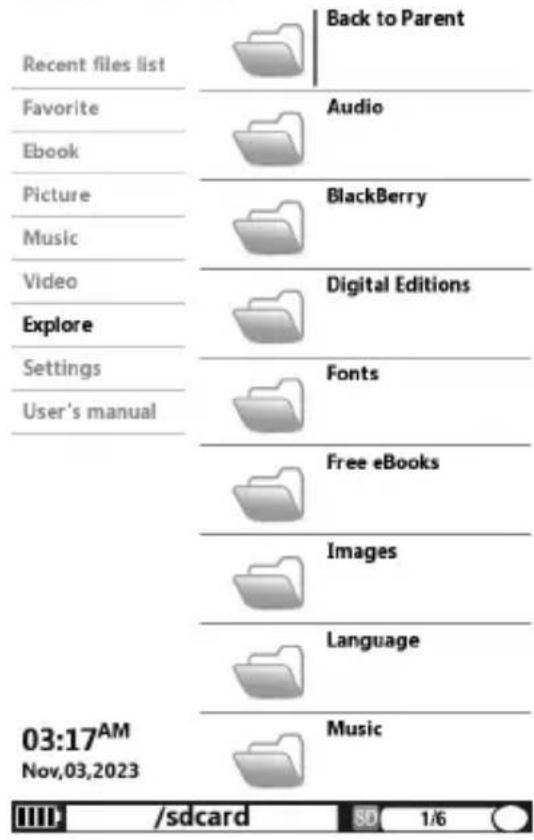
7.7 EXPLORE
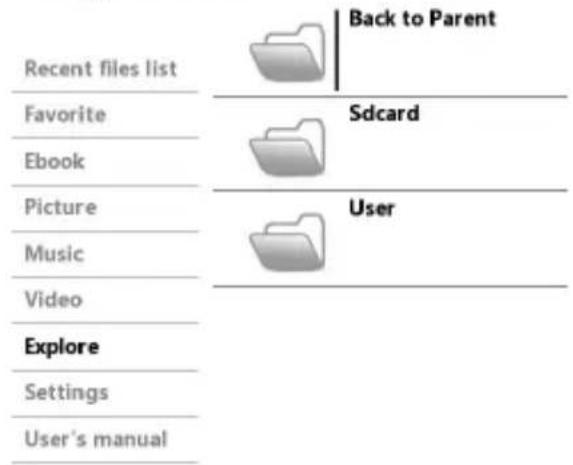
Select “Explore” from the main menu and press [M] button to enter. All the files and folders stored in the device (flash memory) and microSD card will be listed. Select the desired option to browse folders or files and press [M] to open/confirm your selection.
Energy Color Book
| Recent files list | Back to Parent | |
| Favorite | Sdcard | |
| Ebook | ||
| Picture | User | |
| Music | ||
| Video | ||
| Explore | ||
| Settings | ||
| User's manual |
Energy Color Book
03:10 AM
Nov,03,2023


7.8 SETTINGS
7.8.1 DEFAULT
This function restores factory default values.
7.8.2 UPGRADE
Select this option and press [M] button to confirm, a dialogue box wills popup, press the directional pad to confirm the upgrade.
7.8.3 FORMAT
Select this function only if necessary to format all data on the internal memory/microSD card. We strongly recommend that you perform regular a backup copy of your files stored in the reader.
note: This option will erase all data on internal memory and microSD card.
7.8.4 SYSTEM INFO
▶ Display system version information.
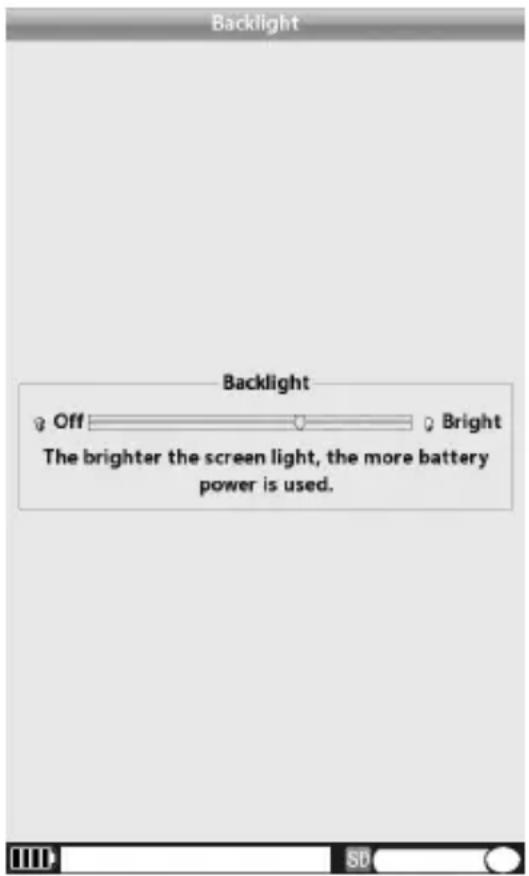
7.8.5 BRIGHT
- Press directional pad to adjust the brightness level. A higher brightness level will consume more battery.
7.8.6 SORT
▶ You can sort books by name, date, size and type.
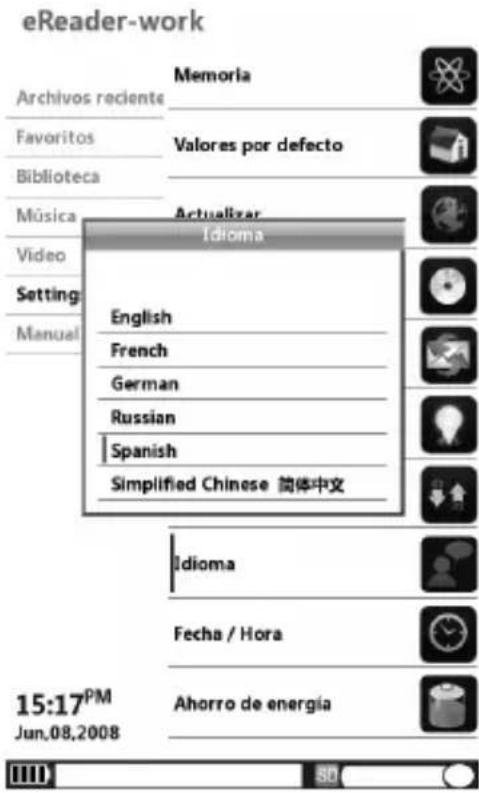
7.8.7 LANGUAGE
Change the user interface language.
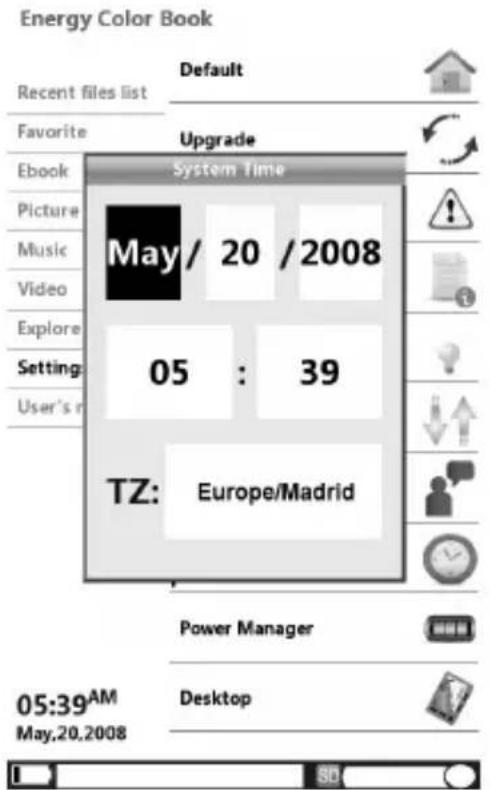
Adjust the system date and time. Press the joystick to move the cursor, and adjust the value. Select the zone location with the joystick on the TZ cell. Locate your geographic region and press [M] to confirm the setting.
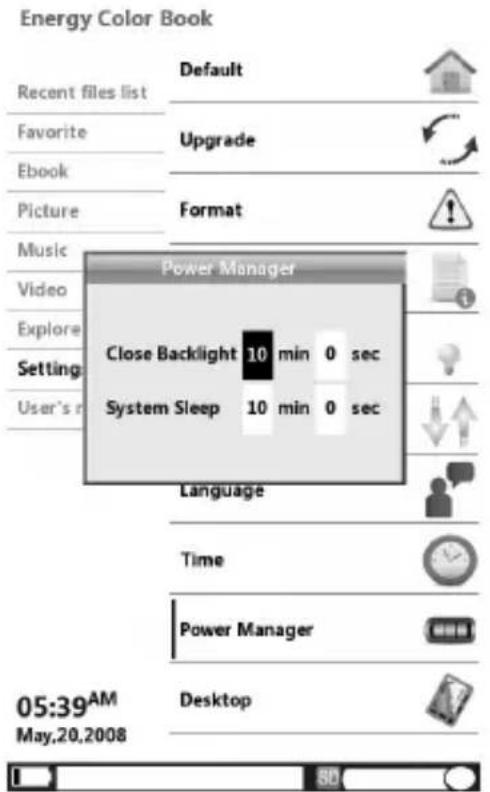
7.8.9 POWER MANAGER
To adjusts the power settings. You can adjust the backlight auto off time and the system sleep on minutes and seconds. Press the joystick to move the cursor, and adjust the value pressing M to confirm.
7.8.10 DESKTOP
Set the pre-installed desktop backgrounds on the main menu and submenus.
8.0 USER'S MANUAL
We have included an electronic copy of our manual for your review. Simply choose the option from the main menu, and press the M button to read it.
9. ABOUT MICROSD CARD
If microSD card cannot be recognized by the device, you should again remove the microSD card and reboot the device. When the system is reading data, please do not remove the memory card or reset the system. If you need to reformat the microSD card please create a backup copy of your files previously and format the microSD card in FAT/FAT32 file system.
10 RESET YOUR EBOOK
In the rare event that the data on the screen is corrupted or device freezes, you will need to perform a reset.
The Reset button is located on the back of the device. It can be accessed with any thin object like a paper clip. Never use a needle or a sharp pin for this purpose since it can damage the device.
ATTENTION: This operation will restore the device to original factory values, erasing all user settings.
II. RECOMMENDATIONS
- Due to the limited RAM, some text as PDF and video as AVI files cannot be played properly due to resolution/bitrate or codec used.
- We recommend that you keep a backup of the contents of microSD card additional external storage medium (PENDRIVES, hard drives, etc.).
- The eBook is compatible with microSD/SDHC cards but when more used memory are your needs more load time will need, creating a instability on the device.
- Do not put weight on the device.
12. TROUBLESHOOTING
The device hang or cannot be switched on.
- Reset the device by pressing the Reset button with a small pin or clip.
▶ Battery has been fully depleted. Please charge the device via USB.
Battery capacity seems short:
The battery is not used for prolonged period. Please recharge the battery device again.
The battery is not fully charged. Please charge the device for 4-6 hours depending of power supply (USB, USB-DC).
It takes long time for the display to appear:
This is due to the characteristic of the display panel, especially in low temperature environment, and not a malfunction.
Cannot read/open en ebook:
- Check if the book has copyright protection. Check if the book format is supported by device.
Format Reading: TXT (unlimited size), PDF (up to 4MB), EPUB (up to 4MB), PDB(up to 4MB), DOC(up to 5MB).
The device cannot be operated during USB connection:
The device cannot be operated while it is connected to a computer
Remove the device from computer to resume operation.
To use your device while charging, click on the [Safely Remove Hardware] icon located on the right corner to disconnect with computer. After is safely removed, computer will only charge your device and you can now resume normal operation.
- Your device can read microSD cards up to 32 GB.
On microSD card:
After inserted a microSD card, if your device is has no response, please take out and insert again.
Do not remove microSD card or turn off during data writing or reading to prevent damage to data and your device.
Make sure the microSD card is unlocked before writing or deleting data in the microSD card.
▶ Backup your files and data before formatting the microSD card. Please format the microSD card in FAT/FAT32.
Why do some EPUB documents not look right on my Energy Book?
Many publishers and convert software are supporting this format, but without maintaining a single standar set. One of the most common problems is when the creator puts everything EPUB e-book content in a “chapter” in EPUB. This can cause the document reading differs with formatted text, margins, gaps, etc.
Is Matter the size of supported file by my Energy Book?
Yes, less than 10 MB TXT files. EPUB 4 MB. PDF 4 MB. PDB 4 MB. When more images and graphics are in the ebook the response of your device will be slow
Can I listen music while reading?
▶ Yes, expect in PDF format.
Why some video files cannot be played?
Maybe your format/codec may not be 100% compatible, (see supported files table). Please convert the file with a specialized program to ensure compliance and obtain a file which occupies less space in reader memory.
II.1 SPECIFICATIONS
| VIDEO FORMAT | VIDEO/AUDIO CODEC RESOLUTION MAX. | |
| RMVB | REAL8/9/10+COOKER/RA/AAC | 640 x 480 |
| AVI | MPEG4 SIMPLE PROFILE + MP3/AC3/AAC | |
| MPEG4 ASP + MP3/AC3/AAC | ||
| DIVX 3/4/5 + MP3/AC3/AAC | ||
| XVID + MP3/AC3/AAC | ||
| WMV | WMV 7/8/9 + WMA/ MP3/AC3/AAC | |
| FLV | DAT MPEG1 + MP3 | |
| TS MPEG2 + MP3 | ||
| MOV | MPEG4 + MP3/AC3/AAC | |
| MP4 | MPEG4/DIVX/XVID + MP3/AC3/AAC | |
| 3GP | MPEG4/DIVX/XVID + MP3/AC3/AAC | |
| ASF | MPEG4/DIVX/XVID + MP3/AC3/AAC |
| ITEM | DESCRIPTION |
| DISPLAY | TFT LCD COLOR |
| 5.0 inch | |
| 800(V)×480(H) | |
| E-BOOK | TXT, HTML, PDF, EPUB, FB2, RTF, MOBI, CHM, DOC.5 kinds of fonts, 6 level of font size3 options for page jump, Book Margin/Line space adjustable.Landscape and Portrait availalbe, 4 options for alignment |
| FORMATS | Photo: JPEG, BMP, PNG, GIF |
| Audio: WMA, MP3 | |
| MP3: 8Kbps ~ 320 Kbps. | |
| WMA: 5Kbps ~ 320 Kbps. | |
| DIGITAL FILES SUPPORT | microSD up to 32GB |
| MEMORY | Internal 2GB (1052 Ruby Red-Electric Blue) |
| 4 GB (1054 Arctic White) | |
| 8 GB (1058 Dark Iron) | |
| BATTERY TYPE | Built in Li Polymer(1800 mAH) |
| eBook mode: 7-9h, Aprox. (depending of bright setting and ebook)Audio mode: 7 h with earphones.Video mode: 4 h. | |
| Battery Charge USB: 6 - 8 h.Battery Charge USB/DC: 4 - 6 h. | |
| SIZE | Weight: 181 g. without pouch154mm × 98mm× 10mm |
WARRANTY
Energy Sistem Soyntec S.A. warrants its products to be free from defects in materials and workman ship at the time of purchase.
The warranty period is 36 months from the date of purchase.
WARRANTY PROCEDURE
Visit the Support section at http://support.energysistem.com and select your product to view the FAQ (Frequently Asked Questions). The solution to your problem is very likely to have been already published there. You will also be able to download user manuals, user guides, drivers and updates.
If you cannot find an appropriate solution in the Support section, you may send us your enquiry or warranty service request by email: support@energysistem.com
Alternatively, you may prefer to contact the distributor from which you purchased the product, presenting the purchase receipt or invoice.
Specifications are subject to change without notice.
© 2010 by Energy Sistem ®. All rights reserved.
TRADEMARKS.
All company, brand and product names are trademarks or registered trademarks of their respective companies.
DECLARATION OF CONFORMITY
Manufacturer Name: Energy Sistem Soyntec S.A.
Address: Pol. Ind. Finestrat, C/.Calpe n°1, 03509, Finestrat Alicante (Spain)
Tel: 902 388 388 Fax: 902 119 034
NIF: A53107488
We declare under our own exclusive responsibility that the product:
Energy Sistem® Electronic Book Reader Energy™ Color Book 1052/1054/1058
Manufacturing country: China
Is in compliance with the essential directives, norms and standards of the European Union 89/336/EEC (EMC Directive).

- PRECAUTIONS
- WE STRONGLY RECOMMEND READING THE POINTS BELOW BEFORE OPERATING THIS PRODUCT
- INTRODUCTION
- GENERAL VIEW
- GETTING STARTED
- FILE MANAGEMENT
- 6.1 CONNECT TO THE PC
- 6.1.2 MANAGING FILES
- 6.1.3 USING MICROSD CARDS
- INITIAL CHARGE AND SUBSEQUENT CHARGES
- RECHARGING THE BATTERY
- PRINCIPAL MENU
- 7.1 RECENT FILES LIST
- 7.2 FAVORITE
- 7.3 EBOOK
- FUNCTIONS AVAILABLE WHEN READING AN EBOOK
- 7.3.1 FONT
- 7.3.2 GO TO PAGE
- 7.3.3 BOOKMARK
- ADD A BOOKMARK
- OPEN A BOOKMARK
- DELETE A BOOKMARK
- 7.3.4 FAVORITE
- 7.3.5 STYLE
- 7.3.6 TIME
- 7.4 PICTURE
- 7.5 MUSIC
- 7.6 VIDEO
- 7.7 EXPLORE
- 7.8 SETTINGS
- 7.8.1 DEFAULT
- 7.8.2 UPGRADE
- 7.8.3 FORMAT
- 7.8.4 SYSTEM INFO
- 7.8.5 BRIGHT
- 7.8.6 SORT
- 7.8.7 LANGUAGE
- 7.8.9 POWER MANAGER
- 7.8.10 DESKTOP
- 8.0 USER'S MANUAL
- ABOUT MICROSD CARD
- 10 RESET YOUR EBOOK
- RECOMMENDATIONS
- TROUBLESHOOTING
- THE DEVICE CANNOT BE OPERATED DURING USB CONNECTION
- ON MICROSD CARD
- WHY DO SOME EPUB DOCUMENTS NOT LOOK RIGHT ON MY ENERGY BOOK
- IS MATTER THE SIZE OF SUPPORTED FILE BY MY ENERGY BOOK
- CAN I LISTEN MUSIC WHILE READING
- WHY SOME VIDEO FILES CANNOT BE PLAYED
- II.1 SPECIFICATIONS
- WARRANTY
- WARRANTY PROCEDURE
- TRADEMARKS
- DECLARATION OF CONFORMITY
Brand : ENERGY SISTEM
Model : 347209
Category : Electronics