E-Ink eReader e4 Mini - Tablet ENERGY SISTEM - Free user manual and instructions
Find the device manual for free E-Ink eReader e4 Mini ENERGY SISTEM in PDF.


Pick your language and provide your email: we'll send you a specifically translated version.
| Product type | E-book reader |
| Brand | Energy Sistem |
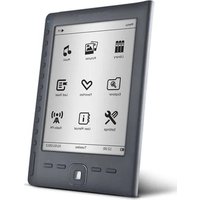
| Model | E-Ink eReader e4 Mini |
| Display technology | E-Ink electronic paper |
| Display size | 6 inches |
| Resolution | 800 x 600 pixels |
| Built-in light | Yes (frontlight) |
| Storage capacity | 4 GB (expandable via microSD) |
| Supported formats | PDF, EPUB, TXT, MOBI, FB2 |
| Connectivity | USB 2.0, Wi-Fi (802.11 b/g/n) |
| Battery type | Rechargeable lithium-ion, 1500 mAh |
| Battery life | Up to 4 weeks on a single charge |
| Dimensions | 160 x 120 x 10 mm |
| Weight | 200 g |
| Operating temperature | 0°C to 40°C |
| Languages supported | Multiple languages (including English, Spanish, French) |
| Safety features | Low heat generation, energy-efficient E-Ink display |
| Cleaning instructions | Wipe screen with a soft dry cloth; avoid liquids |
| Repairability | Replaceable battery and microSD card slot |
| Included accessories | USB cable, user manual |
| Warranty | 2 years (depending on region) |
Frequently Asked Questions - E-Ink eReader e4 Mini ENERGY SISTEM
How do I turn on the Energy Sistem E-Ink eReader e4 Mini?
Press and hold the power button located on the bottom edge for 3 seconds. Release when the screen lights up.
What file formats does the e4 Mini support?
The device supports PDF, EPUB, TXT, MOBI, and FB2 files. You can load them via USB or download directly using the built-in Wi-Fi.
How long does the battery last?
The 1500 mAh battery can last up to 4 weeks with regular reading (30 minutes per day). Battery life varies based on Wi-Fi usage and screen refresh.
Can I expand the storage?
Yes, the eReader has a microSD slot that supports cards up to 32 GB, allowing you to store thousands of books.
How do I transfer e-books from my computer?
Connect the device to your computer using the USB cable. It will appear as an external drive. Simply drag and drop files into the Ebooks folder.
Is the screen readable in direct sunlight?
Yes, the E-Ink display uses reflective technology, making it easy to read outdoors even in bright sunlight, without glare.
What should I do if the screen freezes?
Press and hold the power button for 10 seconds to force a reboot. If the issue persists, charge the device for at least 30 minutes and try again.
Does the e4 Mini have built-in Wi-Fi?
Yes, it has 802.11 b/g/n Wi-Fi for downloading books from online stores or from your own cloud services.
Can I use the eReader in the bathtub or near water?
No, the device is not waterproof. Keep it away from moisture and liquids to avoid damage.
How do I clean the screen?
Use a soft, lint-free dry cloth to gently wipe the screen. Avoid using any cleaning agents or solvents.
User questions about E-Ink eReader e4 Mini ENERGY SISTEM
0 question about this device. Answer the ones you know or ask your own.
Ask a new question about this device
No questions yet. Be the first to ask one.
Download the instructions for your Tablet in PDF format for free! Find your manual E-Ink eReader e4 Mini - ENERGY SISTEM and take your electronic device back in hand. On this page are published all the documents necessary for the use of your device. E-Ink eReader e4 Mini by ENERGY SISTEM.
USER MANUAL E-Ink eReader e4 Mini ENERGY SISTEM



Manual assistant
Powered by Anthropic
Waiting for your message
Product information
Brand : ENERGY SISTEM
Model : E-Ink eReader e4 Mini
Category : Tablet