
EOC110R - Network Card/Adapter StarTech.com - Free user manual and instructions
Find the device manual for free EOC110R StarTech.com in PDF.


| Product Type | Ethernet over Coax Adapter |
| Model | EOC110R |
| Brand | StarTech.com |
| Ports | 1x RJ45 (10/100 Mbps), 1x F-type Coax |
| Max Data Rate | 200 Mbps (over coax) |
| Coax Standard | HomePlug AV2 / MoCA 1.1 compatible |
| Power Supply | 12V DC, 1A (external adapter) |
| Power over Coax | Yes (supports remote power via coax) |
| Dimensions | 3.5 x 2.8 x 1.1 in (89 x 71 x 28 mm) |
| Weight | 4.2 oz (120 g) |
| Operating Temperature | 32°F to 104°F (0°C to 40°C) |
| LED Indicators | Power, Link/Activity |
| Supported Protocols | IEEE 802.3, IEEE 802.3u, CSMA/CA |
| Range over Coax | Up to 1000 ft (300 m) |
| Key Features | Extends network using existing coax cabling; plug-and-play installation; low latency |
| Maintenance | Clean with dry cloth; avoid moisture; keep vents unobstructed |
| Safety | Use only supplied power adapter; do not expose to liquids; disconnect during storms |
| Repairability | No user-serviceable parts; contact StarTech.com support for repairs |
| Spare Parts | Power adapter and coax cables available separately |
| Package Contents | 1x EOC110R adapter, 1x power adapter, 1x quick-start guide |
Frequently Asked Questions - EOC110R StarTech.com
User questions about EOC110R StarTech.com
0 question about this device. Answer the ones you know or ask your own.
Ask a new question about this device
Download the instructions for your Network Card/Adapter in PDF format for free! Find your manual EOC110R - StarTech.com and take your electronic device back in hand. On this page are published all the documents necessary for the use of your device. EOC110R by StarTech.com.
USER MANUAL EOC110R StarTech.com
10/100 Mbps Ethernet Over Coaxial LAN Extender Kit - 2.4km
EOC110K
EOC110R
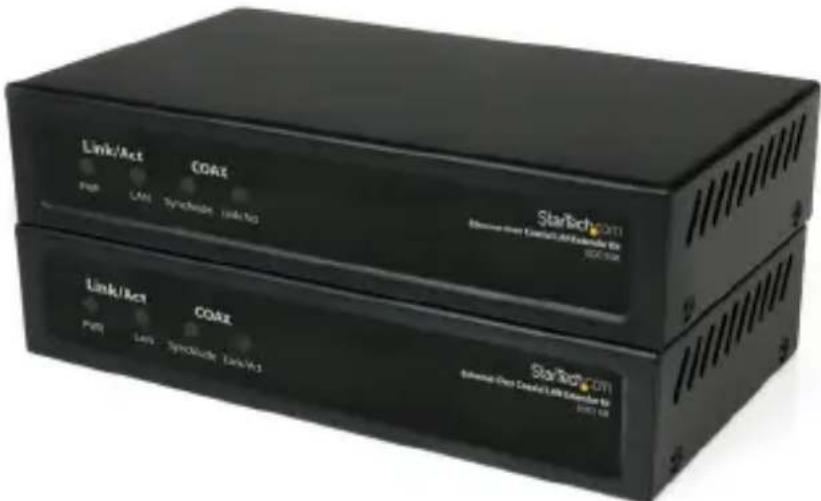
*actual product may vary from photos
For the most up-to-date information, please visit: www.startech.com
FCC Compliance Statement
This equipment has been tested and found to comply with the limits for a Class B digital device, pursuant to part 15 of the FCC Rules. These limits are designed to provide reasonable protection against harmful interference in a residential installation. This equipment generates, uses and can radiate radio frequency energy and, if not installed and used in accordance with the instructions, may cause harmful interference to radio communications. However, there is no guarantee that interference will not occur in a particular installation. If this equipment does cause harmful interference to radio or television reception, which can be determined by turning the equipment off and on, the user is encouraged to try to correct the interference by one or more of the following measures:
• Reorient or relocate the receiving antenna.
- Increase the separation between the equipment and receiver.
- Connect the equipment into an outlet on a circuit different from that to which the receiver is connected.
- Consult the dealer or an experienced radio/TV technician for help.
Use of Trademarks, Registered Trademarks, and other Protected Names and Symbols
This manual may make reference to trademarks, registered trademarks, and other protected names and/or symbols of third-party companies not related in any way to StarTech.com. Where they occur these references are for illustrative purposes only and do not represent an endorsement of a product or service by StarTech.com, or an endorsement of the product(s) to which this manual applies by the third-party company in question. Regardless of any direct acknowledgement elsewhere in the body of this document, StarTech.com hereby acknowledges that all trademarks, registered trademarks, service marks, and other protected names and/or symbols contained in this manual and related documents are the property of their respective holders.
Table of Contents
Introduction ....1
System Requirements....1
Package Contents....1
Front View 2
Rear View....2
Installation ....3
Hardware Installation .... 3
Driver Installation....3
Cable Lengths 4
Specifications ....5
Technical Support 6
Warranty Information ....6
Introduction
The StarTech.com EOC110K Ethernet over Coax extender kit allows you to span a 10/100 network over extremely long distances (up to 1.2km) while still maintaining high speed network connectivity. Allowing Ethernet connections over existing Coaxial cable with little to no modification, providing a perfect solution for a broad range of applications, including connecting isolated user stations from the same or separate building, or overcoming infrastructure obstacles and distances (e.g. older stone/concrete architecture) where new wiring or wireless may be impossible.
System Requirements
• 10/100Mbps compatible Ethernet network/equipment
• Coaxial cabling (RG-59/6/7/11)
• Available AC power outlet at converter box locations
Package Contents
• 2 x Ethernet over Coax converter box*
- 2 x Power Adapter*
• Instruction Manual
*EOC110R only contains one unit
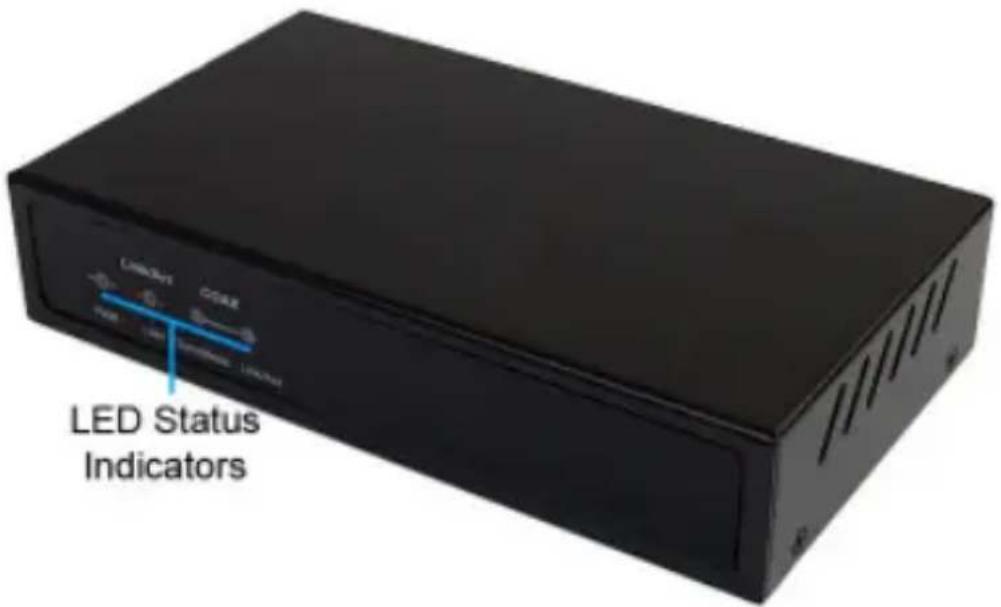
Front View
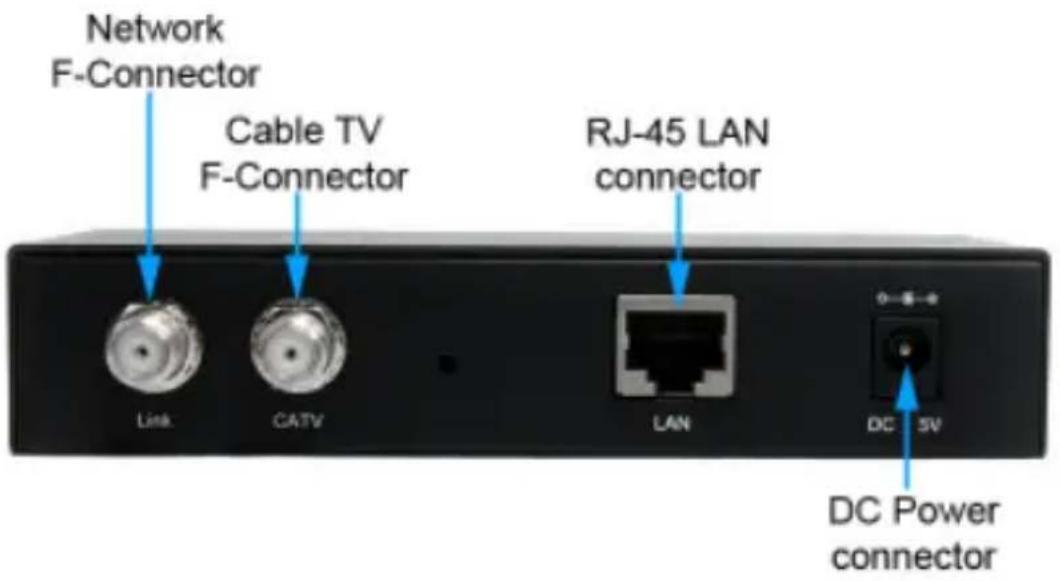
Rear View
Installation
Hardware Installation
NOTE: Both of the converter boxes in the EOC110K kit are identical, so they can be installed at either end, in any order.
- At one of the locations for the converter box, connect an RJ45 Ethernet cable from the existing Ethernet network or computer network adapter to the "LAN" port on the converter box.
- Connect the coax cable to the "Link" F-Connector on the converter.
- OPTIONAL: If also transmitting analog cable TV signals over the coax line, connect the CATV F-Connector to a TV or TV receiver. Digital cable TV signals are not supported.
- Connect the included power adapter. The power LED should light up solid. The LAN Link/Act LED should light up solid when successfully connected to an Ethernet device on the "LAN" port.
- Setup additional converter boxes by following the same Steps 1\~4 for each location.
- Once all units are setup, they should be able to automatically locate one another over the coax cabling. The Coax Link and Sync LEDs should stay solid once communication is established. The Coax Link LED will flash during communication.
- The devices plugged into the "LAN" ports should now be able to communicate with one another freely.
Driver Installation
No driver or software installation is required for these converters on any connected computer systems.
Cable Lengths
Maximum bandwidth (Mbps) based on coaxial cable type and length.
| Distance | RF Bandwidth | RG-59 RG-6 RG-7 RG-11 |
| 100m ~ 700m | 144 144 144 144 | |
| 800m 128 144 144 144 | ||
| 900m 112 144 144 144 | ||
| 1000m 96 128 144 144 | ||
| 1100m 80 128 144 144 | ||
| 1200m 64 112 128 144 | ||
| 1300m 80 128 144 | ||
| 1400m 80 128 144 | ||
| 1500m 64 112 144< 30MHz | ||
| 1600m 96 128 | ||
| 1700m 80 128 | ||
| 1800m 80 128 | ||
| 1900m 64 112 | ||
| 2000m 112 | ||
| 2100m 96 | ||
| 2200m 80 | ||
| 2300m 80 | ||
| 2400m 64 |
Specifications
| Transmission Standards | ITU G.9954, IEEE802.3, IEEE802.3u, IEEE802.3x |
| Connectors (per unit) | 2 x F-Connector female1 x RJ45 female1 x DC Power |
| LEDs (per unit) | 1 x Power1 x LAN Link/Activity1 x Coax Link/Activity1 x Coax Sync |
| Compatible Cabling RG-59, 6, 7, 11 | |
| Maximum Distance 2400m (RG-11) | |
| Power Adapter | 5VDC, 2000mA, center positive, type M plug |
| Operating Temperature | 0°C ~ 55°C (32°F ~ 131°F) |
| Storage Temperature | -10°C ~ 65°C (14°F ~ 149°F) |
| Humidity 10% ~ 90% RH | |
| Dimensions (per unit) 280.0mm x 138.0mm x 76.8mm | |
| Weight (per unit) 320g |
Technical Support
StarTech.com's lifetime technical support is an integral part of our commitment to provide industry-leading solutions. If you ever need help with your product, visit www.startech.com/support and access our comprehensive selection of online tools, documentation, and downloads.
For the latest drivers/software, please visit www.startech.com/downloads
Warranty Information
This product is backed by a two year warranty.
In addition, StarTech.com warrants its products against defects in materials and workmanship for the periods noted, following the initial date of purchase. During this period, the products may be returned for repair, or replacement with equivalent products at our discretion. The warranty covers parts and labor costs only. StarTech.com does not warrant its products from defects or damages arising from misuse, abuse, alteration, or normal wear and tear.
Limitation of Liability
In no event shall the liability of StarTech.com Ltd. and StarTech.com USA LLP (or their officers, directors, employees or agents) for any damages (whether direct or indirect, special, punitive, incidental, consequential, or otherwise), loss of profits, loss of business, or any pecuniary loss, arising out of or related to the use of the product exceed the actual price paid for the product. Some states do not allow the exclusion or limitation of incidental or consequential damages. If such laws apply, the limitations or exclusions contained in this statement may not apply to you.
Hard-to-find made easy. At StarTech.com, that isn't a slogan. It's a promise.
StarTech.com is your one-stop source for every connectivity part you need. From the latest technology to legacy products — and all the parts that bridge the old and new — we can help you find the parts that connect your solutions.
We make it easy to locate the parts, and we quickly deliver them wherever they need to go. Just talk to one of our tech advisors or visit our website. You'll be connected to the products you need in no time.
Visit www.startech.com for complete information on all StarTech.com products and to access exclusive resources and time-saving tools.
StarTech.com is an ISO 9001 Registered manufacturer of connectivity and technology parts. StarTech.com was founded in 1985 and has operations in the United States, Canada, the United Kingdom and Taiwan servicing a worldwide market.
- 10/100 Mbps Ethernet Over Coaxial LAN Extender Kit - 2.4km
- FCC Compliance Statement
- Use of Trademarks, Registered Trademarks, and other Protected Names and Symbols
- Table of Contents
- Introduction ....1
- Installation ....3
- Cable Lengths 4
- Specifications ....5
- Technical Support 6
- Warranty Information ....6
- Introduction
- System Requirements
- Package Contents
- Front View
- Rear View
- Installation
- Hardware Installation
- Driver Installation
- Cable Lengths
- Specifications
- Technical Support
- Warranty Information
- Limitation of Liability
Brand : StarTech.com
Model : EOC110R
Category : Network Card/Adapter