SCD-2080EB - Security Camera SAMSUNG - Free user manual and instructions
Find the device manual for free SCD-2080EB SAMSUNG in PDF.


| Product Type | Security Camera (Bullet) |
| Brand | Samsung |
| Model | SCD-2080EB |
| Image Sensor | 1/3-inch Super HAD CCD II |
| Resolution | 600 TV Lines (Color) |
| Minimum Illumination | 0.15 Lux (Color), 0.0001 Lux (B/W, Sens-up) |
| Lens | 2.8x Varifocal, 2.8~10mm (F1.2) |
| Day/Night | ICR, True Day/Night |
| Video Output | CVBS: 1.0 Vp-p / 75 Ω composite |
| Power Supply | 12V DC (±10%), 24V AC (±10%) |
| Power Consumption | Max. 3.0W |
| Dimensions (W x H x D) | 67.6 x 64.6 x 122.8 mm (2.66 x 2.54 x 4.83 in) |
| Weight | Approx. 320 g (0.71 lb) |
| Operating Temperature | -10°C to +50°C (14°F to 122°F) |
| Storage Temperature | -20°C to +60°C (-4°F to 140°F) |
| Ingress Protection | IP66 (Weatherproof) |
| Features | Motion Detection, Privacy Masking, Sens-up, Digital Zoom, Mirror/Flip |
| Remote Control | RS-485 (Pelco-D/P, Samsung) |
| Cleaning | Clean lens with soft, dry cloth; housing with mild soap and water |
| Maintenance | Check connections and cable integrity regularly; update firmware if available |
| Safety | Use only approved power supply; install in compliance with local regulations |
| Spare Parts / Repairability | Contact Samsung service center for replacement parts; repair by qualified personnel |
Frequently Asked Questions - SCD-2080EB SAMSUNG
User questions about SCD-2080EB SAMSUNG
0 question about this device. Answer the ones you know or ask your own.
Ask a new question about this device
Download the instructions for your Security Camera in PDF format for free! Find your manual SCD-2080EB - SAMSUNG and take your electronic device back in hand. On this page are published all the documents necessary for the use of your device. SCD-2080EB by SAMSUNG.
USER MANUAL SCD-2080EB SAMSUNG
High Resolution Varifocal Dome Camera SCD-2080E
User Manual
SCD-2080E

High Resolution Varifocal Dome Camera
User Manual
Copyright
©2010 Samsung Techwin Co., Ltd. All rights reserved.
Trademark
SAMSUNG TECHWIN is the registered logo of Samsung Techwin Co., Ltd.
The name of this product is the registered trademark of Samsung Techwin Co., Ltd.
Other trademarks mentioned in this manual are the registered trademark of their respective company.
Restriction
Samsung Techwin Co., Ltd shall reserve the copyright of this document. Under no circumstances, this document shall be reproduced, distributed or changed, partially or wholly, without formal authorization of Samsung Techwin.
Disclaimer
Samsung Techwin makes the best to verify the integrity and correctness of the contents in this document, but no formal guarantee shall be provided. Use of this document and the subsequent results shall be entirely on the user's own responsibility. Samsung Techwin reserves the right to change the contents of this document without prior notice.
Warranty
If the product does not operate properly in normal conditions, please let us know. Samsung Techwin will resolve the problem for free of charge. The warranty period is 3 years. However, the followings are excluded:
- If the system behaves abnormally because you run a program irrelevant to the system operation.
- Deteriorated performance or natural worn-out in process of time
Before operating the camera, confirm the camera model and correct input power voltage. To help you understand this manual thoroughly, we'll introduce our model description.
■ SCD-2080E SERIES
• NTSC MODEL SCD-2080EN
• PAL MODEL SCD-2080EP
■ MODEL DESCRIPTION
- SCD-2080EX
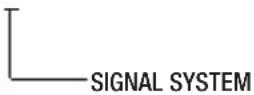
• SIGNAL SYSTEM N → NTSC MODEL P → PAL MODEL
safety information
CAUTION
RISK OF ELECTRIC SHOCK. DO NOT OPEN
CAUTION:
TO REDUCE THE RISK OF ELECTRIC SHOCK, DO NOT REMOVE COVER (OR BACK) NO USER SERVICEABLE PARTS INSIDE. REFER SERVICING TO QUALIFIED SERVICE PERSONNEL.
This symbol indicates that dangerous voltage consisting a risk of electric shock is present within this unit.
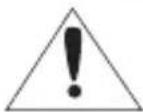
This exclamation point symbol is intended to alert the user to the presence of important operating and maintenance (servicing) instructions in the literature accompanying the appliance.
WARNING
- To prevent damage which may result in fire or electric shock hazard, do not expose this appliance to rain or moisture.
- To prevent injury, this apparatus must be securely attached to the floor/wall in accordance with the installation instructions.
WARNING
- Be sure to use only the standard adapter that is specified in the specification sheet. Using any other adapter could cause fire, electrical shock, or damage to the product.
- Incorrectly connecting the power supply or replacing battery may cause explosion, fire, electric shock, or damage to the product.
- Do not connect multiple cameras to a single adapter. Exceeding the capacity may cause abnormal heat generation or fire.
- Securely plug the power cord into the power receptacle. insecure connection may cause fire.
- When installing the camera, fasten it securely and firmly. The fall of camera may cause personal injury.
4\_ safety information
- Do not place conductive objects (e.g. screwdrivers, coins, metal parts, etc.) or containers filled with water on top of the camera. doing so may cause personal injury due to fire, electric shock, or falling objects.
- Do not install the unit in humid, dusty, or sooty locations. doing so may cause fire or electric shock.
- If any unusual smells or smoke come from the unit, stop using the product. in such case, immediately disconnect the power source and contact the service center. continued use in such a condition may cause fire or electric shock.
- If this product fails to operate normally, contact the nearest service center. never disassemble or modify this product in any way. (samsung is not liable for problems caused by unauthorized modifications or attempted repair.)
- When cleaning, do not spray water directly onto parts of the product. doing so may cause fire or electric shock.
CAUTION
- Do not drop objects on the product or apply strong shock to it. Keep away from a location subject to excessive vibration or magnetic interference.
- Do not install in a location subject to high temperature (over 50^ C), low temperature (below -10^ C), or high humidity. Doing so may cause fire or electric shock.
- If you want to relocate the already installed product, be sure to turn off the power and then move or reinstall it.
- Remove the power plug from the outlet when then there is a lightning. Neglecting to do so may cause fire or damage to the product.
- Keep out of direct sunlight and heat radiation sources. It may cause fire.
- Install it in a place with good ventilation.
- Avoid aiming the camera directly towards extremely bright objects such as sun, as this may damage the CCD image sensor.
- Apparatus shall not be exposed to dripping or splashing and no objects filled with liquids, such as vases, shall be placed on the apparatus.
- The Mains plug is used as a disconnect device and shall stay readily operable at any time.
- Do not expose the camera to radioactivity. Radioactivity exposure may damage the CCD.
safety information
FCC STATEMENT
This device complies with part 15 of the FCC Rules. Operation is subject to the following two conditions:
1) This device may not cause harmful interference, and
2) This device must accept any interference received including interference that may cause undesired operation.
CAUTION
This equipment has been tested and found to comply with the limits for a Class A digital device, pursuant to part 15 of FCC Rules. These limits are designed to provide reasonable protection against harmful interference when the equipment is operated in a commercial environment.
This equipment generates, uses, and can radiate radio frequency energy and, if not installed and used in accordance with the instruction manual, may cause harmful interference to radio communications. Operation of this equipment in a residential area is likely to cause harmful interference in which case the user will be required to correct the interference at his own expense.
IC Compliance Notice
This Class A digital apparatus meets all requirements of the Canadian Interference.-Causing Equipment Regulations of ICES-003.
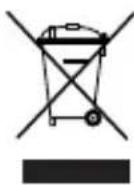
Correct Disposal of This Product (Waste Electrical & Electronic Equipment)
(Applicable in the European Union and other European countries with separate collection systems)
This marking on the product, accessories or literature indicates that the product and its electronic accessories (e.g. charger, headset, USB cable) should not be disposed of with other household waste at the end of their working life. To prevent possible harm to the environment or human health from uncontrolled waste disposal, please separate these items from other types of waste and recycle them responsibly to promote the sustainable reuse of material resources.
Household users should contact either the retailer where they purchased this product, or their local government office, for details of where and how they can take these items for environmentally safe recycling.
Business users should contact their supplier and check the terms and conditions of the purchase contract. This product and its electronic accessories should not be mixed with other commercial wastes for disposal.
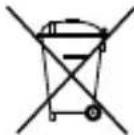
Correct disposal of batteries in this product
(Applicable in the European Union and other European countries with separate battery return systems.)
This marking on the battery, manual or packaging indicates that the batteries in this product should not be disposed of with other household waste at the end of their working life. Where marked, the chemical symbols Hg, Cd or Pb indicate that the battery contains mercury, cadmium or lead above the reference levels in EC Directive 2006/66. If batteries are not properly disposed of, these substances can cause harm to human health or the environment.
To protect natural resources and to promote material reuse, please separate batteries from other types of waste and recycle them through your local, free battery return system.
6\_ safety information
important safety instructions
-
Read these instructions.
-
Keep these instructions.
-
Heed all warnings.
-
Follow all instructions.
-
Do not use this apparatus near water.
-
Clean only with dry cloth.
-
Do not block any ventilation openings. Install in accordance with the manufacturer's instructions.
-
Do not install near any heat sources such as radiators, heat registers, or other apparatus (including amplifiers) that produce heat.
-
Do not defeat the safety purpose of the polarized or grounding-type plug. A polarized plug has two blades with one wider than the other. A grounding type plug has two blades and a third grounding prong. The wide blade or the third prong is provided for your safety. If the provided plug does not fit into your outlet, consult an electrician for replacement of the obsolete outlet.
-
Protect the power cord from being walked on or pinched particularly at plugs, convenience receptacles, and the point where they exit from the apparatus.
-
Only use attachments/accessories specified by the manufacturer.
-
Use only with cart, stand, tripod, bracket, or table specified by the manufacturer, or sold with the apparatus.
-
Unplug this apparatus when a card is used. Use caution when moving the cart/ apparatus combination to avoid injury from tip-over.
-
Refer all servicing to qualified service personnel. Servicing is required when the apparatus has been damaged in any way, such as powersupply cord or plug is damaged, liquid has been spilled or objects have fallen into the apparatus, the apparatus has been exposed to rain or moisture, does not operate normally, or has been dropped.


Apparatus shall not be exposed to dripping or splashing and no objects filled with liquids, such as vases, shall be placed on the apparatus
7_ important safety instructions
English_7
contents
INTRODUCTION

9 Features
10 What's included
11 Component names and functions
INSTALLATION
12 Installation
15 Adjust the panning and tilting while watching the monitor
CONNECTION

16 Connecting to Monitor
16 Connecting to Power
17 Using Coaxial Communications
SETUP

18 Menu Confi
18 Menu Setup
TROUBLESHOOTING
31 Troubleshooting
SPECIFICATIONS
32 Specifications
34 Dimension
8_ contents
FEATURES
- High Resolution
By adopting a diagonal 6mm(1/3") 410,000 (NTSC) pixel, 470,000(PAL) pixel SONY CCD, the camera produces clear picture quality with a horizontal resolution of 600 TV lines in color mode.
• Excellent Sensitivity
The built-in high sensitivity COLOR CCD produces a clear image.
- Color : 0.15Lux(50IRE, @F1.2), 0.0003LUX (SENS-UP, x512)
• SSNR3 (Samsung Super Noise Reduction) Function
The high-performance W-V DSP chip effectively removes low-light gain noise and afterimage to provide clear images even in dark environments.
• Electrical Day & Night
This camera has a function that automatically selects the mode that is appropriate for daytime or night-time conditions.
- Motion Detection
Since the camera detects motion without any additional external sensor, you can monitor activity more efficient.
• SSDR (Samsung Super Dynamic Range)
For images with high contrast between bright and dark areas from diffi cult lighting conditions such as backlighting, this camera selectively illuminates darker areas while retaining the same light level for brighter areas to even out the overall brightness.
• DIS (Digital Image Stabilizer)
The DIS function compensates for any camera movement, to produce more stable pictures.
- Communication
Coaxial communication methods are supported.
- Protocol : Pelco Coaxitron
• Miscellaneous Functions
HLC(High Light Compensation), SENS-UP, FLIP (H/V-REV), D-ZOOM, SHARPNESS and PRIVACY functions are provided.
- OSD
The camera control is convenient by using 17 different foreign language O.S.D.
- NTSC : English, Japanese, Spanish, French, Portuguese, Korean
- PAL : English, French, German, Spanish, Italian, Chinese, Russian, Polish, Czech, Romanian, Serbian, Swedish, Danish, Turkish, Portuguese
WHAT'S INCLUDED
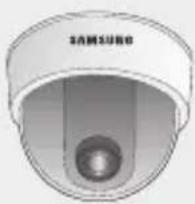
Check if the following items are included in the product package.
natural_image
Close-up of a 3-pin security camera (no text or symbols visible)SCD-2080E
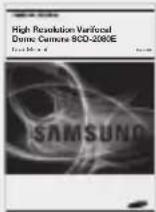
User Manual
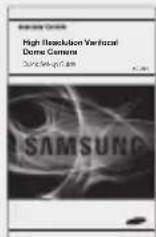
Quick Set-up Guide
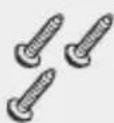
M4 Tapping Screw 3EA
Installation Video
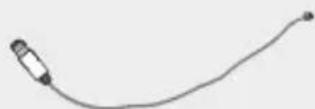
Output Cable
COMPONENT NAMES AND FUNCTIONS
FRONT
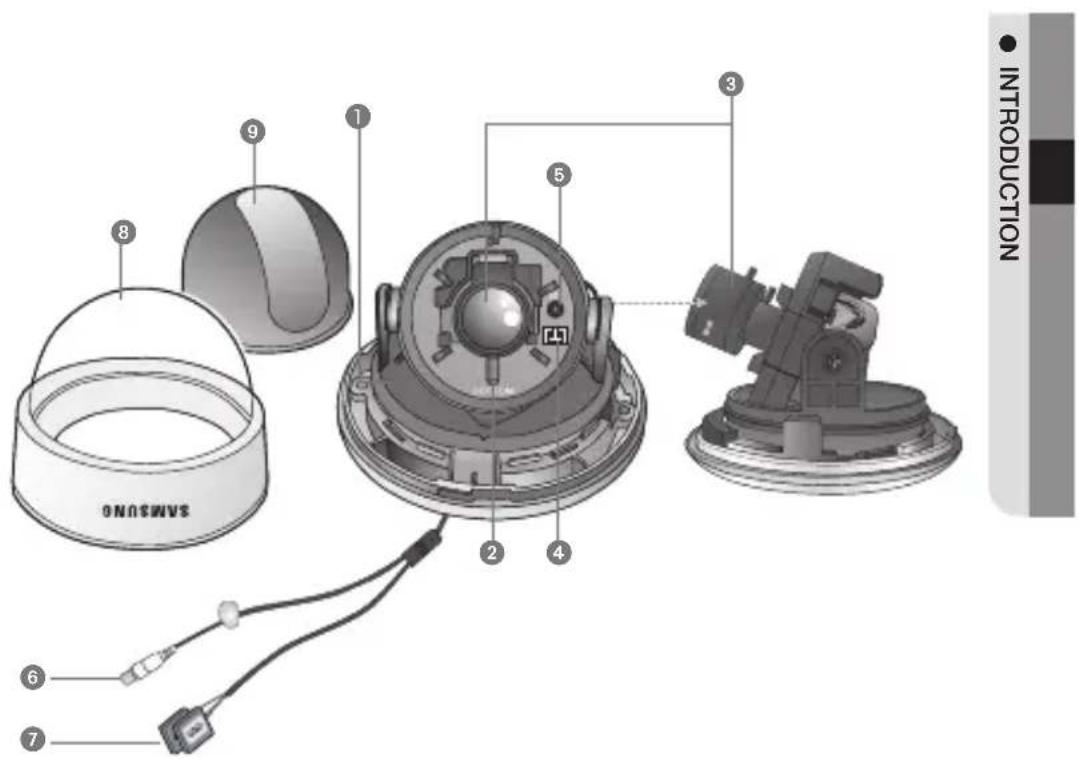
① Pan Base : Control panning angle of camera.
2 Rotate Base : Control rotating angle of camera.
3 x3.6 Vari-focal Lens Module 2.8 \~ 10.0mm (F1.2)
4 Video Output Terminal to Monitor
5 Function Setup switch : Display the menu on the screen and move the cursor to four directions to confirm status or after changing a selected item.
6 Video Output Jack
7 Power Input Terminal
8 Dome Cover
9 Shield Case
INSTALLATION
- Separate the dome cover by turning anti-clockwise.
- Separate the shield case by pulling from the camera body.
![Latch SAMSUNG Locking direction [Figure-1] Main Body (Camera) Shield Case Unlocking direction (Anti-clockwise) SAMSUNG Locking direction (Clockwise) Dome cover * To install the dome cover body, turn the latches in lo shown in the [Figure-1].](/content/2026/05/1140443/images/44c3c947dfd720a5f7103e3f218a896e8374bcdf4c392382772325b8eff50423.jpg)

■ The installation should be done by qualified service personnel or system installers.
If the ceiling material is not strong enough to hold the installation screws, the camera may fall off. Reinforce the ceiling as needed.
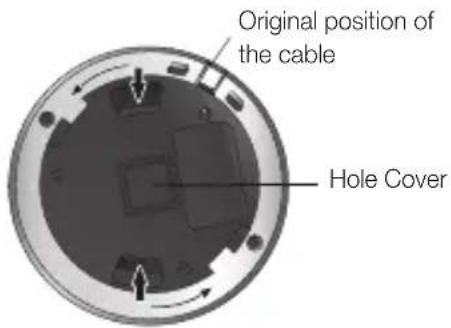
■ To change the position of the cable, take away the Hole Cover and pass the cable through.
12\_ installation
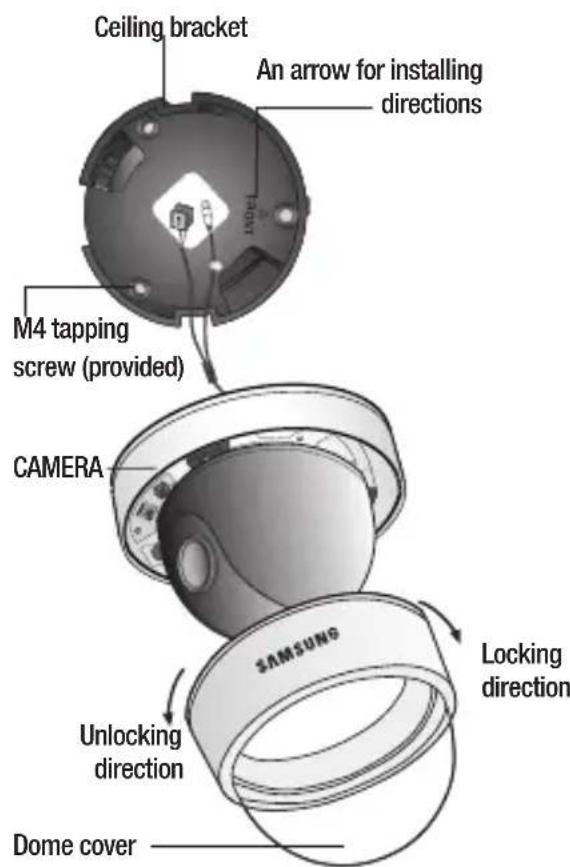

- Hold the ceiling bracket (located where the arrow points to) and separate it from the main body of the camera by rotating it anti-clockwise. (refer to the picture in 'Notes' on page 13)
- Place the separated ceiling bracket so that the "Front" side faces the area to be monitored and install it with the M4 tapping screws.
- To combine the main body with the ceiling bracket, make sure that the Pan Base fixing screw face the opposite side of the "Front" side of the ceiling bracket and rotate it clockwise.
- Adjust the camera lens to face the area to be monitored and fix the main body and the dome cover by aligning the grooves and rotating the body clockwise.
installation
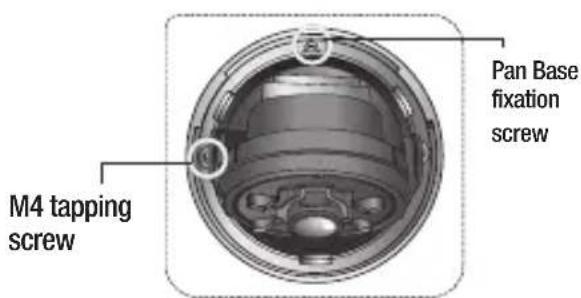
[Figure-2]

If you want to install the camera with the ceiling bracket together, fi x them using two M4 tapping screws at the side of the main body (refer to the [Figure-2] on page 14)
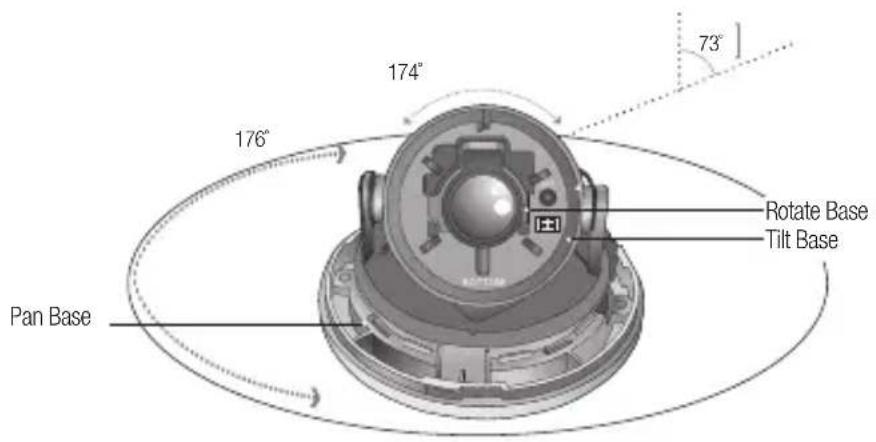
ADJUST THE PANNING AND TILTING WHILE WATCHING THE MONITOR
-
You can adjust camera to any direction by using Pan, Tilt, Rotate mechanism.
-
Pan Base moves by 176^ to each side direction and 352^ on the whole.
- Tilt Base covers total 73^ angle (0^ 73^) .
-
Change to read, "Rotate Base moves by 174^ to each side direction and 348^ in total.
-
Methods of adjustment
• Installing the dome on a wall
① After mounting the camera on a wall, adjust the panning angle so that the camera faces the direction that is to be monitored.
② Adjust the tilting angle by rotating the tilt base.
3 Loosen the rotate base hold screw and adjust rotate base for the best view.
4 Tighten the rotate base hold screw.
• Installing the dome on a ceiling
1 After mounting the camera on a ceiling, adjusting the panning angle to the correct viewing position by rotating the pan base.
② Adjust the tilting angle by rotating the tilt base.
3 Loosen the rotate base hold screw and adjust rotate base for the best view.
4 Tighten the rotate base hold screw.
CONNECTING TO MONITOR
Connect the VIDEO-OUT jack to the VIDEO-IN jack of the monitor.
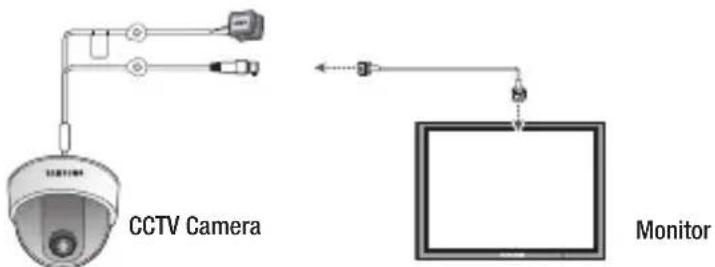
- As the connecting method varies with the instruments, refer to the manual supplied with the instrument.
- If necessary, you can connect the monitor to the REMOTE jack on the back of your camera.
- Only connect the cable when the power is turned off.
CONNECTING TO POWER
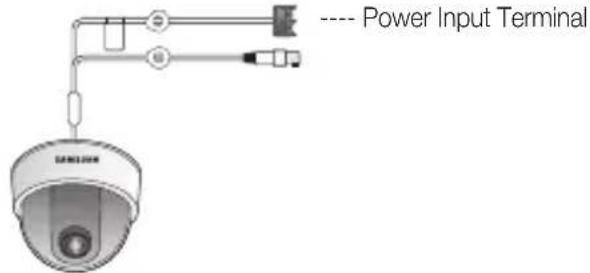
Connect the adaptor to the power input terminal as shown in the figure below. The recommended adaptor specification for SCD-2080EN/SCD-2080EP is DC 12V / 500mA or AC 24V / 300mA.
When the resistance value of copper wire is at [20^(68^)]
| Copper wire size (AWG) | #24 (0.22mm ^2 ) | #22 (0.33mm ^2 ) | #20 (0.52mm ^2 ) | #18 (0.83mm ^2 ) |
| Resistance ( /m) | 0.078 | 0.050 | 0.030 | 0.018 |
| Voltage Drop (V/m) | 0.028 | 0.018 | 0.011 | 0.006 |
- As shown in the table above, voltage decreases as the wire gets longer. Therefore use of an excessively long adaptor output line for connection to the camera may affect the performance of the camera.
* Standard voltage for camera operation : DC 12V ±10%
* There may be some deviation in voltage drop depending on the type of wire and the manufacturer.
16 connection

- Be sure to connect power only after all the installation is complete.
■ Note that DC adaptor is not supplied with camera.
■ Ground should be connected to the GND terminal.
USING COAXIAL COMMUNICATIONS
• Coaxial Communications System
- OSD Control method
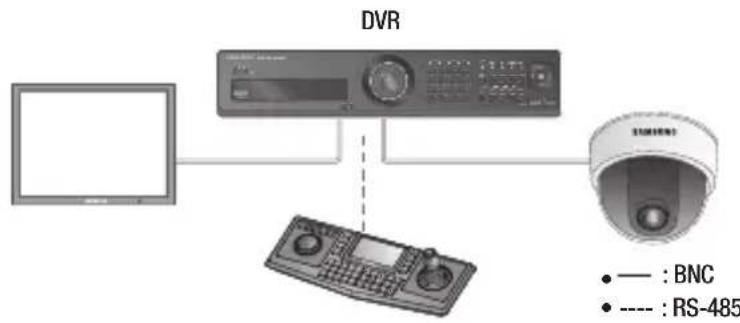
flowchart
graph TD
    A["Monitor"] --> B["DVR"]
    B --> C["Controller"]
    C --> D["SNR-485"]
- Video Cable
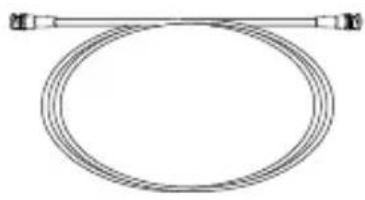
The camera's video output port is connected to the monitor with a BNC coaxial cable, shown below: If the distance between the camera and the monitor exceeds the recommended maximum, please use an auxiliary video amp.
natural_image
Simple line drawing of a coiled cable or hose with two connectors (no text or symbols)| Distance Recommended Cable Specification |
| 300m 3C2V(RG-59/U) |
| 450m 5C2V(RG-6/U) |
| 600m 7C2V(RG-11/U) |

If the camera is controlled through coaxial communication, please use a video amp intended for coaxial communications. Regular video amps do not transfer coaxial signals.
English_17
MENU CONFIGURATION
| MAIN SETUP | |||
| LENS | ●DC | ||
| EXPOSURE | ●BRIGHTNESS●SENS-UP | ●SHUTTER●RETURN | ●AGC |
| WHITE BAL | ●ATW●MANUAL | ●OUTDOOR●AWC→SET | ●INDOOR |
| SSDR | ●OFF | ●ON | |
| BACKLIGHT | ●OFF | ●BLC | ●HLC |
| SSNR3 | ●ON | ●OFF | |
| DAY/NIGHT | ●AUTO | ●COLOR | ●B/W |
| SPECIAL | ●IMAGE ADJ●SYNC●DIS | ●MONITOR●MOTION DET●LANGUAGE | ●CAM TITLE●PRIVACY●RETURN |
| EXIT | ●SAVE | ●NOT SAVE | ●RESET |
MENU SETUP
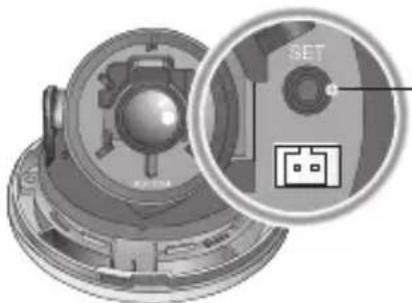
Use the Function Setup switch within the camera.
natural_image
Mechanical component diagram showing a circular inset with a SET button and a grid symbol (no readable text or labels)Function Setup switch
- Press the Function Setup switch.
- Main setup menu is displayed on the monitor screen.
18_ setup
Select the function using the Function Setup switch.
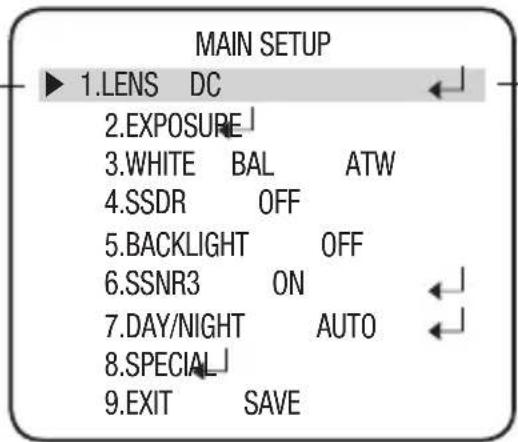
Change the status using the Function Setup switch.
-
Select a desired function using the Function Setup switch.
-
Place the cursor over a desired item.
- Set up a selected item by using the Function Setup switch.
- To finish the setting, select 'EXIT' and press the Function Setup switch.

An item with the icon also has sub menus. To select a sub menu, select an item with the icon and press the Function Setup switch.
■ An item with the - - - icon is unavailable due to function settings.
LENS
Using this function, you can control the screen brightness.
- When the SETUP menu screen is displayed, select 'LENS' by using the Function Setup switch so that the arrow indicates 'LENS'.
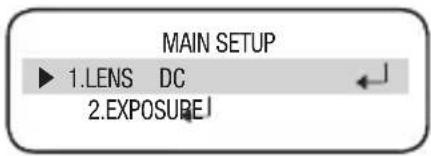
-
The Lens mode has a sub menu, shown below.
-
BRIGHTNESS : Adjusts the video brightness.
- FOCUS ADJ : To adjust the lens focus correctly, you must activate the Focus Settings mode. To activate the Focus Settings mode, adjust the lens focus, and then deactivate the settings mode.
- You can adjust the shutter value of ESC shutter mode.

If color rolling occurs, set Shutter to ---.
EXPOSURE
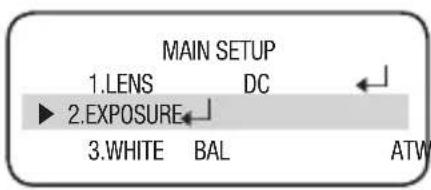
- When the SETUP menu screen is displayed, select EXPOSURE by using the Function Setup switch so that the arrow indicates 'EXPOSURE'.
- Select a desired mode using the Function Setup switch.
English_19
setup
• BRIGHTNESS : Adjusts the video brightness.
- SHUTTER: You can select the shutter.
- A.FLK : Select this when you experience picture flicker, which can happen when there is a clash with the frequency of the installed lighting.
- ESC : Select this to control the shutter
EXPOSURE SETUP
▶ 1.BRIGHTNESS 25
2.SHUTTER ---
3.AGC HIGH
4.SENS-UP OFF
5.RETURN
speed automatically. If ESC is selected, the shutter speed is automatically controlled depending on the ambient illumination of the subject.
- MANUAL: You can control shutter speed manually.
(NTSC MODEL : 1/60\~1/120,000 sec, PAL MODEL : 1/50\~1/120,000 sec)
- --- : Shutter speed is fixed at 1/60sec(1/50sec).

■ Set the shutter mode to --- if color rolling occurs.
- When the SHUTTER is set to ESC after selecting the Internal Synchronization Type, the picture may become unstable if the camera faces a bright fluorescent light. Therefore, take care when choosing the installation position.
- When the SHUTTER is set to MANUAL or A.FLK mode, SENS-UP will be disabled.
• AGC (AUTO GAIN CONTROL)
The higher the gain level, the brighter the screen- but the higher the noise.
- OFF : Deactivates the AGC function.
- LOW : Allows automatic gain control from 5.3dB to 32dB.
- HIGH : Allows automatic gain control from 5.3dB to 37dB.
- SENS-UP: When it is night or dark, the camera automatically detects the light level and maintains a clear picture if this mode is activated.
- OFF : Deactivates the SENS-UP function.
- AUTO : Activates the SENS-UP function.
- RETURN: Select this to save the changes in the EXPOSURE menu and return to the SETUP menu.

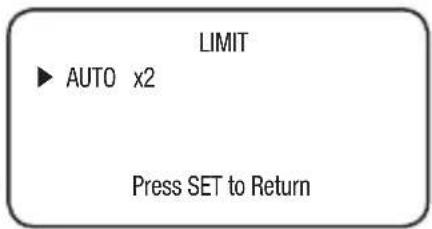
If you press the Function Setup switch in 'AUTO' mode, You can adjust brightness by adjusting the SENS-UP level. (x2 \~ x512)
Note that the higher the SENS-UP level, the brighter the screen, but the more likely it is that an after-image will appear.
Although Noise, Spots, and Whitish symptoms may occur in SENS-UP operation when the sens-up level is increased, this is normal.
If GAIN of EXPOSURE is not in use, the SENS-UP (Sensitivity-Up) is set to “---”.
20\_ setup
Press SET to Return
WHITE BAL (WHITE BALANCE)
Use the White Balance function to adjust the screen color.
-
When the SETUP menu screen is displayed, select 'White Bal' by using the Function Setup switch so that the arrow indicates 'White Bal'.
-
Select a desired mode using the Function Setup switch.
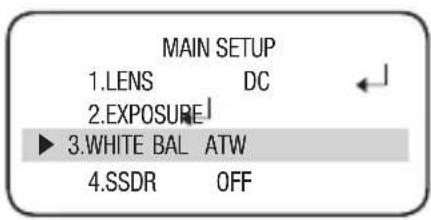
※ Select one of the following 5 modes, as appropriate for your purpose.
- ATW: Select this when the color temperature is between 1,700°K and 11,000°K.
- OUTDOOR: Select this when the color temperature is between 1,700°K and 11,000°K.(sodium light inclusion) Select this when the color temperature of environment surrounding the subject is out of the control range (e.g. clear sky, or sunset).
- INDOOR: Select this when the color temperature is between 4,500°K and 8,500°K.
- MANUAL: Select this to fi ne-tune White Balance manually. Set White Balance fi rst by using the ATW or AWC mode. After that switch to MANUAL mode, fi ne-tune the White Balance and then press the Function Setup switch.
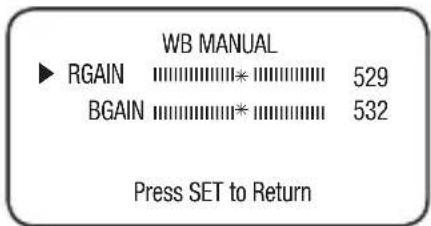
- AWC→SET: To find the optimal luminance level for the current environment, point the camera towards a sheet of white paper and press the Function Setup switch. If the environment changes, readjust it.

- White Balance may not work properly under the following conditions.
① When the ambient illumination of the subject is dim.
2 If the camera is directed towards a fluorescent light or is installed in a place where illumination changes dramatically, the White Balance operation may become unstable.
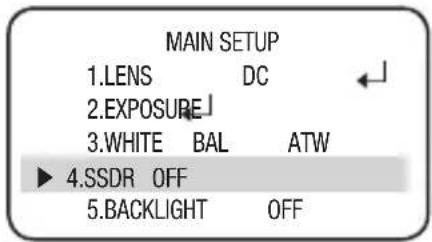
SSDR (SAMSUNG SUPER DYNAMIC RANGE)
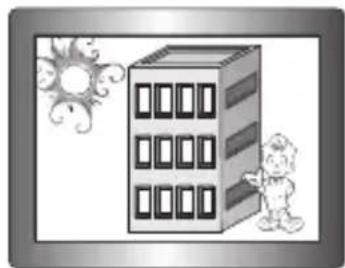
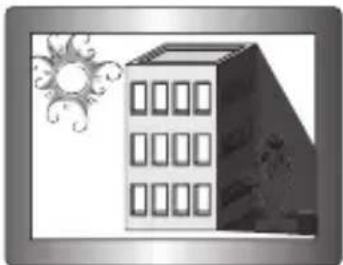
SSDR illuminates darker areas of an image while retaining the same light level for brighter areas to even out the overall brightness of images with high contrast between bright and dark areas.
-
When the SETUP menu screen is displayed, select 'SSDR' by using the Function Setup switch so that the arrow indicates 'SSDR'.
-
Use the Function Setup switch to change the SSDR level in the sub menu according to the contrast between bright and dark areas.
natural_image
Illustration of a cartoon-style building with windows and a child pointing at it, surrounded by decorative sun and swirls (no text or symbols)SSDR ON
natural_image
Illustration of a modern multi-story building with windows and decorative sunburst elements (no text or symbols)SSDR OFF
BACKLIGHT
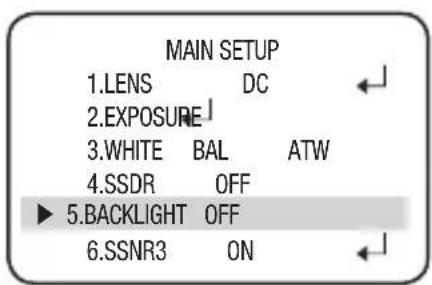
The SCD-2080E is designed so that it delivers a distinctive subject and background at the same time, even when the subject is in backlight, by adopting a function of the proprietary W-V DSP chip.
- When the SETUP menu screen is displayed, select 'BACKLIGHT' by using the Function Setup switch so that the arrow indicates BACKLIGHT.
-
Select a desired mode using the Function Setup switch depending on the camera purpose.
-
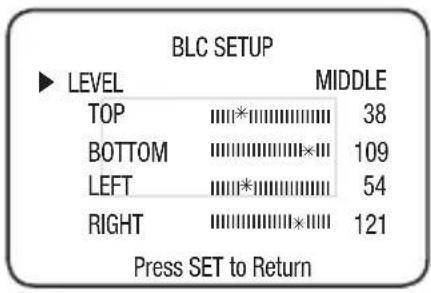
BLC: Enables a user to directly select a desired area from a picture and to view the area more clearly.
- LEVEL : Adjusts the brightness level of a monitoring area.
- TOP/BOTTOM/LEFT/RIGHT : Adjust the area to be enhanced.
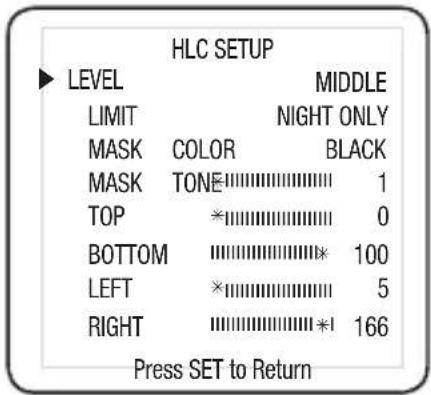
• HLC (High Light Compensation):
This function masks any areas of peak white light, this minimizes whiteout due to over exposure and thus preserve much of the on-screen details that are within the camera view.
- LEVEL : Adjusts the brightness level of a monitoring area.
- LIMIT: Enable to change the operating condition.
- MASK COLOR/TONE : Change the color / brightness of the masking area. (Black, Red, Blue, Cyan, Magenta)
- TOP/BOTTOM/LEFT/RIGHT : Adjust the area to be enhanced.
- OFF: Not being used
- Select a desired mode using the Function Setup switch and press the switch.

Because there can be a difference in the effectiveness of HLC according to the amount of light area in the screen, optimize the installation angle for the best HLC performance.
- When dark, the HLC is only activated when a bright light exceeding a specific size. (In NIGHT ONLY mode.)
The HLC is not activated in day light or when bright light is not present at night. (In NIGHT ONLY mode.)
■ When HLC function is used, D-ZOOM and DIS functions are not activated.

SSNR3
This function reduces the background noise in a low luminance environment.
-
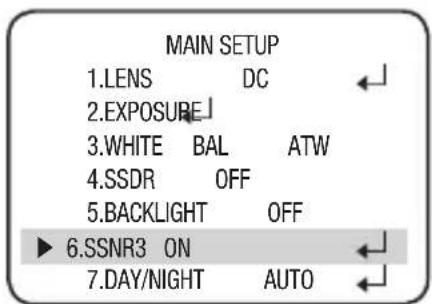
When the SETUP menu screen is displayed, select 'SSNR3' by using the Function Setup switch so that the arrow indicates 'SSNR3'.
-
Select a desired mode using the Function Setup switch.
- OFF: Deactivates SSNR3. Noise is not reduced.
- ON: Activates SSNR3 so that noise is reduced.
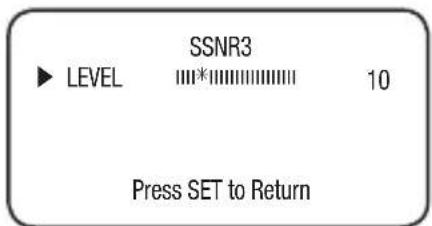
- Set the SSNR3 mode to 'ON' and press the Function Setup switch. Then you can adjust the noise reduction level.

- You cannot set the SSNR3 to 'ON' or 'OFF' when the AGC mode of the EXPOSURE menu is 'OFF'.
- When adjusting the noise reduction level of the SSNR3 mode, remember that the higher the level set, the more the noise level will be reduced but that after image may also occur.
DAY/NIGHT
You can display pictures in color or black and white.
-
When the SETUP menu screen is displayed, select 'DAY/NIGHT' by using the Up and Down buttons so that the arrow indicates 'DAY/NIGHT'.
-
Select a desired mode using the Left and Right buttons according to the picture display you want.
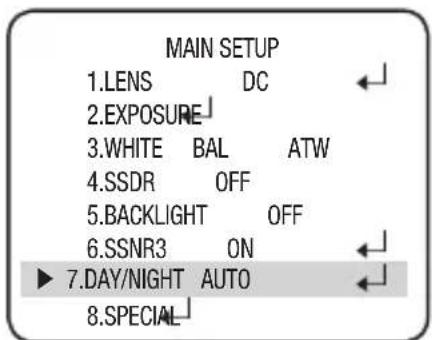
• COLOR: The picture is always displayed in color.
- B/W: The picture is always displayed in black and white. You can turn on or off the burst signal on B/W mode.
- AUTO: The mode is switched to 'Color' in a normal environment, but switches to 'B/W' mode when ambient illumination is low. To set up the switching time for AUTO mode, press the Function Setup switch. You can turn on or off the burst signal on B/W mode.
- DURATION: You can select the day/night switching point.
- DWELL TIME : You can select the duration time about changing the day/night mode. →3s, 5s, 7s, 10s, 15s, 20s, 30s, 40s, 60s
| Color → B/W B/W → Color | ||
| Early 2.5 lux | 5 lux | |
| Late 1 lux | 10 lux |
※ The day/night switching point of the camera can be adjusted.

When AGC in the EXPOSURE menu is 'OFF', AUTO mode is not available to select.
SPECIAL
- When the SETUP menu screen is displayed, select 'SPECIAL' by using the Function Setup switch so that the arrow indicates 'SPECIAL'.
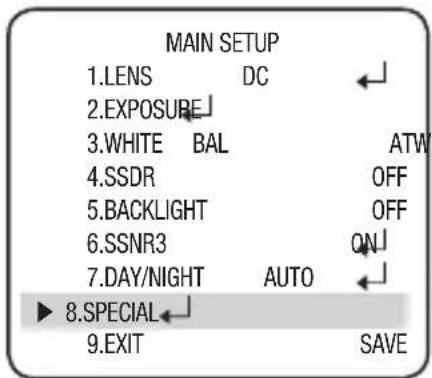
- Select a desired mode using the Function Setup switch.
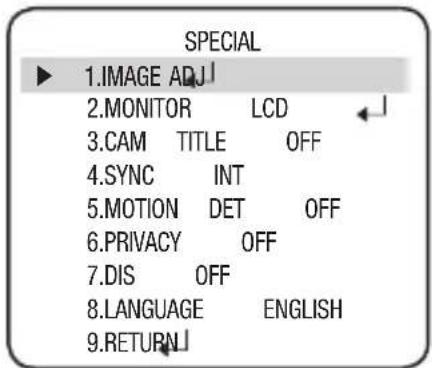
- IMAGE ADJ :
1) When the SPECIAL menu screen is displayed, select 'IMAGE ADJ' by using the Function Setup switch so that the arrow indicates 'IMAGE ADJ'.
2) Select a desired mode using the Function Setup switch.
- V-REV : You can flip the picture vertically on the screen.
- H-REV : You can flip the picture horizontally on the screen.
- D-ZOOM : You can use a digital zoom of x1 \~ x16.
- FONT COLOR : You can change the OSD font color.
(White, Yellow, Green, Red, Blue)
- SHARPNESS: As you increase this value, the picture outline becomes stronger and clearer. Adjust this value appropriately depending on the sharpness of the picture.
- RETURN : Select this to save the settings for the IMAGE ADJ menu and to return to the SPECIAL menu.
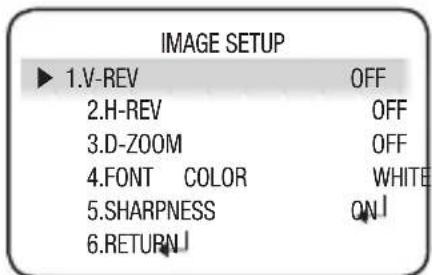

- When the V-REV or H-REV mode is enabled, the text on the screen does not flip.
If you increase the SHARPNESS level too high, the picture may become distorted or noise may appear.
- Monitor: Please change the settings value of video appropriate to your monitor.
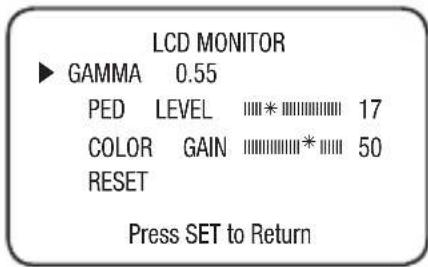
- LCD : Please select this menu item when using an LCD monitor. You can change the gamma, PED level and color gain in the sub menus.
- CRT : Please select this menu item when using a CRT monitor.
- USER : Please use this menu item when using a monitor other than standard ones. You can change the gamma, PED level and color gain in the sub menus.
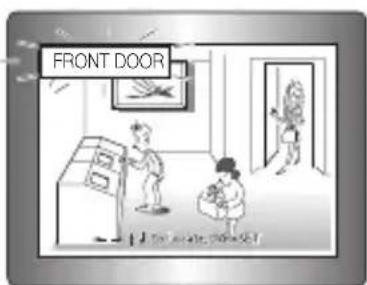
- CAM TITLE:
If you enter a title, the title will appear on the monitor.
If the SPECIAL menu screen is displayed, use the Function Setup switch so that the arrow indicates 'CAM TITLE'.
② Set it to 'ON' by using the Function Setup switch.
③ Press the Function Setup switch.
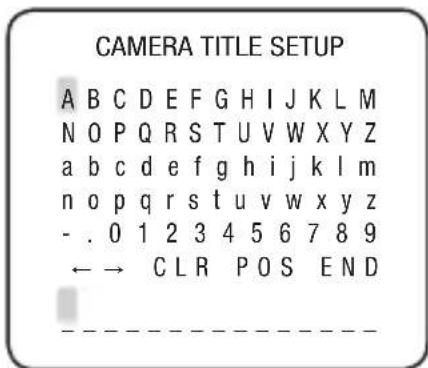
4 Use the Function Setup switch to move to a desired letter and select the letter by pressing the switch. Repeat this to enter multiple letters. You can enter up to 15 letters.
5 Enter a title, move the cursor to 'POS' and press the Function Setup switch. The entered title appears on the screen. Select the position to display the title on the screen by using the Function Setup switch and press. When the position is determined, select 'END' and press the Function Setup switch to return to the SPECIAL menu.

English_27
setup

- When the CAM TITLE menu is 'OFF', no title will be displayed on the monitor screen even if you enter one.
■ English and Numbers are available in the mode.
If you move the cursor to CLR and press the Function Setup switch, all the letters are deleted. To edit a letter, change the cursor to the bottom left arrow and press the Function Setup switch. Move the cursor over the letter to be edited, move the cursor to the letter to be inserted and then press the Function Setup switch.
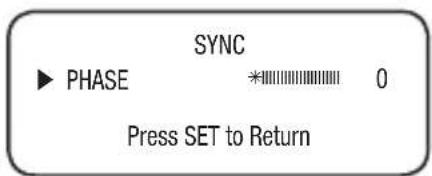
- SYNC: In areas where the supply is at 60Hz(NTSC), 50Hz(PAL), you can synchronize the output phase of multiple cameras using the power synchronization function (Line-Lock) without using a synchronization sign
- INT : Internal Synchronization Type
-
L/L : Power Synchronization Type, Line-lock
-
Press the Function Setup switch.
- You can select a desired phase from 0 to 359 when select 'phase'.

- When using AC power at 60Hz(NTSC), 50Hz(PAL) frequency, you can use the L/L type synchronization.
When the power is DC 12V, the SYNC menu is fixed to the 'INT' mode.
- MOTION DET:
This product has a feature that allows you to observe movement of objects in 8 different areas on the screen, and the words 'MOTION DETECTED' appear on the screen when movement is detected. You can monitor activity more efficient.
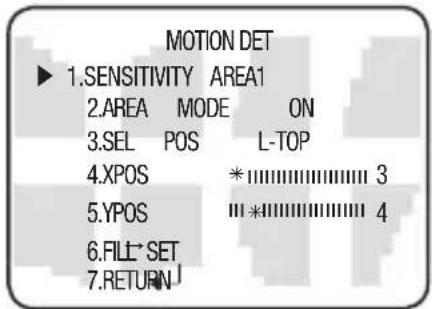
When the SPECIAL menu screen is displayed, press the Function Setup switch so that the arrow indicates 'MOTION DET'.
② Set up the mode using the Function Setup switch.
- SENSITIVITY :
You can select up to 8 MD areas. When SENSITIVITY number is high, motion detection sensitivity is increased to recognize even small movement.
- AREA MODE : Determines whether to use the MD area selected in SENSITIVITY.
- SEL POS : Determines which of the 4 vertices of each MD area is to be used.
- XPOS : Determines the coordinate of the horizontal axis for SEL POS.
- YPOS : Determines the coordinate of the vertical axis for SEL POS.
- FILL → SET : Fills in a selected MD area. The color of fi lling is sequentially selected as brown, orange, blue, cyan, yellowish green, yellow, magenta and red.
- RETURN : Select this to save the MOTION DET menu settings and return to the SPECIAL menu.
- PRIVACY: Mask an area you want to hide on the screen,
When the SPECIAL menu screen is displayed, press the Function Setup switch so that the arrow indicates 'PRIVACY'.
2 Set up the mode using the Function Setup switch.
- AREA: You can select up to 12 PRIVACY areas.
- MODE: Determines whether to use the area selected.
- MASK COLOR :
Determine area color. You can select GREEN, RED, BLUE, BLACK, WHITE and GRAY.
- MASK TONE : Adjust the brightness of MASK COLOR.
- TOP/BOTTOM/LEFT/RIGHT : Adjust the size and position of the selected area.
- RETURN : Select this to save the PRIVACY menu settings and return to the SPECIAL menu.
• DIS (Digital Image Stabilizer) :
This function mitigates any picture movement due to external factors such as wind.

As the DIS function uses the digital zoom the camera's resolution will decrease.
- DIS doesn't operate when background illumination is too low.
DIS doesn't operate when object pattern is monotonic as like sky or white wall.
If DIS is enabled, the digital zoom is not configured to less than 46 level.
setup
- LANGUAGE: You can select the menu language according to your requirements.
- RETURN : Select this to save the SPECIAL menu settings and return to the MAIN SETUP menu.
EXIT
Select a desired EXIT mode using the Function Setup switch depending on the camera purpose.
- SAVE: Save the current settings and exit the MAIN SETUP menu.
- NOT SAVE: Do not save the current settings and exit the MAIN SETUP menu.
- RESET: Resets the camera settings to the factory defaults. Language and Monitor settings are not initialized.
troubleshooting
TROUBLESHOOTING
If you have trouble operating your camera, refer to the following table. If the guidelines do not enable you to solve the problem, contact an authorized technician.
| PROBLEM | SOLUTION |
| Nothing appears on the screen. | ▶ Check that the power cord and line connection between the camera and monitor are fixed properly. ▶ Check that you have properly connected VIDEO cable to the camera VIDEO output jack. |
| The image on the screen is dim. | ▶ Is the lens stained with dirt? Clean your lens with a soft, clean cloth. ▶ Check the monitor and DVR settings. ▶ If the camera is exposed to very strong light, change the camera position. |
| The image on the screen is dark. | ▶ Adjust the contrast feature of the monitor or DVR. ▶ If you have an intermediate device, set the 75Ω / Hi-z properly. |
| The camera is not working properly, and the surface of the camera is hot. | ▶ Check that you have properly connected the camera to an appropriate power source. |
| The SENS-UP function does not work. | ▶ Check that AGC of EXPOSURE SETUP menu is 'OFF'. ▶ Check that SHUTTER of EXPOSURE SETUP menu is 'A.FLK' or 'MANUAL'. |
| The Motion Detection function does not work. | ▶ Check that MOTION DEF of SPECIAL SETUP menu is 'OFF'. |
| Color is not correct. | ▶ Check the setting of WHITE BAL SETUP menu . |
| The screen fl ickers continually. | ▶ Check that the camera is not pointing at the sun. |
| When coaxial communication is not available | ▶ Make sure that the camera and monitor are installed within the recommended distance. ▶ Use the video amplifier equivalent to coaxitron if the recommended installation distance is exceeded. |
specifications
SPECIFICATIONS
| SCD-2080EN SCD-2080EP | ||
| ELECTRICAL | ||
| Input Voltage DC 12V / AC 24V | ||
| Power Consumption Max 3.5W | ||
| VIDEO | ||
| Imaging Device 1/3 inch, Diagonal 6mm Super HAD CCD | ||
| Total Pixels 811(H) x 508(V) | 795(H) x 596(V) | |
| Effective Pixels 768(H) x 494(V) 752(H) x 582(V) | ||
| Scanning System 2:1 Interlace | ||
| Synchronization Internal / Line-Lock | ||
| Frequency H : 15.734KHz V:59.94Hz H: 15.625KHz V: 50.00Hz | ||
| Horizontal Resolution COLOR : 600TVL | ||
| Min. Illumination COLOR : 0.15 Lux (50IRE, @F1.2), 0.0003Lux (SENS-UP, x512) | ||
| S/N (Y Signal) 52dB (Weight On, AGC Off) | ||
| Video Output CVBS : 1.0Vp-p, 75Ω composite | ||
| LENS | ||
| Zoom Ratio 3.6x (Manual) | ||
| Focus Length | 2.8 ~ 10.0mm (F1.2) | |
| Angular Field of View | Tele : 28°(H) x 21°(V), Wide : 94.4°(H) x 69.2°(V) | |
| PAN / TILT / ROTATE | ||
| Pan / Tilt / Rotate Range | 0°~352° / 0°~73° / 0°~348° | |
| OPERATIONAL | ||
| Electronic Shutter Speed | 1/60 ~ 1/120k sec | 1/50 ~ 1/120k sec |
| ON Screen Display | NTSC : Korean, English, Japanese, Spanish, French, PortuguesePAL : English, Chinese, German, Italian, French, Spanish, Russian,Czech, Polish, Romanian, Serbian, Swedish, Danish, Turkish,Portuguese | |
| SSDR | On / Off (Level adjustable) | |
| Backlight Compensation | BLC / HLC / OFF | |
32\_ specifications
| SCD-2080EN SCD-2080EP | |
| Day & Night COLOR / BW / AUTO (S/W Type) | |
| Gain Control Low / High / Off | |
| White Balance ATW / Outdoor / Indoor / Manual / AWC (1,700°K ~ 11,000°K) | |
| SENS-UP (frame Integration) | Auto / Off (Selectable x2 ~ x512) |
| Motion Detection On / Off (8 Programmable zones) | |
| Privacy Masking On / Off (12 Programmable zones) | |
| 3D Noise Filter (SSNRIII) On / Off (Level adjustable) | |
| Digital Zoom On / Off (x1 ~ x16) | |
| Digital Image Stabilization(DIS) | On / Off |
| Camera Title On / Off (Displayed 15 Characters) | |
| Sharpness On / Off (Level adjustable) | |
| Flip / Mirror On / Off | |
| Communication | Coaxial(Pelco Coaxitron) |
| ENVIRONMENTAL | |
| Operating Temperature / Humidity | -10°C ~ +50°C / 30% ~ 80% RH |
| Storage Temperature / Humidity | -20°C ~ +60°C / 20% ~ 90% RH |
| MECHANICAL | |
| Dimension / Weight | ∅115.8 x 92.7(H)mm / 0.34kg |
※ This specification can be changed without notice for performance improvement of product.
specifications
DIMENSION
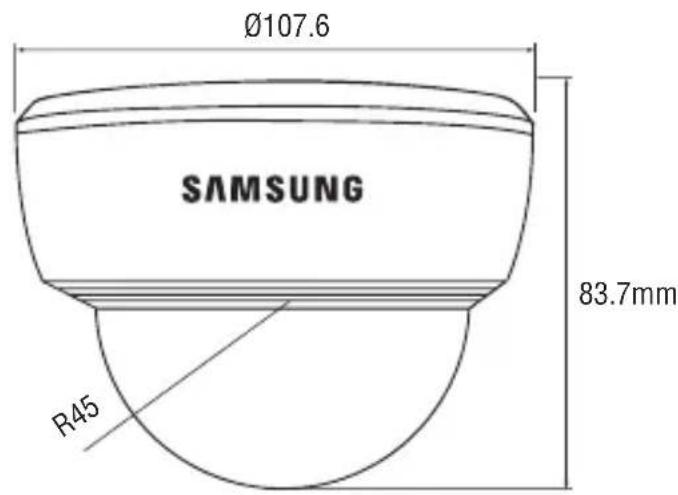
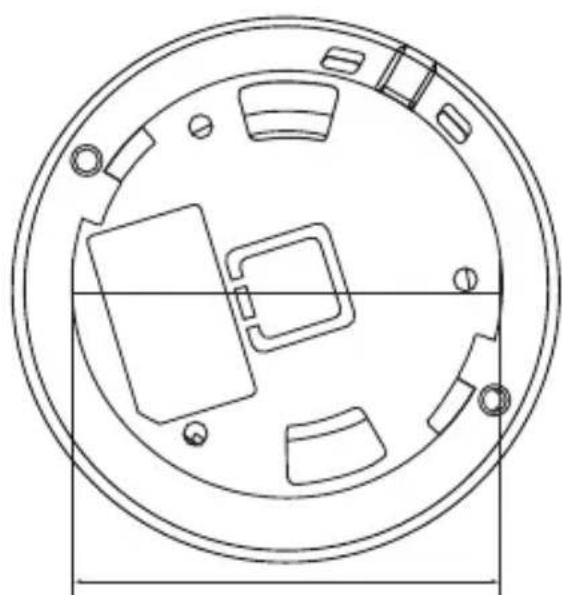
natural_image
Technical line drawing of a circular mechanical component with internal compartments and mounting holes (no text or symbols)81.6mm
34_ specifications
DECLARATION OF CONFORMITY
Application of Council Directive(s) 2004 / 108 / EC
Manufacturer's Name SAMSUNG TECHWIN CO., LTD
Manufacturer's Address SAMSUNG TECHWIN CO., LTD
42, SUNGJU-DONG CHANGWON-CITY,
KYUNGNAM, KOREA, 641-716
European Representative Name
European Representative Address
Equipment Type/Environment CCTV Camera
Model Name SCD-2080EP
Beginning Serial NO. C64A6V2Z700001Z
Conformance to EN 55022 : 2006
EN 50130-4 : 2003
We, the undersigned, hereby declare that the equipment specified above conforms to the above Directive(s).
Manufacturer SAMSUNG TECHWIN CO., LTD Legal Representative in Europe
Signature Signature
Full Name BONJENG GU Full Name
Position QUALITY CONTROL MANAGER Position
Place CHANGWON, KOREA Place
MEMO
MEMO
MEMO
MEMO

SALES NETWORK
SAMSUNG TECHWIN CO., LTD.
Samsungtechwin R&D Center, 701, Sampyeong-dong, Bundang-gu, Seongnam-si, Gyeonggi-do, Korea, 463-400
TEL : +82-70-7147-8740\~60, FAX : +82-31-8018-3745
Samsung House, 1000 Hillswood Drive, Hillswood Business Park Chertsey, Surrey, UNITED KINGDOM KT16 OPS
TEL: +44-1932-45-5300, FAX: +44-1932-45-5325
www.samsungtechwin.com
www.samsungsecurity.com
P/NO.: Z6806153601A