XM128 - Uncategorized NETGEAR - Free user manual and instructions
Find the device manual for free XM128 NETGEAR in PDF.


User questions about XM128 NETGEAR
0 question about this device. Answer the ones you know or ask your own.
Ask a new question about this device
Download the instructions for your Uncategorized in PDF format for free! Find your manual XM128 - NETGEAR and take your electronic device back in hand. On this page are published all the documents necessary for the use of your device. XM128 by NETGEAR.
USER MANUAL XM128 NETGEAR
Reference Guide for the Model XM128 ISDN Digital Modem
NETGEAR
NETGEAR, Inc.
A Bay Networks Company
48105 Warm Springs Blvd.
Fremont, CA 94539
USA
M-XM128NA-1
November 1997
© 1997 by NETGEAR, Inc. All rights reserved.
Trademarks
Bay Networks is a registered trademark of Bay Networks, Inc.
NETGEAR and FirstGear are trademarks Bay Networks, Inc.
Microsoft, Windows, and Windows NT are registered trademarks of Microsoft Corporation.
Other brand and product names are trademarks of their respective holders.
Statement of Conditions
In the interest of improving internal design, operational function, and/or reliability, NETGEAR reserves the right to make changes to the products described in this document without notice.
NETGEAR does not assume any liability that may occur due to the use or application of the product(s) or circuit layout(s) described herein.
Federal Communications Commission (FCC) Compliance Notice: Radio Frequency Notice
This device complies with part 15 of the FCC Rules. Operation is subject to the following two conditions:
- This device may not cause harmful interference.
- This device must accept any interference received, including interference that may cause undesired operation.
Note: This equipment has been tested and found to comply with the limits for a Class B digital device, pursuant to part 15 of the FCC Rules. These limits are designed to provide reasonable protection against harmful interference in a residential installation. This equipment generates, uses, and can radiate radio frequency energy and, if not installed and used in accordance with the instructions, may cause harmful interference to radio communications. However, there is no guarantee that interference will not occur in a particular installation. If this equipment does cause harmful interference to radio or television reception, which can be determined by turning the equipment off and on, the user is encouraged to try to correct the interference by one or more of the following measures:
- Reorient or relocate the receiving antenna.
- Increase the separation between the equipment and receiver.
- Connect the equipment into an outlet on a circuit different from that to which the receiver is connected.
- Consult the dealer or an experienced radio/TV technician for help.
EN 55 022 Declaration of Conformance
This is to certify that the NETGEAR Model XM128 Digital Modem is shielded against the generation of radio interference in accordance with the application of Council Directive 89/336/EEC, Article 4a. Conformity is declared by the application of EN 55 022 Class B (CISPR 22).
Certificate of the Manufacturer/Importer
It is hereby certified that the NETGEAR Model XM128 Digital Modem has been suppressed in accordance with the conditions set out in the BMPT-AmtsblVfg 243/1991 and Vfg 46/1992. The operation of some equipment (for example, test transmitters) in accordance with the regulations may, however, be subject to certain restrictions. Please refer to the notes in the operating instructions.
Federal Office for Telecommunications Approvals has been notified of the placing of this equipment on the market and has been granted the right to test the series for compliance with the regulations.
VCCI-2 Statement
This equipment is in the second Class category (information equipment to be used in a residential area or an adjacent area thereto) and conforms to the standards set by the Voluntary Control Council for Interference by Data Processing Equipment and Electronic Office Machines aimed at preventing radio interference in such residential areas.
When used near a radio or TV receiver, it may become the cause of radio interference.
Read instructions for correct handling.
Customer Support
For assistance with installing and configuring your NETGEAR system or with post-installation questions or problems, contact your point of purchase representative.
To contact customer support or to purchase additional copies of this document and publications for other NETGEAR products, you can contact NETGEAR at the following numbers:
- Phone:
U.S./Canada:1-800-211-2069
Japan: 0120-66-5402
Europe: (44) 171-571-5120
Australia:1-800-142-046
• F a x :
U.S./Canada: 510-498-2609
World Wide Web
NETGEAR maintains a World Wide Web Home Page that you can access at the universal resource locator (URL) http://NETGEAR.baynetworks.com. A direct connection to the Internet and a Web browser such as Internet Explorer or Netscape are required.
Bulletin Board Service
NETGEAR maintains a bulletin board that you can access to obtain information about the latest version of the software. In the United States, phone 407-531-4574.
Contents
Preface
Purpose ......xvii
Conventions ...... xviii
Special Message Formats ......xviii
Use of Enter, Type, and Press ......xviii
Other Conventions ......xix
Related Publication ....xix
Chapter 1
Introduction
Features 1-1
Interface Options 1-3
Front Panel 1-3
Rear Panel 1-6
Chapter 2
Installation
Package Contents 2-1
Installing the Modem 2-2
Verifying Hardware Installation 2-3
Chapter 3
Setup for Windows 95 and Windows NT 4.0
Selecting the Appropriate Windows 95 Driver (INF file) ....3-1
Chapter 4 Configuration
Configuring Your ISDN Line and Network 4-1
Configuring Your Modem Using a Terminal Program ....4-1
Understanding AT Commands 4-2
Quick Tips for Issuing AT Commands 4-3
Using AT Commands to Verify Modem Response 4-4
Communication Speed Setup 4-4
Switch Type Setup for North America 4-5
SPID Setup for North America 4-6
Entering DNs 4-7
Setup for Europe and the United Kingdom 4-7
Chapter 5 Async to Sync PPP
Internet and Remote Access PPP and SLIP 5-1
Making Async to Sync PPP and SLIP calls 5-1
Keeping a Line Connection During Idle Time 5-2
Answering Async to Sync PPP calls 5-3
Multilink PPP 5-3
Making a call using Multilink PPP 5-3
Dialing Pre-stored Phone Numbers 5-4
Endpoint Discriminator 5-4
Call Bumping Dynamic Channel Allocation 5-5
Chapter 6 ISDN Overview
Commands for Outgoing Calls 6-1
Dialing Out Using ISDN Mode 6-1
Dialing Out Using ISDN Mode Optional Speech Bearer Service 6-2
Dialing Out for Analog Adapter Port 1 ......6-2
Dialing Out for Analog Adapter Port 2 6-2
Manually Switching Communication Modes 6-2
Placing the Call 6-3
Commands for Incoming Calls 6-4
Digital Data 6-4
Determining the Packet Length 6-5
Answering a Call Using MSN 6-6
Data over Speech Channel 6-7
Best-effort Call Answering 6-7
Ambiguity Resolution Switch for Voice Calls 6-8
Multi Auto-Answering of Data Calls 6-8
Understanding ISDN Communication Protocols ......6-9
V.110 ISDN Communications 6-10
Answering a V.110 Call 6-10
Making a V.110 Call 6-10
V.120 ISDN Communications 6-11
Selecting V.120 for European ISDN (DSS1) Switch 6-11
Selecting V.120 for German National ISDN (1TR6) 6-11
Answering a V.120 Call 6-12
Making a V.120 Call 6-12
Configuring the V.120 Mode 6-12
Dialing in V.120 Mode 6-13
Making a Bundled Call with V.120 6-13
Identifying Your Line Provisioning 6-14
128 Kbps Speeds 6-15
Dialing Prestored Phone Numbers 6-15
Error Correction and Data Compression with V.120 6-15
X.75 ISDN Communications (Europe) 6-16
Answering an X.75 Call 6-16
Making an X.75 Call 6-17
Making a Bundled Call with X.75 6-17
Dialing Prestored Phone Numbers 6-18
Invoking V.42bis Data Compression 6-18
Bundle Connection with V.42bis Data Compression 6-19
Chapter 7 Advanced ISDN
Call Control for DSS1 7-1
Control of Outgoing Service Indicator 7-2
Control of ISDN Phone Numbers and Subaddresses 7-3
Call Control for 1TR6 (Old German ISDN) 7-5
Control of Outgoing Service Indicator 7-5
Control of EAZ (ENDGERÄTEAUSWAHLZIFFER) 7-6
Command Function 7-6
Answering a Call 7-7
Answering a Call for DSS1 7-7
Answering a Call for 1TR6 ....7-8
Best-effort Call Answering 7-8
Ambiguity Resolution Switch for Voice Calls 7-9
Multi-Auto-Answering of Data Calls 7-9
Data Call Indication 7-10
Disable Inbound Call Connection 7-10
Point-to-Point Configuration 7-11
Placing a Call 7-11
Placing a Call for DSS1 7-11
Placing a Call for 1TR6 7-12
User-To-User Information 7-13
Chapter 8 Analog Call Handling
AT Commands for Analog Calls 8-2
Making and Receiving Analog Calls 8-3
Placing a Call from the Analog Adapter 8-3
Accepting an Incoming Call 8-4
Chapter 9 Modem Upgrade
Upgrading with Flash EPROM 9-1
Upgrade Instructions 9-2
Kernel Mode 9-2
Chapter 10
Troubleshooting
Power-on Self-test 10-1
Loopback Tests 10-2
ISDN Loopback test (AT&T9) 10-2
Loopback with Self-test (AT&T10) 10-2
B1/B2 Loopback with Self-test 10-3
The Diagnostic Command 10-3
Modem Reset 10-4
Using The Embedded Protocol Analyzer 10-4
Setting up the Embedded EPA 10-5
Capturing the Protocol Data 10-5
Analyzing the Captured Data 10-6
10-8
Appendix A
Technical Specifications
General Specifications ...... A-1
Appendix B
Security Functions
Security Types and Levels ...... B-1
Level 1 Security B-2
Level 2 Security B-2
Level 3 Security B-3
Setting and Modifying Passwords B-3
Nonpassword Auto Callback Function ...... B-4
Appendix C
AT Command Set Reference
Operation Mode of the DTE Interface ......C-1
Simplex Mode C-1
AT Command Descriptions ......C-2
Description of ATI3 Output C-7
Appendix D
Status Registers and Result Codes
Viewing and Setting S-Registers ....D-1
Setting S-Registers ....D-2
Examples for Setting S-Registers ....D-2
S-Register Descriptions ......D-4
ATXn Result Code Option Table D-19
Result Code Chart Symbol Reference ......D-21
Result Code Field Descriptions ...... D-22
Connect Strings for Error Corrected Connections ...... D-23
Appendix E
Connector Pin Assignments
RJ-45 Plug and Connector ...... E-1
RJ-11 Plug and Connector E-3
Appendix F
Serial Port Interface
RS-232 Serial Interface ......F-1
Asynchronous Cable Connections ......F-2
Appendix G
ISDN Reference
ISDN Overview G-1
Basic Rate Interface ......G-2
Out-of-Band Signaling ......G-2
Terminal Adapter or Digital Modem ......G-3
ISDN Basic Rate Interface Points ......G-3
SPID Setup G-4
Ordering ISDN Service ......G-4
Order Form for AT&T 5ESS Switch (NI-1 ISDN) ......G-6
Order Form for DMS-100 Switch (NI-1 or Custom ISDN) ......G-7
Order Form for EWSD (NI-1 ISDN) G-8
Index
Figures
Figure 1-1. Front panel of the Model XM128 modem (with S/T interface) ......1-3
Figure 1-2. Front panel of the Model XM128 modem (with U interface) ......1-4
Figure 1-3. Rear panel of the Model XM128 modem (with S interface) .....1-6
Figure 1-4. Rear panel of the Model XM128 modem (with U interface) .....1-6
Figure 2-1. Model XM128 modem connections .....2-2
Figure E-1. RJ-45 plug and RJ-45 connector ...... E-1
Figure E-2. RJ-11 plug and RJ-11 connector ...... E-3
Tables
Table 1. Manual contents ......xix
Table 2. Manuals ...... xx
Table 1-1. Interface options ......1-3
Table 1-2. LED descriptions .....1-4
Table 1-3. Rear panel components ..... 1-7
Table 4-1. Terminal programs ....4-2
Table 4-2. Supported AT command types ......4-3
Table 4-3. Result codes commands ....4-4
Table 4-4. Switches supported by the Model XM128 modem ....4-5
Table 4-5. AT commands for setting protocols ....4-8
Table 4-6. AT commands for setting MSN 4-8
Table 5-1. S85 register values ....5-4
Table 6-1. Dialing commands ......6-3
Table 6-2. Call placing commands ....6-3
Table 6-3. Commands for assigning ISDN numbers ......6-6
Table 6-4. Best-effort call answering bit commands ......6-8
Table 6-5. ISDN protocol specifications ....6-9
Table 6-6. V.110 configuration commands ....6-10
Table 7-1. S-register values and functions .....7-2
Table 7-2. Outgoing low-layer compatibility commands ....7-3
Table 8-1. Frequently used AT commands 8-2
Table 8-2. Frequently used AT commands (European switches) ......8-2
Table 9-1. Definitions for the d modifier .....9-1
Table 10-1. Power-on self-test .....10-1
Table 10-2. EPA Commands 10-6
Table 10-3. Commands for analyzing captured data 10-6
Table 10-4. Control key functions ......10-7
Table B-1. Types of security ...... B-2
Table B-2. Levels of security ...... B-3
Table B-3. Auto callback commands ...... B-4
Table C-1. Basic AT command set ...... C-2
Table C-2. ATI3 command output ...... C-8
Table C-3. Extended AT& command set C-8
Table C-4. Extended AT* command set ...... C-12
Table D-1. Binary conversion table ...... D-3
Table D-2. Setting bit 3 D-3
Table D-3. Basic S-registers ATSn=x ...... D-4
Table D-4. Extended S-registers ATSn=x ......D-5
Table D-5. ATXn command setting options ...... D-19
Table D-6. Result code chart ...... D-21
Table D-7. Result code field descriptions ...... D-22
Table D-8. Connect strings ...... D-23
Table E-1. RJ-45 plug and RJ-45 connector pin assignments for the S/T interface . E-2
Table E-2. RJ-45 plug and RJ-45 connector pin assignments for the U interface .... E-2
Table E-3. RJ-11 connector pin assignments ...... E-3
Table F-1. Serial port interface ......F-1
Table F-2. Asynchronous flow control cable connection ......F-2
Table G-1. ISDN line configuration ......G-6
Table G-2. ISDN line configuration ......G-7
Table G-3. ISDN line configuration ......G-8
Preface
Congratulations on your purchase of the NETGEAR™ Model XM128 ISDN Digital Modem.
The NETGEAR Model XM128 modem provides connection for one or more PCs to the Internet or to the office over ISDN (Integrated Services Digital Network) lines. The modem operates at a speed of up to 460 kilobits per second (Kbps) data rate, or 115 Kbps data rate without compression, and can download video clips, music, or high-resolution color graphics from the World Wide Web or other online services many times faster than an analog modem. The Model XM128 modem supports concurrent data and voice communications, reducing cost and administration of multiple phone lines.
Purpose
This guide provides instructions for the installation and use of the Model XM128 modem. This guide also provides instructions for the installation and use of FirstGear ^™ , a configuration software application for installing, configuring, and monitoring the Model XM128 modem.
Conventions
This section describes the conventions used in this guide.
Special Message Formats
This guide uses the following formats to highlight special messages.

Note: This format is used to highlight information of importance or special interest.

Caution: This format is used to highlight information that will help you prevent equipment failure or loss of data.

Warning: This format is used to highlight material involving possibility of injury or equipment damage.
Use of Enter, Type, and Press
This guide uses “enter,” “type,” and “press” to describe the following actions:
- When you read “enter,” type the text and press the Enter key.
- When you read "type," type the text, but do not press the Enter key.
- When you read “press,” press only the alphanumeric or named key.
- When you read "click," click the left mouse button.
Other Conventions
This guide uses the following additional conventions:
italics
Book titles and UNIX file, command, and directory names.
courier font
Screen text, user-typed command-line entries.
Initial Caps Menu titles and window and button names.
[Enter] Named keys in text are shown enclosed in square brackets. The notation [Enter] is used for the Enter key and the Return key.
[Ctrl]+C Two or more keys that must be pressed simultaneously are shown in text linked with a plus (+) sign.
ALL CAPS DOS file and directory names.
Related Publication
Refer to Getting Started Using FirstGear for the Model XM128 ISDN Digital Modem for a quick installation guide. Refer to Table 1 to identify the contents of both manuals. The subject column in this table identifies the order of basic procedures you must complete to install your Model XM128 modem.
Table 1. Manual contents
| Subject | Getting Started Using FirstGear for the Model XM128 ISDN Digital Modem | Reference Guide for the Model XM128 ISDN Digital Modem |
| Installing modem hardware Chapter 3 | Chapter 2 | |
| Configuring the modem Chapter 3 | (If you are using Windows® 95 or Windows NT®) | Chapter 4(If you are using a terminal program.) |
| Installing the Windows 95 and Windows NT Driver | Chapter 3 No information given. | |
| Installing FirstGear Chapter 3 No information given. | ||
| Assigning ISDN numbers | Chapter 3 Chapter 4 and Chapter 5 | (For using AT commands when assigning ISDN numbers.) |
| Assigning multiple subscriber numbers | Chapter 3 Chapter 5 | (For using AT commands when assigning multiple subscriber numbers.) |
| Assigning protocols Chapter 3 Chapter 4 and Chapter 5 | (For using AT commands when assigning protocols.) | |
| Configuring Windows 95 Dial-Up Networking | Chapter 3 See: | Getting Started Using FirstGear |
Table 2 lists the manuals that are available for various localized products.
Table 2. Manuals
| Language | Product Model/Version | Interface | Reference Manual | FirstGear Manual |
| English Model | XM128S International | S/T M-XM128 | NA-0 M1-XM128S-0 | |
| English Model | XM128AU North America | U M-XM128N | NA-0 M1-XM128U-0 | |
| Japanese Model | el XM128D Japanese | DSU M-XM1 | 28JP-0 M1-XM128JP-0 | |
| German Model | XM128GE German | S/T M-XM128 | NA-0 M1-XM128S-0 | |
| Korean Model | XM128KO Korean | U M-XM128KO | 0-M1-XM128KO-0 |
Chapter 1 Introduction
Congratulations on your purchase of the NETGEAR Model XM128 ISDN Digital Modem. The Model XM128 modem sets a new price and performance standard for the rapidly growing Internet and telecommuting applications.
When used with off-the-shelf Internet or remote access client software, the Model XM128 modem enables mobile or home users to easily connect to the Internet or branch offices over Integrated Services Digital Network (ISDN) lines. The same device also allows a user to connect to the analog world via a modem, fax machine, or telephone connected directly to the Model XM128 modem.
To take advantage of constant new developments, the Model XM128 modem employs flash EPROMs, which allow for convenient uploading of newly available firmware that preserves your hardware investment.
The Model XM128 modem supports both D and B channel protocols. For the D channel, it supports DSS1, 1TR6, DMS-100, AT&T Custom, and NI-1. For the B channel, it supports X.75 SLIP, V.120, V.110, PPP Async-to-sync Conversion and Bundle (128 Kbps).
With its Hi/fn LZS or V.42bis compression on the B channel using either X.75 or V.120, the Model XM128 modem can effectively communicate at speeds up to 460 kilobits per second (Kbps) over ISDN lines.
Features
The Model XM128 modem supports a variety of compression schemes including V.42bis and Hi/fn LZS Compression (STAC) and communicates effectively at speeds up to 460 kilobits per second (Kbps) over ISDN lines.
The Model XM128 modem has two analog ports to connect analog devices such as fax machines, modems, and telephones. Two different devices can communicate over the two B channels to different locations simultaneously, enabling you to send a fax and make a voice call at the same time. The analog ports recognize standard dual-tone multifrequency (DTMF) tones as well as pulse dialing.
The Model XM128 modem has the following features:
- Plug-and-Play support for a windows 95 ^® environment
• Full compatibility with both ISDN and remote public-switched telephone network (PSTN) by way of ISDN - Multiple signaling protocol compatibility with DSS1, 1TR6, NI-1, AT&T 5ESS, and Northern Telecom DMS 100 network switches
• X.75, V.110, V.120, and Point-to-Point Protocol (PPP) Async-to-Sync Conversion B Channel Protocol support - B channel speeds of 56 Kbps (in-band signaling) and 64 Kbps (out-of-band signaling)
- MLP and Multipoint PPP (RFC1717)
• Hi/fn LZS compression (STAC)
• V.42bis data compression using the X.75, V.120, and bundle protocols
• NETGEAR ISDN AT modem commands
• Automatic ISDN and analog call detection - Two analog telephone jacks (analog adapters)
- Push-button switch for quick dial and teardown
- Easy-to-use configuration software
- Flash EPROM memory for easy firmware upgrades
Interface Options
Several interfaces are available. Table 1-1 lists the interface options for the Model XM128 modem as applicable for each region.
Table 1-1. Interface options
| XM128NA XM128 | GE XM128UK XM1 | 28AU XM128JP | |||
| Unit XM12 | 8U XM128S XM12 | 8S XM128S XM128 | D | ||
| Region | North America | Germany | UK | Australia | Japan |
| Interface | U (internal NT-1) | S/T | S/T | S/T | Internal DSU |
| Auto SPID Switch |
For the North American ISDN, NETGEAR provides an optional 2B1Q U interface to allow direct connection to the network without the use of an external NT-1 device.
Front Panel
For easier management and control of the Model XM128 modem, familiarize yourself with the components on the front panel, as illustrated in Figure 1-1 and Figure 1-2. Use the key at the bottom of each illustration to identify the panel components.
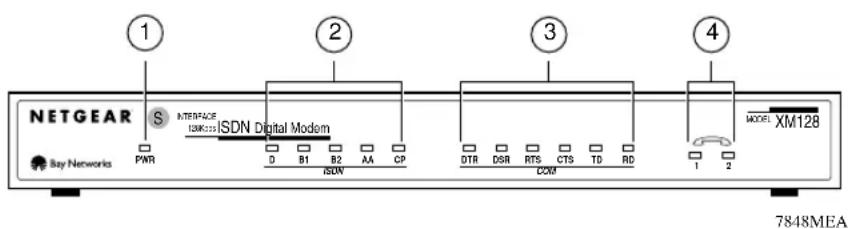
Key:
1 = PWR (power) LED
2 = ISDN LEDs
3 = RS-232 COM LEDs
4 = PHONE 1 and PHONE 2 LEDs
Figure 1-1. Front panel of the Model XM128 modem (with S/T interface)
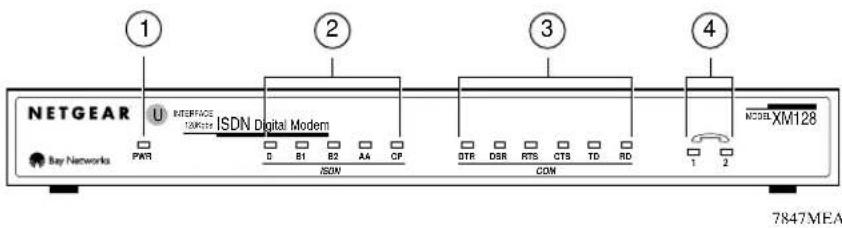
Key:
1 = PWR (power) LED
2 = ISDN LEDs
3 = RS-232 COM LEDs
4 = PHONE 1 and PHONE 2 LEDs
Figure 1-2. Front panel of the Model XM128 modem (with U interface)
LEDs on the front panel of the Model XM128 modem allow you to monitor and diagnose the device. Table 1-2 describes each LED.
Table 1-2. LED descriptions
| Label Color | Activity Description | |
| PWR(Power) | Yellow On Power is supplied to the modem. | |
| ISDN LEDs:D | Green On The ISDN link on the D channel is active.Blinking | The modem is attempting to make a connection to the switch.On A connection is established to the B1 channel.On A connection is established to the B2 channel.On The Model XM128 modem is in the automatic answering mode.BlinkingAn incoming call is ringing.On Compression is active on either of the B channels. |
| B1 | ||
| B2 | ||
| AA | ||
| CP | ||
| Label Color | Activity | Description |
| COM LEDs: | ||
| DTR Green On The data terminal or computer connected to the COM port on the Model XM128 modem is ready to communicate. | ||
| DSR On The Model XM128 modem is ready to communicate with the connected data terminal or computer. | ||
| RTS On The data terminal or computer connected to the COM port on the Model XM128 modem is ready to transmit data. | ||
| CTS On The Model XM128 modem is ready to accept data from the connected data terminal or computer. | ||
| TD Blinking The data terminal or computer connected to the Model XM128 modem is transmitting data to the modem. | ||
| RD On The data terminal or computer connected to the Model XM128 modem is receiving data from the DTE port of the modem. | ||
| PHONE 1 On The handset of the telephone connected to the port is not properly placed in the receiver cradle. | ||
| PHONE 2 On The handset of the telephone connected to the port is not properly placed in the receiver cradle. | ||
Rear Panel
As illustrated in Figure 1-3 and Figure 1-4, the rear panel contains a power switch, a power receptacle, and ports to connect a computer, ISDN line, and two analog devices (phone, fax, or modem).
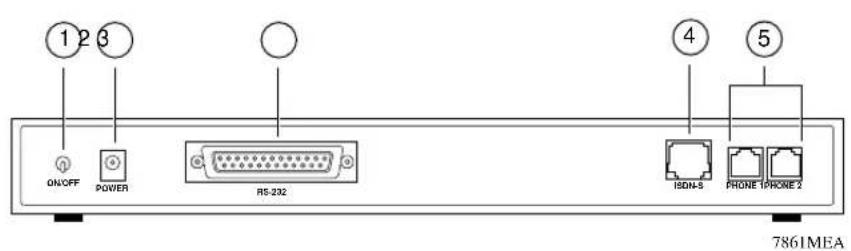
key:
1 = ON/OFF switch
2 = Receptacle for power adapter
3 = RS-232 COM port for connecting to a computer
4 = ISDN port for connecting to an ISDN line NT-1
5 = PHONE 1 and PHONE 2 ports for connecting analog devices (telephone, fax, or modem)
Figure 1-3. Rear panel of the Model XM128 modem (with S interface)
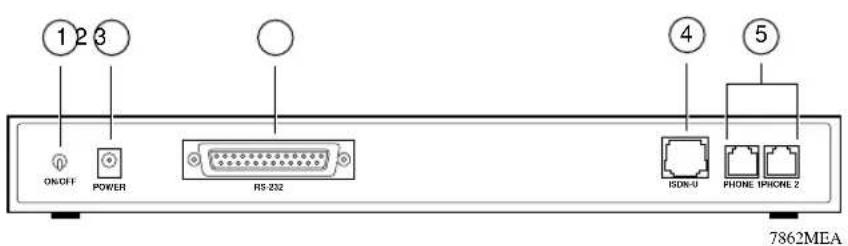
Key:
1 = ON/OFF switch
2 = Receptacle for power adapter
3 = RS-232 COM port for connecting to a computer
4 = ISDN port for connecting to an ISDN line
5 = PHONE 1 and PHONE 2 ports for connecting analog devices (telephone, fax, or modem)
Figure 1-4. Rear panel of the Model XM128 modem (with U interface)
Table 1-3 describes the components on the rear panel of the Model XM128 modem.
Table 1-3. Rear panel components
| Label Description | |
| ON/OFF This switch turns power on or off. | |
| POWER This is the power receptacle for the power adapter. | |
| RS-232 This RS-232 COM port is for connecting the Model XM128 modem to the serial port of a computer or data terminal. | |
| ISDN This port is for connecting the RJ-45 connector of an ISDN line. | |
| PHONE 1 This port is for connecting the RJ-11 connector of an analog device (telephone, fax, or analog modem). | |
| PHONE 2 This port is for connecting the RJ-11 connector of an analog device (telephone, fax, or analog modem). | |
Chapter 2 Installation
This chapter information about installing and using the Model XM128 ISDN Digital Modem.
Package Contents
Your package should contain the following items:
• Model XM128 ISDN Digital Modem
- Power adapter
• RJ-45 ISDN telephone cable
• Shielded RS-232 25-pin to 25-pin cable
- 25-pin to 9-pin adapter
- This manual
- Getting Started Using FirstGear
• CD ROM with bundled software
• 3.5-inch driver and utility diskettes
• Warranty Registration Card
Call your reseller or customer support in your area if there are any wrong, missing, or damaged parts. Refer to page iii for the location of customer support in your area.
Keep the carton, including the original packing materials. Use them to repack the modem if you need to return it for repair.
To qualify for product updates and product warranty registrations, fill in the Warranty and Owner Registration Card within 30 days of purchase and return it to NETGEAR, Inc.
Installing the Modem
Before connecting any of the devices to your modem, make sure the power is turned off on your computer and your Model XM128 modem. If connecting to the model with the S/T interface, you must use an NT-1 device, which converts the S/T interface to a U interface. If connecting to the Model XM128 modem with the U interface, you can connect directly to your ISDN line. Refer to Figure 2-1 and then the detailed steps that follow for making those connections.
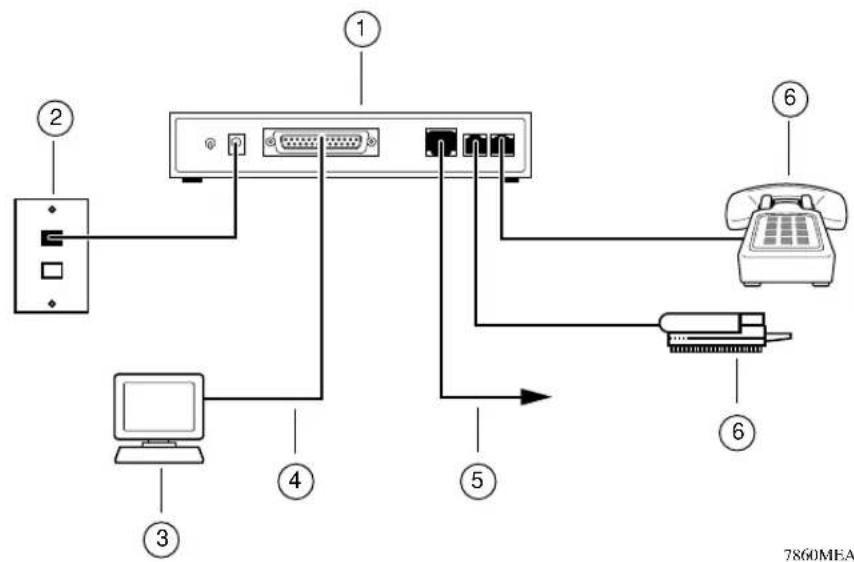
Key:
1 = Model XM128 modem
2 = AC power adapter
3 = Station (PC, Macintosh, or UNIX workstation)
4 = Shielded RS-232 25-pin straight cable
5 = ISDN wall connection (connected with ISDN cable provided in package)
6 = Analog device (telephone or fax)
Figure 2-1. Model XM128 modem connections
2-2 Installation
To install your Model XM128 modem, follow these steps:
- Connect the male end of the 25-pin cable to the RS-232 COM port of the Model XM128 modem.
- Connect the other end of the 25-pin cable (female end) to the serial (COM) port on your computer.

Note: If your computer has a 9-pin serial connector, use a 25-pin to 9-pin converter (25-pin male to 9-pin female). If you have a Macintosh, a special cable is needed for the connection.
- Using the ISDN cable that is included, connect the RJ-45 connector on one end of the cable to the ISDN port on the back of the Model XM128 modem.
- For European models, connect the other end of the RJ-45 ISDN cable to your NT-1 terminal or S/T interface. Using the proper cable supplied with your NT-1, connect your NT-1 or U interface to the wall jack installed by your phone company.
- For North American models, connect the other end of the RJ-45 ISDN cable to the wall jack installed by your phone company.
- Using the proper cable, insert the round end of the power adapter in the POWER connector on the rear panel.
- Plug the power supply unit into an AC wall outlet.
- Turn the power on to your Model XM128 modem.
- Turn the power on to your computer.
Verifying Hardware Installation
When the installation is complete and power applied to the modem, a self-test sequence begins. The B1, B2, and AA LED lights blink on and then off again. After this cycle is complete, the PWR (power) LED remains on.
If the test routine fails, the D LED blinks. Refer to Chapter 10, “Troubleshooting,” for more information about the self-test and the error codes.
Chapter 3
Setup for Windows 95 and Windows NT 4.0
This chapter contains step-by-step procedures both for installing the Windows NT and Windows 95 drivers and for configuring Dial-Up Networking for the Model XM128 modem.
Selecting the Appropriate Windows 95 Driver (INF file)
If your computer supports the Plug-and-Play feature, be sure your Model XM128 modem is powered on before starting your computer. If you are using a non-Plug-and-Play protocol, follow the steps to complete installation:
- Open the Control Panel by double-clicking the Control Panel icon in your My Computer folder.
- Double-click on Modems.
- Click on Add.
The Install New Modem screen appears. - Select Don't detect my modem; I will select from a list.
- Click on Next.
- Click on Have Disk.
- Insert the NETGEAR Windows 95 driver disk into your floppy drive and click on OK.
-
If you have downloaded an updated INF file from NETGEAR's Web site or BBS, use Browse to find the location of the updated INF file, click on Open, then click on OK.
-
Select the Model XM128 modem driver with the protocol that your host is using. Generally, the following examples work. However, we recommend that you verify the protocol your Internet service provider (ISP) uses.
If you are connecting to an Internet service provider (ISP), select:
NETGEAR XM128, PPP 64K
If the ISP has not upgraded to an ASCEND compatible server, select:
NETGEAR XM128 V.120 64K
If you are calling another location such as a BBS system, select:
NETGEAR XM128 V.120 64K
If you dial up to CompuServe, select:
NETGEAR XM128 V.120 64K
If you are calling the Microsoft Network (MSN) ISDN line, select:
NETGEAR XM128, PPP 64K
-
After you have completed the selections above, click on Next.
-
Select the COM port your modem is connected to and click on Next.
A final dialog box will appear.
- Click on Finish.
The Modems Properties screen is displayed.
- Click on Close.
This step completes the installation of your Model XM128 modem driver. You may now use programs such as Dial-Up Networking with your modem.
Chapter 4 Configuration
This chapter describes the procedures for configuring your Model XM128 modem and your ISDN line.
Configuring Your ISDN Line and Network
The setup procedure for the Model XM128 modem needs to be done only once. The settings are stored in the nonvolatile random access memory (NVRAM) of the modem. Turning power on and off will not erase the information. The only time that you need to reconfigure your line is when you perform a hardware reset on your modem when you change options on your ISDN line.
NETGEAR provides a simple Windows 95 or NT 4.0 utility to help you set up the Model XM128 modem. Refer to Getting Started Using FirstGear for the XM128 ISDN Digital Modem for complete instructions. This chapter explains how to set up your switch using the Windows/Windows 95 utility that comes with the modem.
If your Model XM128 modem is not going to be set up by a computer running Windows, use a terminal program that allows you to send AT commands to the modem and receive responses from it.
Configuring Your Modem Using a Terminal Program
If you are not running Windows 95 or Windows NT, configure your Model XM128 modem with a terminal program that allows you to send and receive AT commands and responses from the modem.
NETGEAR recommends that you have your Model XM128 modem ready to use before the telephone company installs your ISDN line. If the modem is ready, you can enter the SPID and confirm that the ISDN network is responding properly before the telephone installer leaves.
The setup procedure for the Model XM128 modem needs to be done only once because the settings are stored in the nonvolatile RAM of the modem and turning the power off does not erase the information. The only time you have to reconfigure your line is when you perform a hardware reset or when you change options on your ISDN line.

Note: If you perform a hardware reset and have to reenter the SPID number(s) and switch type again, it is easier if you write down or store all the relevant information so it can be easily retrieved.
Table 4-1 shows a list of example terminal programs for different operating platforms. For instructions on how to use a terminal program, refer to the instructions that came with the program.
Table 4-1. Terminal programs
| Operating system Program | |
| Windows 95 Hyper Terminal | |
| Windows 3.x Terminal | Procomm Plus for Windows Qmodem for Windows |
| UNIX Minicomm | |
| DOS PC Plus | Qmodem |
| Macintosh Z-Term | Communicate Lite |
Understanding AT Commands
AT commands configure and control the Model XM128 modem through a terminal program. Command statements are usually sent to the modem from the computer keyboard.
Command statements must be written in a specific form in order for the Model XM128 modem to recognize them. A command statement begins with the letters AT or at. It is then followed by one or more commands and the Enter key.
AT commands can be issued only when the Model XM128 modem is in command or offline mode.
After the Model XM128 modem has established a connection with the remote device, it goes into online mode, and the characters sent from your computer (through the modem) are transmitted to the remote device.
In order to issue an AT command statement, you first need to run your communications software and configure it to the port connected to the Model XM128 modem. Refer to your communications software manual for more information.
Table 4-2 lists the supported AT command types.
Table 4-2. Supported AT command types
| Type of AT command Example | |
| Basic AT (Hayes compatible) ATA | |
| Basic AT(online Help) AT | |
| Extended AT& AT&F | |
| Extended AT* command AT*I1 | |
| S-Register command ATS0=1 | |
| S-Register bitmapped command(set S-Register bit 1 equal to 1) | ATS13.1=1 |
| Register inquiry command SATSO | ? or ATS13.1? |
You can also browse the list by using the command AT\$.
Quick Tips for Issuing AT Commands
The following is a list of quick tips when issuing AT commands:
- The [Enter] key must be pressed to execute a command.
- Multiple AT commands can be combined into one line (for example, AT&O2 and ATB02 are combined as follows: AT&O2B02).
- The Model XM128 modem processes commands from left to right. The AT command that appears to the right might overwrite the command to the left (for example, ATB13B14 results in ATB14 because both B13 and B14 cannot coexist).
- If you see duplicated characters for each one you type, your Model XM128 modem and software both have their echo feature turned on (the modem defaults to enable command echo). To eliminate the double characters, turn off software command echo.
- Use A/ to repeat the last command. No AT prefix is needed for this command. The Model XM128 modem supports either verbose result code (OK, for example) or numerical result code (0, for example). You can use the ATVn command to set it one way or the other.
Table 4-3 lists the commands for viewing both the numerical and verbose result codes.
Table 4-3. Result codes commands
| Command Description | |
| ATV0 Select numerical result code | |
| ATV1 Select verbose result code |
Using AT Commands to Verify Modem Response
Use AT commands to make sure the Model XM128 modem responds, and follow these steps:
1. Type the command AT and press [Enter].
You should receive the following response:
OK
2. Type the command ATI and press [Enter].
You should receive the following response:
1291
3. Type the command ATI1 and press [Enter].
You should receive the following response:
NETGEAR XM128 ISDN Digital Modem xxxx: V x.xx
7607
OK
In the first line, x designates the country or region of operation and the firmware version number. The second line is the firmware checksum (which changes based on your firmware version).
Communication Speed Setup
Make sure the program is set up to communicate with the COM port that is connected to the Model XM128 modem. In most cases, when the terminal program is active and ready to communicate with the connected port, the DTR signal is activated and the DTR LED lights. If the DTR LED is off, check the terminal program settings.
The communication speed can be set between 110 bits per second (bps) and 460.8 bps, but 115.2 bps is a good default value. The Model XM128 modem automatically adjusts its speed to match the communication speed you set.
4-4 Configuration
Switch Type Setup for North America
In North America, the popular types of switches are AT&T 5ESS, Northern Telecom DMS100, and Siemens EWSD. All of these switches run software that either conforms to the National ISDN-1 standard or a custom version. The Model XM128 modem supports the six different combinations listed in Table 4-4. The value for n in the ATPn command is shown in the AT command column. The ATPn command programs the D channel protocol so that the Model XM128 modem works with the type of switch that is connected to your ISDN line.
Table 4-4. Switches supported by the Model XM128 modem
| ISDN network switch Switch version AT command Number of SPIDs | |||
| AT&T 5ESS network switch Point | -to-point Protocol ATP4 0 | ||
| Point-to-multipoint Protocol ATP5 1 | |||
| Point-to-multipoint Protocol ATP6 2 | |||
| National ISDN-1 ATP1 1 | |||
| National ISDN-1 ATP2 2 | |||
| NT DMS 100 network switch Custom | ATP0 2 | ||
| National ISDN-1 ATP1 1 | |||
| National ISDN-1 ATP2 2 | |||
| Siemens EWSD network switch | National ISDN-1 ATP1 1 | ||
| National ISDN-1 ATP2 2 | |||
| Other | National ISDN-1 ATP1 1 | ||
| National ISDN-1 ATP2 2 | |||
To set your switch type, use AT commands (examples given are if your switch type is DMS 100 with Custom Protocol) and follow these steps:
1. Type ATP0 and press [Enter].
You should receive the following response:
OK
Switch Type: Northern Telecom DMS 100
2. Type AT&WZ and [Enter] to save the settings.
You should receive the following response:
OK
SPID Setup for North America
SPID numbers are needed unless your switch type is AT&T 5ESS with Point-to-Point Protocol. The ISDN switches use SPID numbers to represent the subscribed network services. Each SPID corresponds to one terminal end point identifier. Different switches might provide different rules for the SPID number format. You should get the SPID number from your local telephone company. To program your SPID number(s), use AT commands (n is the SPID provided by your telephone company) and follow these steps:
1. Type ATSPIDO=n and [Enter].
You should receive the following response:
OK
SPID Correct!
It might take up to 30 seconds for the response. This response indicates that the SPID number was accepted. If a second SPID is required, go to step 2.
2. Type ATSPID1=n and [Enter].
You should receive the following response:
OK
SPID Correct!
An error condition is present and it indicates that an incorrect SPID number was entered if you receive the following response:
OK
SPID Error!
A general failure is indicated if the ISDN line is not connected to your Model XM128 modem or if you select the wrong switch. The SPID number was not verified if you receive the following response:
OK
The D LED lights when the SPID(s) are entered and verified. If you are not able to get the SPID(s) to accept correctly, recheck all cable connections before verifying the number(s) with your telephone company and reentering them again. If the D LED still does not light, the telephone company should make sure the line you ordered has been correctly set up.
Entering DNs
You will need to enter the phone numbers given to your ISDN line. The phone numbers will be cleared whenever the switch type is changed.
- Type ATDN0=n and [Enter].
Where n is the 7-digit phone number.
You should receive the following response:
OK
- Type ATDN1=n [Enter].
Where n is the second 7-digit phone number.
You should receive the following response:
OK
- Type AT&W0Z0 and [Enter] to save the settings.
You should receive the following response:
OK
Setup for Europe and the United Kingdom
To configure your Model XM128 modem for Europe and the United Kingdom, follow these steps:
- Type the command AT&ZOI= and the ISDN telephone number to assign the outgoing telephone numbers.
For example, AT&ZO=5551111
-
Press [Enter].
-
Type the command AT&ZOA= and the outgoing telephone number for PHONE 1.
For example, AT&ZOA=5552222
- Type the command AT&ZOB= and the outgoing telephone number for PHONE 2.
For example, AT&ZOB=5553333
- Assign a protocol using the commands in Table 4-5 to configure the B channel protocol.
Table 4-5. AT commands for setting protocols
| Protocol AT command | |
| X.75 | ATB00&O2 |
| V.110 user rate - 38400 bps ATB18&O2 | |
| V.120 ATB20&O2 | |
| PPP ATB40&O2 | |
For example, if the protocol you want is PPP, type the command ATB40&O2. For other X.75 or V.110 protocol options, refer to Appendix C, “AT Command Set Reference.”
6. Assign the appropriate MSN telephone numbers, using the AT commands in Table 4-6.
Table 4-6. AT commands for setting MSN
| Multiple subscriber number AT command | |
| X.75 telephone number AT&ZI0=telephone number | |
| V.110 telephone number | AT&ZI1=telephone number |
| V.120 telephone number | AT&ZI2=telephone number |
| PPP telephone number | AT&ZI3=telephone number |
| ISDN Data (Protocol autodetection) | AT&ZI4=telephone number |
| PHONE 1 | AT&ZI6=telephone number |
| PHONE 2 | AT&ZI7=telephone number |
For example, to assign an MSN number for a V.120 call, type the command AT&ZI2=5553434.
7. Type the AT command AT&W0Z0 to store the information into NVRAM.
This chapter describes the application of asynchronous to synchronous HDLC conversion.
Internet and Remote Access PPP and SLIP
More and more Internet Service Providers are offering their services through dial-up ISDN lines for higher data bandwidth. The equipment used by your service provider frequently consists of ISDN LAN routers which, unlike a digital modem, do not have asynchronous capability. For this reason, terminal adapters that support only V.120 or asynchronous protocol do not work with this type of equipment.
The Model XM128 modem converts the asynchronous data it receives from your computer to synchronous format in order to communicate with ISDN LAN routers. We call this process asynchronous to synchronous HDLC conversion or Async to Sync PPP (Point-to-Point Protocol) or Async to Sync Serial Line Internet Protocol (SLIP) protocol.
Making Async to Sync PPP and SLIP calls
In order to communicate with an ISDN LAN router (from vendors such as Ascend and Cisco), set the Model XM128 modem B channel protocol to one of the following:
ATB40<Enter> (HDLC PPP)
or
ATB41<Enter> (HDLC SLIP)
You should also set the DTE speed based on the bandwidth that the switches support.
Most of the time, you only use this protocol for making calls to remote sites with ISDN LAN Routers. If the remote access site you are calling uses a Terminal Adapter such as the Model XM128 modem, you can use V.120, as it provides data compression.
Before making the call, check which protocol is set for the ISDN mode using the &V command to view the settings.
When you are ready to view the settings type:
AT&V<Enter>
The Model XM128 modem modem responds:
Current Settings...
Switch Type: Northern Telecom DMS
ISDN Outgoing Service: PPP Async-to-Sync Conv 64K
If the settings displayed match your current setup, you are ready to place the call.
When you are ready to place the call type:
ATDI<remote_access_number><Enter>
The Model XM128 modem responds:
Connect 115000/64000 PPP/None
Keeping a Line Connection During Idle Time
If you are using PPP to access a server the server probably has a watchdog timer to monitor the line activity. If the idle time exceeds some time interval (usually 1 minute), the server releases the connection for other clients to dial in. Users may suffer some inconvenience because you have to dial to the server again and repeat the login procedure when disconnected. The value in register S124 (in seconds) is used as the idle time gauge. If the idle time exceeds this guarding period, the Model XM128 modem sends out a dummy PPP packet to the server to keep it from disconnecting the line.
Example: If the server you are calling disconnects after 1 minute of inactivity, issue the following command before connecting:
ATS124=59<Enter> (send dummy PPP packet after 59 seconds of inactivity)
Setting S124=0 disables this function.
Answering Async to Sync PPP calls
There is no need to configure the ISDN mode to the protocol of an incoming call. If it is set to auto-answer or an answering command is issued, the Model XM128 modem determines the correct protocol to use by examining the data coming in from the remote site. One exception is when the ISDN data call is carried through a Speech bearer. In this case you would need to set up an MSN for the phone number of the calling party. To do this, use the command AT&ZI3=xxx; where xxx is the number from which the call originates.
For the Model XM128 modem to automatically answer incoming calls, you need to set S0 to a value greater than 0 (i.e. ATS0=1). The Model XM128 modem answers the call and uses asynchronous to synchronous conversions to and from the DTE. If S0 is not set (S0=0), the DCE reports RING and also makes an audible ring notification.
Multilink PPP
Multilink PPP (MPPP) is a protocol that allows virtual bundling of the two B channels allowing connection speeds of 128Kbps. MPPP support is a standard feature of the Model XM128 modem.
Making a call using Multilink PPP
A Multilink PPP connection is initiated at the calling site when ATB40 (B channel protocol HDLC PPP) has been selected and the Multilink PPP mode has been enabled by an AT&Jn command:
AT&J0 (disables Multilink PPP)
AT&J1 (enables Multilink PPP in answer mode only)
AT&J2 (enables Multilink PPP in call mode only)
AT&J3 (enables Multilink PPP in both call and answer modes)
By default, the Model XM128 modem dials the same number for both Multilink PPP connections. If the destination you are dialing requires two different telephone numbers to establish a two channel Multilink PPP connection, then the following command can be used:
ATDIphone_number_1+phone_number_2
The phone numbers of the destination are determined by the commands: phone_number_1 and phone_number_2 are the phone numbers of the destination.
If the destination refuses the Multilink PPP during the Link Control Protocol (LCP) negotiation, a single B channel PPP connection is established. The connection message is the same whether the Multilink PPP connections have been established or not.
Dialing Pre-stored Phone Numbers
The ATDSn command, n=0,1,...,39, dials the (n+1) th phone number twice for both of the Multilink PPP connections. The command ATDSn+Sm, (n and n=0,1,...,39) dials the (n+1) th phone number for the first connection and the (m+1) th phone number for the second connection.
Example: ATDIS0+S1 [Enter] dials the number stored in location 0, and the number stored in location 1 for the MPPP connection.
Endpoint Discriminator
The Endpoint Discriminator option represents identification of the system transmitting the packet. This option advises a system that the peer on this link could be the same as the peer on another existing link. Some Multilink PPP implementations require the use of the Endpoint Discriminator option.
The Endpoint Discriminator consists of two components: Class and Address.
The Class field is one octet as stored in S-register S85 and indicates the identifier address space. Table 5-1 lists the valid values of the S85 register.
Table 5-1. S85 register values
| Value Description | |
| 0 | Null Class (by default). |
| 1 | Internet Protocol (IP) Address |
| 2 | IEEE 802.3 Globally Assigned MAC Address. |
| 3 | Locally Assigned Address. |
| 4 | PPP Magic-Number Block. |
| 5 | Public Switched Network Directory Number. |
The Endpoint Discriminator Address field is of variable length from 0 to 20 octets and can be assigned by the ATEPD command:
ATEPD = <Octet_1, Octet_2, Octet_3, ..., Octet_n>
Each Octet_i is in the range from 0 to 255. The angle brackets (<) and (>) are part of the this command. The command ATEPD? can be used to view current setting of the Endpoint Discriminator Address.

Note: The Endpoint Discriminator option is not required in most cases, thus users don't have to change the default settings. The system administrator of your corporate or the Internet service provider provides these values if the Endpoint Discriminator option is required.
Call Bumping Dynamic Channel Allocation
When call bumping, Dynamic Channel Allocation (DCA) is enabled (by default), you can place or answer a voice call (and only one) from a device that is attached to one of the phone ports. The call can be placed while a Multilink PPP call is active. The Model XM128 modem automatically removes one of the Multilink PPP connections and uses it for the voice call. When the voice call ends, the Model XM128 modem automatically reestablishes that channel for Multilink PPP operation. The call bumping DCA function is only effective when the Model XM128 modem is at the calling site (the client site). The following command can be used to select the DCA function:
ATCE0 (disables call bumping)
ATCE1 (enables call bumping by default)
Chapter 6 ISDN Overview
This chapter covers the procedures for initiating and receiving calls over digital lines using your Model XM128 ISDN Digital Modem.
Commands for Outgoing Calls
The Model XM128 modem uses the following three modes to send communication over your ISDN network:
- ISDN data
- Analog port, PHONE 1 communication
- Analog port, PHONE 2 communication
These modes are automatically switched based on the commands you issue. To understand this process, use your terminal program and proceed with the instructions explained in the following sections.
Dialing Out Using ISDN Mode
The command ATDI tells your Model XM128 modem that you want to make an ISDN data call and to therefore use the ISDN mode to call out. Enter:
ATDI17142630398
This command initiates an ISDN call.
Dialing Out Using ISDN Mode Optional Speech Bearer Service
The Model XM128 modem supports ISDN data utilizing Speech Bearer Service. To enable this function, you need to set S-register S83 bit 7 to 1 (ATS83.7=1). This function is useful in the areas where ISDN service providers charge lower usage rates for voice (speech) calls. To enable this function, enter:
ATS83.7=1
To disable it, enter:
ATS83.7=0
Dialing Out for Analog Adapter Port 1
Using the A command following the ATD tells your Model XM128 modem to switch the call to analog adapter port PHONE 1, when dialing is complete. Enter:
ATDA17146930762

Note: You must have an analog modem connected to your plain old telephone service (POTS) port before you issue this command.
Dialing Out for Analog Adapter Port 2
Using the B command following the ATD tells your Model XM128 modem to automatically switch the call to analog adapter port PHONE 2, when dialing is complete. Enter:
ATDB17146930762
Manually Switching Communication Modes
The manual switching function is necessary only if your communication software does not allow you to change your dial-up string.
Conventional dialing commands ATD, ATDT, and ATDP, used by much of the existing communication software, can be mapped onto one of the new dialing commands according to the AT&O setting as shown in Table 6-1.
Table 6-1. Dialing commands
| AT Command Dial string it maps to | |
| AT&O0 ATD, ATDT, and ATDP are the same as ATDB. | |
| AT&O2 ATD, ATDT, and ATDP are the same as ATDI. | |
| AT&O3 ATD, ATDT, and ATDP are the same as ATDA. |
The factory default is AT&O2, which means that the Model XM128 modem selects ISDN data mode when you do not specify the communication mode to use (that is, ATD or ATDT).
Placing the Call
To initiate a call, choose the proper communication mode and configure the mode according to the bearer service (or protocol) you want to use. Table 6-2 contains some simple commands that are useful when placing a call.
Table 6-2. Call placing commands
| Command | Description |
| ATBnn Changes | ISDN B channel protocol setting |
| ATDL Redials the | last dialed telephone number |
Commands for Incoming Calls
When a call comes in, the call is carried by one of the following protocols:
• V.120
• HDLC PPP, MPPP, or SLIP
• V.110
• X . 7 5
Or the call may be initiated by an analog device.
This section provides some general guidelines for setting up the Model XM128 modem for call answer handling. Be aware that the modem does not automatically answer a call unless S-register S0 is set to a value greater than 0 (zero). If S-register S0=0, the modem only reports RING to your terminal program. It can also respond with an audible tone that allows you to decide whether or not you should take any action.
When an ISDN data call comes in, the Model XM128 modem tries to negotiate a connection using the proper ISDN protocol. When an analog call comes in, the modem sends the call to the analog port as the factory default, PHONE 1, and then PHONE 2.
Digital Data
The Model XM128 modem currently supports Circuit Switched Data (CSD) for ISDN data applications. The CSD protocols supported by the Model XM128 modem include: PPP, MPPP, V.120, X.75, and V.110. PPP is the most popular protocol used in North America; it is used by most of the Internet service providers. After the Model XM128 modem answers a call, it examines the incoming data to determine which protocol to use and automatically switches to that mode. This process occurs transparently to the user. The Model XM128 modem is able to auto-switch for PPP, MPPP, V.120, X.75, and V.110 protocols over speech channel. In most cases, you can rely on the auto-switching feature for your applications. If you need more specific settings for answering calls, refer to “Answering a Call Using MSN” on page 5-5.
Determining the Packet Length
The user's information is sent on a frame-by-frame basis for V.120 and X.75, sometimes called packetized. The maximum frame length on the sending side should not exceed the maximum frame length that the receiving side allows. Sometimes this information is exchanged during handshaking. However, few manufacturers, if any, have implemented this mechanism.
If the sending side sends packets greater than what the receiving side allows, the receiving side discards the frame and replies with a Frame Reject Frame (FRMR). The FRMR indicates that the information received is too long. Both sides then reset their link layer negotiation and send the frame again. Usually this process repeats until the call gets disconnected.
The Model XM128 modem has a fixed maximum receiving frame size of 2048 octets, which is larger than most devices can support. The default maximum sending frame size is 252 octets for V.120 and 2048 for X.75. If you need to change the maximum sending frame size, the ATCL command is used.
To change the maximum sending frame size, use the following commands and follow these steps:
- Enter ATCL252 (set the frame size to 252 octets, user value between 1 and 2048).
You should receive this message:
OK
- Enter ATCL? (to inquire about the current setting of the packet length).
You should receive this message:
Maximum user data length in a packet (byte) : 252
Answering a Call Using MSN
When answering an incoming call, the call is first identified if the caller number matches the Multiple Subscriber Number (MSN) settings.
The MSN supplementary service enables multiple ISDN numbers to be assigned to a single ISDN BRI line. It allows the caller to select, through the public network, one or more distinct terminals from a variety of terminal choices. The Model XM128 modem supports many different communication protocols and two analog adapters. Table6-3 shows the commands used to assign each of the ports to an ISDN number.
Table 6-3. Commands for assigning ISDN numbers
| Command Description | |
| &ZI0=s Assigns | the MSN phone number for X.75 |
| &ZI1=s Assigns | the MSN phone number for V.110 |
| &ZI2=s Assigns | the MSN phone number for V.120 |
| &ZI3=s Assigns | the MSN phone number for PPP, MPPP |
| &ZI4=s Assigns | the MSN phone number for ISDN data, protocol auto-detection |
| &ZI5=s Assigns | the MSN phone number for PPP, MPPP |
| &ZI6=s Assigns | the MSN phone number for Phone 2 |
| &ZI7=s Assigns | the MSN phone number for Phone 1 |
The command AT&ZI? can be used to display the MSN numbers. The factory default for these numbers is UNASSIGNED.
If an incoming setup message is offered with addressing information (that is, the appropriate part of the Called Party Number), this address is compared with the MSN numbers assigned by the AT&ZIn=s commands. The call is accepted using the specific protocol if the assigned number of this protocol matches the received Called Party Number.

Note: You are not required to enter the complete numbering string for the AT&Z command. The last few distinguishable digits are enough for the XM128 to make the decision. Two phone number strings are said to be matched if their least significant n digits are identical, where n is the number of digits in the shorter string.
The called party subaddress information within the incoming setup message can also be used to select the protocols and/or analog ports. In normal conditions, called party subaddress information is not used by the Model XM128 modem to select the protocols or services, but only indicates the subaddress (if any) to the DTE. Refer to Chapter 11 for more detailed information.
Data over Speech Channel
If you are expecting ISDN data calls through Speech (Voice) channel, you would need to set up MSN for it. If no MSN entries are found in MSN ISDN data lists, all speech (voice) calls are sent to either PHONE 1 jack or PHONE 2 jack. The entry to use would depend on the type of data call that you are expecting. If you expect only PPP type of calls, you should enter the number that the remote user used to dial in to entry #3 (AT&ZI3=xxx) or entry #5 (A&ZI5=xxx). After this number is set, when the caller dials in to this number, the Model XM128 modem attempts to use PPP protocol to handshake with this remote user. This handshake takes place whether the setup message from the switch indicates an ISDN data call or a speech (voice) call.
Best-effort Call Answering
If some numbers have been set using &ZIn command (as can be seen by the AT&ZI? command) and they are not matched with the address of the incoming call, the Model XM128 modem, by default, ignores the call because it may be intended for other devices that share the same S/T interface (S0 bus) with the Model XM128 modem.
If you want the Model XM128 modem to answer inbound calls using all possible protocols, refer to Table 6-4 for the commands used to set the best-effort call answering bit.
Table 6-4. Best-effort call answering bit commands
| Command Function |
| ATS119.3=0 Answer call only when number matched (by default) |
| ATS119.3=1 Best-effort call answering |
Ambiguity Resolution Switch for Voice Calls
For a speech or voice-band-data call, if the &ZI number assignment can tell which of the analog adapters is being addressed, then the call is delivered to the proper destination. Sometimes, however, ambiguity of address matching may exist. This ambiguity may exist if the &ZIn numbers of the various protocols are either unassigned or not matched or the address information is absent in the incoming setup message. In this case, users may want to set answering priority to an analog port. The AT&Ln command sets the address ambiguity resolution flag as follows:
- AT&L0
The analog adapter 1 has the higher priority to answer a voice or voice-band-analog-data call. If the analog adapter 1 is busy, the call is routed to the analog adapter, PHONE 2.
- AT&L1
The analog adapter 2 has the higher priority to answer a voice or voice-band-analog-data call. If the analog adapter 2 is busy, the call is routed to the analog adapter, PHONE 1.
Multi Auto-Answering of Data Calls
When an ISDN data call comes in, the Model XM128 modem can determine the protocol to be used in one of two ways.
One is way is through the information conveyed by the setup message. For DSS1, this information includes the bearer capability, low-layer compatibility, or high-layer compatibility information elements; for 1TR6, it includes the Service Indicator as well as an Additional Octet of the Service Indicator.
The other way is by the Multi Auto-answering process. The Model XM128 modem determines the protocol by monitoring the B channel signal sent by the calling site.
With either method, the data call can be identified by the modem to be X.75, V.110, V.120, or PPP, MPPP Async-to-Sync conversion.
If the address-matching process is again unable to tell which protocol to use, the Model XM128 modem goes into the Multi Auto-answering Routine by examining the B channel data pattern and, hence, determining the protocol to use.
When alerted, the Model XM128 modem sends a RING message to the DTE in the following format:
RING
FM:17145522863TO:17142630398
Understanding ISDN Communication Protocols
Table 6-5 shows the specifications of different ISDN protocols.
Table 6-5. ISDN protocol specifications
| Parameter V.110 V.120 X.75 | |||
| Layer 1 80 Bits Framing HDLC HDLC | |||
| Layer 2 None LAPD LAPB Transparent | |||
| Layer 3 None V.120 ISO8208T.70 NL | |||
| Error Control No Yes | Yes | ||
| V.42bis | No | Yes | Yes |
| Async or Sync if used with V-Series DTE | Async Only Async Only | Async Only | |
| Bundle | No | Yes | Yes |
| Max. Line Speed | Async: 38.4 KbpsSync: 64 Kbps | 64 Kbps128 Kbps | 64 Kbps128 Kbps |
| AT-Command Configuration | ATB10 | ATB20 | ATB00 TransparentATB01: T.70 NL |
V.110 ISDN Communications
This section describes how to set up and configure your Model XM128 modem with the V.110 Protocol.
Answering a V.110 Call
After you set the proper V.110 communication mode, there is no need to configure the ISDN mode to the protocol of an incoming call. If the device is set to auto-answer, the Model XM128 modem determines the correct protocol to use by examining the data coming in from the remote site. Otherwise, this determination takes place after an answering command is issued.
One exception to this process is when the ISDN data call is carried through speech bearer. In this case, you need to make an MSN entry for the phone number from which you are expecting the data-over-speech-bearer call to be coming for X.75 protocol. Use AT&ZI1=n. Refer to “Data over Speech Channel” on page 6-7 for details.
To allow the Model XM128 modem to answer the incoming call, you need to set S0 to a value greater than 0 (in other words. ATS0=1). The Model XM128 modem answers the call and uses asynchronous to synchronous conversions to and from the DTE. If S0 is not set (S0=0), the DCE reports RING and also makes an audible ring notification.
Making a V.110 Call
Before an ATDIxxx command is issued to dial out, make sure that your Model XM128 modem is in the asynchronous mode (AT&M0). Use the commands in Table6-6 to configure V.110 ISDN communication.
Table 6-6. V.110 configuration commands
| AT Command Description | |
| ATB10 User rate follows DTE speed | |
| ATB13 User rate = 2400bps | |
| ATB14 User rate = 4800bps | |
| ATB15 User rate = 9600bps | |
| ATB16 User rate = 14400bps | |
| ATB17 User rate = 19200bps | |
| ATB18 User rate = 38.4 Kbps | |
| ATB19 User rate = 57.6 Kbps (Japanese version only) |
The highest asynchronous V.110 user rate depends on bit 4 of S119 as follows:
• S119.4=0 (19.2 Kbps)
• S119.4=1 (38.4 Kbps for areas other than Japan)
• S119.4=1 (57.6 Kbps for Japanese version)
If the DTE speed is higher than what has been set, the user rate in Table 6-6 is used.
The X bits in the 80-bit frame are used for remote flow control.
V.120 ISDN Communications
This section describes how to set up and configure your Model XM128 modem with the V.120 ISDN protocol. Refer to Table 6-5 on page 6-9 for the ISDN protocol specifications.
Selecting V.120 for European ISDN (DSS1) Switch
With European ISDN, V.120 is an option in the bearer capability (BC) information element, which is a mandatory information element in the setup message. Although we can specify V.120 in the low-layer compatibility (LLC) information element, some switches just do not deliver the LLC. Other switches do deliver the LLC, but the V.120 selection is discarded midway.
If the called modem does not get any B channel protocol information from the incoming setup message and the remote device is a NETGEAR ISDN device, the Model XM128 modem can identify the V.120 protocol automatically with the Multi Auto-answer Routine. Otherwise, the handshake fails.
Selecting V.120 for German National ISDN (1TR6)
With a 1TR6 switch, data connections are achieved by setting the Service Indicator to 7 (Daten_bertragung 64Kbps) and using the Additional Information octet to select B channel protocols. Because there is no predefined code for asynchronous V.120, the Model XM128 modem uses the synchronous V.120 code to fill in the additional information octet. This approach might not work all the time.
Answering a V.120 Call
In most cases, there is no need to configure the Model XM128 modem to properly answer calls. The Model XM128 modem decides which protocol to use by detecting the type of data that is received. You only need to set S0 to greater than or equal to 1 in order for the modem to automatically answer an incoming call. If S0=0, the DCE simply reports RING to your terminal and sounds a ring notification.
One exception to this is when the ISDN data call is carried through speech bearer. In this case, you would need to make an MSN entry for the phone number from which you are expecting the data-over-speech-bearer call to be coming. For V.120 protocol, use AT&ZI2=n. Refer to “Data over Speech Channel” on page 6-7.
Making a V.120 Call
Some switches transmit all network signals through the D channel (out-of-band signaling), allowing both B channels to be used exclusively for your communication purposes. This arrangement allows for throughput of 64 Kbps per channel. However, not all switches support out-of-band signaling at this time. For switches that do not support out-of-band signaling, network signals are transmitted through the B channels, which reduces the bandwidth to 56 Kbps.
When making a V.120 call, be sure that the communication supports out-of-band signaling. If it does not support out-of-band signaling, you need to set your Model XM128 modem to 56K mode using the AT&E1 command (AT&E0 to set it back to 64K mode). If your modem is on the receiving end, you can keep the setting at AT&E0 (64K data mode). The modem automatically switches between the two speeds in answer mode.
Configuring the V.120 Mode
To configure for a 56K V.120 call, use the following commands:
- Enter ATB20 (Select V.120 for communication).
Model XM128 modem should respond with:
OK
- Enter AT&E1 (Select 56K data mode).
Model XM128 modem should respond with:
OK
Now you are ready to dial the phone number. If you need to save the setting into NVRAM, use the following commands and follow these steps:
- Enter AT&W0 (save the settings to profile 0) [Profiles available: 0-3].
Model XM128 modem should respond with:
OK
- Enter ATZ0 (save stored settings as the power on settings to profile 0) [Profiles available: 0-3].
Model XM128 modem should respond with:
OK
All of the above commands can be simplified by combining all the commands onto one line (for example, AT&B20&E1&WZ0).
Dialing in V.120 Mode
Finally, use the ATDn command to make the call (n is the phone number you want to dial). Once the connection is made, you should see the following connect messages:
CONNECT 115200/V120 56000/LAPD
This message indicates that the connection is made with the following specifications:
• DTE speed of 115.2 Kbps
- Protocol V.120
• Data speed of 56 Kbps
- Error Control LAPD
Making a Bundled Call with V.120
A bundled V.120 connection is initiated at the calling site when ATB20 (B channel protocol V.120) has been selected and the channel bundling mode has been enabled by an AT&J3 command. The channel bundling command (AT&J3) must be set on both the calling and receiving sides; otherwise, a single channel connection is made.
To set up your Model XM128 modem to make a bundled V.120 connection, follow these steps:
- Enter ATB20 (set B channel protocol to V.120).
- Enter AT&J3 (set the Model XM128 modem to make a bundled call).
3. Enter AT&WZ (if you want to save the setting).
After these commands are entered, the ATD command generates two consecutive setup messages to invoke bundle initiation.
For the Northern Telecom switch, each BRI phone number can be called only once at any given time. So if you dial this number, it reports busy to any other incoming calls. In order to use two B channels for aggregation, you must place two calls with different phone numbers. To place these calls, separate the two numbers with a plus (+) sign after the ATD command.
For bundling calls with the Northern Telecom switch, enter the following commands:
ATDI [phone_number_1] + [phone_number_2]
4. Press [Enter].
The answering Model XM128 modem determines that the call is a bundle request: when AT&J3 is set and two consecutive setup messages are received. The two data calls are established as one message. The phone company's ISDN line splits it off into two messages. That is, the ISDN network treats the messages as two independent calls. Finally, the receiving side receives one bundled message into the computer's serial port.
The success of a bundle connection initiation is indicated by the connect message reported to the DTE. The following two examples are of connect messages:
CONNECT 115200/V120M 128K/LAPD
or
CONNECT 115200/V120M 128K/LAPD/V42b (with data compression)
If you are not using American ISDN, you have a choice between Multiple Link Protocol (MLP) or cFos channel bundling (CCB), two bundle protocols. You can set it by the following commands:
ATS100=0 (for MLP channel bundling)
ATS100=1 (for CCB channel bundling)
Identifying Your Line Provisioning
For bundled connections, the two B channels of your ISDN line must be able to handle data circuit switch connections with unrestricted 64 Kbps or 56 Kbps line speeds. Two separate data calls can be established consecutively.
128 Kbps Speeds
BRI ISDN consists of three (2B+D) logical channels. Each B channel can be used independently for a dial-up connection running at 56 Kbps or 64 Kbps (bits per second).
The two B channels can be used together for a single data connection to provide 112K (with In-Band Signaling) or 128K (when Out-of-Band Signaling is used). It is called a Bundle Connection (different from BONDING).
The type of channel bundling described in the V.120 section is supported only between the following NETGEAR products: Model XM128 modem. Dialing Prestored Phone Numbers
Use ATDSn, n=0,1,...,39, to dial the (n+1) th phone number twice for both the bundle connections. Use ATDSn+Sm, (n and n=0,1,...,39) to dial the (n+1) th phone number for the first connection and the (m+1) th phone number for the second connection.
For example, ATDIS0+S1[Enter] dials the number stored in location 0, and the number stored in location 1 for the bundle connection.
Error Correction and Data Compression with V.120
With V.120, the default setting is for Link Access Protocol Digital (LAPD) error correction only. No data compression is negotiated. The following AT commands are used to switch the V.42bis data compression on or off for ISDN data calls when using V.120 protocol:
- AT&K44 (enable V.42bis on ISDN call)
- AT&K00 (disable V.42bis on ISDN call)
With the &K44 setting, the Model XM128 modem tries to connect using V.42bis data compression. If the remote device does not support V.42, then LAPD error correction can be used.
When a connection is made using V.42bis compression, the following connect message is displayed:
CONNECT 115200/V120 56000/LAPD/V42b.
It takes extra time for the calling ISDN device to negotiate V.42bis. If you know in advance that the called site has no V.42bis capability, it would be better to issue the AT&K00 command beforehand in order to get a quick connection.
V.42bis is an international data compression standard commonly used in modem communications. This standard provides real-time data compression. The NETGEAR expertise in data compression has been brought into its ISDN applications, which are much higher in speed than modem communications.
Because the V.42bis algorithm needs an error-free transmission channel between the compression and decompression processes, it can only work with a protocol that has error control competence. The X.75 and V.120 protocols can be used together with V.42bis data compression. The V.110 protocol, on the other hand, is just an R-interface layer 1 adaptation protocol without error-control and is thus inadequate for V.42bis.
X.75 ISDN Communications (Europe)
This section describes how to set up and configure your Model XM128 modem with X.75 protocols. Refer to Table 6-5 for the X.75 protocol specifications for Europe.
The X.75 protocol was originally designed for packet-switched signaling systems in public networks to provide data transmission services. Now, however, it is also used as the link layer for telematic services (as defined in T.90) in ISDN. These services include both the ISDN circuit-switched mode (DTE-DTE communication) and the ISDN packet-switched mode (DTE-DCE communication).
Answering an X.75 Call
There is no need to configure the ISDN mode to the protocol of an incoming call. The Model XM128 modem is able to determine the correct protocol to use by examining the data coming in from the remote site. Protocol determination takes place if the device is set to auto-answer or after an answering command is issued.
One exception to this process is when the ISDN data call is carried through speech bearer. In this case, you need to make an MSN entry for the phone number from which you are expecting the data-over-speech-bearer call to be coming for the X.75 protocol. Use AT&ZI0=n. Refer to "Data over Speech Channel" on page 6-7 for further information.
To allow the Model XM128 modem to answer the incoming call, you need to set S0 to a value greater than 0 (for example, ATS0=1). The Model XM128 modem answers the call and uses asynchronous-to-synchronous conversions to and from the DTE. If S0 is not set (S0=0), the DCE reports RING and also makes an audible ring notification.
Making an X.75 Call
The default data protocol of the Model XM128 modem is ATB20 (V.120). the X.75 protocols can be chosen using the following AT commands:
ATB00 (for X.75 with transparent layer 3)
ATB01 (for X.75 with T.70 NL)
The ATB0x commands not only specify the outgoing protocol, but also set the default layer 3 for an incoming X.75 call without layer 3 information. It is important for both ends of an X.75 connection to execute the same preassigned layer 3 protocol because it reduces the chance of the Model XM128 modem making the wrong protocol selection.
For European ISDN (DSS1), the low-layer compatibility (LLC) information element in the setup message can be used to specify the layer 3 protocol. Because this is an option for ISDN switches, some of the switches might not deliver the LLC information element to the remote end. There is no provision for 1TR6 switches to specify the layer 3 protocol for X.75 type of calls.
Making a Bundled Call with X.75
A bundle connection is initiated at the calling site by sending two consecutive setup messages to the network. The two setup messages are all the same except for the Call Reference values.
AT&Jn can be used for bundle configuration as follows:
• AT&J0 (disables B channel bundling)
- AT&J1 (enables B channel bundling in answer mode only)
- AT&J2 (enables B channel bundling in call mode only)
- AT&J3 (enables B channel bundling in both call and answer modes)
The bundle protocol can be selected as follows:
• ATS100=0 (MLP channel bundling)
- ATS100=1 (CCB channel bundling)
If channel bundling is enabled, the ATDIs command generates two consecutive setup messages to invoke bundle initiation.
For Northern Telecom ISDN, each BRI destination phone number can be called only once at any time. In order to use two B channels for aggregation, you must place two calls with different phone numbers. For this purpose, enter the following command:
ATDIphone\_number\_1+phone\_number\_2
If the called site receives two consecutive setup messages with the same calling party number and bearer capability (or origination address for and service indicator for 1TR6), then it is deemed as a bundle request. The two data calls are established following normal call control procedures. That is, the network treats them as two independent calls.
The devices in the two sites then use X.75 Multiple Link Protocol or cFos channel bundling protocol to coordinate the two B channels. The former would need an overhead of 2 octets for each packet. The following is an example of the connect message reported to the DTE. The success of bundle connection initiation is indicated by this message:
CONNECT 460800 / X.75M 128K / V42b
If any B channel is unavailable in any site, the bundle initiation falls back to single channel connection. The following message may appear in this case:
CONNECT 460800 / X.75 64000 / V42b
Dialing Prestored Phone Numbers
The 40 phone numbers stored in NVRAM can also be used to place a bundle call:
- ATDSn (dials the (n + 1) th phone number twice for both the bundle connections; n = 0 to 39)
- ATDSn+ (dials the (n + 1) th phone number for the first connection and dials the (n + 2) th phone number for the second connection; n = 0 - 38 )
- ATDSn+Sm (dials the (n + 1) th phone number for the first connection and the (m + 1) th phone number for the second connection; n = 0 - 39 ; m = 0 - 39 )
Invoking V.42bis Data Compression
The following AT commands are used to switch the V.42bis data compression on or off for ISDN data calls when using X.75 or V.120 protocols:
- AT&K44 (enables V.42bis on ISDN call)
• AT&K00 (disables V.42bis on ISDN call)
For X.75 to negotiate compression parameters with the remote ISDN terminal, you exchange XID frames before the Link Layer is established. The calling site sends an XID frame with V.42bis request to the called site. If the called site understands the meaning of this XID, it replies to an XID frame with a V.42bis request. If it is able to execute V.42bis, it ignores the XID or replies using an XID frame with a V.42bis reject or empty information field.
The calling site assumes that the remote site is unable to execute V.42bis if it gets no reply for a period of time after sending the request XID. In this situation, normal connection without data compression is established.
It takes about 2 seconds for the calling Model XM128 modem to send XID and wait until timing out. If you know in advance that the called site has no V.42bis capability, it would be better to issue the AT&K00 command beforehand in order to get a quick connection.
Although not defined in X.75, the XID frame is based on the encoding in ISO Standard 8885 and on being used in V.42/V.42bis. In addition to the compression parameters, XID can be used to negotiate such packet parameters as window or packet size.
Bundle Connection with V.42bis Data Compression
If both sites have set AT&K44 to enable V.42bis negotiation, XID frames can be exchanged through the main B channel, which corresponds to the call established by the first setup message.
Only one data compression channel can be used in bundle connection, which means that the compression is done before packet disassembly and the decompression is done after packet assembly. The compression ratio of V.42bis is commonly recognized as up to 4:1 for text files. If the line speed is 128 Kbps, the DTE speed may reach 460 Kbps. This circumstance makes the normal RS-232 serial port of the DTE unsuitable for bundle applications. A special I/O card on the computer side is required in this situation for external models.
Chapter 7 Advanced ISDN
This chapter provides information about using advanced ISDN for the Model XM128 ISDN Digital Modem.
Call Control for DSS1
In order to initiate a Digital Subscriber Signaling #1 (DSS1) ISDN call, two information elements are necessary:
- The bearer capability element indicates what kind of bearer service is desired. It is also used for compatibility checking in the addressed entity.
- The called party number element provides necessary information for the telephone company central office (CO) to direct the call to the destination.
The following optional information elements are also pertinent to call control:
• High-layer compatibility
- Low-layer compatibility
- Calling party number
- Called party number
- Calling party subaddress
- Called party subaddress
Control of Outgoing Service Indicator
The high-layer compatibility and low-layer compatibility information provides a means for compatibility checking by the called party. This information is transferred transparently by the ISDN network between the call-originating entity (for example, the calling user) and the addressed entity.
The outgoing high-layer compatibility can be controlled by setting the value of S-register S(108+n) as follows:
• n=0 (S108) setting for analog adapter 2
• n=2 (S110) setting for ISDN data calls
- n=3 (S111) setting for analog adapter 1
Table 7-1 lists the S-register values and their functions.
Table 7-1. S-register values and functions
| S(108+n=) Function | |
| 0 No high-layer comptability info element sent (default) | |
| 1 Telephony | |
| 4 Facsimile Group 2/3 | |
| 40 Telex service (Rec. F.220) | |
| 49 Telex service (Rec. F.200) | |
| 50 International internetworking for video services (Rec.F.300 and T.110) | |
| 53 Telex service (Rec. F.60) | |
| 56 Message Handling Systems (MHS)(Rec. X. 400 series) | |
| 65 OSI application (Rec. X.200 series) | |
Example: ATS111=4 sets fax compatibility message for analog port 1.
Bearer capability and low-layer compatibility information elements are determined when you configure the B channel protocols using the ATBnn command. The outgoing low-layer compatibility information element can be turned on or off by setting the S80 bit n as follows:
• n = 4 for analog adapter 2
• n = 6 for ISDN data calls
- n = 7 for the analog adapter 1
Table 7-2 lists the commands for enabling and disabling outgoing low-layer compatibility.
Table 7-2. Outgoing low-layer compatibility commands
| S108.n= Function | |
| S80.n=0 Disable | outgoing low-layer compatibility(default) |
| S80.n=1 Enable | outgoing low-layer compatibility |
Example: ATS80.4=0 disables low-layer-compatibility message for analog port 2.
Control of ISDN Phone Numbers and Subaddresses
The calling-party number information element identifies the origin of a call, and the called-party number information element identifies the destination of a call.
The calling-party subaddress information element identifies the subaddress associated with the origin of a call.
The called-party subaddress information element identifies the subaddress of the destination of a call.
Each type of outgoing call can be assigned with one number/subaddress pair by using the AT&ZOx=s command. The possible values for x are as follows:
• x = I for ISDN data calls
- x = A for the analog adapter 1
• x = B for the analog adapter 2
The number-subaddress string s is defined as:
$$ s = [ [ \mathrm{Yn} ] [ \mathrm{Nn} ] \text { own - number } ] / [ [ \mathrm{Zn} ] \text { own - subaddress } ] / $$
Yn specifies the type of number:
- Y0 for unknown (default if Yn is omitted)
• Y1 for international number
• Y2 for national number
• Y3 for network specific number
• Y4 for subscriber number
Nn is the identifier of the numbering plan:
- N0 for unknown (default if Nn is omitted)
- N1 for ISDN numbering plan (Rec. E.164) (default for Australia if Nn is omitted)
• N3 for data numbering plan (Rec. X.121)
• N4 for telex numbering plan (Rec. F.69)
• N8 for national standard numbering plan
• N9 for private numbering plan
Zn specifies the subaddress type:
- Z0 for NSAP (Rec. X.213) with AFI=0x50, IA5 characters (default if Zn is omitted)
• Z2 for user specified, IA5 characters
The command AT&ZOx=// removes the number/subaddress assignment.
The number and subaddress assigned by AT&ZOx=s, if any, can be used for calling-party number and calling-party subaddress information elements, respectively, while dialing.
The default settings of the phone number and subaddress of all the types of calls are UNASSIGNED, meaning the setup message sent by the Model XM128 modem contains neither calling-party number nor calling-party subaddress information elements.
The command AT&ZO? can be used to browse the current settings of the known numbers and subaddresses.
Call Control for 1TR6 (Old German ISDN)
In order to initiate a 1TR6 ISDN call, two information elements are necessary:
- Service indicator, which determines what kind of bearer services are desired.
- Destination address, which provides necessary information for the telephone company central office to direct the call to the remote party.
Control of Outgoing Service Indicator
The outgoing service indicator is assigned when you configure the B channel protocols using the command ATBnn.
Because there are a number of combinations of voice or voice-band-data services on the analog adapters, users may want to control the outgoing service indicator themselves for some specific applications.
The following information is recommended to configure S104/S107 (service indicator) and S108/S111 (additional information octet) according to the terminal types:
• Service indicator
• S107: analog, PHONE 1
• S104: analog, PHONE 2 Addi. S. I.
• S111: analog, PHONE 1
• S108: analog, PHONE 2
- Telephone1 (Fernsprechen)1 (3.1 KHz)
- Modem2 (analog - dienste)3 (Daten Über Modem)
• 4 (Btx Über Modem)
• G3 Fax3 (analog - dienste)2 (Fax Gruppe 3)
Control of EAZ (ENDGERÄTEAUSWAHLZIFFER)
EAZ (or terminal selection code) is the last digit of an ISDN phone number in 1TR6. Usually EAZ=0 indicates that a global call (any terminal on the S0 interface), which is service-compatible with the incoming call, can answer the call.
Other values of EAZ (1,2,...,9) provide the possibility for assigning multiple ISDN numbers to a single ISDN BRI line. A calling user can select, via the public network, one or more distinct terminals on a single BRI line.
With its highly integrated, multifunction features, the Model XM128 modem can be imagined as a “black box” containing multiple distinct terminals. Each of these “internal terminals” can be assigned one EAZ using the command AT&ZIn=m, where n=0-7 and m=0-9.
Command Function
The following commands are used for assigning EAZs:
- &ZI0=massigns EAZ for X.75
- &ZI1=massigns EAZ for V.110
- &ZI2=massigns EAZ for V.120
- &ZI3=massigns EAZ for PPP, MPPP
- &ZI4=massigns EAZ for ISDN data, protocol auto-detection
- &ZI5=massigns EAZ for PPP, MPPP
- &ZI6=massigns EAZ for PHONE 2
- &ZI7=massigns EAZ for PHONE 1
The default EAZ of each protocol is as follows:
- &ZI0=1 for data
- &ZI4=2 for data
- &ZI6=3 for the analog adapter, PHONE 2
- &ZI7=4 for the analog adapter, PHONE 1
- T&ZI? for displaying the EAZ numbers assigned by the AT&ZIn=m commands
The EAZ (last digit) of the destination address in an incoming setup message is checked with the protocol of each EAZ. If there is a match and the service indicated is compatible with this protocol, the call be accepted using the protocol.

Note: The EAZs must be assigned precisely in order to accept calls accordingly.
The suffix digit to an ISDN phone number in a dial-out command is used as the destination EAZ (in the Destination Address W-element) in the setup message sent to the destination. If this suffix digit is omitted, the switch assumes the EAZ as 0.
Each type of outgoing call of the XM128 can be assigned with one origination EAZ by using the command AT&ZOx=Origination_EAZ (where x = I for ISDN data calls, A for the analog adapter 1, and B for the analog adapter 2).
The command AT&ZOx=// removes the assignment of the origination EAZ.
The number assigned by AT&ZOx=Origination_EAZ, if any, can be used for the Origination Address W-element while dialing. The default settings of origination EAZ of all the types of calls are UNASSIGNED, meaning the setup message sent by the Model XM128 modem contains no Origination Address W-element.
The command AT&ZO? can be used to list the current settings of the origination EAZs.
Answering a Call
The incoming call first must be identified as either an ISDN data call or a voice call (including the voice-band-data call). ISDN data calls are routed to the digital communications portion of the Model XM128 modem. Voice calls or voice-band data calls are assigned to the analog adapters.
Answering a Call for DSS1
The Multiple Subscriber Number (MSN) supplementary service provides the possibility for assigning multiple ISDN numbers to a single ISDN BRI line. Calling users can select, via the public network, one or more distinct terminals on a BRI line.
In some areas, however, it is very expensive to get additional subscriber numbers. The subaddress, which is transferred transparently by the ISDN network between the calling user and the addressed user, can be used for the same purpose as the MSN. Because the Model XM128 modem is highly integrated and multifunctional, it can be thought of as a black box that contains multiple distinct terminals. Each of these internal terminals can be assigned one ISDN number using the AT&ZIn=xxxx... command.
The number assigned by AT&ZIn=xxxx... can be interpreted as either the MSN or the subaddress, determined by the bit 5 of S119 as follows:
- S119.5=0 for number treated as the MSN (default)
- S119.5=1 for number treated as the subaddress
The factory defaults for these numbers are unassigned. If an incoming setup message is offered with addressing information (in other words, the appropriate part of the called party number or the called party subaddress), this address is compared with the MSN/subaddress numbers assigned by the AT&ZIn=xxxx... commands. The call is accepted using the specific protocol if the assigned number of this protocol matches the received called party number or called party subaddress.

Note: Two phone number strings are said to be matched if their least significant n digits are identical, where n is the number of digits of the shorter string. Usually one digit is enough to distinguish the various protocols.
Answering a Call for 1TR6
If an incoming setup message is offered with addressing information (for example, the destination address W-element). This address is compared with the EAZ numbers assigned by the AT&ZIn=m commands. The call is accepted using the specific protocol if the assigned number of this protocol matches with the received address.
Best-effort Call Answering
If some numbers have been set using the &ZI command (as can be seen by the AT&ZI? command) and they are not matched with the address of the incoming call, the Model XM128 modem, by default, ignores the call because it may be intended for other devices that share the same S/T interface (S0 bus) with the modem.
If you want the Model XM128 modem to answer inbound calls as often as possible, you can set the best-effort call answering bit as follows:
- S119.3=0 for Answering call only when number matched (by default)
• S119.3=1 for best effort call answering
Ambiguity Resolution Switch for Voice Calls
For a voice or voice-band data call, if the &ZI number assignment can tell which of the analog adapters is being addressed, then the call is delivered to the proper destination. Sometimes, however, ambiguity of address matching may exist. This ambiguity may happen if the &ZI numbers of the various protocols are either unassigned or not matched or the address information is absent in the incoming setup message. In this case, users may wish to set the priority of answering a call by the analog adapter PHONE 1 or the analog adapter PHONE 2.
The AT&Ln command sets the address ambiguity resolution flag:
• AT&L0
The analog adapter 1 has the higher priority to answer a voice or voice-band-data call. If the analog adapter 1 is busy, the call is routed to the analog adapter PHONE 2.
• AT&L1
The analog adapter 2 has the higher priority to answer a voice or voice-band-data call. If the analog adapter 2 is busy, the call is routed to the analog adapter PHONE 1.
Multi-Auto-Answering of Data Calls
For an ISDN data call, if the Model XM128 modem can exclusively determine the protocol to be used by means of the information conveyed by the setup message (for DSS1, this information includes the bearer capability, low-layer compatibility, or high-layer compatibility information elements; for 1TR6, it includes the service indicator as well as the Additional Octet of Service Indicator), then the indicated protocol is used. Otherwise, the Multi-Auto Answering process is invoked. The Model XM128 modem can monitor the B channel signal sent by the calling site.
The data call can be identified by the Model XM128 modem as X.75, V.110, V.120, or PPP Async-to-Sync conversion and MPPP.
Data Call Indication
Data calls are accepted by the Model XM128 modem in the same way as with any terminal adapter. When alerting, the Model XM128 modem sends the first Ring message to the DTE with a format as follows:
RING <CR><LF>
[FM: [[Prefix]Calling-Party-Number] [/Subaddress/]]
[TO: [Called-Party-Number] [/Subaddress/]] <CR><LF>
RING <CR><LF>
RING <CR><LF>
The display of address information between the first Ring and the second Ring is disabled by setting ATS84.4=1. The term Prefix is a predefined number string is added in front of the calling-party number before indicating it to the DTE. Adding Prefix is useful for some automatic dial-back-up systems. The number string is assigned as follows:
- ATCI
When and only when the type of number denotes an international number, this "Prefix" is added to the calling-party number before indicating it to the DTE.
- ATCI<>
This command disables the international number prefix-adding function. (Default)
- ATCN
When and only when the type of number denotes a national number, this "Prefix" is added to the calling-party number before indicating it to the DTE.
- ATCN<>
This command disables the national number prefix-adding function. (Default)

Note: The angle brackets (<) and (>) are part of this command.
Disable Inbound Call Connection
In some cases, the user may require that the Model XM128 modem not answer any incoming calls. This response is accomplished by setting the bit 0 of S-register S118 as follows:
- S118.0=0 to enable answering a call (by default)
• S118.0=1 to disable answering any call
Point-to-Point Configuration
In some areas, the Direct-Dial-In (DDI) number is less expensive than the MSN; therefore, you might want to subscribe to point-to-point ISDN to employ the DDI function. In this case, only one modem can be connected to the ISDN line and the TEI (Terminal Equipment Identifier) is always zero. The TEI is established by setting the bit 1 of S-register S119 as follows:
- S119.1 = 0 to disable point-to-point DDI function (default)
- S119.1 = 1 to enable point-to-point DDI function
Placing a Call
To initiate a call, configure the Model XM128 modem according to the bearer service (or protocol) that you want to use.
ATBnn is used for ISDN data calls.
Placing a Call for DSS1
The ATDx command ATDx[Yn][Nn]called_party_number[/[Zn]called-party-subaddress/] is used for dialing.
Where x = I (for ISDN data calls), A (for the analog adapter 1), or B (for the analog adapter 2).
Yn specifies the type of number:
- Y0 for unknown (default if Yn is omitted)
• Y1 for international number
• Y2 for national number
• Y3 for network specific number
• Y4 for subscriber number
Nn is the identifier of the numbering plan for the ATDx command:
- N0 for unknown (default if Nn is omitted)
• N1 for ISDN numbering plan (Rec. E.164)
• N3 for data numbering plan (Rec. X.121)
• N4 for telex numbering plan (Rec. F.69)
• N8 for national standard numbering plan
• N9 for private numbering plan
Zn specifies the type of the subaddress:
- Z0 for NSAP (Rec. X.213) with AFI=0x50, IA5 characters (default if Zn is omitted)
• Z2 for user specified, IA5 characters
The called-party number or an appropriate part of it is sent to the addressed entity. The called-party subaddress is transferred transparently by the ISDN network to the destination.
Use ATDL to redial the last dialed telephone number (and/or subaddress).
Placing a Call for 1TR6
The ATDx[Yn][Nn]destination_address command is used for dialing as follows:
x = I (ISDN data), A (the analog adapter 1), or B (the analog adapter 2)
Yn specifies the type of address:
- Y0 for unknown (default if Yn is omitted)
• Y1 for international number
• Y2 for national number
Nn is the identifier of numbering/addressing plan:
- N0 for unknown (default if Nn is omitted)
• N1 for ISDN numbering plan (Rec. E.164)
The destination address is the ISDN phone number of the called party. The last digit of this number is the EAZ. Use ATDL to redial the last dialed ISDN phone number.
User-To-User Information
The Model XM128 modem supports user-to-user information exchange via the D channel. To transmit a message, use the ATT4
If the ATT4
During a call connection session, the D channel is still used to exchange user-to-user information. For the single stream configuration, both sides must be in Escaped state because only then can they send the AT commands and view the responses.
The user-to-user information element is a supplementary service that has to be invoked on a per-call basis.
Chapter 8
Analog Call Handling
This chapter outlines the steps required to place and answer analog calls through the ISDN line for your Model XM128 ISDN Digital Modem.
The analog adapters enable you to connect analog devices (for example, telephone, fax, or modem) to an ISDN basic rate line. Any conventional analog telephony equipment that supports desktop management task force (DTMF) tone/pulse dialing can be plugged into either of the two RJ-11 connectors (labeled PHONE 1 and PHONE 2) on the back of the Model XM128 modem.
The analog adapters use RJ-11 phone jacks. The pin assignment of the connectors and plugs are shown in Appendix E, “Connector Pin Assignments.”

Note: German NETGEAR customers: The inner two pins of the RJ-11 are used for the Tip and Ring (or a and b signals in Germany, the two signals that connect to a telephone set). This is the standard pin assignment, but some BZT-approved telephones use the outer two pins for a and b. If this is the case, use the attached TAE adapter, which has a unique interface definition, or use an RJ-11 cable that connects the inner pins on one end and the outer pins on the other end.
AT Commands for Analog Calls
Table 8-1 lists some of the most frequently used AT commands.
Table 8-1. Frequently used AT commands
| AT Command Description of command | |
| ATDAs | Automatically dials out for device connected to PHONE 1.The number string to dial is represented by the letter s. |
| ATDBs Automatically dials out for device connected to PHONE 2. | |
| AT&V6 View current setting of analog adapter, PHONE 1. | |
| AT&V7 View current setting of analog adapter, PHONE 2. | |
| AT&L0orATS84.5=0 | Assign analog calls to PHONE 1 if the line is not in use. |
| AT&L1orATS84.5=1 | Assign analog calls to PHONE 2 if the line is not in use. |
| AT&ZIn=s MSN setting, assign called phone number, s, to be answered by n port(where n=6 for PHONE 1 and n=7 for PHONE 2). | |
| AT&ZI6=s Assign the called phone number for analog adapter, PHONE 1. | |
| AT&ZI7=s Assign the called phone number for analog adapter, PHONE 2. | |
| ATS56=n Flash timer, in 100 ms unit, to set maximum duration of on/off hook transition to be recognized as flash. | |
Table 8-2 lists the AT commands that are specific to European switches.
Table 8-2. Frequently used AT commands (European switches)
| AT Command Description of command | |
| ATS89.6=0 To | disable the metering pulse for analog adapter, PHONE 1 |
| ATS89.6=1 To | enable the metering pulse for analog adapter, PHONE 1 |
| ATS89.5=0 To | disable the metering pulse for analog adapter, PHONE 2 |
| ATS89.5=1 To | enable the metering pulse for analog adapter, PHONE 2 |
Making and Receiving Analog Calls
This section explains the role of analog adapters in placing outgoing analog calls and receiving incoming analog calls.
Placing a Call from the Analog Adapter
Making a call from the analog adapter is as easy as picking up the telephone connected to the analog port and dialing. With a terminal program, you can also use the Model XM128 modem to dial the number for you.
To place a call from the analog adapter, follow these steps:
- Type ATDB714-693-0808 (dial the number).
You should see this message:
CONNECT (Dialing is complete)
-
Pick up the phone handset and wait for the remote device to answer.
-
Use ATDAs (ATDBs) to place a call for the analog adapter 1 (analog adapter 2).
When the hook sensor of the analog adapter detects that the handset on the telephone device is picked up (off hook), it sends a setup message to the ISDN central exchange to request a connection. One B channel, if available, is assigned to this connection, and the exchange waits for the dialed number to route the call. At the same time, a dial tone is presented to the adapter port to prompt the user to dial. Both tone and pulse dialing are accepted.
A busy tone is heard on the handset if:
• The B channel is unavailable.
- The dialed number is undeliverable.
• The called party is busy.
This busy tone indicates the failure of the attempt to connect. To place another call, hang up the phone; then pick it up again. If the called party is alerted, a ring-back tone is heard.
Accepting an Incoming Call
Incoming ISDN calls are directed to one of the analog ports (PHONE 1 or PHONE 2) if:
- A voice call is sent to one of the two analog adapters automatically when it is received. As the manufacturer default, the call is sent to the analog adapter, PHONE 1, first then PHONE 2 if PHONE 1 is busy.
- The MSN is set (AT&ZIn=s, as shown in Table 6-1 to specify the phone number (s) the remote user dialed to be sent to specific analog adapter, n.
- The MSN setting for the phone number in the incoming setup message is acceptable to both the analog adapters, and the ambiguity resolution bit is set to 0 or 1.
Chapter 9
Modem Upgrade
This chapter describes how to upgrade flash electrically erasable programmable read-only memory (EEPROM) firmware on your Model XM128 ISDN Digital Modem.
Upgrading with Flash EPROM
Your Model XM128 modem employs a flash EEPROM that lets you conveniently download updated firmware and program the modem with new features and enhanced functions. If you are using Windows 95 or Windows NT, use the NETGEAR Internet Configuration Manager to upgrade the firmware. For other operating systems, use a terminal program that supports the X-modem Protocol.
Obtain the new firmware from the NETGEAR bulletin board system (BBS), WWW, or FTP site. Refer to Customer Support on page -iii. The firmware is distributed in the ONETd.vvv file, where the extension vvv denotes the version of this firmware. Table 9-1 lists the definitions for the d modifier in the file name.
Table 9-1. Definitions for the d modifier
| Modifier Definition | |
| G German national ISDN (1TR6) | |
| E European ISDN | (DSS1)European ISDN is also used in most other countries including Asian countries. |
| A American ISDN | (AT&T 5ESS, Northern Telecom DMS-100, or National ISDN-1)The active D channel protocol can be chosen by an AT command. |

Note: The American firmware version supports both the S/T interface and U interface models. During power-on test, it checks the hardware configuration and follows the initialization procedures of the specific interface.
Upgrade Instructions
To upgrade your Model XM128 modem, turn the modem on and follow these steps:
-
Start any communications program that supports the X-modem Protocol.
-
Enter the command ATUPX.
Your Model XM128 modem responds:
You have chosen Xmodem (128 octets of data with checksum) protocol to update your ISDN modem. Data in Flash ROM will be erased !!! Are you sure (Y/N) ?
- Press Y.
The following message appears:
Start programming, please upload.
- Use the X-modem Protocol to upload the file ONETd.vvv to your Model XM128 modem. This step updates the flash EEPROM of the modem with the new firmware. When installation is complete, the Model XM128 modem restarts automatically.
Kernel Mode
In the unlikely event that your Model XM128 modem fails to respond to AT commands after upgrading the EEPROM, turn on power to the modem. The reset prompts the modem to check the integrity of the codes in the flash EEPROM. If proper valid firmware cannot be verified, the modem initiates kernel mode. When the Model XM128 modem is in kernel mode, you can issue limited AT commands. Start from step 2 of the upgrade instructions on this page.
Chapter 10
Troubleshooting
This chapter provides quick easy-reference troubleshooting tables for the Model XM128 ISDN Digital Modem. For troubleshooting purposes, the Model XM128 modem performs its own diagnostic tests, which can provide information about each of its functions.
The Model XM128 modem provides several diagnostic capabilities:
- Power-on self-test
- Local digital loopback tests
- Diagnostic command
- Modem reset
Power-on Self-test
At each power-up sequence or upon a reset command from the panel, the Model XM128 modem tests the ROM code checksum, system RAM memory, EEPROM, digital and analog circuit calibrations, and analog circuit calibrations.
Table 10-1 summarizes the power-on self-test of the Model XM128 modem.
Table 10-1. Power-on self-test
| Test Sequence LED LNK LED B1 | LED B2 LED AA Test Description | ||||
| 1 On Off Off Memory test | |||||
| 2 | Off | On | Off | Off | ISDN chip interface test |
| 3 Off Off On Off ISDN chip functional test | |||||
| 4 Off Off Off On | HDLC functional test | ||||

Note: The LED lights up during the test and blinks if the test fails.
The LNK LED light s up for a half second to indicate the success of the power-on self-test. Then the LNK LED becomes the normal physical layer (layer 1) active indicator.
Loopback Tests
The Model XM128 modem performs several loopback tests as part of its diagnostic capabilities.
ISDN Loopback test (AT&T9)
The AT&T9 command invokes an ISDN loopback test connection. The loopback point is in the S/T interface chip (Siemens 2086 chip) or the U interface chip (Siemens 2091 chip) just behind the line transformers. It checks almost every part of the Model XM128 modem and RS-232 cable except the passive front end of the ISDN S/T or U interface.
During this test, data from the terminal or computer is sent through the DTE interface to the transmitter of the Model XM128 modem. Data is then packetized to the proper frame format according to the B channel protocol selected. Finally, the data is looped back to the receiver, depacketized, and sent through the DTE interface back to the terminal or computer screen. You can tell if anything is wrong by looking at the screen. The screen shows the data you sent to the Model XM128 modem.
Loopback with Self-test (AT&T10)
The AT&T10 command invokes an ISDN loopback connection with self-test. The data is generated by the Model XM128 modem and goes through the same path as the above loopback test does. The data pattern is printable ASCII characters, so you can see the result on the screen. The looped back data is compared with the transmitted data. Should an error occur, the LNK LED starts to flash. Any character sent through the DTE interface to the Model XM128 modem discontinues the test.
B1/B2 Loopback with Self-test
An AT and T11 command is designed for testing the readiness of your ISDN line that uses one B channel (B1) to place a call to itself and uses the other B channel (B2) to receive the call. This test is a modem loopback test.
To make your test call, follow these steps:
- Enter the command AT&ZOI=your_isdn_number.
Your Model XM128 modem responds with:
OK
- Enter the command AT&T11.
Your Model XM128 modem responds with:
OK
Dial your_isdn_number
Loop from B1 to B2 through the switch established!
Sending and receiving data.....
B1/B2 loopback test succeeded.
Disconnecting.....
NO CARRIER
The modem loopback test is complete.
The Diagnostic Command
The ATCG command is used to test and isolate fault if there are any hardware problems in the Model XM128 modem. Some of the tests are interactive operations. Follow the instructions prompted on the screen to carry out the tests. If the modem is in the normal condition, the test results printed on the screen are as follows:
System address & data bus test ....OK
Layer 1 hardware test ....OK
Layer 2 hardware test ....OK
Layer 1 activation test.... OK
First B channel hardware test .... OK
Second B channel hardware test.... OK

Listen to the Ring and then pick up phone set #1..... !! Off-hook action is detected, (Hook Interrupt) .... OK
Listen to the dial tone and then dial 1234567890*# in sequence.!! 1234567890*#
Dialed digits detected, please hang-up the handset....!!
On-hook action is detected, (Hook Interrupt)...... OK

Listen to the RING and then pick up phone set #2 ....!!!
Off-hook action is detected, (Hook Interrupt) ...... OK
Listen to the dial tone and then dial 1234567890*# in quence.!!
1234567890*#
Dialed digits detected, please hang-up the handset ...!!
On-hook action is detected, (Hook Interrupt) ...... OK
Listen to the prompt signal of the Internal Speaker and then press the button switch......!!
Button switch is pushed (Button Interrupt) ...... OK
Modem Reset
If you have modified the setting of the Model XM128 modem and cannot get it back because the unit is locking up, or you just want to reset it back to the factory default state, the following reset procedure helps you to reset the modem back to the factory default state.
To reset the Model XM128 modem back to the factory default state, follow these steps:
- Hold the DATA/VOICE button down while turning the unit on.
Continue holding the switch down for 3 seconds after the power switch is turned on.
- Release the switch.
The Model XM128 modem resets itself back to the factory setting and runs a continuous loopback self-test. If the modem is connected to a terminal, printable characters show on the terminal screen.
- Turn power to the modem off and then back on again.
Using The Embedded Protocol Analyzer
This section describes how to set up the embedded protocol analyzer (EPA) and capture and analyze the protocol data.
Setting up the Embedded EPA
The EPA records and analyzes various protocols on the B channel, D channel and DTE-DCE interface. The results are displayed with ANSI color. This professional tool is designed for hobbyists as well as users with technical backgrounds. The EPA enables you to examine messages exchanged between your Model XM128 modem and the Central Exchange office when making an ISDN call. You can review the packets sent or received through the B channel (for X.75 or V.120 protocols) to or from the remote site. You can also check the AT commands issued from an application software program. This helps you understand their causal relationship with other events.
In addition to its tutorial purpose, the EPA is very useful for diagnostics. If you have compatibility problems with your Central Exchange or with the TA at the remote site, the EPA is your first aid resource. According to the analysis of the EPA, you might decide to fix the problem yourself (modify the configuration and try again) or log the analyzed results as a file (a very comprehensive bug report), and then send it to NETGEAR Technical Support.
Capturing the Protocol Data
The data captured by the EPA is classified into three categories:
• B channel user data protocols
• D channel signaling protocols
• DTE-DCE protocols
The D channel signaling protocols include layer 2 and layer 3 call control protocols. Frames and messages exchanged through the D channel are all recorded for further analysis. These data messages are essential to understanding interactive operations between an ISDN TA and the ISDN network. They contain the compatibility information for the Model XM128 modem and your Central Exchange.
The B channel user data protocols include X.75 and V.120 protocols. Only the layer 2 header (addresses and control bytes) and layer 3 header are captured. Since the X.75 protocol can be used with various layer 3 protocols (T.70, T.90, and ISO8208 protocols), only the first 8 octets of the information field are recorded as the layer 3 header, and are displayed in raw data form. The analysis of the protocol data is carried out by NEGEAR Technical Support.
The DTE-DCE protocols (at the R reference point according to the ISDN nomenclature) include the AT commands/responses as well as the CAPI internal interface. The CAPI internal interface is used with NETGEAR CAPI driver. The NETGEAR CAPI driver communicates with the Model XM128 modem through this internal interface. It is not recommended that users get involved in this internal interface. The AT commands/responses, on the other hand, are in a standard user interface. An analysis of these commands and responses might prove very informative. All messages captured by the EPA are tagged with a time stamp according to a free running timer that starts at the beginning of data capture. The resolution of this timing information is in 0.01 second.
The commands listed in Table 10-2 determine the kind of protocol data to be captured by the EPA.
Table 10-2. EPA Commands
| AT Command Description | |
| ATCDn | n = 0 Disables the capture of D channel protocols |
| n = 1 Enables the capture of D channel protocols (default) | |
| ATCBn | n = 0 Disables the capture of B channel protocols (default) |
| n = 1 Enables the capture of B channel protocols | |
| ATCCn | n = 0 Disables the capture of DTE-DCE interface protocols (default) |
| n = 1 Enables the capture of DTE-DCE interface protocols | |
The EPA starts to capture data when the command ATCT is issued. This capturing process continues until the command ATC\$ is issued. The EPA maintains 8 Kbytes RAM as a ring buffer. In case the buffer is full, the earliest data captured is overwritten by the latest data.
Analyzing the Captured Data
To view the analyzed result, use the command ATC\$. The relevant AT commands are summarized in Table 10-3.
Table 10-3. Commands for analyzing captured data
| AT Command Description |
| ATCT Clears buffer and starts the embedded protocol analyzer. Captures data immediately and starts the timer. |
| ATC$ Invokes the interpretation function of the embedded protocol analyzer and displays the results on the DTE screen. |
The analyzed results can be viewed as if contained in a full screen editor. Several number keys are used to control the display. For PC users, it is convenient to use the keys on the numeric keypad (make sure that Num-Lock is on.).
The functions of the control keys are listed in Table 10-4 Any other key pops up the control menu.
Table 10-4. Control key functions
| Key Function Description | ||
| 1 End Display to the end of buffer | ||
| 2 Cursor down Scroll one line up | ||
| 3 Page down Display the next page | ||
| 7 Home Display the first page | ||
| 8 Cursor up Scroll one line down | ||
| 9 Page up Display the previous page | ||
| Q, q Quit Quit embedded protocol analyzer |
Appendix A
Technical Specifications
This appendix provides the technical specifications for the Model XM128 ISDN Digital Modem.
General Specifications
Network Protocols and Standards Compatibility
WAN Protocols: Multilink PPP, BACP, PPP V.120, V.110, X.75
ISDN Standards: National ISDN-1 (North America)
AT&T 5ESS Custom (North America)
1TR6 (Europe)
Nortel DMS-100 (North America)
EURO ISDN ETSI/NET-3/CTR3 (Europe)
NTT INS-Net64 (Japan)
Compatibility: AT Command Set with ISDN extensions
DTR Dialing Supplementary Services
Calling Line Identification
Security
PAP, CHAP, Caller ID, Callback, Call blocking
Data Compression
Hi/fn LZS (Stac) Compression with CCP V.42bis
Power Adapter
16 V, 1A (22W max.)
UL/CSA (North America)
CE/TUV (Europe)
TMark (Japan)
Physical Specifications
Dimensions: 190 x 122 x 31 mm
7.5 x 4.8 x 1.2 in.
Weight: 0.7 kg
1.6 lb
Environmental Specifications
Operating temperature:
0^ to 40^
Operating humidity: 90% max. relative humidity, noncondensing
Electromagnetic Emissions
CE Mark
FCC Part 15 Class B
EN 55 022 (CISPR 22), Class A
VCCI Class 2
Appendix B Security Functions
This appendix describes the security functions of the Model XM128 ISDN Digital Modem. The modem provides two types of security functions that may be enabled to prevent unauthorized connections.
Security Types and Levels
The Model XM128 modem provides the following types of security:
- Type 1 security is used when the remote modem is a NETGEAR modem.
- Type 2 security is used when the remote modem is a non-NETGEAR device.
With a Type 1 connection, the dial-in (remote) modem sends in its supervisor password for matching with the prestored password list of the local modem. With a Type 2 connection, the remote terminal is prompted to enter the password at the initial connection. The local Model XM128 modem matches the entered password with the prestored password list.
The two types of security are summarized in Table B-1.
Table B-1. Types of security
| Type 1 Security Type 2 Security | ||
| Remote (Calling) Site | NETGEAR ISDN device only Can be modem of any brand | |
| Password Check Automatic Interactive | ||
| Protocols Supported X. | 75, V.120 Any data protocol | |
| AT Commands *G1 for | Level 1 security*G2 for Level 2 security | *G3 for Level 1 security*G4 for Level 2 security*G5 for Level 3 security |
Level 1 Security
This security level performs only password checking. With Level 1 security, the local modem maintains the connection if the password is matched. Otherwise, the line is disconnected.
Level 2 Security
Level 2 security provides extra calling party number (CPN) checking and callback. The callback number is prestored in the password table. If the password has been matched (in a maximum of three tries over a 40-second time period) with its prestored password list, the local modem checks the calling party number (or origination address for 1TR6) against the prestored number corresponding to the password. If they are matched, the local modem chooses either to keep the connection or to disconnect; then it calls back according to the following settings of bit 6 of S119:
• S119.6=0
This setting prompts the modem to connect and then to call back.
• S119.6=1
This setting prompts the modem to keep the connection.
If the CPN does not match what is stored in the table, the local modem disconnects the call. If CPN is unavailable in the setup message, the local modem disconnects the call and calls back using the prestored number corresponding to the dial-in password.
Level 3 Security
After the password is matched, the local modem prompts the remote user to enter a callback number.
The three levels of security are summarized in Table B-2
Table B-2. Levels of security
| Level 1 Level 2 Level 3 | |||
| Password Check Yes | Yes Yes | ||
| CPN Check OK and S119.6=0 | N/A Call back Prompts the remote | user to enter callback number for calling back | |
| CPN Check OK and S119.6=1 | N/A Keep the connection | ||
| CPN unmatched N/A | Disconnect | ||
| CPN not Available N/A | Call back using the corresponding prestored number | ||
| AT Commands *G1 for Type 1*G3 for Type 2 | *G2 for Type 1*G4 for Type 2 | *G5 for Type 2 | |
Setting and Modifying Passwords
The AT*Hn command (where n represents the index to the entry) can define 40 user passwords. Numbers between 0 and 39 are accepted.
The corresponding 40 callback numbers are defined by the AT&Zn=xxx command, where n represents the index to the entry and xxx represents the assigned callback phone number. Any character (ASCII 0-127) can be used in the password table. The maximum password length is eight characters for each entry.
The security functions are accessible only through AT commands in terminal mode. A supervisory password is required for adding or modifying the entries. The default supervisor password is NETGEAR when the Model XM128 modem is shipped from the factory. This supervisory password is sent to the remote user if Type 1 security is set at the remote end.
To modify the supervisor password, use the command AT*HS.
You are asked to enter the original password, to enter a new password, and then to reenter the new password for verification. For example, you are prompted with the following:
Password:
Enter the current supervisory password at this prompt. You are then prompted for a new password.
Password:
Enter the new supervisory password at this prompt. You are then prompted to verify the new password.
Verify:
Enter the new supervisory password again at this prompt. You should receive the following response:
OK
The supervisory password is now modified.
Use the command AT*Hn to modify the nth user password. You are prompted to enter the supervisory password first; then the user's password for this entry is requested and verified. The command AT*V lists both the 40 user passwords and the supervisor password on the screen for viewing.
Nonpassword Auto Callback Function
In addition to the standard modem-like security functions described in the previous section, the Model XM128 modem provides another simpler callback function. The calling party number (origination address) is checked against the five prestored callback numbers before the B channel is connected. If the CPN is matched with any one of the numbers, the incoming call is rejected (without connection and without any charge) and the Model XM128 modem automatically calls back using the matched phone number. Table B-3 lists the auto callback commands.
Table B-3. Auto callback commands
| Command Description | |
| AT*GC0 This command disables the auto callback function (default). | |
| AT*GC1 This command enables the auto callback function. | |
| AT*HCn=xxxx, - n=0,1,...,4 This command sets the prestored numbers. | |
| AT*VC This command lists all the prestored numbers. | |
B-4 Security Functions
Appendix C
AT Command Set Reference
This appendix provides information for using AT commands for the Model XM128 ISDN Digital Modem.
Operation Mode of the DTE Interface
The operation mode for the DTE interface is Simplex mode. This mode is used for conventional AT command operation.
Simplex Mode
In simplex mode, the Model XM128 modem is used just like an ordinary modem. The DTE interface is either in the command state or in the data state. Only one data connection session is possible at any time.
To perform various functions of the Model XM128 modem, a number of different AT commands can be used. The simplex mode is designed for AT command users. The guides and descriptions throughout the rest of this manual, if not otherwise specified, are applicable to this mode. The power-on default of the DTE interface is in simplex mode as well.
AT Command Descriptions
The AT command is a command in asynchronous data format issued by the computer to the Model XM128 modem through the asynchronous computer-modem interface. AT commands control the behavior and actions of the modem.
To send an AT command from a computer to the Model XM128 modem, the following rules apply:
- You must be running a communication software.
- The modem must be in the command state.
The commands A/, A>, and +++ are exceptions. These commands are not preceded by AT or followed by any more characters.
- The AT command prefix can be typed in either uppercase letters (AT) or lowercase letters (at). Do not combine uppercase and lowercase letters in the prefix.
Table C-1, Table C-2, Table C-3, and Table C-4 list the AT commands supported by the Model XM128 modem. An asterisk (*) following a command option or value indicates that it is a default setting when the Model XM128 modem is shipped. Table C-1 lists the basic AT command set.
Table C-1. Basic AT command set
| Command Options Function and description | |
| A/ Re-executes the last command once. | |
| A> Reexecutes the last command once or repeats the last call up to 9 times. You can abort this command by pressing down on any key on the keyboard or front panel. This command is also aborted when a successful connection with a remote modem is made. See also S-register S8. For a description of Basic S-registers, refer to Table D-3 on page D-4 in Appendix D, “Status Registers and Result Codes.” | |
| Pressing any key | |
| +++ | |
| A | |
Table C-1. Basic AT command set (continued)
| Command | Options | Function and description |
| Bnn Select IS | DN Teleservice. | B must be followed by two digits.See also S-registers 82 and 102. For a description of Extended S-registers, refer to Table D-4 on page D-5 in Appendix D, “Status Registers and Result Codes.” |
| B00 X.75 Transparent | ||
| B01 X.75 T.70 | ||
| B04 BTX (Data X-J) | ||
| B10 V.110 user rate follows DTE speed (async) or V.110 user rate determined by in-band negotiation (sync) | ||
| B13 V.110 user rate = 2400 bps. See also S-register 117. For a description of Extended S-registers, refer to Table D-4 on page D-5 in Appendix D, “Status Registers and Result Codes.” | ||
| B14 V.110 user rate = 4800 bps | ||
| B15 V.110 user rate = 9600 bps | ||
| B16 V.110 user rate = 14400 bps | ||
| B17 V.110 user rate = 19200 bps | ||
| B18 V.110 user rate = 384000 bps (sync only) | ||
| B19 V.110 user rate = 576000 bps (sync only) | ||
| B20 V.120 | ||
| B40 PPP async to sync conversion | ||
| B41 SLIP async to sync conversion | ||
| CEn Call bump | ping for MPPP | and CCB. See also S-register 85.0. For a description of Extended S-registers, refer to Table D-4 on page D-5 in Appendix D, “Status Registers and Result Codes.” |
| CE0 Disable call bumping function. | ||
| CE1 Enable call bumping function. | ||
| CH? Display the accumulated charging unit of the last call. | ||
| CIPrefix number strng to be added to the Calling-party-number before indicating to the DTE when the type of number denotes international. | ||
| CLn n=0-2048 | Maximum size of user data in a packet (number of octets). | |
| CL? | Inquire current setting of ATCLn. | |
| CN | Prefix number string to be added to the calling party number before indicating to the DTE when the type of number denotes national. | |
| CPn Loopback | 4 control | |
| CP0 Disable Loopback 4 | ||
| CP1 Enable Loopback 4 | ||
| CRn n=0-3 | 0 * | Resumes a previously suspended call; n is the call identifier (Europe). |
| CSn n=0-3 | 0 * | Suspends a call; n is the call identifier (Europe). |
| Ds Dial s num | bers and options that follow. See also S-register 38.0 and 35.4. For a description of Extended S-registers, refer to Table D-4 on page D-5 in Appendix D, “Status Registers and Result Codes.”The s options are listed as follows: | |
| , Pause for a time specified in S6. Remaining digits are dialed as in-band DTMF. | ||
| + Prefix for the second number string, to be used in making bundling or MPPP calls. | ||
| W Wait for second dial tone. Remaining digits are dialed as in-band DTMF (ISDN numbering options). | ||
| Y0 Unknown type of number | ||
| Y1 International number | ||
| Y2 National number | ||
| Y3 Network-specific number | ||
| Y4 Subscriber number | ||
| Y6 Abbreviated number | ||
| Z0 Type of subaddress, NSAP with AFI=$50, IA5 characters | ||
| Z2 Type of subaddress, user specified, IA5 characters | ||
| N0 Unknown numbering plan | ||
| N1 ISDN/Telephony numbering plan (CCITT E.164/E.163) | ||
| N3 Data numbering plan (CCITT X.121) | ||
| N8 National standard numbering plan | ||
| N9 Private numbering plan | ||
| / Called party subaddress delimiters | ||
| Format of “s” | [[Yn][Nn]called_party_number][[W][,]]inband_dtmf_number or [[Yn][Nn]called_party_Number][[Zn]called_party_subaddress/] | |
| DAs Dial s (number and options) that follows for the analog adapter, PHONE 1. | ||
| DBs Dial s (number and options) that follows for the analog adapter, PHONE 2. | ||
| Dls Dial s (number and options) that follows for ISDN data call. | ||
| DL Repeat last ATD command. | ||
| DNn=m | DN0= | User enters DNs (USA switches)First phone number (m=seven-digit phone number for North American switches). |
| DN1= Second | phone number (m=seven-digit phone number for North American switches). | |
| DSn n=0-39 Dial number stored in nonvolatile RAM at location n. Use a plus sign (+) to dial two consecutive numbers for bundling or MPPP calls. See also S-register 44.3. For a description of Extended S-registers, refer to Table D-4 on page D-5 in Appendix D, “Status Registers and Result Codes.” | ||
| En Command | mode local echo of keyboard commands. See also S-register 23.0.For a description of Extended S-registers, refer to Table D-4 on page D-5 in Appendix D, “Status Registers and Result Codes.” | |
| E0 Echo off | ||
| E1 * Echo on | ||
| Hn On/off hook control | ||
| Hang up the Model XM128 modem or ISDN, same as the command ATH. | ||
| Hang up the analog adapter, PHONE 1. | ||
| Hang up the analog adapter, PHONE 2. | ||
| In | Display inquired information | |
| I0 | Display product code, same as ATI Results:1291 (USA)1292 (DSS1)1293 (1TR6) | |
| I1 | Display product information and ROM checksumResults: XM128:= V x.xxwhere= USA, DSS1, or 1TR6 | |
| I3 | Display link status report | |
| I9 | Display Microsoft PnP code | |
| JAn | n=0-255*48 | Add-threshold for MPPP in Kbps unit |
Table C-1. Basic AT command set (continued)
| Command | Options | Function and description | |
| JSn n=0-255 | *32 | Sub-threshold for MPPP in Kbps unit | |
| KAxn n=0-63 | *0 | Add-persist time interval for BOD; BOD disabled if n=0x= M(in Minute unit) or S(in Second unit) | |
| KSxn n=0-63 | *0 | Sub-persist time interval for BOD; BOD disabled if n=0x= M(in Minute unit) or S(in Second unit) | |
| Ln n=0-3 | 2 * | Speaker volume control. The higher the value, the higher the volume. | |
| Mn M=0-2 Speaker control. | |||
| M0 Speaker always off. | |||
| M1 * Speaker on until call is answered. | |||
| M2 Speaker always on. | |||
| Nn n=0-3 | 3 * | Ring volume control. The No command disables the audio ring function. | |
| O Return to online state | |||
| Pn n=0-6 D channel protocol selection (USA) for American version | |||
| P0 * Northern Telecom proprietary ISDN | |||
| P1 National ISDN 1 (1 SPID) | |||
| P2 National ISDN 1 (2 SPID) | |||
| P3 Reserved | |||
| P4 AT&T custom point-to-point | |||
| P5 AT&T custom point-to-multipoint (1 SPID) | |||
| P6 AT&T custom point-to-multipoint (2 SPID) | |||
| Qn | n=0-1 Result code displayed. See also S-register 23.7. For a description of Extended S-registers, refer to Table D-4 on page D-5 in Appendix D, “Status Registers and Result Codes.” | ||
| Q0 * The Model XM128 modem returns result code. | |||
| Q1 | The Model XM128 modem does not return result code. | ||
| Sr.b=n | Set bit b of S-register r to value n. The value n is a binary digit 0 or 1. | ||
| Sr.b? | Display value of bit b of S-register r. | ||
| Sr=n | Set S-register r to value n, which must be a decimal number between 0 and 255. | ||
| Sr? | Display value stored in S-register r. | ||
Table C-1. Basic AT command set (continued)
| Command | Options | Function and description |
| SPIDn=m User | er enters Service | Profile ID (SPID) m, for USA switches. |
| SPID0 First SPID number | ||
| SPID1 Second | SPID number, if any. | |
| SPID? Display the SPID setting(s). | ||
| UPX Download firmware to the flash EPROM using X-modem Protocol. | ||
| Vn | Sets display type for result codes. See also S-register 23.6. For a description of Extended S-registers, refer to Table D-4 on page D-5 in Appendix D, “Status Registers and Result Codes.” | |
| V0 | Displays result code in numeric form. See also S-register 35.7 and the result code table of ATXn. For a description of Extended S-registers, refer to Table D-4 on page D-5 in Appendix D, “Status Registers and Result Codes.” | |
| V1 * | Displays result code in verbose form. | |
| Xn | n=0-75 * | Result code options. See the options table. See also S-registers 23.3 to 23.5. For a description of Extended S-registers, refer to Table D-4 on page D-5 in Appendix D, “Status Registers and Result Codes.” |
| Zn | n=0-4 | Resets the Model XM128 modem and sets power-on profile. See also S-registers15.5 to 15.7. For a description of Extended S-registers, refer to Table D-4 on page D-5 in Appendix D, “Status Registers and Result Codes.” |
| Zn | Resets the Model XM128 modem and loads user profile n (0-3). | |
| Z4 | Resets the Model XM128 modem and loads factory settings. | |
| $ | Basic command summary help | |
Description of ATI3 Output
The Link Status Report output is displayed on the screen as follows:
NETGEAR ISDN Modem LINK STATUS REPORT
Connect DTE Speed :
Error Control Level :
Protocol Link Speed :
Octets Received : 0
Octets Sent : 0
Cause :
Cause Value : 0
HDLC FCS Error : 0
HDLC Receive Over-run : 0
HDLC Transmit Under-run : 0
Table C-2 shows the outputs for the AT13 commands.
Table C-2. ATI3 command output
| Output parameter Output value description | |
| Connect DTE Speed Current online DTE speed | |
| Error Control Level Error control protocol used for current session | |
| Protocol Link Speed Current online DCE speed, line speed | |
| Octets Received Number of data octets received from remote | |
| Octets Sent Number of data octets sent to remote | |
| Cause Verbose disconnection reason for the last session | |
| Cause Value Numerical disconnection reason for the last session | |
| HDLC FCS Error | Errors in frame (block) checksum (If there were many FCS Errors, you may have experienced problems on the line.) |
| HDLC Transmit Under-run | For processor power measurement of the Model XM128 modem |
| HDLC Receive Over-run | For processor power measurement of the Model XM128 modem |
Table C-3 lists the extended AT& command set.
Table C-3. Extended AT& command set
| Command | Options | Function and description | ||
| &Cn | Carrier Detect (CD) options. See also S-register 21.4. For a description of Extended S-registers, refer to Table D-4 on page D-5 in Appendix D, “Status Registers and Result Codes.” | |||
| &C0 | CD is always on. See also S-register S42.7. | |||
| &C1 * | CD tracks presence of carrier. See also S38.3 and S42.7. For a description of Extended S-registers, refer to Table D-4 on page D-5 in Appendix D, “Status Registers and Result Codes.” | |||
| &Dn Data Terminal | Ready (DT) | R) options. See also S-registers 21.6 to 21.7 and 25. For a description of Extended S-registers, refer to Table D-4 on page D-5 in Appendix D, “Status Registers and Result Codes.” | ||
| &D0 Ignore | DTR signal; assume DTR is always on. | |||
| &D1 108.1, | DTR OFF-ON transition causes dialing of the default number. See also the command AT*Dn and S48.4. For a description of Extended S-registers, refer to Table D-4 on page D-5 in Appendix D, “Status Registers and Result Codes.” | |||
| &D2 * 108.2, Data Terminal Ready, DTR OFF causes the Model XM128 modem to hang up. | ||||
| &D3 Same | as &D2, but DTR OFF causes the Model XM128 modem to hang up and reset from profile 0. | |||
| &En B channel line | speed for ISDN data call. See also S-register 118.2. For a description of Extended S-registers, refer to Table D-4 on page D-5 in Appendix D, “Status Registers and Result Codes.” | |||
| &E0 * 64 Kbps. | ||||
| &E1 56 Kbps (Default for American ISDN). | ||||
| &F Load factory settings to RAM as active configuration. | ||||
| &Hn Data flow control, DTE/DCE. See also S-registers 27.3 to 27.5. For a description of Extended S-registers, refer to Table D-4 on page D-5 in Appendix D, “Status Registers and Result Codes.” | ||||
| &Jn Bundle selection. See also S-registers 87.5, 87.6 and 100. For a description of Extended S-registers, refer to Table D-4 on page D-5 in Appendix D, “Status Registers and Result Codes.” | ||||
| &Knn V.120/X.75 | compression | control. The command &K must be followed by two digits. See also S-register 83.2. For a description of Extended S-registers, refer to Table D-4 on page D-5 in Appendix D, “Status Registers and Result Codes.” | ||
| &K00 Disables V.42bis. | ||||
| &K44 Enables V.42bis. | ||||
| &Ln Analog port selection during call answering. See also S-register 84.5. For a description of Extended S-registers, refer to Table D-4 on page D-5 in Appendix D, “Status Registers and Result Codes.” | ||||
| &L0 Sets priority to analog port, PHONE 1. | ||||
| &L1 Sets priority to analog port, PHONE 2. | ||||
| &On Set default call type for conventional dialing commands. See also S-register 83.4 and 83.5. For a description of Extended S-registers, refer to Table D-4 on page D-5 in Appendix D, “Status Registers and Result Codes.” | ||||
| &O0 ATDs, ATDPs, and ATDTs default to make calls for analog adapter, PHONE 2. | ||||
| &O2 ATDs, ATDPs, and ATDTs default to make ISDN data calls. | ||||
| &O3 ATDs, ATDPs, and ATDTs default to make calls for the analog adapter, PHONE 1. | ||||
| &Sn Data Set Ready (DSR) function selection. See also S-register 21.3. For a description of Extended S-registers, refer to Table D-4 on page D-5 in Appendix D, “Status Registers and Result Codes.” | ||||
| &S0 * DSR is overridden; DSR is always on. | ||||
| &S1 DSR according to CCITT (ITU-TSS). See also S-registers 41.5 and 44.4. For a description of Extended S-registers, refer to Table D-4 on page D-5 in Appendix D, “Status Registers and Result Codes.” | ||||
| &Tn | Model XM128 modem testing. | |||
| &T9 | Initiates ISDN loopback test. | |||
| &T10 | Initiates ISDN loopback with self-test. | |||
| &Vn Views profile settings. | ||||
| &Wn n=0-3 Writes | current settings to user profile n in nonvolatile RAM. See also S-register 35.6. For a description of Extended S-registers, refer to Table D-4 on page D-5 in Appendix D, “Status Registers and Result Codes.” | |||
| &Z? Display all the phone numbers stored in nonvolatile RAM. | ||||
| &Zn=s n=0-39 Write phone number/s to NVRAM at location n (n=0-39); use AT+Dn or ATS29=n to set the default dial pointer. | ||||
| &ZIn=s s=phone number | n=0-7 | |||
| MSN setting. Assign the phone number (including subaddress, if any) for various B channel protocols. In answer mode, these numbers are compared with the received called_party_number and called_party_subaddress information. The call is accepted using the specific protocol if the assigned number of this protocol matches with the called_party_number. | ||||
| n=0 Assigns multiple subscriber number (MSNs) phone number for X.75. | ||||
| n=1 Assigns MSNs phone number for V.110. | ||||
| n=2 Assigns MSNs phone number for V.120. | ||||
| n=3 Assigns MSNs phone number for PPP, MPPP. | ||||
| n=4 Assigns MSNs for ISDN data, protocol auto-detection. | ||||
| n=6 Assigns the phone number s for analog adapter, PHONE 1. | ||||
| n=7 Assigns the phone number s for the analog adapter, PHONE 2. | ||||
| &ZI? Displays the phone number (including subaddress, if any) for various B channel protocols. | ||||
| &ZO? Displays the &ZOn setting. | ||||
| &ZOn=x Writes own phone number (including subaddress, if any). The number specified is used as the calling party number while dialing. Value for n: I = ISDN dataA = analog adapter, PHONE 1B = analog adapter, PHONE 2 | ||||
Table C-4 lists the extended AT* command set.
Table C-4. Extended AT* command set
| Command Options Function and description | |
| *Cn n=0-3 Character length, including start, stop and parity bit. See also S-register 15.3 and 15.4. For a description of Extended S-registers, refer to Table D-4 on page D-5 in Appendix D, “Status Registers and Result Codes.” | |
| *C0 * 10-bit character length. | |
| *C1 11-bit character length. | |
| *C2 9-bit character length. | |
| *C3 8-bit character length. | |
| *Dn n=0-39 Sets default dial pointer at telephone directory location n. See also S-register 29.For a description of Extended S-registers, refer to Table D-4 on page D-5 in Appendix D, “Status Registers and Result Codes.” | |
| *D0 * See also S35.4 and S38.0. For a description of Extended S-registers, refer to Table D-4 on page D-5 in Appendix D, “Status Registers and Result Codes.” | |
| *Gn Security function selection. See also S-registers 36.5 to 36.7. For a description of Extended S-registers, refer to Table D-4 on page D-5 in Appendix D, “Status Registers and Result Codes.” | |
| *G3 Enables type 2 security, with password check. | |
| *G4 Enables type 2 security, with password check and callback. | |
| *G5 Enables type 2 security, with password check and callback; remote site enters the callback number. | |
| *GCn n=0-1 Callback function selection. | |
| *GC0 | Disables callback function. |
| *GC1 | Enables callback function. |
| *HCn=s n=0-4 Assigns callback phone number, s to storage location n. | |
| *Hn n=0-39 Modifies user password table at location n. | |
| *HS | Modifies supervisory password (Default: NETGEAR). |
| *T | Recalls the last CND (Caller ID) information. |
| *V | Views the Password table. |
| *VC | Views the Callback Number table. |
Appendix D Status Registers and Result Codes
This appendix describes the purpose and application of status registers and result codes for the Model XM128 ISDN Digital Modem.
Status registers (S-registers) contain values that determine and reflect how your Model XM128 modem operates and executes commands. You can read the values and change them by using either terminal commands or the panel controls with the same results.
Every user profile corresponds to a separate set of S-register values, but when S-registers are mentioned in this guide, the reference is to those that correspond to the active profile. If you want to read or change the values in a profile that is currently inactive, you must first recall that profile to make it active.
S0 to S11 are standard AT S-registers, and S12 to S124 are mostly bitmap configured. Changes in the bitmap configuration can have the same effect as issuing AT commands. However, NETGEAR recommends that you use equivalent AT commands.
Viewing and Setting S-Registers
Several AT commands are used to view the values stored in the S-registers. To view S-registers, follow these steps:
1. Type the AT command ATSr? to display the values stored in S-registers.
The S-register values may be displayed in either decimal or hexadecimal format when using the commands. Bit 3 of S-register 84 sets the numbering system to be used for display:
- ATS84.3=0 for decimal format.
- ATS84.3=0 for hexadecimal format.
2. Type the &Vn command AT&Vn to view all of the S-register settings.
To view different S-register settings, use the following for n:
- 0 for viewing S-register settings for current active profile
- 1 to 4 for viewing settings for user profile number (n-1)
- 5 for viewing the factory default settings
- 6 for viewing the setting of PHONE 1
- 7 for viewing the setting of PHONE 2
3. Type the command ATSr.b? to display the value of bit b of S-register r.
Setting S-Registers
In the commands to change the value in S-register r and to change the value in a specific bit of S-register r, n is a decimal number in the given range. Although the first command modifies all bits in the S-register simultaneously, the second command lets you change bit b without affecting other bits in this S-register. When using ATSr=n, do a conversion to or from the binary number to find out which bits to manipulate.
To change the S-register values, follow these steps:
-
Type the command ATSr=n (range 0-255) to change the value in S-register r to value n.
-
Type the command ATSr.b=n (range 0-1) to change the value in a specific bit (b) of S-register r.
Examples for Setting S-Registers

Note: The values used in the examples differ from the actual values in the S-register and are used for demonstration purposes only.
If you want to set S38 bit 3 to 1 for a specific application, use either the simple command ATS38.3=1 or use the difficult method outlined in the following steps:
- Read the value from S38 using the ATS38? command.
2. Use Table D-1 to convert the decimal bit value to binary.
Table D-1. Binary conversion table
| Bit | Binary value | Decimal value | Hexadecimal value |
| 0 0000 | 0001 1 01 | ||
| 1 0000 | 0010 2 | 02 | |
| 2 0000 | 0100 4 04 | ||
| 3 0000 | 1000 808 | ||
| 4 0001 | 0000 16 10 | ||
| 5 0010 | 0000 3220 | ||
| 6 0100 | 0000 64 40 | ||
| 7 1000 | 0000 12880 |
3. Use Table D-2 to perform a logic OR operation with the value to set bit 3 to 1 (binary).
Table D-2. Setting bit 3
| Operation | Example 1 Binary | Decimal Hexadecimal | Example 2 Binary | Decimal Hexadecimal | ||
| OR | 10001000 | 136 | 88 | 01000000 | 64 | 40 |
| 00001000 | 8 | 08 | 00001000 | 8 | 08 | |
| 10001000 | 136 | 88 | 01001000 | 72 | 48 | |
| NOT | 00001000 | 8 | 08 | 00001000 | 8 | 08 |
| 11110111 | 247 | F7 | 11110111 | 247 | F7 | |
| AND | 10001000 | 136 | 88 | 01000000 | 64 | 40 |
| 10000000 | 128 | 80 | 01000000 | 64 | 40 | |
- Use Table D-2 to invert the value using a logic NOT operation and then perform a logic AND operation to set bit 3 to 0 (binary).
- Using the resulting decimal value, type the ATS38=n command to set the register.
S-Register Descriptions
In most bitmapped S-registers, the default bit value is 0 (which is the normal situation) and only the nondefault situation is described. Some reserved bits are for factory use, and the user should not change them. Table D-3 describes each basic S-register. Values followed by an asterisk (*) are the factory default settings.
Table D-3. Basic S-registers ATSn=x
| Command Function and description Default | ||
| S0= Sets the number of rings on which the Model XM128 modem answers; 0 value disables auto-answer. | 000 | |
| S1= Counts and stores number of rings from an incoming call. | 000 | |
| S2= Defines escape code character, default [+] (43 dec.). | 043 | |
| S3= Defines ASCII carriage return. 013 | ||
| S4= Defines ASCII line feed. 010 | ||
| S5= Defines ASCII backspace. 008 | ||
| S7= Sets duration, in number of seconds, that the Model XM128 modem waits for a carrier. | 060 | |
| S8= Sets duration, in seconds, for the pause and repeat commands. For more information, refer to Table C-1 on page C-2. | 002 | |
Table D-4 describes each extended S-register. Defaults are indicated by a plus sign (+) in the Default or reference column of the table.
Table D-4. Extended S-registers ATSn=x
| Command Bit Decimal Hexadecimal | Function and description | Default or reference | |||
| S15= Bitmapped register +1 30 | |||||
| Command | Bit | Decimal | Hexadecimal | Function and description | Default or reference |
| S20= DTE speed (bps) auto | -detected | from AT command | +003 | ||
| 0 0 230400 bps | |||||
| 1 1 115200 bps | |||||
| 3 3 57600 bps | |||||
| 4 4 38400 bps | |||||
| 5 5 19200 bps | |||||
| 9 9 9600 bps | |||||
| 11 B 4800 bps | |||||
| 12 C 2400 bps | |||||
| 13 D 1200 bps | |||||
| 14 E 460800 bps | |||||
| 15 F 921600 bps | |||||
| S21= Bitmapped register | |||||
| 1-2 0 0 Speaker is always off. M0 | |||||
| 2 2 Speaker is on until carrier is detected. | M1 | ||||
| 4 4 Speaker is always on. M2 | |||||
| 3 0 0 DSR is always on. &$0 | |||||
| 8 8 According to CCITT. See also S-register S44.4 and S41.5. | &S1 | ||||
| 4 0 0 CD is always on. &C0 | |||||
| 16 10 CD tracks presence of data carrier.See also S-register 38.3. | &C1 | ||||
| S21= (continued) | 6-7 0 0 Assumes that Data | Terminal | Ready (DTR) is always on. | &D0 | |
| 64 40 108.1, | DTR off-on transition causes dial of the default number. | &D1 | |||
| 128 80 108.2, | DTR off causes the Model XM128 modem to hang up and return to command state. | &D2 | |||
| 192 C0 108.2, | DTR off causes the Model XM128 modem to hang up and resets the Model XM128 modem to profile #0 after DTR dropped. | &D3 | |||
| S23= Bitmapp | ed register +1 | 105 | |||
| 0 0 0 Command and echo is disabled. E0 | |||||
| 1 1 Command echo is enabled. E1 | |||||
| 2 0 0 Insertion is not allowed during a | PHONE call. | ||||
| 4 4 Insertion is allowed during a PHONE call. | |||||
| 3-5 0 0 ATX0 (see result code table) | |||||
| 8 8 | ATX1 dec | hex AT | |||
| 16 10 ATX2 | 40 28 X5 | ||||
| 24 18 ATX3 | 48 30 X6 | ||||
| 32 20 ATX4 | 56 38 X7 | ||||
| 6 0 0 Displays result code in numeric | format. See also S-register S35.7. | V0 | |||
| 64 40 Displays result code in verbose format. | V1 | ||||
| S24= Bitmapp | ed register. | ||||
| 0-1 0-3 0-3 Ring volume control, in incrementsof 1 in decimal value | N0-3 | ||||
| 2 0 0 Ignore S21.1-2 when PHONE 1 | keypad is dialed. | ||||
| 4 4 Do not ignore S21-2 when | PHONE1 keypad is dialed. | ||||
| 3 0 0 Ignore S21.1-2 when PHONE 2 | keypad is dialed. | ||||
| 8 8 Do not ignore S21-2 when | PHONE2 keypad is dialed. | ||||
| 5-4 Speaker volume control, in increments of 16 in decimal value | L0-3 | ||||
| S25= 0-255 0- | FF Specify the time delay that DTR | signal needs to be off before it is recognized, in 10 ms units. If S25=0, the delay time is set to 4 ms. | +000 | ||
| S27= Bitmapp | ed register | ||||
| 3-5 0 0 Flow control is disabled. &H0 | |||||
| 24 | 18 | Hardware (RTS/CTS) flow control. | &H3 | ||
| 32 | 20 | Software (XON/XOFF) flow control. | &H4 | ||
| 40 | 28 | Reserved. | &H5 | ||
| S29= 0- | 39 | 0-39 | Sets default dial PHONE number pointer; uses AT&Zn=s to store PHONE numbers. | +000 *D | |
| S31= 0-255 0- | FF Holds the ASCII decimal value of | the XON. | +017 | ||
| S32= 0-255 0- | FF Holds the ASCII decimal value of | the XOFF. | +019 | ||
| S35= Bitmapped | ed register | ||||
| 4 16 10 When | Data/Voice is pressed, | the Model XM128 modem dials the default number. | |||
| 7 128 80 Enable extended | numerical result | codes from 50 -71 when an error corrected connection is made. Use with ATV0 (see result code table). | |||
| S38= Bitmapped | ed register +000 | ||||
| 0 1 1 Repeatedly dialing default number. *Dn S29 | |||||
| 3 8 8 DCD on/off sequence follows UNIX | standard, DCD high before connect message is sent, DCD off after last DCE response is sent. | &C1 S21.4 | |||
| S40= Bitmapped | ed register +000 | ||||
| 1 2 2 No result code displayed in answer | mode. | Q2 | |||
| S41= Bitmapped | ed register. +000 | ||||
| 3 8 8 Enables CCITT signals 140 and | 141 on EIA-232D interface. | ||||
| S42= Bit | Bitmapp | ed register +000 | |||
| 3 8 8 Disable escape sequence code | in answer mode. | ||||
| 5 32 20 Disable Data/Voice button. | |||||
| 6 | 64 | 40 | Disablesresult code. | Xn | |
| S44= Bitmapped | ed register +000 | ||||
| 3 8 8 ATDSn initiates auto-dial of the | stored numbers consecutively until connection is made. | DSn | |||
| 4 16 10 DSR follows DTR. See also | S-register S41.5. | &S1 | |||
| S56= | 0-255 | 0-FF | Hook flash detect time for analog adapter (POTS port); units 10ms. | +050 | |
| S64= 0-255 0 | FF Security | callback timer | in unit of 1 | second. | +050 |
| S80= Bitmapp | ed register +0 | 00 | |||
| 4 0 * 0 Do not | send low-layer compatibility | information for PHONE 2 (Model XM128 modem) or internal fax/modem (2864I). | |||
| 16 10 Send low-layer compatibility | PHONE 2 (Model XM128 modem) or internal fax/modem (2864I). | ||||
| 6 0 * 0 Do not | send low-layer compatibility | information for ISDN data call. | |||
| 64 40 Send low-layer compatibility | ISDN data call. | ||||
| 7 0 * 0 Do not | send low-layer compatibility | information for PHONE 1 (Model XM128 modem) or analog adapter (2864I). | |||
| 128 80 Send low-layer compatibility | PHONE 1 (Model XM128 modem) or analog adapter (2864I). | ||||
| S82= ISDN B | channel protocol Bn | ||||
| 60 V.120 64000 | |||||
| 61 V.120 56000 | |||||
| 62 X.75 64000 Transparent | |||||
| 63 X.75 56000 Transparent | |||||
| 64 X.75 64000 T.70 | |||||
| 65 X.75 56000 T.70 | |||||
| 72 V.110 64000 | |||||
| 73 V.110 56000 | |||||
| 74 PPP async to sync 64K | |||||
| 75 PPP async to sync 56K | |||||
| 76 SLIP to sync HDLC conversion 64K | |||||
| 77 SLIP to sync HDLC conversion 56K | |||||
| S83= Bitmapp | ed register +000 | ||||
| 0 0 0 Disable s loopback 4 test. CP0 | |||||
| 1 1 Enables loopback 4 test. CP1 | |||||
| 2 0 0 ISDN without V.42bis &K00 | |||||
| 4 4 ISDN with V.42bis, if applicable &K44 | |||||
| 4-5 0 * 0 ATDs, ATDPs, and ATDTs are mapped to ATDMs. | &O0 | ||||
| 32 | 20 | ATDs, ATDPs, and ATDTs are mapped to ATDIs. | &O2 | ||
| 48 | 30 | ATDs, ATDPs, and ATDTs are mapped to ATDBs. | &O3 | ||
| S84= 3 8 8 Displays S-register value in hex | format. | ||||
| S87= 5-6 0 * 0 | Bundle connection is disabled. &Jn | ||||
| 32 20 Bundle connection is enabled in answer mode only. | |||||
| 64 40 Bundle connection is enabled in call mode only. | |||||
| 96 60 Bundle connection is enabled in both directions. | |||||
| S89= Bitmapp ed register | |||||
| 5 0 0 Disables the metering pulse of analog adapter, PHONE 2. | |||||
| 32 32 Enables the metering pulse of analog adapter, PHONE 2. | |||||
| 6 0 0 Disables the metering pulse of analog adapter, PHONE 1. | |||||
| 64 40 Enables the metering pulse of analog adapter, PHONE 1. | |||||
| S100= B channel bundling protocol | selection. | ||||
| 0 * 0 Multiple Link Protocol (MLP). | |||||
| 1 1 cFossil channel bundling, for European switches only (cFos). | |||||
| S102= Outgoing ISDN data type; value | has the same definition as S82. | Bnn | |||
Table D-4. Extended S-registers ATSn=x (continued)
| Command Bit | Decimal Hexadecimal | Function and description | Default or reference | |
| S104+n=Outgoing service | additional (for | 1TR6 only) information:n=0, analog adapter, PHONE 2n=2, ISDN datan=3, analog adapter, PHONE 1 | ||
| 1 1 Fernsprechen | ||||
| 2 2 a/b - Dienste | ||||
| 7 7 Daten bertragung 64 Kbps. The defaults are:* s104=1 - for a/b adapter 2* s105= - reserved* s106=7 - for ISDN data* s107=1 - for a/b adapter 1 | ||||
| S108+n=Outgoing service | additional (for | 1TR6 only) information:n=0, analog adapter, PHONE 2n=2, ISDN datan=3, analog adapter, PHONE 1 | ||
| SI=1 1 1 * ISDN-Fernsprechen 3.1 KHz | ||||
| 2 2 Fernsprechen analog | ||||
| SI=2 2 2 Fax | Gruppe 3 | |||
| 3 3 * Daten Über Modem | ||||
| 4 4 Btx Über Modem | ||||
Table D-4. Extended S-registers ATSn=x (continued)
| Command | Bit | Decimal | Hexadecimal | Function and description | Default or reference |
| S108+n= (continued) | SI=7 0 00 Daten bertragung 64 Kbps | (X.75 SLP) | |||
| 192 C0 Async. V.110 | |||||
| 64 40 Extensions of async. | |||||
| 0 00 Number of data bits: 8 | |||||
| 32 20 Number of data bits: 7 | |||||
| 0 00 Number of stop bits: 1 | |||||
| 16 10 Number of stop bits: 2 | |||||
| 0 | 0 0 | N o | p | ||
| 8 08 Even parity | |||||
| 192 C0 1200 bps | |||||
| 195 C3 2400 bps | |||||
| 196 C4 4800 bps | |||||
| 197 C5 9600 bps | |||||
| 198 C6 14400 bps | |||||
| 199 C7 19200 bps | |||||
| 64 40 38400 bps | |||||
| 160 A0 Sync. V.110 | |||||
| 160 A0 1200 bps | |||||
| 163 A3 2400 bps | |||||
| 164 A4 4800 bps | |||||
| 165 A5 9600 bps | |||||
| 166 A6 14400 bps | |||||
| 167 A7 19200 bps | |||||
| 168 A8 48000 bps | |||||
| 169 A9 56000 bps | |||||
| 170 AA 56000 bps for 56K network | |||||
| 175 AF In-band negotiation | |||||
| Command Bit | Decimal | Hexadecimal | Function and description | Default or reference | |
| S108+n= High | -layer compatibility | (Non-1TR6) | |||
| n=0, analog adapter,PHONE 2n=2, ISDN datan=3, analog adapter, PHONE 1 | |||||
| 0 * 0 No high-layer compatibility information element is sent. | |||||
| 1 1 Telephone | |||||
| 4 4 Facsimile Group 2/3 | |||||
| 40 28 Teletex service (Rec.F.220) | |||||
| 49 31 Teletex service (Rec.F.200) | |||||
| 50 32 Information interworking for Video Services (Rec.F.300 T.110) | |||||
| 53 35 Telex service (Rec.F.60) | |||||
| 56 38 Message handling systems (MHS)(Rec.X.400 series) | |||||
| 65 41 OSI application (Rec.X.200 series) | |||||
| S114= I-field data length (MSB byte) | |||||
| S115= I-field data length (LSB byte) | |||||
| S117= V.110 user rate B1n | |||||
Table D-4. Extended S-registers ATSn=x (continued)
| Command | Bit | Decimal | Hexadecimal | Function and description | Default or reference |
| S118= (see AT&ZIn=s) | Bit Decimal H | Hexadecimal | |||
| 0 0 0 Enables | dial-in call. | ||||
| 1 1 Disables | dial-in call (dial out only). | ||||
| 2 0 0 Default | B channel line speed is | 64 Kbps for ISDN data call. | &E0 | ||
| 4 4 Default B | channel line speed is | 56 Kbps for ISDN data call. | &E1 | ||
| 4 0 * 0 Uses | 3.1KHz bearer service | whenever possible for analog adapter, PHONE 2. | |||
| 16 10 Uses speech bearer service | whenever possible for analog adapter, PHONE 2. | ||||
| 5 0 * 0 Uses | 3.1KHz bearer service | whenever possible for analog adapter, PHONE 1. | |||
| 32 20 Uses speech bearer service | whenever possible for analog adapter, PHONE 1. | ||||
| 6 0 * 0 Enables | analog adapter to accept | global calls. | |||
| 64 40 Forbids analog adapter to accept | global calls with MSN unmatched. | ||||
| 7 0 * 0 Enables | analog incoming calls. | ||||
| 128 80 Rejects analog incoming calls. | |||||
| S119= 0 0 * 0 | Disables call back function. | *GC | |||
| 1 1 Enables | callback function. | ||||
| 1 0 * 0 Disables point-to-point signaling | DDI function. | ||||
| 2 2 Enables | point-to-point signaling | DDI function. | |||
| S119= (continued) | 2 0 * 0 Disab | es point-to-m | multipoint | signaling DDI function. | |
| 4 4 Enables | point-to-multipoint | signaling DDI function. | |||
| 3 0 * 0 Inbound | call ignored | when no | MSN (EAZ) is matched. | ||
| 8 8 Inbound | call accepted using | default protocol when no MSN (EAZ) is matched. | |||
| 4 0 * 0 V.110 | user rate = 19 | 200 bps if DTE | speed is greater than 19200 bps. | ||
| 16 10 V.110 | user rate = 38400 | bps if DTE speed is greater than 38400 bps. | |||
| 5 0 * 0 Enables | es normal MSN function. &ZIn | ||||
| 32 20 Treats | the number assigned by &ZI=n... as subaddress, and matches with the called party subaddress for inbound call routing. | ||||
| S120= Accumulated charging unit (MSB | byte) for B1 channel. | ||||
| S121= Accumulated charging unit (LSB | byte) for B1 channel. | ||||
| S122= Accumulated charging unit (MSB | byte) for B2 channel. | ||||
| S123= Accumulated charging unit (LSB | byte) for B2 channel. | ||||
| S124= Empties IP packet interval for PPP. +000 | |||||
| 0-255 0-FF Units of 1 sec. | |||||
| S125= | 1-6 | *0 | Sub-persist time interval. | KSxn | |
| 7 0 *0 | S125b | 1-6 is in second | unit. KSSn | ||
| 128 | 80 S125b1-6 is | in minute unit. KSMn | |||
| S126= 0-255 | 0-FF Add-threshold for BOD in Kbps | unit | JAn,+48 | ||
| S127= 0-255 | 0-FF Sub-threshold for BOD in Kbps | unit | JSn,+32 | ||
ATXn Result Code Option Table
Table D-5 lists the different options available when setting the ATXn command. The default value for n is 5 when the Model XM128 modem is shipped.
Table D-5. ATXn command setting options
| ATV0 | ATV1 X0 X1 X2 X3 X4 | X5 X6 X7 | |||||||
| 0 | O K | V V | V V | V V | V V | V V | V V | V V | |
| 1 | C O N | N | E | C | T | V | V | V | |
| 2 | R I N | G | V | V | V | V | V | V | |
| 3 | N O C | A | R | R | I | E | R | V | V |
| 4 | E R R | O | R | V | V | V | V | V | |
| 5 | CONNECT 1200 | % | % | % | % | @ | # | ||
| 6 | NO DIAL TONE | V | V | V | V | V | |||
| 7 | B U S | Y | V | V | V | ||||
| 8 | NO ANSWER | V | V | V | V | V | |||
| 9 | R I N | G | I | N | G | * | |||
| 10 | CONNECT 2400 | % | % | % | % | @ | # | ||
| 11 | CONNECT 4800 | % | % | % | % | @ | # | ||
| 12 | CONNECT 9600 | % | % | % | % | @ | # | ||
| 14 | CONNECT 19200 | % | % | % | % | @ | # | ||
| 15 | CONNECT 7200 | % | % | % | % | @ | # | ||
| 16 | CONNECT 12000 | % | % | % | % | @ | # | ||
| 17 | CONNECT 14400 | % | % | % | % | @ | # | ||
| 18 | CONNECT 16800 | % | % | % | % | @ | $ | # | |
| 19 | CONNECT 38400 | % | % | % | % | @ | |||
V V @ \$
V V
V V V
V V V
V V
V V V
Table D-5. ATXn command setting options (continued)
* Use S42.6 to disable RINGING result code
Result Code Chart Symbol Reference
Table D-6 lists the result codes.
Table D-6. Result code chart
| V | Supported |
| % Reports the DTE Speed as:CONNECT DTE_Speed | |
| @ CONNECT DTE_Speed/Protocol DCE_Speed/Error_Control ** | |
| Example: CONNECT 115200/V120 64000 /LABD | |
| $CONNECT DCE_Speed[/Error_Code] | |
| Example: CONNECT 64000/ARQ | |
| # CONNECT DCE _Speed/Error_Code/Error_Control | |
| Example: CONNECT 64000/ARQ/V42b | |
Result Code Field Descriptions
Table D-7 lists the result code field descriptions.
Table D-7. Result code field descriptions
| Field name Possible values | |
| Error_Code NONE, ARQ | |
| Error_Control LAPB, LAPD, V42(This field will not show if no error control is negotiated) | |
| Data_Compression V42b | |
| DCE_Speed All possible DCE speeds supported | |
| DTE_Speed All possible DTE speeds supported | |
| Protocol Only ISDN protocols are listed hereX.75X.75M (X.75 with MLP Bundle)X.75C (X.75 with cFos Bundle)V110V120V120M (V.120 with MLP Bundle)V120C (V.120 with cFos Bundle)SLIPPPPBTX |
Connect Strings for Error Corrected Connections
To enable the following numerical (ATV0) and verbose (ATV1) result codes when an error corrected connection is made, set S35 bit 7 to 1.
Example: ATS35.7=1
Table D-8 lists the connect strings.
Table D-8. Connect strings
| ATV0 ATV1 | ATV0 ATV1 | ||
| 50 CONNECT 61 CONNECT 24000 | |||
| 51 CONNECT 1200 62 CONNECT 26400 | |||
| 52 CONNECT 2400 63 CONNECT 28800 | |||
| 53 CONNECT 4800 64 CONNECT 31200 | |||
| 54 CONNECT 7200 65 CONNECT 33600 | |||
| 55 CONNECT 9600 66 CONNECT 38400 | |||
| 56 CONNECT 12000 67 CONNECT 48000 | |||
| 57 CONNECT 14400 68 CONNECT 56000 | |||
| 58 CONNECT 16800 69 CONNECT 64000 | |||
| 59 CONNECT 19200 70 CONNECT 112000 | |||
| 60 CONNECT 21600 71 CONNECT 128000 | |||
Appendix E Connector Pin Assignments
This appendix describes the connector pinout assignments for the Model XM128 ISDN Digital Modem.
The Model XM128 modem features one RJ-45 ISDN connector and two RJ-11 phone connectors. The RJ-45 connector labeled ISDN-S or ISDN-U is for an ISDN line connection (S/T interface or U interface), and the RJ-11 connectors labeled PHONE 1 and PHONE 2 (also known as analog adapters in European countries) are for an optional connection to analog telephone equipment such as a telephone, fax, or analog modem.
RJ-45 Plug and Connector
The RJ-45 plug and RJ-45 connector are both illustrated in Figure E-1.
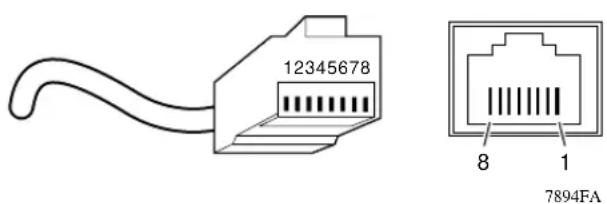
Figure E-1. RJ-45 plug and RJ-45 connector
Table E-1 lists the pin assignments for the RJ-45 plug and RJ-45 connector for the S/T interface.
Table E-1. RJ-45 plug and RJ-45 connector pin assignments for the S/T interface
| Pin Assignment | |
| 1 Not connected | |
| 2 Not connected | |
| 3 RCV + | |
| 4 | X M |
| 5 | X M |
| 6 RCV - | |
| 7 - 48V | |
| 8 - 48V RTN |
T + T -
Table E-2 lists the pin assignments for the RJ-45 plug and RJ-45 connector for the U interface.
Table E-2. RJ-45 plug and RJ-45 connector pin assignments for the U interface
| Pin Assignment | |
| 1 Not connected | |
| 2 Not connected | |
| 3 Not connected | |
| 4 | R i |
| 5 | Tip |
| 6 Not connected | |
| 7 - 48V | |
| 8 - 48V RTN |
n g
RJ-11 Plug and Connector
Figure E-2 shows an RJ-11 plug and an RJ-11 connector.
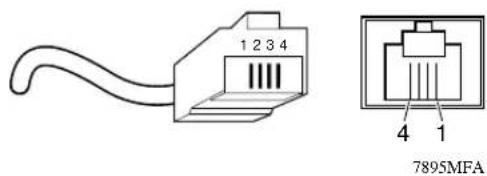
Figure E-2. RJ-11 plug and RJ-11 connector
Table E-3 lists the pin assignments for RJ-11 plugs and the RJ-11 connectors for the PHONE 1 and PHONE 2 ports.
Table E-3. RJ-11 connector pin assignments
| Pin Assignment | |
| 1 Not connected | |
| 2 | R i n |
| 3 | Tip |
| 4 Not connected |
g
Appendix F Serial Port Interface
This appendix provides information about the serial port interface for the Model XM128 ISDN Digital Modem.
RS-232 Serial Interface
Table F-1 describes the RS-232 25-pin serial port interface for the Model XM128 modem.
Table F-1. Serial port interface
| Pin number | ITU-TSS signal name | EIA signal name | Signal/pin description | Signal direction DTE -DCE |
| 1 101 AA Protective ground (GND). □ | ||||
| 2 103 BA Transmitted data (TXD). ? | ||||
| 3 104 BB Received data (RXD). < | ||||
| 4 105 CA Request to send (RTS). ? | ||||
| 5 106 CB Clear to send (CTS). < | ||||
| 6 107 CC | Data set ready (DSR). | < | ||
| 7 102 AB Signal ground (GND). | □ | |||
| 8 109 CF Data carrier detected (DCD). | < | |||
| 15 | 114 DB Transmit clock signal (source: DCE). < | |||
| 17 | 115 DD | Synchronous receive clock. < | ||
| 18 | 141 | Local analog loopback test. | ? | |
| 20 | 108/2108/1 | CD | Data terminal ready (DTR). Connect DCE to line. | ? |
| 21 | 140 | Remote digital loop test. | ? | |
| 22 125 CE Ring | indicator (RI). < | |||
| 24 113 DA Transmit clock signal | (source: DTE). ? | |||
| 25 142 Test indicator. < | ||||
Asynchronous Cable Connections
Table F-2 provides information about the asynchronous flow control cable connection.
Table F-2. Asynchronous flow control cable connection
| Modem (DCE) DB25 | Signal To PC | (DTE) DB 9 | To DCE (Null) DB25 | To MAC Mini 8 | To NeXT 68,040 Mini 8 |
| 2 | TXD | 3 | 3 | 3 | 3 |
| 3 | RXD | 2 | 2 | 5 | 5 |
| 4 | RTS | 7 | 5 | 1 | 6 |
| 5 | CTS | 8 | 4 | 2 | 8 |
| 6 | DSR | 6 | 20 | ||
| 7 | Ground | 5 | 7 | 4,8 | 4 |
| 8 | CD (DCD) | 1 | 20 | 2 | |
| 20 | DTR | 4 | 6,8 | 1 | 1 |
| 22 | RI | 9 |
Appendix G ISDN Reference
This appendix explains ISDN technical terms. The appendix also provides you with forms to assist you when working with your local telephone company to set up ISDN services to use with your Model XM128 ISDN Digital Modem.
ISDN Overview
ISDN is a global system that provides a variety of high-speed digital communication solutions, while maintaining compatibility with existing analog voice, modem, data, and fax protocols.
ISDN is based on various standards that define communications between switches and the equipment that connects to the switches. These standards allow most types of equipment to communicate across different types of switches in every part of the world. Implementation of network switches by telephone companies differs from country to country.
In North America, a separate ISDN standard called National ISDN (NI-1) is currently being adopted by network providers and equipment manufacturers. When fully implemented, NI-1 will make installation of ISDN equipment much easier. Currently, many different types of custom signaling protocols are used. Therefore, you must configure your Model XM128 modem for the type of signaling that is used by your network.
In the rest of the world, Digital Subscriber Signaling Number 1 (DSS1) is widely deployed with minor differences from country to country. In Germany, there is an old ISDN system called 1TR6, which will be replaced gradually by DSS1.
Basic Rate Interface
When you order a Basic Rate Interface (BRI) ISDN line, you receive what is known as the 2B+D service. This service provides two B channels that can transmit at 64 Kbps per channel for user information and a D channel that can communicate between the user and the ISDN network at 16 Kbps.
The D channel is used to manage communication between the equipment and the switch. It is used mainly to exchange signal messages with the switch and to set up and release calls. In most cases, if there is any incompatibility issue raised, it is the D channel signaling protocol that is causing the problem. The Model XM128 modem does not allow the user to use the D channel for sending and receiving user data.
Out-of-Band Signaling
Some switches transmit all the network signals through the D channel, freeing both B channels to be used exclusively for your communication. This arrangement allows a throughput of 128 Kbps (64 Kbps per channel). However, not all switches support out-of-band signaling at this time. For the switches that do not support out-of-band signaling, network signals are transmitted through B channels only, which reduces the bandwidth to 56 Kbps.
The Model XM128 modem currently supports the following switch types and D channel protocols:
• DSS1
• 1TR6
• AT&T 5ESS Custom and National ISDN-1 protocol
• Northern Telecom DMS-100 Custom and National ISDN-1 protocol
• Siemens EWSD National ISDN-1 protocol
- Rate Adaption & B channel protocol
The Model XM128 modem currently supports the following protocols:
• V.120
• X . 7 5
• V.110
- Asyn-to-sync PPP and PPP/MP
The B channels are used for carrying user communication information, which can be data, voice, or fax. Voice and analog data must be sent on the B channels. Unlike the asynchronous communications between most PCs and your Model XM128 modem, the B channel operates in synchronous mode. In order to convert the asynchronous communication to synchronous communication, it is necessary to use a Rate Adaption Protocol.
In North America, the V.120 Protocol is the most popular Rate Adaptation Protocol used. The V.120 Protocol is an ITU-T protocol that supports synchronous and asynchronous rate adaption and provides link-layer error control. NETGEAR also implements V.42bis data compression on top of V.120, allowing the user to achieve even higher data communication throughput.
The Model XM128 modem also supports high-level data link control (HDLC) asynchronous to synchronous conversion from Point-to-Point Protocol (PPP). This protocol is very popular for Internet access and remote access applications.
Currently, most of us still use plain old telephone service (POTS) for our regular communication needs. The Model XM128 modem provides two POTS ports (PHONE 1 and PHONE 2) for you to connect analog devices; this feature lets you continue to use analog communications. You can connect phones, fax machines, or analog modems to the PHONE 1 and PHONE 2 ports, while using one of the idle B channels (even if the Model XM128 modem is busy doing data communications).
Terminal Adapter or Digital Modem
A terminal adapter (TA) allows users to send and receive data over the ISDN network. You can send and receive both data and voice simultaneously by using both B channels. The PHONE 1 and PHONE 2 ports in the Model XM128 modem allow you to connect analog devices to the modem to make outgoing calls as well as to receive incoming calls. With its auto-detect feature, the Model XM128 modem monitors incoming calls from both analog and digital devices. It monitors these calls without user intervention and makes connections accordingly.
ISDN Basic Rate Interface Points
In the interest of supporting deregulated Customer Premises Equipment (CPE), the exchange Carrier Standard Association in the United States established a basic rate transmission standard for CPE. The standards are defined for equipment to connect to different reference points of the ISDN link. Some of these reference points are S, T, and U. They have very specific definitions and provide standard interfaces for equipment connected to them.
Not all the interfaces must exist in actual implementations. For example, not all houses are equipped with a PBX (NT2). In this case, the U interface is provided by the NT-1 device.
An ISDN terminal adapter can be constructed with the functionality of an NT-1 device. In this case, the terminal adapter connects directly to the U interface. The Model XM128 modem connects directly to a U interface without an NT-1 device, which can sometimes be quite expensive.
The Model XM128 modem comes with the following two different types of interfaces:
- An S/T interface
The Model XM128 modem with an S/T interface is called a Model XM128S modem and requires an NT-1 device to be connected between the modem and the ISDN wall connection.
• A U interface for American ISDN
The Model XM128 modem with a U interface is called a Model XM128U modem and can be connected directly to the ISDN jack installed by the telephone company.
SPID Setup
Service provider identification (SPID) numbers are needed unless your switch type is AT&T 5ESS with Point-to-Point Protocol. The ISDN switches use SPID numbers to represent the subscribed network services. Each SPID number corresponds to one terminal end point identifier. Different switches might provide different rules for the SPID number format. You should get the SPID number from your local telephone company.
Ordering ISDN Service
This section provides information about ordering an ISDN line from your telephone company. Follow these guidelines and use the information to fill in the appropriate worksheet in this appendix:
- Provide the following ISDN codes to the telephone company:
- S
- EZ-ISDN-1
Each code describes a set of capabilities and features that are available in the Model XM128 modem. Providing these codes ensures that your ISDN line is installed for maximum compatibility.
- Make sure the telephone company provides you with:
– The switch type information
Ask the telephone company representative which switch type is available in your area. Select the appropriate worksheet in this appendix and complete the information to use as a guide. The three types of worksheets provided are AT& T 5ESS, Northern Telecom DMS-100, and Siemens EWSD.
- The switch protocol
Ask the telephone company representative which switch protocol you will be using to communicate with the telephone company switch.
- The SPID numbers
Determine the number of SPID numbers your configuration requires and request that quantity.
– The Directory numbers
In most cases, you will have two directory numbers. Determine and request the appropriate quantity.
Order Form for AT&T 5ESS Switch (NI-1 ISDN)
To order ISDN service for the AT&T switch, provide the information on this form to your local telephone company by photocopying and faxing this order form.
First Name: ____ Last Name: ____
Address:
City: ____ State: ____ Zip: ____
Telephone (analog): ____
Refer to Table G-1 for information about your configuring your ISDN line for the AT & T switch.
Table G-1. ISDN line configuration
| Line type Standard (2B+D) NI -1 or Custom | |
| Data line class Point-to-Point (PPP) or Multipoint | |
| Line code 2B1Q | |
| Interface type U interface with RJ-45 jack | |
| B1 service On demand (DMD) | |
| B2 service On demand (DMD) | |
| Access rate 64 Kbps | |
| Maximum B channels 2 | |
| Circuit-switched voice | 2 |
| Circuit-switched voice channel | Any |
| Circuit-switched data | 2 |
| Circuit-switched data channel | Any |
| D channel packet | No |
| Electronic Key Telephone Sets (EKTS) | No |
| Terminal Type | Type A |
Information the telephone company must provide:
Switch Protocol: _ NI-1 _ Point-to-Point _ Multipoint
Number of SPIDs: _ 0 _ 1 _ 2
ISDN # 1 ____ SPID #1 ____
ISDN # 2 ____ SPID #2 ____
Order Form for DMS-100 Switch (NI-1 or Custom ISDN)
To order ISDN service for the DMS-100 switch, provide the information on this form to your local telephone company by photocopying and faxing this order form.
First Name: ____ Last Name: ____
Address:
City: ____ State: ____ Zip: ____
Telephone (analog): ____
Refer to Table G-2 for information about your configuring your ISDN line for the DMS-100 switch.
Table G-2. ISDN line configuration
| Line type Standard (2B+D) NI-1 or custom | |
| Line code 2B1Q | |
| Interface type U interface with RJ-45 jack | |
| Access rate 64 Kbps | |
| Directory numbers, logical terminals 2 | |
| Bearer service Circuit switch voice and data on any B channel | |
| Circuit switched service Yes | |
| Packet switched service | No |
| Terminal endpoint identifier (TEI) | Dynamic |
| Electronic key telephone sets (EKTS) | No |
| Call appearance handling (CACH) | No |
Information the telephone company must provide:
Switch protocol: __ NI-1 __ Point-to-Point __ Multipoint
Number of SPIDs: _ 0 _ 1 _ 2
ISDN # 1 ____ SPID #1 ____
ISDN # 2 ____ SPID #2 ____
Order Form for EWSD (NI-1 ISDN)
To order ISDN service for the EWSD switch, provide the information on this form to your local telephone company by photocopying and faxing this order form.
First Name: ____ Last Name: ____
Address:
City: ____ State: ____ Zip: ____
Telephone (analog): ____
Refer to Table G-3 for information about your configuring your ISDN line for the EWSD switch.
Table G-3. ISDN line configuration
| Line type Standard (2B+D) NI-1 | |
| Line code 2B1Q | |
| Interface Type U interface with RJ-45 jack | |
| Access Rate 64 Kbps | |
| Directory numbers, logical terminals 2 | |
| Bearer Service Circuit Switch Voice and Data on any B Channel | |
| Circuit Switched Service Yes | |
| Packet Switched Service | No |
| Terminal Endpoint Identifier (TEI) | Dynamic |
| Electronic Key telephone sets (EKTS) | No |
Information the telephone company must provide:
Switch protocol: __NI-1 Custom
Number of SPIDs: _ 0 _ 1 _ 2
ISDN # 1 ____ SPID #1 ____
ISDN # 2 ____ SPID #2 ____
Index
Numerics
1TR6 communication
incoming calls 7-8
outgoing calls 7-5
placing a call 7-12
A
address ambiguity 6-8, 7-9
address matching 6-8
ambiguity resolution 7-9
analog calls 8-1
ANSI 10-5
answer modes 5-3
asynchronous flow control cable F-2
AT commands
address ambiguity 6-8
analog calls 8-2
auto callback B-4
basic C-2
best-effort call answering 6-8
call, placing 6-3
capture commands 10-6
dial strings 6-3
EAZ 7-6
EPA 10-7
European switches 8-2
extended C-8, C-12
for analog calls 8-2
frequently used 8-2
ISDN numbers, assigning 6-6
issuing 4-3
MSN 4-8
placing a call 6-3
result codes 4-4
types supported 4-3
V.110 configuration 6-10
ATXn command D-19
B
B channel 10-5
bundling 5-3
embedded protocol analyzer 10-5
protocol 5-1
basic rate interface G-2
best-effort call answering 6-8
C
cable, asynchronous F-2
COM LEDs 1-5
communication speed, setting up 4-4
configuring
ISDN line 4-1
network 4-1
using a terminal program 4-1
connect strings D-23
conventions xviii
CSD (Circuit Switched Data) 6-4
customer support iii
D
D channel 10-5, 10-6
data call indication 7-10
data compression 6-15
data over speech channel 6-7
DCA 5-5
diagnostic command 10-3
dialing out
for analog adapter port 1 6-2
for analog adapter port 2 6-2
using ISDN mode 6-1
using speech bearer service 6-2
DSS1 (Digital Subscriber Signaling #1)
incoming calls 7-7
outgoing calls 7-1
placing calls 7-11
DTE interface, operation modes C-1
E
EAZ 7-6
embedded protocol analyzer 10-5, 10-6
Endpoint Discriminator 5-4
EPA 10-5
EPA. See embedded protocol analyzer
error correction 6-15
Europe, configuration for 4-7
F
features 1-1
flash EPROM, upgrading 9-1
frequently used AT commands 8-2
front panel 1-3
H
HDLC 5-1, 5-3
I
incoming calls 6-3, 7-10
installation
instructions 2-2
verifying 2-3
interfaces 1-3
ISDN
advanced call control 7-1
answering a call 7-7
basic rate interface points G-3
control of ENDGERATEAUSWAHLZIFFER (EAZ) 7-6
LEDs 1-4
line configuring 4-1
numbers, assigning 6-6
ordering G-4
overview G-1
placing a call 7-11
port 1-7
L
LED descriptions 1-4, 2-3
loopback tests 10-2
M
modem reset 10-4
modes, answer 5-3
MPPP 5-3, 5-4
MSN 5-3
answering a call using 6-6
AT commands 4-8
multi-auto answering 6-9, 7-9
Multilink PPP 5-3, 5-4, 5-5
N
network switches, setting up 4-5
network, configuring 4-1
O
out of band signaling G-2
outgoing calls 6-1
P
package contents 2-1
packet length, determining 6-5
passwords, setting and modifying B-3
Phone 1 port 1-7
Phone 2 port 1-7
point-to-point configuration 7-11
port
ISDN 1-7
Phone 1 1-7
Phone 2 1-7
serial 1-7
Power LED 1-4
power receptacle 1-7
PPP 5-1, 5-2, 5-3, 5-4, 5-5
protocol specifications 6-9
PWR LED 1-4
R
rear panel 1-6
related publications xix
Remote Access 5-1
reset modem 10-4
result codes D-21
RJ-11 connector pin assignments E-3
RJ-45 connector pin assignments E-1
RS-232 interface F-1
RS-232 port 1-6
S
security
level 1 B-2
level 2 B-2
level 3 B-3
types and levels B-1
serial port 1-7
serial port interface F-1
simplex mode C-1
SLIP 5-1
Speech bearer 5-3
SPID numbers 4-6, G-4
S-register
descriptions D-4
extended D-5
setting D-2
values 7-2
viewing D-1
Status Register. See S-register
subaddresses 7-3
switches, Northern Telecom 5-2
T
technical specifications A-1
terminal adapter G-3
terminal programs 4-2
troubleshooting 10-1
U
United Kingdom, configuration for 4-7
upgrading with flash EPROM 9-1
user-to-user information 7-13
V
V.110
call answering 6-10
making a call 6-10
V.120
answering incoming calls 6-12, 6-13
bundled call 6-13
configuring 6-12
dialing out 6-13
error correction and data compression with 6-15
making a bundled call with 6-13
selecting for European ISDN 6-11
V.42bis data compression 6-18
W
World Wide Web iv
X
X.75
Answering a call 6-16
bundled call 6-17
ISDN communications for Europe 6-16
making a call 6-17
prestored phone numbers 6-18