Avanta Exclusive 39C - Central heating boiler Remeha - Free user manual and instructions
Find the device manual for free Avanta Exclusive 39C Remeha in PDF.


| Product Type | Condensing Central Heating Boiler |
| Brand | Remeha |
| Model | Avanta Exclusive 39C |
| Fuel Type | Natural Gas (G20/G25) |
| Heating Output (Min-Max) | 11.0 - 39.0 kW (PHS) |
| Efficiency Class | A (ErP Directive) |
| Dimensions (H x W x D) | 740 x 465 x 305 mm |
| Weight (Empty) | 44 kg |
| Flow Temperature Range | 35 - 85 °C |
| Water Capacity | 3.2 L |
| Expansion Vessel Capacity | 10 L (pre-charge 1 bar) |
| Pump Type | High-efficiency variable speed pump |
| Gas Connection | R 3/4" |
| Flue Type | Concentric 60/100 mm (horizontal or vertical) |
| Controls | On-board digital display, optional remote control |
| Modulation Ratio | 1:3.5 |
| Safety Devices | Flame supervision, overheat thermostat, frost protection, pressure relief valve |
| Annual Servicing | Recommended (access via front panel) |
| Warranty | 2 years (parts and labour) |
| Spare Parts Availability | Widely available through Remeha distributors |
Frequently Asked Questions - Avanta Exclusive 39C Remeha
User questions about Avanta Exclusive 39C Remeha
0 question about this device. Answer the ones you know or ask your own.
Ask a new question about this device
Download the instructions for your Central heating boiler in PDF format for free! Find your manual Avanta Exclusive 39C - Remeha and take your electronic device back in hand. On this page are published all the documents necessary for the use of your device. Avanta Exclusive 39C by Remeha.
USER MANUAL Avanta Exclusive 39C Remeha
High-efficiency wall-hung boilers
Avanta Exclusive 28C - 35C - 39C
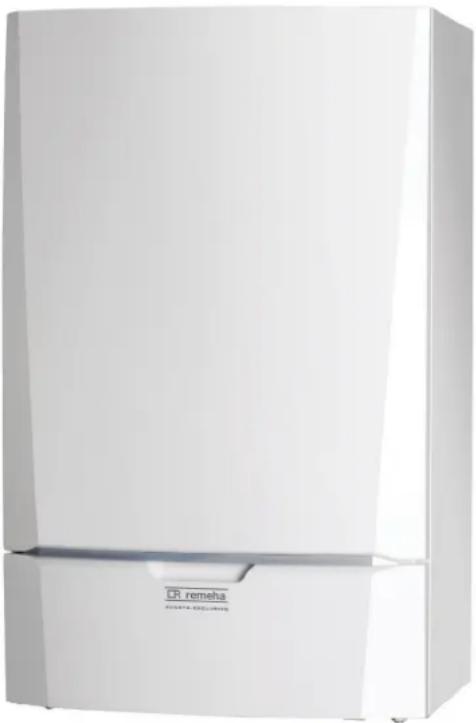
natural_image
White refrigerator with visible label 'CR remeha' and 'HYARE EXCLUSIONS' on the front panel (no other text or symbols)
User's Operation Instructions & Important Warranty Information
Please keep these instructions in a safe place.
If you move house, please hand over to the next occupier.

text_image
benchmark COLLECTIVE MARK THE MARK OF QUALITY FOR THE INSTALLATION, COMMISSIONING AND SERVICING OF DOMESTIC HEATING AND HOT WATER SYSTEMSBenchmark places responsibilities on both manufacturers and installers. The purpose is to ensure that customers are provided with the correct equipment for their needs, that it is installed, commissioned and serviced in accordance with the manufacturer's instructions by competent persons and that it meets the requirements of the appropriate Building Regulations. The Benchmark Checklist can be used to demonstrate compliance with Building Regulations and should be provided to the customer for future reference. Installers are required to carry out installation, commissioning and servicing work in accordance with the Benchmark Code of Practice which is available from the Heating and Hotwater Industry Council who manage and promote the Scheme.
Visit www.centralheating.co.uk for more information.
CONTENT
1 SAFETY....3
2 PROBLEMS WITH BOILER AND/OR CENTRAL HEATING SYSTEM....4
3 FILLING THE SYSTEM....5
4 CHANGING BOILER SETTINGS....6
5 DISABLING THE BOILER 8
6 ENABLING THE BOILER....9
7 WARRANTY & SERVICE....10
1 SAFETY

Can you smell gas? What to do:
- Do not smoke and do not create any flame or sparks.
- Do not use any electric switches.
- Turn off the main gas stop cock.
- Open windows and doors.
- Warn those present and leave the building together.
- Call your gas suppliers / installer once you are outside the building, TRANSCO tel. 0800 111 999.

Can you smell smoke or flue gases? What to do:
- Switch off the boiler.
- Open windows and doors.
- Warn those present and leave the building together.
- Call your installer once you are outside the building.

Installation location for the boiler!
- Do not store or use any flammable materials, aggressive substance and/or aerosols near the boiler.
- The installation area must be frost-free.
- The switched spur unit for the boiler must always be accessible.

Water and pipe temperatures!
- The factory setting for the tap water temperature is 55^ ; this temperature can be set to 65^ .
- The maximum water temperature in the Avanta Exclusive can reach 90^ . This means that pipes and/or radiators can reach this temperature.
- If the boiler is running, the flue duct can reach a high temperature.
2 PROBLEMS WITH BOILER AND/OR CENTRAL HEATING SYSTEM
Error codes – errors which can be resolved by the user
 | 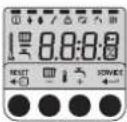 | 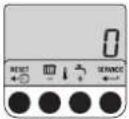 Or Or | 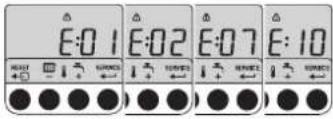 | ||
| E:01 | Check water pressure: water pressure is greater or equal to 1 bar. | Press RESET -key | Wait for recovery; display shows ☐, boiler functions properly. | Display shows E:01, E:02, E:07 or E:10 again; note down the error code and boiler type and call your installer | |
| E:02 | |||||
| E:07 |  |  | Press RESET -key | 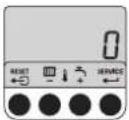 Or Or |  |
| E:09 | |||||
| E:10 | Check water pressure: water pressure is lower than 1 bar. | Top up your central heating system | Wait for recovery; display shows ☐, boiler functions properly. | Display shows E:01, E:02, E:07 or E:10 again; note down the error code and boiler type and call your installer | |
 | 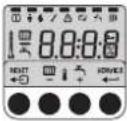 | 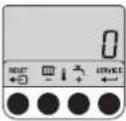 Or Or | 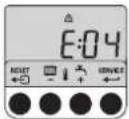 | ||
| E:04 | Check yellow gas valve, bottom boiler, gas valve must be in line with gas supply pipe, if necessary open gas valve. | Press RESET -key | Wait for recovery; display shows ☐, boiler functions properly.LT.NL.W6H.000.114 + LT.NL.W6H.000.116 + LT.AL.W7H.000.230 + LT.AL.W7H.000.235 + R000184-A + R000185-A + R000186-A + R000187-A | Display shows E:04 again: note down the error code and boiler type and call your installer. | |
Error codes – errors which have to be remedied by the installer
If the display indicates a different error code from that described above, note down the error code and boiler type and call your installer. Contact your installer also in the event of a water leak.
natural_image
Two mechanical components showing a valve mechanism with rotation arrows (no text or symbols)Add water to the installation if necessary. To do this, proceed as follows:
- Open the valves on all radiators connected to the heating system
T000181-B
text_image
230 VT000182-A + LT.AL.W7H.000.224
-
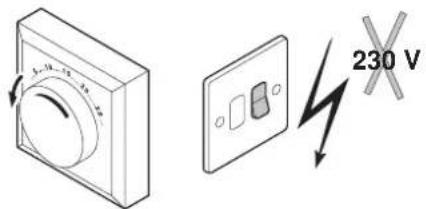
Set the room thermostat to as low a temperature as possible.
-
Switch off the boiler electrical power supply.
-
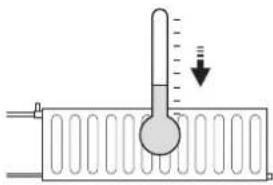
Wait until the temperature drops below 40^ C and the radiators seem cold before filling the heating system.
text_image
Diagram showing a thermometer measuring a submerged object in a container, with a downward arrow indicating pressure or displacement.T000185-A

text_image
Technical diagram showing a pressure gauge and pipe connection with labeled parts and directional arrowsLT.NL.W6H.000.114 + LT.AL.W7H.000.235
-
Open the filling loop valve.
-
Close the filling loop valve when the manometer indicates the design operating pressure.
-
After filling the installation, switch the boiler on.
-
Set the room thermostat or the regulator.
-
Set the radiator valves.
4 CHANGING BOILER SETTINGS

text_image
2x P : 1 75 70 P : 1 2xR000188-A
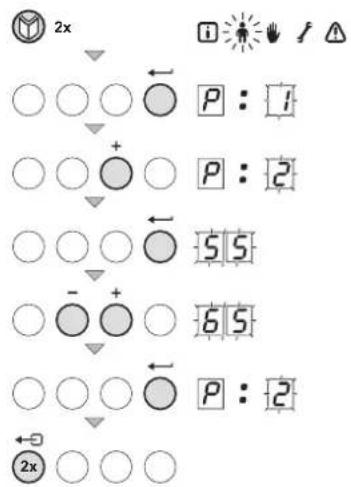
1. Changing P1 setting: flow temperature of water in central heating system
Reduce the flow temperature as follows:
- Press the ⏻-key until the 🔔 symbol flashes in the menu bar.
- Select the users menu using the ←-key. P: I is displayed with I flashing.
- Press the ←-key a second time. The value 75°C appears and flashes.
- Change the value by pressing the [+] or [-] key. In this example, use the [-] -key to change the value to 70^ .
- Confirm the value with the ←-key. P: I is displayed with I flashing.
- Press 2 times on the ←→-key to return to the current operating mode.
2. Changing P2 setting: domestic hot water temperature
Increase the domestic hot water temperature as follows:
- Press the ⏻-key until the 🔔 symbol flashes in the menu bar.
- Select the users menu using the ←-key. P: I is displayed with I flashing.
- Press the [+] - key. P: 2 is displayed with 2 flashing.
- Press the ← key a second time. The value 55°C appears and flashes.
- Change the value by pressing the [+] or [-] key. In this example, use the [+] -key to change the value to 65^ .
- Confirm the value with the ←-key. P:2 is displayed with 2 flashing.
- Press 2 times on the ←→-key to return to the current operating mode.
3. Changing P3 setting: boiler regulation (domestic hot water and central heating mode)
$$ \begin{array}{l} \boxed {0} = \mathrm{CH} _ {\text { off }} / \mathrm{DHW} _ {\text { off }} \ \boxed {I} = \mathrm{CH} _ {\text { on }} / \mathrm{DHW} _ {\text { on }} (\text { factory setting }) \ \boxed {2} = \mathrm{CH} _ {\text { on }} / \mathrm{DHW} _ {\text { off }} \ \boxed {3} = \mathrm{CH} _ {\text { off }} / \mathrm{DHW} _ {\text { on }} \ \end{array} $$
Change the boiler regulation as follows:
- Press the ⏻-key until the 🔔 symbol flashes in the menu bar.
- Select the users menu using the ←-key. P: I is displayed with I flashing.
- Press the [+] - key several times. P: 3 is displayed with 3 flashing.
- Press the ←-key a second time. The setting □ appears and flashes.
- Change the setting by pressing the [+] or [-] key. In this example, use the [+] -key to change the setting to 2 (CH on / DHW off ).
- Confirm the value with the ←-key. P:3 is displayed with 3 flashing.
- Press 2 times on the ←→-key to return to the current operating mode.
Remeha is a licensed member of the Benchmark Scheme which aims to improve the standards of installation and commissioning of domestic heating and hot water systems in the UK and to encourage regular servicing to optimise safety, efficiency and performance.
Benchmark is managed and promoted by the Heating and Hotwater Industry Council.
For more information visit www.centralheating.co.uk
flowchart
graph TD
    A["○ ○ ○"] --> B["○ + ○"]
    B --> C["○ ○ ○"]
    C --> D["○ - + ○"]
    D --> E["○ ○ ○"]
    E --> F["○ 2"]
    F --> G["□ 1"]
    G --> H["○ P: 4"]
    H --> I["← 2x ○ ○ ○"]
R000191-A
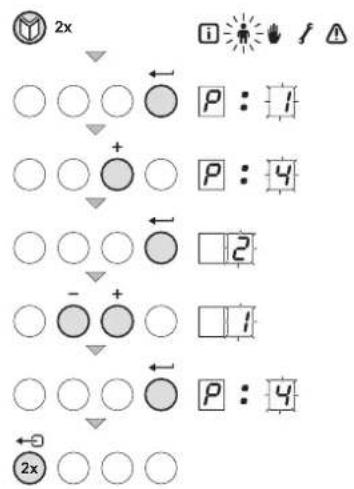
4. Changing P4 setting: Eco or comfort mode
No hot water
Beware; the system boiler in combination with an external calorifier will not warm up the calorifier in the Eco-mode.
So, if the calorifier is empty, the tap water will be cold.
0 = Comfort mode 1 = Eco mode 2 = regulated by controller (= factory setting)
Change the mode as follows:
- Press the ⏻-key until the ⏻ symbol flashes in the menu bar.
- Select the users menu using the ←-key. P: I is displayed with I flashing.
- Press the [+) -key several times. P:4 is displayed with 4 flashing.
- Press the ←-key a second time. The setting 2 appears and flashes.
- Change the setting by pressing the [+] or [-] key. In this example, use the [-] -key to change the setting to |1| (Eco mode).
- Confirm the value with the ←-key. P: 4 is displayed with 4 flashing.
- Press 2 times on the ←→-key to return to the current operating mode.
5. Changing P6 setting: display on/off
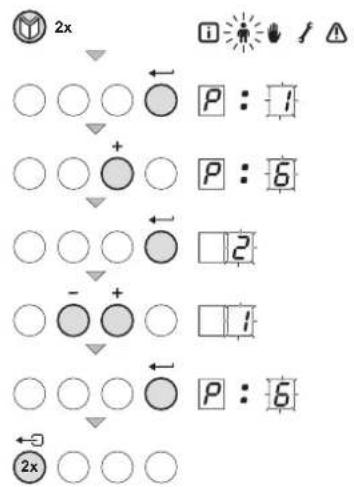
flowchart
graph TD
    A["2x"] --> B["○ ○ ○"]
    B --> C["○ + ○"]
    C --> D["○ ○ ○"]
    D --> E["○ - + ○"]
    E --> F["○ ○ ○"]
    F --> G["○ ← □2"]
    G --> H["○ □1"]
    H --> I["○ ← □6"]
    I --> J["○ ← □2x"]
R000192-A
0 = Display stays off 1 = Display stays on 2 = Display light switches off automatically after 3 minutes (= factory setting)
Change the display setting as follows:
- Press the ⏻-key until the ⏻ symbol flashes in the menu bar.
- Select the users menu using the ←-key. P: I is displayed with I flashing.
- Press the [+] -key several times. P:6 is displayed with 5 flashing.
- Press the ←-key a second time. The setting 2 appears and flashes.
- Change the setting by pressing the [+] or [-] key. In this example, use the [-] -key to change the setting to (Display stays on).
- Confirm the value with the -key. P:5 is displayed with 5 flashing.
- Press 2 times on the ←→-key to return to the current operating mode.
5 DISABLING THE BOILER
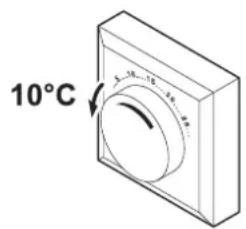
text_image
10°CLT.AL.W7H.000.217
The boiler must be disabled before any maintenance or repairs are carried out. If the central heating system is not used for a long time (during the holidays, for instance, or periods of milder weather) it is advisable to disable the boiler.
1. Disable boiler with frost protection, during longer periods of non-use
- Set the room thermostat to a low temperature, e.g. 10^ ,
- Switch setting to (Eco mode), this will switch off the heat retention function.
Now the boiler will only start working to protect itself against freezing.
With an external frost protection connected, the boiler can also prevent the central heating system from freezing.
Pre and After Sales Service
Our dedicated pre-and-after-sales teams are ready to give you the support you need.
Its an integral part of the quality package that Remeha offers as standard with all products.
Contact Information
Sales Office: 0844 8711544
After Sales Service: 0844 879 7690
Literature: 0844 879 7690
Training: 0844 879 7690
Technical Helpline: 0118 974 3070
Spares Sales Office: 0844 871 1540
For all your queries please call the Avanta team on: 0844 879 7690
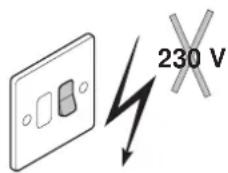
text_image
230 VLT.AL.W7H.000.224
2. Disable boiler without frost protection, during longer periods of non-use
- Switch off the boiler.
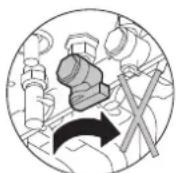
Gas
LT.AL.W7H.000.228
- Turn off the boiler gas tap.
Drain boiler
Drain the boiler and central heating system if you will not be using the home for a long period and there is a chance of night frost.
6 ENABLING THE BOILER
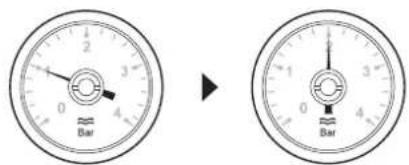
text_image
Bar → BarR000176-A
text_image
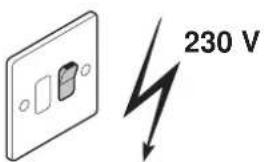
230 VLT.AL.W7H.000.225
- Check the boiler water pressure. If the water pressure is less than 1 bar, the system has to be topped up with water.
- Switch on the boiler at the fused spur unit; the boiler will run the start-up program.
- A display test will briefly appear showing all segments of the display.
F□:X|X software version
P□:X X parameter version;
- A venting cycle of 3 minutes now follows, the version numbers will be displayed alternately.
- Next, the following will appear in the display:
□1 pre-purge stage
□2 ignition stage
☐3 operating in CH mode or
□4 operating in DHW mode
☐7 pump run on after CH or DHW is satisfied
□0 stand-by mode
- Set the room thermostat to the desired room temperature.
The boiler will now automatically start operating.

LT.AL.W7H.000.212
7 WARRANTY & SERVICE
Standard Warranty Terms & Conditions
To activate your warranty you must register your boiler with heateam the service division of Baxi Heating UK Ltd either by completing and returning the registration card or calling our telephone registration line on 0844 879 7690.
It is also a requirement of the warranty that the boiler has an annual service (every 12 months) in accordance with the installation and servicing instructions, performed by a Gas Safe registered engineer. If you would like heateam to carry this out please call on 0844 879 7690 or visit www.heateam.co.uk
Our promise to you
If you experience a fault with your new boiler, we aim to provide a safe and high quality repair service supported by our dedicated national network of highly skilled engineers. If your installer can't resolve the problem for you, we will do everything we can to get an engineer out to you as quickly as possible. Nothing in this warranty will affect your statutory consumer rights.
What you need to do if you experience a problem with your heating system or the operation of the boiler.
You should always contact your installer first, because the cause of the fault may not be related to the boiler. If your installer confirms that the fault is with the boiler and he / she can't repair it, our friendly customer service team is on hand to help. Simply call our service division heateam on 0844 879 7690 to book an engineer visit or for any general advise that you may need. Our contact centre is open Monday to Friday 8am - 6pm, weekends and bank Holidays 8:30am - 2pm, excluding Christmas Day and New Years Day.
When calling heateam it would be helpful if you could have the following information to hand:-
- Boiler serial number
- Boiler make and model number
- Your installer name and address details
- Proof of purchase (if you do not have the boiler serial number)
What the warranty covers
- Free of charge repair or replacement of components found to be of faulty manufacture.
- Free of charge replacement of the complete unit provided always that the failure is related to a manufacturing fault that cannot be repaired or is uneconomic to repair.
What this warranty does not cover
- Repairs to boilers which haven't been installed and commissioned properly, and as set out in the installation instructions (this includes the need to flush the system effectively and add a suitable corrosion inhibitor).
- Any damage caused by hard water scale deposits and/or aggressive water resulting from corrosion.
- Any other defects or failures, either in the connected heating system or outside of the boiler itself.
- Faults caused by inadequate supply of electricity, gas or water to the property.
• Installations within commercial settings for which this boiler was not designed. - Reimbursements of any third party repair or replacement costs that e haven't been told about or agreed with you in advance.
- Compensation for consequential losses (e.g. loss of earnings, business losses, stress and inconvenience) arising from a production breakdown, including repair delays caused by factors outside our reasonable control.
After Sales Service 0844 879 7690
• 90735 Avanta Exclusive 28C
• 90736 Avanta Exclusive 35C
• 90737 Avanta Exclusive 39C
Please ensure that the installer has fully completed the Benchmark Checklist on the inside back pages of the installation instructions supplied with the product and that you have signed it to say that you have received a full and clear explanation of its operation. The installer is legally required to complete a commissioning checklist as a means of complying with the appropriate Building Regulations (England and Wales).
All installations must be notified to Local Area Building Control either directly or through a Competent Persons Scheme. A Building Regulations Compliance Certificate will then be issued to the customer who should, on receipt, write the Notification Number on the Benchmark Checklist.
This product should be serviced regularly to optimise its safety, efficiency and performance. The service engineer should complete the relevant Service Record on the Benchmark Checklist after each service.
The Benchmark Checklist may be required in the event of any warranty work and as supporting documentation relating to home improvements in the optional documents section of the Home Information Pack.
Remeha - PART OF BDR THERMEA
Brooks House
Coventry Road
Warwick
CV34 4LL
After Sales Tel: 0844 879 7690
Technical Enquires: 0118 974 3070
Internet: www.remehaheating.co.uk
© Copyright
All technical and technological information contained in these technical instructions, as well as any drawings and technical descriptions supplied, remain our property and shall not be multiplied without our prior consent in writing. Subject to alterations
126582-160412


bar
| Category | Value | |---|---| | Category 1 | 100 | | Category 2 | 100 | | Category 3 | 100 | | Category 4 | 100 | | Category 5 | 100 | | Category 6 | 100 | | Category 7 | 100 | | Category 8 | 100 | | Category 9 | 100 | | Category 10 | 100 |DR remeha