PRMC620 - Bill Counter Pyle - Free user manual and instructions
Find the device manual for free PRMC620 Pyle in PDF.


| Product Type | Currency Counter |
| Brand | Pyle |
| Model | PRMC620 |
| Counting Speed | Up to 1000 bills per minute |
| Hopper Capacity | 200 bills |
| Stacker Capacity | 200 bills |
| Detection Modes | UV, MG, IR |
| Display | LED digital display |
| Functions | Count, Batch, Add |
| Power Supply | AC 100-240V, 50/60Hz |
| Dimensions (L x W x H) | 25.4 x 20.3 x 15.2 cm |
| Weight | 2.2 kg |
| Operation | Automatic start/stop |
| Construction | Plastic housing |
| Warranty | 1 year |
| Certifications | CE, FCC |
| Accessories Included | Power cord, user manual |
| Cleaning | Use soft dry cloth; avoid liquids |
| Maintenance | Regular cleaning of sensors and rollers |
Frequently Asked Questions - PRMC620 Pyle
User questions about PRMC620 Pyle
0 question about this device. Answer the ones you know or ask your own.
Ask a new question about this device
Download the instructions for your Bill Counter in PDF format for free! Find your manual PRMC620 - Pyle and take your electronic device back in hand. On this page are published all the documents necessary for the use of your device. PRMC620 by Pyle.
USER MANUAL PRMC620 Pyle
AUTOMATIC COIN COUNTER
User Manual

natural_image
White Pyle USA 3D-printer appliance with digital display and black base (no visible text or symbols on the device itself)PRMC620
FORWARD
This manual uses for telling you how to operate the machine. Before using it, please read this manual carefully and know about all the options for this machine.
CONTENTS
I. APPEARANCES.... 2
II. DESCRIPTION 3
III. SPECIFICATIONS...... 4
IV. FUNCTION DEFINITIONS 4
V. FEATURES 4
VI. OPERATION 4
VII. ERROR TREATMENT 6
I. APPEARANCES


| 1 | “+”KEY | 5 | REPORT KEY |
| 2 | BAT KEY | 6 | START&STOP KEY |
| 3 | “-”KEY | 7 | CLEAR KEY |
| 4 | SET KEY |
II. DESCRIPTION
1. Hopper
The place for putting the coins
2. Shunting stick
Use for rolling the coins and indicate the capacity of the hopper
3. Keyboard
Control display. Used to preset optional batch size (up to 4 digits).
4. Receiving Slot
The place for receiving the different value coins.
5. Power Switch
To control the power source.
6. Bat key
Used to set the batch number (up to 4 digits)
7. “+”KEY
Used to add the number of presetting the batch number
8. “-” KEY
Used to reduce the number of presetting the batch number
9. Set Key
Used to preset the number of the different value coins
10. Clear Key
Used to return to display total value menu.
11. Report Key
Used to display the individual value of different coins
12. Start & Stop Key
Used to start counting or stop counting.
III. SPECIFICATIONS
| Ambient temperature: | 0°C~40°C |
| Ambient Humidity: | 30~80% |
| Hopper capacity: | 300~500 units |
| Each receiving slot capacity: | 80~150 units |
| Batch preset number display: | 3 Digits LED |
| Counting number display: | 4 Digits LED |
| Power Source: | AC220V/50HZ |
| Power Consumption: | 45W (MAX) |
| Dimensions: | 355mm×330mm×266mm |
| Net weight: | 4.5KG |
| Counting speed: | 216units/min |
IV. FUNCTION DEFINITIONS
1. SET OPTION
It uses for presetting the number of the different value coins.
2. REPORT OPTION
It uses for giving a report about the number of the different value coins after counting.
V. FEATURES
- Convenient operation
- Batch count mode and free count mode
VI. OPERATION
- Put the machine on the horizontal and then turn on the power switch.
2. Select the count mode
This machine can work in two ways: free count and batch count mode. The count mode can be selected by presetting the batch number.
◆ Free Count Mode
In this mode, the machine counts all the coins in the hopper with no stoppage until one of coins receiving slot is full. This mode machine will preset the Batch Number itself when power up.
◆ Batch Count Mode
In this mode, the machine counts a batch coins according to the presetting number. This count mode will be set by presetting an expected number on the Batch Number Display. Before counting, please use the “SET” KEY to select which kind of the coins you want to preset and then use “+”, “-” and “BAT” KEY to preset the expected number.
- Put the coins to the hopper, and the coins should not be piled up higher than the top of the shunting stick one time and then it press the “START&STOP” KEY to start counting.
- When finish counting, please press the START&STOP KEY to stop the machine, or it will auto stop after about 20 seconds.
- If you want to get the result of each kind coins, press the "Report" Key and then the machine will display the individual number for the each kind of coins, and then press "C" KEY it will return to display total value of all the coins.
VII. ERROR TREATMENT
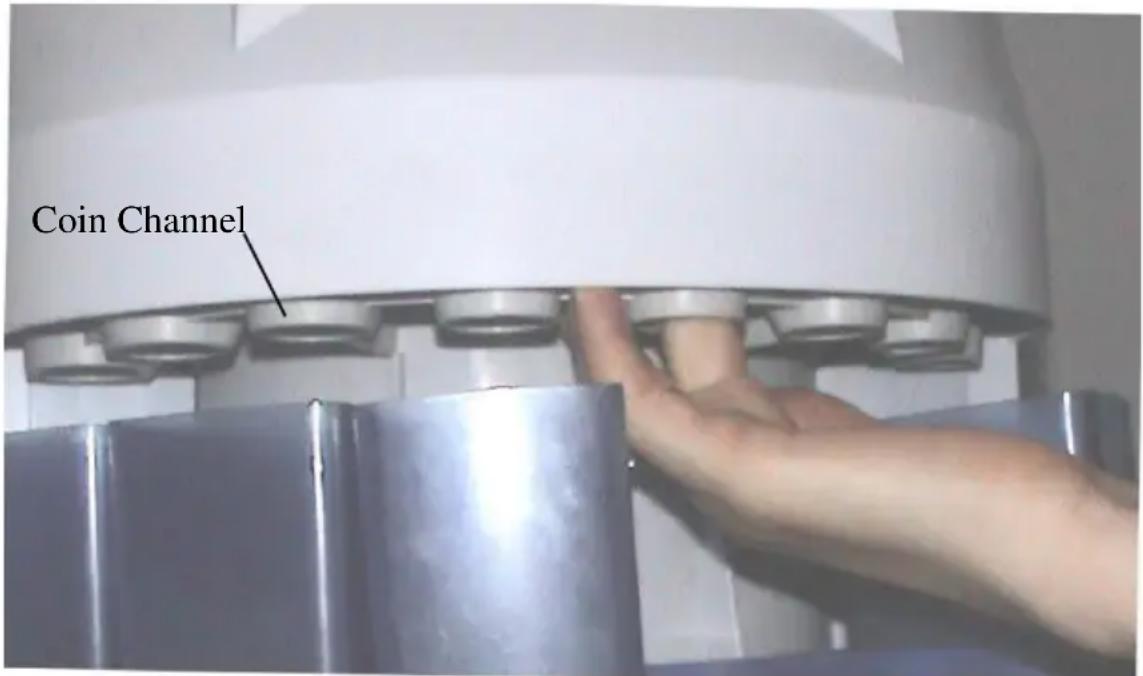
If the machine isn't put on the horizontal or it shakes too much when it's working, sometimes a coin will falls in a smaller Coin Channel by error and then it will cause a jam. To settle this error, please push the coins in the jam-packed channel with the finger and then let them down from the gap between two coin channels just as the picture above.
NOTICE:
Sometimes if the coins can't fall to the counting plate when the machine is working, please use a stick or others to help them.
- AUTOMATIC COIN COUNTER
- FORWARD
- CONTENTS
- APPEARANCES
- DESCRIPTION
- Hopper
- Shunting stick
- Keyboard
- Receiving Slot
- Power Switch
- Bat key
- “+”KEY
- “-” KEY
- Set Key
- Clear Key
- Report Key
- Start & Stop Key
- SPECIFICATIONS
- FUNCTION DEFINITIONS
- SET OPTION
- REPORT OPTION
- FEATURES
- OPERATION
- Select the count mode
- ◆ Free Count Mode
- ◆ Batch Count Mode
- ERROR TREATMENT
- NOTICE:
Brand : Pyle
Model : PRMC620
Category : Bill Counter