ETL6 - Washing machine Esatto - Free user manual and instructions
Find the device manual for free ETL6 Esatto in PDF.


User questions about ETL6 Esatto
0 question about this device. Answer the ones you know or ask your own.
Ask a new question about this device
Download the instructions for your Washing machine in PDF format for free! Find your manual ETL6 - Esatto and take your electronic device back in hand. On this page are published all the documents necessary for the use of your device. ETL6 by Esatto.
USER MANUAL ETL6 Esatto
natural_image
White disposable water purifier with control panel and digital display (no visible text or symbols)Dear Customer, Congratulations on purchasing your washing
machine. The Esatto brand is proudly distributed within Australia by Residentia Group Pty Ltd.
Please refer to the warranty card at the rear of this manual for information regarding your product's parts and labour warranty, or visit us online at www.residentiagroup.com.au.
At Residentia Group, we are customer obsessed and our Support Team are there to ensure you get the most out of your appliance. Should you want to learn more about your washing machine such as the various washing modes or importantly taking care of the appliance, our Support Team are here to help.
You can use our online Support Centre at anytime by visiting http://support.residentiagroup.com.au, or you can contact us via phone by dialling: 1300 11 HELP (4357).
It is important that you read through the following use and care manual thoroughly to familiarise yourself with the installation and operation requirements of your appliance to ensure optimum performance.
Again, thank you for choosing an Esatto appliance and we look forward to being of service to you.
Kind Regards,
The Residentia Team

User Manual:
Esatto
Contents:
Page:
Safety instructions 4
Your Esatto Vented Dryer 4
Installation Instructions 5
Operating your Washing Machine 8
Cleaning and maintenance 12
Troubleshooting 13
Technical Specifications 15
Warranty information 16
Notes 18

natural_image
Three horizontal teal bars on white background (no text or symbols)Safety Instructions
→ This appliance is only intended for use within the interior of a domestic environment.
This appliance is not intended for use by persons (including children) with reduced physical, sensory or mental capabilities, or lack of experience and knowledge, unless they have been given supervision or instruction concerning use of the appliance by a person responsible for their safety.
→ Children should be supervised to ensure that they do not play with the appliance.
→ Never insert your hands, or try to remove clothes from inside the washing machine, until the drum has completely stopped spinning.
UNPACKING
During transportation, protective packaging was used to protect the appliance against any damage. After unpacking, please dispose of all elements of packaging in a way that will not cause damage to the environment. All materials used for packaging the appliance are environmentally friendly; they are 100% recyclable and are marked with the appropriate symbol.
Caution! During unpacking, the packaging materials (polythene bags, polystyrene pieces, etc.) should be kept out of reach of children.
DISPOSAL OF THE APPLIANCE
→ Old appliances should not simply be disposed of with normal household waste, but should be delivered to a collection and recycling centre for electric and electronic equipment. A symbol shown on the product, the instruction manual or the packaging shows that it is suitable for recycling.
→ Materials used inside the appliance are recyclable and are labeled with information concerning this. By recycling materials or other parts from used devices you are making a significant contribution to the protection of our environment.
→ Information on appropriate disposal centres for used devices can be provided by your local authority.
Your Esatto Top Load Washing Machine
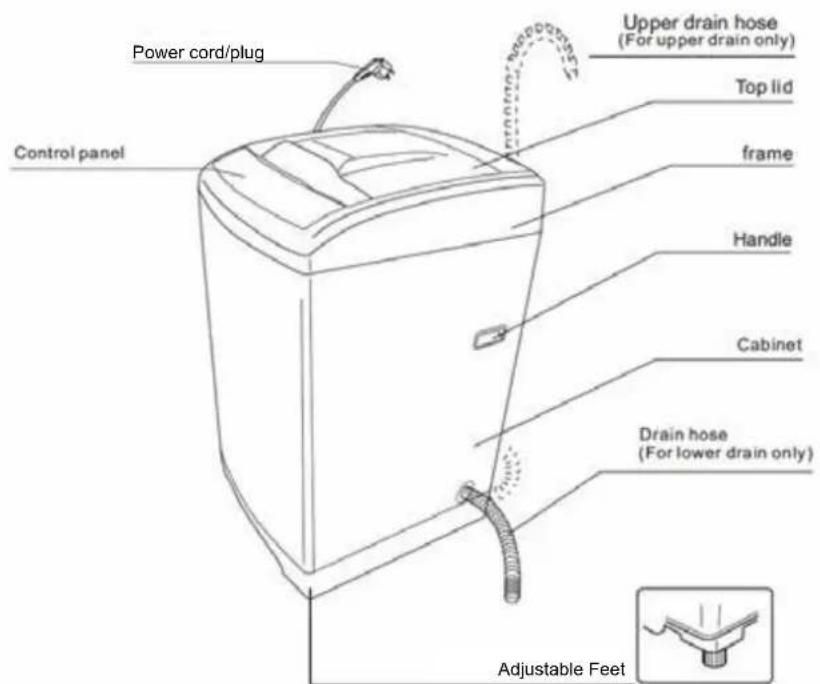
text_image
Power cord/plug Control panel Upper drain hose (For upper drain only) Top lid frame Handle Cabinet Drain hose (For lower drain only) Adjustable FeetInstallation Instructions
POWER SOURCE AND GROUNDING
It's recommended to use the washing machine on it's own dedicated power outlet for both convenience and safety. The power outlet must be grounded.
Important!
If the power cord is damaged, it must be replaced by Residentia Group or one of its authorised service representatives. Please contact 1300 11 HELP (4357) and ensure the appliance is completely disconnected from the power supply.
INSTALLATION OF DRAIN HOSE:

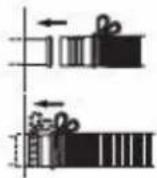
• Completely sleeve the drain hose over the sewer.
- Fix and tighten it with a hoop.
( As shown in the figure )
Placement of water drain hose
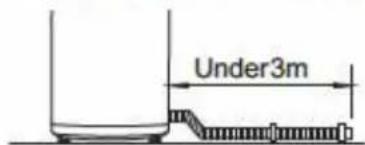
text_image
Under3mIf the water drain hose shall be extended, its length shall not exceed 3 meters, otherwise it will affect the water discharging time.

text_image
Under 15amThe placed height of water drain hose shall not exceed 15cm.

Do not bend the water drain hose and place it under the washer.
Placement of upper water drain hose
• The height of drain hose ("a") should between 86-100 cm.
- Diameter of "b" should not less than 3 cm, and flow capacity not less than 40 L/Min.
- Before washing machine starts, user should hang up the drain pipe 86-100cm height from the floor.
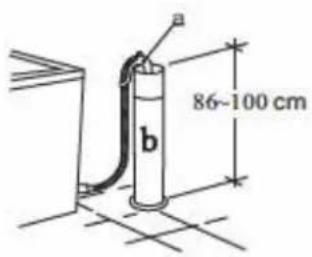
text_image
a 86-100 cm bInstallation of water inlet pipe
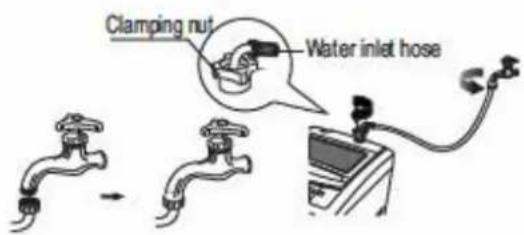
- Put the water inlet pipe(which has metallic filtering bag) screw on to the tap.
- Tightly screw another end of water inlet hose on water inlet valve. (with rubber seal ring inside).
Note: When tightening the clamping nut, evenly apply the force and do not twist the water inlet valve to avoid breaking of water inlet valve joint.
text_image
Clamping nut Water inlet hoseOnly for model with double screw thread water inlet pipe
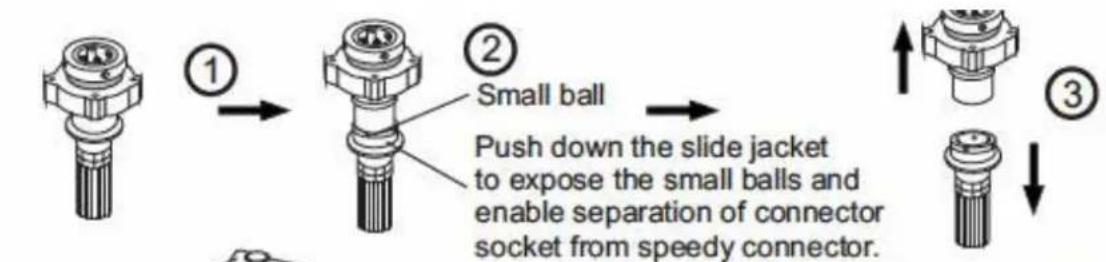
INSTALLATION OF THE WATER INLET PIPE:
text_image
① ② Small ball Push down the slide jacket to expose the small balls and enable separation of connector socket from speedy connector. ③
text_image
A B 5mm Junk ring ④ ⑤ not flat) and push it washer firmly press Then tighten the sc screw on part B.Unscrew four screws of part A and sleeve part A horizontally over the mouth at the end of water tap (the mouth at the end of water tap must be flat and smooth. Flatten it by filing if it is not flat) and push it upward with force making the rubber washer firmly press the plane center of water tap mouth. Then tighten the screw sequentially. After that, tightly screw on part B.
The connection socket consists of A and B two parts. Before installation, A and B two parts must be unscrewed about 5mm, or directly disconnected. If the bore of water tap is larger, remove the plastic junk ring of part A.
natural_image
Illustration of a faucet with directional arrows indicating flow or movement (no text or symbols)Connect
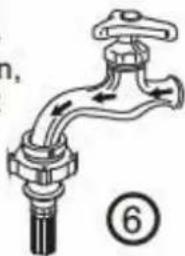
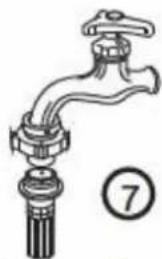
Connect: Push down the slide jacket of speedy connector (4 small balls must be exposed), insert it into the connection socket and then push upward Release the connection of water tap with speedy connector completely. If it is required to feed water, simply open the water tap. Separate: Close the water tap, push down the slide jacket of speedy connector and pull out the speedy
natural_image
Illustration of a faucet with tassel and handle, no text or symbols presentSeparate
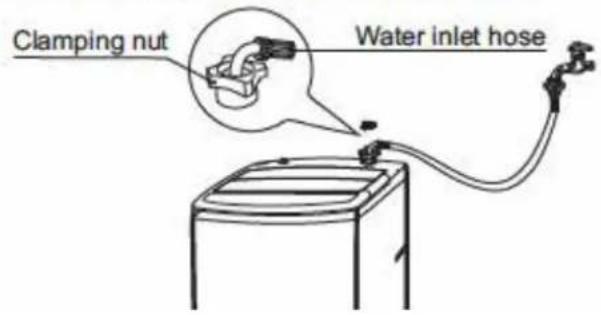
Tightly screw another end of water inlet hose on water inlet valve. (with rubber seal ring inside).
Note: When tightening the clamping nut, evenly apply the force and do not twist the water inlet valve to avoid breaking of water inlet valve joint.
text_image
Clamping nut Water inlet hosePREPARATION BEFORE WASHING:
-
Adjust the feet on your washing machine to ensure it is stable and level. The feet extend when rotated clockwise and shorten when rotated anti-clockwise.
-
Connect the water inlet hose(s) to your taps.
-
Connect the plug to a power point.
-
Turn on the water supply at the taps.
- Put the drainage hose down the drain. Note: the water will overflow when the height of the drain hose is under 860mm.
CAUTION!
Always ensure coins, keys and other hard goods are removed from items of clothing before washing, as they can cause damage to the barrel. It is recommended to zip up clothes for the same reason.
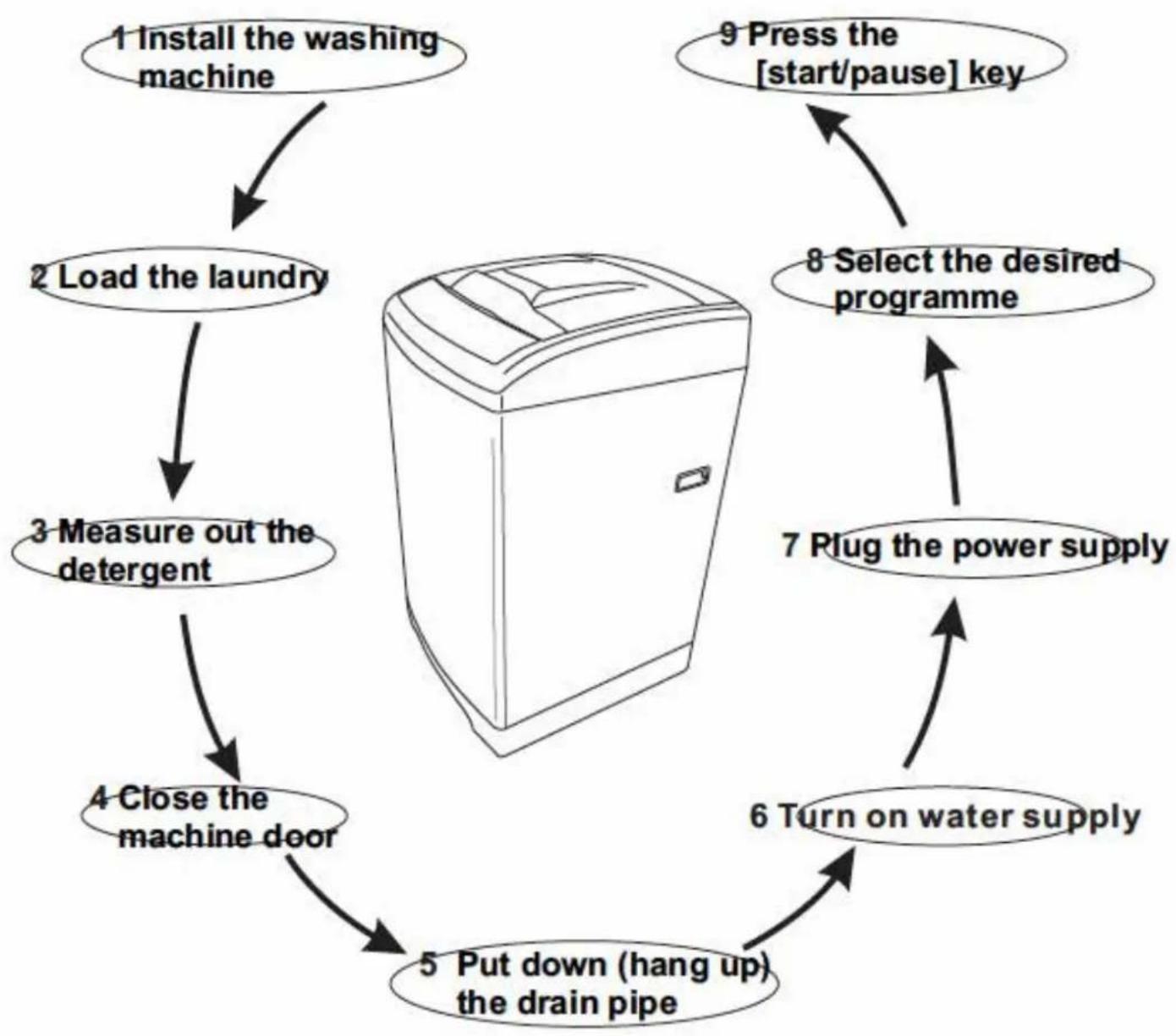
QUICK START GUIDE
flowchart
graph TD
    A["1 Install the washing machine"] --> B["2 Load the laundry"]
    B --> C["3 Measure out the detergent"]
    C --> D["4 Close the machine door"]
    D --> E["5 Put down (hang up) the drain pipe"]
    E --> F["6 Turn on water supply"]
    F --> G["7 Plug the power supply"]
    G --> H["8 Select the desired programme"]
    H --> I["9 Press the [start/pause"] key]
    I --> A
PROGRAM SELECTION:
- Press the POWER button.
- Select your required water level and the other desired wash functions.
- Press the START/PAUSE button.
COMPLETION OF THE WASHING CYCLE:
When the washing cycle is complete, a buzzer will sound six times and then the power will switch off.
→ Turn off the water at the tap(s).
Although the washing machine will switch off, the power outlet should be switched off and the plug must be pulled out for safety reasons.
Operating Your Washing Machine
flowchart
graph TD
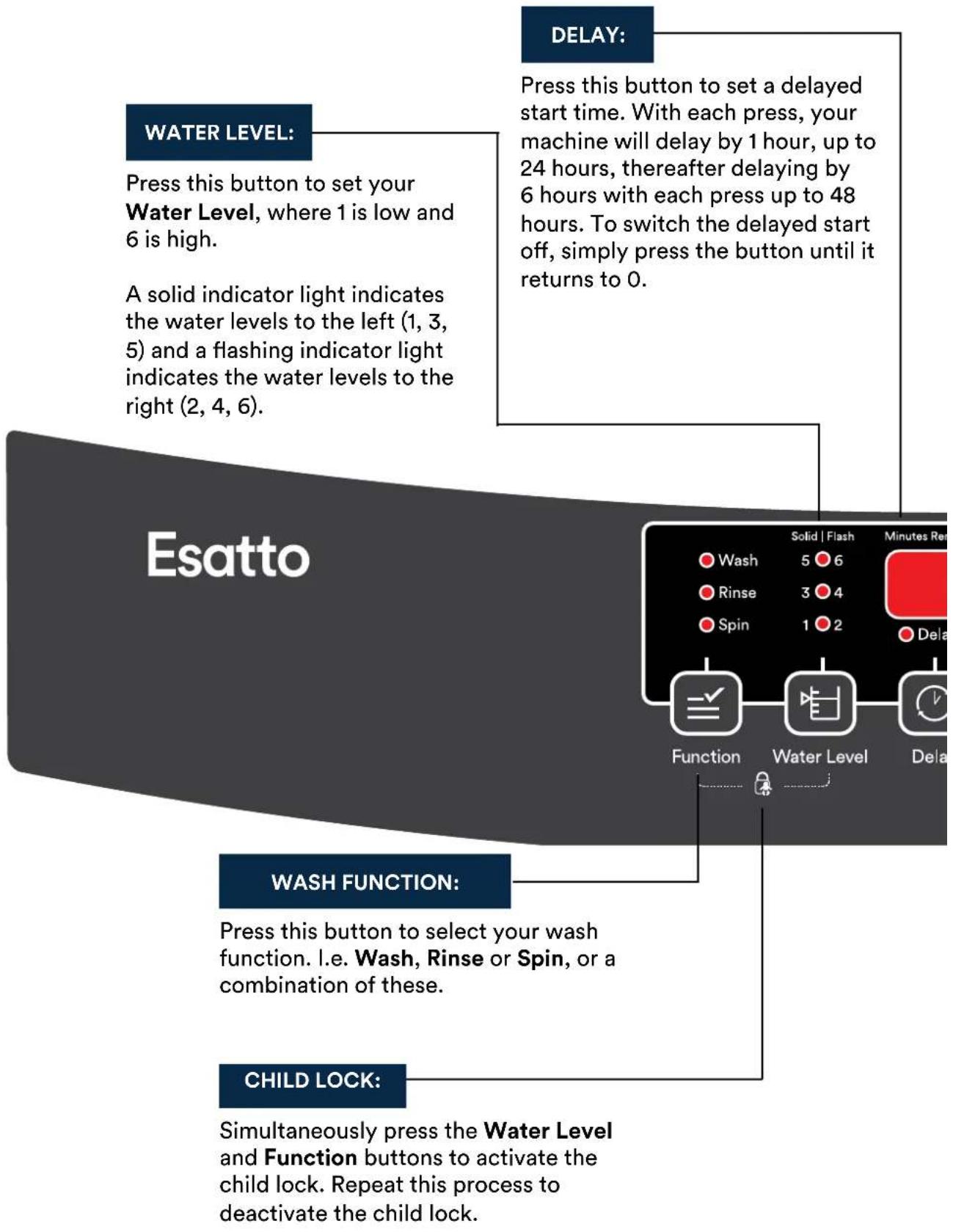
    A["Water Level: Press this button to set your Water Level, where 1 is low and 6 is high."] --> B["A solid indicator light indicates the water levels to the left (1, 3, 5) and a flashing indicator light indicates the water levels to the right (2, 4, 6)."]
    C["Delay: Press this button to set a delayed start time. With each press, your machine will delay by 1 hour, up to 24 hours, thereafter delaying by 6 hours with each press up to 48 hours. To switch the delayed start off, simply press the button until it returns to 0."] --> D["Function: Wash, Rinse, Spin, Water Level, Delay"]
    E["Wash Function: Press this button to select your wash function. i.e. Wash, Rinse or Spin, or a combination of these."] --> F["CHILD LOCK: Simultaneously press the Water Level and Function buttons to activate the child lock. Repeat this process to deactivate the child lock."]

text_image
POWER: Press this button to turn your washing machine On or Off. START/PAUSE: After selecting your desired wash settings, press this button to start your wash cycle. You can also use this button to pause the washing machine during operation. Xkg Program Key Heavy Quick Jeans Easy iron Normal Air dry POWER Program Temperature Start/Pause PROGRAM: WATER TEMPERATURE: Press this button to select your water temperature. When both the Hats and Cold indicators are lit in your air dryPress this button to select your wash program type. A solid indicator indicates the programs to the left, whereas a flashing indicator indicates the programs to the right.
Refer to the Program Key on the right hand side of the control panel, for an explanation of the program icons.
Press this button to select your water temperature. When both the Hot and Cold indicators are lit, your washing machine will be set to use Warm water.
WASH PROGRAMS:
| Program: | Wash Time: | Rinse Time: | Spin Time: | Total Time: |
 | 12 minutes | two times | 5 minutes | 44 minutes |
 | 2 minutes | one time | 1 minutes | 10minutes |
 | 48 minutes | one time | 14 minutes | 87 minutes |
 | Soak13 minutesWash 4 minutes | two times | 1 minutes | 42 minutes |
 | 12minutes | two times | only drain | 34 minutes |
 | 60 minutes | 60 minutes |
QUICK - Suitable to wash lightly soiled clothes.
HEAVY- Delicate wash, designed especially for heavy fabrics. This is normally the most commonly used wash program.
JEANS- Suitable program to wash heavily soiled, durable clothes.
AIR DRY- Designed to dry clothes without heat, with a similar result of being dried in a room.
EASY IRON- Thorough wash program that leaves the clothes more moist than the other programs, helping to ensure clothes are less wrinkled.
PROCEDURE FOR SETTING A SINGLE WASH:
-
Load your washing into the machine.
-
Switch on the washing machine with the POWER button.
-
Use the PROGRAM button to select the desired wash program, which will be indicated by a solid light.
Note: The Heavy wash program is the most common wash program used and is a good all purpose washing program.
-
Press the WATER LEVEL button to select your desired water level, where 1 is a small load and 6 is a full load.
-
Press the FUNCTION button to select your desired procedure (Wash, Rinse, Spin), where you may select a single procedure alone, or any two combined.
-
Press the TEMPERATURE button to select your desired water temperature (Cold, Warm, Hot).
-
Press the START/PAUSE button to start the wash program. The LED panel will indicate the remaining time for your wash program and begin to count down.
Note: The washing machine lid must be closed for it to operate.
SPECIAL FEATURES:
→ DELAY START TIME
The DELAY button allows you to preset the start time of your washing machine. After selecting your desired wash program and functions (as described on page 10), press the DELAY button to select the number of hours time you'd like to start your wash program in (i.e. 1 to 48 hours). With each press of the button the display will increase by 1 hour, from 24 it will increase by 6 hours with each press. After you reach 48 hours, it will reset to display the remaining wash time for the program you have selected.
Once you've set your desired delay time, press the START/PAUSE button. The Delay indicator light will begin to flash in isolation and will countdown to your desired start time.
→ CANCELING OR ALTERING A DELAY TIME
To cancel a set delayed start time, simply press the POWER button to reset the machine.
→ CHILD LOCK
To activate the child lock feature, simply press the FUNCTION and WATER LEVEL buttons at the same time. Repeat this process to deactivate the child lock.
→ AUTOMATIC POWER SHUT-OFF
If the machine isn't used within the first 10 minutes after being powered on it will automatically power off. This also occurs after completing a wash cycle, where the machine will sound a buzzer 6 times and then automatically power off.
→ AUTOMATIC ADJUSTMENT FOR IMBALANCE
If the laundry is placed unevenly within the drum, it is likely to cause vibration during spinning. Your Esatto washing machine has a built in function of adjusting for the imbalance. When the machine is adjusting for any imbalance, the rinse light will flash and normally takes around 1 minute. In the event that the washing machine cannot adjust for the imbalance, an alarm will sound.
→ FUZZY LOGIC FUNCTIONALITY
These machines offer the advantages of performance, productivity, simplicity, productivity, and less cost. Sensors continually monitor varying conditions inside the machine and accordingly adjust operations for the best wash results. Your Esatto machine's fuzzy logic controls the washing process including water intake, water temperature, wash time, rinse performance and spin speed, optimising for the best wash results.
During the fuzzy logic testing process, the water circulation lights will flash and the LED time display will show “--”.
→ POWER FAILURE MEMORY FUNCTION
If the power supply is cut off suddenly during operation, the machine remembers the current operation state. When the power supply is restored, the machine returns to former operation state automatically.
Cleaning Your Washing Machine
| End of program | Maintenance | ||
| The washing machine will send off the sound of "dou-dou" at the end of any program operation to remind you to take out the laundry or operate it again.After the sound ,the washing machine returns to its power-off state with no display and all lights off.Please shut off the tap, pull out the plug when not in use to avoid water leakage or the fire accidents. | Use gentle clothing to wipe off the water and dirt on the surface each time after using the washing machine.Detergent , propellant and other chemicals are not allowed to use so as to avoid any damage to the plastic accessories.  | ||
| Clean the water inlet Clean Of the filter | |||
| After long time use, the water inlet mesh bag may be blocked with smudginess, and should be cleaned according to the following steps:1. Switch on the power, followed by shutting off the tap2. Let the washer works for 5 seconds so that water flows into the tub through the water inlet hose. then turn off the power.3. Unload the water inlet hose and clean the mesh bag, then restore the water inlet assembly. | After using the washing machine for a period, please clean it according to the following steps:1. Take out the lint filter.2.Open the filter and wash it clean in the water.3.Restore it and fix it.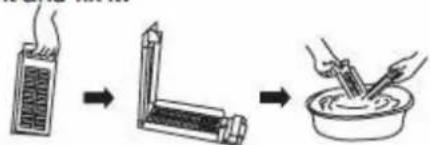 (only for magic filter) (only for magic filter) | ||
After using the washing machine for a period, clean it according to the following steps:1. Take off the lint filter.2. Turn over the mesh bag and wash it clean in the water.3.Restore and fix it. (only for normal filter) (only for normal filter) | |||
| Clean the lint filter in the drain pump (only for having drain filter) | |||
1. Drain the water out of the pump,under which use a container to collect.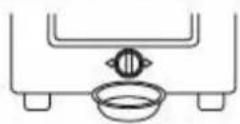 | 2. Loosen the pump cover anticlockwise.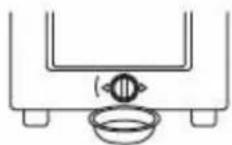 | 3. Take out the lint filter.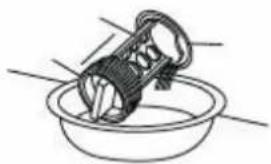 | |
4. Clean the filter. | 5. Restore it and adjust the convex place to align at the pump hole.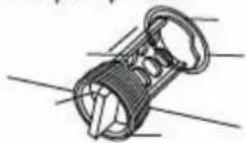 | 6. Tighten the pump cover clockwise.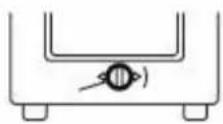 | |
Troubleshooting
OPERATION IN CASE OF EMERGENCY
In the event of an emergency you should:
→ Switch off all controls.
→ Switch the washing machine off at the power point or at the fuse box.
→ Call the Residentia Support Team on 1300 11 HELP (4357).
Some minor faults can be fixed by referring to the instructions given in the Troubleshooting section below. There is also a self-help section online at http://www.residentiagroup.com.au.
| Faults | Inspection Items |
| No water flows in | ●If the power is off or the fuse is burned out.●If the water supply is cut off or the water pressure is too low.●If the inlet hose is properly connected and the water tap is opened.●If the filtering screen of inlet valve is blocked by dirt.●If the coil of inlet valve is damaged. (The slight electromagnetic sound is normal phenomenon when the inlet valve is switched on)●If the "Start / Pause" button is pressed after the power switch is pressed. |
| No washing | ●If the power is off or the fuse is burned out.●If the power supply voltage is too low.●If the water amount reaches to the required water level. (The washer will not work if the water amount does not reach the required water level)●If it is set to "Delay" washing mode. (It will only start to work until the reservation time reached) |
| Abnormal draining | ●If the water drain hose is placed very high.●If the end of water drain hose is sealed in pond.●If the internal rubber ring of drain valve is blocked by dirt. |
| Abnormal spin | ●If the door lid is closed.●If all clothing piled largely at one side of barrel or the clothing is excessively placed.●If the washer is not placed in stable condition or it is placed in inclination state. (The ground is not flat).●If the motor belt is loosened. |
Troubleshooting (continued)
When the washing machine experiences a fault, please contact the Residentia Group support team on 1300 11 HELP (4357).
WARNING! Never dismantle the washing machine.
ERROR MESSAGES AND SOLUTIONS:
| Fault | Cause of fault | Indication | Alarm of the buzzing sound | Stopping alarm |
| Alarm for water inlet | Water injection for about 16 minutes, but do not reach preset water level | “E1” flares | The buzzer goes on buzzing for 10 seconds. If the fault is not solved, buzzes again for 10 seconds in every 16 minutes. | Open the lid to deal with faults, then close the lid to stop the alarm. |
| Alarm for opening lid | Open the lid after starting the delay time. Open the lid when the washer is spinning. Open the lid when entering into the child lock state. | “E2” flares | ||
| Imbalance alarm | Checked imbalance for the third time. | “E3” flares | ||
| Drain alarm | Alarm for water drain time out. | “E4” flares |
Technical Specifications
Below outlines the technical specifications for your Esatto Washing Machine.
| Size | 545x560x940(mm) | Weight of the product | 36Kg |
| Rated input power | 560W | Rated capacity of wash and spinning | 6.0kg (dry clothes) |
| Rated voltage | 240V~ | Maximum water pressure permitted in the water inlet | 0.6Mpa |
| Rated frequency | 50Hz | Minimum water pressure permitted in the water inlet | 0.1Mpa |
Warranty
WARRANTY TERMS AND CONDITIONS
LAUNDRY APPLIANCES
→ This document sets out the terms and conditions of the product warranties for Residentia
Group Appliances. It is an important document. Please keep it with your proof of purchase documents in a safe place for future reference should you require service for your Appliance.
- In this warranty
(a) ‘acceptable quality’ as referred to in clause 10 of this warranty has the same meaning referred to in the ACL;
(b) ‘ACL’ means Trade Practices Amendment (Australian Consumer Law) Act (No.2) 2010;
(c) 'Appliance' means any Residentia Group product purchased by you accompanied by this document;
(d) 'ASR' means Residentia Group authorised service representative;
(e) ‘Residentia Group’ means Residentia Group Pty Ltd of 20 Yaltara Avenue, Bundoora Victoria 3083, ACN 600 546 656 in respect of Appliances purchased in Australia;
(f) ‘major failure’ as referred to in clause 10 of this warranty has the same meaning referred to in the ACL and includes a situation when an Appliance cannot be repaired or it is uneconomic for Residentia Group, at its discretion, to repair an Appliance during the Warranty Period;
(g) 'Warranty Period' means:
(i) where the Appliance is used for personal, domestic or household use
(i.e. normal single family use) as set out in the instruction manual, the Appliance is warranted against manufacturing defects in Australia for 12 months following the date of original purchase of the Appliance;
(h) ‘you’ means the purchaser of the Appliance not having purchased the Appliance for re-sale, and ‘your’ has a corresponding meaning.
-
This warranty only applies to Appliances purchased and used in Australia and is in addition to (and does not exclude, restrict, or modify in any way) any non-excludable statutory warranties in Australia.
-
During the Warranty Period Residentia Group or its ASR will, at no extra charge if your Appliance is readily accessible for service, without special equipment and subject to these terms and conditions, repair or replace any parts which it considers to be defective. Residentia Group or its ASR may use remanufactured parts to repair your Appliance. You agree that any replaced Appliances or parts become the property of Residentia Group. This warranty does not apply to light globes, batteries, filters or similar perishable parts.
-
Parts and Appliances not supplied by Residentia Group are not covered by this warranty.
-
You will bear the cost of transportation, travel and delivery of the Appliance to and from Residential Group or its ASR. If you reside outside of the service area, you will bear the cost of:
(a) travel of an authorised representative;
(b) transportation and delivery of the Appliance to and from Residentia Group or its
ASR, in all instances, unless the Appliance is transported by Residentia Group or its ASR, the Appliance is transported at the owner's cost and risk while in transit to and from Residentia Group or its ASR.
- Proof of purchase is required before you can make a claim under this warranty.
Warranty continued
- You may not make a claim under this warranty unless the defect claimed is due to faulty or defective parts or workmanship. Residentia Group is not liable in the following situations (which are not exhaustive):
(a) the Appliance is damaged by:
(i)
accident
(ii) misuse or abuse, including failure to properly maintain or service
(iii) normal wear and tear
(iv) power surges, electrical storm damage or incorrect power supply
(v) incomplete or improper installation
(vi) incorrect, improper or inappropriate operation
(vii) insect or vermin infestation
(viii) failure to comply with any additional instructions supplied with the Appliance;
(b) the Appliance is modified without authority from Residentia Group in writing;
(c) the Appliance's serial number or warranty seal has been removed or defaced;
(d) the Appliance was serviced or repaired by anyone other than Residentia Group, an authorised repairer or ASR.
-
This warranty, the contract to which it relates and the relationship between you and Residentia Group are governed by the law applicable where the Appliance was purchased.
-
To the extent permitted by law, Residentia Group excludes all warranties and liabilities (other than as contained in this document) including liability for any loss or damage whether direct or indirect arising from your purchase, use or non use of the Appliance.
-
For Appliances and services provided by Residentia Group in Australia, the Appliances come with a guarantee by Residentia Group that cannot be excluded under the Australian Consumer Law. You are entitled to a replacement or refund for a major failure and for compensation for any other reasonably foreseeable loss or damage. You are also entitled to have the Appliance repaired or replaced if the Appliance fails to be of acceptable quality and the failure does not amount to a major failure. The benefits to you given by this warranty are in addition to your other rights and remedies under a law in relation to the Appliances or services to which the warranty relates.
-
At all times during the Warranty Period, Residentia Group shall, at its discretion, determine whether repair, replacement or refund will apply if an Appliance has a valid warranty claim applicable to it.
-
To enquire about claiming under this warranty, please follow these steps:
(a) carefully check the operating instructions, user manual and the terms of this warranty;
(b) have the model and serial number of the Appliance available;
(c) have the proof of purchase (e.g. an invoice) available;
(d) telephone the numbers shown below.
- You accept that if you make a warranty claim, Residentia Group and its ASR may exchange information in relation to you to enable Residentia Group to meet its obligations under this warranty.
IMPORTANT Before calling for service, please ensure that the steps in point 12 have been followed.
Service: Please call 1300 11 HELP (4357)
Spare Parts: Please call 1300 11 SPARE (7727)
Notes

E2447