
Pinnacle P1 - Earphones MEE audio - Free user manual and instructions
Find the device manual for free Pinnacle P1 MEE audio in PDF.


| Product Type | High-Fidelity In-Ear Headphones |
| Brand | MEE audio |
| Model | Pinnacle P1 |
| Impedance | High-impedance (requires powerful source for optimal performance) |
| Cable Type | Detachable; includes silver-plated 99.99% pure copper stereo audio cable and headset cable with microphone and remote |
| Eartips Included | Comply T-200 memory foam eartips (3 pairs) and silicone eartips (6 pairs) |
| Adapter | 1/4" (6.3mm) stereo adapter |
| Microphone | Inline microphone with remote for phone calls and media control (compatible with iPhone, iPad, iPod, Android) |
| Warranty | 2-year manufacturer warranty |
| Package Contents | Pinnacle P1 earphones, stereo audio cable, headset cable, Comply foam eartips (3 pairs), silicone eartips (6 pairs), 1/4" adapter, premium carrying case, shirt clip, user manual |
| Wear Styles | Conventional cable-down or cable-up musician fit |
| Care | Clean with hydrogen peroxide on cotton swab; store in protective case; avoid liquids |
| Safety | Avoid high volumes to prevent hearing damage; do not use while driving, cycling, or operating machinery |
| Support | Email support@meelec.com or visit www.MEEaudio.com |
| Repairability | Detachable cables and replaceable eartips; replacement parts available at www.MEEaudio.com |
Frequently Asked Questions - Pinnacle P1 MEE audio
User questions about Pinnacle P1 MEE audio
0 question about this device. Answer the ones you know or ask your own.
Ask a new question about this device
Download the instructions for your Earphones in PDF format for free! Find your manual Pinnacle P1 - MEE audio and take your electronic device back in hand. On this page are published all the documents necessary for the use of your device. Pinnacle P1 by MEE audio.
USER MANUAL Pinnacle P1 MEE audio
Thank you for choosing the MEE audio Pinnacle P1 High Fidelity In-Ear Headphones.
The Pinnacle P1 is a high-impedance in-ear headphone designed for audiophiles and music professionals and tuned to deliver the highest levels of resolution and refinement.
While a headphone amplifier is not required to enjoy the Pinnacle P1, the audio hardware in some phones, tablets, and computers is not designed with high-impedance headphones in mind and using a dedicated audio source or amplifier instead can make the difference between a great listening experience and an outstanding one.
The superb sound quality and resolution of high-end headphones such as the Pinnacle P1 are also more pronounced when listening to recordings in CD (or better) quality. To experience the full potential of the P1, we recommend avoiding music that has undergone excessive dynamic range compression or been digitally compressed into low-bitrate formats.
We hope you enjoy the Pinnacle P1 and wish you happy listening!


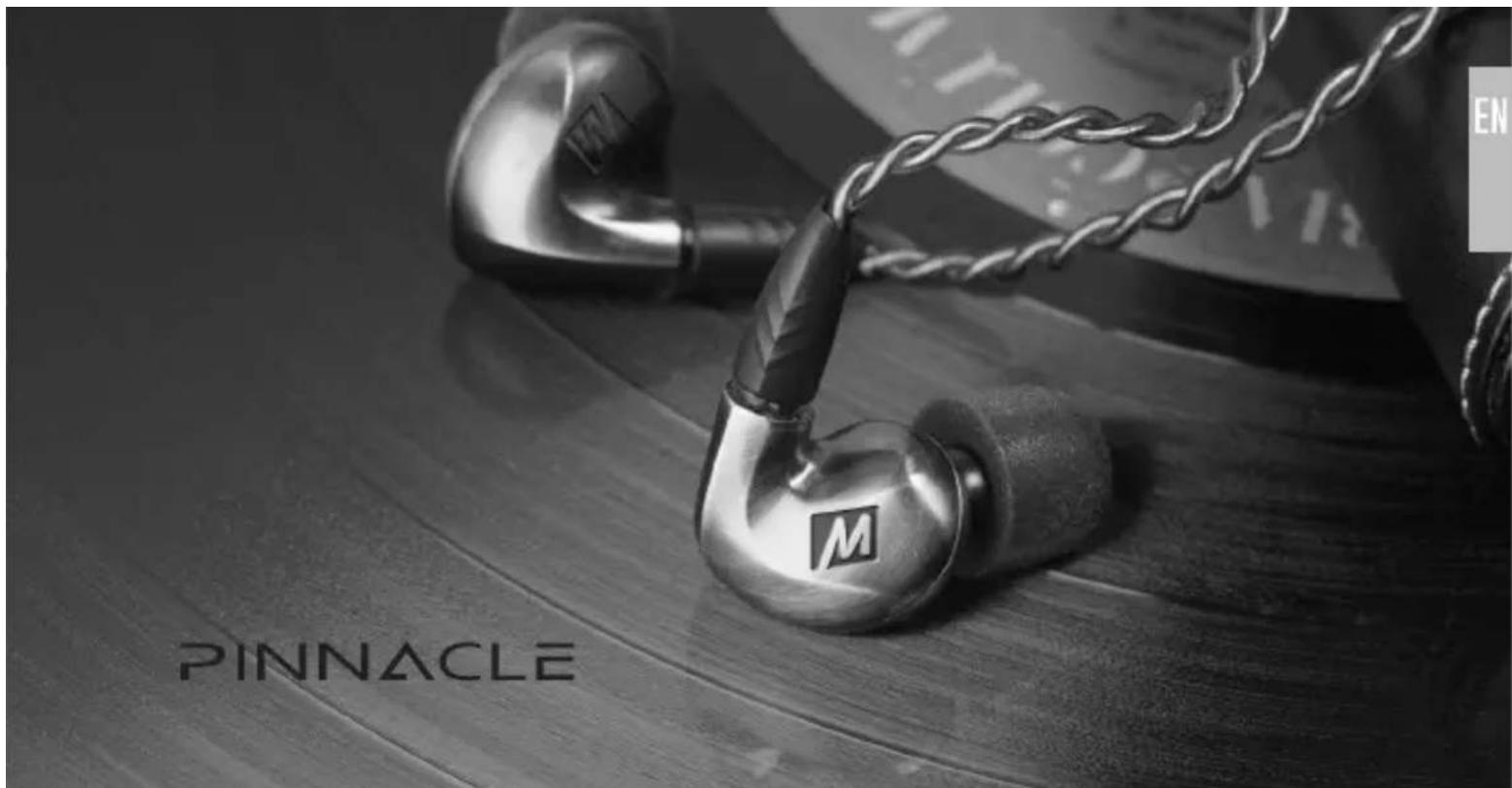
PINNACLE
PACKAGE CONTENTS
Pinnacle P1 Audiophile In-Ear Headphones High-fidelity silver-plated stereo audio cable Headset cable with microphone and remote Comply T-200 memory foam eartips (3 pairs) Silicone eartips (6 pairs) ^1/4 " (6.3mm) stereo adapter Premium carrying case Shirt clip User manual

natural_image
Illustration of medical or laboratory equipment including a walking stick, pen-like devices, and a device labeled 'PENKACLE' (no readable text or symbols beyond labels)CONFIGURING FOR YOUR EARS
An airtight seal between the earpieces and your ear canals is required for your Pinnacle P1 earphones to deliver the level of sound quality they are engineered for. Multiple sets of eartips are included to ensure you get the best fit. We recommend trying each of the included eartips to find the size that provides the best comfort and sound for your ears. Because ear canals are not always symmetrical, you may need to use different-size ear tips in each ear.
The correct eartip for your ear will:
• Fit inside your ear canal without discomfort
- Seal with your ear canal and reduce outside noise when inserted
• Provide the best bass response and overall sound quality
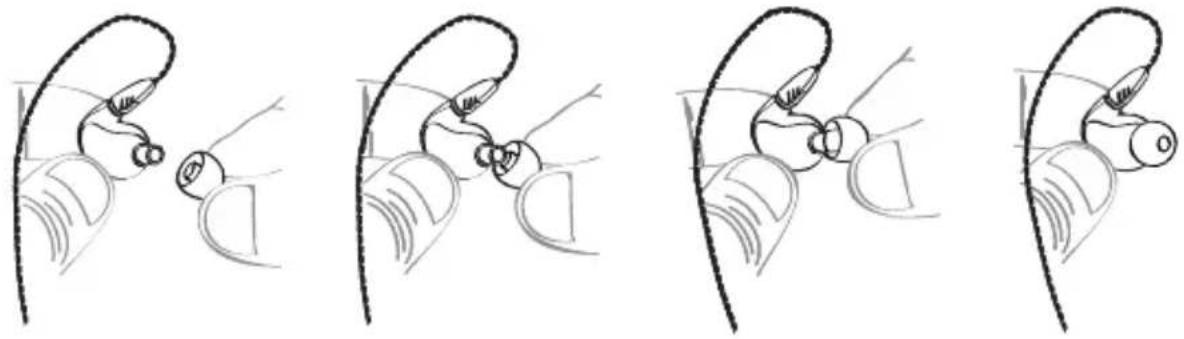
Install eartips as shown. Make sure eartips are mounted securely before use.
COMPLY MEMORY FOAM EARTIPS
The Pinnacle P1 comes with Comply™ Memory Foam eartips in three sizes. Memory foam eartips are designed to provide a more comfortable fit by using body heat to conform to the shape of the ear canal. Install Comply eartips as shown on previous page.
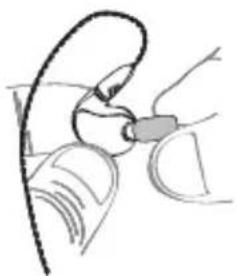
Inserting the Comply™ Premium Memory Foam Eartip
natural_image
Illustration of a hand holding a small object, possibly a device or tool, with no visible text or symbols.- Roll the tip into a thin, round cylinder.
natural_image
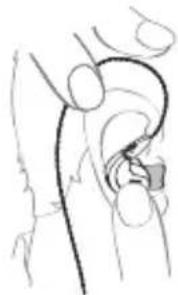
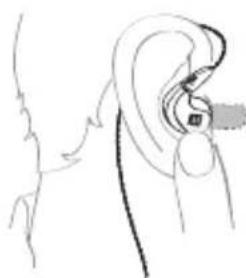
Anatomical line drawing of a human hip joint (no labels or text)- Pull back and up on the ear to open the canal. Gently insert the entire tip into the ear.
natural_image
Line drawing of a human ear with earphones and a clip, no text or symbols present- Hold the tip in place until it expands.
Changing the Comply™ Premium Memory Foam Eartips
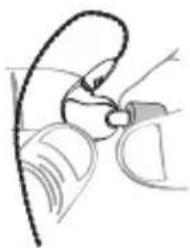
Remove old Comply foam tip by grasping the entire tip, including the plastic inner core, at the back of the tip (close to the earpiece). Firmly pull the tip off the earphone nozzle, rotating slightly or pulling at an angle if necessary to overcome friction.
Clean earphone nozzle of any debris. Securely install the new Comply™ Premium Earphone Tip onto clean, dry nozzle. Recommended replacement is after 3 months of regular use. For replacement tips, visit complyfoam.com. The Comply eartip size included with the Pinnacle P1 is the T-200.
natural_image
Line drawing of a hand holding a small object, possibly a device or tool, with no visible text or symbols.ATTACHING THE EARPIECES
The Pinnacle P1 includes two detachable, interchangeable cables:
1. STEREO AUDIO CABLE
Silver-plated 99.99% pure copper stereo audio cable ensures the richest detail retrieval and maximum performance with high-end audio systems.
2. HEADSET CABLE
The headset cable incorporates a microphone and remote button for phone calls and media control with compatible phones and tablets (see MICROPHONE & REMOTE USE section on p. 8 for more info).
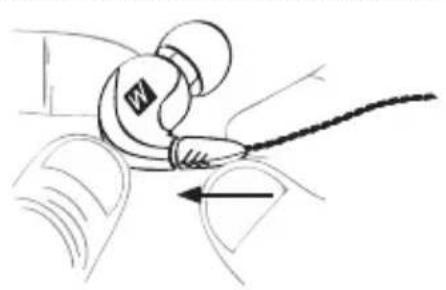
Before using the earphones, select your desired cable and attach the earpieces. Make sure to attach the cable connector marked "R" to the earpiece you will use in your right ear and the connector marked "L" to the earpiece you will use in your left ear – see SELECTING A WEAR STYLE on the next page for more info.
natural_image
Line drawing of a car interior with a tool interacting with the wheel (no text or symbols)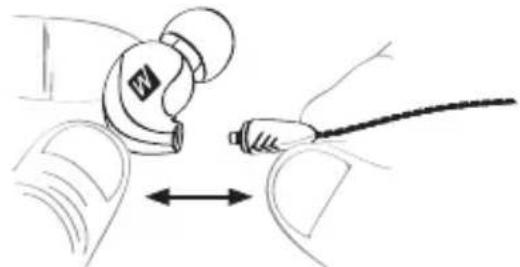
natural_image
Line drawing of a person using a tool to interact with a device (no text or symbols present)To detach, firmly grasp the earpiece and cable connector and pull apart. To attach, push connector in un
SELECTING A WEAR STYLE
The unique ergonomics and detachable cables of the Pinnacle P1 are designed so that the earphones can be worn either in the conventional "cable down" style or using a "cable up" musician fit, which can be more secure and reduces cable noise (microphonics).

SELECTING A WEAR STYLE (CONTINUED)
Adjust earpiece until it fits flush in the ear and the eartip seals in the ear canal. Repeat for other side.
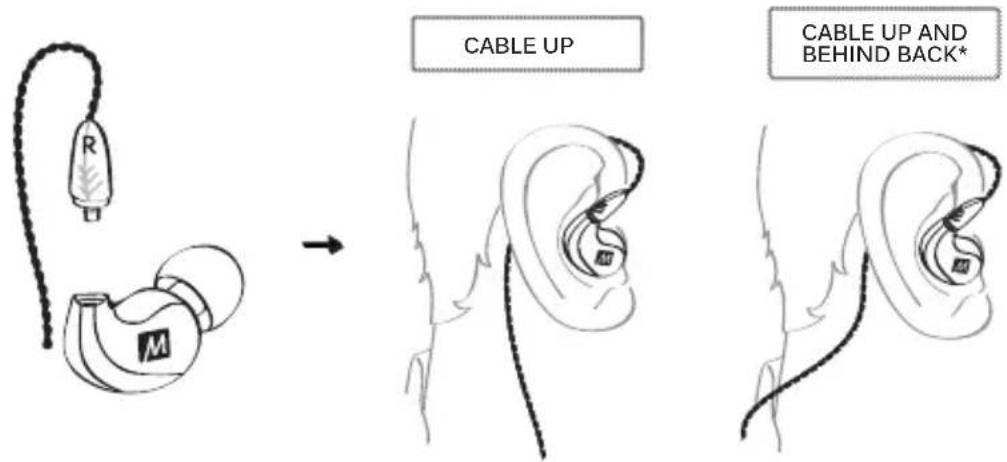
*Note: the microphone may not work properly when using the headset cable in this configuration.
EARPIECE B WORN IN RIGHT EAR
Cable Management
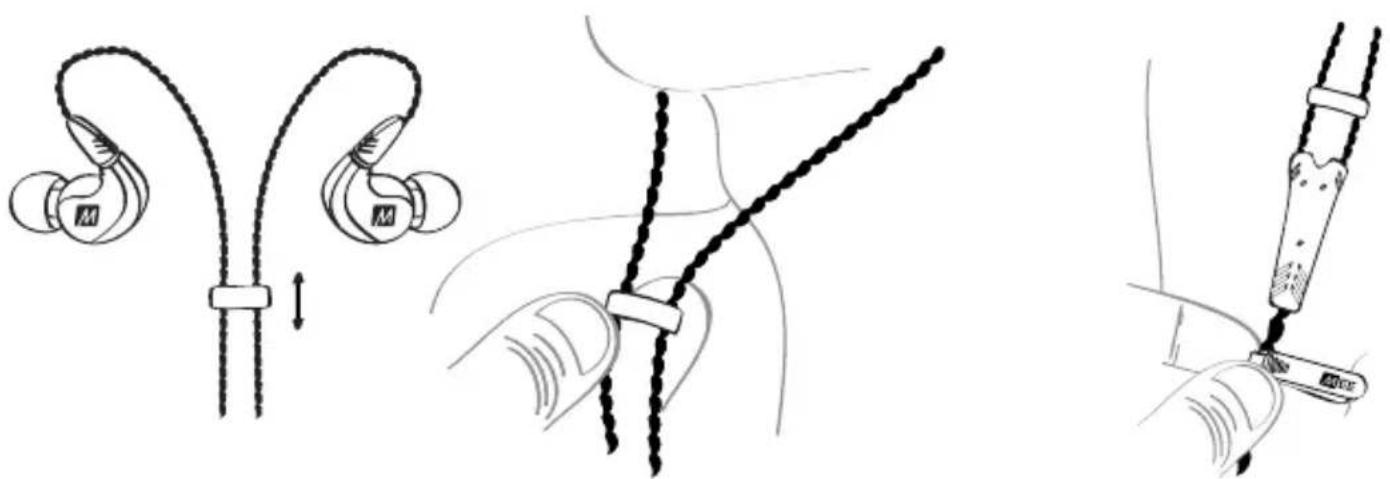
Slide the cable cinch up to fix the earphones in place for the most secure fit
Use the shirt clip to control cable movement
MICROPHONE & REMOTE USE
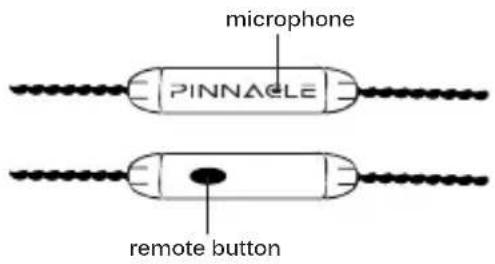
The headset cable included with the Pinnacle P1 features an inline microphone and remote that can be used during phone calls and to control media playback.
Basic Remote Operation
for iPhone®, iPad®, iPod® and Android™ phones:
| Function Operation | |
| Answer incoming phone call Press the remote button | |
| End phone call Press the remote button | |
| Play media* | Press the remote button |
| Pause media | Press the remote button |
| Skip to next track** | Double-press the remote button |
| Restart the track/previous track** | Triple-press the remote button |
| Activate SIRI/Voice control/Voice dialing** | Press and hold the remote button |
*You may need to open the media player application for initial playback to start.
**Not all media players support this functionality.
CARE AND STORAGE
Do not remove from ears or headphone jack by pulling on the cable.
Always store in the included protective carrying case when not in use. Do not store in direct sunlight, near heating devices, or in humid places.
Do not expose to liquids. If the earphones come in contact with liquids, quickly wipe away. If submersed in water, do not use until completely dried. Note: liquid submersion voids the warranty.
If necessary, clean the earphones with a small amount of hydrogen peroxide on a cotton swab. Swab only the outside of the earphone. Eartips can be removed and rinsed under running water or in hydrogen peroxide. Allow earphones and eartips to dry completely before resuming use.
Replacement parts and accessories are available online at www.MEEaudio.com
WARNING
Using headphones at high to moderate volumes for extended periods of time will result in permanent hearing damage. Do not use while driving a car, cycling, operating machinery, or performing other activities that require hearing surrounding sounds.
It is advised to turn the volume on your device all the way down before connecting your headphones, then gradually increase the volume until you reach a comfortable listening level.
SUPPORT
Contact support@meelec.com or visit www.MEEaudio.com for troubleshooting information and solutions to common issues.
WARRANTY
MEE earphones purchased from authorized retailers are covered by a 2-year manufacturer warranty. Visit www.MEEaudio.com for warranty information.
SPECIFICATIONS
See the Pinnacle P1 product page at www.MEEaudio.com for product specifications
PINNACLE

MEE audio and its logo are registered trademarks of S2E, Inc. All rights reserved.
iPhone®, iPad®, iPod® are a registered trademark of Apple Inc.
Android ^™ is a registered trademark of Google Inc.
© 2014 Hearing Components. Comply is a trademark of Hearing Components.

natural_image
Close-up of a PinNACLE audio ear with two external earbuds and a coiled cord, no visible text or symbols on the devices themselves.MEE audio
www.MEEaudio.com
support@meelec.com


- PINNACLE
- PACKAGE CONTENTS
- CONFIGURING FOR YOUR EARS
- COMPLY MEMORY FOAM EARTIPS
- ATTACHING THE EARPIECES
- STEREO AUDIO CABLE
- HEADSET CABLE
- SELECTING A WEAR STYLE
- SELECTING A WEAR STYLE (CONTINUED)
- Cable Management
- MICROPHONE & REMOTE USE
- Basic Remote Operation
- CARE AND STORAGE
- WARNING
- SUPPORT
- WARRANTY
- SPECIFICATIONS
- MEE audio
Brand : MEE audio
Model : Pinnacle P1
Category : Earphones