Internet Security 2020 - Software ESET - Free user manual and instructions
Find the device manual for free Internet Security 2020 ESET in PDF.


| Product Type | Software |
| Brand | ESET |
| Model | Internet Security 2020 |
| Edition | Internet Security |
| License Duration | 1 Year |
| Number of Devices | 3 |
| Platform Support | Windows 10, 8.1, 8, 7 (32/64-bit), macOS, Linux |
| Main Functions | Antivirus, Anti-phishing, Firewall, Anti-spam, Banking Protection, Parental Control, Home Network Protection, Webcam Protection, Password Manager, Game Mode, Ransomware Shield |
| Minimum Processor | 1 GHz |
| Minimum RAM | 1 GB (32-bit) / 2 GB (64-bit) |
| Disk Space Required | 1.5 GB |
| Internet Connection | Required for updates and cloud features |
| Update Method | Automatic via cloud |
| Activation | License key via email |
| Installation File Size | Approximately 60 MB |
| Languages | Multilingual (including English, French, German, Spanish, etc.) |
| Support Options | Phone, Email, Live Chat, Knowledge Base |
| Warranty | 30-day money-back guarantee |
| Security Technologies | Advanced heuristics, Machine learning, Cloud-based scanning |
| Maintenance | Automatic updates, scheduled scans |
Frequently Asked Questions - Internet Security 2020 ESET
User questions about Internet Security 2020 ESET
0 question about this device. Answer the ones you know or ask your own.
Ask a new question about this device
Download the instructions for your Software in PDF format for free! Find your manual Internet Security 2020 - ESET and take your electronic device back in hand. On this page are published all the documents necessary for the use of your device. Internet Security 2020 by ESET.
USER MANUAL Internet Security 2020 ESET
Click here to download the most recent version of this document
ENJOY SAFER TECHNOLOGY™

natural_image
Close-up of a humanoid robot with exposed circuit board and medical sensors (no text or symbols visible)
INTERNET SECURITY
ESET INTERNET SECURITY IS ALL-IN-ONE INTERNET SECURITY SOFTWARE. IT KEEPS YOU SAFE ONLINE AND OFFL - AND INCLUDES ANTI-THEFT TO TRACK, FIND AND HELP RETRIEVE YOUR MISSING LAPTOP, PLUS BOTNET PROTECTION TO DETECT AND PREVENT ATTEMPTS TO INFILTRATE YOUR SYSTEM.
Integrated antivirus, antispyware, firewall and antispam modules, along with parental control, make ESET Internet Security a complete security solution. This manual will guide you step-by-step through a typical installation and the basic configuration of the product.

INTERNET SECURITY
| Antivirus & Antispyware | Connected Home Monitor | Script-Based Attack Protection | Anti-Ransomware protection | JAWS | Parental Control |
| Proactively detects and cleans more known and unknown viruses, worms, trojans and rootkits. Protects you from hidden backdoors, downloaders, exploits, crackers, hijackers, password stealers and keyloggers. | This feature provides you with an easy-to-access list of connected devices, categorized by device type (e.g. printer, router, mobile device, etc. to show you what i connected to your home network. | Proactively protects you from dynamic script-based attacks and non-traditional attack vectors. | Monitors the behavior of applications and processes that try to modify your personal data. | ESET Internet Security supports the most popular screen reader JAWS. | Prevents children from getting access to pages with inappropriate or harmful content. |
Installation
Launching the installation
ESET Internet Security contains components that may conflict with other antivirus products or security software installed on your computer. ESET strongly recommends that you remove any such programs to prevent potential problems. You do not need to disable or remove the Windows firewall in Microsoft Windows Vista or later, as this is automatically handled by the ESET Internet Security installer.
You can install ESET Internet Security from an installation CD/DVD or by downloading the installer from www.eset.com.
To launch the installer wizard, do one of the following:
- If you are installing from a CD/DVD, insert the CD/DVD into the CD/DVD-ROM drive. If the autorun menu does not appear automatically, double-click your CD/DVD drive to open it manually.
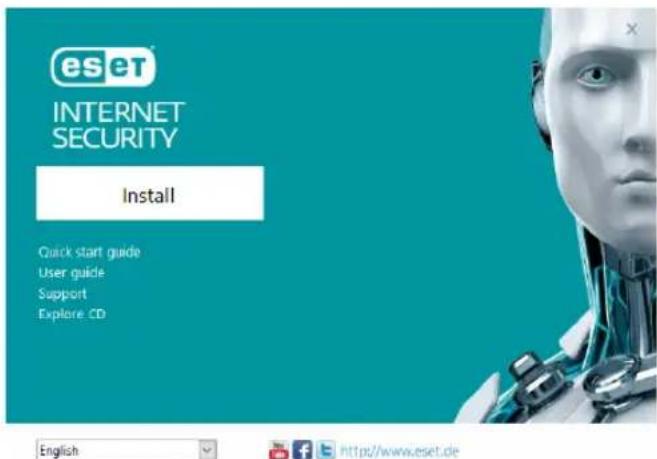
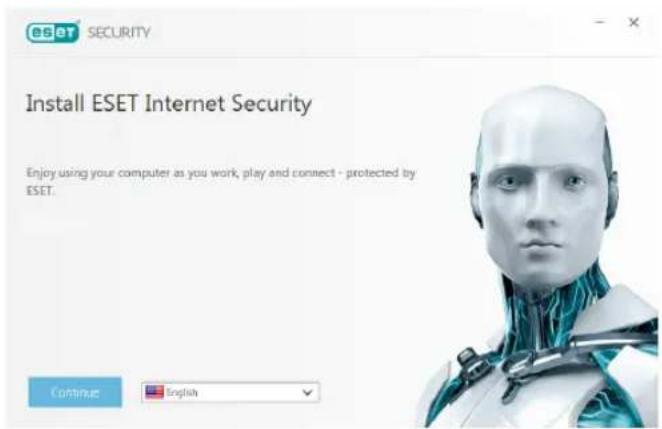
click I Accept to acknowledge your acceptance of the End-User License Agreement. After you accept, installation will continue.
- If you are installing from a downloaded file, double-click the file to launch Live installer. Live installer itself is a small file; additional files required to install ESET Internet Security will be downloaded automatically.
The installer will automatically check online for the latest product version. If a newer version is available, you will be prompted to download it before beginning the installation process.
Next, the End-User License Agreement will be displayed. Please read the agreement and
Product activation
The Product Activation window appears.
- If you purchased a retail boxed version of ESET Internet Security, activate your product using a License Key. You can find the License Key on the license card or you have received it via email if you purchased
your license online. For a successful activation, the License Key must be entered as supplied. To renew your existing license, enter your renewal activation key.
- If you would like to evaluate ESET Internet Security before activating, select Free trial. Specify an email address. Your test license will be sent to this address and ESET Internet Security will be activated for a limited period of time. Alternatively, you can select Skip activation to continue installation without activation. You will be prompted for a License Key later.
• After selecting Use License Manager you will be asked for your my.eset.com d credentials in a new window. - If you do not have a license and would like to buy one, click Purchase License. This will
redirect you to the website of your local Completing the installation ESET distributor.
Join ESET LiveGrid®
Help us capture malware by joining our collaboration network. Your participation allows us to gather more sample threats, which helps us to offer increasingly stronger and more efficient proactive protection to all ESET users. We recommend that you enable this feature, and we thank you for your support.
Detection of potentially unwanted applications
Since some potentially unwanted applications, are used legitimately and might not necessarily pose a security risk, the user's consent is required to enable detection.
Start the final installation by clicking Install. Installation progress will be indicated by a progress bar. After installation is complete, ESET Internet Security will start automatically. A computer restart is not normally required, ESET Internet Security will begin protecting your computer from malware threats immediately.
Trusted zone setup
If a network connection is detected once installation is complete, a notification will appear allowing you to configure a trusted zone. The New network connection detected notification displays the local subnet defined in your computer's system setup. These options only affect the visibility of your computer in the local network, not the
internet. There are two access modes available:
- Public network – select this option if you do not want to share your folders or printers and want your computer to be invisible to other users on the same network. This setting is recommended for users with a wireless connection.
- Home or office network – select this option if you want to share files and folders on your computer and want your computer to be visible to other users in the same network. This setting is recommended for trusted local home or office networks.
INTERNETSECURITY
i Change network connection
What kind of network is this?
Wired network hq.eset.com
Network name:
Network address:
Adapter name:
hq.eset.com
10.0.2.15 / 255.255.255.0
fe80:9df:d302:d00d:1612
This is a publicly accessi
Home or office network (Windows setting)
This is a trustworthy network, for example at home or at work. Your computer will be visible to others.
The network type will match the corresponding setting in Windows.
Close
Learn more about this message
^Details
Anti-Theft
To protect your computer in case of a loss or theft click Enable Anti-Theft to activate ESET Anti-Theft features for the computer you just registered.
For more instructions about ESET Anti-Theft computer association and to learn how it works see How to add a new device.
Starting ESET Internet Security
ESET Internet Security starts protecting your computer immediately after installation. You do not have to open the program to start it. You can open ESET Internet Security at any time to check your protection status or to perform various scanning and maintenance tasks.
To open ESET Internet Security, double-click the ESET Internet Security icon located in your Windows notification area (system tray).
User interface
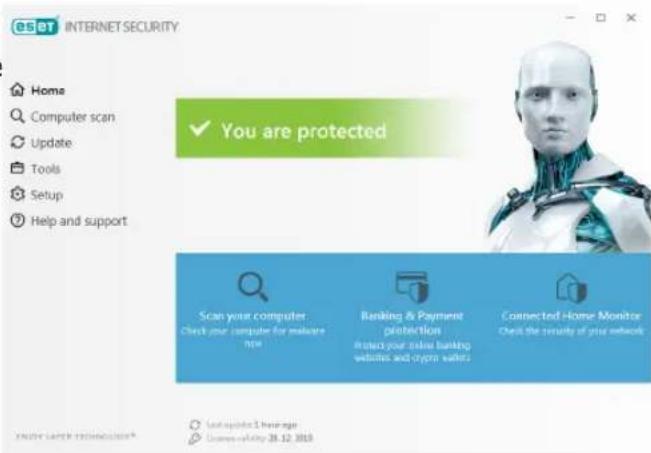
The Home section informs you about the current protection level of your computer.
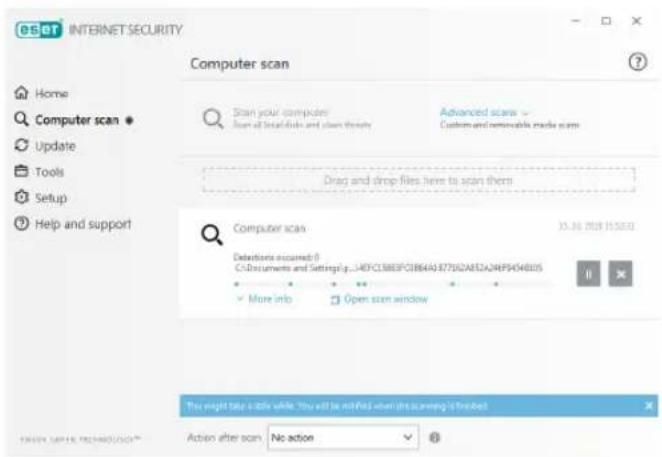
A Computer scan is an important part of each antivirus solution. It is used to perform a scan of the files and folders on your computer's disk(s).
The Update section contains important information about program updates. It is crucial that the program be updated regularly to provide the maximum level of protection against the latest threats.
The Tools section allows you to access advanced features such as Connected Home Monitor, Banking & Payment protection and More tools including features such as log files, quarantine, scheduler etc.
The Setup options allow you to adjust the protection levels of your computer.
The Help and support section provides comprehensive help and support for ESET Internet Security. You can also contact ESET technical support directly from here.
Update
ESET Internet Security comes with a predefined task to ensure regular updates (see the Scheduler section in the product manual). If once installation is completed you have not yet performed an update, we
recommend starting the update manually as follows:
From the ESET Internet Security main program window, click Update from the main menu on the left and then click Update now.
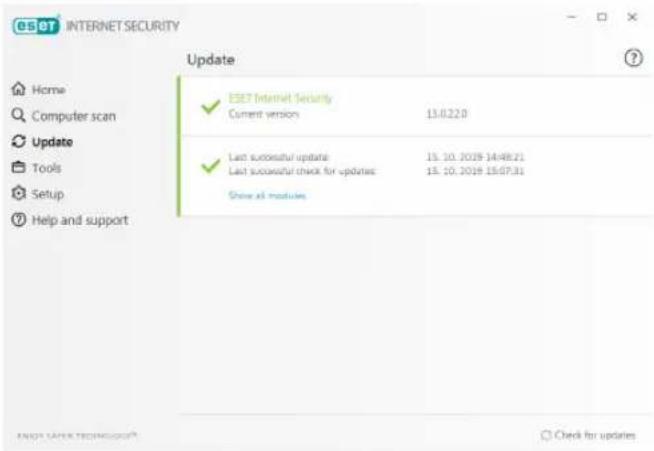
The update module will connect to the Internet, contact an available ESET update server and download digitally signed update files. These updates contain the most recent malware signatures and new definitions for advanced heuristics as well as other program modules. As soon as a newer update has been installed, ESET Internet Security displays a notification in the system tray area and in the main program window.
Computer scan
After a successful installation and update, we recommend that you perform a complete computer scan for threats. To do this, click Computer scan from the main menu on the left and then select Scan your computer from the ESET Internet Security primary window.
NOTE: After installing ESET Internet Security, a computer scan will start automatically after
first successful update in order to check portray area. You should be able to continue malicious code. working as normal while the scan takes place.
Protection status
ESET Internet Security's current protection status is indicated in the following ways:
The system tray icon
The Home section displays a detailed report of your protection status. In the event that any protection module is disabled, the Home window will show the name of the disabled module, along with a link allowing you to re-enable it.
Scanning of all local hard drives will start. The status window will display scan progress as
well as the current statistics about scanned and infected files found. If a threat is
detected, ESET Internet Security quarantines the file and displays an alert in the system
The individual protection statuses are indicated by the following icons:

Green
Antivirus protection is working properly and your computer is protected against malicious software as well as network attacks. This status indicates that all protection modules are enabled and the detection engine is up-to-date.

Orange
This icon is displayed if your operating system does not have all necessary operating system updates installed.
The orange icon is displayed if
– Real-time file system protection is enabled, but the maximum level of protection is not ensured.
- Email client protection or Web access protection is disabled or malfunctioning.

Red
- Real-time file system protection is disabled or malfunctioning. Since the proper function of this module is vital to your system's security, we recommend re-enabling the inactive module immediately.
- The detection engine is out of date. If the detection engine is not updated automatically, try to update it manually, or check to see if the computer is connected to Internet.
Resolving issues
Submitting a technical support query
In the event of a problem, contact ESET ESET technical support specialists are ready to Customer Care using the query submission assist you in resolving any issues you may form integrated into ESET Internet Security. have. Before contacting technical support, we strongly recommend that you read the related Click Submit support request in the Help and support section.
topic in the product documentation (https://help.eset.com) or search for a solution on the ESET website. For solutions to specific issues or questions about features and products, visit our Knowledgebase at: https://support.eset.com
To contact ESET technical support, use the web form available at: www.eset.com/support/contact
Copyright© 2019 by ESET, spol. s r.o.
ESET Internet Security was developed by ESET, spol. s r.o.
For more information visit www.aset.com. All rights reserved. No part of this documentation may be reproduced, stored in a retrieval system or transmitted in any form or by any means, electronic, mechanical, photocopying, recording, scanning, or otherwise without permission in writing from the author. ESET, spol. s r.o. reserves the right to change any of the described application software without prior notice. ESET, logo of ESET, NOD32, Smart Security, ThreatSense, LiveGrid® and/or other mentioned products of ESET, spol. s r. o. are registered trademarks of ESET, spol. s r. o. Other companies mentioned here or products, may be registered trademarks of its proprietors.
Produced according to quality standards of ISO 9001:2000.
REV. 10/17/2019