DA-70857 - Carte/adaptateur réseau Digitus - Free user manual and instructions
Find the device manual for free DA-70857 Digitus in PDF.


| Product Type | Network Adapter |
| Brand | Digitus |
| Model | DA-70857 |
| Interface | USB 2.0 |
| Network Standards | IEEE 802.3, IEEE 802.3u, IEEE 802.3ab |
| Data Transfer Rate | 10/100/1000 Mbps |
| Connector Type | RJ-45 Ethernet |
| LED Indicators | Link/Activity |
| Dimensions (L x W x H) | 20 x 15 x 7 mm |
| Weight | 10 g |
| Power Supply | USB bus-powered |
| Operating Temperature | 0°C to 40°C |
| Storage Temperature | -20°C to 70°C |
| Operating Humidity | 10% to 90% non-condensing |
| Supported Operating Systems | Windows, macOS, Linux |
| Plug and Play | Yes |
| Warranty | 2 years |
| Maintenance | Clean with a dry cloth; avoid liquids. |
| Safety Precautions | Keep away from water and extreme temperatures. |
| Spare Parts and Repairability | Not user-serviceable; no spare parts available. |
Frequently Asked Questions - DA-70857 Digitus
User questions about DA-70857 Digitus
0 question about this device. Answer the ones you know or ask your own.
Ask a new question about this device
Download the instructions for your Carte/adaptateur réseau in PDF format for free! Find your manual DA-70857 - Digitus and take your electronic device back in hand. On this page are published all the documents necessary for the use of your device. DA-70857 by Digitus.
USER MANUAL DA-70857 Digitus
natural_image
Black USB drive adapter with VGA port and USB cable, no visible text or symbols on device bodyUser Manual
DA-70857
1.0 INTRODUCTION
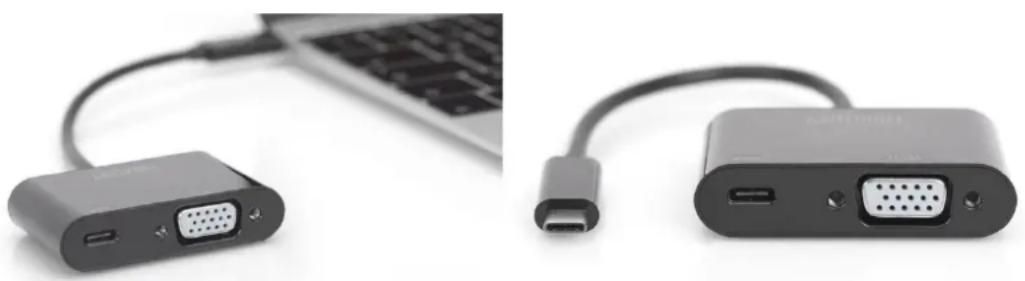
The USB Type-C™ VGA graphics adapter allows you to connect a TV set, monitor or projector to a USB-C™ device. The highest possible resolution is Full HD (1080p). In addition, it has another USB-C™ port with Power Delivery (PD) 2.0 functionality to power your mobile device while using the adapter. It is suitable for all operating systems: Windows®, Mac®, Google Chrome®. The adapter is a must-have accessory, whether you use it privately when connecting your laptop to an additional monitor or professionally for presentations with a VGA projector.
2.0 FEATURES
• Supports USB-C™ input and VGA output
• Supports DisplayPort 1.2 Alt-mode
• Supports content protection of HDCP
• Supports VGA resolution up to 1920X1200@60Hz
- USB-C™ female charging port supports to charge any USB-C™ device and supplies power for the adapter simultaneously
- USB-C™ female ports supplies power up to 60W(20V/3A)
• Power Delivery 2.0
- Multiple USB-C™ interfaces support plug and play, hot swap
- Easy to use and carry
natural_image
Two black electronic devices with labeled ports and connectors, one connected to a laptop keyboard (no visible text or symbols)3.0 SPECIFICATIONS
| Input/Output Connector | |
| Input 1x USB-CTM plug | 1x USB-CTM socket for charging (PD) |
| Output 1x VGA socket | |
| Resolutions | |
| Resolutions up to 1920x1200p/60Hz, FullHD | |
| Physical | |
| Weight | 29.2g |
| Size(L-W-H) 58 x 40 x 15 (mm) | |
| Environmental | |
| Operating Temperature 0°C to +45°C | |
| Operating Humidity 10% to 85 % RH (no condensation) | |
| Storage Temperature -10°C to +70°C | |
| Storage Humidity 5% to 90 % RH (no condensation) | |
| Power Supply | |
| USB-C Female Charging Port up to 60W (20V/3A) | |
4.0 PACKAGE CONTENTS
Before attempting to use this unit, please check the packaging and make sure the following items are contained in the shipping carton:
- Main unit x1
- User Manual x1
5.0 OPERATION
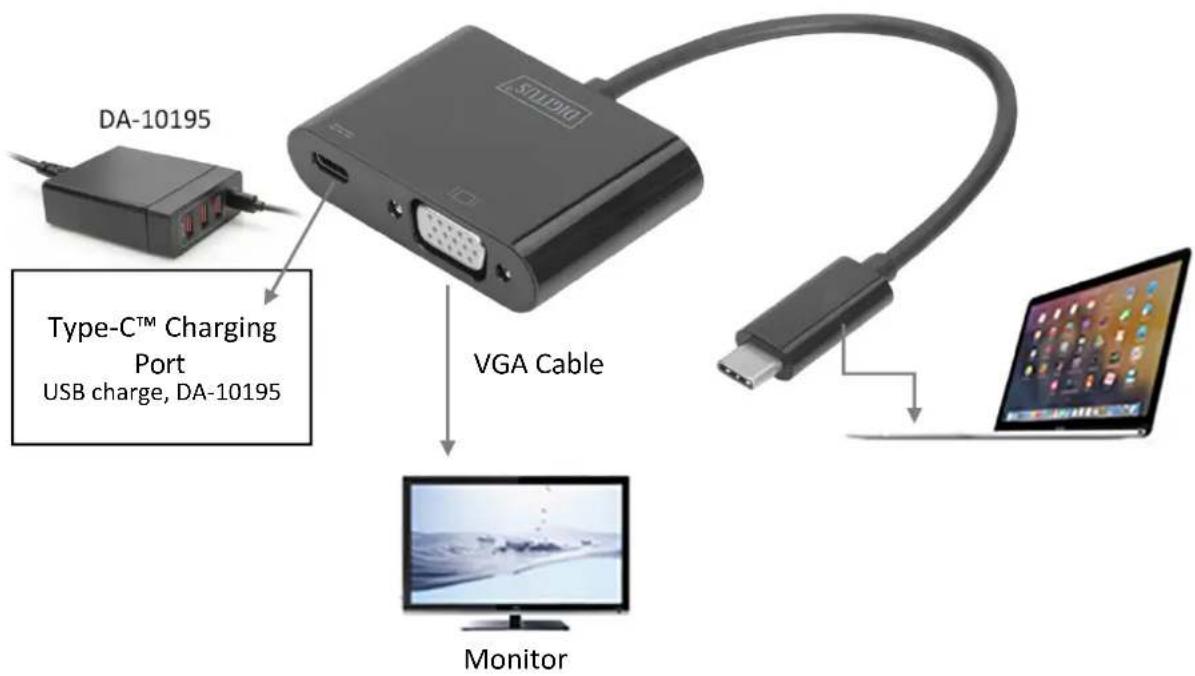
- Connect the USB-C™ plug of this product to your USB-C™ device
- Connect VGA socket of this product to your Monitor/TV with a VGA cable
- Connect the USB-C™ charging port, it can charge your USB-C™ device and support this adapter to work simultaneously
Note: When connecting this product to Chromebook, the VGA video signal may not appear on the screen of the VGA monitor under certain resolutions. This problem is caused by the incompatibility of the Chromebook system, not by the product itself.
6.0 CONNECTION DIAGRAM
text_image
DA-10195 Type-C™ Charging Port USB charge, DA-10195 VGA Cable MonitorHereby Assmann Electronic GmbH, declares that the Declaration of Conformity is part of the shipping content. If the Declaration of Conformity is missing, you can request it by post under the below mentioned manufacturer address.
www.assmann.com
Assmann Electronic GmbH
Auf dem Schüffel 3
58513 Lüdenscheid
Germany