Gamester MM279 - Console Manta - Free user manual and instructions
Find the device manual for free Gamester MM279 Manta in PDF.


| Product Type | Handheld Gaming Console / Multimedia Player |
| Display | 2.8-inch TFT LCD |
| Battery | Built-in rechargeable lithium battery |
| Storage | Internal flash memory; expandable via SD card slot (up to 32 GB) |
| Camera | Built-in digital camera (photo and video recording) |
| Video Recording (DV) | Yes, resolutions: 160x128, 320x240 |
| Video Playback | Supports multiple video formats |
| Audio Playback | MP3, WMA, WAV; built-in speaker and earphone jack |
| FM Radio | Yes, requires earphone as antenna |
| Game Support | Built-in NES-style games; directional keys and action buttons |
| Connectivity | USB 2.0, AV Out/In (NTSC/PAL), earphone jack |
| Other Features | E-book reader, dictionary, calculator, notebook, recording (MIC), slide design |
| Power Supply | DC 5V input via charger (included) |
| Charging Indicator | Blue (working), Red (charging) |
| Dimensions (Approx.) | 120 x 60 x 15 mm (estimated based on 2.8" screen) |
| Weight (Approx.) | 120 g (estimated) |
| Body Material | Plastic |
| Color | White (as shown in images) |
Frequently Asked Questions - Gamester MM279 Manta
User questions about Gamester MM279 Manta
0 question about this device. Answer the ones you know or ask your own.
Ask a new question about this device
Download the instructions for your Console in PDF format for free! Find your manual Gamester MM279 - Manta and take your electronic device back in hand. On this page are published all the documents necessary for the use of your device. Gamester MM279 by Manta.
USER MANUAL Gamester MM279 Manta
To ensure proper use of this product please read this User's Manual carefully and keep for future reference.
MM621 GT Racing Wheel

natural_image
Close-up of a black and white car steering wheel with control buttons (no visible text or symbols)natural_image
Exterior view of a white electronic device with a circular lens and drive slots (no visible text or symbols)DVD-037 Emperor Recorder 2

natural_image
White electronic device with a remote control unit and display screen (no visible text or symbols)natural_image
Two transparent mechanical components with circular bases, no visible text or symbolsOdtwarzacz audio....13
Zdjęcia 14
Device features ......26
Description 27
Device functions brief ....29
Basic operation ....30
Main menu interface operation ....30
Audio player ....31
Picture mode ....33
Camera 34
DV mode 35
Recording 36
Game 37
Study 38
Dictionary....38
E-book 39
Tools 40
Calculator 40
MM253/279 - GAMESTER
Notebook 40
Memory Administration ....40
System setting 41
Language....41
Original Setting 41
Sound Setting 41
Auto Power Off 41
Interface Style 41
Power saving 42
Recording 42
FM radio 42
Instrukcja obsługi
Widok z dołu

Widok z tyłu
MM253/279 - GAMESTER
Podstawowe funkcje
- Screen slide design with 2.8" TFT
● Game function
● Digital video camera, DV function.
● Movie playing function:
● Audio playing function: for all audio format including MP3/WMA and WAV etc.
● Photo/picture view function
● Build-in MIC;
● A.V out: (NTSC/PAL)
A.V. in: A.V.
● Multi-languages set - SD card socket, expanding the storage space.
E-book function.
● Built-in li. battery
● Built-in speaker
Function
Description
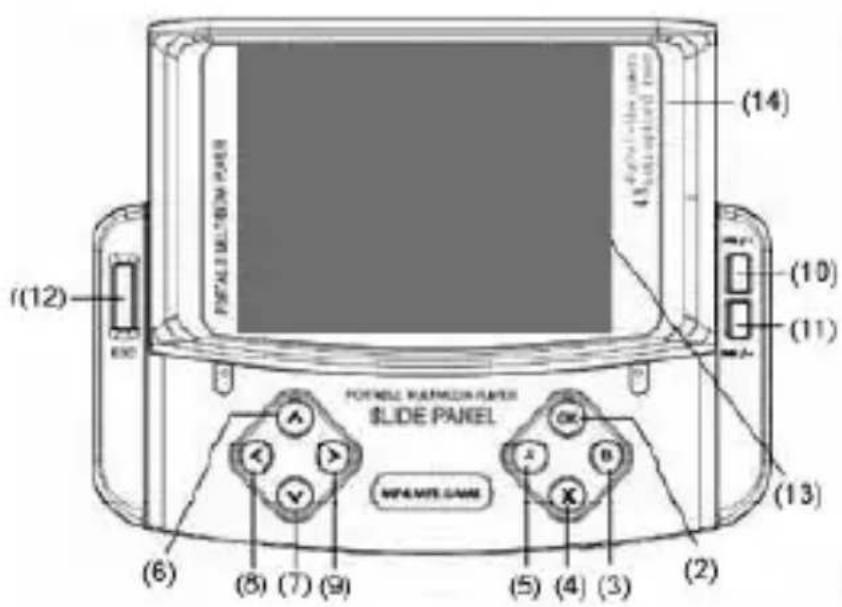
Front

Top
MM253/279 - GAMESTER

Bottom
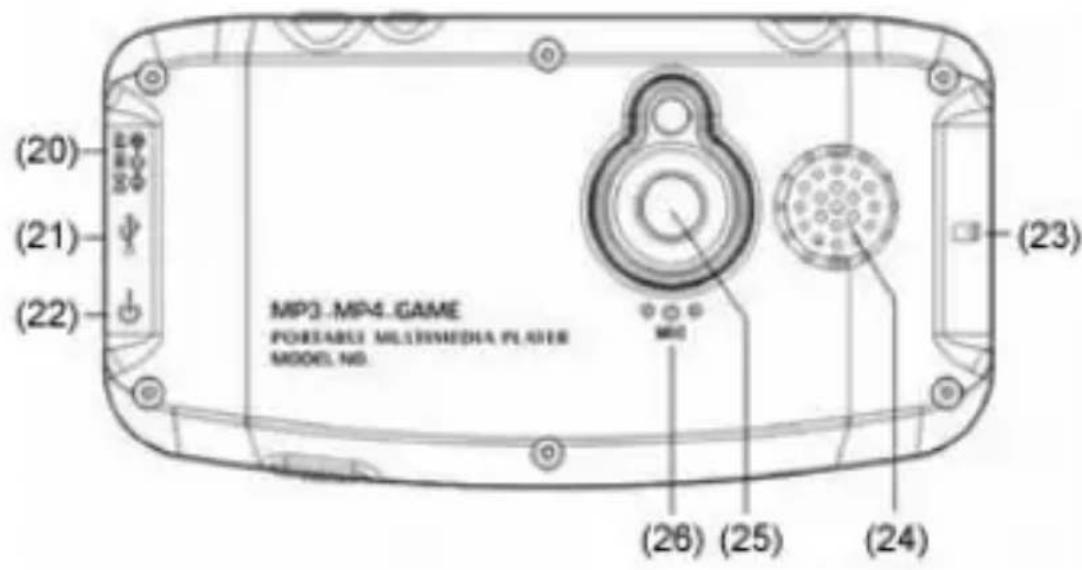
Back
MM253/279 - GAMESTER
Device functions brief
- Power ON/OFF
- OK - Confirm
- B – Shooting key in Game/OSD display
- X – Mode exchange in MP3/menu key/turning and jumping key in Game
- A – Recycle mode exchange in MP3/menu;
-
- ^ UP; cursor moving/object moving direction in Game
-
- v Down
-
- < left
- -> right
- Vol+
- ▶/ = - Vol-
- ESC – Exit
(Note: When playing NES game, press and hold
- Slide panel
- – Earphone socket
- Working indicator light (blue)/charging light (red
- 📷/▶‖ –Przycisk migawki aparatu/nagrywania kamery
- Reset - Reset
- Hold – Hold
- Dc in /charger in
- USB
- AV OUT/IN
- SD card
- Built-in speaker
- Built-in camera
- Built-in MIC
Application Introduction
Basic operation
Power on /off
Press and hold the power “ON/OFF” to power on ,Press and hold again the device displays off picture and turn off. The device will be power off automatically after standby by over 3 min.
Main Menu Operation
Main menu interface operation
Video player
UP/Down – Selecting video files.
A – Get in sub-menu:
| Display Mode | List |
| Thumbnail | |
| Recycle Mode | One |
| All | |
| Random | |
| File proof | Lock |
| Unlock | |
| File del. | One |
| All | |
| Video out put | LCD |
| NTSC | |
| PAL |
MM253/279 - GAMESTER
Exit
UP/Down – Items selecting
RIGHT – Sub-menu.
OK - Confirm.
Note: The files locked can not be deleted.
Video files playing
OK – Play/pause
UP/Down – Last or next song selecting
LEFT/RIGHT - Fast backword or forward (×2 ×4×6×8)

- Vol+ or Vol-
OK – Normal play /pause
Exit From Video Playing
ESC - exit.
Audio player
„OK“ – Get in music viewing operation interface;
UP/Down – Selecting audio files.
A – Get in menu, functions as follow:
| Recycle Mode | One |
| All | |
| Random | |
| File Proof | Lock |
| Unlock | |
| File Del. | One |
| All |
MM253/279 - GAMESTER
| EQ Mode | Normal |
| Classical | |
| Pop | |
| Bass | |
| Rock | |
| 3Min. | |
| Exit |
UP/Down – Last or next item selection
RIGHT – Sub-menu
OK – Confirm
Audio files playing
Selecting the audio file ,play by “OK” key .The id3 information of music file under playing can be displayed on the screen:
OK – Play/Pause
UP/Down – Last or next song

LEFT/RIGHT – Fast backward/fast forward; (×2 ×4×6×8
A – Recycle mode(3 modes)
X - EQ mode
Note:
Pressing any key to relieve screen proof.
MM253/279 - GAMESTER
Picture mode
Get in picture mode
Operation:
UP/Down – selecting picture files
A – Get in menu: functions as shown bellow.
| Display Mode | Thumbnail |
| List | |
| Slide | |
| File Proof | Lock |
| Unlock | |
| File Del. | One |
| All | |
| Power on catalogue | Customer's definition |
| Power off catalogue | Customer's definition |
| Video out put | LCD |
| NTSC | |
| PAL |
UP/Down – Last or next item selecting
OK - Confirm
Picture files playing
Selecting slide view or any picture file, play by "OK"
UP/Down – Upper or next picture
OK – Slide viewing or stop
Exit
ESC – Exit
MM253/279 - GAMESTER
Camera
Camera mode:
The camera working state and the picture size are showed on the left upper corner of LCD, the memory capacity left is showed on the right.
![Shoot mode Picture size Quatit Shoot time 1280×960 H [1459] Built-in memory capacity left or shoot times 1.0 Focus indicator](/content/2026/05/1129228/images/5ac095f99122eacb7832aa3fa4c2d24f7bf97bfa3d985253a206ca55423d259b.jpg)
Operation:
SHUTTER – shooting
UP/Down – Focus adjust (2 times auto-zoom)
A – Get in Camera actors setting sub-menu
MM253/279 - GAMESTER
| Shoot Mode | Single |
| Continuance | |
| Auto | |
| Picture Size | Select |
| Picture Quality | High |
| Normal | |
| Low | |
| Special Effect | Normal Mode |
| Negative Mode | |
| Solaris Mode | |
| Relief Mode | |
| Binaries Mode | |
| Sepia Mode | |
| Black and white Mode | |
| Exit |
DV mode
Press „OK“ key to confirm as shown bellow.
![Picture size 320×240 H Picture quality [55:21:08] Time Focus indicator](/content/2026/05/1129228/images/13de990e43797672cd4df0f010ebe156929b714b35199e5884bb89d7a507291f.jpg)
MM253/279 - GAMESTER
Operation:
- Shooting/Stop shooting
UP/Down – Focus adjusting(2 times digital focus).
A – Stop shooting, get in sub-menu:
| Video Size | 160*128 |
| 320*240 | |
| Video Quality | High |
| Normal | |
| Low | |
| Special effect | Normal |
| Negative | |
| Solaris | |
| Relief | |
| Binaries | |
| Sepia | |
| Black & White | |
| Exit |
Recording
MIC recording mode
Pressing „OK“ to get in recording work interface:
Built-in MIC Recording
When MIC recording:
OK – Start/Pause
ESC – Stop recording
MM253/279 - GAMESTER
Note:
After recording, the music file will be stored in MP3 list automatically.
Exit From Recording Mode
ESC – Exit.
Game
Key operation:
UP/Down – Game selection
A Get in sub-menu, as follow:
| File proof | Lock |
| Unlock | |
| File Del. | One |
| All | |
| Video out | LCD |
| NTSC | |
| PAL | |
| Exit |
UP/Down – Upper or next item selection
RIGHT – Sub-menu
OK – Confirm
MM253/279 - GAMESTER
Starting Game
In game, key function as follow
| Key | Function |
| Direction key | Up/down/left/right moving |
| OK | Start game or pause |
| B | Shoot Kick fight |
| X | Turn jump game grade select |
| ESC | Exit from game |
| |/- | Exit |
Study
OK – Get in study mode, as shown bellow:
Dictionary
Confirming by „OK“ key:
Direction keys – Moving cursor to select words
X – Confirm the word
B – „Tab” key of PC keyboard, the device passes 3 display windows.

- Words sound
UP/Down – upper or down selection
ESC – Exit from dictionary
MM253/279 - GAMESTER
E-book
UP/Down – File selection
A – Get in sub-menu:
| File proof | Lock |
| Unlock | |
| File Del. | One |
| All | |
| Exit |
UP/Down – Upper or next item
RIGHT – Sub-menu
OK – Confirm
When you read, operations as follow:
UP/Down – Line selection
A – Get in „searching menu:
OK – Get in „searching“ mode
LEFT – Get in follow function
| View mode | Manual |
| 0.5 Sec. | |
| 1 Sec. | |
| 2 Sec. | |
| Lines Distance | Small |
| Middle | |
| Big |
The book lable can be used to administrate the E-book
ESC – Exit from E-book
MM253/279 - GAMESTER
Tools
Calculator
Direction keys – Words selection
OK – Confirm /Working
ESC – Exit
Notebook
A – Get sub-menu
| New file | |
| Edit file | |
| File proof | Lock |
| Unlock | |
| File Del. | Now |
| All | |
| Esc |
OK – Get in
A – Store menu
B – Mode exchange
OK – Confirm
ESC – Exit
Memory Administration
This function is for memory selection (SD card - flash)
Operation:
LEFT / RIGHT – Flash or SD card selection
UP / DOWN – Working area or format selection
OK – Confirm
ESC – Exit
MM253/279 - GAMESTER
Note: After formatting, all files in device's memory will be deleted.
System setting
OK – Get in system setting mode:
Auto power off
Language
UP / DOWN – Upper or next selection
OK - Confirm
Note: After confirming, the system needs to power on again.
Original Setting
This function is designed to open or close the speaker's sound or key's sound.
ESC - exit
Auto Power Off
Stand by time – the time from the last key operation to power off.
Never – Clear the auto power off function
Interface Style
The device possess 2 interfaces;
MM253/279 - GAMESTER
Power saving
Select the LCD OFF time to save the power.
Recording
OK – Start/Stop
ESC – Exit
FM radio
B – Channel selection Auto-searching or manual searching exchange key.
LEFT/RIGHT à Frequency adjust or channel selection
UP / DOWN à Channel numbering in manual searching
a Vol+ or Vol- in channel searching
OK à Channel store in manual search;
Start searching in auto-searching
ESC à Exit from FM mode
Note:
The earphone lines is used as the antenna in FM mode
TV LCD 701

natural_image
Black-and-white illustration of a person reading on a TV with a antenna and remote control nearby (no text or symbols)natural_image
Two headsets displayed in different angles, one with black ear and headband, the other with transparent display (no visible text or symbols)natural_image
Exterior view of a silver audio amplifier with two speakers (no visible text or symbols)LCD Monitor 1703 with TV

natural_image
Black-and-white photo of a woman on a computer monitor, no visible text or symbols- MM621 GT Racing Wheel
- DVD-037 Emperor Recorder 2
- MM253/279 - GAMESTER
- System setting 41
- Recording 42
- FM radio 42
- Instrukcja obsługi
- Podstawowe funkcje
- Function
- Description
- Device functions brief
- Application Introduction
- Basic operation
- Power on /off
- Main Menu Operation
- Main menu interface operation
- Video player
- Exit
- Video files playing
- Exit From Video Playing
- Audio player
- Audio files playing
- Note:
- Picture mode
- Operation:
- Picture files playing
- Camera
- Camera mode:
- DV mode
- Recording
- Exit From Recording Mode
- Game
- Starting Game
- Study
- Dictionary
- E-book
- Tools
- Calculator
- Notebook
- Memory Administration
- System setting
- Language
- Original Setting
- Auto Power Off
- Interface Style
- Power saving
- FM radio
- TV LCD 701
- LCD Monitor 1703 with TV
Brand : Manta
Model : Gamester MM279
Category : Console