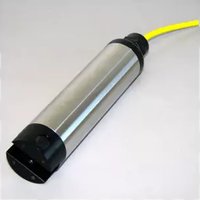
WQ730 - Portable device YSI - Free user manual and instructions
Find the device manual for free WQ730 YSI in PDF.


| Product Type | Portable Water Quality Meter |
| Brand | YSI |
| Model | WQ730 |
| Dimensions (H x W x D) | 19.1 cm x 8.9 cm x 3.8 cm (7.5 in x 3.5 in x 1.5 in) |
| Weight | 0.45 kg (1.0 lb) |
| Power Supply | 4 AA alkaline batteries (not included) or rechargeable NiMH |
| Battery Life | Approximately 50 hours of continuous use |
| Display | Backlit LCD, multi-parameter readout |
| Measurement Parameters | pH, Conductivity, Dissolved Oxygen (DO), Temperature |
| pH Range | 0 to 14 pH |
| Conductivity Range | 0 to 200 mS/cm |
| DO Range | 0 to 20 mg/L |
| Temperature Range | -5 to 50 °C (23 to 122 °F) |
| Accuracy (pH) | ±0.1 pH |
| Accuracy (Conductivity) | ±1% of reading |
| Accuracy (DO) | ±0.2 mg/L |
| Memory | Up to 500 data logs |
| Data Logging | Manual or automatic interval logging |
| Waterproof Rating | IP67 (protected against temporary immersion) |
| Sensor Connection | Waterproof connector for optional probes |
| Calibration | Auto-calibration for pH and conductivity; manual DO calibration |
| Warranty | 1 year limited warranty |
| Cleaning and Maintenance | Rinse sensors with clean water after use; store in humid environment |
| Included Accessories | User manual, calibration screwdriver, neck strap |
Frequently Asked Questions - WQ730 YSI
User questions about WQ730 YSI
0 question about this device. Answer the ones you know or ask your own.
Ask a new question about this device
Download the instructions for your Portable device in PDF format for free! Find your manual WQ730 - YSI and take your electronic device back in hand. On this page are published all the documents necessary for the use of your device. WQ730 by YSI.
USER MANUAL WQ730 YSI
natural_image
Simple black-and-white icon of a stylized storefront with wavy roof lines (no text or symbols)Global Water
Instrumentation, Inc.
11390 Amalgam Way
Gold River, CA 95670
T: 800-876-1172
Int'l: (916) 638-3429, F: (916) 638-3270
Turbidity Sensor: WQ730

Global Water
800-876-1172 • globalw.com
Congratulations on your purchase of the Global Water WQ730 Turbidity Sensor. This instrument has been quality tested and approved for providing accurate and reliable turbidity measurements. We are confident that you will find this product to be a valuable asset for your application. Should you require assistance, our technical staff will be happy to help.
Table of Contents
| I. | Use and Maintenance | ● | ● | ● | ● | ● | Page | 3 |
| II. | Sensor Specifications | ● | ● | ● | ● | ● | 4 | |
| III. | Troubleshooting | ● | ● | ● | ● | ● | 5 | |
| IV. | Warranty | ● | ● | ● | ● | ● | 6 | |
| V. | Appendix A: Turbidity Sensor Calibration | ● | ● | 7 | ||||
| VI. | Appendix B: Turbidity Standard Solutions | ● | ● | 10 | ||||
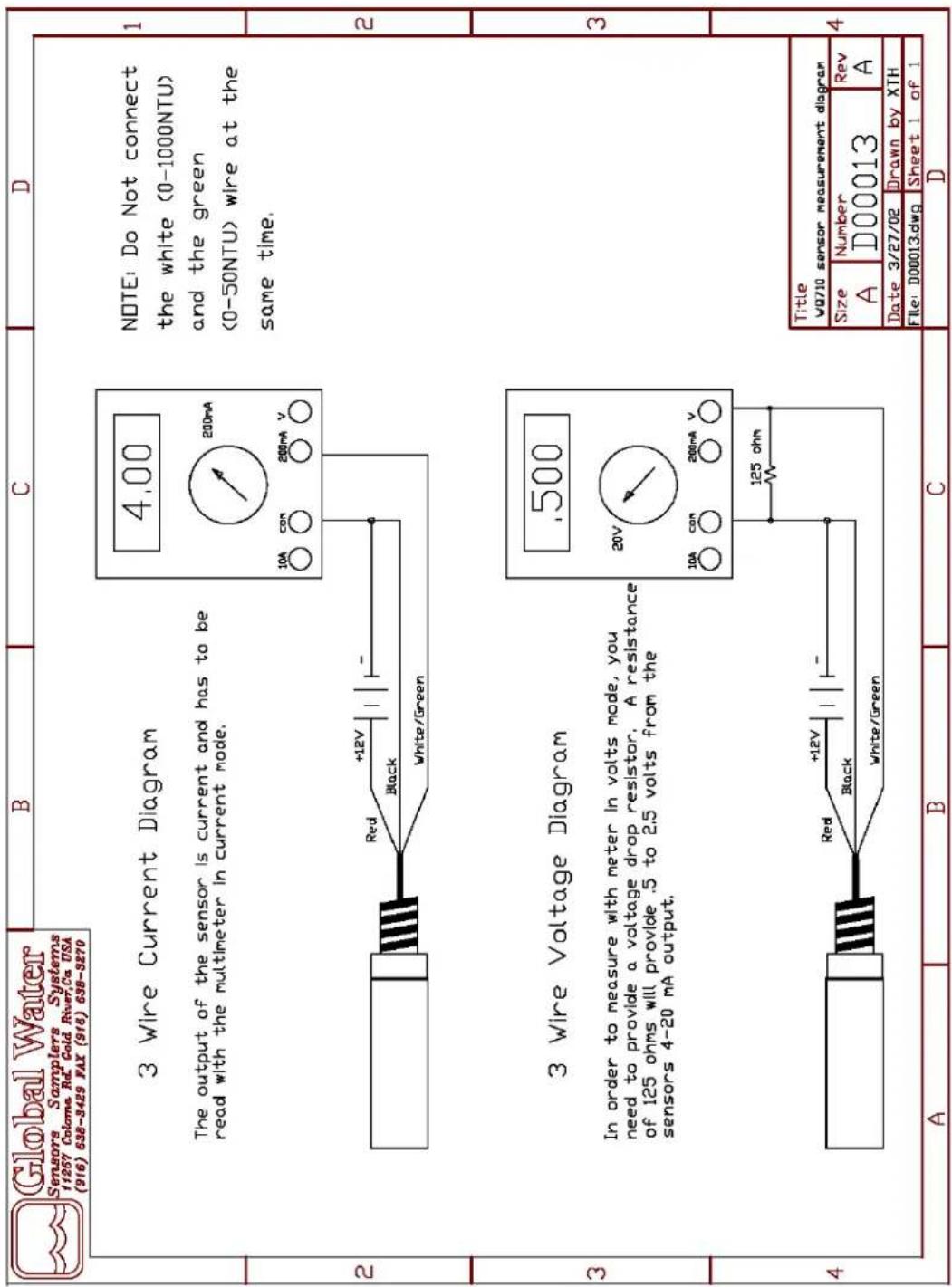
| VII. | Appendix C: Sensor Measurement Diagram | ● | ● | 11 | ||||
| VIII. | CE Certification | ● | ● | ● | ● | ● | 12 | |
Global Water
800-876-1172 • globalw.com
I. Use and Maintenance
a. The WQ730 Turbidity Sensor is a sensitive optical device and should be handled and used carefully. Avoid hitting or dropping the sensor. Avoid exposure to shock, vibration, extreme hot or cold temperatures, or sudden wide temperature changes. Transport the sensor in a safe and dry enclosure.
b. Normal maintenance requires the sensor to be checked on a regular basis. Harsh environments can permanently damage the optics of the sensor if it is left untended for long periods of time.
c. Deposits will develop on the optics over time and should be cleaned every 2-3 days for best operation. The windows can be cleaned using lint free cotton swabs and rubbing alcohol. Do not use any abrasive cleaners on the lenses or permanent damage will occur. Cleaner water requires cleaning less often, in other applications the sensor may need to be cleaned once each day.
d. The calibration of the sensor should be checked every 6 months.
e. Always turn off the power when making circuit connections.
f. Air bubbles on the lenses can greatly affect the readings. When installing, make sure that any bubbles are clear of the lenses or allow them dissipate before taking readings.
g. Under no circumstances should the sensor be disassembled. There are no internal adjustments or user serviceable parts inside. Opening the housing will permanently damage the seals and can cause serious damage to the optics. Opening the sensor will void any warrantee.
h. The stainless steel body of the WQ730 Sensor is connected to the circuit ground. When taking measurements, the body of the sensor must be in contact with the test solution or noise problems may occur.

Global Water
800-876-1172 • globalw.com
II. Sensor Specifications
a. Specifications.
Outputs: Two, 4-20mA
Ranges: 0-50 NTU (Green Wire) 0-1000 NTU (White Wire)
Accuracy: 1% of full scale
Pressure: 30 psi maximum
Power Requirements: 10-36 VDC
20ma plus sum of both 4-20
Warm Up Time: 3 seconds minimum
8 seconds recommended
Operating Temperature: 0°C to +50°C
Storage Temperature: -10^ to +60^
Dimensions: 1-1/2" diameter x 7-1/2"" long
Weight: 1 lb plus cable
b. Connections:
Red: 10-36 VDC
Black: Ground
Green: 4-20 mA low range output (50 NTU)
White: 4-20 mA high range output (1000 NTU)
Note: The stainless steel body of the sensor is connected to
the circuit ground and must be in contact v s o l u t i o n .
Warning: Always turn off the power when connecting or disconnecting the sensor or it could be damaged.

Global Water
800-876-1172 • globalw.com
III. Trouble Shooting
There are no user serviceable parts inside this sensor
Issue: Sensor reading incorrectly
a. Clean the sensor windows using a lint free cotton swab and rubbing alcohol.
b. Verify there are no air bubbles blocking the lenses.
c. Check the sensor's calibration, see appendix A.
Other issues
d. Refer to the manual for proper set-up; check all connections and batteries.
e. Call us for tech support: 800-876-1172 or 916-638-3429 (many problems can be solved over the phone). Fax: 916-638-3270 or Email: globalw@globalw.com.
f. In the event that the equipment needs to be returned to the factory for any reason, please call to obtain a RMA # (Return Material Authorization). Do not return items without a RMA # displayed on the outside of the package.
Clean and decontaminate the WQ730 when necessary.
Include a written statement describing the problems.
Send the package with shipping prepaid to Global Water's factory address. Insure the shipment, as the warranty does not cover damage incurred during transit.
g. When calling for tech support, please have as much of the following information as possible;
- Model #.
- Unit serial number.
- P.O.# the equipment was purchased on.
- Global Water's sales number or the invoice number.
- Repair instructions and/or specific problems relating to the product.

Global Water
800-876-1172 • globalw.com
IV. Warranty
a. Global Water Instrumentation, Inc. warrants that its products are free from defects in material and workmanship under normal use and service for a period of one year from date of shipment from factory. Global Water's obligations under this warranty are limited to, at Global Water's option: (I) replacing or (II) repairing; any products determined to be defective. In no case shall Global Water's liability exceed the products original purchase price. This warranty does not apply to any equipment that has been repaired or altered, except by Global Water Instrumentation, Inc., or which has been subject to misuse, negligence or accident.
b. The warranty begins on the date of the product's invoice.

Global Water
800-876-1172 • globalw.com
V. Appendix A: Turbidity Sensor Calibration
Note: The following steps show how to calibrate the WQ730 Turbidity Sensor using suspended polymer turbidity standards only.
General
a. The Turbidity Sensor is measuring turbidity in liquids by using a 90 degrees scatter nephelometer where a focused beam is directed into the monitored water. The principle is based on recommendations of the international guideline ISO 7027. Two detectors receive light from a source emitting 880 nm infrared light in a pulsed mode. One detector is placed opposite the source, receiving the transmitted light, and the other detector is placed at an angle of 90 degrees to the incident light beam measuring side-scattered light. The detected light intensity is directly proportional to the turbidity of the water.
b. The following supplies are required:
Stand with rod and clamp Beakers, 500 or 1000 ml 1000 NTU Turbidity Standard 50 NTU Turbidity Standard 0.0 NTU Turbidity Standard Distilled Water Power Supply Current Meter Test leads as necessary
The preferred and recommended turbidity standards are suspended polymer solutions. These are EPA approved, non-toxic, and require no mixing or stirring. Other types of standards such as Formazin can also be used, but these require thorough mixing and must be used with low speed stirring plates during the calibration process.
All the necessary turbidity standard solutions are available from Global Water, contact the sales department for more information. See Appendix B.

Global Water
800-876-1172 • globalw.com
Preparation:
a. Set up a test stand with a rod and clamp to hold the sensor. Beakers will be placed underneath the clamp so the sensor can be inserted into the liquid.
b. The sensor must have the stainless steel section of the body in contact with the test solution. Install the sensor so that the end of the sensor is at least 3 inches from the bottom. If the sensor is too close to the bottom, infrared light may be reflected from the glass and effect the measurements.
c. The lenses must be gently cleaned with a cotton swab and isopropyl alcohol before each calibration step.
d. Fill a large beaker with distilled water. This will be used to rinse solution from the sensor in between steps.
e. Fill three more beakers with 0.0 NTU Standard, 50 NTU Standard and 1000 NTU Standard. These beakers must be at least 500 ml in size or the end of the sensor will be too close to the bottom for accurate calibration. This generally requires solution volumes of at least 500ml.
f. The calibration process should not be done in bright light if possible. While not generally required, the extra step of covering the outside of the beakers with a non-transparent material may help to prevent stray light from the outside affecting the readings.
Note: The sensor is factory calibrated and will provide output currents of 20mA at the maximum turbidity values; however, some small drift in this output current can occur over time. These adjustments are done internally, access to these settings are not available to the user. The sensors should never be disassembled. The following process describes how to re-check these output currents. A full recalibration can only be done by returning the sensor to Global Water.

Global Water
800-876-1172 • globalw.com
Checking Calibration
Step 1) Connect the sensor to the power supply and current meter in the following way. Attach the black wire to the ground terminal of the power supply. Attach the white wire to the positive current input of the meter. Connect the ground terminal of the power supply to the ground input of the current meter. Check that the power supply is set between 10 and 30 volts DC. Attach the red wire to the positive terminal of the power supply. Warning: Always hook up the red wire last or the sensor may be damaged.
Step 2) Place the turbidity sensor in the distilled water beaker, rinse and dry. Clean the lenses with alcohol.
Step 3) Place the sensor in the clamp above the 0.0 NTU standard. Turn on the power supply and the current meter. Let the sensor stabilize for several seconds before taking any measurements. If necessary, use a lint free cotton swab bent at 90^ to remove any air bubbles from underneath the detector window. Air bubbles will cause large errors in the current output, especially at low turbidity values.
Step 3) Record the output current of the sensor, Zero (1000) = _____. Disconnect the white wire and connect the green wire to the positive input of the current meter. Let the sensor stabilize. Record the output current of the sensor, Zero (50) = _____.
Step 4) Remove the sensor and rinse in distilled water. Dry the sensor and clean the lenses with alcohol.
Step 5) Place the sensor in the clamp above the 50 NTU solution. If necessary, use a lint free cotton swab bent at 90^ to remove any air bubbles from underneath the detector window.
Step 6) Record the output current of the sensor, 50NTU = ____.

Global Water
800-876-1172 • globalw.com
Step 7) Remove the sensor and rinse in distilled water. Dry the sensor and clean the lenses with alcohol.
Step 8) Disconnect the green wire and connect the white wire to the positive input of the current meter.
Step 9) Place the sensor in the clamp above the 1000 NTU solution. If necessary, use a lint free cotton swab bent at 90^ to remove any air bubbles from underneath the detector window.
Step 10) Record the output current of the sensor, 1000NTU = ____.
Step 11) Remove the sensor and rinse in distilled water. Dry the sensor.
VI. Appendix B: Turbidity Standard Solutions
The following turbidity standards are available from Global Water, contact the Sales Department or Technical Support for more information.
These are EPA approved primary standards that are safe, non-toxic and disposable. They are easy-to-use with no dilution or re-suspension needed. Their inherent stability means they do not settle from suspension and require no stirring. The convenient submicron polymer suspensions are non-toxic primary calibration standards approved by the US EPA for drinking water analysis for turbidity, and preferred by the U. S. Geological Survey for turbidity and sediment transport analysis.
Part Number Description
| 02-003 | 0.0 NTU Turbidity Standard | |||
| 02-004 | 50 | NTU | Turbidity | Standard |
| 02-005 | 100 | NTU | Turbidity | Standard |
| 02-006 | 1000 | NTU | Turbidity | Standard |

Global Water
800-876-1172 • globalw.com
Appendix C: Sensor Measurement Diagram

Global Water
800-876-1172 • globalw.com
Declaration of CE Conformity
Global Water Instrumentation, Inc.
11390 Amalgam Way
Gold River, CA 95670 USA
FAX: 00 1 916 638 3270
Phone: 00 1 916 638 3429
declares that the Product:
Product Name: Turbidity Sensor and Turbidity Meter
Model Number: WQ730, WQ770
conforms to the following European Council directives:
Low Voltage Directives: 2006/95/EC; Requirements covering all health and safety risks of electrical equipment operating within certain voltage ranges.
According to the following standards:
EN61010-1: 2001
Electro-Magnetic Directives: 2004/108/EC; Requirements to prevent electrical and electronic equipment from generating or being affected by electromagnetic disturbances.
According to the following standard:
EN 61326-1: 2006
Batteries Directive: 2006/66/EC ; Requirements regarding the
proper handling and disposal of batteries and accumulators.
Global Water hereby certifies that the product stated above conforms to all directives and standards required for it to bear the CE mark.

Dale Daniel
Engineering Manager
Global Water Instrumentation, Inc.


- Global Water
- 800-876-1172 • globalw.com
- Use and Maintenance
- Sensor Specifications
- Trouble Shooting
- There are no user serviceable parts inside this sensor
- Other issues
- Warranty
- Appendix A: Turbidity Sensor Calibration
- General
- Preparation:
- Checking Calibration
- Appendix B: Turbidity Standard Solutions
- Declaration of CE Conformity
- Global Water Instrumentation, Inc.
Brand : YSI
Model : WQ730
Category : Portable device