RH10MD - Audio/video converter AJA - Free user manual and instructions
Find the device manual for free RH10MD AJA in PDF.


| Product Type | 3G-SDI to HDMI Converter |
| Brand | AJA |
| Model | RH10MD |
| Dimensions (W x D x H) | 5.5 x 3.5 x 1.5 in (140 x 89 x 38 mm) |
| Weight | 0.4 lbs (180 g) |
| Power Supply | 5V DC 2A via included adapter |
| Power Consumption | 5W typical |
| Input Interface | 1x BNC (3G-SDI/HD-SDI) |
| Output Interface | 1x HDMI Type A (v1.4) |
| Supported Video Formats | 1080p60, 1080i, 720p, 576i, 480i |
| SDI Standards | SMPTE 259M, 292M, 424M |
| HDMI Format Support | YCbCr 4:2:2, 8-bit, up to 1080p60 |
| Audio Support | 2-channel embedded SDI audio to HDMI |
| Cable Equalization | Automatic up to 100m at 3G-SDI |
| LED Indicators | Power, Signal Lock |
| Mounting | Free-standing or optional bracket |
| Operating Temperature | 32° to 104°F (0° to 40°C) |
| Compliance | CE, FCC Class A |
| Cleaning | Wipe with dry cloth, avoid liquids |
| Repairability | No user-serviceable parts; contact AJA support |
Frequently Asked Questions - RH10MD AJA
User questions about RH10MD AJA
0 question about this device. Answer the ones you know or ask your own.
Ask a new question about this device
Download the instructions for your Audio/video converter in PDF format for free! Find your manual RH10MD - AJA and take your electronic device back in hand. On this page are published all the documents necessary for the use of your device. RH10MD by AJA.
USER MANUAL RH10MD AJA
Installation and Operation Guide
Because it matters.

Trademarks
AJA^® , KONA®, Ki Pro®, and XENA® are registered trademarks of AJA Video, Inc. FiDO™, Io HD™ and Io™ are trademarks of AJA Video, Inc. HDMI, the HDMI logo and High-Definition Multimedia Interface are trademarks or registered trademarks of HDMI Licensing LLC. DVI is a registered trademark of DDWG. All other trademarks are the property of their respective holders.
Notice
Copyright © 2010 AJA Video, Inc. All rights reserved. All information in this manual is subject to change without notice. No part of the document may be reproduced or transmitted in any form, or by any means, electronic or mechanical, including photocopying or recording, without the express written permission of AJA Inc.
Contacting Support
To contact AJA Video for sales or support, use any of the following methods:
180 Litton Drive, Grass Valley, CA. 95945 USA
Telephone: 800.251.4224 or 530.274.2048
Fax: 530.274.9442
Web: http://www.aja.com
Support Email: support@aja.com
Sales Email: sales@aja.com
When calling for support, have all information at hand prior to calling.
Limited Warranty
AJA Video warrants that this product will be free from defects in materials and workmanship for a period of five years from the date of purchase. If a product proves to be defective during this warranty period, AJA Video, at its option, will either repair the defective product without charge for parts and labor, or will provide a replacement in exchange for the defective product.
In order to obtain service under this warranty, you the Customer, must notify AJA Video of the defect before the expiration of the warranty period and make suitable arrangements for the performance of service. The Customer shall be responsible for packaging and shipping the defective product to a designated service center nominated by AJA Video, with shipping charges prepaid. AJA Video shall pay for the return of the product to the Customer if the shipment is to a location within the country in which the AJA Video service center is located. Customer shall be responsible for paying all shipping charges, insurance, duties, taxes, and any other charges for products returned to any other locations.
This warranty shall not apply to any defect, failure or damage caused by improper use or improper or inadequate maintenance and care. AJA Video shall not be obligated to furnish service under this warranty a) to repair damage resulting from attempts by personnel other than AJA Video representatives to install, repair or service the product, b) to repair damage resulting from improper use or connection to incompatible equipment, c) to repair any damage or malfunction caused by the use of non-AJA Video parts or supplies, or d) to service a product that has been modified or integrated with other products when the effect of such a modification or integration increases the time or difficulty of servicing the product.
THIS WARRANTY IS GIVEN BY AJA VIDEO IN LIEU OF ANY OTHER WARRANTIES, EXPRESS OR IMPLIED. AJA VIDEO AND ITS VENDORS DISCLAIM ANY IMPLIED WARRANTIES OF MERCHANTABILITY OR FITNESS FOR A PARTICULAR PURPOSE. AJA VIDEO'S RESPONSIBILITY TO REPAIR OR REPLACE DEFECTIVE PRODUCTS IS THE WHOLE AND EXCLUSIVE REMEDY PROVIDED TO THE CUSTOMER FOR ANY INDIRECT, SPECIAL, INCIDENTAL OR CONSEQUENTIAL DAMAGES IRRESPECTIVE OF WHETHER AJA VIDEO OR THE VENDOR HAS ADVANCE NOTICE OF THE POSSIBILITY OF SUCH DAMAGES.
Introduction
The RH10MD is a 10-bit broadcast quality HD down converter and HD-SDI distribution amplifier. Provided are 4 re-clocked HD-SDI outputs, and four down-converted SD outputs. The SD outputs can be individually configured as analog or SDI—and the analog outputs can be component or composite.
All HD formats are supported by the RH10MD, including 24p/psf with 3:2 pulldown. The input format supplied to the RH10MD is auto-detected—no configuration is necessary.
Serial digital output can be formatted for either 4:3 or 16:9 monitors. When used with 4:3 monitors, both Letterbox and Crop modes are supported.
The RH10MD is dual-rate (HD/SD) and supports SDI inputs. Four-channel AES embedded audio is passed through to the SDI outputs.
The RH10MD is compatible with AJA's FR1 and FR2 frames.
Features
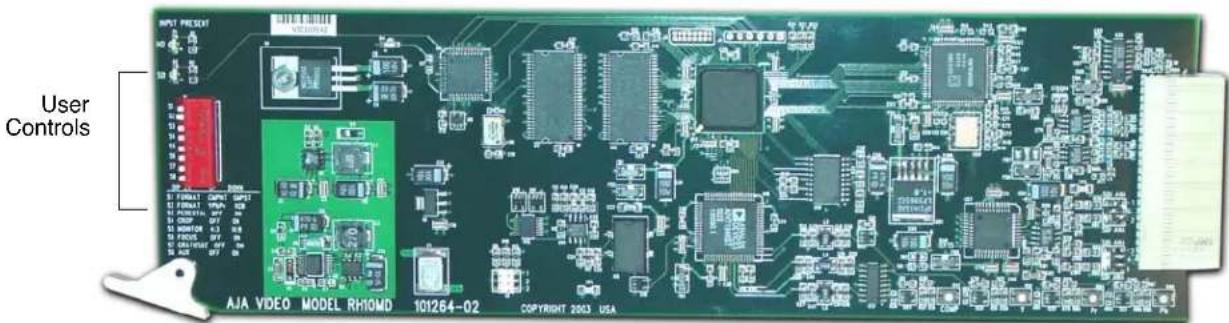
RH10MD Card Module, Side View
- Broadcast quality 10-bit HD to SD down conversion
- Broadcast quality 10-bit SDI and analog output
• 4 Equalized, Re-clocked DA outputs—HD-SDI or SDI (outputs follow input) - Multi-Standard input, including 1080p24sf (3:2 pulldown)
- Configurable for 16:9 or 4:3 monitor
- Crop Mode or Letterbox Mode
• 4:3 Safe Zone graticule
• Supports 4-channel embedded audio (passed to SDI output)
• Audio features high quality 10-bit encoding and 4-times oversampling
Block Diagram
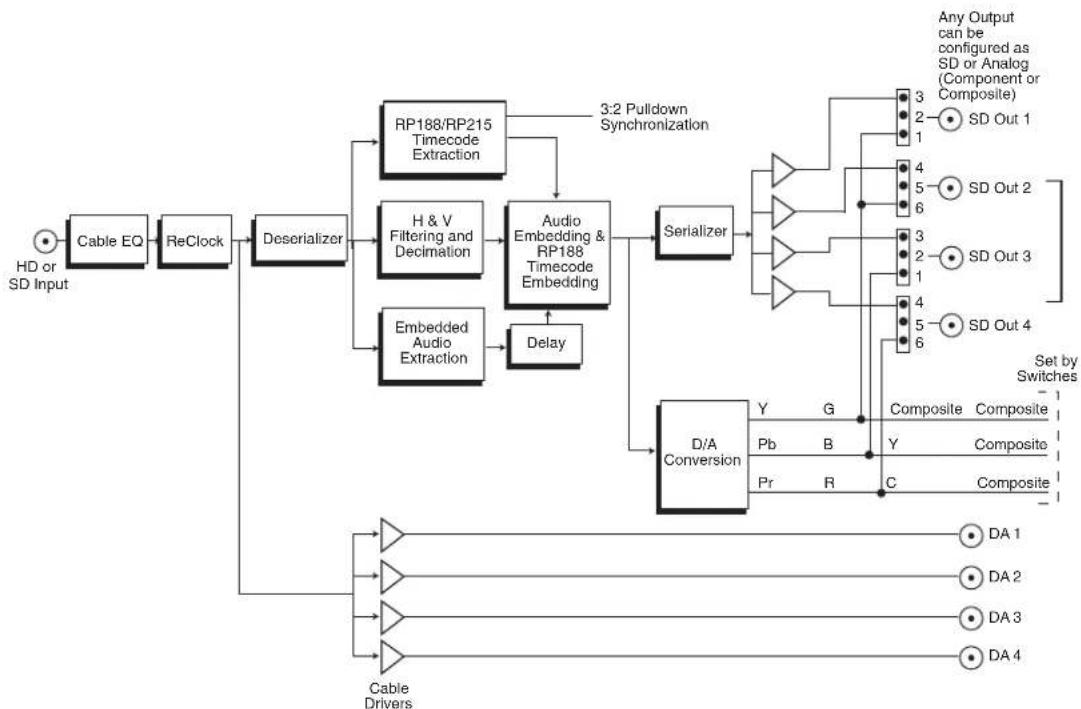
flowchart
graph TD
    A["HD or SD Input"] --> B["Cable EQ"]
    B --> C["ReClock"]
    C --> D["Deserializer"]
    D --> E["RP188/RP215 Timecode Extraction"]
    D --> F["H & V Filtering and Decimation"]
    D --> G["Embedded Audio Extraction"]
    E --> H["3:2 Pulldown Synchronization"]
    F --> I["Audio Embedding & RP188 Timecode Embedding"]
    G --> J["Delay"]
    H --> K["Serializer"]
    I --> K
    J --> K
    K --> L["D/A Conversion"]
    L --> M["Y"]
    L --> N["G"]
    L --> O["Pb"]
    L --> P["B"]
    L --> Q["Pr"]
    L --> R["R"]
    M --> S["Composite"]
    N --> S
    O --> S
    P --> S
    Q --> T["Composite"]
    R --> T
    S --> U["Any Output can be configured as SD or Analog (Component or Composite)"]
    T --> V["SD Out 1"]
    T --> W["SD Out 2"]
    T --> X["SD Out 3"]
    T --> Y["SD Out 4"]
    U --> Z["Set by Switches"]
    V --> AA["DA 1"]
    V --> AB["DA 2"]
    V --> AC["DA 3"]
    V --> AD["DA 4"]
    AA --> AE["Cable Drivers"]
    AB --> AE
    AC --> AE
    AD --> AE
RH10MD, Block Diagram
I/O Connections
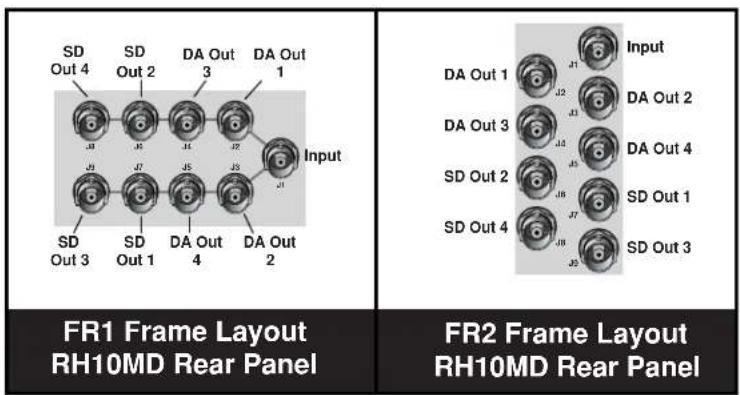
FR1 and FR2 BNC Connector Assignments, RH10MD Card Module
When the RH10MD module is installed in an AJA FR1 or FR2 frame, a corresponding group of 9 BNCs on the rear panel then provide I/O for the module. The illustration above shows the connector assignments for both the FR1 and FR2 when used with the RH10MD.
Output configuration is discussed next in User Controls.
User Controls
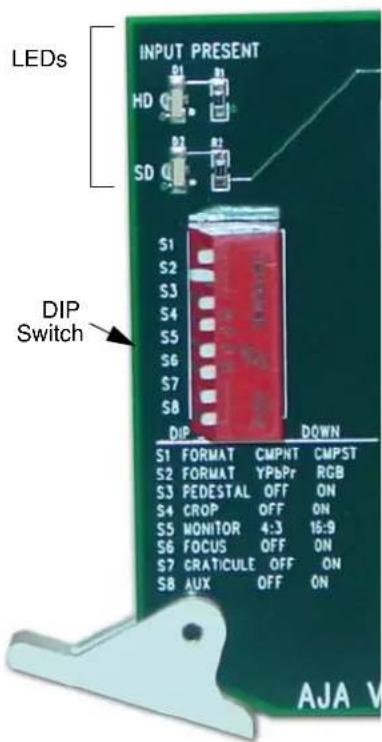
The user interface for configuring the RH10MD and selecting output formats is a dipswitch at the front of the card and some jumpers at the back of the card. Two LEDs at the front card additionally show the type of input present (HD or SD).
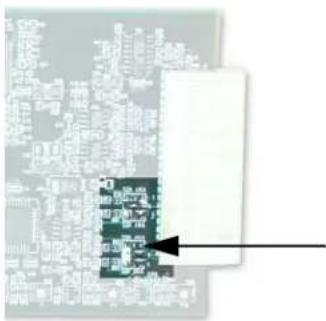
The four outputs labeled DA Out 1-4 are always serial digital, either HD or SD, depending on the input format detected. They are cable-equalized, and reclocked. The four outputs labeled SD Out 1-4 may be configured as either SDI or analog via 4 jumpers on the circuit board. These jumpers are located at the end of the board next to the large backplane connector where the card plugs into an FR1/FR2 chassis. These jumpers are labeled as "1", "2", "3", or "4", corresponding to the four SD output BNCs. This arrangement supports any combination of SDI or analog output. For example, 4 SDI, 4 composite, 2 SDI and 2 composite, etc. If a jumper is set for analog, then the corresponding output is defined by the dipswitch settings of S1, S2, and S8 as shown in the table below.
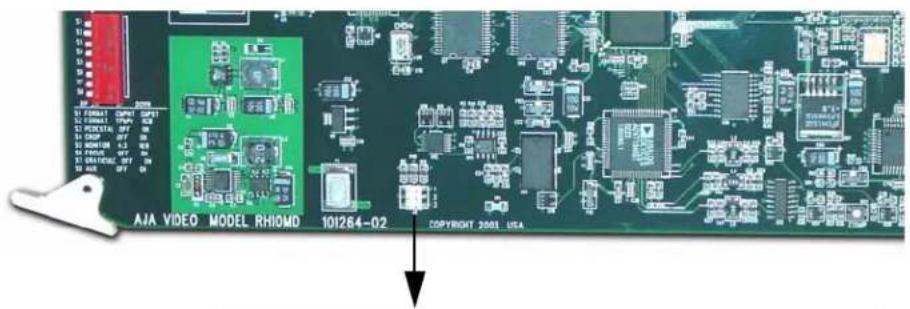
A jumper (J2) on the card allows you to select further options described later.
| S1 = Component (UP) | S1 = Composite (Down) | |
| SD Out 1 Y if S2 = YPbPr (up)G if S2 = RGB (down) | Composite | |
| SD Out 2 Y if S2 = YPbPr (up)G if S2 = RGB (down) | Composite | |
| SD Out 3 Cb if S2 = YPbPr (up)B if S2 = RGB (down) | Composite if S8 = upY of YC pair if S8 = down | |
| SD Out 4 Cr if S2 = YPbPr (up)R if S2 = RGB (down) | Composite if S8 = upC of YC pair if S8 = down | |
This example shows SDI selected for output 1 BNC, analog output for 2 BNC, and analog for 3 and 4 BNCs.
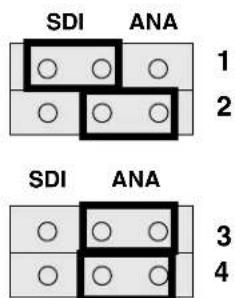
Jumpers to Select Output Format
Control Functions
In addition to selecting output format, the 8-position dipswitch also controls many other configuration settings of the RH10MD card. These are described in the following table.
| Switch Number Description Details | ||
| 1 Analog Format UP = Component | DOWN = Composite | |
| 2 Component format UP = YPbPr | DOWN = RGB | |
| 3 Pedestal UP = Pedestal Off | DOWN = Pedestal On | |
| 4 Crop UP = Horizontal Edges cropped off from input lines; all output lines are used DOWN = Black Bars top and bottom; all of input line is visible horizontally | ||
| 5 Monitor UP = 4:3 monitor; S4 selection in effect | DOWN = 16:9 monitor; S4 has no effect; uses all input lines and pixels to make a full screen raster | |
| 6 Focus UP = not in focus mode | DOWN = Focus mode; overrides S4 & S5. Passes the middle 720 pixels and 486 lines with no filtering | |
| 7 Graticule UP= Graticule Off | DOWN = Display Graticule showing safe area for 4:3 material on the 16:9 raster | |
| 8 Composite All UP = Composite on all analog outputs. S I must be down for this switch to take effect DOWN = Do not force composite on all outputs | ||
* For Betacam 525 levels, select Component, YPbPr, and set Pedestal to "On."
Jumper J2 Settings
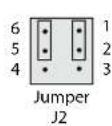
Jumper J2 is located at the bottom of the card (shown in the photo below). The meaning of the jumper settings is detailed in the illustration:
Jumper Between Pins 1 and 2:
ON = RP215 is used to synchronize 3:2 pulldown sequence
OFF = RP188 is used.
In both cases the "A Frame" is synchronized to frame with timecode "xx:00"
Jumper Between Pins 5 and 6:
ON = Output start of vertical blanking lines up with input start of vertical blanking
OFF = Output start of vertical sync lines up with input start of vertical sync (per RP168)
Installation
Typically, RH10MD installation consists of the following:
-
disconnect power from the frame (remove line cord)
-
remove the FR1/FR2 front panel
-
install RH10MD card module
-
replace the FR1/FR2 front panel
-
apply power to the frame by connecting a north american-style power cord from the frame to mains power (90 to 260 VAC)

Warning!
Ensure Mains Power is disconnected before installing the FR1 or FR2 frame R-series modules into the frame, or installing and removing options. If a Mains switch is not provided, the power cord(s) of this equipment provide the means of disconnection. The socket outlet must be installed near the equipment and must be easily
accessible.

Warning!
FR2 Dual Power Cord Notice—please read this. To reduce the risk of electrical shock, disconnect both power cords before servicing equipment.

Caution!
The FR1/FR2 front fan door is heavy and is not hinged. Remove with Caution.
Instructions for removing the frame front door for module installation is discussed in the FR1/FR2 User Manual.
Specifications
| Item Specification | |
| Input Formats: 1035i/1080i/1080 | psf/1080p/720p SMPTE 292/296, or 525/625iSMPTE 259M23.98/24/25/50/59.94/60 Hz Frame Rates23.98 -> 525/59.94 (3:2 pulldown)24 -> 525/59.94 (3:2 pulldown) (drop frame)25 -> 625/5050 -> 625/5059.94 -> 525/59.9460 -> 525/59.94 (drop frame) |
| Delay: 1 frame, audio and video | |
| Outputs: SDI, SMPTE, 259M, 10-bits, BNCHD-SDI SMPTE, 292/296, 10-bits, BNCYPbPr- (SMPTE, EBU-N10, Betacam)RGB, NTSC, PAL, YC (S-Video), 10-bits | |
| Power Consumption: 6 watts | |
Appendix A: Safety & Compliance
Federal Communications Commission (FCC) Compliance Notices
Class A Interference Statement
This equipment has been tested and found to comply with the limits for a Class A digital device, pursuant to Part 15, Subpart B of the FCC Rules. These limits are designed to provide reasonable protection against harmful interference in a commercial installation. This equipment generates, uses, and can radiate radio frequency energy and, if not installed and used in accordance with the instructions, may cause harmful interference to radio communications. However, there is no guarantee that interference will not occur in a particular installation. Operation of this equipment in a residential area is likely to cause harmful interference in which case the user will be required to correct the interference at his own expense. If this equipment does cause harmful interference to radio or television reception, which can be determined by turning the equipment off and on, the user is encouraged to try to correct the interference by one or more of the following measures:
- Reorient or relocate the receiving antenna.
- Increase the separation between the equipment and receiver.
- Connect the equipment into an outlet on a circuit different from that to which the receiver is connected.
- Consult the dealer or an experienced radio/TV technician for help.
FCC Caution
This device complies with Part 15 of the FCC Rules. Operation is subject to the following two conditions: (1) This device may not cause harmful interference, and (2) this device must accept any interference received, including interference that may cause undesired operation.
Canadian ICES Statement
Canadian Department of Communications Radio Interference Regulations
This digital apparatus does not exceed the Class A limits for radio-noise emissions from a digital apparatus as set out in the Radio Interference Regulations of the Canadian Department of Communications. This Class A digital apparatus complies with Canadian ICES-003.
European Union and European Free Trade Association (EFTA) Regulatory Compliance
This equipment may be operated in the countries that comprise the member countries of the European Union and the European Free Trade Association. These countries, listed in the following paragraph, are referred to as The European Community throughout this document:
AUSTRIA, BELGIUM, BULGARIA, CYPRUS, CZECH REPUBLIC, DENMARK, ESTONIA, FINLAND, FRANCE, GERMANY, GREECE, HUNGARY, IRELAND, ITALY, LATVIA, LITHUANIA, LUXEMBOURG, MALTA, NETHERLANDS, POLAND, PORTUGAL, ROMANIA, SLOVAKIA, SLOVENIA, SPAIN, SWEDEN, UNITED KINGDOM, ICELAND, LICHTENSTEIN, NORWAY, and SWITZERLAND.
Declaration of Conformity
Marking by this symbol indicates compliance with the Essential Requirements of the EMC Directive of the European Union 2004/108/EC.
CE
This equipment meets the following conformance standards:
Safety:
CB- IEC 60065:2001 + A1:2005
NRTL - UL 60065:2003 R11.06, CSA C22.2 NO. 60065:2003 + A1:06
GS - EN 60065:2002 + A1
Additional licenses issued for specific countries available on request.
Emissions:
EN 55103-1:1996
EN61000-3-2:2006, EN61000-3-3:1995 +A1:2001 +A2:2005
Immunity:
EN 55103-2: 1996
EN61000-4-2:1995 + A1:1999 + A2:2001, EN61000-4-3:2006, EN61000-4-4:2004,
EN 61000-4-5: 2005, EN 610004-6:2007, EN61000-4-11:2004
The product is also licensed for additional country specific standards as required for the International Marketplace.

Warning!
This is a Class A product. In a domestic environment, this product may cause radio interference, in which case, the user may be required to take appropriate measures.
Korea KCC Compliance Statement
1) Class A ITE
| Class A(Broadcasting and Communication Equipment for Business Use) | Please note that this equipment has obtained EMC registration for business use (Class A), and it is intended to use in other than home area. |
Taiwan Compliance Statement
警告使用者:
This is a Class A product based on the standard of the Bureau of Standards, Metrology and Inspection (BSMI) CNS 13438, Class A.
Japanese Compliance Statement
- Class A ITE
This is a Class A product based on the standard of the VCCI Council (VCCI V-3/2008.04). If this equipment is used in a domestic environment, radio interference may occur, in which case, the user may be required to take corrective actions.
Translated caution statements, warning conventions and warning messages
The following caution statements, warning conventions, and warning messages apply to this product and manual.

Warning Symbol

Caution Symbol
Before operating your unit, please read the instructions in this document

Warning!
Read and follow all warning notices and instructions marked on the product or included in the documentation.
Do not use this device near water and clean only with a dry cloth.
Do not block any ventilation openings. Install in accordance with the manufacturer's instructions.
Do not install near any heat sources such as radiators, heat registers, stoves, or other apparatus (including amplifiers) that produce heat.
Refer all servicing to qualified service personnel. Servicing is required when the device has been damaged in any way, such as power-supply cord or plug is damaged, liquid has been spilled or objects have fallen into the device, the device has been exposed to rain or moisture, does not operate normally, or has been
dropped.
This device is a Class A product. Operation of this equipment in a residential area is likely to cause harmful interference, in which case users will be required to take whatever measures may be necessary to correct the interference at their own expense.
Disconnect the external AC power supply line cord(s) from the mains power before moving the unit.
Ensure Mains Power is disconnected before installing the FR1 or FR2 frame R-series modules into the frame, or installing and removing options. If a Mains switch is not provided, the power cord(s) of this equipment provide the means of disconnection. The socket outlet must be installed near the equipment and must be easily accessible.
FR2 Dual Power Cord Notice—please read this. To reduce the risk of electrical shock, disconnect both power cords before servicing equipment.
The FR1/FR2 front fan door is heavy and is not hinged. Remove with Caution.