Dock Box V - Audio Accessories PRO-JECT - Free user manual and instructions
Find the device manual for free Dock Box V PRO-JECT in PDF.


| Product Type | Audio Dock |
| Brand | Pro-Ject |
| Model | Dock Box V |
| Category | Audio Accessories |
| Dimensions (W x D x H) | 150 x 80 x 40 mm |
| Weight | 0.3 kg |
| Power Supply | 12V DC, 500mA (adapter included) |
| Compatibility | iPod (5th gen), iPod classic, iPod nano, iPod touch, iPhone (30-pin connector) |
| Audio Outputs | Stereo RCA (L/R) |
| Input Connector | 30-pin dock connector |
| Charging | Charges connected device while docked |
| Material | Aluminum and plastic |
| Color | Black or Silver |
| Cleaning & Maintenance | Wipe with a soft, dry cloth; avoid abrasive cleaners |
| Safety Instructions | Do not expose to moisture; use only included adapter; disconnect before cleaning |
| Spare Parts & Repairability | No user-serviceable parts; contact Pro-Ject support for service |
| Warranty | 2 years |
Frequently Asked Questions - Dock Box V PRO-JECT
User questions about Dock Box V PRO-JECT
0 question about this device. Answer the ones you know or ask your own.
Ask a new question about this device
Download the instructions for your Audio Accessories in PDF format for free! Find your manual Dock Box V - PRO-JECT and take your electronic device back in hand. On this page are published all the documents necessary for the use of your device. Dock Box V by PRO-JECT.
USER MANUAL Dock Box V PRO-JECT
Pro-Ject AUDIO SYSTEMS
INSTRUCTIONS FOR USE Pro-Ject Dock Box V
Dear music lover,
thank you for purchasing a PRO-JECT AUDIO Dock Box.
In order to achieve maximum performance and reliability you should study these instructions for use carefully.

Warning of a hazard for the user, the unit or possible misuse.

Important notice.
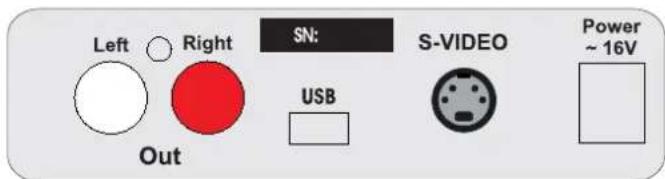
Connectors
text_image
Left ○ Right SN: S-VIDEO USB Power ~ 16V Out
Make all connections whilst the Dock Box is disconnected from the power supply.

Take care to connect the left and right channels correctly. The right channel is usually marked red, the left channel black or white.
Connection to a power amplifier or active speakers
Connect the Out socket to the pre input on your power amplifier or active speakers.

Turn the Dock Box volume level to minimum before switching on your power amplifier or active speakers.
Connecting to a computer
Connect the USB-output of the Dock Box to a free USB-socket on your computer and turn it on/make sure it is powered on.
Connection to a TV-set or a beamer
Connect the S-VIDEO socket to a s-video input of your TV-set or beamer.

S-VIDEO output not compatible with the models iPod ^® nano 3 ^th and 4 ^th gen, iPhone ^® , iPod ^® Touch and iPod ^® Classic 6 ^th gen.
Fitting and adjustment of the iPod® cradle
Use the knurled screw supplied to fix the cradle to the Dock Box chassis. Do not fully tighten the screw yet. Now place your iPod ^® on the Dock Box contacts. Move the cradle so that it supports the iPod ^® and tighten the screw.

Suitable for iPods ^® with 30-pole connector only (iPod ^® nano 3 ^th and 4 ^th gen only)

Use without the cradle breaks the 30-pole connector of the Dock Box and the socket of the iPod®.
Loading the battery
When the Dock Box is connected to the mains power supply, the iPod ^® will start recharging as soon as it is placed on the contacts. Recharging will continue even if the Dock Box is on standby.

To charge the battery of the models iPod ^® nano 4 ^th gen, iPhone ^® G3 and iPod ^® Touch 2 ^th gen an USB-charger (not supplied) has to be connected to the USB-output of the Dock Box.
Mains power connection
The unit is supplied with a power supply suitable for your country's mains supply. Check the label before connecting to ensure compliance with the mains rating in your house. Connect the low voltage plug from the power supply to the Power \~16V socket before connecting the power supply to the mains.
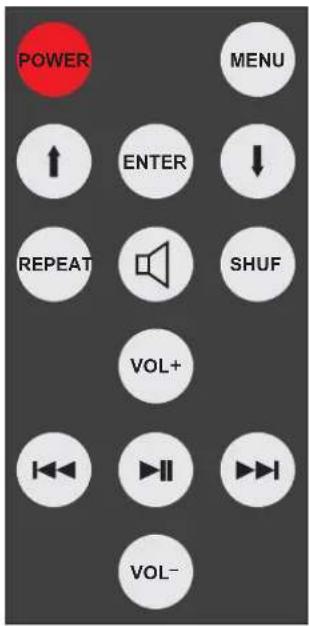
Remote control
text_image
POWER MENU ↑ ENTER ↓ REPEAT SHUF VOL+ I← I→II I→I VOL-Standby

turn the unit on or back into standby. The blue LED on the front panel shows that the unit is powered on.
Volume control


adjusts the sound volume
Mute

activates and deactivates mute
Start / Pause

starts and pauses play back. Press and hold the button stops play back
Stepping between tracks, reverse and forward scanning

skips to the previous track.

skips to the next track

restarts the current track in play back mode
Press and hold the button for reverse scanning, or the button to start forward scanning.
Repeat play

starts repeat replay for the current track. Pressing the button again starts repeat play for all tracks.
To deactivate repeat play press REPEAT once more.
Shuffle play

activates and deactivates shuffle play
Navigating the menu

shows the menu. Returns to the previous step in the menu



and moves the curser up and down, to highlight the requested option.
selects or deselects the highlighted option. Shows the next step in the menu
Technical specifications Pro-Ject Dock Box V
Frequency response: 20Hz - 20kHz
Line-level output: 1 pair RCA/Phono sockets
Output impedance: 15 ohms
Output voltage: max. 1V
Volume control and mute: min. level -68dB
USB-output: digital serial data protocol USB 1.1
Operating systems: Windows ^TM und Mac OS ^TM
Video output: S-video socket
Outboard power supply: 16V/500mA AC, suitable for your country's mains supply
Power consumption: 16V/200mA AC. Power consumption is not constant.
It depends on charging needs of the iPod ^® battery
Replacement battery remote control: 1 x CR2025 / 3V
Dimensions (W x H x D): 103 x 38 x 141 mm
Weight: 585g without power supply
Service
Should you encounter a problem which you are not able to alleviate or identify, please contact your dealer for further advice. Only when the problem cannot be resolved there should the unit be sent to the responsible distributor in your country.
Warranty

The manufacturer accepts no responsibility for damage caused by not adhering to these instructions for use. Modification or change to any part of the product by unauthorized persons release the manufacturer from any liability over and above the lawful rights of the customer.
PRO-JECT is a Registered Trademark of H. Lichtenegger.
This guide was produced by: Audio Trade GmbH Copyright © 2009. All rights reserved.
The information was correct at the time of going to press. The manufacturer reserves the right to make changes to the technical specification without prior notice as deemed necessary to uphold the ongoing process of technical development.