Sucker - Hub et station d'accueil KitSound - Free user manual and instructions
Find the device manual for free Sucker KitSound in PDF.


User questions about Sucker KitSound
0 question about this device. Answer the ones you know or ask your own.
Ask a new question about this device
Download the instructions for your Hub et station d'accueil in PDF format for free! Find your manual Sucker - KitSound and take your electronic device back in hand. On this page are published all the documents necessary for the use of your device. Sucker by KitSound.
USER MANUAL Sucker KitSound
Do not dispose of Lithium-ion batteries with general waste. Please return it to battery recycling collection point.

KITSOUND
SUCKER
WIRELESS
SPEAKER
MANUAL
JB. 2962 / Made in China. © KitSound ™ 2013
Christchurch, Dorset. BH23 4FL

natural_image
Close-up of a black and silver electronic control board with multiple knobs and dials (no visible text or symbols)We are craftspeople. We are musicians. We are KitSound ^TM
And we all commit ourselves to achieving one shared goal: Bringing people closer to their music. By truly understanding music we stay true to its craft. Pure, rich, incredible sound.
We'll settle for nothing less.
At KS we believe your music deserves to be showcased on great quality products that don't cost the earth. We might not all share the same taste in music (the ferocious disputes on music forums prove that), but whether it's Irish folk, death metal or any number of obscure genres which seem to be multiplying by the minute, the artists responsible for connecting with you through their craft have bared their souls to do so. And we think that's worth celebrating.

natural_image
Black and white photo of a crowd cheering at a concert with stage lighting (no text or symbols visible)Box contents
- KS Sucker Speaker
• USB to micro USB charge cable
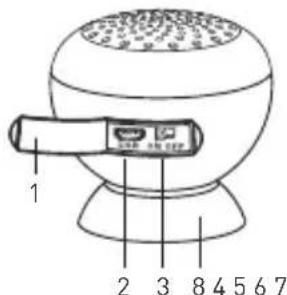
Functions
- Dust cover
- Micro USB charge port
- On/off switch
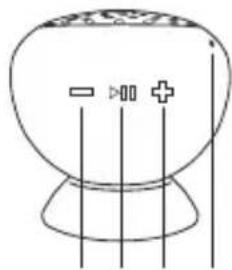
- Volume down/skip back (press and hold to decrease the volume or press for two seconds and release to skip back through songs)
- Play/pause (when listening to music, press for two seconds and release to pause playback. Press for two seconds and release to resume playback. If your Sucker Speaker has also been paired with your phone and there is an incoming
call, the music will pause and your ringtone will sound. Press this button to answer the call. Press and hold this button at any time to redial the last call)
- Volume up/skip ahead (press and hold to increase the volume. Press for two seconds and release to skip ahead through songs)
- Microphone
- Suction cup (will adhere firmly to most smooth surfaces and works best if dampened before use)
- LED indicator (red light on indicates charging, light goes out when charged. Blue Light flashing quickly indicates Bluetooth pairing mode. Blue light flashing slowly indicates pairing with a device, blue light on means pairing is successful)
Functions
natural_image
Simple line drawing of a spherical object with vertical lines and three symbols (two minus, one plus), no text or labels present.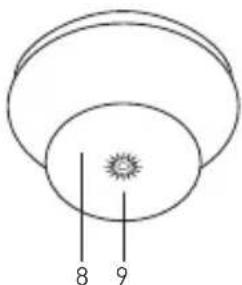
natural_image
Simple diagram of concentric circles with a central star-like symbol and two vertical lines labeled 8 and 9 (no text or symbols beyond labels)Charging the Speaker
IMPORTANT: Please make sure that your Sucker Speaker is fully charged before first use.
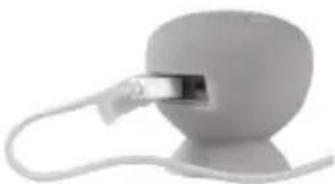
a. Open the dust cover
b. Insert the micro USB end of the charge cable into the micro USB port
c. Insert the USB end of the charge cable into a USB port on your computer (you can also use a USB-enabled wall charger that has a current of 1 amp or less)
natural_image
Close-up of a white plastic electronic device with a metallic connector inserted into a spherical body (no text or symbols visible)Pairing to your Bluetooth-enabled device
- Make sure the device with which you want to pair the Sucker Speaker to has its Bluetooth setting in the "On" position and that it is searching for devices
- Open the dust cover and switch the speaker on. The blue LED on the bottom should flash quickly to show that the Sucker Speaker is in pairing mode
- Find and select 'Sucker' on your device
- The speaker will beep and the blue LED on the bottom will flash slowly to show that pairing is successful
Note: Only one device can be paired at a time.
Using the Sucker Speaker as a stand
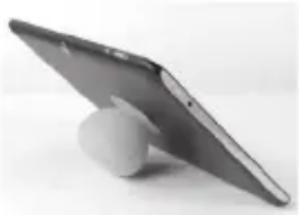
The Sucker Speaker can be used as a handy phone or tablet stand. Simply adhere the suction cup to the back of your device.
Note: The durable silicone gel casing makes the Sucker Speaker splash proof and suitable for use in damp and harsh environments. However, it is not waterproof and care should be taken to make sure that the speaker does not get submerged in water
natural_image
Exterior view of a modern tablet device with a white stand (no text or symbols visible)Care for your Sucker Speaker
Please DON'T:
- Drop the Sucker Speaker as this will invalidate your warranty
- Open up the Sucker Speaker. There are no user serviceable parts inside
- Use any other USB cable than the one supplied
- Expose the Sucker Speaker to extreme temperatures or rapid changes of hot to cold or vice versa
Please DO:
- Clean the Sucker Speaker with a soft dry cloth and no detergents
Specifications
- Bluetooth: V2.1
- Battery type: Polymer Li-ion
- Play time: up to 4 hours
• Output RMS: 3 W RMS @ 4 ohm
• Frequency response: 180 Hz – 20 kHz
Troubleshooting
We hope you've now got all the information you need to get started, but if you're having problems with anything, please feel free to contact us at: support@kitsound.co.uk
Battery warning
This product has an embedded, non-replaceable battery, which is designed to last the lifetime of the product. Do not attempt to open the product or remove the battery as this may cause injury and damage the product.
Recycling
Your product and batteries must be recycled or disposed of properly. Please contact your local recycling centre for more information on proper disposal.
We apologise for any inconvenience caused by minor inconsistencies in these instructions, which may occur as a result of product improvement and development.