
SASCOMB - Receiver SAMSON - Free user manual and instructions
Find the device manual for free SASCOMB SAMSON in PDF.


| Product Type | Wireless Receiver |
| Brand | Samson |
| Model | SASCOMB |
| Color | Black |
| Connectivity | RF 2.4 GHz |
| Operating Frequency | 2.4 GHz ISM Band |
| Wireless Range | Up to 30 meters (line of sight) |
| Power Source | 2 x AAA batteries (not included) |
| Battery Life | Approximately 50 hours continuous use |
| Dimensions (L x W x H) | 85 x 50 x 20 mm |
| Weight (without batteries) | 45 g |
| Mounting Options | Desktop placement or wall-mountable with screws (not included) |
| Compatibility | Works with Samson SASCOMB transmitter or compatible RF devices |
| Number of Channels | 1 |
| Audio Output | 3.5 mm stereo headphone jack |
| Indicator Lights | Green LED (power on), Red LED (low battery) |
| Operating Temperature | 0°C to 40°C |
| Material | ABS plastic |
| Included Accessories | User manual, belt clip |
| Maintenance | Clean with a dry, soft cloth. Avoid contact with water. |
| Safety | Keep away from heat sources. Do not expose to rain or moisture. |
| Repairability | Battery compartment user-accessible. No other user-serviceable parts. |
Frequently Asked Questions - SASCOMB SAMSON
User questions about SASCOMB SAMSON
0 question about this device. Answer the ones you know or ask your own.
Ask a new question about this device
Download the instructions for your Receiver in PDF format for free! Find your manual SASCOMB - SAMSON and take your electronic device back in hand. On this page are published all the documents necessary for the use of your device. SASCOMB by SAMSON.
USER MANUAL SASCOMB SAMSON
Two by One Microphone Combiner
Owners Manual
SAMSON®
A U D I O
Table Of Contents
Introduction and Features 3 Front and Rear Panel Layout 4
Operating the S combine Setting up the S combine 5 Typical Set-up 6
Wiring Guide 7 Specifications
8
Copyright 2003, Samson Technologies Corp.
Printed June 2003
Samson Technologies Corp.
575 Underhill Blvd.
P.O. Box 9031
Syosset, NY 11791-9031
Phone: 1-800-3-SAMSON (1-800-372-6766)
Fax: 516-364-3888
www.samsontech.com
S combine Introduction and Features
Introduction
Congratulations on your purchase of the S combine by Samson Audio! The S combine is a two-to-one microphone combiner ideal for any situation where an extra microphone input is needed. The S combine is a perfect solution for live sound applications, as well as, fixed installations like schools, hotel meeting rooms and houses of worship. You can use your S combine anytime two microphone inputs are needed and only one is available.
Whatever your situation, the S combine will provide high quality and reliable performance thanks to its solid build construction based around the extruded aluminum chassis and oversized rubber bumper feet.
In this manual, you'll find a more detailed description of the features of the S combine, as well as a guided tour through the front and rear panels, step-by-step instructions for using the S combine, and full specifications. You'll also find a warranty card enclosed—please don't forget to fill it out and mail it so that you can receive online technical support and so we can send you updated information about other Samson products in the future.
S C combine Features
• T wo inputs by one output microphone combiner.
• 2 balanced XLR microphone inputs.
• 1 balanced XLR microphone output.
- Ground lift switch for transformer isolated microphone input.
• Large rubber bumper feet.
- Three year extended warranty.
S combine Front and Rear Panel Layout
Front Panel Layout
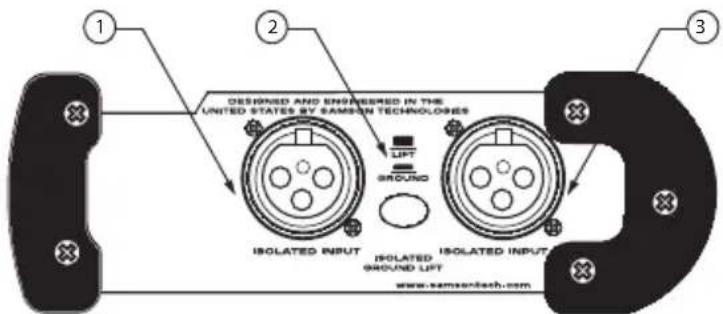
1 ISOLATED INPUT- XLR balanced, transformer isolated microphone input for connecting the first microphone.
3 DIRECT INPUT- XLR balanced microphone input for connecting the second microphone.
2 ISOLATED GROUND LIFT- When engaged, the ground from the Isolated Mic Input is disconnected.
Rear Panel Layout

A B ALANCED OUTPUT- XLR balanced connector outputs carrying the summed signal from Microphone 1 and 2.
Operating the S combine
Setting Up the S combine
The basic procedure for setting up and using your S combine is simple and takes only a few minutes. Remove all packing materials (save them in case of need for future service).
There are many different ways to use the S combine, however the basic connection is the same in most installations and applications. The following example details the connection for two microphones to a main PA mixer. Follow these simple steps to get connected.
- Using a standard XLR microphone cable, connect both mics to the S combine MIC INPUTS.
- Using another standard mic cable, connect the BAL. OUT. 1 to the main PA mixer or stage box.
Operating the S combine
Typical Set-up
The diagram below shows a typical set-up for a project recording studio using the S combine to mix two microphones into one microphone input.

S combine Wiring Guide
Wiring Guide
There are several ways to interface the S combine, depending on your exact set-up. Follow the cable diagrams below for connecting your gear.
XLR to XLR - Balanced

Male XLR to 1/4" Phone TRS - Balanced

1/4" TRS Phone to Female XLR - Balanced

Male XLR to 1/4" Unbalanced

1/4" Unbalanced to Female XLR

flowchart
graph LR
    A["Sleeve (ground)"] --> B["Ground"]
    C["Sleeve (ground)"] --> D["Ground"]
    E["Tip (signal)"] --> F["Tip (signal)"]
    G["Cold (P=3) (p=1)(ground)"] --> H["Female XLR"]
    I["Solder Points"] --> J["Cold (3)"]
    K["Hot (2)"] --> L["Female XLR"]
    M["Solder Points"] --> N["End View"]
S combine Specifications
Frequency Response 10 Hz to 30kHz +/- 3dB
Noise Level -110 dBu
Maximum Ouput Level Bal: +18 dBu
Max Input Level Bal: +22 dBu
Input Impedance
XLR: 10k Ohm
Output Impedance
XLR: 100 Ohm balanced
THD .003% Max
Noise Floor <-90 dBu
Dimensions 5.65" L x 4.13" W x 2" H (144mm L x 105mm
W x 51mm H)
Weight 16.5 oz., 419 gm.
Samson Technologies Corp.
575 Underhill Blvd.
P.O. Box 9031
Syosset, NY 11791-9031
Phone: 1-800-3-SAMSON (1-800-372-6766)
Fax: 516-364-3888
www.samsontech.com




Brand : SAMSON
Model : SASCOMB
Category : Receiver