P3100 - Uncategorized FLUKE - Free user manual and instructions
Find the device manual for free P3100 FLUKE in PDF.


User questions about P3100 FLUKE
0 question about this device. Answer the ones you know or ask your own.
Ask a new question about this device
Download the instructions for your Uncategorized in PDF format for free! Find your manual P3100 - FLUKE and take your electronic device back in hand. On this page are published all the documents necessary for the use of your device. P3100 by FLUKE.
USER MANUAL P3100 FLUKE
P3100 & P3200 Series
Hydraulic Deadweight Tester
Users Manual
LIMITED WARRANTY AND LIMITATION OF LIABILITY
Each Fluke product is warranted to be free from defects in material and workmanship under normal use and service. The warranty period is one year and begins on the date of shipment. Parts, product repairs, and services are warranted for 90 days. This warranty extends only to the original buyer or end-user customer of a Fluke authorized reseller, and does not apply to fuses, disposable batteries, or to any product which, in Fluke's opinion, has been misused, altered, neglected, contaminated, or damaged by accident or abnormal conditions of operation or handling. Fluke warrants that software will operate substantially in accordance with its functional specifications for 90 days and that it has been properly recorded on non-defective media. Fluke does not warrant that software will be error free or operate without interruption.
Fluke authorized resellers shall extend this warranty on new and unused products to end-user customers only but have no authority to extend a greater or different warranty on behalf of Fluke. Warranty support is available only if product is purchased through a Fluke authorized sales outlet or Buyer has paid the applicable international price. Fluke reserves the right to invoice Buyer for importation costs of repair/replacement parts when product purchased in one country is submitted for repair in another country.
Fluke's warranty obligation is limited, at Fluke's option, to refund of the purchase price, free of charge repair, or replacement of a defective product which is returned to a Fluke authorized service center within the warranty period.
To obtain warranty service, contact your nearest Fluke authorized service center to obtain return authorization information, then send the product to that service center, with a description of the difficulty, postage and insurance prepaid (FOB Destination). Fluke assumes no risk for damage in transit. Following warranty repair, the product will be returned to Buyer, transportation prepaid (FOB Destination). If Fluke determines that failure was caused by neglect, misuse, contamination, alteration, accident, or abnormal condition of operation or handling, including overvoltage failures caused by use outside the product's specified rating, or normal wear and tear of mechanical components, Fluke will provide an estimate of repair costs and obtain authorization before commencing the work. Following repair, the product will be returned to the Buyer transportation prepaid and the Buyer will be billed for the repair and return transportation charges (FOB Shipping Point).
THIS WARRANTY IS BUYER'S SOLE AND EXCLUSIVE REMEDY AND IS IN LIEU OF ALL OTHER WARRANTIES, EXPRESS OR IMPLIED, INCLUDING BUT NOT LIMITED TO ANY IMPLIED WARRANTY OF MERCHANTABILITY OR FITNESS FOR A PARTICULAR PURPOSE. FLUKE SHALL NOT BE LIABLE FOR ANY SPECIAL, INDIRECT, INCIDENTAL, OR CONSEQUENTIAL DAMAGES OR LOSSES, INCLUDING LOSS OF DATA, ARISING FROM ANY CAUSE OR THEORY.
Since some countries or states do not allow limitation of the term of an implied warranty, or exclusion or limitation of incidental or consequential damages, the limitations and exclusions of this warranty may not apply to every buyer. If any provision of this Warranty is held invalid or unenforceable by a court or other decision-maker of competent jurisdiction, such holding will not affect the validity or enforceability of any other provision.
Fluke Corporation
P.O. Box 9090
Everett, WA 98206-9090
U.S.A.
Fluke Europe B.V.
P.O. Box 1186
5602 BD Eindhoven
The Netherlands
11/99
To register your product online, visit register.fluke.com
Table of Contents
Chapter
Title
1 General Information 1-1
Introduction.... 1-1
How to Contact Fluke....1-1
Safety Information 1-2
Safety Summary 1-2
Compressed Liquid.... 1-2
Heavy Weights 1-2
Personal Protective Equipment.... 1-2
Symbols Used in this Manual 1-2
Operating Principle 1-3
Environmental Corrections 1-5
Gravity....1-5
Temperature.... 1-5
Head of Fluid 1-6
Model Variations 1-6
2 Preparation 2-1
Introduction.... 2-1
Operating Fluid 2-1
Connections 2-2
Test Port Insert 2-4
3 Priming 3-1
Priming 3-1
4 Operation 4-1
Operation 4-1
5 Calibration in Different Pressure Units 5-1
Calibration in Different Pressure Units.... 5-1
Conversion Weights 5-1
Software....5-1
6 Maintenance and Servicing 6-1
Maintenance and Servicing.... 6-1
PCU Assembly - 10 mm Nominal Diameter 6-1
Piston Disassembly 6-1
Piston Cleaning 6-1
Piston Re-Assembly 6-2
Replacement PCU Assembly 6-3
PCU Assembly - 2 & 3 mm Nominal Diameters 6-4
Piston Disassembly 6-4
Piston Cleaning 6-4
Piston Re-Assembly 6-5
Replacement PCU Assembly 6-5
PCU Assembly - 5 mm Nominal Diameter 6-7
Piston Disassembly 6-7
Piston Cleaning 6-7
Piston Re-Assembly 6-7
Replacement PCU Assembly 6-8
Top Plate Removal 6-10
Screw Pump Assembly 6-10
Priming Pump Assembly 6-12
Disassembly 6-12
Re-Assembly 6-12
Check Valves....6-14
Inlet Check Valve....6-14
Outlet Check Valve 6-14
Reservoir Assembly....6-15
7 Fault Finding.... 7-1
Poor PCU Spin/Sensitivity....7-1
General 7-1
PCU Assembly - 10 mm....7-1
PCU Assembly - 2 and 3 mm....7-1
PCU Assembly - 5 mm....7-2
High PCU Fall-Rate 7-2
System Will Not Prime 7-2
System Will Not Pressurize 7-3
Priming Pump Malfunction 7-3
Cannot Reach Maximum Pressure.... 7-3
8 Storage and Transportation 8-1
Storage and Transportation 8-1
Instrument....8-1
Weights....8-1
9 Ancillary Equipment.... 9-1
Ancillary Equipment 9-1
Liquid Separator, P5521 or P5522 9-1
Angle Adapter, P5543 9-2
Pointer Remover/Punch, P5551....9-2
List of Tables
Table
Title
1-1. Symbols.... 1-2
1-2. Operation and Storage Specifications 1-4
2-1. Test Port Insert Parts List 2-5
6-1. PCU Assembly - 10 mm Parts List 6-4
6-2. PCU Assembly - 2 and 3 mm Parts List.... 6-6
6-3. PCU Assembly - 5 mm Parts List 6-9
6-4. Screw Pump Assembly Parts List 6-12
6-5. Priming Pump Assembly - Parts List 6-14
6-6. Check Valves Assemblies Parts List.... 6-15
6-7. Reservoir Assembly Parts List 6-18
List of Figures
Figure
Title
1-1. Hydraulic Circuit Schematic 1-4
1-2. Dual PCU Instrument.... 1-7
2-1. Screw on Gauge Adapter.... 2-2
2-2. Making Pressure Connections 2-3
2-3. Making Pressure Connections 2-3
2-4. Adjust Gauge Position.... 2-4
2-5. Tighten Gauge 2-4
2-6. Test Port Insert 2-5
4-1. Float-Height Indicator Post 4-1
4-2. Weight Rotation 4-2
6-1. PCU Assembly - 10 mm 6-3
6-2. PCU Assembly - 2 and 3 mm.... 6-6
6-3. PCU Assembly - 5 mm 6-9
6-4. Screw Pump Assembly 6-11
6-5. Priming Pump Assembly 6-13
6-6. Check Valves Assemblies 6-15
9-1. Liquid Separator.... 9-1
9-2. Angle Adapter 9-2
9-3. Pointer/Remover Punch.... 9-2
Chapter 1
General Information
Introduction
This manual covers the following pressure instruments:
Oil Operated Instruments: P3111, P3112, P3113, P3114, P3115, P3116, P3123, P3124, and P3125.
Distilled Water Operated Instruments: P3211, P3213, P3214, P3223, and P3224.
How to Contact Fluke
To order accessories, receive operating assistance, or get the location of the nearest Fluke distributor or Service Center, call:
• Technical Support USA: 1-800-99-FLUKE (1-800-993-5853)
• Calibration/Repair USA: 1-888-99-FLUKE (1-888-993-5853)
• Canada: 1-800-36-FLUKE (1-800-363-5853)
• Europe: +31-402-675-200
• China: +86-400-810-3435
• Japan: +81-3-3434-0181
• Singapore: +65-738-5655
• Anywhere in the world: +1-425-446-5500
Or, visit Fluke's website at www.fluke.com.
To register your product, visit http://register.fluke.com.
To view, print, or download the latest manual supplement, visit http://us.fluke.com/usen/support/manuals.
Safety Information
Safety Summary
The following are general safety precautions that are not related to any specific procedures and do not appear elsewhere in this publication. These are recommended precautions that personnel must understand and apply during equipment operation and maintenance to ensure safety and health and protection of property.
⚠ Warning
If the equipment is used in a manner not specified by the manufacturer, the protection provided by the equipment may be impaired.
Compressed Liquid
Use of compressed liquids can create an environment of propelled foreign matter.
Pressure system safety precautions apply to all ranges of pressure. Care must be taken during testing to ensure that all hydraulic connections are properly and tightly made prior to applying pressure. Personnel must wear eye protection to prevent injury.
Heavy Weights
Lifting and movement of heavy weights can create an environment of strain and impact hazards. Care must be taken during testing to ensure that weight masses are lifted in a manner that avoids over-reaching or twisting, and that the masses are not dropped. Personnel must wear reinforced safety shoes to prevent injury.
Personal Protective Equipment
Wear eye protection and reinforced safety shoes approved for the materials and tools being used.
Symbols Used in this Manual
In this manual, a Warning identifies conditions and actions that pose a hazard to the user. A Caution identifies conditions and actions that may damage the Hydraulic Deadweight Tester
Symbols used on the Hydraulic Deadweight Tester and in this manual are explained in Table 1-1.
Table 1-1. Symbols
| Symbol | Description |
| ~ AC (Alternating Current) | |
| ⊥ Earth | Ground |
| ⚠ Important Information: refer to manual | |
| ⚠ Shock | Hazard |
| Do not dispose of this product as unsorted municipal waste. Go to Fluke's website for recycling information. | |
Operating Principle
Deadweight Testers are the primary standard for pressure measurement. Utilizing the well-proven Piston-Gauge system, consisting of a vertically mounted, precision lapped Piston and Cylinder assembly, accurately calibrated weight masses (Force) are loaded on the piston (Area), which rises freely within its cylinder. These weights balance the upward force created by the pressure within the system.
$$ P R E S S U R E = \frac {F O R C E}{A R E A} $$
Each weight is marked with the tester serial number, and the pressure measured when placed on a correctly spinning and floating piston. The total pressure measured is the summation of the weights plus the piston weight carrier assembly.
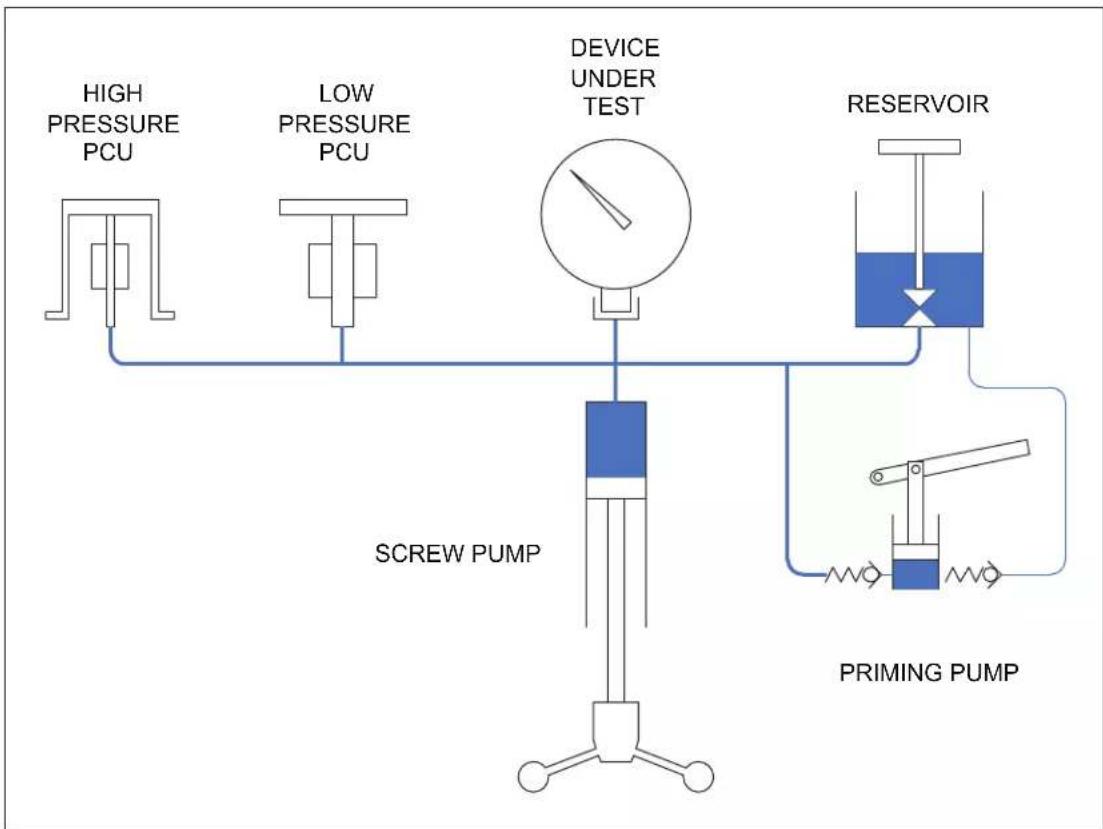
The schematic diagram below shows the basic hydraulic circuit for a dual-PCU (Piston Cylinder Unit) instrument.
The system is primed with liquid from the Reservoir, and the system pressure is increased by means of the Screw Pump. As liquids are considered incompressible, the displaced liquid causes the pistons to rise within their cylinders to balance the downward force of the weights.
Fluids at the same height in a system are at the same pressure, so when the system is in equilibrium (i.e. the piston and weights are floating freely, rotating and falling at its natural sink-rate), the pressure generated by the combined mass of the piston and weights equals the pressure within the device under test.
The design of a Piston/Cylinder Unit (PCU) fitted to a deadweight tester allows for a very small clearance gap between the piston and cylinder. This is required to allow the working fluid to pass between the components, providing a lubricating film, and preventing metal-to-metal contact.
Therefore, during the normal operation of a deadweight tester, the working fluid in the system will slowly pass through this clearance gap. This is perfectly normal, and there are Sump Rings around the piston bodies to collect the excess fluid.
Although calibration is carried out using one PCU at a time, there is a point during normal operation of a dual-PCU instrument where both PCUs will rise. This is due to the overlap in pressure range of the two PCUs. The PCU that is not in use will seal in the fully extended position to avoid additional fluid loss.
flowchart
graph TD
    A["HIGH PRESSURE PCU"] --> B["SCREW PUMP"]
    C["LOW PRESSURE PCU"] --> D["SCREW PUMP"]
    E["DEVICE UNDER TEST"] --> F["SCREW PUMP"]
    G["RESERVOIR"] --> H["PRIMING PUMP"]
    I["DRUM"] --> J["DRUM"]
    style A fill:#f9f,stroke:#333
    style C fill:#f9f,stroke:#333
    style E fill:#f9f,stroke:#333
    style G fill:#f9f,stroke:#333
    style I fill:#f9f,stroke:#333
    style J fill:#f9f,stroke:#333
gjn001.eps
Figure 1-1. Hydraulic Circuit Schematic
Operating & Storage Specification are as follows:
Temperature and relative humidity ranges for operation and storage of the deadweight tester.
Table 1-2. Operation and Storage Specifications
| Operation | Storage | |
| Temperature 18 to 23 °C64 to 82 °F | 10 to 50 °C50 to 122 °F | |
| Relative Humidity(Non-Condensing) | 20 to 75 % 0 to 90 % | |
Environmental Corrections
The deadweight tester has been calibrated to the Gravity, Temperature, and Air Density stated on the certificate.
Equations and factors are given on the certificate to adjust for any variations in these environmental conditions.
Gravity
Gravity varies greatly with geographic location, and so will the deadweight tester reading.
Due to the significant change in gravity throughout the world (0.5%), ensure that the tester has either been manufactured to your local gravity, or that you have applied the correction from the calibrated gravity.
Example:
Deadweight Tester calibrated gravity 980.665 cm/s²
(980.665 cm/s ^2 is the International Standard Gravity)
Gravity at site 981.235 cm/s²
Indicated Pressure 250 psi
$$ \frac {2 3 5 . 9 8 1}{6 6 5 . 9 8 0} x P 2 5 E S S U R E T R U E = $$
$$ p s i P R E S S U R E T R U E 1 4 5 3. 2 5 0 = $$
The ability to determine the local gravity value will depend on the data available in the country that the instrument is to be used in. Some countries have geographic/geological survey/mapping organizations that have the data readily available. If not, the countries' National Standards Laboratory may be able to recommend a source of suitable information.
Temperature
Temperature and Air Density variations are less significant than gravity.
Variations should be corrected for when maximum accuracy is required.
Temperature variation example:
Deadweight Tester calibrated temperature 20°C
Operating temperature 24°C
Percentage change per ^ C 0.002%
Indicated Pressure 250 psi
$$ T R U E P R E S S U R E = 2 5 0 + (2 0 - 2 4) x \frac {0 0 \Omega}{1 0 0} x 2 5 0 $$
$$ \text { TRUE PRESSURE } = 2 4 9. 9 8 \text { psi } $$
Head of Fluid
The pressure measured is at the top of the test port seal.
Vertical height difference between this datum point and the connection to the instrument under test should be corrected for. To correct for vertical heights above and below the datum line, either subtract or add respectively, the amount stated on the certificate.
To ensure accuracy is maintained, the piston and weights must be kept clean and undamaged. The tester is accurate when the piston and weights are floating and rotating freely.
Model Variations
This manual covers many pressure ranges and models within the P3100 and P3200 series of instruments.
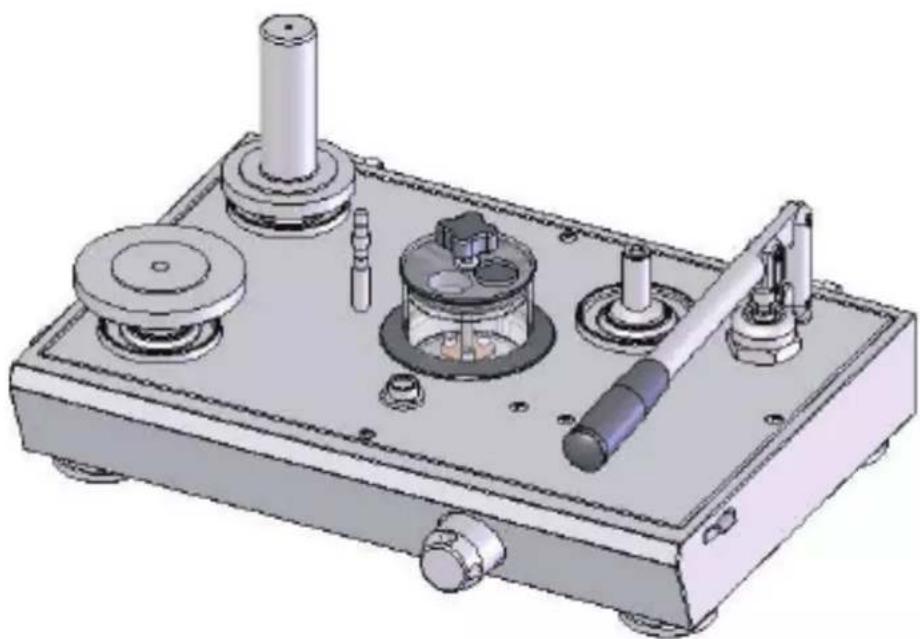
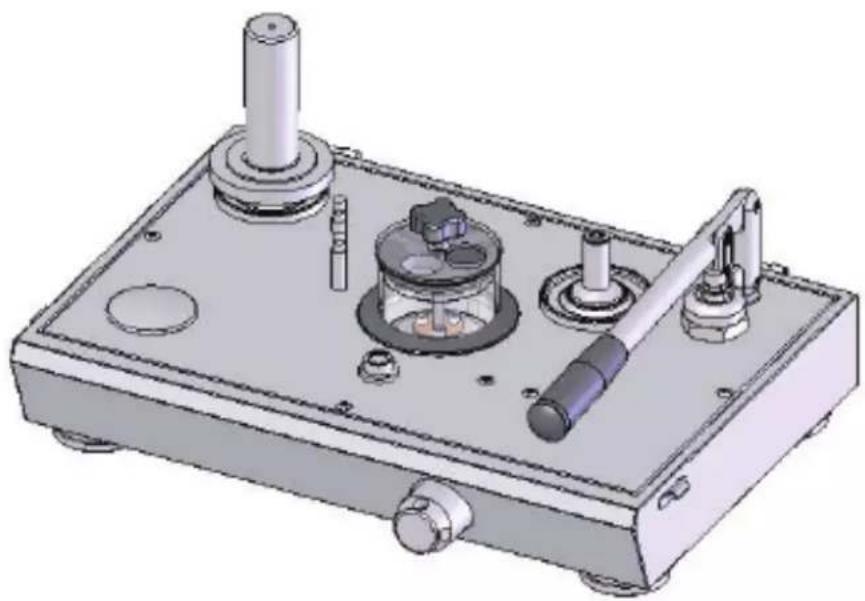
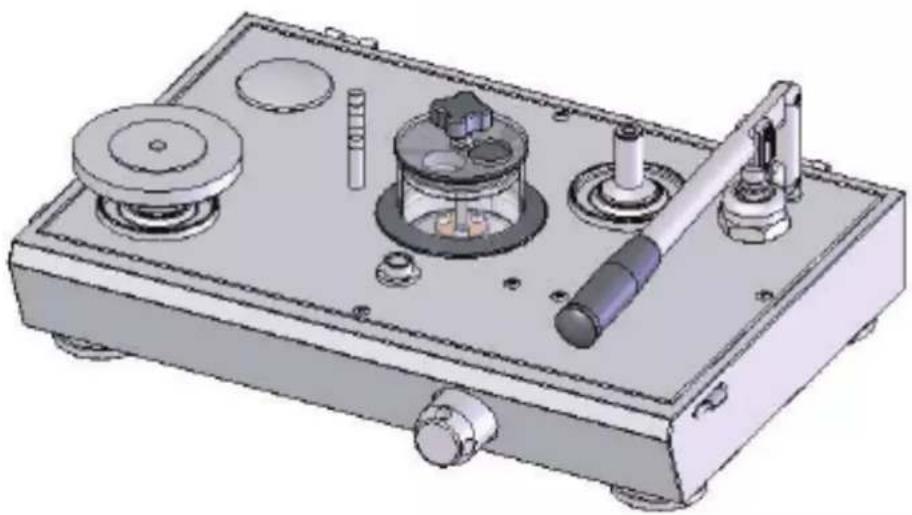
The following illustrations detail the physical appearance of the three basic models:
Models: 3123, 3124, 3125, 3223 and 3224.
natural_image
3D technical illustration of a mechanical device with multiple ports and components (no visible text or symbols)Figure 1-2. Dual PCU Instrument
gjn003.bmp
Models: 3112, 3113, 3114, 3115, 3116, 3213, and 3214.
natural_image
3D technical illustration of a mechanical device with cylindrical components and mounting base (no text or symbols)Figure 1-3. Single High Pressure PCU Instrument
gjn004.bmp
Models: 3111 and 3211.
natural_image
3D technical illustration of a mechanical device with labeled components (no text or symbols visible)Figure 1-4. Single Low Pressure PCU Instrument
gjn005.bmp
Chapter 2 Preparation
Introduction
The deadweight tester must be set up on a level, stable workbench or similar surface.
Remove spokes from tool roll and fit to capstan hub.
Level the tester using the four adjustable feet to the bubble level attached to the top plate.
Rotate reservoir dust cover through 14 turn and fill reservoir approximately 34 full with the appropriate fluid. Rotate dust cover back to cover hole.
Operating Fluid
Oil: The instrument is supplied with Shell Spindle Oil 22, our reference 55-655.
Water: Only Distilled or De-ionized Water should be used in the instrument. Great care must be taken when operating any deadweight tester that uses water as its operating fluid, as any contamination present within the system will result in degradation of performance, and eventual irreparable damage to the PCUs. The impurities found in ordinary water supplies are sufficient to affect the spin and sensitivity of the PCU assemblies, and damage the PCUs.
⚠ Warning
The system is designed for use with the fluids described above only; use of other fluids can effect the operation and performance of the instrument, and CAN CAUSE PERMANENT DAMAGE.
To avoid damage to the instrument, the operator should check the quality of the operating fluid during use. If the fluid becomes discolored, cloudy or particles appear in the reservoir, the system should be drained and flushed with clean fluid.
If the device under test (DUT) is from a system operating on different fluid from that of the deadweight tester, the Liquid Separator, P5521, can be mounted to the test port of the deadweight tester. This will allow the calibration of the DUT in its normal operating fluid, and prevent cross-contamination of the system, (See Chapter 9, Ancillary Equipment, Liquid Separator).
Connections
Fit the device under test (DUT) to the test port using the method described below:
Caution
Ensure that all devices are internally clean and free from contamination before connecting to the tester.
Particle contamination can damage the sensitive piston assemblies, valve seats and screw pump.
To avoid cross-contamination from other fluids, and protect the system from particulates, we recommend the use of a Liquid-to-Liquid Separator (see Chapter 7, Ancillary Equipment).
Warning
DO NOT use Teflon/PTFE tape on these connections, as this will prevent correct sealing. The Gauge Adapter sealing system is designed for hand-tight sealing up to 20,000 psi / 1,400 bar-wrenches or similar tools are not required—over tightening can cause damage to threads or sealing faces.
Before connection, ensure that there is an O-ring fitted to the test port.
Check that the sealing face of the device to be fitted is clean and undamaged, as scratches or dents can form leak-paths.
Note
The thread on the test port, and the lower part of the gauge adapters is LEFT-HANDED. The following procedure details the correct method for mounting devices using these adapters:
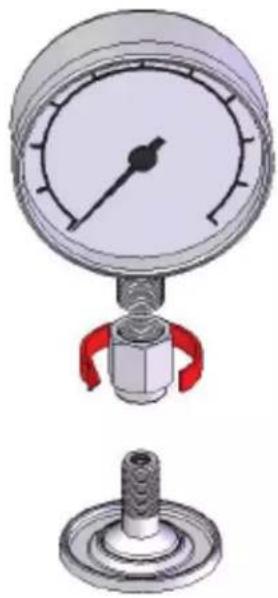
- Screw the appropriate gauge adapter fully on to the instrument to be tested.
natural_image
Technical illustration of a pressure gauge and a mechanical component (no text or symbols)Figure 2-1. Screw on Gauge Adapter
gjn006.bmp
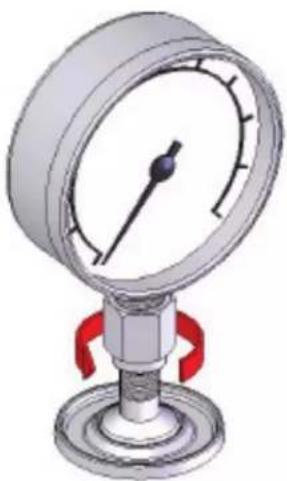
- Screw assembly down COUNTER-CLOCKWISE on to test port.
Note
Hand-tight is sufficient; ensure that the bottom face contacts the O-ring on the test port.
natural_image
3D illustration of a pressure gauge with red valves and a base (no text or symbols)Figure 2-2. Making Pressure Connections
gjn007.bmp
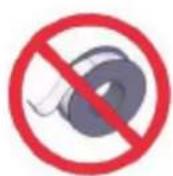
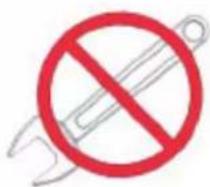
Figure 2-3. Adjusting Pressure Connections
gjn008.bmp
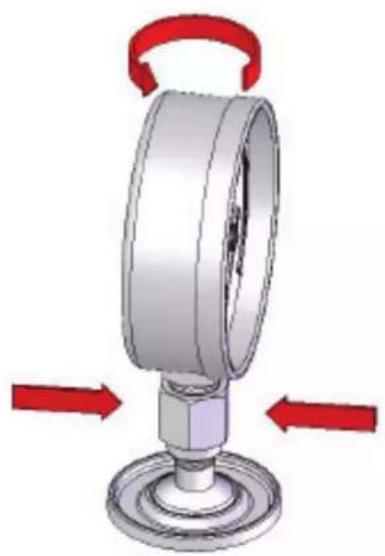
- To adjust the position to face forward, hold the gauge adapter and turn the instrument COUNTER-CLOCKWISE, so that it faces forward.
natural_image
3D mechanical component diagram showing a rotating shaft with red directional arrows indicating rotation (no text or symbols)Figure 2-4. Adjust Gauge Position
gjn009.bmp
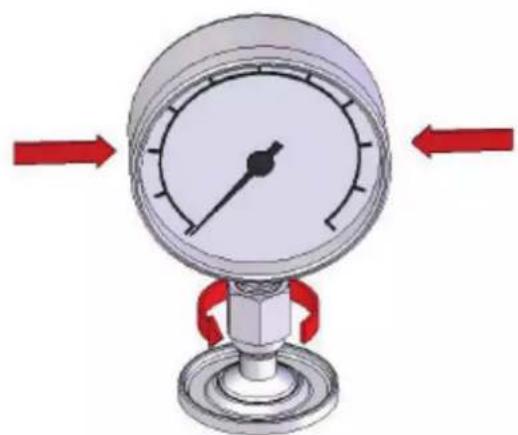
- Hold the instrument steady, while turning the gauge adapter COUNTER-CLOCKWISE until it pulls down onto the O-ring.
natural_image
Diagram of a pressure gauge with red arrows indicating left and right motion (no text or symbols)Figure 2-5. Tighten Gauge
gjn010.bmp
Test Port Insert
For devices with 1/8 BSP or NPT mounting threads, the diameter of the thread is very close to the effective sealing diameter of the O-ring fitted to the test port.
This can make it difficult to achieve a good seal. When mounting these devices, use the test port insert (stored in the spare seals container) as shown in Figure 2-6.
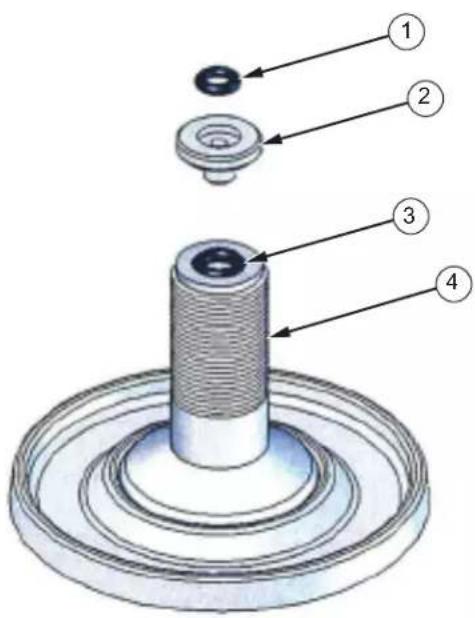
Figure 2-6. Test Port Insert
gjn012.eps
Table 2-1. Test Port Insert Parts List
| Item | Description | Part |
| 1 | O RING | 3865142 |
| 2 TEST PORT INSERT 3919892 | ||
| 3 | O RING | 3883397 |
| 4 | TEST PORT | 3921414 |
To calibrate panel-mounted gauges with pressure connections in the rear, use an Angle Adapter (Refer to Chapter 9, Ancillary Equipment).
Chapter 3 Priming
Priming
- Open reservoir valve one turn counter-clockwise and turn capstan fully in.
- Pump the priming pump two times.
- Close valve and turn capstan fully out.
- Open valve and turn capstan fully in.
Note
During this operation, bubbles may appear in the reservoir, as trapped air is expelled. For large volumes, repeat steps 3 and 4 until no further bubbles appear.
- With valve open, turn capstan fully out and close valve. The tester is now ready for use.
⚠ Warning
Turning the capstan out with the reservoir valve closed will generate approximately 15 inHg / 0.5 bar vacuum. If the DUT is vacuum sensitive, leave valve open during priming operation.
Chapter 4 Operation
Operation
- Select the required weights and stack them on the appropriate piston assembly. The pressure measured is the sum of the weights plus the piston/weight carrier.
Dual PCU models: The PCU's are matched in a ratio of effective areas, 20:1 or 10:1, depending upon model, and the weights will be marked accordingly with both high and low pressure values.
Note
The priming pump is intended for system priming only, and cannot be used to generate high pressures.
- Turn the capstan in (clockwise) to generate pressure. When the piston rises, ensure that the bottom face of the lowest weight is level with the groove, midway in the recessed area on the indicator post.
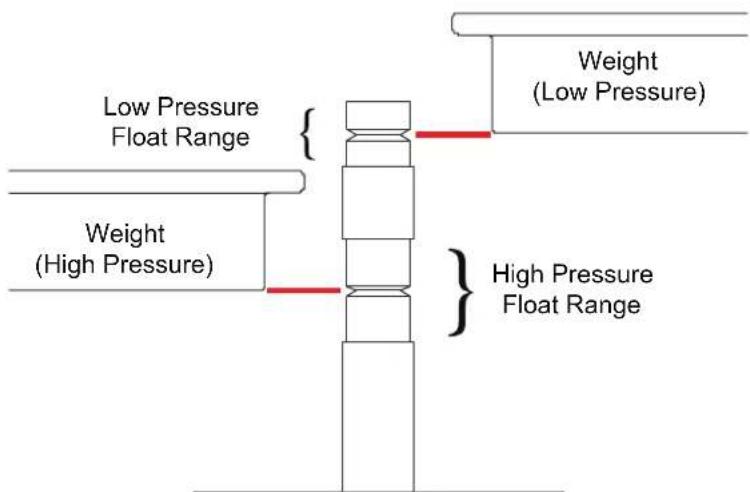
Figure 4-1. Float-Height Indicator Post
gjn002-2.eps
Note
This is the PCU mid-float position, which is the point at which all internal corrections have been made with reference to the pressure datum (at the top of the test port). The recessed area is simply a guide for the operator to indicate the PCU travel limits.
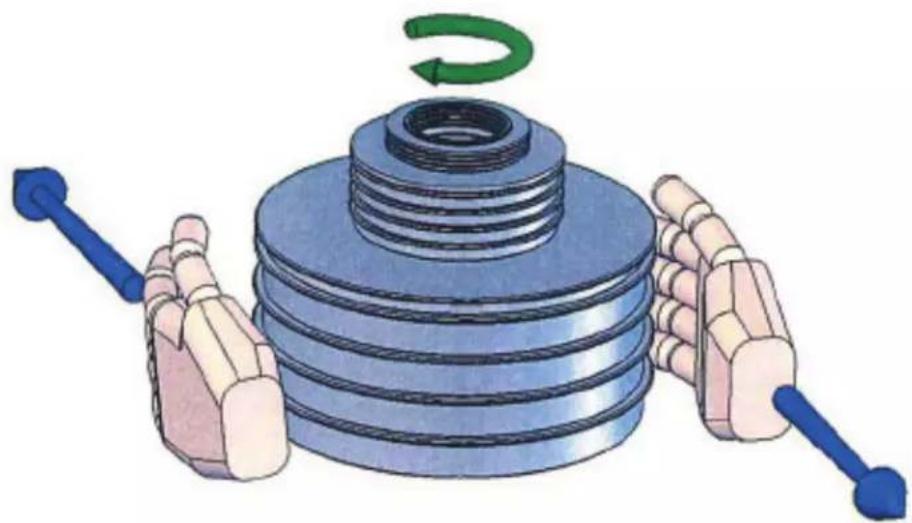
- Gently rotate the weight stack clockwise, such that it is turning between approximately 10 and 60 rpm. Avoid side-loads when turning the weights by placing the palms of the hands on either side and "rolling" the stack by pulling in opposite directions, see Figure 4-2.
DO NOT rotate weights when the piston is against the top or bottom limits of travel.
natural_image
Illustration of a mechanical component with blue hands and a green curved arrow indicating rotation (no text or symbols)Figure 4-2. Weight Rotation
gjn013.bmp
- Allow a few moments for the system to stabilize before taking any readings, especially after large changes in system pressure.
Note
Large, sudden changes in pressure will cause the system temperature to rise or fall, which can cause instrument readings to change as the fluid in the system expands or contracts, thus increasing or decreasing the pressure.
-
For the next higher calibration point, repeat from step 1 above.
-
To measure reducing pressures, remove the necessary weights, and turn the capstan out so that the weight stack floats at the correct height, then rotate clockwise.
-
Depressurize the system by turning the capstan FULLY OUT.
Caution
Never release the system pressure without turning the capstan fully out, as sudden depressurization will cause the weight stack to fall quickly, which may damage the piston assembly.
- Remove weight stack.
Note
The design of a Piston/Cylinder Unit (PCU) fitted to a deadweight tester allows for a very small clearance gap between the piston and cylinder. This is required to allow the working fluid to pass between the components, providing a lubricating film, and preventing metal-to-metal contact.
Therefore, during the normal operation of a deadweight tester, the working fluid in the system will be slowly passed through this clearance gap. This is perfectly normal, and does not mean that the system is leaking. However, over time, it will collect and run down the side of the PCU mounting bodies.
The design of this instrument includes Sump Rings around the base of the PCU mounting bodies to collect the excess fluid—these should be wiped clean periodically to avoid overflowing on to the instrument top plate. The sump ring is also fitted at the base of the test station, as it is common for fluid to fall from the DUT when it is disconnected from the instrument after calibration. This should also be kept clean to prevent spills on the top plate.
Correct Operation of Water-Operated Instruments (3200 Series):
Caution
To avoid damage to the sensitive PCUs, it is vital to ensure that there is a continuous film of water between piston and cylinder.
Due to the very close fit of these components, the water film can break down very quickly after use, due to evaporation, surface tension and capillary action effects.
Before using the instrument after a period of inactivity:
- Low Pressure: Hold the weight carrier table and gently lift the piston assembly vertically, slowly turning to check for freedom of movement.
- High Pressure: Lift off the weight carrier tube assembly. Hold the piston cap and gently lift the piston assembly vertically, slowly turning to check for freedom of movement.
Caution
UNDER NO CIRCUMSTANCES should excessive force be used on the piston assembly as this may lead to permanent damage. IT SHOULD NEVER be forced, or pulled, in such a way that a bending movement is applied to it.
- To aid in piston lubrication and movement, it is sometimes helpful to gently pressurize the system to a maximum of 15 psi/1 bar.
- If any resistance or “grittiness” is felt, the PCU has either dried out too much to use in its current condition or the system has been contaminated. In either case, the PCU must be removed and dismantled for cleaning, see Chapter 6.
If, after cleaning, the PCU's performance deteriorates quickly, it confirms that the system is contaminated. If this is the case, the instrument must be completely dismantled and cleaned before further operation of the PCU assembly.
Chapter 5
Calibration in Different Pressure Units
Calibration in Different Pressure Units
The deadweight tester can be used to calibrate in different pressure units in either of two methods.
Conversion Weights
A set of Conversion Weights can be supplied, marked in the required pressure unit, and adjusted to the correct mass for use with the existing piston(s).
The set includes (where applicable) a replacement low-pressure weight carrier table, and a replacement high-pressure weight carrier ring. These items are simply exchanged for the original items when using the conversion weights. Calibration is carried out as described above, with logical pressure increments throughout the operating range, avoiding the need to perform pressure unit conversion calculations.
Software
PressCal software is available for use with deadweight testers, and will allow users to apply all necessary corrections (e.g. local gravity, temperature, pressure head, etc.) to enhance the pressure measurement accuracy of the instrument.
It will allow calibration in any of 12 different pressure units, using the existing weight set.
Chapter 6
Maintenance and Servicing
Maintenance and Servicing
Note
The piston/cylinder assembly is the most critical and sensitive part of the deadweight tester. To maintain accuracy, the piston must always slide freely in the cylinder, and the hydraulic fluid must remain clean.
The Figures on the following pages detail the components of each assembly, together with the relevant part numbers. Where “Spec” appears as a part number, this indicates that this particular component varies with the specification of the deadweight tester, and is usually associated with other components in an assembly for replacement purposes.
PCU Assembly - 10 mm Nominal Diameter
Piston Disassembly
- Hold the weight carrier (1), and lift the piston to its full extent. Tap the carrier sharply down onto the cylinder (2) to release the tapered fit between the piston and carrier. Remove the weight carrier.
- Unscrew the PCU assembly from the instrument; use the dowel hole if the cylinder is tight.
- Carefully withdraw the piston from the cylinder.
- If required, lift support ring (4) from around o-ring (3), the o-ring can now be withdrawn from the piston.
Piston Cleaning
-
Use “non-fluffing”, non-abrasive, lint-free tissue or absorbent cloth. Hold the piston by the larger “head” end, and rub the tissue back and forth along its length.
-
To remove all traces of contamination (especially important with Water Operated Testers), the piston can be cleaned in a suitable solvent.
Caution
O-ring seals (where fitted) are Nitrile rubber, and should not be immersed in solvents, as they will become damaged. They should be wiped carefully with a new tissue.
-
After removal from the solvent, using a NEW tissue, repeat the cleaning procedure in step 5.
-
Place piston carefully on a NEW tissue where it will not be damaged while the cylinder is cleaned.
Caution
Never touch the working surface of a clean piston with bare fingers—the natural oil in your skin can cause the piston and cylinder to stick.
-
Wipe excess fluid from the outside surfaces of the cylinder (2).
-
Roll a NEW tissue into a tapered rod of appropriate size. Force the tissue through the cylinder bore while rotating. Ensure that the tissue is a tight fit inside the bore so that dirt and contamination is removed.
- Repeat step 10 using a NEW tissue but from the opposite end of the cylinder.
- Immerse the cylinder in a suitable, clean solvent, see note in step 6 above.
- After removal from the solvent, using a NEW tissue, repeat the cleaning procedure in step 10 and 11.
Piston Re-Assembly
- Replace the clean support ring (4) over the tapered end of the piston, followed by the O-ring (3). Slide the O-ring to the bottom of the piston so that it holds the support ring in place.
- Holding the piston by the larger “head” end, dip the other end into a container of clean operating fluid, and transfer to the bore in the underside (threaded end) of the cylinder. Allow the fluid to run through the bore. Repeat this 2 or 3 times to ensure a good film of clean operating fluid exists in the cylinder bore.
- Carefully introduce the piston into the underside of the cylinder, and push gently through (the piston will normally slide freely through due to its own weight).
Caution
Never force the piston into its cylinder or damage will result.
If resistance is felt, introduce more fluid. If resistance continues, re-clean piston, cylinder or both. If, after repeated cleaning, the piston still will not slide freely within the cylinder, then permanent damage may have occurred. In which case, the parts should be returned to the factory for evaluation or replacement.
- Stand assembly upright on a clean, hard, stable surface. Ensure that the O-ring (3) and support ring (4) are both located centrally around the piston. Push the cylinder down so that the O-ring is forced evenly inside the support ring.
- Ensure that the weight carrier (1) is clean (especially the central mounting hole), and place on the tapered end of the piston. Tap lightly using the palm of the hand to locate on the taper.
- Carefully screw the assembly into the instrument, ensuring that the seal (6) is clean and undamaged, and correctly re-fitted.
Replacement PCU Assembly
Caution
The piston and cylinder assembly is a matched pair, which is calibrated and adjusted to a calculated mass figure. If, for any reason, the piston or cylinder becomes damaged, then the entire assembly must be replaced. The replacement assembly consists of the following components: Item numbers 1 through 5.
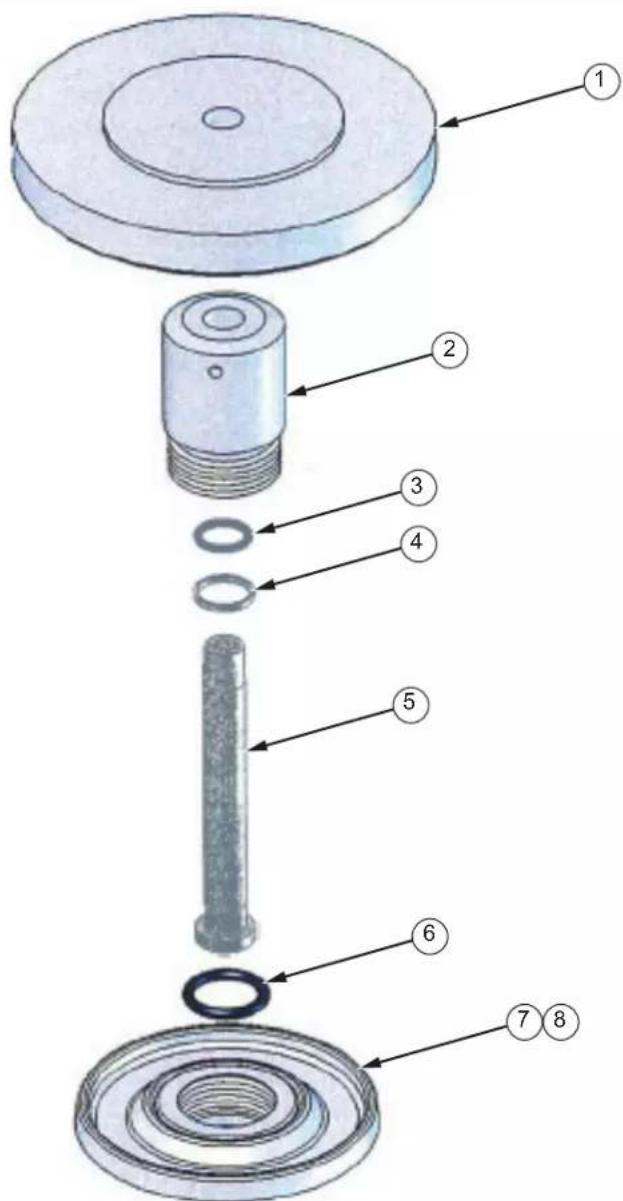
Figure 6-1. PCU Assembly - 10 mm
gin014.eps
Table 6-1. PCU Assembly - 10 mm Parts List
| Item | Description | Part | Item | Description | Part |
| 1 | Weight Carrier Spec | 5 Piston | Spec | ||
| 2 | Cylinder | Spec | 6 O | Ring | 3864802 |
| 3 O Ring 3867553 7 LP PCU Body | 3921406 | ||||
| 4 Support Ring 3918481 8 Sump Ring 3921391 | |||||
PCU Assembly - 2 & 3 mm Nominal Diameters
Piston Disassembly
- Lift off the weight carrier assembly (1 & 2), and unscrew the piston nut (5). Use the dowel hole if the nut is tight. Remove the piston/cylinder assembly.
- Loosen set screw (3) in piston cap (4), and gently pull the piston cap from the piston. DO NOT PULL IN SUCH A WAY THAT THE PISTON CAN BEND. The piston and cylinder assembly (6, 7 & 8) can now be removed from the piston nut.
- Gently withdraw the piston (8) from the cylinder (6).
Piston Cleaning
- Use “non-fluffing”, non-abrasive, lint-free tissue or absorbent cloth. Hold the piston by the larger “head” end, and rub the tissue back and forth along its length.
- To remove all traces of contamination (especially important with Water Operated Testers), the piston can be cleaned in a suitable solvent.
Caution
O-ring seals (where fitted) are Nitrile rubber, and should not be immersed in solvents, as they will become damaged. They should be wiped carefully with a new tissue.
- After removal from the solvent, using a NEW tissue, repeat the cleaning procedure in step 2.
- Place piston carefully on a NEW tissue where it will not be damaged while the cylinder is cleaned.
Caution
Never touch the working surface of a clean piston with bare fingers—the natural oil in your skin can cause the piston and cylinder to stick.
- Wipe excess fluid from the outside surfaces of the cylinder (6).
- Roll a NEW tissue into a tapered rod of appropriate size. Force the tissue through the cylinder bore whilst rotating. Ensure that the tissue is a tight fit inside the bore so that dirt and contamination is removed.
- Repeat step 9, using a NEW tissue, but from the opposite end of the cylinder.
- Immerse the cylinder in a suitable, clean solvent, see note in step 5 above.
- After removal from the solvent, using a NEW tissue, repeat the cleaning procedure in step 9 and 10.
Piston Re-Assembly
- Replace O-ring (7) in the counter-bore in the underside of the cylinder (F), ensuring that it is located correctly and evenly.
- Holding the piston by the larger “head” end, dip the other end into a container of clean operating fluid, and transfer to the bore in the underside of the cylinder. Allow the fluid to run through the bore. Repeat this 2 or 3 times to ensure a good film of clean operating fluid exists in the cylinder bore.
- Carefully introduce the piston into the underside of the cylinder, and push gently through.
- NEVER FORCE THE PISTON INTO ITS CYLINDER OR DAMAGE WILL RESULT. If resistance is felt, introduce more fluid. If resistance continues, re-clean piston, cylinder or both. If, after repeated cleaning, the piston still will not slide freely within the cylinder, then permanent damage may have occurred. In which case, the parts should be returned to the factory for evaluation or replacement.
- Insert piston/cylinder assembly into piston nut (5) through the threaded end, such that the shoulder on the cylinder is located within the central bore of the nut.
- Replace piston cap (4), and secure with set screw (3), DO NOT OVER-TIGHTEN.
- Carefully screw the assembly into the instrument, ensuring that the o-ring (10) is clean and undamaged, and correctly fitted to the piston post (11).
- Replace weight carrier assembly (1 & 2), ensuring that it locates correctly on the piston cap.
Replacement PCU Assembly
Caution
The piston and cylinder assembly is a matched pair, which is calibrated and adjusted to a calculated mass figure. If, for any reason, the piston or cylinder becomes damaged, then the entire assembly must be replaced. The replacement assembly consists of the following components: Item numbers 1 through 8.
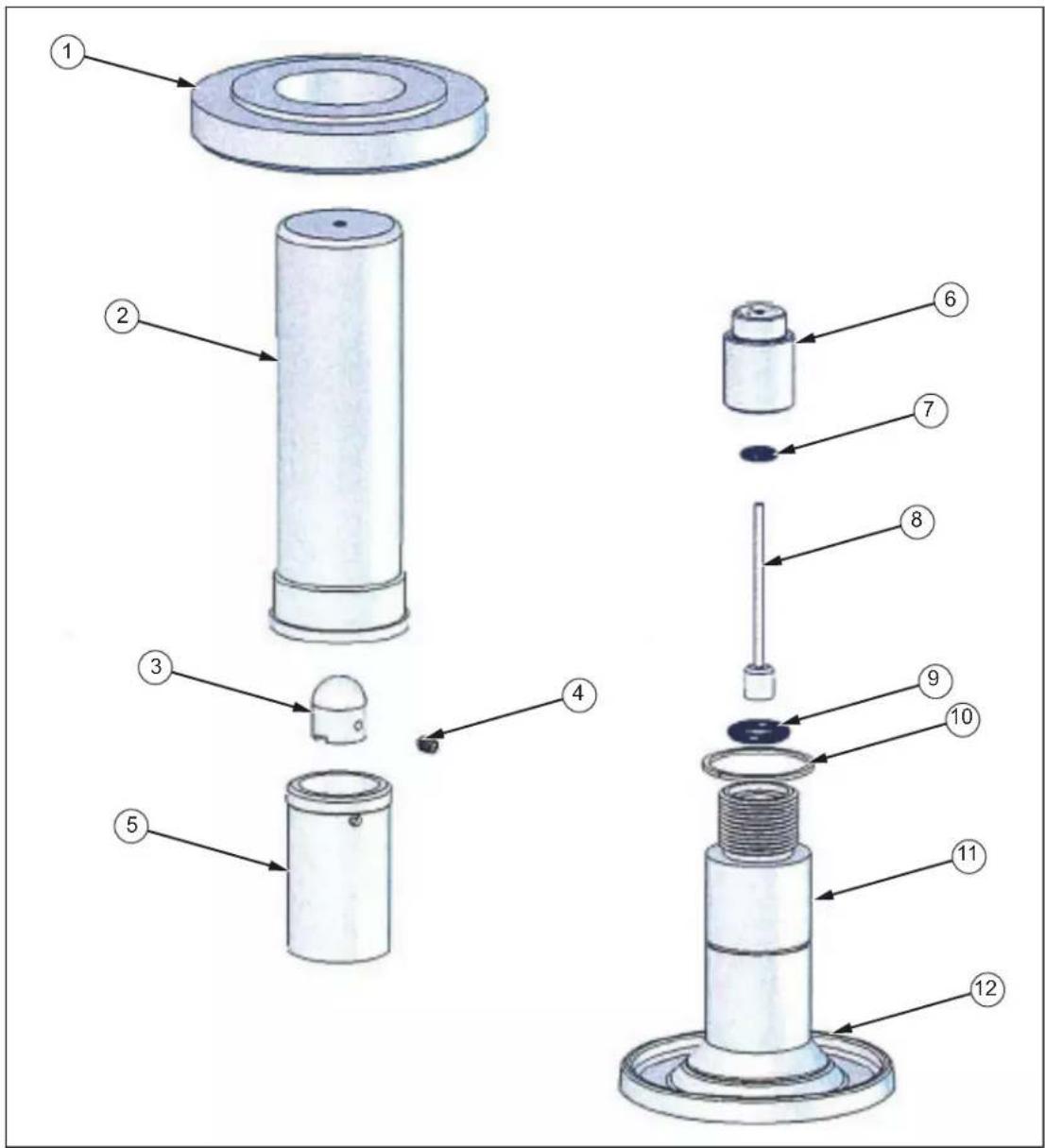
Figure 6-2. PCU Assembly - 2 and 3 mm
Table 6-2. PCU Assembly - 2 and 3 mm Parts List
| Item | Description | Part | Item | Description | Pa |
| 1 Carrier Ring Spec 7 O | Ring 3883397 | ||||
| 2 Carrier Tube | Spec | 8 | Piston | ||
| 3 Piston Cap Spec 9 O Ring 3864782 | |||||
| 4 Set Screw | 3910313 | 10 | Bearing Ring | 3920186 | |
| 5 Piston Nut | 3919915 | 11 | HP PCU Body | 3921423 | |
| 6 Cylinder | Spec | 12 | Sump Ring | 3921391 | |
Spec
PCU Assembly - 5 mm Nominal Diameter
Piston Disassembly
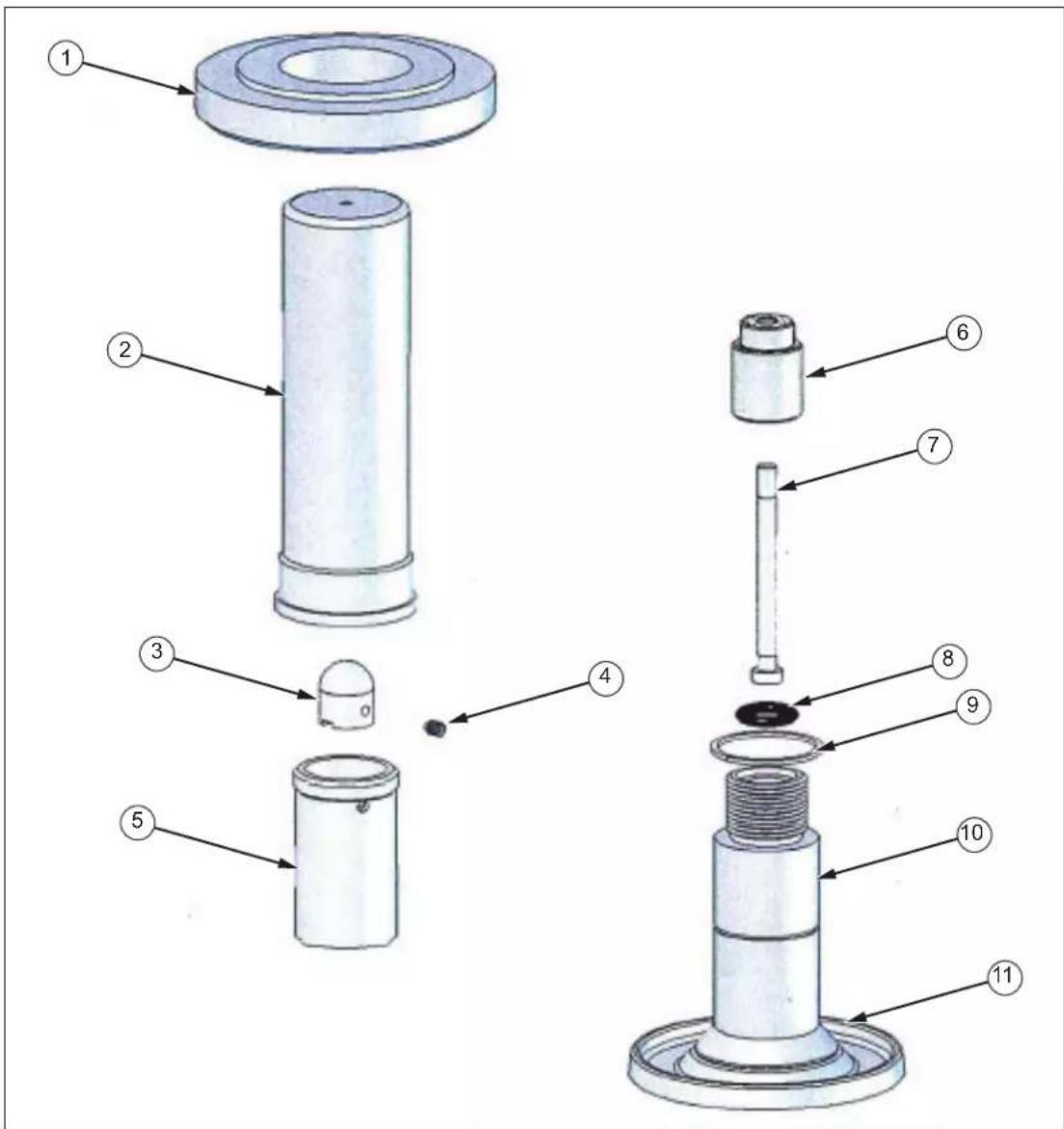
- Lift off the weight carrier assembly (1 & 2), and unscrew the piston nut (5). Use the dowel hole if the nut is tight. Remove the piston/cylinder assembly.
- Loosen set screw (3) in piston cap (4), and gently pull the piston cap from the piston. DO NOT PULL IN SUCH A WAY THAT THE PISTON CAN BEND. The piston and cylinder assembly (6 & 7) can now be removed from the piston nut.
- Gently withdraw the piston (6) from the cylinder (7).
Piston Cleaning
- Use “non-fluffing”, non-abrasive, lint-free tissue or absorbent cloth. Hold the piston by the larger “head” end, and rub the tissue back and forth along its length.
- To remove all traces of contamination (especially important with Water Operated Testers), the piston can be cleaned in a suitable solvent.
Caution
O-ring seals (where fitted) are Nitrile rubber, and should not be immersed in solvents, as they will become damaged. They should be wiped carefully with a new tissue.
- After removal from the solvent, using a NEW tissue, repeat the cleaning procedure in step 5.
- Place piston carefully on a NEW tissue where it will not be damaged while the cylinder is cleaned.
Caution
Never touch the working surface of a clean piston with bare fingers — the natural oil in your skin can cause the piston and cylinder to stick.
- Wipe excess fluid from the outside surfaces of the cylinder (6).
- Roll a NEW tissue into a tapered rod of appropriate size. Force the tissue through the cylinder bore whilst rotating. Ensure that the tissue is a tight fit inside the bore so that dirt and contamination is removed.
- Repeat step 9, using a NEW tissue, but from the opposite end of the cylinder.
- Immerse the cylinder in a suitable, clean solvent, see note in step 5 above.
- After removal from the solvent, using a NEW tissue, repeat the cleaning procedure in steps 9 and 10.
Piston Re-Assembly
- Holding the piston by the larger “head” end, dip the other end into a container of clean operating fluid, and transfer to the bore in the underside of the cylinder. Allow the fluid to run through the bore. Repeat this 2 or 3 times to ensure a good film of clean operating fluid exists in the cylinder bore.
- Carefully introduce the piston into the underside of the cylinder, and push gently through.
-
NEVER FORCE THE PISTON INTO ITS CYLINDER OR DAMAGE WILL RESULT. If resistance is felt, introduce more fluid. If resistance continues, re-clean piston, cylinder or both. If, after repeated cleaning, the piston still will not slide freely within the cylinder, then permanent damage may have occurred. In which case, the parts should be returned to the factory for evaluation or replacement.
-
Insert piston/cylinder assembly into piston nut (5) through the threaded end, such that the shoulder on the cylinder is located within the central bore of the nut.
- Replace piston cap (4), and secure with set screw (3), DO NOT OVER-TIGHTEN.
- Carefully screw the assembly into the instrument, ensuring that the o-ring (9) is clean and undamaged, and correctly fitted to the piston post (10).
- Replace weight carrier assembly (1 & 2), ensuring that it locates correctly on the piston cap.
Replacement PCU Assembly
Caution
The piston and cylinder assembly is a matched pair, which is calibrated and adjusted to a calculated mass figure. If, for any reason, the piston or cylinder becomes damaged, then the entire assembly must be replaced. The replacement assembly consists of the following components: Item numbers 1 through 7.
gin016.eps
Figure 6-3. PCU Assembly - 5 mm
Table 6-3. PCU Assembly - 5 mm Parts List
| Item | Description | Part | Item | Description | Pa |
| 1 | Carrier Ring | Spec | 7 | Piston | |
| 2 Carrier Tube Spec 8 | O Ring | 3864782 | |||
| 3 | Piston Cap | Spec | 9 | Bearing Ring | 3920186 |
| 4 | Set Screw | 3910313 | 10 | HP PCU Body | 3921423 |
| 5 | Piston Nut | 3919915 | 11 | Sump Ring | 3921391 |
| 6 | Cylinder | Spec | |||
Spec
Top Plate Removal
Note
In order to perform maintenance procedures on the hydraulic system, the Top Plate Assembly must first be removed from the instrument case.
- Depressurize the system, open the reservoir valve, and turn the capstan fully in.
- Disconnect any DUT from the test station, and remove the fluid from the reservoir*.
- Remove the spokes from the capstan hub of the screw pump.
- Remove the 4 screws from the instrument top plate (1 at the mid-point of each edge).
- Hold the top plate assembly by the test station, and tilt the plate so that the rear edge is lifted, but the front edge remains in contact with the instrument case.
- Slide the top plate towards the rear until the capstan hub of the screw pump is clear of the front lip of the instrument case.
- Lift out the top plate assembly.
*The reservoir is fitted with a drain plug, which can be accessed from the underside of the instrument case (Refer to Chapter 6, Reservoir Assembly).
Caution
When handling the top plate assembly, it is good practice to remove the piston assemblies to avoid accidental damage.
Note
Replacement is simply the reverse of the above procedure.
Screw Pump Assembly
- Unscrew the large union nut (just behind the inner hub) of the screw press assembly.
- Withdraw the lead screw assembly from the barrel (6), taking care not to drop the rambler assembly (3).
- The white, anti-extrusion ring (4) is a PTFE spiral and can be removed by "unwinding" it from the rambler.
- When removing the rambler seal (5), take care not to use any tool that may have a sharp edge that will scratch the surfaces of the rambler, otherwise it may leak when reassembled.
- The replacement rambler seal can be eased over the front of the rambler, and into the groove.
- Similarly, the new anti-extrusion ring can be "wound" into the groove in the rambler, behind the rambler seal.
- If it is necessary to remove the barrel (6), the locknut (7) must be loosened approximately 12 turn. The barrel can then be unscrewed from the test station (9).
Note
It is often easier to remove the barrel support bracket (11) to allow greater movement, (remove the 2 screws (12) from the upper side of the top plate).
-
Before re-fitting the barrel, ensure that the barrel seal (8) is correctly located in the counter-bore in the front of the barrel. Screw the barrel fully in to the test station, and secure with the locknut.
-
Re-align the barrel support bracket (if removed), and secure through the top plate with the 2 screws (12).
-
Ensure that the rambler assembly is correctly located on the end of the lead screw assembly. Carefully introduce the rambler into the open end of the barrel making sure that it does not tilt when entering the barrel.
- Push the lead screw assembly fully in to the barrel, ensuring that the key in the nut locates correctly in the slot in the barrel.
- Re-tighten the barrel union nut.
Caution
If the lead screw assembly shows signs of excessive wear, then it is very likely that the associated components have worn also; therefore, the screw press assembly is available as a spare part. See diagrams for part numbers.
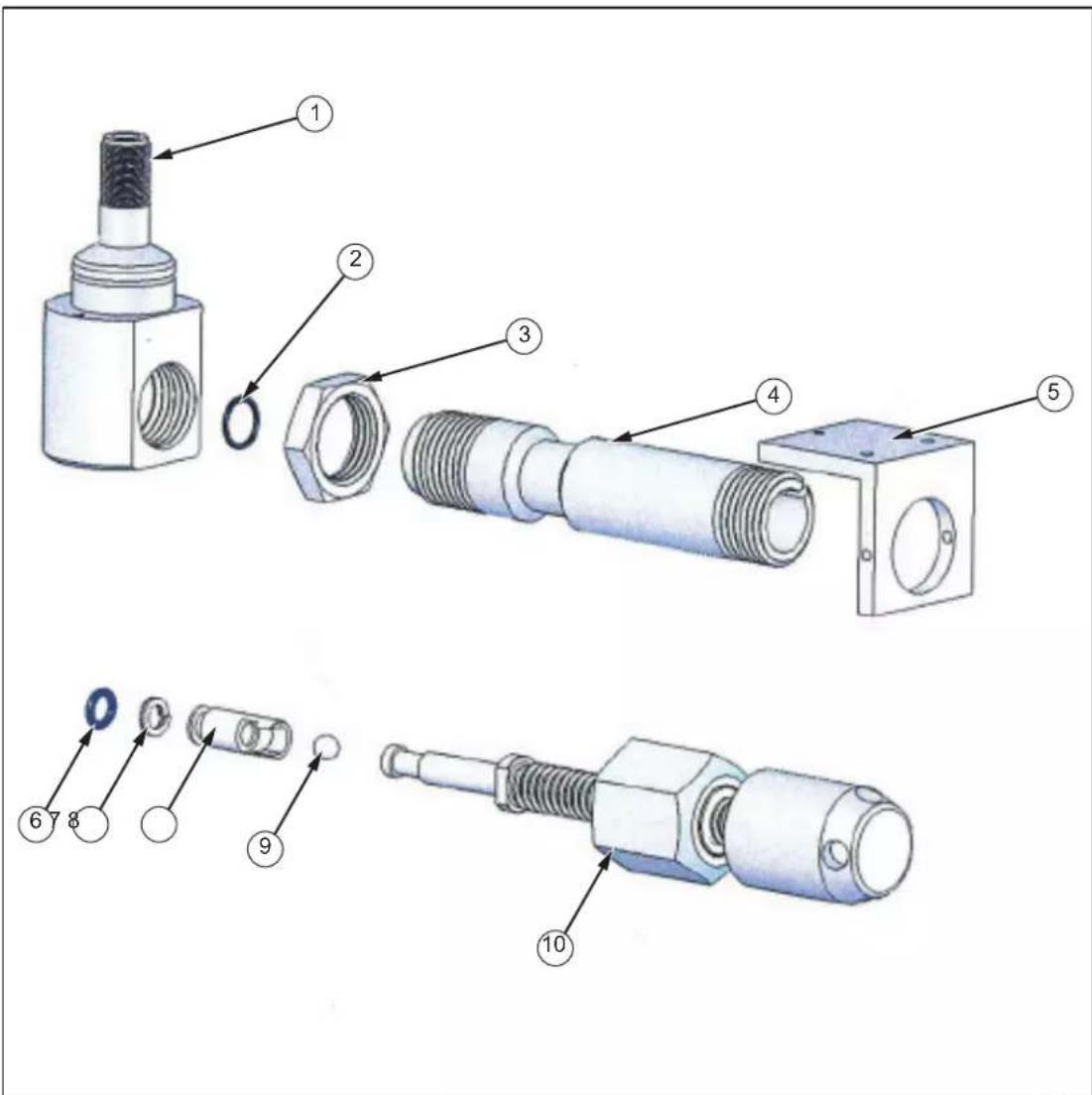
Figure 6-4. Screw Pump Assembly
gin017.eps
Table 6-4. Screw Pump Assembly Parts List
| Item | Description | Part | Item | Description | Part |
| 1 Test | Port 3921414 6 O Ring | 3867566 | |||
| 2 O Ring | 3864922 7 Back-Up | Ring 3919118 | |||
| 3 | Barrel Locknut | 3921438 | 8 | Rambler | 3919129 |
| 4 | Barrel | 3921450 | 9 | Ball | 3917855 |
| 5 Barrel Support | Support 3921492 10 Lead Screw | 3885994 | |||
Priming Pump Assembly
Disassembly
- On the underside of the top plate, disconnect the hydraulic tubing from the pump block assembly (1).
- On the upper side of the top plate, unscrew locknut (12) 12 turn, and remove clip pin from clevis (13).
- The pump arm assembly can be swung out of the way.
- Remove locknut (12) and clevis (13).
- Unscrew union nut (11), and withdraw pump assembly from below the top plate.
- Withdraw pump shaft (9), taking care not to drop shaft bearing (10) or rambler assembly (7).
- The white, anti-extrusion ring (6) is a PTFE spiral and can be removed by "unwinding" it from the rambler.
- When removing the rambler seal (5), take care not to use any tool that may have a sharp edge that will scratch the surfaces of the groove in the rambler, otherwise it may leak when reassembled.
- The replacement rambler seal can be eased over the front of the rambler, and into the groove.
- Similarly, the new anti-extrusion ring can be "wound" into the groove in the rambler, behind the rambler seal.
- If it is necessary to remove the barrel (4), the locknut (2) must be loosened approximately 12 turn. The barrel can then be unscrewed from the pump block assembly (1).
Re-Assembly
- Before re-fitting the barrel, ensure that the O-ring (3) is correctly located in the counter-bore in the front of the barrel. Screw the barrel fully into the test station, and secure with the locknut.
- Ensure that the rambler assembly is correctly located on the end of the pump shaft. Carefully introduce the rambler into the open end of the barrel making sure that it does not tilt when entering the barrel.
- Slide the pump bearing (10) over the shaft, and locate it inside the barrel.
-
Re-introduce the pump assembly from the underside of the top plate, and secure with the union nut (11).
-
Replace locknut (12) and clevis (13), reconnect pump arm assembly, and secure with pin clip.
- Reconnect hydraulic tubing.
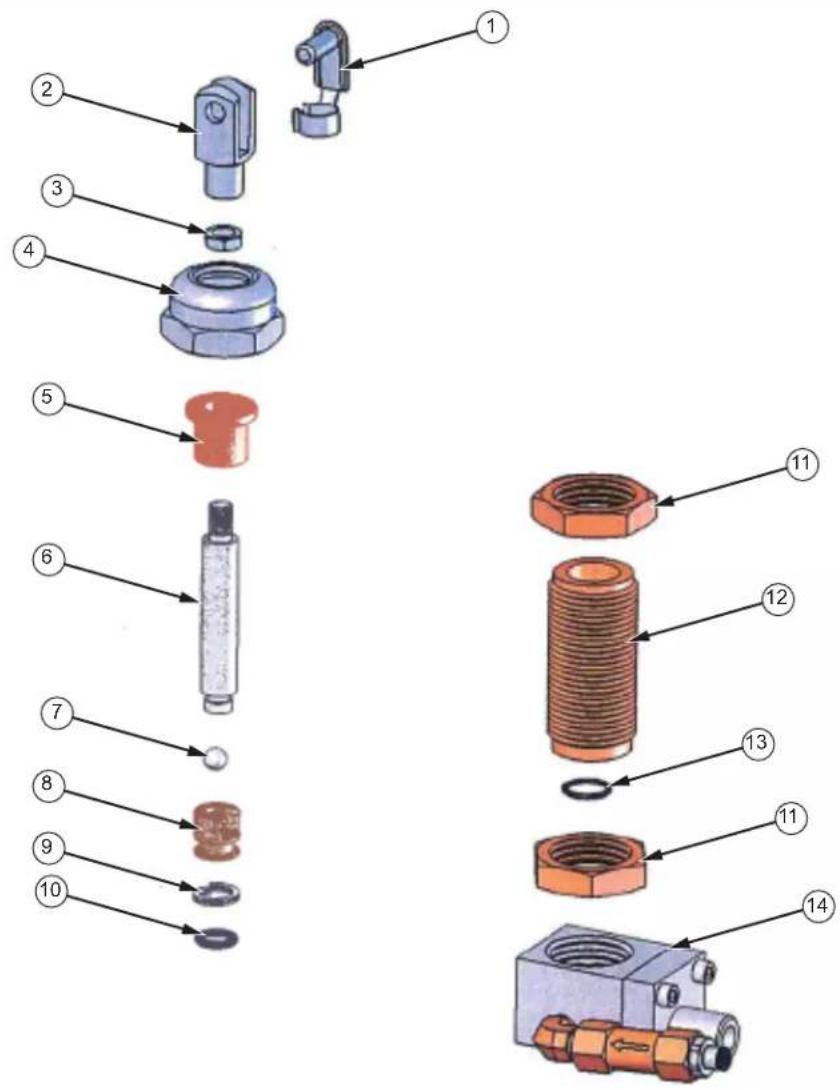
gjn018.eps
Figure 6-5. Priming Pump Assembly
Table 6-5. Priming Pump Assembly - Parts List
| Item | Description | Part | Item | Description | Part |
| 1 | Pivot Clip | 3920224 | 8 Rambler | ||
| 2 | Clevis | 3920236 | 9 | Back-Up | Ring |
| 3 | Locknut | 3918713 | 10 | O Ring | 3864782 |
| 4 | Pump Union Nut | 3921527 | 11 | Barrel Locknut | 3921438 |
| 5 | Shaft Bearing | 3867744 | 12 | Pump Barrel | 3921511 |
| 6 | Pump Shaft | 3921509 | 13 | O Ring | 3864711 |
| 7 | Ball | 3917855 | 14 | Pump Block Assembly |
3919165 3920516
Check Valves
Inlet Check Valve
The inlet check valve is a bought-in item, and is not readily user-serviceable. To remove:
- Disconnect nylon tubing from connector (9), by pressing in the collar at the top of the connector, and gently pulling on the tubing.
- Unscrew and remove connector.
- Remove check valve assembly (8).
- When replacing the check valve assembly, take care to remove all traces of PTFE or Teflon sealing tape on the mating threads of elbow (7). New tape (or similar sealing method) must be applied to ensure a pressure-tight joint.
- Reassembly is the reverse of removal.
Outlet Check Valve
- Remove screws (7) and pump check flange (6), taking care not to drop the check valve bullet (3) and spring (4).
- Inspect the parts for cleanliness and damage—particularly the sealing surfaces.
- When removing O-rings, take care not to use any tool that may have a sharp edge that will scratch the surfaces of the mating groove, otherwise it may leak when reassembled.
- Reassembly is the reverse of removal, but care mast be taken to ensure that the spring and bullet are seated correctly.
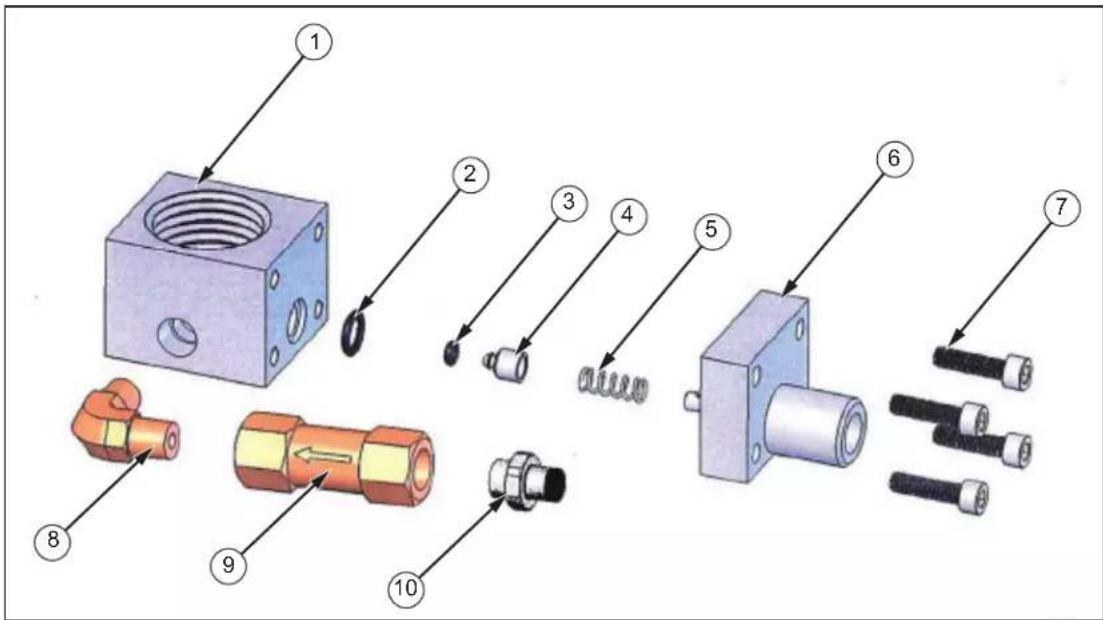
Figure 6-6. Check Valves Assemblies
gin019.eps
Table 6-6. Check Valves Assemblies Parts List
| Item | Description | Part | Item | Description | Part |
| 1 Pump | Block 3921530 6 Pump Check Flange | 3921744 | |||
| 2 | O Ring | 3864766 | 7 Screw | 3909261 | |
| 3 | O Ring | 3865142 | 8 Elbow | 3862616 | |
| 4 | Bullet | 3920584 | 9 Check Valve | 3867767 | |
| 5 | Spring | 3920600 | 10 Connector | 3923564 |
Reservoir Assembly
- To drain the fluid from the reservoir, first remove any weights, and raise the instrument a few inches by placing suitably sized blocks under the feet.
- Place a suitable catchment tray or bowl below the reservoir drain (13).
- Open the valve by turning valve stem (1) counter-clockwise.
- Remove gland nut and plug (13 & 12), and allow the fluid to drop into the catchment tray.
To completely disassemble the reservoir, the top plate must be removed from the instrument case (Refer to Chapter 6, Top Plate Removal).
- Disconnect the high-pressure tubing by unscrewing the gland nuts fitted to the reservoir body (11).
- The low pressure feed to the priming pump is disconnected by pressing down on the black plastic ring at the top of the connector, and gently pulling on the nylon tubing.
- Remove valve stem completely by turning counter-clockwise, taking care not to lose the spring (2) and nylon washer (3).
-
Lift off reservoir cover (4).
-
Remove three screws from reservoir spacers that hold the assembly to the top plate. The assembly can now be withdrawn from the underside of the top plate.
- The reservoir body (11) and reservoir cap (5) are a close fit to the reservoir tube (7), and both rely on the O-ring seal (6) to hold them in place. These parts can be separated by gently pulling them apart.
- The valve vent (9) is disassembled from the reservoir body by removing the three screws (8).
- Reassembly is the reverse of the above procedure.
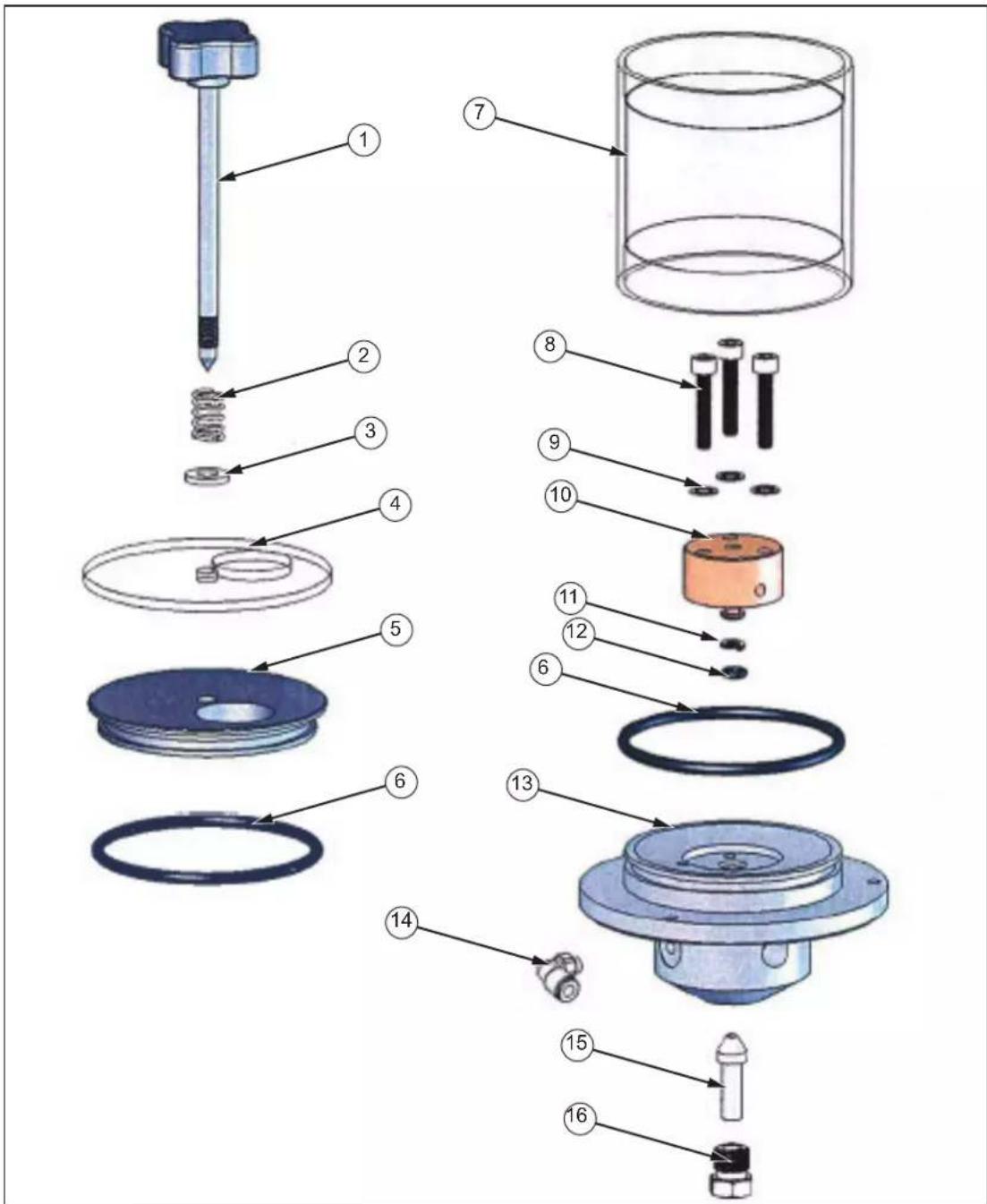
Figure 6-7. Reservoir Assembly
gjn020.eps
Table 6-7. Reservoir Assembly Parts List
| Item | Description | Part | Item | Description | Part | |
| 1 | Valve Stem | 3886430 | 9 | Washer | 3205770 | |
| 2 | Spring 39 | 22786 10 | Valve | Vent | 3921582 | |
| 3 Nylon Washer 3916458 11 | Back-Up Ring | 3921912 | ||||
| 4 Reservoir Cover 392 | 1624 12 O Ring | 3865142 | ||||
| 5 Reservoir Cap 392 | 1613 13 Reservoir Body | 3921575 | ||||
| 6 | O Ring | 3864910 | 14 | Elbow | 3926855 | |
| 7 | Reservoir Tube | 3921608 | 15 | Plug | 3068437 | |
| 8 | Screw | 3909292 | 16 | Gland Nut | 3903089 | |
Chapter 7 Fault Finding
Poor PCU Spin/Sensitivity
General
The weights floating on a clean PCU assembly will rotate freely, slowing down gradually to a complete stop. If the rotation stops quickly, then the PCU may be dirty and require cleaning.
⚠ Caution Do not rotate the piston if it is dirty as permanent damage can occur.
If the spin/sensitivity of a recently cleaned PCU deteriorates quickly, then it is likely that the hydraulic system has become contaminated.
During the normal operation of a deadweight tester, the working fluid flows slowly through the tiny gap between the piston and its cylinder. If the hydraulic system has become contaminated, any particles will tend to move towards the PCU(s) and thus affect their performance, and possibly damage them.
If this is the case, the system must be completely dismantled, thoroughly cleaned and rebuilt before further calibration is carried out.
PCU Assembly - 10 mm
Plug the test station to prevent leakage, and open the reservoir valve. Hold the weight carrier (1) and lift gently up and down, the piston should slide freely within its cylinder. If any resistance greater than fluid drag or a “gritty” sensation is detected, then the PCU must be removed and cleaned. (See Chapter 6, PCU Assembly - 10 mm Nominal Diameter.)
PCU Assembly - 2 and 3 mm
Pressurize the system with 1 large weight so that the piston is rotating and floating correctly. Gently push down on the rotating weight carrier (2) and release. This should result in a smooth, “bouncing” oscillation. If the piston does not rotate or “bounce” freely, it must be removed and cleaned. (See Chapter 6, PCU Assembly - 2 and 3 mm Nominal Diameter.)
PCU Assembly - 5 mm
Plug the test station to prevent leakage, and open the reservoir valve. Remove the weight carrier assembly (1 & 2). Hold the piston cap (4), and lift gently up and down, the piston should slide freely within its cylinder. If any resistance greater than fluid drag or a "gritty" sensation is detected, then the PCU must be removed and cleaned. (See Chapter 6, PCU Assembly - 5 mm Nominal Diameter.)
Pressurize the system with 1 large weight so that the piston is rotating and floating correctly. If the piston does not rotate freely, it must be removed and cleaned. (See Chapter 6, PCU Assembly - 5 mm Nominal Diameter.)
High PCU Fall-Rate
The piston will always fall slowly due to a small leak between the piston and cylinder. This fall rate will never be so fast that a stable reading cannot be made.
- If the system has been pressurized quickly, then sufficient time must be allowed for the instrument to thermally stabilize. Continue re-floating the piston until the fall rate stabilizes; this should take no longer than one minute.
- If PCU has just been re-fitted after cleaning:
Air pockets can be introduced when re-fitting a PCU. This will cause the piston to fall faster while the air bleeds between the piston and cylinder.
Continue to re-float the piston until the fall rate slows down. If the piston continues to fall quickly, then check for fluid leakage around the base of the PCU assembly. Check for loose/damaged/dirty seal under the PCU, tighten, clean or replace as necessary. (See Chapter 6, PCU Assembly - 10 mm Nominal Diameter, PCU Assembly - 2 and 3 mm Nominal Diameter, and PCU Assembly - 5 mm Nominal Diameter.)
- Reservoir valve may be leaking. Observe fluid level, it will rise slowly if the valve is leaking. This indicates that the valve seat may be damaged or dirty, or the o-ring below the valve vent may be damaged. It should be disassembled, cleaned and inspected, then retested or replaced as necessary. (See Chapter 6, Reservoir Assembly.)
- Rambler seal may be leaking. Check lead screw in screw pump for “wetness” when extended, the screw thread should be greased, not running with operating fluid. If lead screw is “wet”, then replace rambler seal and anti-extrusion ring. (See Chapter 6, Screw Pump Assembly.)
System Will Not Prime
- Check reservoir valve is closed.
- Check for sufficient fluid in reservoir.
- Check for damaged/missing/dirty O-ring on test station.
- Check that the face of the DUT is contacting the O-ring, and that the surface is not scored or dented.
System Will Not Pressurize
- Ensure correct valve operation during priming process.
- Check DUT is not leaking.
- Clean system externally, check for fluid leak by continually trying to pressurize. Wherever fluid appears, replace the seal—check sealing faces are clean and undamaged before re-assembly.
Priming Pump Malfunction
- If pumping does not generate pressure, then the inlet check valve has probably failed, and requires replacement.
- If the system pressurizes and depressurizes in conjunction with the downward and upward strokes of the pump, then the outlet check valve has failed completely. This should be disassembled and inspected for dirt or damage to valve seat and seal. After inspection, clean all parts carefully, replace as required, and re-assemble correctly.
- If the pump handle rises during normal system pressurization, then the outlet check valve is leaking. Inspect as above.
Caution
Do not continue to pressurize if pump handle rises, as this can damage the inlet check valve.
Cannot Reach Maximum Pressure
If maximum pressure cannot be reached, even after the screw press has been turned fully in, and the checks above have been made:
- Ensure that the screw press is FULLY OUT, and the priming pump is used for initial pressurization.
- If the DUT has a large internal volume or there is air in the system, then re-prime increasing the initial pressurization with the priming pump from 100 psi/7 bar to at least 200 psi/14 bar.
Chapter 8
Storage and Transportation
Storage and Transportation
Instrument
- With the test station plugged, open the reservoir valve and turn capstan fully in, close reservoir valve.
- Remove spokes from capstan hub, and store in tool-roll.
- Remove screw-in handle from pump arm, and store in tool-roll.
- If fluid is to remain in the reservoir, ensure that the tester is kept level at all times to avoid spills. If not, drain the reservoir as described in Chapter 6, Reservoir Assembly.
- Refit instrument lid, ensuring that the hinges are correctly engaged, and secure with toggle clips at the sides.
Weights
- Starting with the largest increments first, stack all appropriate weights in the wooden weight case.
- Pass the threaded rod of the weight clamp assembly down through the center of the weight stack, and locate in the base of the weight box.
- Secure the weights by screwing the clamp assembly in clockwise, ensuring that the stepped rim of the clamping disc locates correctly in the center of the weight stack.
- Close lid and secure with catches at front.
⚠ Warning
The weight set is HEAVY (can be up to 80 lbs/36 kg per individual box) so care must be taken when moving it. Both handles must be used when lifting the set for stability, and we recommend that it be carried between two people.
Chapter 9
Ancillary Equipment
Ancillary Equipment
Liquid Separator, P5521 or P5522
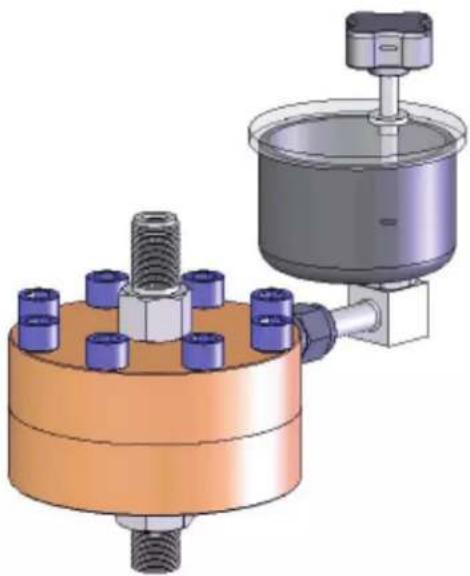
If there is any doubt that the instrument to be tested is not internally clean, then the addition of the P5521 Liquid Separator will protect the deadweight tester from contamination and possible damage. The P5521 is also particularly useful in applications where the instruments under test are used on systems that must not be contaminated by the operating fluid from the deadweight tester. The unit contains a flexible diaphragm that separates the two working fluids, preventing transfer either way.
The P5521 has a Viton diaphragm and seals, and a maximum working pressure range of 10,000 psi / 700 bar.
The P5522 has a PTFE diaphragm and EPDM seals, and a maximum working pressure range of 7,000 psi / 500 bar. This unit is specifically designed for use with brake fluids, Skydrol ^® and similar liquids.
natural_image
3D mechanical assembly diagram showing a cylindrical component with threaded bolt and flange, connected to a vertical actuator (no text or symbols present)Figure 9-1. Liquid Separator
gjn021.bmp
Angle Adapter, P5543
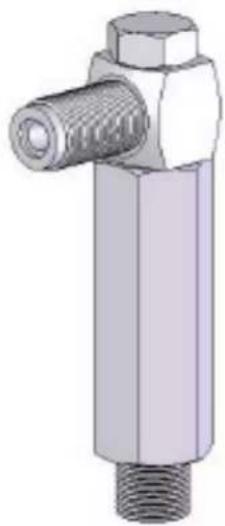
To calibrate gauges with the pressure connection on the rear (e.g. panel-mount gauges) in their correct position, an angle adapter should be used. The angle adapter fits directly onto the test station, converting it through 90 degrees, allowing the standard adapters to be used.
natural_image
3D rendering of a mechanical valve or fitting component with threaded shaft and hexagonal housing (no text or symbols)Figure 9-2. Angle Adapter
gjn022.bmp
Pointer Remover/Punch, P5551
To remove and refit the pointer of a pressure gauge, a pointer remover/punch should be used. This tool has a spring-loaded plunger to quickly and consistently refit the pointer.

natural_image
Technical line drawing of a cylindrical mechanical component with a base and protruding shaft (no text or symbols)Figure 9-3. Pointer/Remover Punch
gjn023.bmp