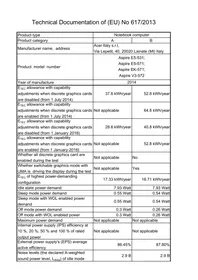
| Product type | Notebook computer |
| Product category | A | B |
| Manufacturer name, address | Acer Italy s.r.l., Via Lepetit, 40, 20020 Lainate (MI) Italy |
| Product model number | Aspire E5-531; Aspire E5-571; Aspire EK-571; Aspire V3-572 |
| Year of manufacture | 2014 |
| ETEC allowance with capability adjustments when discrete graphics cards are disabled (from 1 July 2014) | 37.6 kWh/year | 52.8 kWh/year |
| ETEC allowance with capability adjustments when discrete graphics cards are enabled (from 1 July 2014) | Not applicable | 64.8 kWh/year |
| ETEC allowance with capability adjustments when discrete graphics cards are disabled (from 1 January 2016) | 28.6 kWh/year | 40.8 kWh/year |
| ETEC allowance with capability adjustments when discrete graphics cards are enabled (from 1 January 2016) | Not applicable | 52.8 kWh/year |
| Whether all discrete graphics card are enabled during the test | Not applicable | No |
| Whether switchable graphics mode with UMA is driving the display during the test | Not applicable | Yes |
| ETEC of highest power-demanding configuration | 17.33 kWh/year | 16.71 kWh/year |
| Idle state power demand | 7.93 Watt | 7.93 Watt |
| Sleep mode power demand | 0.55 Watt | 0.54 Watt |
| Sleep mode with WOL enabled power demand | 0.55 Watt | 0.54 Watt |
| Off mode power demand | 0.3 Watt | 0.26 Watt |
| Off mode with WOL enabled power | 0.3 Watt | 0.26 Watt |
| Maximum power demand | Not applicable | Not applicable |
| Internal power supply (IPS) efficiency at 10%, 20%, 50% and 100% of rated output power | Not applicable | Not applicable |
| External power supply's (EPS) average active efficiency | 86.45% | 87.80% |
| Noise levels (the declared A-weighted sound power level, Lwad) of idle mode | 2.9 B | 2.9 B |
| Noise levels (the declared A-weighted sound power level, \(L_{\text{WAd}}\)) of "HDD random seek" mode | 2.9 B | 2.9 B |
| Minimum number of loading cycles that the batteries can withstand | 400 cycles | 400 cycles |
| Configuration of memory | 2~16 GB | 2~16 GB |
| Configuration of internal storage | 1 piece | 1 piece |
| Configuration of discrete television tuner | 0 piece | 0 piece |
| Configuration of discrete audio card | 0 piece | 0 piece |
| Configuration of discrete graphics cards | 0 piece | 1 piece |
| Configuration of discrete graphics cards category | Not applicable | G1 |
| The battery in this product cannot be easily replaced by users themselves | No | No |
| For products with an integrated display, the total content of mercury is | 0 mg | 0 mg |
| Measurement methodology for \(E_{\text{TEC}}\) | COMMISSION REGULATION (EU) No 617/2013 of 26 June 2013 implementing Directive 2009/125/EC of the European Parliament and of the Council with regard to ecodesign requirements for computers and computer servers: ANNEX II Ecodesign requirements and timetable: 1.3.1. \(E_{\text{TEC}}\) formula. |
| Measurement methodology for idle mode | EN 62623:2013 — Desktop and notebook computers — Measurement of energy consumption: 5.2. Test setup; 5.3.4. Measuring long idle mode; 5.7. True RMS watt meter specification; 5.8. True RMS watt meter accuracy; Annex E.2 (informative) ENERGY STAR® V5 compliant testing methodology. |
| Measurement methodology for sleep mode | EN 62623:2013 — Desktop and notebook computers — Measurement of energy consumption:
5.2. Test setup;
5.3.3. Measuring sleep mode;
5.4. Test conditions;
5.7. True RMS watt meter specification;
5.8. True RMS watt meter accuracy. |
| Measurement methodology for off mode | EN 62623:2013 — Desktop and notebook computers — Measurement of energy consumption:
5.2. Test setup;
5.3.2. Measuring off mode;
5.4. Test conditions;
5.7. True RMS watt meter specification;
5.8. True RMS watt meter accuracy. |
| Measurement methodology for IPS efficiency | Not applicable |
| Measurement methodology for EPS efficiency | EN 50563:2011 External a.c.—d.c. and a.c.—a.c. power supplies — Determination of no-load power and average efficiency of active modes. |
| Measurement methodology for noise level | ECMA-109 2ndedition (December 1987) Declared Noise Emission Values of Computer and Business Equipment: 4. Determination of the declared noise emission values. ECMA-74 11thedition (December 2010) Measurement of Airborne Noise emitted by Information Technology and Telecommunications Equipment: 5. Installation and operating instructions; 6. Method for determination of sound power levels of equipment in reverberation test rooms; 7. Method for determination of sound power levels of equipment under essentially free-field conditions over a reflecting plane; Annex C.15 Equipment category: personal computers and workstations. |
| Measurement methodology for battery loading cycles | EN 61960:2011 Secondary cells and batteries containing alkaline or other non-acid electrolytes — Secondary lithium cells and batteries for portable applications: 7.6.1 General; 7.6.3 Endurance in cycles (accelerated test procedure). |
| Sequence of steps for achieving a stable condition with respect to power demand | EN 62623:2013 — Desktop and notebook computers — Measurement of energy consumption: 5.2. Test setup; 5.3.2. Measuring off mode; 5.3.3. Measuring sleep mode; 5.3.4. Measuring long idle mode. |
| Description of how sleep mode was selected or programmed | EN 62623:2013 — Desktop and notebook computers — Measurement of energy consumption: 5.2. Test setup; 5.3.3. Measuring sleep mode. |
| Description of how off mode was selected or programmed | EN 62623:2013 — Desktop and notebook computers — Measurement of energy consumption:
5.2. Test setup;
5.3.2. Measuring off mode. |
| Sequence of events required to reach the mode where the equipment automatically changes to sleep mode | ENERGY STAR® Program Requirements Product Specification for Computers, Eligibility Criteria Version 6.0, Rev. Oct-2013:
1.D.4 Sleep Mode. |
| Sequence of events required to reach the mode where the equipment automatically changes to off mode | Not applicable |
| The length of time after a period of user inactivity in which the computer automatically reaches a power mode that has a lower power demand requirement than sleep mode | 30 minutes |
| The length of time before the display sleep mode is set to activate after user inactivity | 10 minutes |
| User information on the energy-saving potential of power management functionality | http://www.energystar.gov/index.cfm?c=power_mgt.pr power mgt_users |
| User information on how to enable the power management functionality | http://www.energystar.gov/index.cfm?c=power_mgt.pr power mgt_users |
| Test parameter for ambient temperature | 25 °C |
| Test parameter for test voltage | 230 V |
| Test parameter for frequency | 50 Hz |
| Test parameter for total harmonic distortion of the electricity supply system | 3 % |
| Test parameter for information and documentation on the instrumentation, set-up and circuits used for electrical testing | AC Power Source EXTECH 6800 SERIES Power Meter YOKOGAWA WT210 |