ACER ASPIRE 3690 - Laptop

ASPIRE 3690 - Laptop ACER - Free user manual and instructions

Find the device manual for free ASPIRE 3690 ACER in PDF.

📄 130 pages English EN Download 💬 AI Question 11 questions ⚙️ Specs
Notice ACER ASPIRE 3690 - page 126
View the manual : Français FR English EN
Pick your language and provide your email: we'll send you a specifically translated version.
Brand Acer
Model Aspire 3690
Product type Laptop
Operating system Windows Vista (Home Basic, Home Premium, Ultimate, or Starter Edition)
Processor Intel Celeron M 410/420/430 (1.46/1.60/1.73 GHz, 1 MB cache, FSB 533 MHz)
RAM memory 512 MB DDR2 533 MHz, expandable up to 2 GB (2 soDIMM slots)
Hard drive 60/80/100/120 GB SATA
Display 15.4-inch WXGA TFT LCD, resolution 1280 x 800 pixels
Graphics card Intel Graphics Media Accelerator 950 (integrated, up to 224 MB shared memory)
Optical drive Super Multi double-layer DVD (slot-load or tray depending on model)
Wireless connectivity Wi-Fi 802.11b/g (Acer InviLink), Bluetooth 2.0+EDR
Wired connectivity 56K V.92 modem, 10/100/1000 Ethernet (depending on model)
Ports and interfaces 4 USB 2.0, VGA, DVI-D (depending on model), IEEE 1394, PCMCIA, ExpressCard, 5-in-1 card reader (SD/MMC/MS/MS PRO/xD)
Audio Built-in stereo speakers, microphone, S/PDIF headphone jack
Battery 6-cell lithium-ion (44 Wh) or 8-cell (71 Wh), fast charging (80% in 1 hour)
Power supply 90 W AC adapter, grounded power plug
Dimensions 358 x 265 x 29.33/36 mm
Weight 2.77 kg (with 15.4-inch display)
Security Kensington security slot, BIOS password protection, Empowering Technology password
Maintenance and cleaning Turn off and unplug before cleaning, use a slightly damp soft cloth, no liquid or aerosol
Repairability Battery and memory user-accessible; other repairs reserved for authorized technicians
Included accessories AC adapter, battery, quick start guide, telephone cable (depending on model)

Frequently Asked Questions - ASPIRE 3690 ACER

How do I turn on the computer?
Press the power button located under the LCD screen, next to the easy launch keys. Release it immediately.
What should I do if the screen remains black?
Check the power indicator. If the computer is in Sleep mode, press the power button to wake it. Adjust brightness with Fn + Up Arrow. If the display is switched to an external monitor, use Fn + F5 to return to the internal screen.
How do I adjust the screen brightness?
Use the special keys: Fn + Right Arrow to increase brightness, Fn + Left Arrow to decrease it.
How do I use the touchpad?
Move your finger on the surface to move the cursor. Tap once to click, twice to double-click. Use the center button for four-way scrolling. The touchpad can be disabled with Fn + F7.
How can I optimize battery life?
Use the Power Saver power profile in Acer ePower Management. Reduce brightness, disable Wi-Fi when not in use, and avoid leaving USB devices plugged in. Enable Sleep mode after 15 minutes of inactivity.
How do I connect an external monitor?
Connect the monitor to the VGA or DVI-D port. Press Fn + F5 to switch between the internal display, external display, or both simultaneously. You can also configure the display in the Windows Control Panel.
How do I burn a DVD with Acer Arcade?
Insert a blank disc into the optical drive. Open Acer Arcade, select Create DVD, choose the disc type (data, video, etc.) and follow the on-screen instructions to add your files and burn.
I lost my Empowering Technology password, what should I do?
The Empowering Technology password cannot be reset. The only solution is to reformat the system. Keep this password safe or write it down in a secure place.
How do I safely clean the computer?
Turn off the computer and remove the battery. Unplug the AC adapter. Use a slightly damp soft cloth (water only). Never use cleaning liquid or aerosol. Avoid touching internal components.
What does the 'Disk boot failure' message mean?
This message appears if the hard drive is not detected or no operating system is found. Check that no non-system USB drive or floppy disk is inserted. If the problem persists, contact customer service.

User questions about ASPIRE 3690 ACER

1 question about this device. Answer the ones you know or ask your own.

Ask a new question about this device

The email remains private: it is only used to notify you if someone responds to your question.

How to charge the battery of the ACER ASPIRE 3690?
Frequently Asked Questions - 05/19/2026
Response Notice-Facile

The ACER ASPIRE 3690 is equipped with a lithium-ion battery (6 or 8 cells depending on the model). Here’s how to charge your laptop:

Charging Procedure

  • Use the power adapter provided with your laptop
  • Plug the adapter into a properly grounded wall outlet
  • Connect the power cable to the input port of your ASPIRE 3690
  • The battery starts charging immediately

Charging Time

Thanks to Acer's fast charging technology, your ASPIRE 3690 reaches 80% charge in 1 hour. For a full charge (100%), expect a little more time. Avoid using the laptop while charging for optimal results.

Battery Usage Tips

  • Do not expose the battery to extreme temperatures (below 0°C or above 50°C)
  • Use only the provided adapter or a compatible model approved by Acer
  • If you replace the battery, use an original Acer lithium-ion battery
Respond (be the first)

Download the instructions for your Laptop in PDF format for free! Find your manual ASPIRE 3690 - ACER and take your electronic device back in hand. On this page are published all the documents necessary for the use of your device. ASPIRE 3690 by ACER.

USER MANUAL ASPIRE 3690 ACER

Acer Empowering Technology 1

Mot de passage de Empowering Technology 1

Acer eNet Management 2

Acer ePower Management 4

Acer ePresentation Management 7

Acer eDataSecurity Management 8

Acer eLock Management 9

Acer eRecovery Management 11

Acer eSettings Management 13

Windows Mobility Center 14

Launch Manager 42
Norton Internet Security 43

Considerations speciales 78

Considerations speciales 79

Considerations speciales 80

Acer Empowering Technology

Acer ePresentation Management

Acer eRecovery Management

ACER ASPIRE 3690 - Acer eRecovery Management - 1

ACER ASPIRE 3690 - Acer eRecovery Management - 2

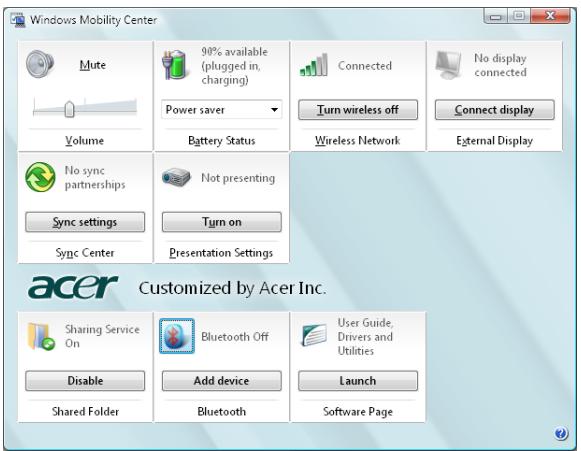
Windows Mobility Center

ACER ASPIRE 3690 - Windows Mobility Center - 1

Acer eRecovery Management

This Class B digital apparatus complies with Canadian ICES-003.

"Brevets U.S. Nos. 4,631,603, 4,819,098, 4,907,093, 5,315,448 et 6,516,132."

Federal Communications Comission Declaration of Conformity

This device complies with Part 15 of the FCC Rules. Operation is subject to the following two conditions: (1) This device may not cause harmful interference, and (2) This device must accept any interference received, including interference that may cause undesired operation.

The following local manufacturer/importer is responsible for this declaration:

Product name:Notebook PC
Model number:BL50
Machine type:Aspire 5680/5650/5630/5610/5610Z/3690
SKU number:Aspire 568xxx/565 xxx/563xxx/561xxx/561xZxxx/369xxx ("x" = 0 - 9, a - z, or A - Z)
Name of responsible party:Acer America Corporation
Address of responsible party:2641 Orchard Parkway San Jose, CA 95134 USA
Contact person:Mr. Young Kim
Tel:408-922-2909
Fax:408-922-2606

C E

Declaration of Conformity

We,

Acer Computer (Shanghai) Limited

3F, No. 168 Xizang medium road, Huangpu District, Shanghai, China

Contact Person: Mr. Easy Lai

Tel: 886-2-8691-3089 Fax: 886-2-8691-3000

Hereby declare that:

Product: Personal Computer

Trade Name: Acer

Model Number: BL50

Machine Type: Aspire 5680/5650/5630/5610/5610Z/3690

SKU Number: Aspire 568xxx/565 xxx/563xxx/561xxx/561xZxxx/369xxx ("x" = 0~9, a ~ z, or A ~ Z)

Is compliant with the essential requirements and other relevant provisions of the following EC directives, and that all the necessary steps have been taken and are in force to assure that production units of the same product will continue comply with the requirements.

EMC Directive 89/336/EEC as attested by conformity with the following harmonized standards:

EN55022:1998 + A1:2000 + A2:2003, AS/NZS CISPR22:2002, Class B
EN55024:1998 + A1:2001 + A2:2003
EN6100-3-2:2000, Class D
EN61000-3-3:1995 + A1:2001
EN55013:2001 + A1:2003 (applied to models with TV function)
EN55020:2002 + A1:2003 (applied to models with TV function)

Low Voltage Directive 73/23/EEC as attested by conformity with the following harmonized standard:

EN60950-1:2001
EN60065:2002 (applied to models with TV function)

Council Decision 98/482/EC (CTR21) for pan-European single terminal connection to the Public Switched Telephone Network (PSTN).

RoHS Directive 2002/95/EC on the Restriction of the Use of certain Hazardous Substances in Electrical and Electronic Equipment

LCD panel ergonomic specifications

Design viewing distance500 mm
Design inclination angle0.0°
Design azimuth angle90.0°
Viewing direction range classClass IV
Screen tilt angle85.0°
Design screen illuminance• Illuminance level: [250 + (250cosα)] lx where α = 85° • Color: Source D65
Reflection class of LCD panel (positive and negative polarity)• Ordinary LCD: Class I • Protective or Acer CrystalBrite™ LCD: Class III
Image polarityBoth
Reference white:• Yn
Pre-setting of luminance and color temperature @ 6500K (tested under BM7)• u'n • v'n
Pixel fault classClass II

Index

A

Mémoire installation 88

Messages erreur 97

Manual assistant
Powered by Anthropic
Waiting for your message
Product information

Brand : ACER

Model : ASPIRE 3690

Category : Laptop