
OF16HF - Fan ORION - Free user manual and instructions
Find the device manual for free OF16HF ORION in PDF.


| Product Type | Mist Fan (Fan with Humidifier) |
| Brand | Orion |
| Model | OF16HF |
| Rated Voltage | 220-240V~ |
| Rated Frequency | 50Hz |
| Fan Power | 80W |
| Humidifier Power | 40W |
| Total Power | 120W |
| Maximum Mist Output | 200ml/h |
| Fan Head Size | 400mm |
| Water Tank Capacity | 1500ml |
| Fan Speed Settings | Low, Med, High |
| Wind Modes | Normal, Breeze, Sleep |
| Oscillation | Yes (Swing function) |
| Timer | Yes, up to 7.5 hours (4 indicator lights) |
| Remote Control | Yes (requires 2x AA batteries) |
| Humidifier Method | Ultrasonic atomization (1-5 micron particles) |
| Water Tank Refill | Removable water tank (1500ml) |
| Safety Features | Low water level auto shut-off; safety switch for mist function |
| Cleaning | Clean water tank every 2-3 weeks; flume weekly |
| Recommended Water Temperature | Below 40°C |
| Recommended Humidity Range | 45% - 65% |
Frequently Asked Questions - OF16HF ORION
User questions about OF16HF ORION
0 question about this device. Answer the ones you know or ask your own.
Ask a new question about this device
Download the instructions for your Fan in PDF format for free! Find your manual OF16HF - ORION and take your electronic device back in hand. On this page are published all the documents necessary for the use of your device. OF16HF by ORION.
USER MANUAL OF16HF ORION
natural_image
Modern outdoor fan with digital display and fan blade (no visible text or symbols)AC220V\~50Hz, 120W
RoHS





DEAR CUSTOMERS!
MANY THANKS FOR BUYING ORION ELECTRIC FAN!
We really believe you will get the greatest pleasure from using this device for the years! Please, read the user's guide in detail before first using of this fan.
Introduction
This product has both fan and humidifier functions, which can be used together or separately. The humidifier is especially useful on very hot days, when the extra mist in the air helps not only to cool you down, but also to increase the humidity in the dry heat.
How does it work?
This Mist Fan uses ultrasonic vibration to atomise water into 1-5 micron particles, which can then be blown through the room with the fan.
Why is it useful?
Not only does this fan help to cool you down with air containing micro water droplets, it also helps to avoid dry skin and eyes which are common in dry heat. A relative humidity of 45% - 65% is recommended for comfortable living, and this fan can help maintain that balance in the hot summer months.
Parts
- Front mist plate
- Front Guard
- Blade cap
- Blade
- Guard Mounting Nut
- Rear Guard
- Motor
- Fan Body
- Base
- Castor wheels
- Base Nut
- Fixer
- Plastic Tube
- Tube Button

Rated Voltage: 220-240V\~
Rated Frequency: 50Hz
Fan Power: 80W
Humidity Power: 40W
General Power: 120W
Max Mist Capacity: 200ml/h
Fan Head Size: 400mm
Water Tank Capacity: 1500ml

Installation
1: First base is installed in place of the main stable
2: The head fixed in the main part of the bearing hole
3: Installed guard and blade, and net fixed firmly lock the lookout Network
Filling the water tank
Place the fan on a flat, stable floor, then add water for the humidifying function as follows:

natural_image
Simple line drawing of a cabinet or enclosure structure with a vertical panel and base (no text or symbols)- Open the water tank cover.

natural_image
Line drawing of a mechanical device with a hand pressing down on screen and an upward arrow indicating motion (no text or symbols)- Lift out the water tank
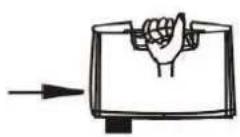
3. Take out the water tank.

- Over a sink, turn the water tank so the outlet cap is facing upwards.

- Screw off the tank cap, and add water.

6. Screw tank cover tightly, and put it into the fan, then close panel.
Operation

*Insert plug to the electrical outlet, and the indicator light turns on.
*Press "ON/SPEED" button to choose the wind for low, Med, High speed that matches the light on the control panel.
*Press "MODE" to choose the wind type from one of the following:
"Normal": Wind flow based on Low/Med/High speed.
"Breeze": Imitates the flow of natural wind based on strong and soft wind.
"Sleep": The fan runs for half an hour on strong then soft natural wind mode, then changes to soft natural wind for the next half hour, and then the fan turns off automatically.
(1).Setting H:
Operation pattern: H→Stop→H→Stop→H
(2).Setting M:
Operation pattern: M→stop →M→Stop→M
(3)Setting L:
Operation pattern: L→Stop→L→off→L
*Press "SWING" to start oscillation; press again to fix the airflow direction.
*Press "HUMIDITY" to start the humidifying function; mist comes out of the front plate if there is water in the tank.
The MIST function can be used on its own or along with the fan function to blow the mist into the room.
*Press "TIMER" button to make the fan run for the length of the timer. There are 4 indicator lights for automatic timing. To set a time of 7.5 hours you need to press 15 times and all the 4 indicator lights light up.
* The Remote Control must be pointed towards the Remote Sensor on the main unit for best results. If the remote control doesn't operate as expected, replace the batteries (2 pcs, AA battery).
Caution
* Do not touch / pull out / put back the water tank when the unit is plugged into a power source. Make sure it is physically disconnected from the mains before doing anything with the water tank.
* When the water level is too low, the safety switch will cut out operation of the mist function. Unplug the unit and refill the water tank for further operation.
* Do not let dust or other particles collect on the mist plate - if the mist outlets are blocked, the mist function could malfunction.
* Before cleaning the unit, make sure it is completely disconnected from the power source. Make sure your hands are not wet when unplugging the unit.
* Do not use very hot water in the water tank - use water less than 40 degrees Celsius.
* Use only water in the water tank. Do not add chemicals or oils or any other additive.
* Infants, the disabled and the elderly should not be in the direct airflow from the fan for long periods of time.
Cleaning and Maintenance
* Make sure power is disconnected before any cleaning or maintenance is performed.
* It is recommended that you clean the water tank every 2-3 weeks of use, and clean the flume every week.
* Pull out the water tank before cleaning it - pull the plastic tube out of the mist cask properly, then take out the mist cask and water tank.
* Use a dry cloth to clean the mist cask. If there are stubborn stains on the mist cask, use a cloth lightly dampened with mild detergent.
* If the mist feature will not be used for a long time, empty the water tank and leave it to dry before recapping it.


Figure of cleaning mist patch
Troubleshooting
| Fault Phenomenon Reason Solution | ||
| 1. Mist projector works normally, but without mist spray | a. Water could be contaminated with other substances or chemicalsb. Water tank could be crackedc. Water tank could be empty | a. Clean out the water tank and replace with clean waterb. Pour out the water and check for cracksc. Refill the water tank. A full tank of water will last approximately 8 hours |
| 2. Mist projector doesn't work | a. Bobber doesn't floatb. Water tank could be empty | a. Free the bobber and allowit to float freely.b. Refill the water tank. A full tank of water will last approximately 8 hours |
| 3. No indicator light, no wind, no mist. | a. Power cord is unplugged, and electric power is power off | a. Plug the power cord, and turn on the electric power |
| 4.Peculiar smell from the mist | a. When new, there might be residue in the water tank/mist plate.b. The water in the water tank many be contaminated. | a. The smell should disappear after further use.b. Clean out the water tank and refill with fresh water |
| 5.The fan doesn't work as normal | a. The plug and supply cord are damaged b. The blades are bendc. Don't safety device | a. Find service agent or a suitable qualified person to change or service b. Don't play the blades. Use soft damp cloth then wipe with dry clothc. Installed correctly in accordance with the manual. Can not be installed until there is no electricity |
WARNING: Unplug from electrical supply source before cleaning. After servicing, any safety device (including grilles and blades) must be reinstalled or remounted as previously installed. Use soft damp cloth then wipe with dry cloth. Do not use harmful cleaners. Do not bend the blades.
If the plug and supply cord are damaged, it must be replaced by the manufacturer, its service agent or a suitable qualified person in order to avoid a hazard.
Extra information on ORION company web-site www.orion.ua
We take your opinion and offers by E-mail support@orion.ua
Brand : ORION
Model : OF16HF
Category : Fan