
SCCMPPT40 - Uncategorized MAJESTIC - Free user manual and instructions
Find the device manual for free SCCMPPT40 MAJESTIC in PDF.


| Product Type | MPPT Solar Charge Controller |
| Model | SCCMPPT40 |
| Brand | Majestic |
| Max PV Input Power | 40A (e.g., 520W for 12V, 1040W for 24V) |
| Max PV Input Voltage | 100V (Voc) |
| Battery System Voltage | 12V/24V Auto Detect |
| Max Charging Current | 40A |
| Charging Type | 3-Stage: Bulk, Absorption, Float |
| Conversion Efficiency | >98% (peak) |
| Display | LCD with backlight |
| Protection Features | Reverse polarity, overcurrent, overvoltage, overtemperature, short circuit |
| Operating Temperature | -20°C to 50°C |
| Dimensions (WxHxD) | Approx. 200 x 140 x 70 mm |
| Weight | Approx. 1.2 kg |
| Enclosure Rating | IP20 (indoor use) |
| Compliance | CE, RoHS |
| Warranty | 2 years |
Frequently Asked Questions - SCCMPPT40 MAJESTIC
User questions about SCCMPPT40 MAJESTIC
0 question about this device. Answer the ones you know or ask your own.
Ask a new question about this device
Download the instructions for your Uncategorized in PDF format for free! Find your manual SCCMPPT40 - MAJESTIC and take your electronic device back in hand. On this page are published all the documents necessary for the use of your device. SCCMPPT40 by MAJESTIC.
USER MANUAL SCCMPPT40 MAJESTIC
Maximum Power Point Tracking
SCCMPPPT20—SCCMPPPT30—SCCMPPPT2440
Solar Charge and Discharge Controller User Manual

| Model | SCCMPPT20 | SCCMPPT30 | SCCMPPT40 |
| Battery voltage | 12V/ 24V | ||
| Max. solar panel voltage | 100V (25°C), 90V (-25°C) | ||
| Charging current | 20A | 30A | 40A |
| Discharging current | 20A | ||
Dear users,
Thank you for choosing our product!
Safety Instructions
- As this controller deals with voltages that exceed the top limit for human safety, do not operate it before reading this manual carefully and completing safety operation training.
- The controller has no internal components that need maintenance or service, thus do not attempt to disassemble or repair the controller.
- Install the controller indoors, and avoid component exposure and water intrusion.
- During operation, the heatsink may reach a very high temperature, therefore install the controller at a place with good ventilation conditions.
- It's recommended that a fuse or circuit breaker be installed outside the controller.
- Before installing and wiring the controller, make sure to disconnect the photovoltaic array and the fuse or breaker close to the battery terminals.
- After installation, check if all connections are solid and reliable so as to avoid loose connections that may give rise to dangers caused by heat accumulation.
Warning: means the operation in question is dangerous, and you should get properly prepared before proceeding.
Note: means the operation in question may cause damage.

Tips: means advice or instruction for the operator.
Table of Contents
1. Product Introduction...... 4
1.1 Product Overview ...... 4
1.2 Product Features .... 4
1.3 Exterior and Interfaces....6
1.4 Introduction to Maximum Power Point Tracking Technology....7
1.5 Charging Stages Introduction ...... 10
2. Product Installation.... 13
2.1 Installation Precautions.... 13
2.2 Wiring Specifications.... 14
2.3 Installation and Wiring 15
3. Product Operation and Display.... 19
3.1 LED Indicators.... 19
3.2 Key Operations 21
3.3 LCD Startup and Main Interface 22
3.4 Load Mode Setting Interface 23
3.5 System Parameter Settings 24
4. Product Protection Function and System Maintenance.... 26
4.1 Protection Functions 26
4.2 System Maintenance.... 27
4.3 Abnormality Display and Warnings.... 28
5. Product Specification Parameters.... 29
5.1 Electric Parameters 29
5.2 Battery Type Default Parameters (parameters set in monitor software) 30
- Conversion Efficiency Curve ...... 31
6.1 12V System Conversion Efficiency.... 31
6.1 24V System Conversion Efficiency.... 32
- Product Dimensions.... 33
1. Product Introduction
1.1 Product Overview
This product can keep monitoring the solar panel's generating power and tracking the highest voltage and current values (VI) in real time, enabling the system to charge the battery in maximum power. It's designed to be used in off-grid solar photovoltaic systems to coordinate operation of the solar panel, battery and load, functioning as the core control unit in off-grid photovoltaic systems.
This product features an LCD screen which can dynamically display the operating status, operating parameters, controller logs, control parameters, etc. Users can conveniently check parameters by the keys, and modify control parameters to cater to different system requirements.
The controller utilizes standard Modbus communication protocol, making it easy for users to check and modify system parameters on their own. By providing free monitoring software, we give users the maximum convenience to satisfy their varied needs for remote monitoring.
With comprehensive electronic fault self-detecting functions and powerful electronic protection functions built inside the controller, component damage caused by installation errors or system failures can be avoided to the greatest extent possible.
1.2 Product Features
◆With the advanced dual-peak or multi-peak tracking technology, when the solar panel is shadowed or part of the panel fails resulting in multiple peaks on the I-V curve, the controller is still able to accurately track the maximum power point.
◆A built-in maximum power point tracking algorithm can significantly improve the energy utilization efficiency of photovoltaic systems, and raise the charging efficiency
by 15% to 20% compared with the conventional PWM method.
◆A combination of multiple tracking algorithms enables accurate tracking of the optimum working point on the I-V curve in an extremely short time.
◆The product boasts an optimum MPPT tracking efficiency of up to 99.9%.
◆Advanced digital power supply technologies raise the circuit's energy conversion efficiency to as high as 98%.
◆Charging program options are available for different types of batteries including gel batteries, sealed batteries, open batteries, lithium batteries, etc.
◆The controller features a limited current charging mode. When the solar panel power exceeds a certain level and the charging current is larger than the rated current, the controller will automatically lower the charging power and bring the charging current to the rated level.
- Instantaneous large current startup of capacitive loads is supported.
◆ Automatic recognition of battery voltage is supported.
◆LED fault indicators and an LCD screen which can display abnormality information help users to quickly identify system faults.
◆Historical data storage function is available, and data can be stored for up to a year.
◆The controller is equipped with an LCD screen with which users can not only check device operating data and statuses, but also modify controller parameters.
◆The controller supports standard Modbus protocol, fulfilling the communication needs of various occasions.
◆The controller employs a built-in over-temperature protection mechanism. When temperature surpasses the set value, the charging current will decline in linear proportion to the temperature so as to curb the temperature rise of the controller,
effectively keeping the controller from being damaged by overheat.
◆Featuring a temperature compensation function, the controller can automatically adjust charging and discharging parameters in order to extend the battery's service life.
◆ TVS diode array helps provide lighting protection
1.3 Exterior and Interfaces


| No. | Definition |
| 1 | Transmitting terminal TX |
| 2 | Receiving terminal RX |
| 3 | Power supply grounding /Signal grounding |
| 4 | Power supply grounding /Signal grounding |
| 5 | Power supply positive |
| 6 | Power supply positive |
Fig. 1-1 Product appearance and interfaces
| No. | Item | No. | Item |
| 1 | Charging indicator | 10 | Battery "+" interface |
| 2 | Battery indicator | 11 | Battery "-" interface |
| 3 | Load indicator | 12 | Load "+" interface |
| 4 | Abnormality indicator | 13 | Load "-" interface |
| 5 | LCD screen | 14 | External temperature sampling interface |
| 6 | Operating keys | 15 | RS232 communication interface |
| 7 | Installation hole | ||
| 8 | Solar panel "+" interface | ||
| 9 | Solar panel "-" interface |
1.4 Introduction to Maximum Power Point Tracking Technology
Maximum Power Point Tracking (MPPT) is an advanced charging technology that enables the solar panel to output more power by adjusting the electric module's operating status. Due to the nonlinearity of solar arrays, there exists a maximum energy output point (maximum power point) on their curves. Unable to continuously lock onto this point to charge the battery, conventional controllers (employing switching and PWM charging technologies) can't get the most of the power from the solar panel. But a solar charge controller featuring MPPT technology can continuously track arrays' maximum power point so as to get the maximum amount of power to charge the battery.
Take a 12V system as an example. As the solar panel's peak voltage (Vpp) is approximately 17V while the battery's voltage is around 12V, when charging with a
conventional charge controller, the solar panel's voltage will stay at around 12V, failing to deliver the maximum power. However, the MPPT controller can overcome the problem by adjusting the solar panel's input voltage and current in real time, realizing a maximum input power.
Compared with conventional PWM controllers, the MPPT controller can make the most of the solar panel's max. power and therefore provide larger charging current. Generally speaking, the latter can raise the energy utilization ratio by 15% to 20% in contrast with the former.

Fig. 1-2 Solar panel output characteristic curve
Meanwhile, due to changing ambient temperature and illumination conditions, the max. power point varies frequently, and our MPPT controller can adjust parameter settings according to the environmental conditions in real time, so as to always keep the system close to the max. operating point. The whole process is entirely automatic without the need of human intervention.

Fig. 1-3 Relation between solar panel output characteristics and illumination

Fig. 1-4 Relation between solar panel output characteristics and temperature
1.5 Charging Stages Introduction
As one of the charging stages, MPPT can not be used alone, but has to be used together with boost charging, floating charging, equalizing charging, etc. to complete charging the battery. A complete charging process includes: fast charging, sustaining charging and floating charging. The charging curve is as shown below:

Fig. 1-5 Battery charging stages diagram
a) Fast charging
At the fast charging stage, as the battery voltage has not reached the set value of full voltage (i.e. equalizing/ boost voltage) yet, the controller will perform MPPT charging on the battery with the maximum solar power. When the battery voltage reaches the preset value, constant voltage charging will begin.
b) Sustaining charging
When the battery voltage reaches the set value of sustaining voltage, the controller will switch to constant voltage charging. In this process, no MPPT charging will be performed, and meanwhile the charging current will also gradually decrease. The sustaining charging stage itself consists of two sub-stages, i.e. equalizing charging and boost charging, the two of which are not carried out in a repeated manner, with the former getting activated once every 30 days.
Boost charging
By default, boost charging generally lasts for 2h, but users can adjust preset values of duration and boost voltage point according to the actual needs. When the duration reaches the set value, the system will then switch to floating charging.
Equalizing charging
Warning: risk of explosion!
In equalizing charging, an open lead-acid battery can produce explosive gas, therefore the battery chamber shall have good ventilation conditions.

Note: risk of equipment damage!
Equalizing charging may raise the battery voltage to a level that may cause damage to sensitive DC loads. Check and make sure that allowable input voltages of all the loads in the system are greater than the set value for battery equalizing charging.

Note: risk of equipment damage!
Overcharge or too much gas generated may damage battery plates and cause active material on the battery plates to scale off. Equalizing charging to an excessively high level or for too long a period may cause damage. Read carefully the actual requirements of the battery deployed in the system.
Some types of batteries benefit from regular equalizing charging which can stir the electrolyte, balance the battery voltage and finish the electrochemical reaction. Equalizing charging raises the battery voltage to a higher level than the standard supply voltage and gasify the battery electrolyte. If the controller then automatically steers the battery into equalizing charging, the charging duration is 120 mins (default). In order to avoid too much generated gas or battery overheat, equalizing charging and boost charging won't repeat in one complete charging cycle.
Note:
1) Due to the installation environment or working loads, the system can't continuously stabilize the battery voltage to a constant level, the controller will initiate a timing process, and 3 hours after the battery voltage reaches the set value, the system will automatically switch to equalizing charging.
2) If no calibration has been done to the controller clock, the controller will perform equalizing charging regularly according to its internal clock.
Floating charging
When finishing the sustaining charging stage, the controller will switch to floating charging in which the controller lowers the battery voltage by diminishing the charging current and keeps the battery voltage at the set value of floating charging voltage. In the floating charging process, very light charging is carried out for the battery to maintain it at full state. At this stage, the loads can access almost all the solar power. If the loads consume more power than the solar panel could provide, the controller will not be able to keep the battery voltage at the floating charging stage. When the battery voltage drops to the set value for returning to boost charging, the system will exit floating charging and reenter into fast charging.
2. Product Installation
2.1 Installation Precautions
◆Be very careful when installing the battery. For open lead-acid batteries, wear a pair of goggles during installation, and in case of contact with battery acid, flush with water immediately.
◆In order to prevent the battery from being short-circuited, no metal objects shall be placed near the battery.
◆Acid gas may be generated during battery charging, thus make sure the ambient environment is well ventilated.
◆Keep the battery away from fire sparks, as the battery may produce flammable gas.
- When installing the battery outdoors, take sufficient measures to keep the battery from direct sunlight and rain water intrusion.
◆Loose connections or corroded wire may cause excessive heat generation which may further melt the wire's insulation layer and burn surrounding materials, and even
cause a fire, therefore make sure all connections are tightened securely. Wires had better be fixed properly with ties, and when needs arise to move things, avoid wire swaying so as to keep connections from loosening.
- When connecting the system, the output terminal's voltage may exceed the top limit for human safety. If operation needs to be done, be sure to use insulation tools and keep hands dry.
◆The wiring terminals on the controller can be connected with a single battery or a pack of batteries. Following descriptions in this manual apply to systems employing either a single battery or a pack of batteries.
◆ Follow the safety advice given by the battery manufacturer.
- When selecting connection wires for the system, follow the criterion that the current density is not larger than 4A/mm2.
◆ Connect the controller's earth terminal to the ground.
2.2 Wiring Specifications
Wiring and installation methods must comply with national and local electrical specifications.
The wiring specifications of the battery and loads must be selected according to rated currents, and see the following table for wiring specifications:
| Model | Rated charging current | Rated discharging current | Battery wire diameter (mm2) | Load wire diameter (mm2) |
| SCCMPPT20 | 20A | 20A | 5 | 5 |
| SCCMPPT30 | 30A | 20A | 6 | 5 |
| SCCMPPT40 | 40A | 20A | 10 | 5 |
2.3 Installation and Wiring
Warning: risk of explosion! Never install the controller and an open battery in the same enclosed space! Nor shall the controller be installed in an enclosed space where battery gas may accumulate.
Warning: danger of high voltage! Photovoltaic arrays may produce a very high open-circuit voltage. Open the breaker or fuse before wiring, and be very careful during the wiring process.
Note: when installing the controller, make sure that enough air flows through the controller's radiator, and leave at least 150 mm of space both above and below the controller so as to ensure natural convection for heat dissipation. If the controller is installed in an enclosed box, make sure the box delivers reliable heat dissipation effect.

Fig. 2.1 Installation and heat dissipation
Step 1: Choose the installation site carefully
Do not install the controller at a place that is subject to direct sunlight, high temperature or water intrusion, and make sure the ambient environment is well ventilated.
Step 2: First place the installation guide plate at a proper position, use a marking pen to mark the mounting points, then drill 4 mounting holes at the 4 marked points, and fit screws in.
Step 3: fix the controller
Aim the controller's fixing holes at the screws fit in Step 2 and mount the controller on.

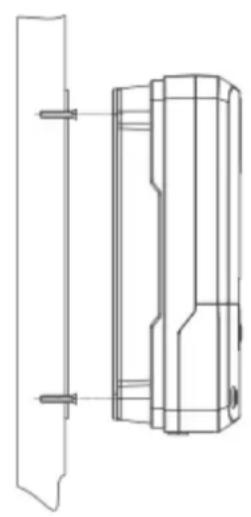
Step 4: wire
First remove the two screws on the controller, and then begin wiring operation. In order to guarantee installation safety, we recommend the following wiring order; however, you can choose not to follow this order and no damage will be incurred to the controller.

① Connecting to external temperature sampling interface
② Connecting communication cable
③ Connecting power cable
Warning: risk of electric shock! We strongly recommend that fuses or breakers be connected at the photovoltaic array side, load side and battery side so as to avoid electric shock during wiring operation or faulty operations, and make sure the fuses and breakers are in open state before wiring.
Warning: danger of high voltage! Photovoltaic arrays may produce a very high open-circuit voltage. Open the breaker or fuse before wiring, and be very careful during the wiring process.
Warning: risk of explosion! Once the battery's positive and negative terminals or leads that connect to the two terminals get short-circuited, a fire or explosion will occur. Always be careful in operation.
First connect the battery, then the load, and finally the solar panel. When wiring, follow the order of first "+" and then "-" .
④ Power on
After connecting all power wires solidly and reliably, check again whether wiring is correct and if the positive and negative poles are reversely connected. After confirming that no faults exist, first close the fuse or breaker of the battery, then see whether the LED indicators light up and the LCD screen displays information. If the LCD screen fails to display information, open the fuse or breaker immediately and recheck if all connections are correctly done.
If the battery functions normally, connect the solar panel. If sunlight is intense enough, the controller's charging indicator will light up or flash and begin to charge the battery.
After successfully connecting the battery and photovoltaic array, finally close the fuse or breaker of the load, and then you can manually test whether the load can be normally turned on and off. For details, refer to information about load working modes and operations.
Warning: when the controller is in normal charging state, disconnecting the battery will have some negative effect on the DC loads, and in extreme cases, the loads may get damaged.
Warning: within 10 minutes after the controllers stops charging, if the battery's poles are reversely connected, internal components of the controller may get damaged.
Note:
1) The battery's fuse or breaker should be installed as close to the battery as possible, and it's recommended that installation distance be not more than 150mm.
2) If no remote temperature sensor is connected to the controller, the battery temperature value will stay at 25° C.
3) If an inverter is deployed in the system, directly connect the inverter to the battery, and do not connect it to the controller's load terminals.
3. Product Operation and Display
3.1 LED Indicators
 | 1---PV array indicator | Indicating the controller's current charging mode. |
| 2---BAT indicator | Indicating the battery's current state. | |
| 3---LOAD indicator | Indicating the loads' On/ Off and state. | |
| 4---ERROR indicator | Indicating whether the controller is functioning normally. |
PV array indicator:
CHARGE STATUS
① BULK Steady on, charging in max. power
② ACCEPTANCE — Slow flashing, boost charging
③ FLOAT — Single flashing, floating charging
④ EQUALIZE ____ Quick flashing, equalizing charging
⑤ CURRENT -LIMITED Double flashing, current-limited charging
| No. | Indicator state | Charging state |
| 1 | Steady on | MPPT charging |
| 2 | Slow flashing(a cycle of 2s with on and off each lasting for 1s) | Boost charging |
| 3 | Single flashing(a cycle of 2s with on and off lasting respectively for 0.1s and 1.9s) | Floating charging |
| 4 | Quick flashing(a cycle of 0.2s with on and off each lasting for 0.1s) | Equalizing charging |
| 5 | Double flashing(a cycle of 2s with on for 0.1s, off for 0.1s, on again for 0.1s, and off again for 1.7s) | Current-limited charging |
| 6 | Off | No charging |
BAT indicator:
| Indicator state | Battery state |
| Steady on | Normal battery voltage |
| Slow flashing(a cycle of 2s with on and off each lasting for 1s) | Batteryover-discharged |
| Quick flashing(a cycle of 0.2s with on and off each lasting for 0.1s) | Battery over-voltage |
LOAD indicator:
| Indicator state | Battery state |
| Off | Load turned off |
| Quick flashing(a cycle of 0.2s with on and off | Load overloaded/short-circuited |
| each lasting for 0.1s) | |
| Steady on | Load functioning normally |
ERROR indicator:
| Indicator state | Battery state |
| Off | System operating normally |
| Steady on | System malfunctioning |
3.2 Key Operations

| ▲ Up | Page up; increase the parameter value in setting |
| ▼ Down | Page down; decrease the parameter value in setting |
| ◀Return | Return to previous menu (exit without saving) |
| ▶Set | Enter into sub-menu; set/ saveTurn on/ off loads (in manual mode) |
3.3 LCD Startup and Main Interface

3.3.1 Startup interface
![graph TD A[" "] --> B[" "] B --> C[" "] C --> D[" "] D --> E[" "] E --> F[" "] F --> G[" "]](/content/2026/05/1102654/images/0e67ac366e5512ce6dda6ef3d834af176b164c83cc6754d7b26276934d72c340.jpg)
During startup, the 4 indicators will first flash successively, and after self-inspection, the LCD screen starts and displays the battery's voltage level which will be either a fixed voltage selected by the user or a voltage automatically recognized.
3.3.2 Main interface
![graph TD A["Main monitoring page"] --> B["12.3 V 12V"] B --> C["Component voltage 90.6 V"] C --> D["Charging current 0.00 A"] D --> E["Battery capacity 100%"] E --> F["Load current 12.3 V"] F --> G["Charging capacity 21 Ah"] G --> H["Discharging capacity 9 Ah"] H --> I["Device temperature 40 °C"] I…](/content/2026/05/1102654/images/79a72cb594322b1382aede74b73e35cb686d6aad2e8c4ecb2dbe4f0bf49bef64.jpg)
3.4 Load Mode Setting Interface
3.4.1 Load modes introduction
This controller has 5 load operating modes which will be described below:
| No. | Mode | Descriptions |
| 0 | Sole light control (nighttime on and daytime off) | When no sunlight is present, the solar panel voltage is lower than the light control on voltage, and after a time delay, the controller will switch on the load; when sunlight emerges, the solar panel voltage will become higher than the light control off voltage, and after a time delay, the controller will switch off the load. |
| 1 to 14 | Light control + time control 1 to 14 hours | When no sunlight is present, the solar panel voltage is lower than the light control on voltage, and after a time delay, the controller will switch on the load. The load will be switched off after working for a preset period of time. |
| 15 | Manual mode | In this mode, the user can switch the load on or off by the keys, no matter whether it's day or night. This mode is designed for some specially purposed loads, and also used in the debugging process. |
| 16 | Debugging mode | Used for system debugging. With light signals, the load is shut off; without light signals, the load is switched on. This mode enables fast check of the correctness of system installation during installation debugging. |
| 17 | Normal on mode | The energized load keeps outputting, and this mode is suitable for loads which need 24-hour power supply. |
3.4.2 Load mode adjustment
Users can adjust the load mode as needed on their own, and the default mode is debugging mode (see "load modes introduction"). The method for adjusting load modes is as follows:
![graph LR A["Load mode 15"] --> B["Press and hold the Set key to enter 15"] B --> C["Tap the Up or Down key to set the mode 16"] C --> D["Press and hold the Set key to save and exit 16"] D --> E["Tap the Return key to exit without saving 15"]](/content/2026/05/1102654/images/d83f40ac5652816bc5a756802198abfa4baa339cd1a0032677028daed8d25924.jpg)
3.4.3 Manual load on/ off page
Manual operation is effective only when the load mode is manual mode (15), and tap the Set key to switch on/off the load under any main interface.
3.5 System Parameter Settings
Under any interface other than load modes, press and hold the Set key to enter into the parameter setting interface.
![graph LR A["Battery type"] --> B["System voltage"] B --> C["Equalizing voltage"] C --> D["Boost voltage"] E["Over-discharge voltage"] --> F["Over-discharge return voltage"] F --> G["Floating charging voltage"] H["1.0 V"] --> I["12.6 V"] I --> J["13.8 V"]](/content/2026/05/1102654/images/48cae74e8f61d368f508cab530c7cfc067db284256a9c712054632ce80d3960e.jpg)
After entering into the setting interface, tap the Set key to switch the menu for setting, and tap the Up or Down key to increase or decrease the parameter value in the menu. Then tap the Return key to exit (without saving parameter setting), or press and hold the Set key to save setting and exit.
Note: after system voltage setting, power supply has to be switch off and then on again, otherwise the system may work under an abnormal system voltage.
The controller enables users to customize the parameters according to the actual conditions, but parameter setting must be done under the guidance of a professional person, or else faulty parameter settings may render the system not able to function normally. For details about parameter settings, see table 3.
| Parameter setting cross-reference table | ||||
| No. | Displayed item | Description | Parameter range | Default setting |
| 1 | TYPE OF BAT | Battery type | User/flooded/Sealed/Gel | Sealed |
| 2 | VOLT OF SYS | System voltage | 12V/ 24V | AUTO |
| 3 | EQUALIZ CHG | Equalizing charging voltage | 9.0 to 17.0V | 14.6V |
| 4 | BOOST CHG | Boost charging voltage | 9.0 to 17.0V | 14.4V |
| 5 | FLOAT CHG | Floating charging voltage | 9.0 to 17.0V | 13.8V |
| 6 | LOW VOL RECT | Over-discharge recovery voltage | 9.0 to 17.0V | 12.6V |
| 7 | LOW VOL DISC | Over-discharge voltage | 9.0 to 17.0V | 11.0V |
Table 3
4. Product Protection Function and System Maintenance
4.1 Protection Functions
Waterproof
Waterproof level: IP32
Input power limiting protection
When the solar panel power exceeds the rated power, the controller will limit the solar panel power under the rated power so as to prevent excessively large currents from damaging the controller and enter into current-limited charging.
▶ Battery reverse connection protection
If the battery is reversely connected, the system will simply not operate so as to protect the controller from being burned.
Photovoltaic input side too high voltage protection
If the voltage on the photovoltaic array input side is too high, the controller will automatically cut off photovoltaic input.
Photovoltaic input side short-circuit protection
If the photovoltaic input side gets short-circuited, the controller will halt charging, and when the short circuit issue gets cleared, charging will automatically resume.
Photovoltaic input reverse-connection protection
When the photovoltaic array is reversely connected, the controller will not break down, and when the connection problem gets solved, normal operation will resume.
Load overpower protection
When the load power exceeds the rated value, the load will enter into delay protection.
Load short-circuit protection
When the load is short-circuited, the controller can implement protection in a quick and timely manner, and will try to switch on the load again after a time delay. This protection can be carried out up to 5 times a day. Users can also manually address the short circuit problem when finding the load is short-circuited via the abnormality codes on the system data analysis page.
▶ Reverse charging protection at night
This protection function can effectively prevent the battery from discharging through the solar panel at night.
▶ TVS lighting protection.
Over-temperature protection
When the controller temperature exceeds the set value, it will decrease the charging power or halt charging. See the following diagram:
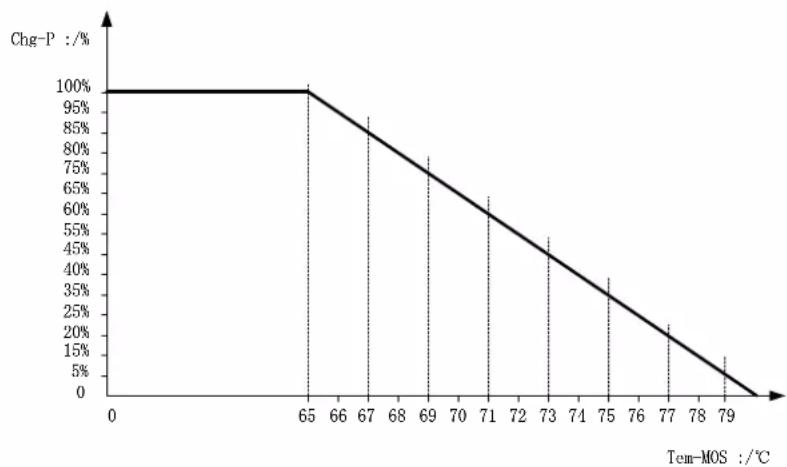
Fig. 4-1
4.2 System Maintenance
◆ In order to always keep the controller's performance at its optimum level, we recommend that the following items be checked twice a year.
◆Make sure the airflow around the controller is not blocked and clear away any dirt
or debris on the radiator.
◆ Check if any exposed wire gets its insulation undermined due to exposure to sunlight, friction with other adjacent objects, dry rot, damage by insects or rodents, etc. Repair or replace those affected when necessary.
◆Verify that indicators function in line with device operations. Note any faults or displayed errors and take corrective measures if necessary.
◆Check all wiring terminals for any sign of corrosion, insulation damage, overheat, combustion/ discoloration, and tighten the terminal screws firmly.
◆Check if there are any dirt, nesting insects or corrosion, and clean as required.
◆If the lightening arrester has lost its efficacy, replace it with a new one timely to prevent the controller and even other devices owned by the user from being damaged by lightening.
Warning: risk of electric shock! Before carrying out the above checkings or operations, always make sure all power supplies of the controller have been cut off!
4.3 Abnormality Display and Warnings
| No. | Error display | Description | LED indication |
| 1 | EO | No abnormality | ERROR indicator off |
| 2 | E1 | Battery over-discharge | BAT indicator flashing slowlyERROR indicator steady on |
| 3 | E2 | System over-voltage | BAT indicator flashing quicklyERROR indicator steady on |
| 4 | E3 | Battery under-voltage warning | ERROR indicator steady on |
| 5 | E4 | Load short circuit | LOAD indicator flashing quicklyERROR indicator steady on |
| 6 | E5 | Load overloaded | LOAD indicator flashing quickly ERROR indicator steady on |
| 7 | E6 | Over-temperature inside controller | ERROR indicator steady on |
| 9 | E8 | Photovoltaic component overloaded | ERROR indicator steady on |
| 11 | E10 | Photovoltaic component over-voltage | ERROR indicator steady on |
| 12 | E13 | Photovoltaic component reversely connected | ERROR indicator steady on |
5. Product Specification Parameters
5.1 Electric Parameters
| Parameter | Value | ||
| Model | SCCMPPT20 | SCCMPPT30 | SCCMPPT40 |
| System voltage | 12V/24V Auto | ||
| No-load loss | 0.7 W to 1.2W | ||
| Battery voltage | 9 to 35 | ||
| Max. solar input voltage | 100V (25°C), 90V (-25°C) | ||
| Max. power point voltage range | Battery voltage +2V to 75V | ||
| Rated charging current | 20A | 30A | 40A |
| Rated load current | 20A | ||
| Max. capacitive load capacity | 10000uF | ||
| Max. photovoltaic system input power | 260W/ 12V520W/ 24V | 400W/ 12V800W/ 24V | 550W/ 12V1100W/ 24V |
| Conversion efficiency | ≤98% | ||
| MPPT tracking efficiency | >99% | ||
| Temperature compensation factor | -3.0mv/ °C/ 2V (default) | ||
| Operating temperature | -35°C to +45°C | ||
| Protection degree | IP32 | ||
| Weight | 1.4kg | 2kg | 2kg |
| Communication method | RS232 | ||
| Altitude | ≤3000m | ||
| Product dimensions | 210*151*59.5mm | 238*173*72.5 | 238*173*72.5 |
5.2 Battery Type Default Parameters (parameters set in monitor software)
| Parameters cross-reference table for different types of batteries | ||||
| Voltage to set Battery type | Sealed lead-acid battery | Gel lead-acid battery | Open lead-acid battery | User (self-customized) |
| Over-voltage cut-off voltage | 16.0V | 16.0V | 16.0V | 9 to 17V |
| Equalizing voltage | 14.6V | — | 14.8V | 9 to 17V |
| Boost voltage | 14.4V | 14.2V | 14.6V | 9 to 17V |
| Floating charging voltage | 13.8V | 13.8V | 13.8V | 9 to 17V |
| Boost return voltage | 13.2V | 13.2V | 13.2V | 9 to 17V |
| Low-voltage cut-off return voltage | 12.6V | 12.6V | 12.6V | 9 to 17V |
| Under-voltage warning return voltage | 12.2V | 12.2V | 12.2V | 9 to 17V |
| Under-voltage warning voltage | 12.0V | 12.0V | 12.0V | 9 to 17V |
| Low-voltage cut-off voltage | 11.1V | 11.1V | 11.1V | 9 to 17V |
| Discharging limit voltage | 10.6V | 10.6V | 10.6V | 9 to 17V |
| Over-discharge time delay | 5s | 5s | 5s | 1 to 30s |
| Equalizing charging duration | 120 minutes | — | 120 minutes | 0 to 600 minutes |
| Equalizing charging interval | 30 days | 0 days | 30 days | 0 to 250D (0 means the equalizing charging function is disabled) |
| Boost charging duration | 120 minutes | 120 minutes | 120 minutes | 10 to 600 minutes |
When selecting User, the battery type is to be self-customized, and in this case, the default system voltage parameters are consistent with those of the sealed lead-acid battery. When modifying battery charging and discharging parameters, the following rule must be followed:
☐Over-voltage cut-off voltage> Charging limit voltage ≥ Equalizing voltage ≥ Boost voltage
≥ Floating charging voltage > Boost return voltage;
☐ Over-voltage cut-off voltage > Over-voltage cut-off return voltage;
☐ Low-voltage cut-off return voltage > Low-voltage cut-off voltage ≥ Discharging limit voltage;
☐ Under-voltage warning return voltage > Under-voltage warning voltage ≥ Discharging limit voltage;
☐Boost return voltage > Low-voltage cut-off return voltage
6. Conversion Efficiency Curve
6.1 12V System Conversion Efficiency
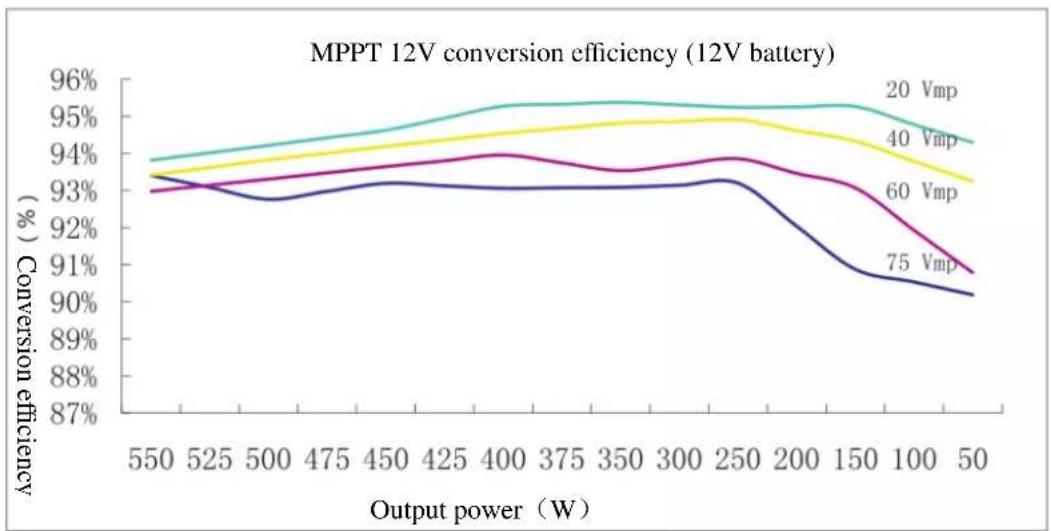
6.1 24V System Conversion Efficiency
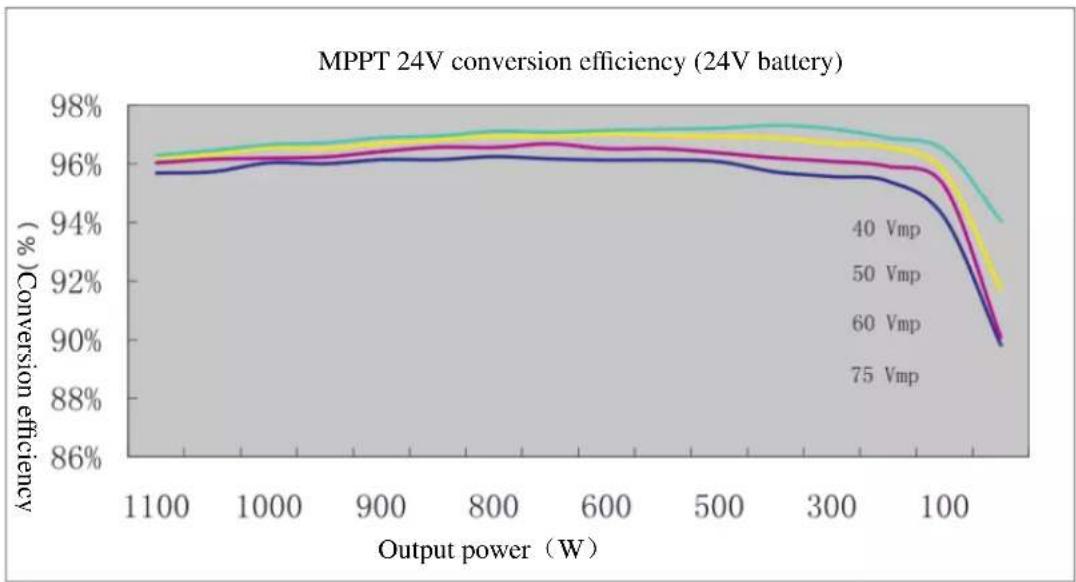
. Product Dimensions

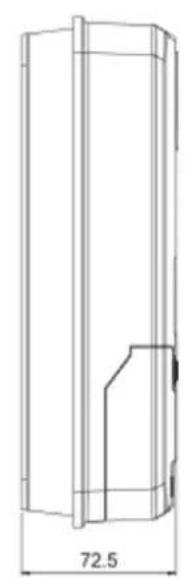


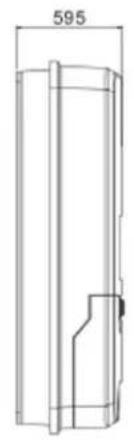
SCCMPPPT30 / SCCMPPT40
Product dimensions: 238*173*72.5mm
Hole positions : 180*147mm
Hole diameter: Φ3mm
Applicable wire: max. 8 AWG



SCCMPPT20
Product dimensions: 210*151*59.5mm
Hole positions: 154*131mm
Hole diameter 3mm
Applicable wire: max. 8 AWG
- MAXIMUM POWER POINT TRACKING
- SCCMPPPT20—SCCMPPPT30—SCCMPPPT2440
- SOLAR CHARGE AND DISCHARGE CONTROLLER USER MANUAL
- DEAR USERS
- THANK YOU FOR CHOOSING OUR PRODUCT
- SAFETY INSTRUCTIONS
- TABLE OF CONTENTS
- PRODUCT INTRODUCTION...... 4
- PRODUCT INSTALLATION.... 13
- PRODUCT OPERATION AND DISPLAY.... 19
- PRODUCT PROTECTION FUNCTION AND SYSTEM MAINTENANCE.... 26
- PRODUCT SPECIFICATION PARAMETERS.... 29
- PRODUCT INTRODUCTION
- 1.1 PRODUCT OVERVIEW
- 1.2 PRODUCT FEATURES
- 1.4 INTRODUCTION TO MAXIMUM POWER POINT TRACKING TECHNOLOGY
- 1.5 CHARGING STAGES INTRODUCTION
- FAST CHARGING
- SUSTAINING CHARGING
- BOOST CHARGING
- EQUALIZING CHARGING
- NOTE
- FLOATING CHARGING
- PRODUCT INSTALLATION
- 2.1 INSTALLATION PRECAUTIONS
- 2.2 WIRING SPECIFICATIONS
- 2.3 INSTALLATION AND WIRING
- PRODUCT OPERATION AND DISPLAY
- 3.1 LED INDICATORS
- PV ARRAY INDICATOR
- CHARGE STATUS
- BAT INDICATOR
- LOAD INDICATOR
- ERROR INDICATOR
- 3.2 KEY OPERATIONS
- 3.3 LCD STARTUP AND MAIN INTERFACE
- 3.3.1 STARTUP INTERFACE
- 3.3.2 MAIN INTERFACE
- 3.4 LOAD MODE SETTING INTERFACE
- 3.4.1 LOAD MODES INTRODUCTION
- 3.4.2 LOAD MODE ADJUSTMENT
- 3.4.3 MANUAL LOAD ON/ OFF PAGE
- 3.5 SYSTEM PARAMETER SETTINGS
- PRODUCT PROTECTION FUNCTION AND SYSTEM MAINTENANCE
- 4.1 PROTECTION FUNCTIONS
- LOAD SHORT-CIRCUIT PROTECTION
- REVERSE CHARGING PROTECTION AT NIGHT
- 4.2 SYSTEM MAINTENANCE
- 4.3 ABNORMALITY DISPLAY AND WARNINGS
- PRODUCT SPECIFICATION PARAMETERS
- 5.1 ELECTRIC PARAMETERS
- 5.2 BATTERY TYPE DEFAULT PARAMETERS (PARAMETERS SET IN MONITOR SOFTWARE)
- CONVERSION EFFICIENCY CURVE
- 6.1 12V SYSTEM CONVERSION EFFICIENCY
- 6.1 24V SYSTEM CONVERSION EFFICIENCY
- PRODUCT DIMENSIONS
Brand : MAJESTIC
Model : SCCMPPT40
Category : Uncategorized