ALPINE KIT-8MBI - Uncategorized

KIT-8MBI - Uncategorized ALPINE - Free user manual and instructions

Find the device manual for free KIT-8MBI ALPINE in PDF.

📄 4 pages English EN Download 💬 AI Question 10 questions ⚙️ Specs
Notice ALPINE KIT-8MBI - page 2
Pick your language and provide your email: we'll send you a specifically translated version.
Product Type Car Audio/Media Receiver
Brand Alpine
Model KIT-8MBI
Dimensions (W x H x D) 7 x 2 x 6 inches (approx.)
Weight 1.5 lbs
Power Output 4 x 50 Watts RMS
Display LCD Color Display
Connectivity Bluetooth, USB, AUX, SiriusXM Ready
Supported Audio Formats MP3, WMA, AAC, FLAC
Radio Bands AM/FM
Equalizer 9-Band Parametric EQ
Remote Control Included (wired/wireless)
Installation Type DIN Slot Mount
Operating Voltage 12V DC (Car Battery)
Power Consumption ≤ 15A
Operating Temperature -20°C to +60°C
Maintenance Clean with soft dry cloth; avoid liquids
Safety Fuse protection, reverse polarity protection
Spare Parts / Repairability Fuse, faceplate, remote available; professional repair recommended
Warranty 1 Year Limited Warranty

Frequently Asked Questions - KIT-8MBI ALPINE

What power supply does the Alpine KIT-8MBI require?
The unit requires a 12V DC power source, typically from the vehicle's battery. Ensure proper fuse protection as per the manual.
Does the KIT-8MBI support Bluetooth audio streaming?
Yes, it supports Bluetooth for hands-free calling and audio streaming. Pair your device via the settings menu.
How do I reset the unit if it freezes?
Press and hold the reset button (usually a small pinhole) on the front panel using a paperclip for about 5 seconds.
Can I connect a backup camera to this receiver?
Yes, it has a dedicated rear camera input (RCA). The unit automatically switches to camera view when reverse gear is engaged.
What are the dimensions of the Alpine KIT-8MBI?
The standard DIN dimensions are approximately 7 x 2 x 6 inches (W x H x D). Check the manual for exact measurements.
Does it support Apple CarPlay or Android Auto?
No, this model does not include CarPlay or Android Auto. It features basic smartphone connectivity via Bluetooth and USB.
How do I update the firmware?
Firmware updates can be downloaded from the Alpine website. Copy the file to a USB drive and insert it into the unit. Follow the on-screen instructions.
What audio formats are supported?
It supports MP3, WMA, AAC, and FLAC files. For best quality, use FLAC or high-bitrate MP3.
Is a remote control included?
Yes, a remote control is included in the box. It allows basic operations like volume, track selection, and source changes.
How do I clean the unit?
Use a soft, dry cloth to clean the front panel. Avoid using any liquids or abrasive cleaners that may damage the screen.

User questions about KIT-8MBI ALPINE

0 question about this device. Answer the ones you know or ask your own.

Ask a new question about this device

The email remains private: it is only used to notify you if someone responds to your question.

No questions yet. Be the first to ask one.

Download the instructions for your Uncategorized in PDF format for free! Find your manual KIT-8MBI - ALPINE and take your electronic device back in hand. On this page are published all the documents necessary for the use of your device. KIT-8MBI by ALPINE.

USER MANUAL KIT-8MBI ALPINE

Compatible with these Alpine navigation devices

INE-W928R
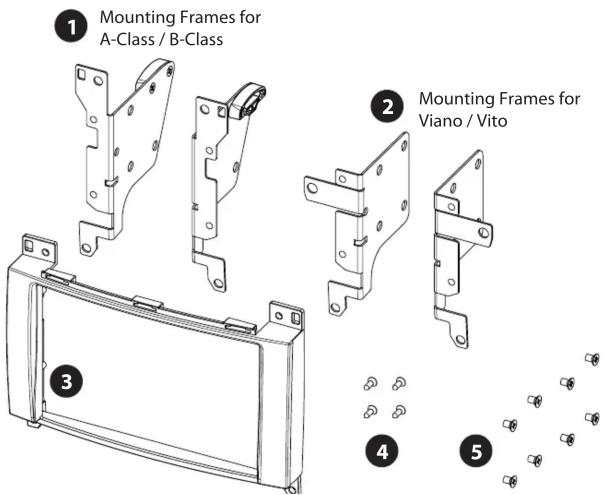
1 Mounting Frames for A-Class / B-Class 2 Mounting Frames for Viano / Vito 3 4 5

• (1) Mounting Frames for A-Class / B-Class

• (2) Mounting Frames for Viano / Vito

• (3) Facia plate

• (4) countersunk flat head tapping screw

• (5) recessed countersunk flat head screw

Mercedes A-Class / B-Class

Interior view of a car dashboard with air vent, ventilation grille, and control panel (no readable text or symbols)

  1. Insert pulling hooks into air vent catches. Pull out air vents
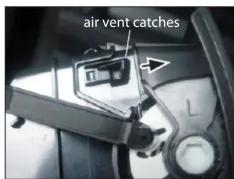
air vent catches

Close-up of mechanical components with a visible crack, no text or symbols present

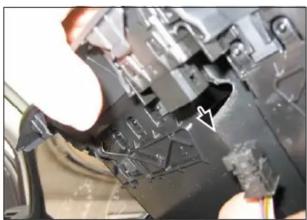
  1. Disconnect plugs for hazard light switch
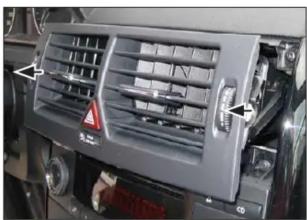
Close-up of a car air vent with airflow indicators and a warning symbol (no readable text or labels)

  1. Remove air vents completely

Close-up of hands inserting a device into a black appliance control panel (no visible text or symbols)

  1. Unclip and remove lower panel

Mercedes Viano / Vito

4. Mount facia plate and mounting frames to dou DIN head unit.

  1. Mount facia plate and mounting frames to double DIN head unit

Connect all required circuit points and push double DIN head into dash board

Point Info/Code Running Price Go to Go Go to Go Go to Go Go to Go Go to Go Go to Go Go to Go Go to Go Go to Go Go to Go Go to Go Go to Go Go to Go Go to Go Go to Go Go to Go Go to Go Go to Go Go to Go Go to Go Go to Go Go to Go Go to Go Go to Go Go to Go Go to GO Go to Go Go to Go Go to Go Go to Go…

  1. Clip OEM trim panel on dash board to finish installation

Mercedes A-Class / B-Class

Interior view of a car dashboard with digital display and control knobs (no visible text or symbols)

  1. Remove four torx screws Remove OEM head unit

6. Mount facia plate and mounting frames for A-0

  1. Mount facia plate and mounting frames for A-Class / B-Class to Alpine INE-W928R

Mercedes A-Class / B-Class

Pur Main Drive Pur Audio Running Free Sponsor 100/32-01-458 [+] 12 V 12 V 12 V 12 V 12 V 12 V 12 V 12 V 12 V 12 V 12 V 12 V 12 V 12 V 12 V 12 V 12 V 12 V 12 V 12 V 12 V 12 V 12 V 12 V 12 V 12 V

  1. Connect all required circuit points and push double DIN head into dash board

Reinstall everything in reverse order to finish installation.

Mercedes Viano / Vito
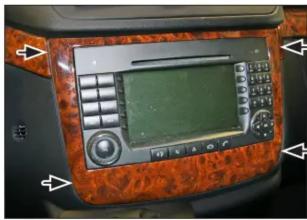
Interior view of a car dashboard with digital display and control panel (no visible text or symbols)

  1. Vehicle with OEM head unit.

Remove OEM trim panel surrounding the radio.

Close-up of a hand holding a black flip phone with a wooden handle, next to a green surface (no visible text or symbols)

Interior view of a car dashboard with labeled buttons and display screen (no readable text or symbols)

  1. Remove the four screws at the top and bottom of OEM head unit.

Interior view of a car showing exposed electrical wiring and components (no visible text or symbols)

  1. Remove the OEM head unit.

All installation work must be performed by a qualified professional installer only. The manufacturer / dealer is not liable for any kind of incidental or indirect damages.

Manual assistant
Powered by Anthropic
Waiting for your message
Product information

Brand : ALPINE

Model : KIT-8MBI

Category : Uncategorized