440-117 - Safe Jula - Free user manual and instructions
Find the device manual for free 440-117 Jula in PDF.


| Product Type | Safe with code lock |
| Battery | 4 x 1.5 V AA (alkaline recommended) |
| User Code Length | 3-8 digits |
| Default User Code | 1234 |
| Locking Bolts | Yes, multiple bolts |
| Emergency Key Override | Yes, with cover |
| External Power Supply | Yes, connector under keypad |
| Intrusion Alarm | Yes, motion/tamper detection with 20s alert |
| Hidden Code Function | Yes, displays ---- instead of digits |
| Lockout After Wrong Code | 3 wrong entries trigger 20s alarm and 3 min lockout |
| Installation | Wall mount with expander screws (included) |
| Construction Material | Steel body |
| Display | LCD character display |
| Keypad | Touch screen with function buttons |
Frequently Asked Questions - 440-117 Jula
User questions about 440-117 Jula
0 question about this device. Answer the ones you know or ask your own.
Ask a new question about this device
Download the instructions for your Safe in PDF format for free! Find your manual 440-117 - Jula and take your electronic device back in hand. On this page are published all the documents necessary for the use of your device. 440-117 by Jula.
USER MANUAL 440-117 Jula
SE Bruksanvisning för säkerhetsskåp med kodlås
NO Bruksanvisning for sikkerhetsskap med kodelås
PL Instrukcja obsługi sejfu z zamkiem szyfrowym
EN Operating instructions for safe with code lock
SE - Bruksanvisning i original
EN - Operating instructions (Translation of the original instructions)
Jula reserves the right to make changes. In the event of problems, please contact our service department.
www.jula.com
Tillverkare/ Produsent / Produenci/ Manufacturer
Jula AB, Box 363, 532 24 SKARA
Importör/ Importør/ Importer/ Importer
Care for the environment!
Must not be discarded with household waste! This product contains electrical or electronic components that should be recycled. Leave the product for recycling at the designated station e.g. the local authority's recycling station.
SVENSKA....5
TEKNISKA DATA....5
BESKRIVNING ....5
MONTERING 6
HANDHAVANDE 6
NORSK 9
TEKNISKE DATA 9
BESKRIVELSE....9
MONTERING....10
BRUK....10
POLSKI 13
DANE TECHNICZNE 13
OPIS 13
MONTAŽ 14
OBSŁUGA 14
ENGLISH 17
TECHNICAL DATA 17
DESCRIPTION 17
INSTALLATION....18
USE....18
HANDHAVANDE
BRUK
VIKTIG! Den fabrikkinnstilte brukerkoden er 1234. Hvis du trykker på feil tall, kan du trykke på * for å slette det. Ett siffer slettes hver gang du trykker på knappen. Hvis du angir feil kode 3 ganger på rad, lyder et alarmsignal i 20 sekunder og skapet låses i 3 minutter.
Stenge døren
OBSŁUGA
Read the operating instructions carefully before use.
Save them for future reference.
TECHNICAL DATA
Battery 4 x 1.5 V AA
DESCRIPTION

- Lock bolts
- Reset button
-
Battery compartment
-
Opening knob
- Cover over emergency lock
- Keypad
INSTALLATION
Installation
Install the safe so that it cannot be moved.
- Mark out where the safe is to be placed.
-
Drill holes for the screws.
-
Mount the safe on the wall with expander screws, or the like. NOTE: Use screws suitable for the underlying surface.
-
Check that the safe is correctly positioned and tighten the screws.

USE
NOTE: Never store emergency keys in the safe.
Opening the safe for the first time
Use the emergency key to open the safe the first time. Follow the instructions in the section on opening the safe with the emergency key.
- Remove the cover over the emergency lock, insert the emergency key and turn it clockwise.
- Turn the opening knob anticlockwise to open the door.
IMPORTANT: Complete this operation, pull out the emergency key and store it in a safe place.
Inserting the batteries
- Open the panel.
- Insert 41.5 V AA batteries in the battery compartment.
- In normal circumstances the batteries should be replaced if both the red and green lamp go on at the same time.
IMPORTANT: Insert 4 new batteries with the correct polarity as shown by the markings in the compartment. If the power supply has been interrupted for more than 30 minutes, you must enter a new user code.
Opening the door
- Press the # button.
- Enter your user code (3–8 digits) and press the # button again. The LCD character display turns blue and shows the text OPEN.
- Turn the knob clockwise to open the door.
![graph LR A["Before State"] --> B["Change to Control Panel"] B --> C["After Change to Reset Panel"]](/content/2026/05/1097843/images/8a84bf788e75edbf1cb9c14300c3f67e9cf481ff76546b64cf7654608702345b.jpg)
IMPORTANT: The default user code is 1234. Press the * button to delete a digit if you pressed the wrong button. One digit is deleted every time you press the button. If you enter the wrong code 3 times in succession an alarm signal will be activated for 20 seconds and the safe will lock for 3 minutes.
Closing the door
Turn the knob anticlockwise to close the door.
Setting the user code
- Leave the door open and press the reset button once. The buzzer will sound once and the LCD character display will turn blue and show ----.
- Enter your new user code (3–8 digits) and press the # button.
- The character display will turn blue and show IN followed by the new code, which means that the setting was successful and that the new code can be used.
Setting the master code
- Leave the door open and press the # button once, press the 0 button twice, and the reset button once. The buzzer will sound twice and the LCD character display will turn blue and show ----.
- Enter your new master code (3–8 digits) and press the # button.
- The character display will turn blue and show IN followed by the new code, which means that the setting was successful and that the new code can be used.
Security function
The safe has a security function that prevents your code being shown in the character display when you enter it.
- Press # to activate the lock.
- Press * on the touch screen to activate the hidden code function. When you enter the code, only ---- will be shown in the character display.
- Deactivate this function by pressing * twice.
Intrusion alarm
The safe has an intrusion alarm which is activated if someone attempts to move or interfere with the safe.
- Press the * button. ALERT ON is shown in the character display.
- The alarm can be deactivated by pressing the # button, entering the relevant code and then pressing the # button again. If no code is entered to deactivate the alarm it will be automatically deactivated after 20 seconds.
Emergency opening
If for some reason the safe cannot be opened in the normal way there are alternative ways of opening it.
Alternative A
The safe has a connection for an external power supply. Connect the external power supply unit under the keypad (see diagram).
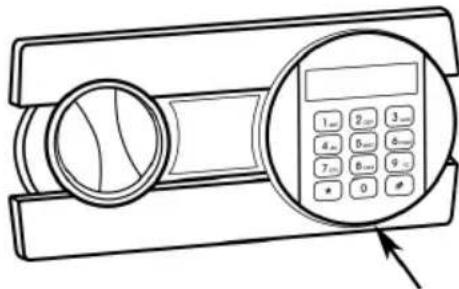
- Press # to activate the lock.
- Enter the default user code 1234, and then press #.
- Turn the knob (main key) clockwise to open the door.
Alternative B
- Remove the cover over the emergency lock.
- Insert the emergency key in the keyhole and turn it anticlockwise.
- Turn the opening knob clockwise to open the door.
- CARE FOR THE ENVIRONMENT
- SVENSKA....5
- NORSK 9
- POLSKI 13
- ENGLISH 17
- HANDHAVANDE
- BRUK
- STENGE DØREN
- OBSŁUGA
- READ THE OPERATING INSTRUCTIONS CAREFULLY BEFORE USE
- TECHNICAL DATA
- DESCRIPTION
- INSTALLATION
- USE
- OPENING THE SAFE FOR THE FIRST TIME
- INSERTING THE BATTERIES
- OPENING THE DOOR
- CLOSING THE DOOR
- SETTING THE USER CODE
- SETTING THE MASTER CODE
- SECURITY FUNCTION
- INTRUSION ALARM
- EMERGENCY OPENING
- ALTERNATIVE A
- ALTERNATIVE B
Brand : Jula
Model : 440-117
Category : Safe