
JY339 - Baby monitor Clas Ohlson - Free user manual and instructions
Find the device manual for free JY339 Clas Ohlson in PDF.


| Product Type | Video Baby Monitor |
| Brand | Clas Ohlson |
| Model | JY339 (Art. no 36-4120) |
| Power Supply (Camera & Monitor) | AC/DC adaptor: Input 230 V AC, 50 Hz, 200 mA; Output 6 V DC, 800 mA |
| Monitor Battery | Rechargeable lithium-ion, 3.7 V, 1200 mAh |
| Frequency | 2.4 GHz |
| Channels | 4 channels |
| Modulation | FM |
| Night Vision | 6 high-intensity LEDs for black-and-white images in low light |
| Night Light | Multicolored, noise-activated (Auto) or continuous (On/Off) |
| Voice Activation | Auto mode: camera transmits only when noise exceeds threshold |
| Maximum Cameras | Up to 4 cameras can be paired to one monitor |
| Monitor Display | Color display with light control and volume control |
| Included Accessories | 2 AC/DC adaptors, desk stand for monitor, instruction manual |
| Pairing Method | Hold light button while turning monitor on, press pairing button on camera |
| Channel Selection | Rotary switch on monitor |
| Reset | RESET button on monitor restores factory defaults |
| Care and Cleaning | Clean camera lens with soft cloth; avoid touching lens with fingers |
| Safety Precautions | Do not open casing; avoid water; use only supplied adaptors; keep away from children |
| Disposal | Follow local ordinances for electronic waste |
Frequently Asked Questions - JY339 Clas Ohlson
User questions about JY339 Clas Ohlson
0 question about this device. Answer the ones you know or ask your own.
Ask a new question about this device
Download the instructions for your Baby monitor in PDF format for free! Find your manual JY339 - Clas Ohlson and take your electronic device back in hand. On this page are published all the documents necessary for the use of your device. JY339 by Clas Ohlson.
USER MANUAL JY339 Clas Ohlson
natural_image
Exterior view of a modern mobile phone with a spherical device displaying a camera lens and a screen showing a sleeping baby (no text or symbols visible)Art.no Model
36-4120 JY339
Ver. 200912
clas ohlson
Video Baby Monitor
Art. no 36-4120 Model JY339
Please read the entire instruction manual before using the product and save it for future reference. We reserve the right for any errors in text or images and any necessary changes made to technical data. If you have any questions regarding technical problems please contact Customer Services.
Contents
Safety
Product description
Use
Care and maintenance
Troubleshooting guide
Disposal
Specifications
Safety
- Do not place the product where it could fall into water or other type of liquid.
- Do not open the casing. Repairs should only be carried out by a qualified tradesman.
- Do not overload wall sockets or extension cables since it may cause fire or electric shocks.
- Only use the product with suitable batteries or with a recommended AC/DC adaptor.
- The camera should only be used and stored in dust- and moisture-free environments.
- Do not store the device in cold places. When the temperature returns to normal, moisture can build up inside the casing and can damage the circuit boards.
- Do not store the device in hot places. High temperatures may shorten the useful life of electronic products and melt or damage some plastics.
- Do not subject the device to heavy impacts.
- Remember that you are using common radio waves when the device is in full use and that sound and picture can be transmitted to other 2.4 GHz receivers. Conversations in nearby rooms might also be transmitted. To protect your personal integrity you should always switch the camera off when it is not being used.
- This product must not be used by anyone (including children) suffering from physical or mental impairment. This product should not be used by anyone that has not read the instruction manual unless they have been instructed in its use by someone who will take responsibility for their safety.
• Never let children play with the product.
Product description This package contains
- Camera
- Monitor
- Two AC/DC adaptors
- Desk stand
• Instruction manual


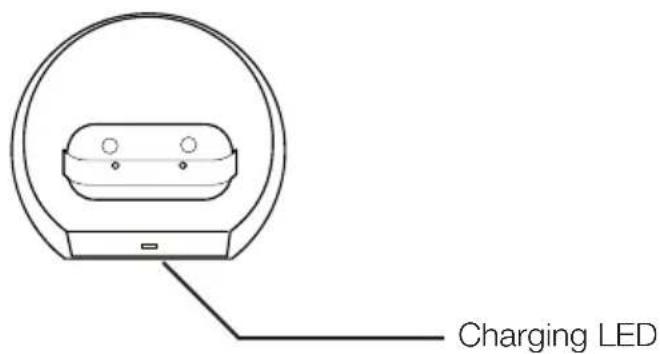
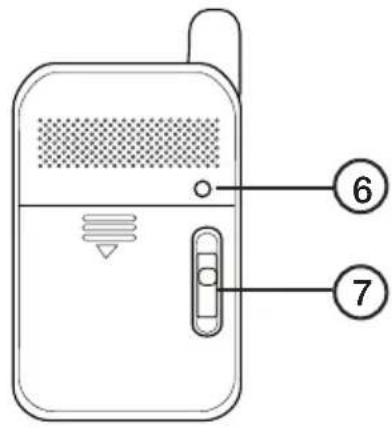
Monitor
- VOL (volume control)
- Power switch
- Adaptor connection
-
Display
-
Light control
- RESET
- Channel selector
Camera


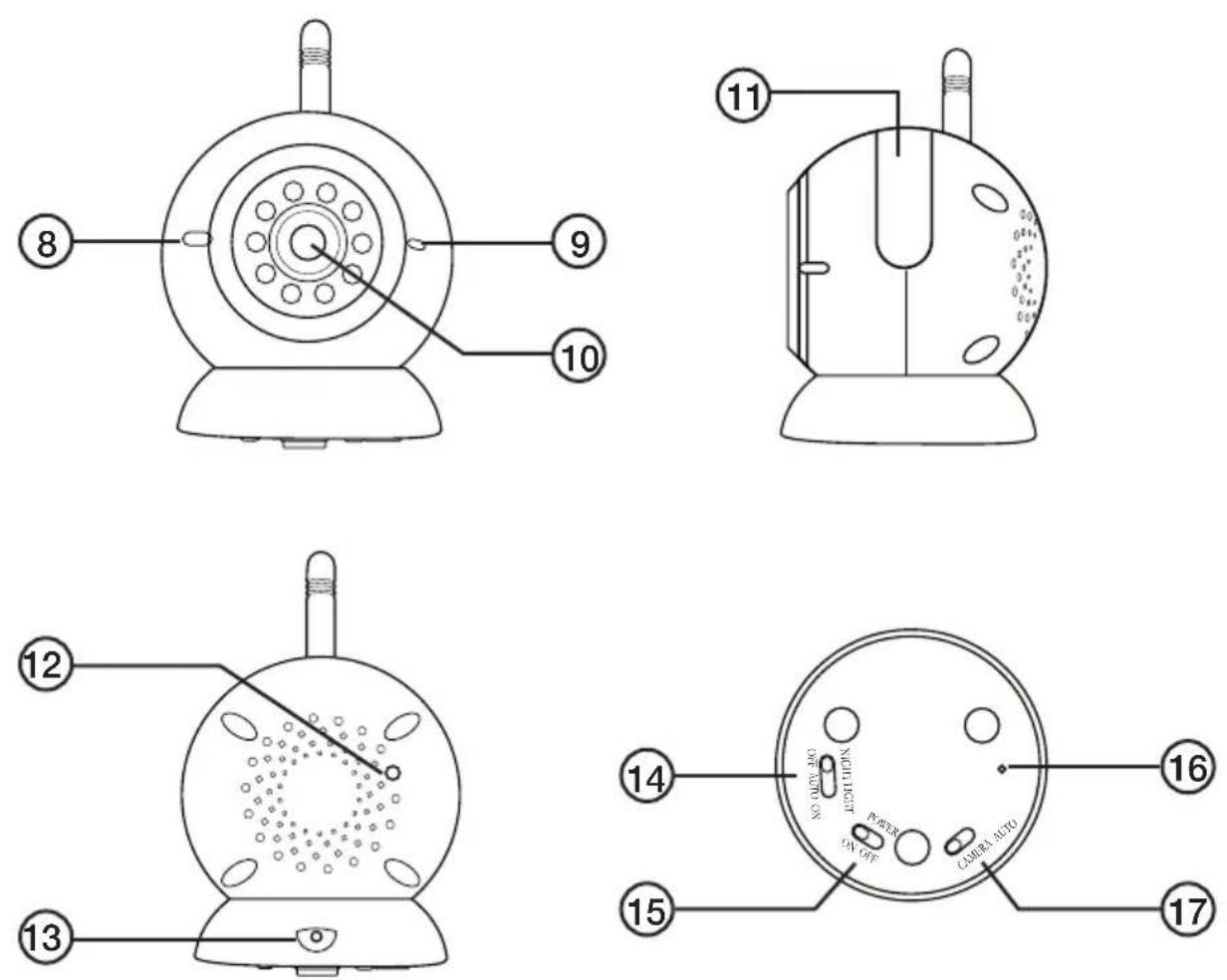
- Microphone
-
Power Indicator light
-
Camera lens
- Night light
- Night-vision light sensor
- Adaptor connection
- NIGHT LIGHT switch
- POWER (on/off switch)
- Pairing button
- CAMERA AUTO switch (camera, voice activation)
Use
Power supply
- The monitor stand/charger and the camera are each powered by their own mains adaptor. Only use the supplied mains AC/DC adaptors.
- The monitor itself is powered by a rechargeable lithium ion battery, 3.7 V, 1200 mAh. Recharge the battery by placing the monitor into the desk stand.
The camera
Turn the camera on by setting the switch (15) to the ON position.
Voice activated camera
- Activate the voice activation feature by setting the CAMERA AUTO switch (17) to AUTO.
- When the level of noise in the vicinity of the camera exceeds the preset level, the camera will be activated. This will enable you to both see and hear your child.
- When the noise level falls below the preset level, the camera ceases to transmit. The monitor switches off.
- The voice activation can be turned off by setting the CAMERA AUTO switch to the CAMERA position. The audio and visual signals will then be sent to the monitor all the time.
Night light
The baby unit also emits calming multicoloured light effects to comfort children when they make noises (noise activated). Set the NIGHT LIGHT switch (14) to the AUTO position to activate this feature. The night light can be switched off completely by setting the switch to the OFF position or it can be left on all the time by sliding the switch to ON.
Night vision
The camera is equipped with 6 high intensity LEDs for viewing sharp images in dark places. When the built-in photo sensor senses that the light is not sufficient, the LEDs are automatically activated. Night vision images are in black and white only.
The monitor
- Turn the monitor on by setting the switch (2) to the ON position.
- Select the channel using the channel selector (7). The included camera has been paired (at the factory) to the monitor on channel 1. Up to four cameras can be paired to the monitor at the same time. Refer to the Pairing section, below, if you wish to use more than on camera.
- Set the desired volume level using the control (1).
- Set the monitor light level using the light control switch (5).
- If it is necessary to reset the monitor to the factory default settings, press the RESET button (6).
Pairing (Synchronising)
This camera and monitor are already paired at the factory, so normally you will not need to pair or synchronise the two units before using them. If, however, you need to resynchronise the camera and monitor, or if you wish to use more than one camera; follow these instructions:
- Hold in the (+) button for the monitor light at the same time as you turn the monitor on by switching the power switch (2) to ON. The display shows:
PAIR ID
-
Pair ID for Cam 1...
-
Use a pointed object to push the pairing button through the hole (16).
- The LED light on the camera will start to flash.
- When the pairing has been successful, the display shows:
PAIR ID
- Pair ID for Cam 1...
Cam 1 OK!
- If you wish to add another camera, change the channel using the selector (7) and go through the above steps again.
- The monitor needs to be restarted for the new settings to apply.
Care and maintenance
- Finger prints and dirt on the camera lens can decrease the camera's performance drastically. Do not touch the camera lens with your fingers.
- Should the lens get dirty, use a soft cloth to clean it.
Troubleshooting guide
If you get no signal at all:
- Check that both camera and monitor are turned on.
• Make sure that none of the connections are loose.
• Make sure that the monitor is set to the correct channel.
If the signal is poor or if there is interference.
• Make sure that the monitor is set to the correct channel.
- If there is a microwave oven between the camera and the monitor, shut it off or move it.
• Make sure that the units are within range of each other.
Disposal
Follow local ordinances when disposing of this product. If you are unsure of how to dispose of this product, please contact your municipality.
Specifications
AC/DC Adaptor
In 230 V AC, 50 Hz, 200 mA
Out 6 V, 800 mA
Battery 3.7 V, 1200 mAh, lithium ion
Frequency 2.4 GHz
Channels 4 channels
Modulation FM
Barnvakt med video
- Pair ID for Cam 1...
Cam 1 OK!
Monitor
- VOL (Volumkontroll)
- Strømbryter
- Tilkoblingspunkt for batterieliminator
-
Display
-
Lysinnstilling
- RESET (Tilbakestillingsknapp)
- Kanalvelger

Kamera
- Mikrofon
-
Indikatorlampe for av/på
-
Kameralinse
- Nattbelysning
- Lyssensor for å kunne se i mørket
- Tilkoblingspunkt for batterieliminator
- NIGHT LIGHT Bryter for nattbelysning
- POWER (Strømbryter)
- Knapp for tilkobling (pairing)
- CAMERA AUTO (Kamera, stemmeaktivering)
Bruk
Strømforsyning
- Monitorens bordstativ/lader og kameraet drives av hver sin batterieliminator. Bruk kun de medfølgende batterieliminatorene.
- Monitoren drives av et ladbart litiumionebatteri, 3,7 V, 1200 mAh. Batteriet lades när det står i monitorens bordstativ.
Kameraet
- Pair ID for Cam 1...
Cam 1 OK!

- Pair ID for Cam 1...
Cam 1 OK!
Declaration of Conformity
CE
Hereby, Clas Ohlson AB, declares that following product(s):
Wireless Baby Monitor
36-4120
JY-339
is in compliance with the essential requirements and other relevant provisions of Directive 1999/5/EC.
Article 3.1a (Safety): EN 60950-1
Article 3.1b (EMC): EN 301489-1
EN 301489-17
Article 3.2 (Radio): EN 300328
CE 1313 ⚠
Insjön, Sweden, December 2009
Klas Balkow President
Clas Ohlson, 793 85 Insjön, Sweden
Sverige
For consumer contact, please visit www.clasohlson.co.uk and click on customer service.
Internet www.clasohlson.co.uk
- Video Baby Monitor
- Contents
- Safety
- Product description This package contains
- Monitor
- Camera
- Use
- Power supply
- The camera
- Voice activated camera
- Night light
- Night vision
- The monitor
- Pairing (Synchronising)
- PAIR ID
- Care and maintenance
- Troubleshooting guide
- If you get no signal at all:
- If the signal is poor or if there is interference.
- Disposal
- Specifications
- AC/DC Adaptor
- Barnvakt med video
- Kamera
- Bruk
- Strømforsyning
- Kameraet
- Declaration of Conformity
- CE
- Wireless Baby Monitor
- Sverige
Brand : Clas Ohlson
Model : JY339
Category : Baby monitor