
MWK-02M - Other Kitchen Appliances MPM - Free user manual and instructions
Find the device manual for free MWK-02M MPM in PDF.


| Product Type | Microwave Oven |
| Brand | MPM |
| Model | MWK-02M |
| Dimensions (W x D x H) | 45 x 35 x 28 cm |
| Weight | 10.5 kg |
| Power Supply | 230 V ~ 50 Hz, 10 A |
| Microwave Power | 700 W |
| Grill Power | 1000 W |
| Capacity | 20 L |
| Control Type | Mechanical knobs and timer |
| Number of Power Levels | 5 |
| Timer | Up to 35 minutes |
| Interior Light | Yes |
| Turntable | Yes, glass tray |
| Door Type | Side opening with handle |
| Child Lock | No |
| Cleaning | Wipe with damp cloth; do not immerse |
| Safety Features | Overheat protection, door interlock |
| Spare Parts | Glass tray, roller ring, fuse |
| Repairability | Limited; contact authorized service |
| Warranty | 2 years |
| Manual Included | Yes, PDF available online |
Frequently Asked Questions - MWK-02M MPM
User questions about MWK-02M MPM
0 question about this device. Answer the ones you know or ask your own.
Ask a new question about this device
Download the instructions for your Other Kitchen Appliances in PDF format for free! Find your manual MWK-02M - MPM and take your electronic device back in hand. On this page are published all the documents necessary for the use of your device. MWK-02M by MPM.
USER MANUAL MWK-02M MPM
natural_image
Top-down view of a gray rectangular electronic device with four circular ports and two black circular indicators at the bottom (no text or symbols)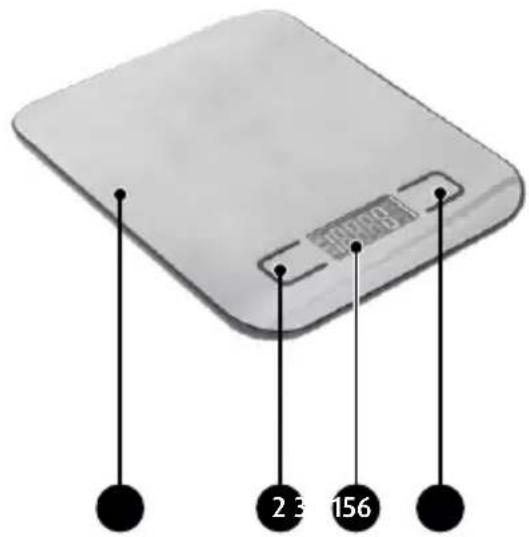
PRZED PIERWSZYM UŻYCIEM
Read carefully this manual before using the appliance for the first time.
The maximum capacity of the scale is 5 kg (weight before tare).
The scale is powered by two LR03 1,5V (AAA) batteries and operates at low and safe voltage. Does not present any danger if used for its intended purpose.
The scale should be stored in a horizontal position.
The scale shall not be stored in an upright position.
The scale is a precision instrument and must be handled with care. Do not throw it, nor jump on it. Protect from risks of shocks and falls.
▶ Always place the scale on a hard, flat, clean and dry surface.
Protect the scale against water, high or low temperature and moist.
▶ Store in a dry place.
This product has been designed for domestic use only.
Do not use the appliance outdoors.
If the scale is not used for a longer time, remove the batteries from the compartment.
If the measurement results are not displayed properly check the connection terminals of the battery.
This appliance can be used by persons with reduced physical, sensory or mental capabilities or lack of experience and knowledge if they have been given supervision or instruction concerning use of the appliance in a safe way and if they understand the hazards involved.
Children shall not play with the appliance (including the accessories).
This appliance shall not be used by children. Keep the appliance and its cord out of reach of children (including the accessories).
- Children should be supervised to ensure that they do not play with the appliance. - Keep your children safe: do not leave any parts of the packaging readily accessible (i.e. plastic bags, cardboard boxes, polystyrene inserts, etc.).
WARNING! Never let children play with plastic film or bags. Choking/ asphyxiation hazard!
DESCRIPTION OF THE APPLIANCE
The scale has been designed for precise measurement of product weight and, if used under normal conditions, should serve for many years.
The scale is powered by two LR03 1,5V (AAA) batteries. The battery is located in the battery compartment (5). When replacing the battery check if it is properly fitted and observe proper polarity. The scale is equipped with a start button (2) which may also be used for weight tarring.
By pressing (4) UNIT you may select the preferred unit of measurement: g - grams, oz - ounces, ml - millilitre, lb: oz-pounds, ounces. Weight unit converter: 1 oz = 28,35g.
- Stainless steel platform
- Z/T, ON/OFF button
- Electronic display
- UNIT button - for changing the weight units: g/oz/ml/lb:oz
- Battery compartment
- Non-slip feet

natural_image
Top-down view of a rectangular electronic device with four circular ports and two black circular indicators at the base (no text or symbols visible)
BEFORE FIRST USE
Before first use check if the battery polarity is correct (the "+" marking should match the marking on the terminals).
USING THE APPLIANCE
- Place the scale on a hard, flat and even surface. Do not place it on soft, unstable surfaces.
- Press the start button (2). The display (3) will show „0g”.
- By pressing the button (4) you can select the preferred measurement unit "g" for grams, "lb:oz" for pounds: ounces or volume units "ml", "oz" for ounces. The display on the side will show a graphic symbol next to the currently running function.
- To start weighing place the product on the scale's surface. The weight is shown on the display. The appliance is also equipped with zeroing and tare function.
Zeroing function:
The zeroing function is activated when the sum of the weights of products is less than or equal to 200 g. It is particularly useful when adding more components and allows you to specify the weight of individual ingredients without adding the totals in memory.
Example:
Place the product on the scale: Wait until the weight display is stable. Read the weight. Press the Z/T, ON/OFF (2) button Then place another product and proceed as above. When all products are removed from the scale the total weight of products will be shown on the display. To return to normal weighing mode, press Z/T, ON/OFF button (2).
Tare function
The tare function is useful if you want to ignore the weight of the container in which the products are placed.
The tare function is activated when the weight of container in which the products are placed is equal to or greater than 200 g.
Example:
Place an empty container on the scale for weighing e.g. flour, sugar, etc. Wait until the weight display is stable. Press the Z/T, ON/OFF (2) button. In the lower left corner you will see the "TARE" symbol which indicates tare mode. Place the product in
the container. Read the weight on the display. To return to normal weighing mode, remove the products and press Z/T, ON/OFF button (2).
- The maximum weighing capacity is 5000 g (5kg), and the minimum capacity is 3 g, the measurement result may be rounded up or down to 1 g.
- When weighing is completed, the scale will switch off automatically after 2 minute.
- To switch off the scale manually press the button (2) and hold it for approx. 2 seconds.
Note! The "OL" or "EEEE" symbol will be shown on the display when the scale is overloaded above 5000 g.
If the measurement results are imprecise or illegible this may indicate that the battery is not properly fitted or has been discharged. The battery symbol or, in case of extremely low charge level, the flashing "Lo" will be shown on the display. To replace the battery make sure that the scale is on, then turn it over. The battery compartment (5) is located on the bottom of the appliance. Press the lock to open the compartment and replace the battery (LR03 1,5V (AAA)).
CLEANING AND MAINTENANCE
- Clean the scale with a slightly damp cloth. Do not immerse in water and do not use chemical and abrasive cleaning agents.
- Clean the scale's components when they come in contact with grease, spices, vinegar and strongly flavoured or colouring agents. Avoid contact with citric acid.
TECHNICAL DATA
Power supply: Battery 2 x LR03 1,5V (AAA)
Weighing capacity: from 2 g to 5000 g
Scale graduation 1 g
Electronic display 43 mm (1,7")

NOTE! MPM agd S.A. reserves its right to modify the technical data.
PROPER DISPOSAL OF THE PRODUCT (waste electrical and electronic equipment)

Marking on the product indicates that after the service-life of the product expires, it should not be disposed with other type of municipal waste. Used equipment may have a negative impact on the environment and health of people due to potentially containing hazardous substances, mixtures and components. Mixing electric waste with other types of waste or disassembling those in an unprofessional manner may cause a release of substances that are hazardous to the environment and health. Used equipment should be handed-over to a point for collection of electric waste. In order to obtain detailed information regarding the electric waste collection points, the user should contact the municipal point of electric waste collection or used equipment processing department.
natural_image
Close-up of a metallic rectangular electronic device with four circular ports and two black circular indicators below (no text or symbols visible)
natural_image
Metallic device with four circular ports and two black circular components at the bottom (no text or symbols visible)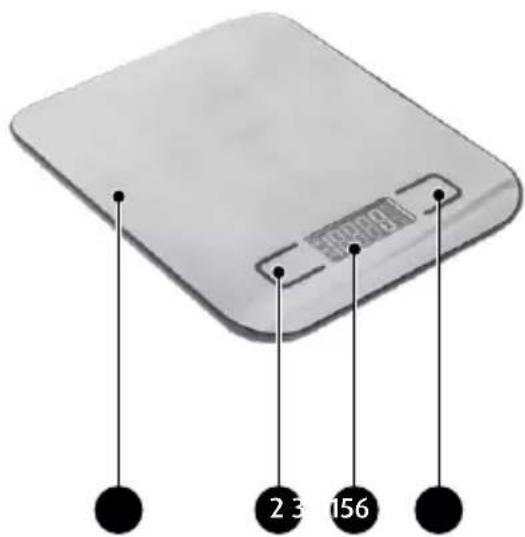
natural_image
Close-up of a metallic electronic device with four circular ports and two black circular components at the base (no text or symbols visible)

We wish you satisfaction from using the product and invite you to check a wide range of other MPM appliances
- PRZED PIERWSZYM UŻYCIEM
- WARNING! Never let children play with plastic film or bags. Choking/ asphyxiation hazard!
- DESCRIPTION OF THE APPLIANCE
- BEFORE FIRST USE
- USING THE APPLIANCE
- Zeroing function:
- Tare function
- CLEANING AND MAINTENANCE
- TECHNICAL DATA
- PROPER DISPOSAL OF THE PRODUCT (waste electrical and electronic equipment)
Brand : MPM
Model : MWK-02M
Category : Other Kitchen Appliances