
Strobros - Flashlight Impact - Free user manual and instructions
Find the device manual for free Strobros Impact in PDF.


| Brand | Impact |
| Model | Strobros |
| Product type | Flashlight |
| Color | Black |
| Material | Aluminum alloy |
| Dimensions (L x D) | 15 cm x 3 cm |
| Weight | 180 g |
| Power source | 3 x AAA batteries (not included) |
| Light source | LED |
| Brightness | 300 lumens |
| Beam distance | 100 m |
| Modes | High, Low, Strobe |
| Switch type | Tail button |
| Water resistance | IPX4 (splash proof) |
| Impact resistance | 1 m drop |
| Battery life (high) | 3 hours |
| Maintenance | Wipe with dry cloth |
| Safety instructions | Do not shine into eyes; keep away from children |
| Spare parts available | Batteries |
| Warranty | 2 years |
Frequently Asked Questions - Strobros Impact
User questions about Strobros Impact
0 question about this device. Answer the ones you know or ask your own.
Ask a new question about this device
Download the instructions for your Flashlight in PDF format for free! Find your manual Strobros - Impact and take your electronic device back in hand. On this page are published all the documents necessary for the use of your device. Strobros by Impact.
USER MANUAL Strobros Impact
Portable Flash Accessories

natural_image
Close-up of a black cylindrical industrial device with hexagonal mesh pattern against a yellow background (no text or symbols visible)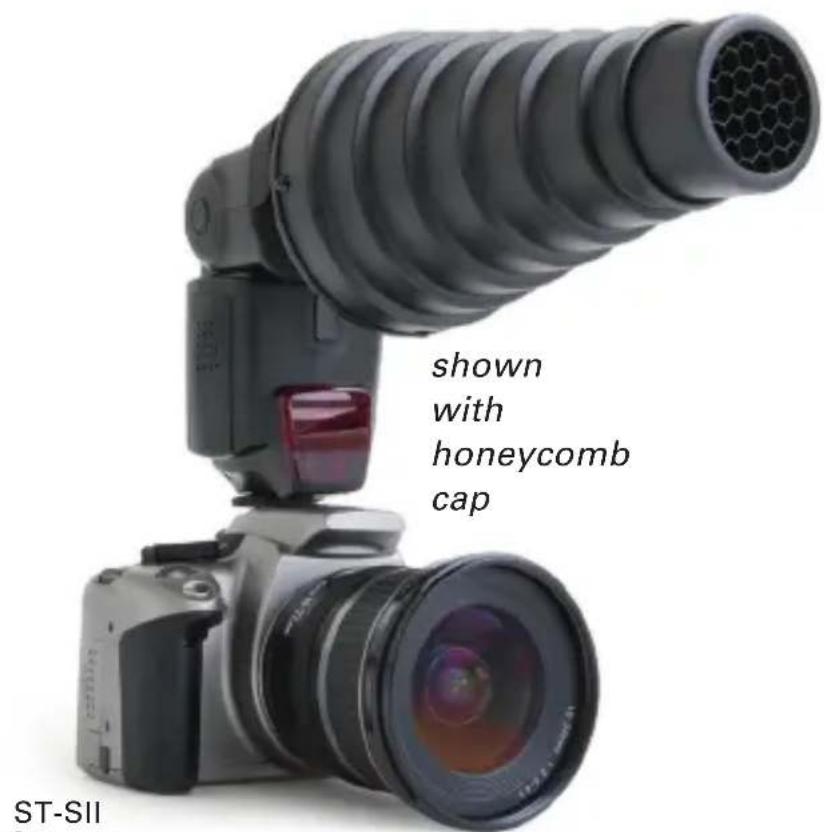
ST-SII Snoot
Reduces your flash's light spread to a narrow focus.

natural_image
Digital camera setup with a large lens and an egg-shaped light bulb, no visible text or symbols on the main subject.ST-BDII Beauty Dish
Spreads the flash output into a softer, more uniform light.

ST-GL
Globe Diffuser
Bare bulb effect for soft, uniform light. Ideal for portraits.
Does not affect exposure in TTL flash mode.

natural_image
Five circular color filter covers (black, yellow, blue, red, white) arranged on a white background, no text or symbols visible.9061800
Beauty Dish Accessories
3 honeycombs (15°, 25°, 35°)
3 color diffusers
1 neutral diffuser
How to Assemble Your Flash Accessory

natural_image
Close-up of hands holding a black mechanical device with a black strap, no visible text or symbols
natural_image
Close-up of hands holding a black cylindrical object with a strap, no visible text or symbols
natural_image
Close-up of hands holding a black plastic object with a strap, no visible text or symbols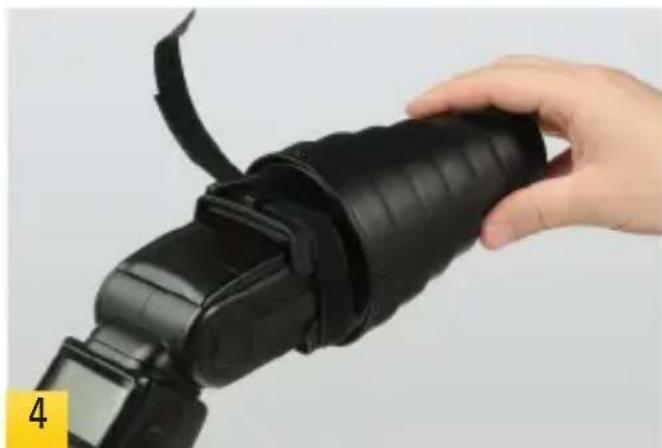
natural_image
Hand holding a black DSLR camera module with a strap, no visible text or symbolsWe're demonstrating with a Snoot, but the same procedure works for the Dome Diffuser and the Beauty Dish.
First feed the strap through the slots on the mount. The touch fastener side should face out. 1
Continue feeding the strap around to the slot on the opposite side. ^2
The Velcro pads prevent slippage. There are multiple sizes—determine what pair will fit your flash, and attach them to the opening of the accessory as shown. ^3
Insert your flash into the opening of the accessory. Take care to place the flash head well into the opening of the accessory. 4
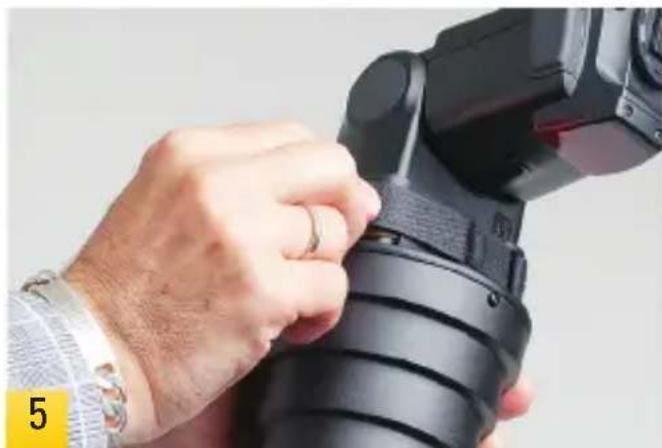
Feed the strap through its buckle. Pull the strap to tighten its grip on the flash. Then fold the strap back onto its touch fastener and press down to lock in place. 5
natural_image
Close-up of a hand adjusting a DSLR camera lens (no visible text or symbols)One-Year Limited Warranty
This IMPACT product is warranted to the original purchaser to be free from defects in materials and workmanship under normal consumer use for a period of one (1) year from the original purchase date or thirty (30) days after replacement, whichever occurs later. The warranty provider's responsibility with respect to this limited warranty shall be limited solely to repair or replacement, at the provider's discretion, of any product that fails during normal use of this product in its intended manner and in its intended environment. Inoperability of the product or part(s) shall be determined by the warranty provider. If the product has been discontinued, the warranty provider reserves the right to replace it with a model of equivalent quality and function.
This warranty does not cover damage or defect caused by misuse, neglect, accident, alteration, abuse, improper installation or maintenance. EXCEPT AS PROVIDED HEREIN, THE WARRANTY PROVIDER MAKES NEITHER ANY EXPRESS WARRANTIES NOR ANY IMPLIED WARRANTIES, INCLUDING BUT NOT LIMITED TO ANY IMPLIED WARRANTY OF MERCHANTABILITY OR FITNESS FOR A PARTICULAR PURPOSE. This warranty provides you with specific legal rights, and you may also have additional rights that vary from state to state.
To obtain warranty coverage, contact the Impact Customer Service Department to obtain a return merchandise authorization ("RMA") number, and return the defective product to Impact along with the RMA number and proof of purchase. Shipment of the defective product is at the purchaser's own risk and expense.
For more information or to arrange service, visit www.impactstudiolighting.com or call Customer Service at 212-594-2353.

IMPACT™
A Gradus Group Brand
Product warranty provided by the Gradus Group.
www.gradusgroup.com
IMPACT is a registered trademark of the Gradus Group.
© 2014 Gradus Group LLC. All Rights Reserved.
Brand : Impact
Model : Strobros
Category : Flashlight